Designing a Central Data Backbone for AV System Integrator by Multi-Software Integration
Most AV businesses don’t have a software problem — they have a data flow problem.
The AV system integration industry is evolving rapidly, yet most businesses still operate on disconnected software ecosystems. This blog explores how AV professionals—dealers, installers, designers, technicians, manufacturers, and decision-makers—can overcome daily operational bottlenecks by implementing a central data backbone through Multi-Software (Anything-to-Anything) Integration for AV System Integrators.
Across the AV lifecycle—from lead generation and proposal creation to project execution, billing, warranty, and AMC management—multiple tools are involved. Platforms like D-Tools, XTEN-AV, Salesforce, Zoho, Monday.com, QuickBooks, and inventory systems all play critical roles. However, these systems often function in isolation, creating inefficiencies, data silos, and manual dependencies.
This article breaks down the complete AV software stack, identifies where workflows fail, and introduces a technical integration architecture using APIs, webhooks, middleware (n8n), and AI-driven automation. It will demonstrate how AV businesses can transition from fragmented operations to fully connected, real-time workflows.
Through practical insights and a real-world case study, the content will illustrate how Anything-to-Anything Integration enables seamless data flow across systems—eliminating duplication, reducing errors, and improving operational efficiency.
The goal is not just to discuss integration, but to redefine how AV businesses operate at a system level.
Understanding the AV Software Ecosystem
The AV system integration ecosystem is not defined by a single platform—it is a multi-layered technology stack, where each tool serves a specific operational function. The challenge is not tool availability, but the absence of interoperability between these systems.
To understand where integration becomes critical, it is essential to break down the stack:
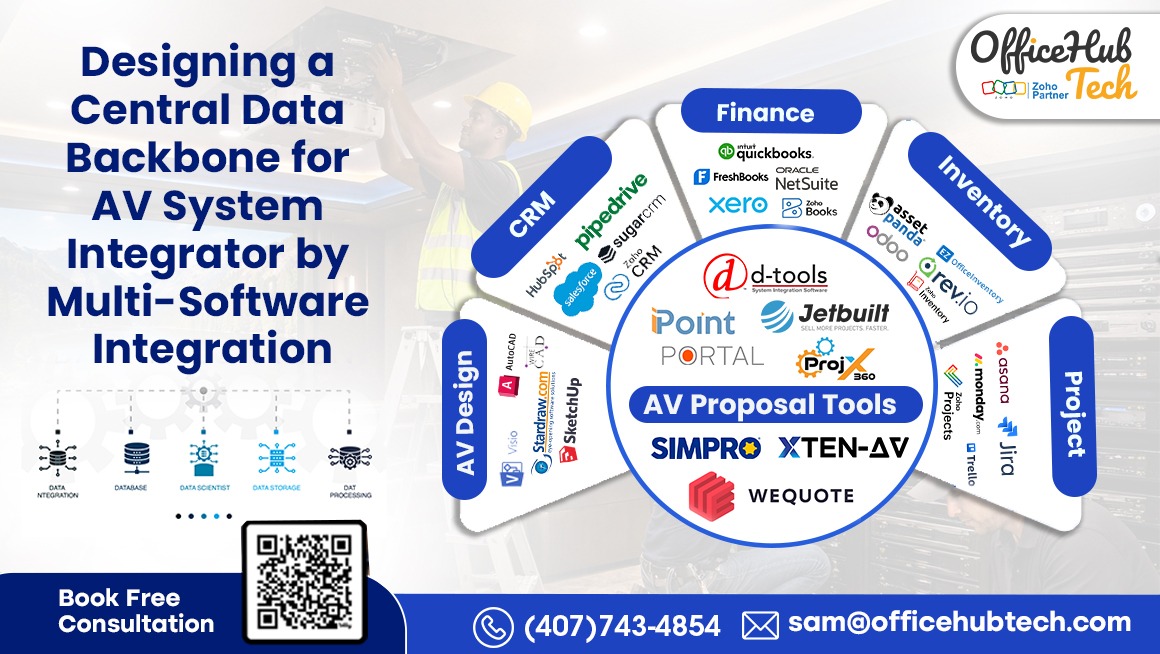
Core Software Layers in AV Business Operations
- CRM Platforms
Salesforce, Zoho CRM, HubSpot, Microsoft Dynamics
→ Manage leads, deals, client communication - Proposal & Estimation Tools
D-Tools, XTEN-AV, Jetbuilt, Portal.io, WeQuote
→ Generate BOMs, pricing, system designs - Design & Engineering Software
AutoCAD, WireCAD, Stardraw, Revit
→ Create technical layouts and schematics - Project Management Systems
Monday.com, Asana, ClickUp, Jira
→ Track execution, resources, timelines - Inventory & Asset Management
Sortly, Asset Panda, Snipe-IT, Zoho Inventory
→ Manage stock, assets, allocations - Finance & Accounting Tools
QuickBooks, Xero, Zoho Books, NetSuite
→ Handle invoicing, billing, financial tracking
Where the Problem Starts
- Systems operate in isolated data silos
- No real-time data synchronization
- Heavy reliance on manual data transfer (CSV, Excel)
- No unified data schema or pipeline
Technical Reality
Each of these platforms exposes APIs, supports webhooks, or allows data exchange mechanisms. Yet, without orchestration:
- APIs remain unused endpoints
- Webhooks remain untriggered events
- Data remains fragmented
The AV ecosystem is not lacking technology—it is lacking integration architecture.
Where the Workflow Breaks: Hidden Inefficiencies in AV Operations
Despite having advanced tools across the AV stack, most workflows break not at the tool level—but at the transition points between systems. This is where operational inefficiencies quietly accumulate and scale.
Critical Workflow Breakpoints
- Lead → Proposal Gap
- CRM (Salesforce / Zoho) captures lead
- Proposal created manually in D-Tools / XTEN-AV
- No API-driven data sync
- Result → duplicate data entry, inconsistent deal data
- Proposal → Project Disconnect
- Approved proposals not auto-converted into projects
- Teams recreate scope in Monday.com / Asana
- No webhook-triggered project creation
- Result → delays, misalignment in execution
- Project → Finance Misalignment
- Billing handled separately in QuickBooks / Xero
- No real-time sync with project milestones
- Result → invoicing errors, revenue leakage
Operational Symptoms
- Repetitive CSV exports / imports
- Manual validation of line items and BOMs
- Disconnected inventory allocation vs project needs
- Lack of real-time reporting across departments
Technical Root Cause
- Absence of centralized API orchestration
- No event-driven architecture (webhooks)
- No middleware layer (n8n / custom workflows)
- Systems operate as independent nodes, not a connected network
Business Impact
- Slower deal closures
- Increased operational overhead
- Reduced scalability
- Poor client experience due to delays and errors
The breakdown is not visible in dashboards—but it is deeply embedded in daily operations.
Without integration, AV businesses are effectively running manual workflows inside digital systems.
The Concept of a Central Data Backbone
A central data backbone is not another software platform—it is an integration architecture layer that enables all systems within an AV business to communicate, synchronize, and operate as a unified ecosystem.
Instead of treating CRM, proposal tools, project systems, and finance platforms as isolated applications, the backbone transforms them into interconnected nodes within a real-time data network, where information flows continuously without manual intervention.
What Defines a Central Data Backbone?
- A single source of truth across all systems
- Real-time data synchronization using APIs and webhooks
- Bidirectional data flow between platforms
- A structured data pipeline architecture
- Centralized workflow orchestration logic
How It Works Technically
- APIs act as communication interfaces between systems, enabling structured data exchange
- Webhooks trigger real-time events (e.g., proposal approved → project created)
- Middleware (n8n / custom engines) manages workflow execution, sequencing, and logic
- AI agents handle data validation, field mapping, and conditional decision-making
Example of Backbone in Action
- Proposal created in D-Tools
→ API pushes structured data to CRM (Salesforce / Zoho)
→ Webhook triggers project creation in Monday.com
→ Project milestones sync with QuickBooks for billing
→ Inventory updates in real-time across systems
Why It Matters
- Eliminates data silos across departments
- Removes manual dependencies and repetitive tasks
- Ensures data consistency and accuracy across platforms
- Enables scalable operations without increasing complexity
System-Level Impact
A central data backbone introduces continuous data flow across the entire AV lifecycle, ensuring that every system—from sales to execution to finance—operates on synchronized, real-time information.
It allows AV businesses to move beyond fragmented tool usage and operate on a connected operational architecture, where workflows are triggered automatically, decisions are data-driven, and systems function as a cohesive unit rather than isolated applications.
This approach shifts AV operations from reactive, manual processes to a proactive, orchestrated workflow environment, where efficiency is built into the system itself—not dependent on human intervention.
Traditional Integration vs. Modern Multi-Software Integration
Most AV businesses assume they are “integrated” because a few systems are connected. In reality, what exists in most cases is fragmented, point-to-point integration, which is neither scalable nor resilient.
Traditional Integration (Legacy Approach)
- Built as point-to-point connections (Tool A ↔ Tool B)
- Limited to basic data synchronization (contacts, simple fields)
- Relies on custom scripts, plugins, or one-off connectors
- Breaks easily when systems update APIs or data structures
- Lacks centralized control, monitoring, and orchestration
Limitations of the Traditional Approach
- ❌ No scalability — adding new tools increases integration complexity exponentially
- ❌ No real-time execution — absence of webhook-driven workflows
- ❌ High maintenance overhead due to fragile connections
- ❌ Data inconsistency across systems due to partial sync
- ❌ No visibility into workflow execution or failure points
Modern Multi-Software Integration (Anything-to-Anything)
- Built on an API-first architecture
- Uses a central orchestration layer (middleware such as n8n)
- Enables event-driven workflows using webhooks and triggers
- Supports multi-directional, real-time data flow across all systems
- Incorporates AI agents for intelligent data processing and decision logic
Core Capabilities
- A single integration layer connects multiple systems simultaneously
- Workflow logic is defined centrally within an orchestration engine
- Data flows through structured pipelines, not manual processes
- Systems operate as interconnected modules within a unified architecture
Technical Shift
From:
- Static, hard-coded integrations
- Manual or scheduled triggers
- Linear, step-by-step workflows
To:
- Dynamic orchestration across systems
- Event-driven automation using webhooks
- Parallel, real-time workflow execution
System-Level Evolution
Modern integration enables AV businesses to move beyond isolated tool connections and build a fully connected operational framework, where data flows seamlessly across proposal, CRM, project, inventory, and finance systems.
It allows organizations to integrate third-party platforms without increasing complexity, while ensuring that every system participates in a continuous, synchronized workflow environment.
This is not simply an improvement in integration—it is a fundamental shift from connecting tools to orchestrating entire business processes, where systems operate cohesively as part of a unified, intelligent infrastructure.
Architecture of Anything-to-Anything Integration
A true Anything-to-Anything Integration is not achieved through simple connectors or one-off APIs—it is engineered through a layered integration architecture that combines communication protocols, event-driven systems, orchestration engines, and intelligent automation.
This architecture transforms disconnected tools into a cohesive, real-time data ecosystem, where every system participates in a continuous and synchronized workflow.
Core Architectural Layers
API Layer (Communication Backbone)
- Every platform (D-Tools, Salesforce, QuickBooks, etc.) exposes REST / GraphQL APIs
- APIs enable structured data exchange using JSON/XML payloads
- Acts as the primary interface for system-to-system communication
- Supports both synchronous (request-response) and asynchronous interactions
Webhook Layer (Event-Driven Triggers)
- Enables real-time execution of workflows based on system events
- Example:
- Proposal approved → webhook triggered
- CRM updated instantly
- Eliminates dependency on manual triggers or scheduled polling
- Forms the foundation of event-driven architecture
Orchestration Layer (n8n / Middleware Engine)
- Serves as the central control layer for all workflows
- Defines execution logic, sequencing, and conditional branching
- Handles:
- Data transformation and normalization
- Field mapping across systems
- Multi-step workflow execution
- Enables cross-platform automation across multiple systems simultaneously
AI Agent Layer (Intelligent Automation)
- Performs data validation, enrichment, and anomaly detection
- Handles exception scenarios and fallback logic
- Enables decision-based automation (e.g., routing, prioritization, approvals)
- Enhances workflows with context-aware processing
(Advanced Layer) Message Queues & Async Processing
- Uses systems like queue-based processing (e.g., RabbitMQ / Kafka concepts)
- Handles high-volume data transactions without system overload
- Ensures reliability, retry mechanisms, and fault tolerance
- Decouples systems for scalable, resilient architecture
Data Flow Architecture
- Data moves through structured pipelines, not manual steps
- Systems communicate via event-based triggers (webhooks + APIs)
- Orchestration layer ensures data consistency, sequencing, and synchronization
- Supports both real-time and asynchronous processing flows
Example Architecture Flow
- Proposal created in D-Tools
→ API call pushes structured data to CRM (Zoho / Salesforce)
→ Webhook triggers project creation in Monday.com
→ n8n orchestrates task creation, resource mapping, and timelines
→ AI agent validates and enriches data
→ Finance system (QuickBooks / Xero) receives billing triggers
Key Outcome
- Systems no longer operate independently
- Data is never manually transferred between tools
- Every action initiates a connected, automated workflow chain
- End-to-end processes are executed with minimal latency and high accuracy
System-Level Impact
This architecture enables AV businesses to build a fully connected operational backbone, where CRM, proposal tools, project systems, inventory, and finance platforms function as part of a unified data ecosystem.
It allows seamless integration of third-party tools while maintaining control through centralized orchestration, ensuring that workflows remain consistent, scalable, and resilient.
The result is not just integration—it is the creation of a real-time, intelligent infrastructure, where business operations are driven by data flow, not manual coordination.
Designing End-to-End AV Workflows
A fully integrated AV business is defined not by tools, but by how data flows seamlessly across the entire lifecycle—from lead capture to post-installation service. Designing this workflow requires a system-level approach, where each stage is connected through APIs, webhooks, and orchestration logic.
1. Lead → Proposal (Sales Layer)
- Lead captured in CRM (Salesforce / Zoho / HubSpot)
- API pushes lead data into D-Tools / XTEN-AV / Portal.io / WeQuote
- Proposal generated with pre-filled client and project data
- No manual entry, no duplication
Outcome: Faster proposal turnaround + consistent data structure
2. Proposal → Project Execution (Operations Layer)
- Proposal approval triggers webhook event
- n8n workflow creates project in Monday.com / Asana / ClickUp
- Tasks, timelines, and resources auto-assigned
- Design files (AutoCAD / WireCAD) linked to project
Outcome: Instant project kickoff without rework
3. Project → Inventory & Procurement (Supply Layer)
- BOM synced to inventory systems (Sortly / Zoho Inventory / Asset Panda)
- Stock validated in real-time
- Procurement workflows triggered automatically
Outcome: No stock mismatch, optimized procurement
4. Project → Finance (Revenue Layer)
- Milestones trigger invoice creation in QuickBooks / Xero / Zoho Books
- Payment tracking synced with CRM
- Financial reports updated in real-time
Outcome: Accurate billing + improved cash flow visibility
5. Post-Sales → Warranty & AMC (Service Layer)
- Installed assets synced with CRM + asset management systems
- Warranty timelines tracked automatically
- AMC reminders triggered via workflows
Outcome: Proactive service management + better client retention
System-Level Impact
- Eliminates manual handoffs between departments
- Ensures real-time data continuity
- Enables AV Project Automation and Integration
This is where integration becomes transformation—turning fragmented processes into a continuous, intelligent workflow engine.
Real-World Case Study: Transforming an AV Integrator’s Workflow
To understand the practical impact of a central data backbone, consider a mid-sized AV system integrator delivering commercial and enterprise-grade projects across the United States. Despite using industry-standard tools, their operations were constrained by disconnected workflows and manual dependencies.
Initial Tech Stack (Before Integration)
- CRM: Salesforce
- Proposal Tool: D-Tools SI
- Project Management: Monday.com
- Inventory Management: Zoho Inventory
- Finance: QuickBooks
Each system was individually optimized for its function. However, there was no integration layer, resulting in fragmented data flow across the organization.
Operational Challenges
- Manual transfer of proposal data from D-Tools into Salesforce
- Project creation duplicated in Monday.com without structured data sync
- Inventory allocation not aligned with real-time project BOM
- Invoices generated manually in QuickBooks without project linkage
- No unified visibility across sales, operations, and finance
Technical Gaps Identified
- Absence of API orchestration across systems
- No event-driven architecture (webhooks) to trigger workflows
- Lack of a centralized workflow engine (n8n)
- Inconsistent and disconnected data schemas between platforms
Integration Architecture Implemented
- Established API-based data pipelines between D-Tools → Salesforce → Monday.com → QuickBooks
- Implemented webhook-driven triggers for real-time workflow execution
- Deployed n8n as the central orchestration engine to manage logic and sequencing
- Integrated AI agents for data validation, field mapping, and exception handling
Workflow Transformation
- Proposal created in D-Tools
→ Automatically synced to Salesforce with structured deal and line-item data
→ Triggered project creation in Monday.com with predefined workflows
→ Inventory reserved and updated in Zoho Inventory based on BOM
→ Financial data pushed to QuickBooks for invoice generation
Results Achieved
- 40% reduction in manual operational effort
- 60% faster project initiation and execution readiness
- Near elimination of data duplication and entry errors
- Real-time visibility across sales, operations, inventory, and finance
System-Level Impact
The transformation enabled the organization to move from manual coordination between tools to a fully orchestrated workflow environment, where every system operated on synchronized, real-time data.
Third-party tools were no longer isolated components—they became part of a connected operational pipeline, ensuring consistency across the entire project lifecycle.
This was not a process improvement—it was an architectural shift.
From fragmented systems and reactive workflows
→ to a unified, automated, and intelligent AV business infrastructure.
Key Benefits of a Central Data Backbone
Implementing a central data backbone is not merely a technical enhancement—it is a fundamental shift in operational architecture. It transforms AV businesses from fragmented, tool-dependent environments into connected, data-driven systems capable of scaling efficiently.
1. Elimination of Manual Data Handling
- Removes dependency on CSV exports, Excel-based workflows, and manual re-entry
- Ensures data flows automatically between CRM, proposal, project, and finance systems
- Achieved through API integrations and webhook-triggered workflows
Impact:
- Significant reduction in human error
- Increased operational efficiency and team productivity
2. Real-Time Data Synchronization
- Data updates propagate instantly across all connected systems
- CRM, project management, and finance platforms remain continuously aligned
- Powered by event-driven architecture (webhooks + API triggers)
Impact:
- Real-time visibility into business operations
- Faster and more accurate decision-making
3. Unified Operational Visibility
- Consolidated view of sales pipeline, project execution, inventory, and financials
- Enables centralized dashboards built on integrated data pipelines
- Eliminates reliance on fragmented or delayed reporting
Impact:
- Improved cross-functional coordination
- Data-driven strategic planning
4. Scalable Workflow Architecture
- New tools can be integrated without disrupting existing workflows
- Integration logic is centralized within middleware (n8n / orchestration layer)
- Supports modular expansion of the technology stack
Impact:
- Future-ready infrastructure
- Ability to scale operations without increasing complexity
5. Improved Financial Accuracy
- Invoice generation linked directly to project milestones and delivery stages
- Real-time synchronization between project systems and accounting platforms
- Minimizes discrepancies between execution and billing
Impact:
- Reduced revenue leakage
- Stronger financial governance and reporting accuracy
6. Enhanced Customer Experience
- Faster proposal generation with pre-synced client and project data
- Accurate project timelines driven by real-time system updates
- Automated service workflows for warranty and AMC management
Impact:
- Higher client satisfaction
- Improved retention and long-term service relationships
7. Intelligent Automation Enablement
- AI agents handle data validation, routing logic, and exception management
- Workflows adapt dynamically based on system events and conditions
- Reduces reliance on manual oversight
Impact:
- Increased automation maturity
- More resilient and adaptive operational processes
System-Level Advantage
A connected integration architecture enables AV businesses to operate on a continuous data flow model, where every system contributes to a unified operational pipeline.
Instead of managing tools individually, organizations gain the ability to orchestrate end-to-end workflows across CRM, proposal, project, inventory, and finance systems, ensuring consistency, speed, and scalability.
The result is not just efficiency—it is operational intelligence, where decisions, workflows, and execution are driven by synchronized, real-time data across the entire business.
Challenges in Implementation and How to Overcome Them
While the value of a central data backbone is clear, implementing it requires navigating technical, operational, and organizational complexities. Most AV businesses do not struggle due to lack of tools—they struggle due to poor integration architecture and execution gaps.
1. Legacy Systems & API Limitations
- Older platforms may expose limited, inconsistent, or undocumented APIs
- Variations in data formats (JSON/XML structures) across systems
- Lack of webhook support, forcing reliance on polling mechanisms
Solution:
- Introduce middleware (n8n / custom connectors) to standardize and normalize data exchange
- Build an API abstraction layer to decouple systems from direct dependencies
- Implement fallback mechanisms such as polling, retries, and error-handling logic
Outcome:
Improved system compatibility and resilience across heterogeneous toolsets
2. Data Inconsistency Across Systems
- Misaligned data schemas (client names, project IDs, SKU formats)
- Duplicate or conflicting records across CRM, proposal, and finance systems
- Lack of a unified data governance strategy
Solution:
- Define a centralized data model as the single source of truth
- Implement field mapping standards across all integrations
- Use AI agents for data validation, deduplication, and normalization
Outcome:
Clean, reliable, and consistent data across the entire ecosystem
3. Workflow Complexity & Process Gaps
- Existing workflows are often undocumented, inconsistent, or team-dependent
- Departments operate in functional silos with no shared process logic
Solution:
- Conduct a structured workflow discovery and mapping exercise
- Define end-to-end process flows before implementing integrations
- Design event-driven workflows using webhooks and conditional logic
Outcome:
Standardized, repeatable workflows aligned across all departments
4. Change Management & Team Adoption
- Resistance to automation due to fear of disruption or loss of control
- Limited understanding of how integrated systems operate
Solution:
- Implement phased rollouts (pilot → scale)
- Provide training, documentation, and onboarding support
- Demonstrate early wins through high-impact workflow automation
Outcome:
Higher adoption rates and smoother transition to integrated operations
5. Integration Maintenance & Scalability
- Integrations break when systems update APIs or data structures
- Point-to-point integrations become unmanageable at scale
Solution:
- Use a central orchestration layer (n8n / middleware) instead of direct integrations
- Implement monitoring, logging, and alerting mechanisms for workflows
- Design integrations using modular and scalable architecture principles
Outcome:
Stable, maintainable, and scalable integration infrastructure
System-Level Perspective
Overcoming these challenges enables AV businesses to move from fragile, manually maintained integrations to a robust, architecture-driven system, where workflows are standardized, monitored, and continuously optimized.
It ensures that integration is not treated as a one-time implementation, but as an evolving operational capability that adapts with business growth and technology changes.
Integration is not just a technical task—it is a structured transformation initiative that requires the right combination of architecture, process alignment, and execution discipline.
Future of AV System Integration: Intelligent, Connected Ecosystems
The next phase of AV system integration will not be defined by the number of tools deployed, but by how effectively those tools are connected, orchestrated, and made intelligent. The industry is moving toward a model where systems no longer operate as isolated applications, but as part of a continuously synchronized, event-driven ecosystem.
In this environment, workflows are not manually triggered—they are automatically executed based on system events, with data flowing seamlessly across the entire business lifecycle. The focus shifts from managing tools to designing intelligent operational architecture.
1. From Integration to Orchestration
- Transition from static, point-to-point API integrations to centralized orchestration
- Systems communicate through event-driven architecture (webhooks, message queues, async processing)
- Orchestration engines (such as n8n) manage workflow sequencing, dependencies, and logic
- Enables multi-system coordination across CRM, proposal, project, and finance layers
Impact:
Workflows become fully synchronized, where actions in one system automatically trigger downstream processes across the entire ecosystem
2. Rise of AI-Driven Automation
- AI agents handle:
- Data validation and anomaly detection
- Intelligent routing of tasks and approvals
- Exception handling and fallback logic
- Workflows evolve from rule-based automation to context-aware decision systems
- Systems begin to learn from patterns and optimize execution dynamically
Impact:
Reduced operational dependency on manual intervention and improved accuracy in complex workflows
3. Unified Data Ecosystems (Data Pipelines & Intelligence Layers)
- Data from multiple systems flows into centralized pipelines or data layers
- Enables real-time analytics, forecasting, and performance monitoring
- Supports cross-functional intelligence across sales, operations, and finance
- Forms the foundation for business intelligence and predictive insights
Impact:
Decision-making shifts from reactive reporting to proactive, data-driven strategy
4. API-First & Composable Architecture
- Modern platforms are built with API-first design principles
- Businesses adopt modular, composable architectures instead of rigid systems
- New tools can be integrated without disrupting existing workflows
- Systems can be replaced or upgraded without rebuilding the entire stack
Impact:
Greater flexibility and scalability in evolving technology ecosystems
5. Event-Driven & Asynchronous Processing
- Adoption of message queues and asynchronous workflows for high-volume operations
- Systems process events independently without blocking execution
- Ensures fault tolerance, retry mechanisms, and system resilience
- Critical for handling complex AV workflows involving multiple dependencies
Impact:
Highly scalable and stable infrastructure capable of handling enterprise-level operations
6. Industry-Specific Automation Frameworks
- Standardization of AV workflows such as:
- Proposal → Design → Installation → Service → AMC
- Development of pre-configured workflow templates and integration blueprints
- Reduced implementation time through reusable architecture patterns
Impact:
Faster deployment of integration systems with reduced complexity and risk
7. Emergence of Unified Operational Platforms
- Integration layers evolve into central operational backbones
- Businesses gain a unified interface across multiple systems
- Enables end-to-end visibility without replacing existing tools
Impact:
Organizations operate on a single, connected operational model rather than fragmented systems
System-Level Direction
The future of AV integration is not about connecting tools—it is about building a continuously evolving, intelligent system architecture, where every component contributes to a unified workflow.
This evolution enables AV businesses to move toward customized, integration-driven operational models, where processes are automated, systems are interconnected, and data flows without interruption.
The AV business of the future will not rely on manual coordination between systems. It will operate on a fully synchronized, intelligent infrastructure, where workflows are triggered automatically, decisions are data-driven, and operations scale seamlessly with minimal friction.
Strategic Recommendations for AV Pros
For AV professionals—whether at the executive, operational, or technical level—the transition toward a central data backbone is no longer optional. It is a strategic imperative. The real differentiator is not whether integration is adopted, but how effectively it is architected, governed, and scaled across the organization.
1. Adopt an Integration-First Mindset
- Evaluate every platform based on its API maturity and integration capabilities
- Avoid tools that operate as closed systems with limited extensibility
- Prioritize platforms that support REST APIs, webhooks, and event-driven interactions
Outcome:
Technology decisions that remain scalable and integration-ready over time
2. Define a Central Data Strategy
- Establish a single source of truth (typically CRM or a centralized data layer)
- Standardize data schemas, object structures, and identifiers across systems
- Implement governance around data consistency and lifecycle management
Outcome:
Reliable, structured, and scalable data pipelines across the organization
3. Build a Scalable Integration Architecture
- Replace point-to-point integrations with a central orchestration layer (n8n / middleware)
- Design workflows using event-driven logic (webhooks, triggers, async processing)
- Adopt a modular architecture to support future expansion
Outcome:
A resilient and adaptable integration infrastructure that evolves with the business
4. Automate High-Impact Workflows First
Focus on integrating the most critical business processes:
- Lead → Proposal
- Proposal → Project
- Project → Finance
- Service → Warranty / AMC
Outcome:
Immediate efficiency gains and measurable operational improvements
5. Leverage Intelligent Automation
- Introduce AI-driven components for data validation, routing, and exception handling
- Enable workflows that can adapt dynamically based on real-time inputs
Outcome:
Reduced manual dependency and increased operational accuracy
6. Invest in Expertise, Not Just Tools
- Integration requires architecture-level planning, not just technical execution
- Align business processes before implementing automation
- Work with partners who understand both AV workflows and system integration ecosystems
Outcome:
Well-structured implementations that deliver long-term value rather than short-term fixes
Strategic Perspective
Organizations that successfully implement these principles move beyond fragmented tool usage and operate on a connected, system-driven model, where workflows are orchestrated across the entire business lifecycle.
The AV businesses that lead in the coming years will not be those with the most tools—but those with the most intelligently connected systems, where every process is aligned, automated, and driven by real-time data.
Conclusion
The AV system integration industry operates within one of the most complex multi-software environments, where every stage—from lead acquisition to post-installation service—depends on multiple specialized tools. However, the real challenge lies not in tool capability but in how effectively these systems communicate with each other. Throughout this discussion, it becomes evident that disconnected platforms create operational friction, data inconsistency, and scalability limitations. By implementing a central data backbone powered by APIs, webhooks, middleware, and intelligent automation, AV businesses can transform fragmented workflows into a unified, real-time operational system. This shift enables seamless data flow across CRM, proposal tools, project management, inventory, and finance systems—eliminating manual intervention and improving overall efficiency.
Adopting Multisoftware Integration for AV System Integrator is no longer a technological upgrade—it is a strategic transformation. With the right architecture, AV companies can achieve Smart Workflow Automation, enabling real-time synchronization, improved financial accuracy, and scalable operations. This approach empowers AV professionals to focus on execution, innovation, and customer experience rather than operational inefficiencies, ultimately redefining how modern AV businesses function.
OfficeHub Tech — Your Partner in AV Workflow Automation & 3rd Party Software Integration
OfficeHub Tech delivers Turn Key Workflow Solutions and Multisoftware (Anything-to-Anything) Integration Services for AV System Integrator. With deep expertise in AV workflows, OfficeHub Tech builds robust integration architectures using APIs, webhooks, middleware, and AI-driven automation—connecting tools like D-Tools, XTEN-AV, CRM platforms, project management systems, and finance tools into one unified ecosystem. As a proud member and exhibitor in leading AV communities such as CEDIA (Booth #3839), AVIXA, InfoComm (Booth #9904), ISO Expo, and Lightapalooza, OfficeHub Tech continues to drive innovation and operational excellence across the AV industry.
If you’re looking to eliminate manual workflows and build a fully connected AV business system, happy to discuss how this can work for your environment—reply here or reach us at sam@officehubtech.com | (407) 743-4854.
In addition, OfficeHub Tech is a trusted Zoho and n8n partner, recognized as a Top Zoho Implementation and Consultation Provider in USA, India, UAE, KSA. With strong capabilities in building scalable automation and integration frameworks, OfficeHub Tech empowers AV businesses with future-ready digital infrastructure tailored to their unique operational needs.