Extend Your Legacy ERP System to Zoho Creator: APIs, Integrations, and Automation Explained
The Hidden Cost of Running a Legacy ERP System in a Connected World
Most businesses do not wake up one day and decide their ERP system is a problem. The realization is gradual. It surfaces as small inefficiencies at first—manual reconciliations, duplicated data, delayed approvals, disconnected reporting. Over time, those inefficiencies compound into operational drag.
Legacy ERP platforms were engineered to centralize transactions, not to participate in a dynamic digital ecosystem. They excel at maintaining financial accuracy and enforcing rigid process control. What they do not excel at is connectivity, orchestration, or automation across modern business tools.
As organizations adopt CRM platforms, cloud accounting, HR systems, vendor portals, analytics tools, and customer-facing applications, the ERP becomes isolated. Instead of acting as a nervous system, it becomes a data silo that everything else must work around. This is the real pain of legacy ERP systems—not that they are outdated, but that they are structurally incompatible with how modern businesses operate.
Why Legacy ERP Systems Are Fundamentally Incompatible with APIs
APIs are the foundation of modern software ecosystems. They allow systems to exchange data, trigger actions, and coordinate workflows in real time. However, most legacy ERP systems were not designed with APIs as a first-class architectural component.
In many traditional ERP platforms, APIs were introduced later as an integration convenience rather than as a core capability. As a result, API support is often limited, inconsistent, and fragile. Common issues include incomplete API coverage, where only basic master data is exposed, while transactional and workflow-related functions remain inaccessible. Even when APIs exist, they frequently rely on older standards, lack proper authentication models, or require intrusive customization to extend.
This creates a significant barrier for businesses that want to connect their ERP system with modern applications. Real-time integrations become difficult. Error handling becomes opaque. Monitoring data flows becomes nearly impossible. Instead of enabling automation, APIs become another maintenance burden.
The Automation Ceiling Inside Legacy ERP Platforms
Automation inside a legacy ERP system typically stops at the module boundary. A finance module can automate journal postings. A procurement module can automate purchase approvals. But automation rarely spans across departments or external systems.
Modern business processes are not linear. A single event—such as a deal closing or inventory dropping below a threshold—often requires coordinated action across sales, finance, operations, procurement, and HR. Legacy ERP systems are not designed to orchestrate this kind of cross-functional workflow.
As a result, employees become the automation layer. They export data, send emails, follow up manually, and reconcile discrepancies across systems. This human middleware is expensive, error-prone, and unsustainable at scale.
Integration Challenges That Businesses Rarely Anticipate
Integration is often treated as a technical problem, but in legacy ERP environments, it becomes an operational risk. Most legacy ERP integrations are batch-based, meaning data synchronization happens on a schedule rather than in response to real events. This introduces latency and inconsistency.
When something breaks—and it often does—the failure is silent. Data stops flowing. Reports become inaccurate. Decisions are made on outdated information. Fixing these issues typically requires ERP specialists, long troubleshooting cycles, and production downtime.
This fragility is not accidental. It is the result of ERP systems that were designed to be the center of the universe rather than one participant in a distributed system.
Why Legacy ERP Extension Is the Only Practical Answer
Attempting to force modern behavior into a legacy ERP core is both risky and expensive. Extension offers a more pragmatic path.
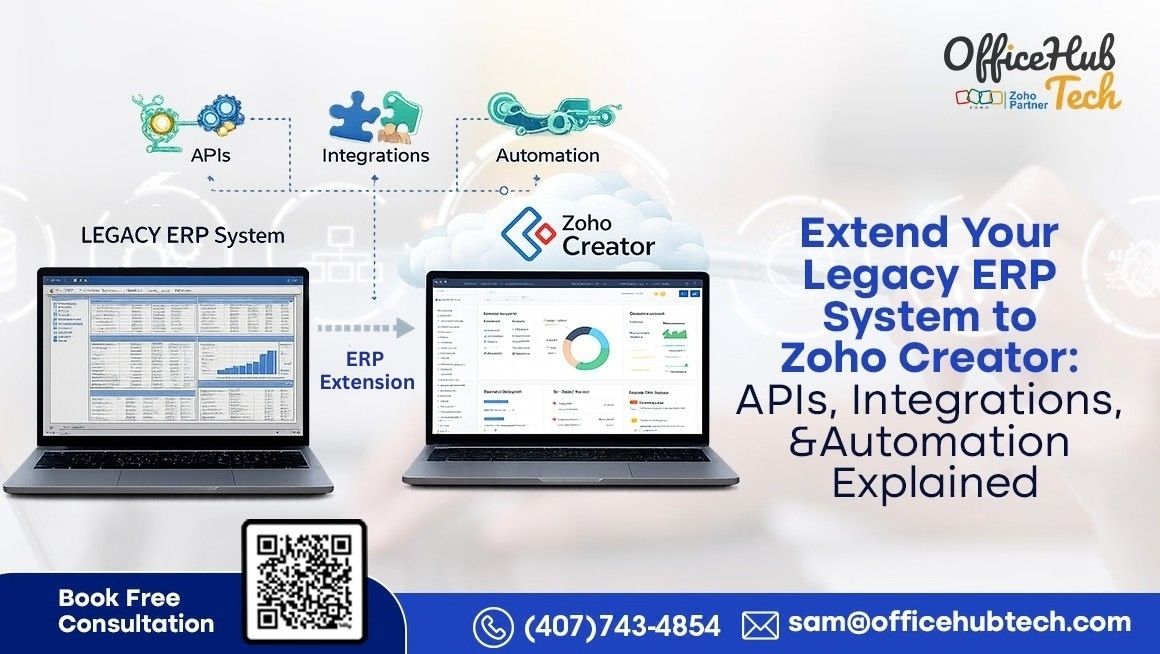
Legacy ERP extension means leaving the ERP system exactly as it is—stable, validated, and trusted—while building a modern, flexible layer around it. The ERP remains the system of record. All innovation happens outside the core.
This approach avoids disruption while enabling agility. It allows businesses to introduce APIs, integrations, automation, and custom workflows without destabilizing the ERP or increasing upgrade complexity.
This is where legacy ERP System extension becomes a strategic capability rather than a workaround.
Zoho Creator as an Extension Layer, Not an ERP Replacement
Zoho Creator is uniquely positioned to act as an ERP extension platform because it was designed from the ground up for integration, automation, and application orchestration.
Rather than forcing businesses to conform to rigid workflows, Zoho Creator allows organizations to design applications that reflect how work actually happens. These applications sit outside the ERP, interact with it through APIs, and handle everything the ERP cannot do efficiently.
This is not about replacing ERP functionality. It is about extending it intelligently.
Through Zoho Creator Legacy ERP integration, businesses can consume ERP APIs, normalize data, apply logic, trigger workflows, and push validated information back to the ERP—all without modifying ERP code.
How Zoho Creator Solves the API Gap Left by Legacy ERPs
Zoho Creator natively supports modern API standards, including REST-based services, OAuth 2.0 authentication, JSON payloads, and webhook-based triggers. This allows it to act as a translation and orchestration layer between legacy ERP systems and modern applications.
When a legacy ERP exposes limited or rigid APIs, Zoho Creator absorbs that complexity. It transforms inconsistent data structures into usable formats. It manages retries, validation, and error handling. It exposes clean APIs to downstream systems without exposing the ERP directly.
This effectively turns a closed ERP into an API-enabled participant in a modern ecosystem—without touching the core system.
Automation That Actually Reflects Business Reality
Automation in Zoho Creator is event-driven, conditional, and cross-platform. Workflows can be triggered by ERP data changes, CRM events, inventory movements, or time-based conditions.
For example, a sales order originating in CRM can trigger credit validation, inventory checks, approval workflows, and financial postings—without requiring users to touch the ERP interface. Exceptions are handled automatically, and stakeholders are notified in real time.
This level of orchestration is simply not achievable inside most legacy ERP systems without deep customization and long development cycles.
Extending ERP with the Zoho Ecosystem
Zoho Creator becomes exponentially more powerful when positioned at the center of the Zoho ecosystem. Instead of forcing a legacy ERP system to handle every operational, analytical, and communication requirement, responsibilities are distributed across specialized Zoho applications while the ERP remains the system of record.
In this architecture, Zoho Creator orchestrates data flow, workflow logic, and automation across interconnected platforms, allowing each system to operate within its architectural strengths.
Common and highly effective integrations include:
-
Zoho CRM – Drives sales-to-ERP workflows by triggering order, approval, and fulfillment processes from customer and deal events.
-
Zoho Books – Extends accounting, invoicing, tax, and compliance workflows beyond the ERP core with automated validation and approvals.
-
Zoho Inventory – Enables real-time stock visibility, multi-warehouse logic, and automated replenishment without ERP customization.
-
Zoho People – Introduces HR-driven approvals, role-based workflows, onboarding events, and asset tracking into ERP-adjacent processes.
-
Zoho Projects – Connects project planning, task execution, and resource tracking with ERP cost centers and billing logic.
-
Zoho Analytics – Transforms ERP data into unified, cross-system dashboards for financial, operational, and performance insights.
-
Zoho Mail – Supports automated notifications, approval communication, and audit trails within ERP extension workflows.
-
Zoho Flow – Acts as an event-driven integration hub connecting Zoho Creator with both Zoho and third-party applications.
Together, these integrations allow Zoho Creator to function as a central orchestration layer—coordinating activity, enforcing logic, and automating decisions—while the legacy ERP remains stable, isolated, and uncompromised.
Extending ERP Beyond Zoho: Third-Party Integrations
Modern businesses rarely operate within a single ecosystem. Zoho Creator supports integration with widely used third-party tools, including QuickBooks, payment gateways, logistics providers, document management systems, and industry-specific SaaS platforms.
QuickBooks integration, for example, allows financial data to flow between ERP systems and cloud accounting environments without manual reconciliation. Zoho Creator handles data mapping, validation, and synchronization logic, ensuring consistency across systems.
This external connectivity is where legacy ERP systems typically fail—and where extension delivers immediate value.
Extending Legacy ERP Capabilities Through Popular APIs
A major limitation of legacy ERP systems is their inability to interact seamlessly with modern, API-driven platforms. While today’s operations depend on real-time communication, collaboration, eCommerce, digital documentation, and analytics, most legacy ERPs cannot consume or orchestrate these services without heavy customization.
Zoho Creator solves this by acting as an external API orchestration layer. It connects legacy ERP data to modern platforms, applies business logic, and triggers workflows—without modifying the ERP core.
Commonly used APIs in ERP extension scenarios include:
Communication & Collaboration
- Twilio API for SMS, voice, and WhatsApp notifications triggered by ERP events
- Slack API for pushing ERP-driven alerts, approvals, and exceptions into team channels
- Mailgun / SendGrid APIs for reliable transactional and automated emails
- Zoom API for automated meeting scheduling tied to ERP-related workflows
Productivity, CRM & Automation
- Microsoft Graph API for integrating Outlook, Teams, calendars, and documents into ERP workflows
- Zapier API for connecting ERP-driven logic with thousands of web applications
Commerce, Documents & Intelligence
- Google Maps API for location-based workflows such as delivery tracking and field operations
- Shopify API for syncing products, orders, and inventory with ERP systems
- DocuSign API for automated contract generation and e-signatures
- OpenAI API for AI-driven insights, summaries, and intelligent automation
- Google Analytics API for combining ERP data with digital performance metrics
Legacy ERP systems are not designed to manage this breadth of API interactions in real time. Zoho Creator absorbs the complexity—handling authentication, data transformation, and workflow orchestration—allowing businesses to extend ERP capabilities safely, securely, and at scale.
What Traditional ERP Platforms Cannot Deliver Through Extension Alone
Established ERP platforms such as SAP, Infor, and Acumatica remain excellent at core transaction processing. However, extending them internally often requires proprietary development frameworks, certified consultants, and long release cycles.
By shifting automation, integration, and workflow logic to an external extension layer, organizations bypass these constraints while preserving ERP stability. This is how enterprises avoid the risk and cost of replacing legacy systems while still achieving modern capabilities.
Security, Governance, and Control in an Extension Model
ERP extension does not compromise governance. In fact, it often improves it.
Zoho Creator enforces role-based access control, field-level permissions, encrypted data transmission, and full audit trails. ERP access is limited to APIs, reducing the number of direct users and minimizing risk.
This architecture scales without introducing fragility and aligns with enterprise security expectations for legacy modernization software.
Conclusion: Extension Is How Legacy ERP Systems Stay Relevant
Legacy ERP systems do not fail because they are old; they fail because they are isolated. By extending them with Zoho Creator, organizations unlock APIs, integrations, and automation that legacy platforms were never designed to support. Workflows accelerate, errors decline, and visibility improves—allowing businesses to regain control over how technology supports operations. As the Best Legacy ERP System Modernisation and Extension Services Provider in the US, India, and UAE, OfficeHub Tech helps enterprises adopt ERP extension as a long-term operating model that balances stability with agility, without disrupting core systems.
As the Top Zoho Creator Developer and Implementation Company, OfficeHub Tech delivers enterprise-grade Zoho Creator solutions purpose-built for legacy ERP extension. From complex API orchestration to cross-platform automation involving Zoho and third-party tools such as QuickBooks, OfficeHub Tech enables organizations to build scalable, secure, and future-ready extension architectures that evolve alongside business needs.