
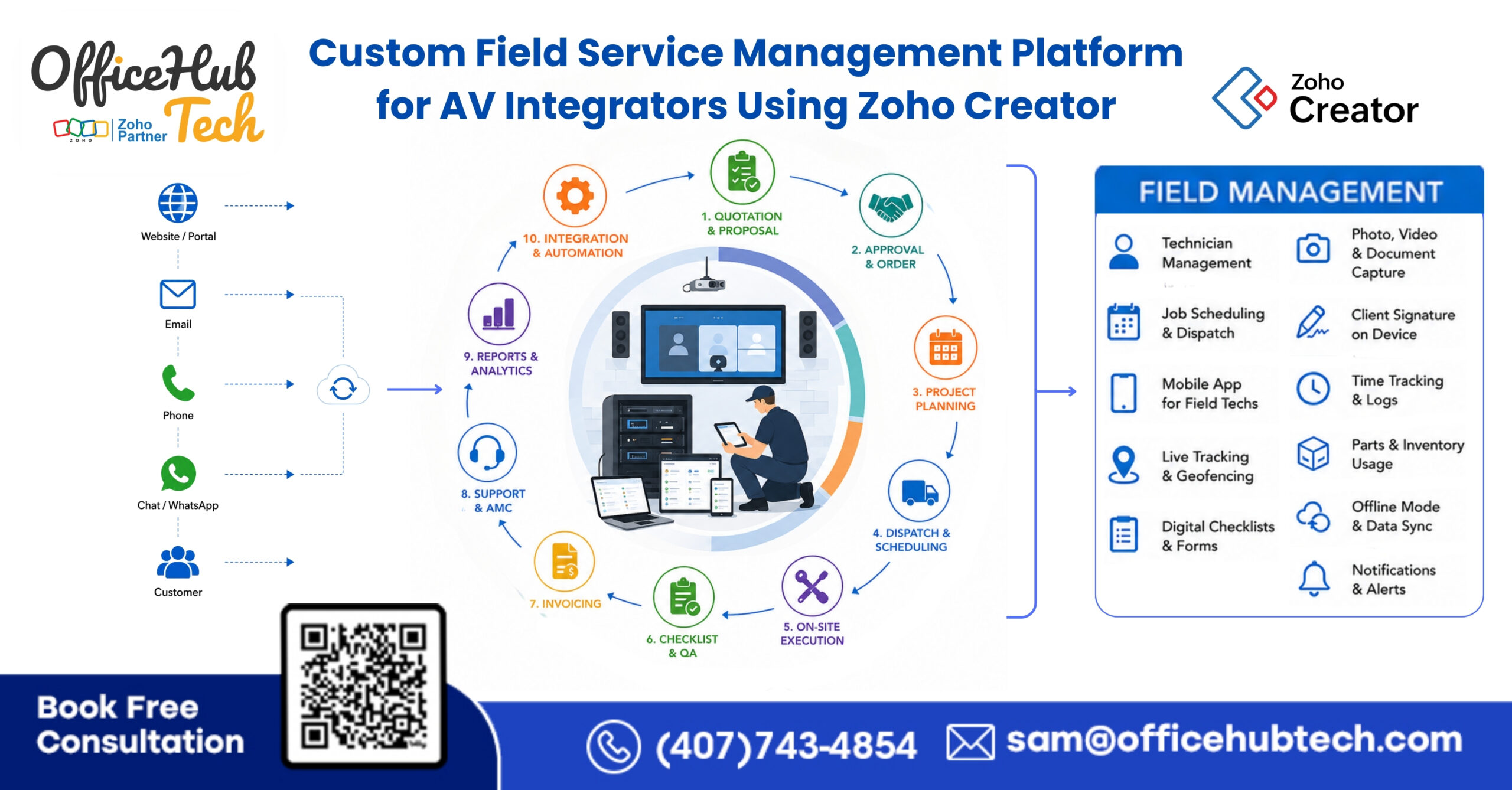
Custom Field Service Management Platform for AV Integrators Using Zoho Creator
Why Modern AV Integrators Need a Better Way to Manage Field Service Operations
Field service operations are one of the most important functions within Residential and Commercial AV System Integration businesses. Every service request, maintenance visit, troubleshooting task, equipment replacement, and onsite support activity depends on effective coordination between customers, technicians, inventory, and internal teams.
As AV projects become more complex, managing field operations has become increasingly challenging. Service teams are expected to respond faster, technicians need access to accurate information in the field, customers expect real-time communication, and businesses require better visibility into ongoing service activities.
However, many AV System Integrators still rely on disconnected tools, spreadsheets, emails, phone calls, and manual coordination to manage service operations. While these processes may work initially, they often become difficult to manage as service volumes, technician headcount, customer expectations, and project complexity increase.
The result is delayed service responses, scheduling inefficiencies, communication gaps, inventory challenges, billing delays, and limited operational visibility. Over time, these issues not only affect customer satisfaction but also restrict an AV company’s ability to scale efficiently.
This is why many Residential and Commercial AV System Integrators are moving toward Custom Field Service Management for AV System Integrators to better manage their field service operations. Instead of relying on fragmented processes, they are looking for centralized and automated approaches that improve coordination, increase visibility, and support long-term business growth.
In this guide, we will explore the challenges AV integrators face, how modern field service workflows can be automated, and what businesses should consider when building a scalable service management operation.
Why Traditional Field Service Management Processes Fail AV Integrators
Field service operations are the backbone of both Residential and Commercial AV System Integration businesses. Every installation, service request, maintenance visit, warranty call, and troubleshooting task depends on efficient coordination between customers, dispatch teams, technicians, inventory managers, and accounting departments. Unfortunately, many AV Integrators still rely on fragmented processes that create operational bottlenecks and limit growth.
Service Requests Are Still Managed Manually
Many service requests still arrive through emails, phone calls, support inboxes, or spreadsheets. Team members manually create tickets, gather customer information, and assign work. This not only increases administrative effort but also delays response times and creates opportunities for errors. As service volumes increase, manual ticket creation becomes increasingly difficult to manage consistently.
Technician Coordination Becomes a Daily Bottleneck
Scheduling technicians is often one of the most time-consuming activities within AV service operations. Dispatch coordinators spend significant time checking availability, making follow-up calls, resolving scheduling conflicts, and updating customers. Without automated workflows, even simple appointment scheduling can consume valuable operational hours every day.
Inventory Visibility Is Missing During Service Calls
Many AV Integrators struggle with real-time inventory visibility across warehouses, vehicles, and storage locations. Technicians frequently arrive onsite only to discover that required replacement parts or equipment are unavailable. This results in repeat visits, delayed issue resolution, increased costs, and reduced customer satisfaction.
Billing and Documentation Are Disconnected
After service work is completed, technicians often submit notes separately while accounting teams manually generate invoices and update records. These disconnected processes can create billing delays, missing documentation, inaccurate service records, and unnecessary administrative work across departments.
No Single Source of Truth
Customer information, service tickets, inventory records, technician schedules, project updates, and financial data are often distributed across multiple software platforms. Because information is scattered, management teams lack real-time operational visibility and spend considerable time gathering updates from different systems.
Why These Challenges Prevent AVSI Companies from Scaling
As AV businesses grow, operational complexity grows with them. More customers, technicians, service requests, and projects often lead to more manual coordination rather than greater efficiency. Teams spend excessive time managing workflows instead of delivering service, supporting customers, and expanding operations. Without connected field service processes, growth becomes increasingly difficult because operational resources are consumed by repetitive administrative tasks rather than revenue-generating activities.
How a Custom Field Service Management (FSM) Platform Creates a Connected Service Operation
A modern Field Service Management platform should do more than simply manage service tickets. For AV System Integrators, it must connect customer support, technician dispatching, inventory availability, project coordination, scheduling, and billing into one continuous workflow.
This is where a Custom Field Service Management (FSM) Platform built on Zoho Creator becomes valuable.
Instead of requiring teams to switch between multiple applications throughout the day, the Field Service Management (FSM) dashboard acts as a centralized operational hub where all service-related activities can be managed from one place. Service managers gain visibility into incoming requests, technician schedules, appointment status, inventory availability, customer history, and completed work without manually collecting information from different departments.
The objective is not to replace every business application. Instead, the Field Service Management (FSM) platform connects existing operational processes into a single workflow-driven environment.
When a customer submits a service request, the workflow automatically begins. Customer information, service history, inventory requirements, technician availability, and communication workflows become connected through one operational process rather than requiring separate manual actions.
This approach helps Residential and Commercial AV System Integrators reduce administrative overhead while improving response times, technician utilization, service visibility, and customer experience.
Most importantly, service operations become scalable because growth no longer depends on adding more administrative effort. The workflow itself becomes responsible for coordinating activities across departments.
Building the Field Service Management (FSM) Dashboard with Zoho Creator and the Zoho Ecosystem
At the center of the solution is a Custom Field Service Management (FSM) Dashboard developed within Zoho Creator. This dashboard serves as the operational command center for service teams, dispatch coordinators, technicians, management, and support staff.
However, the real strength of the platform comes from how it connects multiple business applications into a single Turnkey Workflow Solution.
Zoho Creator acts as the central interface where operational workflows are managed, while connected Zoho applications perform specialized functions across the service lifecycle.
- Zoho CRM maintains customer profiles, site information, installation history, equipment records, and relationship management activities.
- Zoho Desk manages incoming support requests and service tickets, ensuring customer issues enter the workflow automatically.
- Zoho Inventory provides real-time visibility into product availability, replacement equipment, spare parts, and warehouse stock levels. This allows technicians and dispatch teams to verify material availability before a service visit is scheduled.
- Zoho Books automates invoicing, billing workflows, payment tracking, and financial reporting associated with completed service work.
- Zoho Projects supports service-related project coordination, task management, and resource planning when larger deployments or service initiatives are involved.
- Zoho Mail handles automated communication workflows including appointment confirmations, technician notifications, customer updates, and service status alerts.
By connecting these applications through automated workflows, AV System Integrators gain a unified service management environment where information flows automatically across departments without requiring repetitive manual coordination.
From Customer Request to Completed Service: The Automated Field Service Management Workflow
One of the biggest advantages of a custom Field Service Management (FSM) platform is its ability to automate the entire service lifecycle.
The process typically begins when a customer reports an issue through a support portal, email, service request form, or customer support channel. Instead of manually creating records and notifying departments, the system automatically generates a service ticket and initiates the workflow.
The platform then evaluates technician availability, location, workload, expertise, and scheduling capacity to identify the most appropriate technician for the assignment. Simultaneously, inventory information is verified to ensure required parts, replacement devices, or service materials are available before the appointment is confirmed.
Once the assignment is completed, the appointment is automatically scheduled and synchronized with Google Calendar. Both the technician and customer receive confirmation notifications without requiring manual follow-up.
As tasks are completed, technicians can update job progress, log finished work, add service-related notes, and track labor details directly within the system. Service managers receive real-time visibility into job progress while maintaining centralized oversight of field operations.
After completion, service records are updated automatically, billing workflows are initiated, invoices can be generated, and customer communication processes continue without requiring additional administrative effort.
The result is a fully connected service workflow that reduces delays, improves coordination, minimizes manual work, and creates a significantly better experience for both customers and internal teams.
Understanding the Complete Service Workflow Automation Process
A major advantage of a Custom Field Service Management Platform is its ability to automate the entire service lifecycle from customer request to invoice generation. Instead of relying on multiple departments to manually coordinate activities, the workflow moves automatically across connected systems through intelligent automation and real-time synchronization.
Service Workflow Architecture
Customer Request
↓
Service Ticket Creation
↓
Technician Selection Engine
↓
Inventory Verification
↓
Appointment Scheduling
↓
Customer Confirmation
↓
Field Service Execution
↓
Work Completion Update
↓
Invoice & Billing Generation
Step 1 – Customer Reports an Issue
The process begins when a customer submits a service request through a support portal, email, phone call, or customer service channel. Customer information and service history are immediately available within the platform.
Step 2 – Service Ticket Is Automatically Created
The system automatically creates a service ticket and assigns a unique service record. This eliminates manual ticket entry and reduces response delays.
Step 3 – System Identifies the Best Available Technician
Using technician availability, skill sets, location, workload, and service priority, the platform automatically identifies the most suitable technician.
Step 4 – Inventory Availability Is Verified Automatically
Before dispatching a technician, the system checks inventory availability to verify that required equipment, replacement parts, or service materials are in stock.
Step 5 – Appointment Scheduling Happens Automatically
Based on technician availability and service priority, the platform schedules the appointment and updates operational calendars automatically.
Step 6 – Customer Receives Confirmation
Automated notifications are sent to customers through email, providing appointment details and service updates.
Step 7 – Technician Completes Work in the Field
Technicians access work orders, customer information, service history, and inventory details through the Field Service Management dashboard and update job status in real time.
Step 8 – Work Completion Updates All Connected Systems
Once the work is finished, service records, customer information, inventory consumption, technician logs, and operational reports are automatically synchronized and updated across all integrated systems.
Step 9 – Invoice and Billing Are Generated Automatically
Completed service records trigger billing workflows, allowing invoices to be generated quickly while maintaining complete service documentation and financial visibility.
Core Capabilities of the Custom Field Service Management Platform
A Custom Field Service Management Platform for AV System Integrators must do more than manage service tickets. It should create a connected operational environment where service, inventory, customer support, technician management, project coordination, and billing workflows operate together seamlessly.
AI-Powered Technician Assignment & Dispatch
The platform automatically identifies and dispatches the most suitable technician based on skill set, location, availability, workload, and service priority. This helps reduce response times, improve resource utilization, and minimize scheduling conflicts.
Automated Service Scheduling & Work Order Management
Service requests are automatically converted into work orders, while appointments are scheduled through workflow-driven automation. Real-time availability checks help prevent double-booking, reduce administrative effort, and improve service coordination.
Service Ticket Lifecycle Management
Every service request is tracked from creation to completion, providing complete visibility into ticket status, escalation history, technician activities, work progress, and resolution outcomes.
Inventory, Parts & Asset Visibility
Technicians and service coordinators can verify inventory availability before scheduling service visits. The platform provides real-time visibility into spare parts inventory, replacement equipment, warehouse stock, installed assets, equipment history, serial numbers, and warranty details.
Preventive Maintenance & Service Contract Management
Recurring maintenance visits, AMC schedules, warranty services, preventive maintenance programs, and contract-based service workflows can be automated to ensure timely service delivery and SLA compliance.
Mobile Technician Access & Real-Time Updates
Field technicians can access work orders, customer information, site history, equipment records, service notes, and job updates directly from the Field Service Management dashboard or mobile interface. This enables real-time status updates and improved coordination between field and office teams.
Customer Communication & Appointment Automation
The platform automatically sends appointment confirmations, scheduling updates, technician notifications, service status alerts, and follow-up communications, helping improve customer experience while reducing manual coordination.
Technician Productivity Tracking
Managers can monitor technician utilization, completed jobs, response times, workload distribution, service performance, and field activity metrics through centralized reporting and operational dashboards.
Real-Time Service Visibility & Operational Control
Service managers gain real-time visibility into technician status, active work orders, appointment schedules, ticket queues, inventory availability, and ongoing service operations from a centralized dashboard, enabling faster decision-making and better operational oversight.
Billing, Reporting & Operational Insights
Completed service activities automatically update billing workflows, invoices, customer records, service history, technician performance reports, and management dashboards. Real-time reporting and analytics provide visibility across service operations, inventory management, accounting, customer support, and executive leadership teams.
This connected workflow approach enables AV System Integrators to streamline service delivery, reduce administrative overhead, improve technician efficiency, enhance customer experience, and scale operations more effectively.
Benefits of a Custom Field Service Management Platform for AV System Integrators
A Custom Field Service Management Platform helps Residential and Commercial AV System Integrators streamline service operations, improve team coordination, and create a more scalable business model. By connecting service management, technician scheduling, inventory, customer communication, and billing workflows into a unified ecosystem, AV businesses can operate more efficiently while delivering a better customer experience.
Faster Service Response Times
Service requests are automatically captured, processed, and routed through predefined workflows, reducing delays and helping technicians respond to customer issues more quickly.
Reduced Technician Scheduling Effort
Automated scheduling and technician assignment minimize manual coordination, making it easier to allocate the right technician based on availability, location, and expertise.
Improved Inventory Accuracy
Real-time inventory visibility allows service teams to verify part availability before dispatching technicians, reducing service delays and repeat site visits.
Reduced Manual Data Entry
Information flows automatically between connected systems, eliminating repetitive data entry and reducing the risk of operational errors.
Better Customer Experience
Customers receive faster responses, appointment confirmations, service updates, and improved communication throughout the service lifecycle.
Faster Billing Cycles
Completed work orders can automatically trigger invoicing workflows, helping businesses accelerate billing and improve cash flow.
Increased Technician Productivity
Technicians dedicate more time to completing service tasks rather than handling paperwork, resulting in greater efficiency in the field.
Improved Service Visibility
Managers gain centralized visibility into service tickets, technician activities, appointments, inventory status, and ongoing field operations.
Real-Time Operational Reporting
Connected workflows provide accurate, real-time reporting across service performance, technician utilization, response times, and operational efficiency.
Higher Service Team Efficiency
By automating repetitive tasks and connecting departments through a single workflow ecosystem, service teams can handle more work without increasing administrative overhead.
Real-World Use Cases of a Custom Field Service Management Platform for AV Integrators
- Service Request Management: How customer requests automatically become service tickets and technician assignments.
- Preventive Maintenance & AMC Visits: How recurring maintenance schedules are automated.
- Warranty Service Management: How warranty claims, service history, and technician dispatch are connected.
- Emergency Service Dispatch: How urgent service requests are prioritized and assigned automatically.
- Multi-Site Commercial AV Support: How enterprises with multiple locations can manage service operations centrally.
- Inventory-Driven Service Calls: How technicians verify part availability before visiting customer sites.
- Automated Billing & Service Completion: How completed work automatically triggers invoicing and customer notifications.
Business Outcome
- Faster response times
- Fewer scheduling conflicts
- Reduced administrative work
- Better technician utilization
- Improved customer satisfaction
- Faster revenue realization
How Different Teams Benefit from a Custom Field Service Management Platform
A Custom Field Service Management Platform delivers value across the entire organization by connecting service operations, customer data, inventory, billing, and reporting into a unified workflow environment.
Field Technicians
Technicians receive assignments automatically, access service details from mobile devices, verify inventory availability, and spend less time on administrative tasks, allowing them to focus on service delivery.
Service Management Team
Dispatchers and service managers gain real-time visibility into technician schedules, service requests, and work orders, making service coordination faster and more efficient.
Sales Team
Sales teams can access customer history, installed systems, and service records, helping identify upsell opportunities and strengthen customer relationships.
Accounting Team
Automated billing workflows accelerate invoice generation, improve financial accuracy, and support better cash flow management.
Operations, Engineering & Leadership
Operations teams gain better resource visibility, engineering teams can track recurring service issues, and leadership benefits from centralized dashboards and real-time performance reporting for informed decision-making.
Case Study 1: Residential AV Service Workflow Transformation
Smart Haven AV Solutions: A residential AV System Integrator specializing in home automation, home theaters, surveillance systems, smart lighting, and networking solutions.
The Challenge
As service demand increased, the company struggled with:
- Manual technician scheduling
- Service requests managed through emails and spreadsheets
- Inventory verification delays
- Inconsistent customer communication
- Delayed invoicing and status updates
Service managers spent significant time coordinating jobs instead of focusing on customer service and business growth.
The Solution
OfficeHub Tech implemented a Custom Field Service Management Platform built on Zoho Creator integrated with Zoho CRM, Zoho Inventory, Zoho Books, Zoho Desk, and Google Calendar.
The platform automated service ticket creation, technician assignment, appointment scheduling, inventory checks, customer notifications, and billing workflows.
The Results
- 80% reduction in administrative effort
- 85% reduction in repetitive data entry
- Faster technician scheduling and dispatching
- Improved customer communication
- Accelerated billing cycles
The company was able to support more service requests without increasing administrative staff.
Case Study 2: Commercial AV Service Operations Transformation
Summit Integrated Technologies: A commercial AV System Integrator delivering conference room technology, digital signage, collaboration systems, structured cabling, and enterprise AV support.
The Challenge
The company relied on multiple disconnected systems for service management, inventory, project coordination, and billing, resulting in:
- Scheduling conflicts
- Limited operational visibility
- Manual coordination between departments
- Delayed service delivery
- Slow invoicing processes
The Solution
OfficeHub Tech deployed a Custom Field Service Management Platform integrated with Zoho CRM, Zoho Projects, Zoho Inventory, Zoho Books, D-Tools workflows, and Low Voltage Software Connectors.
The solution automated technician dispatching, inventory validation, customer communication, service tracking, and billing processes.
The Results
- 75% reduction in manual workflow coordination
- Improved technician productivity
- Faster service scheduling
- Reduced follow-up effort
- Improved operational visibility
The company successfully scaled service operations across multiple client locations while keeping administrative overhead under control.
Signs Your AV Business Has Outgrown Traditional Service Management
Many AV businesses reach a point where manual processes become operational bottlenecks. Increasing technician headcount, growing service request volumes, rising administrative effort, inventory coordination challenges, scheduling conflicts, delayed billing cycles, and limited visibility are all signs that existing service management processes are no longer supporting growth.
When managers spend more time coordinating information than improving service delivery, operational efficiency begins to decline. A connected Field Service Management (FSM) platform helps eliminate these challenges by creating standardized, automated workflows that scale alongside the business.
Why AV Integrators Need a Custom Field Service Management (FSM) Instead of Generic Service Software
Field service operations within the AV industry are fundamentally different from many other service businesses. AV projects often involve complex equipment, site-specific configurations, inventory dependencies, recurring maintenance, project coordination, and specialized technical expertise.
Generic service software typically focuses on basic ticketing and dispatching. However, AV businesses require service workflows that integrate inventory, project operations, customer history, technician management, scheduling, billing, and reporting into one environment.
A custom Field Service Management platform allows businesses to align software with their operational processes rather than forcing operations to adapt to software limitations. This flexibility creates long-term efficiency, scalability, and competitive advantage.
How OfficeHub Tech Creates Tailored Workflow Solutions for AV System Integrators
OfficeHub Tech specializes in building Custom Workflow Solutions for Residential and Commercial AV System Integrators by connecting service operations, customer management, inventory, project execution, technician dispatching, and financial processes into a unified operational ecosystem.
Unlike generic software that forces businesses to adapt their workflows, our approach focuses on designing solutions around your existing processes, software investments, and operational requirements. Whether your business already uses ERP systems, CRM platforms, accounting software, project management tools, or industry-specific AV applications, we create a connected environment through custom integrations, workflow automation, and API-driven connectivity.
A key component of this approach is the use of Low Voltage Software Connectors, which allow business-critical systems to exchange information automatically in real time. Through integrations such as
- D-Tools SI ↔ Zoho CRM,
- D-Tools SI ↔ SharePoint,
- D-Tools SI ↔ Google Drive,
- D-Tools SI ↔ Pipedrive,
- D-Tools SI ↔ Monday.com, and
customer information, project data, service requests, inventory records, and operational updates remain synchronized across platforms.
For businesses requiring broader workflow automation, we also leverage Zapier-based integrations and custom API connectors to connect platforms such as
- Zapier ↔ D-Tools SI
- Zapier ↔ Ipoint
- Zapier ↔ Portal.io
- Zapier ↔ Simpro
- Zapier ↔ System Surveyor
and other AV-focused applications. This enables automated coordination between sales, engineering, project management, field service, procurement, inventory, customer support, and accounting teams.
Instead of replacing systems that already work, we focus on eliminating operational silos by creating a connected workflow ecosystem where information flows seamlessly between departments. Service requests can automatically trigger technician assignments, inventory verification, customer notifications, project updates, and billing workflows without requiring repetitive manual intervention.
The result is a customized Turnkey Workflow Solution that improves operational visibility, reduces manual work, eliminates duplicate data entry, accelerates workflow execution, and creates a scalable foundation for long-term business growth. Whether you need a Custom Field Service Management Platform, multi-software integration strategy, workflow automation, or Low Voltage Software Connectors, OfficeHub Tech helps transform disconnected business processes into a fully connected operational environment.
Conclusion: Building a Scalable Service Operation for the Modern AV Business
Field service management has evolved beyond basic ticket management and technician scheduling. Today’s AV System Integrators need connected workflows that bring together service operations, technician coordination, inventory visibility, customer communication, billing, and reporting within a single operational ecosystem. By automating workflows and connecting business systems, a Custom Field Service Management (FSM) Platform helps reduce manual effort, improve visibility, and create a more efficient service operation.
As the Best Custom Turnkey Workflow Solution Provider for Residential AVSI and Commercial AVSI in the USA, OfficeHub Tech helps AV System Integrators build customized field service management solutions that integrate with existing software environments and operational processes. The result is a scalable, workflow-driven service ecosystem designed to improve efficiency, enhance customer experience, and support long-term business growth.
Ready to Build Your Next Business Application?
Transform your AV service operations with Zoho Creator’s powerful low-code platform. Build a custom field service management solution that streamlines service requests, technician dispatch, work orders, preventive maintenance, inventory tracking, customer communication, and reporting—all tailored to the way your business operates.
Create your Zoho Creator account today using the link below and start building a field service platform that grows with your business. If you need help with custom development, workflow automation, or integrating your existing AV software ecosystem, OfficeHub Tech is here to help: