From Lead to Installation: AV Workflow Automation Agentic Blueprint
Why AV Businesses Need an Agentic Workflow Blueprint
The AV industry has evolved significantly over the last decade. Residential AV System Integrators now manage increasingly sophisticated smart home ecosystems, while Commercial AV System Integrators handle large-scale deployments involving collaboration platforms, conference rooms, digital signage, security systems, structured cabling, and multi-site infrastructure projects.
As projects become more complex, operational workflows become equally challenging. A single customer opportunity may pass through multiple departments, software applications, approval processes, procurement activities, installation teams, and support workflows before the project is completed successfully.
Unfortunately, many AV businesses still rely on disconnected systems and manual coordination to move information between these operational stages. Sales teams manage leads separately, engineering teams create designs independently, project managers track schedules manually, technicians work from disconnected task lists, and customer communication often depends on email follow-ups.
This creates delays, duplicated work, limited visibility, and operational bottlenecks that directly impact project delivery and profitability.
This is where an AV Workflow Automation Agentic Blueprint becomes valuable.
Rather than viewing each operational activity as a separate process, an Agentic Blueprint connects the entire project lifecycle through specialized workflow agents and automation logic. Combined with n8n Workflow Templates for Residential and Commercial AV System Integrators, businesses can automate operational execution from lead qualification to installation, testing, handover, and ongoing support.
In this guide, we explore how agentic workflow automation transforms AV operations, how each workflow stage functions, and how AV businesses can use connected automation to improve efficiency, scalability, and customer experience.
Why AV Projects Become Operationally Complex
The Hidden Cost of Manual Workflow Management
The majority of AV project failures are not caused by the technology itself. They fail because operational workflows become difficult to manage as businesses grow.
Consider a typical AV project.
A lead enters the organization through a website, referral, event, or sales inquiry. The lead then moves through discovery, solution design, proposal creation, approval workflows, procurement activities, project scheduling, installation, testing, and customer handover.
Each stage generates new information.
Customer requirements need to be documented. Designs need approval. Equipment must be ordered. Technicians need scheduling. Installation progress requires tracking. Customers expect updates.
Managing these tasks manually often leads to a range of operational challenges:
- Delayed lead response times
- Inconsistent project documentation
- Duplicate data entry
- Procurement bottlenecks
- Scheduling conflicts
- Inventory visibility issues
- Communication breakdowns
- Limited operational reporting
As project volume increases, these issues multiply.
Many Residential and Commercial AV System Integrators discover that growth creates operational complexity faster than teams can manage manually. Administrative workloads increase, response times slow down, and project visibility decreases.
The challenge is rarely a lack of software.
Most organizations already have CRM systems, project management tools, proposal platforms, inventory software, and accounting applications.
The primary issue is that these systems function in isolation from one another.
Without workflow orchestration, employees become responsible for moving information between systems manually. This creates inefficiencies that limit scalability and reduce operational performance.
Why Traditional CRM + Project Management Alone Cannot Deliver End-to-End AV Automation
CRM and project management platforms are essential for managing customer information and project tasks, but they are not designed to automate the entire AV operational lifecycle. Most AV businesses still rely on manual coordination between CRM systems, proposal tools, procurement platforms, inventory applications, technician scheduling systems, and customer support software. This creates operational gaps, duplicate data entry, delayed updates, and limited visibility. End-to-end AV automation requires workflow orchestration that connects all business systems and automatically manages operational handoffs between departments. An Agentic Workflow Blueprint fills this gap by creating intelligent, automated workflows that keep projects moving from lead generation to installation and ongoing service without constant manual intervention.
What Is an AV Workflow Automation Agentic Blueprint?
Moving Beyond Traditional Workflow Automation
Traditional workflow automation focuses on automating individual tasks.
For example:
- Sending an email after form submission
- Creating a task when a project is approved
- Generating a notification when inventory reaches a threshold
While useful, task automation only addresses isolated activities.
An Agentic Workflow Blueprint takes a broader approach.
Instead of automating individual tasks, specialized workflow agents manage entire operational stages and coordinate activities across multiple systems.
Each agent has a specific responsibility.
A lead qualification agent evaluates opportunities. A discovery agent gathers project requirements. A planning agent prepares installation schedules. A support agent manages post-installation service operations.
These agents work together through connected workflows that automatically pass information from one stage to the next.
The result is an operational environment where workflows progress intelligently without requiring constant manual intervention.
Core Components of an Agentic AV Workflow
An AV Workflow Automation Agentic Blueprint typically consists of:
- AI-assisted workflow agents
- n8n workflow orchestration
- API integrations
- Business software platforms
- Event-driven triggers
- Automated decision routing
- Operational reporting systems
Rather than relying on employees to coordinate every workflow transition, the system itself becomes responsible for operational execution.
This creates faster workflows, improved consistency, and greater scalability across the entire AV business lifecycle.
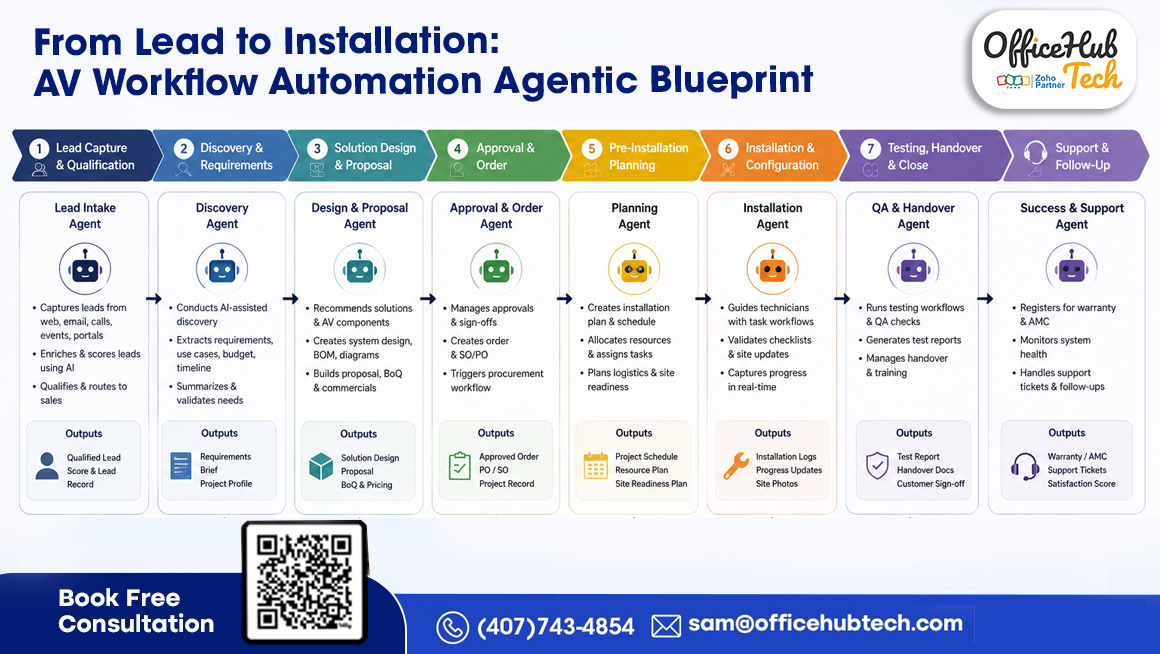
The 8-Stage AV Workflow Automation Agentic Blueprint
Stage 1: Lead Capture & Qualification Agent
The first stage of the blueprint focuses on identifying and qualifying opportunities.
Leads can enter the business through multiple channels, including:
- Company websites
- Marketing campaigns
- Referral programs
- Events and trade shows
- Social media inquiries
- Partner networks
The Lead Capture & Qualification Agent automatically collects lead information, validates submissions, scores opportunities, and routes qualified prospects to the appropriate sales personnel.
Instead of manually reviewing every inquiry, the workflow evaluates incoming opportunities based on predefined criteria such as project type, budget, location, and service requirements.
Business Outcomes
- Faster lead response times
- Improved lead qualification
- Reduced administrative effort
- Better sales productivity
- Higher conversion potential
n8n Workflow Template
Lead Qualification & Routing Template
This workflow automatically captures inquiries, enriches lead data, scores opportunities, creates CRM records, and assigns prospects to sales teams.
Stage 2: Discovery & Requirements Agent
Once a lead is qualified, the next challenge is understanding customer requirements accurately.
Discovery is often one of the most important stages of an AV project because errors made here typically impact every subsequent phase.
The Discovery Agent helps standardize requirement gathering by capturing:
- Business objectives
- User requirements
- Site conditions
- Budget expectations
- Deployment timelines
- Technical requirements
Information collected during discovery is automatically documented and organized into structured project records.
The workflow can also generate requirement summaries and project profiles that become available to engineering, sales, and project management teams.
Business Outcomes
- Consistent discovery processes
- Better project documentation
- Reduced requirement gaps
- Improved collaboration between teams
- Faster proposal preparation
n8n Workflow Template
Customer Discovery Automation Template
This workflow captures customer requirements, stores project information centrally, and automatically distributes relevant data to design and engineering teams.
Stage 3: Solution Design & Proposal Agent
After discovery is completed, the project enters the solution design stage.
This phase typically involves engineering teams, estimators, solution architects, and sales professionals working together to develop the proposed AV solution.
The Design & Proposal Agent oversees and manages tasks including:
- Solution recommendations
- Equipment selection
- Bill of Materials (BOM) creation
- Pricing workflows
- Proposal generation
- Internal review processes
Rather than relying on manual coordination between departments, workflow automation ensures that proposal development progresses through predefined stages while maintaining visibility for all stakeholders.
Business Outcomes
- Faster proposal turnaround
- Improved proposal accuracy
- Reduced engineering delays
- Better pricing consistency
- Higher operational efficiency
n8n Workflow Template
Proposal & Design Automation Template
This workflow streamlines proposal approval processes, design evaluations, pricing revisions, and the creation of client-ready documents.
Stage 4: Approval & Order Agent
Once a proposal is accepted, the project transitions into execution.
At this stage, approvals, purchase orders, procurement activities, and project initiation workflows must be coordinated efficiently.
The Approval & Order Agent automates these operational transitions.
The workflow can:
- Manage approvals and sign-offs
- Generate project records
- Create sales orders
- Initiate procurement workflows
- Notify stakeholders automatically
- Prepare downstream project activities
Without automation, this stage often becomes a bottleneck because multiple teams need to coordinate manually.
Agentic workflow orchestration eliminates these delays by ensuring approvals automatically trigger the next operational action.
Business Outcomes
- Faster project initiation
- Reduced approval delays
- Better procurement coordination
- Improved operational visibility
- Reduced administrative overhead
n8n Workflow Template
Order Approval & Procurement Automation Template
This workflow routes approvals, generates project records, initiates procurement activities, and prepares installation planning workflows automatically.
Stage 5: Pre-Installation Planning Agent
Once approvals are completed and orders are processed, successful project execution depends heavily on planning. This stage determines whether installation teams arrive at the site prepared with the right equipment, resources, schedules, and information.
Many AV projects experience delays because planning activities are handled manually across multiple departments. Project managers may be coordinating schedules, procurement teams may be verifying equipment availability, and technicians may be waiting for updates from different systems.
The Pre-Installation Planning Agent removes these operational inefficiencies by coordinating planning processes through integrated workflows.
The agent can automatically:
- Create installation schedules
- Allocate technicians and resources
- Verify inventory availability
- Coordinate procurement status
- Generate project task lists
- Validate site readiness requirements
Instead of teams manually gathering information from multiple systems, the workflow consolidates operational data and prepares installation plans automatically.
Business Outcomes
- Better project preparedness
- Reduced installation delays
- Improved resource allocation
- Greater schedule accuracy
- Enhanced operational visibility
n8n Workflow Template
Installation Planning Workflow Template
This workflow synchronizes project schedules, resource assignments, inventory validation, procurement updates, and site readiness planning to ensure installations begin without unnecessary delays.
Stage 6: Installation & Configuration Agent
Installation is where planning turns into execution.
At this stage, technicians must perform equipment installation, configuration, testing, documentation, and progress reporting while maintaining visibility for project managers and customers.
Traditionally, installation updates are communicated through phone calls, emails, spreadsheets, or manual status reports. This often creates visibility gaps and delays decision-making.
The Installation & Configuration Agent acts as the operational coordinator for field activities.
The agent can:
- Dispatch technicians automatically
- Assign installation tasks
- Deliver work instructions
- Track project milestones
- Capture field updates
- Record installation progress in real time
Through connected workflows, project stakeholders can monitor installation status without requiring constant technician follow-ups.
As work progresses, updates automatically flow to project management systems, customer communication workflows, and operational dashboards.
Business Outcomes
- Improved technician productivity
- Real-time project visibility
- Faster issue resolution
- Reduced administrative workload
- Better installation consistency
n8n Workflow Template
Technician Dispatch & Work Order Template
This workflow automatically assigns technicians, manages work orders, captures field updates, and synchronizes installation progress across connected business systems.
Stage 7: Testing, QA & Handover Agent
Completing an installation does not automatically mean the project is finished.
Before customer handover, AV systems must undergo validation, testing, documentation, and quality assurance procedures to ensure the solution performs as designed.
Without standardized QA workflows, organizations often encounter rework, support issues, customer dissatisfaction, and project closeout delays.
The Testing, QA & Handover Agent streamlines and automates this essential phase.
The agent can coordinate:
- Testing procedures
- Quality assurance checklists
- Punch list management
- Documentation generation
- Customer sign-off workflows
- Handover package creation
Rather than relying on manual project closeout activities, the workflow ensures every required task is completed before project completion.
Testing results, installation reports, site photos, and customer documentation can all be generated automatically through connected workflows.
Business Outcomes
- Reduced project rework
- Improved installation quality
- Faster project closeout
- Better customer satisfaction
- Consistent handover processes
n8n Workflow Template
QA & Handover Automation Template
This workflow manages testing activities, generates project documentation, captures customer approvals, and automates project handover processes.
Stage 8: Success & Support Agent
Many AV businesses focus heavily on project delivery while overlooking the long-term value created after installation.
In reality, warranty management, recurring service agreements, preventive maintenance, and customer support often represent significant revenue opportunities.
The Success & Support Agent extends workflow automation beyond project completion.
The agent can automatically:
- Register warranties
- Initiate AMC programs
- Monitor support requests
- Manage service tickets
- Schedule preventive maintenance
- Track customer satisfaction
Instead of waiting for customers to report issues, support workflows can proactively monitor ongoing service requirements and trigger follow-up actions automatically.
This creates stronger customer relationships while helping AV businesses generate recurring service revenue.
Business Outcomes
- Improved customer retention
- Better service responsiveness
- Increased recurring revenue
- Enhanced customer satisfaction
- Stronger long-term relationships
n8n Workflow Template
Warranty & Service Management Template
This workflow automates warranty registration, AMC tracking, service scheduling, customer follow-ups, and support ticket management.
How n8n Workflow Templates Power the Entire Blueprint
What Are n8n Workflow Templates?
An Agentic Workflow Blueprint requires a workflow orchestration layer capable of connecting business systems, managing operational logic, and automating decision-making across departments.
This is where n8n Workflow Templates become valuable.
n8n is a workflow automation platform that enables organizations to create reusable automation frameworks connecting multiple applications through APIs, webhooks, business logic, and event-driven workflows.
Rather than building every workflow from scratch, businesses can deploy pre-configured templates designed around common operational requirements.
For AV System Integrators, this significantly reduces implementation time while accelerating workflow automation adoption.
Residential AV System Integrator Workflow Templates
Residential AV businesses often manage workflows involving:
- Smart home installations
- Home theaters
- Networking projects
- Security systems
- Lighting control systems
- Service agreements
Common n8n Workflow Templates include:
- Lead Qualification Automation
- Customer Discovery Workflows
- Proposal Approval Automation
- Installation Scheduling Automation
- Technician Dispatch Automation
- Warranty Management Workflows
- Customer Support Automation
These templates help residential integrators automate repetitive administrative activities while improving customer experience.
Commercial AV System Integrator Workflow Templates
Commercial AV projects typically involve larger teams, longer project timelines, procurement coordination, and multi-site deployments.
Common workflow templates include:
- Enterprise Lead Management
- Design Review Automation
- Procurement Workflows
- Resource Allocation Automation
- Multi-Site Project Coordination
- QA & Handover Workflows
- AMC & Support Automation
These workflows create operational consistency while improving scalability across large commercial projects.
Technical Architecture Behind the Agentic Blueprint
An Agentic Workflow Blueprint operates through multiple interconnected layers that work together to automate operational execution.
Agent Layer
This layer contains specialized workflow agents responsible for managing different operational stages.
Examples include:
- Qualification Agents
- Discovery Agents
- Proposal Agents
- Planning Agents
- Installation Agents
- QA Agents
- Support Agents
Workflow Orchestration Layer
n8n serves as the orchestration engine responsible for:
- Trigger management
- Workflow execution
- Decision routing
- Automation logic
- Process coordination
Integration Layer
This layer connects business systems through:
- REST APIs
- Webhooks
- Middleware services
- Data synchronization mechanisms
Business Systems Layer
Operational workflows interact with:
- CRM platforms
- ERP systems
- Project management software
- Inventory systems
- Procurement tools
- Service management platforms
- Communication applications
Typical Workflow Flow
Lead Capture → Discovery → Proposal → Approval → Procurement → Planning → Installation → QA → Support
Every stage automatically transfers information to the next stage, creating a connected operational ecosystem that minimizes manual intervention and maximizes workflow efficiency.
Before vs After Agentic Workflow Automation
Many AV businesses initially manage operations through emails, spreadsheets, phone calls, disconnected software applications, and manual coordination between departments. While this may work during the early stages of growth, operational complexity increases rapidly as project volumes, technician teams, customer expectations, and service requests expand.
In a traditional environment, information must be manually transferred between sales, engineering, project management, procurement, installation, and support teams. Delays occur because every workflow stage depends on human intervention. Project updates become difficult to track, customer communication becomes inconsistent, and operational visibility decreases as businesses scale.
With an Agentic Workflow Blueprint powered by n8n Workflow Templates, operational activities become connected and automated. Leads are routed automatically, project information flows seamlessly between systems, approvals trigger downstream workflows, technicians receive assignments instantly, and customer updates are generated in real time.
| Operational Area | Traditional Workflow | Agentic Workflow Automation |
| Lead Management | Manual follow-ups | Automated qualification & routing |
| Proposal Process | Email-based coordination | Workflow-driven approvals |
| Scheduling | Manual planning | Automated scheduling |
| Procurement | Reactive coordination | Automated workflow triggers |
| Installation Tracking | Limited visibility | Real-time monitoring |
| QA & Handover | Manual documentation | Automated validation workflows |
| Customer Updates | Manual communication | Automated notifications |
| Support Operations | Reactive service | Proactive workflow management |
The result is faster execution, improved visibility, reduced administrative effort, and a more scalable AV business operation.
Case Study: Residential AV Integrator Transformation
Company Overview
Smart Living Technologies
A residential AV integration company specializing in home theaters, smart home automation, networking, surveillance systems, and whole-home technology solutions.
The Challenge
As project volumes increased, the company struggled with:
- Manual lead tracking
- Disconnected customer information
- Scheduling conflicts
- Technician coordination delays
- Repetitive data entry
- Limited service visibility
Service managers spent significant time following up with technicians, updating spreadsheets, and coordinating customer appointments manually.
The Solution
OfficeHub Tech implemented an Agentic Workflow Blueprint using n8n Workflow Templates that connected:
- Lead management workflows
- Discovery automation
- Installation scheduling
- Technician dispatching
- Customer communication
- Warranty registration workflows
The automation framework created a connected operational ecosystem that reduced dependency on manual coordination.
The Results
- 70% reduction in administrative coordination
- 60% faster technician scheduling
- Significant reduction in duplicate data entry
- Improved project visibility
- Faster customer response times
- Improved technician productivity
- Increased customer satisfaction
The company was able to scale service operations without increasing administrative headcount.
Case Study: Commercial AV Integrator Transformation
Company Overview
Enterprise Vision AV Solutions
A commercial AV integration company specializing in conference rooms, collaboration environments, digital signage, structured cabling, command centers, and enterprise technology deployments.
The Challenge
The organization managed multiple concurrent projects across different locations and faced challenges including:
- Procurement delays
- Resource allocation conflicts
- Multi-site project coordination issues
- Manual project updates
- Limited operational visibility
- Communication gaps between departments
Project managers often spent more time coordinating information than managing projects.
The Solution
OfficeHub Tech deployed a complete Agentic Workflow Automation framework using n8n Workflow Templates integrated with:
- CRM workflows
- Project management systems
- Procurement workflows
- Installation scheduling
- QA processes
- Service management operations
Specialized workflow agents were deployed for planning, installation, procurement, and support operations.
The Results
- 75% reduction in workflow bottlenecks
- Faster project delivery timelines
- Improved technician utilization
- Better procurement visibility
- Increased project transparency
- Reduced coordination effort across departments
- Enhanced customer experience
The company gained the ability to manage larger project volumes without increasing operational complexity.
Why AV Integrators Are Moving Toward Agentic Operations
The AV industry is rapidly moving toward connected operational ecosystems where workflows coordinate activities automatically rather than relying on employees to manage every operational transition.
Several industry trends are accelerating this shift:
- Growing project complexity
- Multi-site deployments
- Hybrid work environments
- Recurring service contracts
- Connected building technologies
- Higher customer expectations
Traditional workflow management models struggle to keep pace with these operational demands.
Agentic operations solve this challenge by introducing workflow intelligence into business processes. Instead of manually monitoring every operational stage, specialized workflow agents automatically coordinate activities, route information, trigger actions, and maintain visibility across departments.
As AI-assisted workflow automation continues evolving, AV businesses will increasingly adopt:
- Intelligent workflow orchestration
- Predictive operational workflows
- Automated decision routing
- AI-assisted project coordination
- Autonomous service management
The future of AV operations will be defined by connected workflow ecosystems rather than disconnected software systems.
How OfficeHub Tech Enables AV Businesses to Create Agentic Workflow Ecosystems
As a Top AV Business Workflow Implementation and Consultation Provider in USA and certified Zoho Partner and n8n Partner, OfficeHub Tech helps Residential and Commercial AV System Integrators transform disconnected business processes into fully connected workflow ecosystems with n8n workflow templates.
Our approach focuses on building automation frameworks specifically designed for AV businesses rather than applying generic workflow solutions.
We help AV companies implement:
Custom Agentic Workflow Design
Workflow architectures tailored around actual operational processes, project lifecycles, and service requirements.
n8n Workflow Templates for AV Integrators
Pre-built and custom-developed workflow templates that automate lead management, project execution, installation coordination, procurement, QA, and support operations.
Multi-Software Integration
Connecting CRM systems, ERP platforms, project management applications, inventory software, communication tools, and operational systems through centralized workflow orchestration.
Low Voltage Software Connectors
Custom integration frameworks that allow AV-specific platforms and business applications to communicate automatically while maintaining synchronized operational data.
AI-Assisted Workflow Automation
Automation strategies that reduce manual work, improve operational visibility, and accelerate workflow execution across departments.
The result is a scalable operational ecosystem capable of supporting growth while reducing administrative complexity.
Conclusion: Building the Future AV Business Through Agentic Workflow Automation
As AV projects become more complex, traditional workflow management methods become increasingly difficult to scale. Manual coordination, disconnected software systems, repetitive administrative work, and limited visibility create operational bottlenecks that directly impact efficiency, profitability, and customer experience.
This AV Workflow Automation Agentic Blueprint demonstrates how Residential and Commercial AV System Integrators can connect every stage of the project lifecycle—from lead qualification and discovery to installation, QA, and ongoing support—through workflow automation and intelligent orchestration.
By combining specialized workflow agents, n8n Workflow Templates, connected integrations, and operational automation, AV businesses can significantly reduce manual effort while improving execution speed, project visibility, and service quality.
Organizations that adopt connected workflow ecosystems today will be better positioned to scale operations, improve customer experiences, and compete effectively in an increasingly technology-driven AV industry.