##Quick Answer
AI is becoming practical for AV and low voltage businesses by helping automate, coordinate, and improve real workflows. From sales and AV design to project management, service, procurement, and inventory, AI can reduce repetitive work.
When connected to CRM, ERP, PSA, proposal, accounting, and other systems through APIs, automation platforms, or MCP, AI agents can work with one or multiple applications.
The goal is not to replace existing software, but to create a more connected, intelligent, and efficient operating environment around the systems businesses already use.
##Key Takeaways
- AI can support nearly every stage of the AV and low voltage business lifecycle, including sales, design, projects, service, finance, procurement, and inventory.
- AI agents can work with one application or coordinate workflows across multiple connected systems using MCP, APIs, and integration platforms.
- n8n can orchestrate AI workflows across CRM, project management, accounting, AV software, and other systems.
- Zia Agent and D-Tools Agentic AI demonstrate AI within specific business ecosystems.
- Governance, permissions, and human oversight are essential for AI-driven business operations.
- Measure AI ROI through time savings, faster processing, fewer errors, and improved productivity.
- Start with one high-impact workflow and expand gradually.
Why AI Matters for AV and Low Voltage Businesses
AV and low voltage businesses rely on interconnected processes, from sales and proposals to project delivery, service, procurement, and finance. Yet these activities often span multiple software platforms, creating repetitive work, disconnected information, and limited visibility across operations.
This is where AI for AV integrators can create practical value. When connected to the right tools, AI can interpret business information, automate repetitive tasks, support faster decision-making, and coordinate workflows across existing systems. AI-powered AV business solutions can help create a foundation for these connected workflows.
In this blog, we’ll explore practical ways AV and low voltage businesses can apply AI to everyday operations, reduce manual effort, improve productivity, and connect existing business systems. We’ll also look at how AI agents, automation platforms, integrations, and emerging technologies can turn individual AI capabilities into scalable business workflows.
What AI Research Says About Moving From Experiments to Workflows
AI adoption is growing rapidly, but organizations getting meaningful value are increasingly looking beyond isolated AI tools.
McKinsey’s State of AI 2025 survey found that 88% of respondents reported regular AI use in at least one business function, while 62% were at least experimenting with AI agents. At the same time, many organizations had not yet begun scaling AI across the enterprise.
McKinsey found that AI high performers are nearly three times more likely to redesign workflows around AI rather than simply adding AI tools.
For AV and low voltage businesses, this difference is significant. Instead of just summarizing meetings, AI can automate task creation, update project systems, track procurement, identify delays, and notify project managers.
The key takeaway: don’t just add AI to existing processes—redesign workflows so AI makes them faster, smarter, and more connected.
AI Use Cases Across AV and Low Voltage Operations
The practical opportunity for AI extends across the complete AV and low voltage operation. These use cases should not be viewed as isolated AI experiments. They can become building blocks for a broader AI-enabled operating model.
Sales and Business Development
Sales teams in AV and low voltage businesses spend significant time researching prospects, monitoring opportunities, responding to RFQs, preparing proposals, recording meetings, and updating CRM information. These activities are valuable but often repetitive.
The document identifies several practical AI use cases, including permit and construction lead mining, bid portal intelligence, RFQ-to-proposal automation, AI meeting notes, CRM data capture, and prospect research.
How AI can be used
An AI workflow can monitor relevant construction or bid information, identify projects that match an integrator’s capabilities, summarize the opportunity, and create or update a CRM record.
After a sales meeting, AI can convert the conversation into structured notes, identify action items, draft follow-up communication, and update relevant CRM fields.
For RFQs, AI can extract requirements from emails or documents and pass structured information into proposal or CRM workflows.
This can create a workflow such as:
Lead Source → AI Qualification → CRM → Sales Workflow → Proposal
For businesses looking for AI-powered sales automation for AV integrators, the goal is not to remove salespeople from the process. It is to reduce research and administrative work so sales teams can spend more time qualifying opportunities and building customer relationships.
AV Design and Engineering
Design and engineering teams deal with technical requirements, product specifications, BOMs, compatibility questions, compliance requirements, and large volumes of documentation.
The document highlights AI-assisted requirements-to-SOW automation, RFQ-to-BOM generation, product compatibility analysis, equipment recommendations, specification review, and technical knowledge search.
How AI can be used
AI can first extract requirements from customer communications, RFQs, specifications, and project documents. Those requirements can then be converted into structured inputs for engineering workflows.
An AI agent connected to product catalogs could help identify equipment that meets defined requirements. It could also compare specifications, identify potential compatibility issues, and surface relevant technical documentation.
A connected workflow could look like:
Client Requirements → AI Analysis → Product Knowledge → BOM/Proposal → Engineering Review
For example, an AV designer could ask an AI agent to find suitable equipment based on room requirements, available products, and predefined business rules. The AI can provide recommendations while the engineer retains final control over technical decisions.
This creates an AI-assisted AV design workflow rather than attempting to replace engineering expertise.
For businesses that need custom AI workflow automation for AV design and engineering processes, AI can be connected to proposal platforms, product databases, document repositories, CRM, and other systems through APIs, automation tools, or MCP.
AV Project Management
Project managers are responsible for schedules, resources, procurement, communication, dependencies, deliverables, and customer expectations. Much of their time can be consumed by collecting information and preparing status updates.
The document identifies AI meeting-to-task automation, project health reporting, delivery and procurement tracking, resource planning, predictive project risk analysis, and delay detection as key opportunities.
How AI can be used
After a project meeting, AI can capture decisions, tasks, owners, and deadlines. These can then be converted into tasks inside the project management system.
AI can also analyze project status, procurement data, task progress, and delivery timelines to detect potential risks.
Instead of a project manager manually reviewing several systems, an AI agent could answer:
- Which projects are at risk?
- Which equipment is delayed?
- Which tasks are overdue?
- Which projects require management attention?
- What changed since the last project review?
The architecture could connect:
AI Agent → Project Management + Procurement + ERP + CRM
This is where AI project management for AV integrators becomes particularly useful. AI is not making the final project decision; it is bringing the right information together faster so project managers can act earlier.
Service and Support
Service teams often work under time pressure. Technicians need access to equipment information, service history, manuals, troubleshooting procedures, customer information, and previous resolutions.
The document identifies AI technician troubleshooting assistants, voice-to-service reports, email-to-ticket automation, knowledge agents, predictive maintenance recommendations, and recurring issue analysis.
How AI can be used
A technician could describe an issue using voice or text. An AI assistant can interpret the problem, search relevant manuals and SOPs, review previous service records, and provide troubleshooting guidance.
After completing the work, the technician could dictate what happened. AI can turn that voice input into a structured service report and update the relevant system.
Another workflow could convert incoming customer emails into service tickets automatically, classify the issue, identify priority, and route it to the appropriate team.
The architecture might look like:
Technician → AI Service Agent → Knowledge Base + Service Records + CRM/PSA
For AV companies looking for AI-powered field service automation and technician support, the value comes from connecting AI with the information technicians already need—not simply placing a chatbot on a service page.
Operations and Finance
Administrative and financial processes are another area where AI can deliver practical improvements. AV companies process invoices, receipts, purchase orders, expenses, vendor quotes, and financial records while management needs accurate visibility into operational performance.
The document highlights email-to-expense workflows, AI invoice processing, PO/invoice/receipt matching, inventory forecasting, vendor quote analysis, and executive KPI reporting.
How AI can be used
AI-powered document processing can extract information from invoices, receipts, and purchase documents without requiring employees to manually enter every field.
AI can compare purchase orders against invoices and receipts, identify discrepancies, and route exceptions for review.
For management, an AI business intelligence workflow can combine financial and operational data and generate summaries such as revenue trends, project performance, outstanding items, purchasing patterns, or cost anomalies.
A connected workflow could be:
Email/Documents → AI Extraction → Validation → ERP/Accounting → Reporting
This makes AI automation for AV business operations particularly valuable because administrative work often exists across departments.
The objective is not simply faster data extraction. It is creating a connected workflow where information moves automatically between systems while employees focus on exceptions, approvals, and decisions.
Procurement and Inventory
Procurement decisions in AV and low voltage businesses often depend on price, availability, lead times, vendor reliability, project requirements, and existing inventory.
The document identifies AI-powered vendor comparison, availability and lead-time monitoring, equipment alternatives, purchase-request automation, predictive inventory planning, and multi-warehouse visibility.
How AI can be used
An AI system can compare vendor quotes against predefined criteria instead of requiring procurement teams to manually review every option.
If a specified product is unavailable, AI can search an approved product catalog and recommend alternatives based on defined technical or commercial requirements.
AI can also monitor inventory levels and project requirements to identify potential shortages before they affect project delivery.
A more advanced workflow can connect:
AI Agent → Product Catalog + Inventory + Procurement + ERP + Vendor Information
This allows AI to answer operational questions such as:
- Is the required equipment available?
- Which vendor provides the best option?
- Is a project likely to experience a material shortage?
- Are there suitable alternatives?
- What inventory needs replenishment?
For companies exploring AI-powered procurement and inventory management for AV integrators, the opportunity is to turn fragmented purchasing data into actionable recommendations.
Multi-Software Integration: Connecting AI Across the AV Technology Stack
AV and low voltage businesses rarely operate from one software platform. CRM, proposal tools, project management, ERP, accounting, inventory, and service systems often hold different parts of the same project lifecycle.
Multi-software integration allows AI to work across these systems instead of being restricted to one application.
For example, an AI agent could receive a customer request from CRM, retrieve project information from D-Tools, check inventory, review procurement status, and provide a consolidated response.
A simplified architecture is:
AI Agent / LLM → MCP / APIs / Integration Layer → CRM + D-Tools + ERP + Inventory + Project Management
AI can help:
- Interpret and route information
- Identify inconsistent data
- Summarize cross-system project information
- Trigger workflows
- Recommend next actions
- Coordinate multi-step processes
For example:
Sales → Proposal → Project Management → Procurement → Accounting
AI can interpret information at each stage while the integration layer moves required data between applications.
This makes AI-powered multi-software integration more than data synchronization. It creates a connected operational workflow where AI can help coordinate information, decisions, and actions across the technology stack.
Connecting AI Agents to AV Business Software
AI becomes more useful when it can interact with the applications where business information already exists.
There are two practical models.
AI + One Business Application
LLM / AI Agent → API or MCP → Business Application
For example, an AI agent can connect with D-Tools to retrieve project information, access product data, or perform defined actions.
AI + Multiple Business Applications
LLM / AI Agent → MCP/API/Integration Layer → CRM + ERP + PSA + Proposal + Inventory + Service
This model is useful when an AV workflow crosses multiple application boundaries.
MCP can provide a structured way for AI assistants and LLMs to interact with external tools and business capabilities.
The progression is:
AI that answers questions → AI that understands context → AI that interacts with systems → AI that executes defined actions
An AV company therefore does not necessarily need to replace its existing CRM, ERP, proposal platform, or project management software to introduce AI.
AI can become an intelligence and action layer around the existing technology stack.
n8n Templates for Practical AV Workflow Automation
Not every workflow requires an AI agent. Many AV processes can be automated using predefined triggers, business rules, API connections, and AI-powered steps.
This is where n8n workflow templates for AV businesses can provide a practical starting point.
OfficeHub Tech offers pre-built n8n automation templates for AV workflows that can connect sales, project management, accounting, CRM, email, calendars, and other business systems. These templates can be adapted to an integrator’s specific processes.
For example:
Lead Capture → AI Extraction → CRM → Scheduling → Qualification → Quote → Project → Accounting
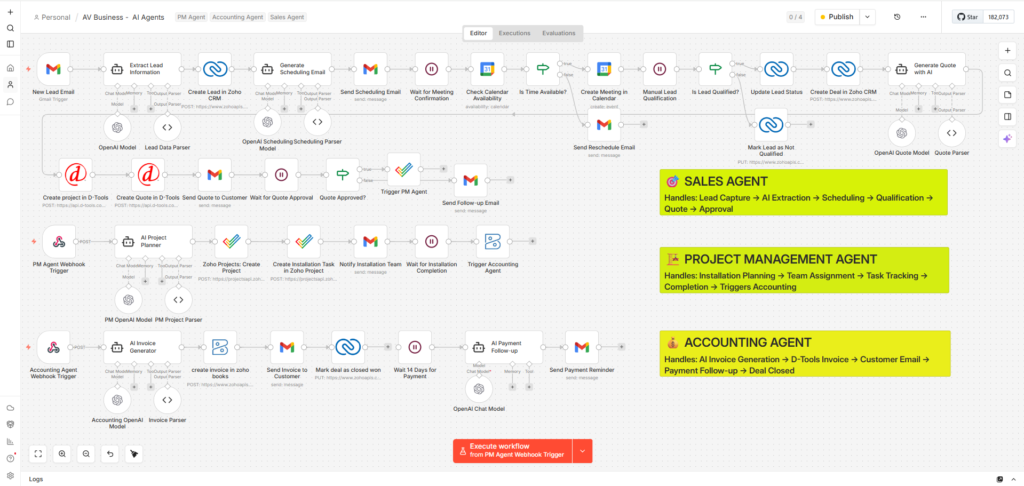
The workflow illustrates how specialized Sales, Project Management, and Accounting Agents can operate as connected workflows.
A Sales Agent can handle lead capture, qualification, quoting, and approvals, while Project Management and Accounting Agents support installation, tasks, invoicing, follow-ups, and deal closure.
n8n orchestrates AI models, APIs, applications, triggers, and workflows—AI provides intelligence while connected systems execute the actions.
Where Zia Agent Fits Into an AV AI Strategy
Not every AI workflow requires a complex multi-system architecture.
Some use cases can be handled within the applications where employees already work. This is where Zia Agent can fit into an AV company’s AI strategy.
Zia Agent can support workflows built around the Zoho ecosystem, including CRM, business information, customer workflows, reporting, and operational assistance.
A simplified architecture could look like:
User → Zia Agent → Zoho CRM / Zoho Projects / Zoho Books / Zoho Inventory
However, AV businesses often operate beyond one software ecosystem.
When Zoho needs to exchange information with D-Tools, proposal platforms, inventory systems, project management tools, or other applications, APIs, n8n, MCP, and integration middleware can extend the workflow.
This creates two complementary approaches:
Application-level AI: Zia Agent operates within connected Zoho applications.
Connected AI: AI interacts with Zoho and external business systems through APIs, n8n, MCP, or custom middleware.
The appropriate architecture depends on where the required data exists, what actions AI needs to perform, and whether the workflow involves one application or multiple systems.
D-Tools Agentic AI: A Practical Example for AV Integrators
D-Tools provides a practical example of how agentic AI can be applied to an AV-specific business environment.
A traditional AI assistant might explain how to use D-Tools. An agentic AI workflow can go further by connecting an LLM to D-Tools through APIs and an MCP-based architecture, exposing defined tools that allow the AI to retrieve information or perform authorized actions.
Depending on the implementation, an AI agent can work with activities such as:
- Retrieving project information
- Creating or updating project records
- Accessing client information
- Searching product catalogs
- Retrieving product or inventory information
- Summarizing project data
The architecture is:
LLM → MCP Server → D-Tools API
It can then expand into:
LLM → MCP/Integration Layer → D-Tools + CRM + ERP + Inventory + Project Management
Connecting AI to one tool creates a focused agentic workflow. Connecting AI to multiple tools creates the foundation for multi-system agentic AI for AV business operations.
The underlying systems continue performing their existing roles while the AI agent provides a natural way to retrieve information, coordinate tasks, and execute defined actions.
If you’d like to see how this approach works in practice, OfficeHub Tech offers a D-Tools Agentic AI solution that demonstrates how AI can interact with D-Tools through an agentic workflow.
You can try it for free and explore its capabilities firsthand.
Click the button below to download D-Tools Agentic AI and get started:
AI Governance, Security & Human Oversight
Connecting AI to business systems requires clear controls over data access and actions. AI agents may interact with customer, project, pricing, inventory, financial, and technical information, making proper governance essential.
Key safeguards include:
- Role-based access and permissions
- Limited access to required data
- Approval checkpoints for high-impact actions
- Audit logs and workflow monitoring
- Human review for financial, contractual, and technical decisions
- Escalation when AI is uncertain
For example, AI can prepare a purchase recommendation while an authorized employee gives final approval, or suggest a technical alternative for an engineer to validate.
This human-in-the-loop approach allows AI to handle repetitive analysis while people retain control over critical decisions. Governance should be built into AI workflows from the beginning.
Measuring the ROI of AI in AV Operations
AI projects should be measured through business outcomes—not simply by whether an AI model works.
Useful KPIs include:
- Hours of manual work eliminated
- Proposal turnaround time
- RFQ processing time
- Reduction in duplicate data entry
- Project delays identified or avoided
- Service ticket resolution time
- Invoice processing time
- Procurement cycle time
- Inventory shortages
- Employee adoption rate
For example, if an RFQ workflow previously required two hours of manual extraction and AI reduces that to 20 minutes with appropriate human review, the time saving becomes measurable.
Similarly, if AI-powered project monitoring identifies procurement delays earlier, the business can measure whether that translates into fewer schedule disruptions.
A useful framework is:
Baseline → Automate → Measure → Optimize → Expand
The objective is not to maximize the number of AI workflows. It is to identify workflows where AI produces measurable improvements in speed, cost, accuracy, visibility, productivity, or customer experience.
Common Challenges When Implementing AI
AI implementation can fail when businesses focus on technology before understanding the underlying workflow.
Poor Data Quality
AI cannot reliably produce useful results when customer, product, project, or inventory information is incomplete or inconsistent.
Fragmented Systems
AI may require APIs, middleware, n8n, MCP, or custom integrations to access information across disconnected platforms.
Unclear Use Cases
Not every repetitive process needs AI. Some can be addressed more easily through traditional automation.
Employee Adoption
Teams need to understand how AI changes their workflow and where human review remains necessary.
Over-Automation
Giving AI too much autonomy too quickly can introduce operational risk. Permissions and approval checkpoints should match the impact of the action.
A practical implementation therefore starts with a specific business problem, evaluates the available data and systems, selects the appropriate architecture, and establishes measurable outcomes before scaling.
n8n, AI Agents, MCP or Custom AI: Which Approach Makes Sense?
There is no single technology for every AI project.
Use n8n when:
The workflow follows predictable triggers, conditions, and actions.
New Proposal → Update CRM → Create Project → Notify Team
AI can be introduced into individual steps where interpretation is required.
Use AI Agents when:
The process requires interpretation, reasoning, recommendations, or natural-language interaction.
Use MCP when:
An AI agent needs structured access to external tools, APIs, or business capabilities.
AI Agent → MCP → D-Tools
or:
AI Agent → MCP → CRM + D-Tools + ERP
Use Custom AI Solutions when:
The business has specialized workflows, unique business rules, custom interfaces, or requirements that standard platforms cannot address effectively.
These technologies can also work together.
The right question is not:
“Which AI technology should we use?”
It is:
“What business process are we looking to optimize, and what is the simplest architecture that can reliably enhance it?”
How to Start Implementing AI in an AV or Low Voltage Business
AI implementation should begin with the workflow—not the technology.
Start by identifying repetitive processes where employees spend substantial time collecting information, entering data, searching documents, preparing reports, or moving information between systems.
Then evaluate each workflow based on:
- Frequency
- Manual effort
- Business impact
- Data availability
- Integration complexity
- Risk of errors
- Potential ROI
A good first use case could be meeting-to-CRM automation, email-to-ticket creation, invoice data extraction, proposal information processing, or project-status reporting.
Once one workflow is working reliably, the business can connect additional systems.
A practical roadmap is:
Identify → Prioritize → Integrate → Automate → Add AI → Measure → Expand
This approach also helps avoid a common mistake: deploying an AI tool without changing the underlying process.
For AV integrators, the long-term opportunity is to build an AI-enabled operating environment in which existing CRM, ERP, PSA, proposal, inventory, finance, and service systems remain in place while AI provides a smarter way to access and coordinate them.
Conclusion: The Future of AI in AV Is Connected, Not Isolated
The most valuable AI opportunities for AV and low voltage businesses are not necessarily the most futuristic ones.
They are the processes employees already perform every day:
Lead research → Proposal preparation → Engineering → Project delivery → Service → Finance → Procurement → Inventory
Each contains repetitive activities that AI can assist with or automate.
The next opportunity is connecting AI to the systems that contain the company’s operational data.
An AI agent connected to one application can solve a focused problem. An AI agent connected through APIs, n8n, MCP, or custom middleware to multiple applications can coordinate information and actions across the business.
This creates a progression:
Automation → AI Assistance → AI Agents → Connected Agentic Workflows
For AV and low voltage companies, AI adoption should therefore not be about adding AI simply because it is available.
It should be about identifying where intelligence, automation, and system connectivity can produce measurable improvements in how the business operates.
The companies that approach AI this way can continue using the CRM, ERP, PSA, proposal, inventory, finance, and service systems they already depend on—while gradually creating a more connected, responsive, and intelligent operating environment.
Why Choose OfficeHub Tech for AI Implementation?
Choosing the right AI technology is only one part of building a successful AI strategy. The real value comes from understanding where AI can improve existing business processes, how it should interact with business systems, and which workflows should be automated first.
As a Top Zoho AI Integration and Implementation Partner for AV and Low Voltage Businesses, OfficeHub Tech takes a business-first approach to AI implementation. Rather than introducing AI as a standalone tool, we look at how your CRM, ERP, PSA, proposal, inventory, accounting, and service systems work together—and where AI can make those workflows more intelligent and efficient.
The source document positions OfficeHub Tech around intelligent workflows, AI agents, business process automation, AI opportunity assessment, agentic AI platforms, custom AI workflow design, AI knowledge agents, business intelligence, and AI integration with CRM, ERP, PSA, and business systems.
Our expertise includes:
- AI opportunity assessment and implementation roadmaps
- AI agent and agentic AI implementation
- AI integration with business applications and workflows
- Third-party software integrations for connected AV business systems
- n8n workflow automation and pre-built automation templates
- MCP-based AI and business-tool connectivity
- Zia Agent and Zoho implementation
- D-Tools and Zoho integration
- Custom AI-powered application development
- Multi-software integration and workflow orchestration
- Ongoing optimization and AI workflow enhancement
Whether you need to automate a single workflow, connect AI with D-Tools, build an AI-powered service workflow, or create a multi-system agentic AI architecture, the implementation approach should match your business processes, existing technology, and operational goals.
Looking for a Practical AI Implementation Strategy?
If you’re exploring AI for AV integrators or low voltage businesses, OfficeHub Tech can help identify high-value use cases, evaluate your existing software environment, and design an AI and automation roadmap around your actual workflows.
The goal isn’t to add AI everywhere. It’s to identify where AI can create measurable business value, connect it to the right systems, and build an architecture that can scale as your needs evolve.
Explore OfficeHub Tech’s AI Integration Services to discuss how AI agents, n8n, MCP, Zoho, D-Tools, and multi-software integration can fit into your business workflow.