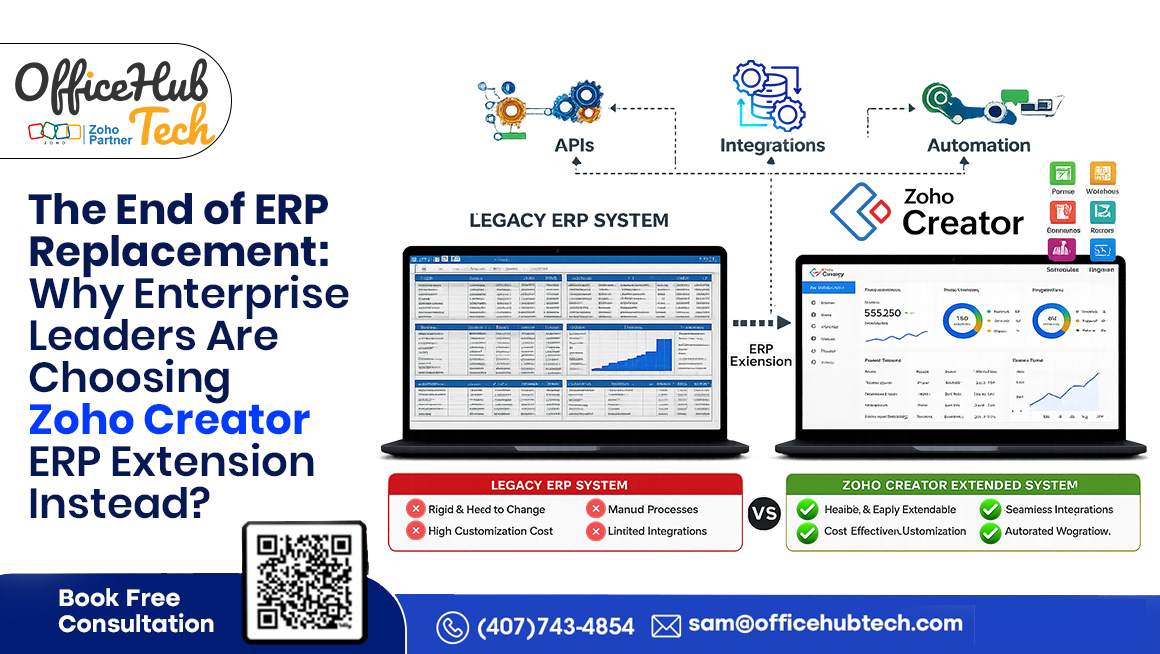
Modernizing Enterprise ERP No Longer Requires a Complete Replacement
For decades, replacing an Enterprise Resource Planning (ERP) system was considered the go-to solution for businesses struggling with outdated technology. While a new ERP promised modernization, it often came with high costs, lengthy implementation timelines, and operational risks.
Today, that mindset is changing. Many legacy ERP systems still manage core business functions such as finance, inventory, procurement, and manufacturing effectively. The real challenge is not the ERP itself, but its limited ability to support evolving business processes, cloud applications, modern integrations, and digital workflows.
As organizations accelerate digital transformation, they are looking for ways to innovate without disrupting daily operations. Instead of investing in costly ERP replacement projects, many enterprises are adopting an ERP extension strategy—adding modern capabilities while preserving their existing ERP investment.
This is where a powerful low-code platform Zoho Creator, plays a key role. It enables businesses to build custom applications, automate workflows, integrate third-party systems, and enhance user experiences without replacing the underlying ERP.
In this article, we’ll explore why businesses are shifting from ERP replacement to ERP extension and how Zoho Creator is helping modernize legacy ERP systems efficiently.
The ERP Replacement Era Is Slowly Coming to an End
For years, ERP modernization followed a familiar path: as systems aged and business needs changed, organizations often believed a complete ERP replacement was the only way forward. New ERP platforms promised better functionality, modern interfaces, and improved efficiency, making replacement seem like the natural choice.
However, today’s business environment has challenged this assumption. Enterprise leaders now recognize that replacing an ERP does not always mean modernization. In many cases, it adds unnecessary cost, complexity, and disruption while delivering benefits that can be achieved through a more targeted approach.
Why ERP Replacement Became the Traditional Approach
Legacy ERP systems were built to standardize core operations, but evolving business demands exposed several limitations, including:
- Limited flexibility for changing processes
- Outdated user interfaces
- Difficult integration with modern cloud applications
- Manual workflows and approvals
- Limited mobile accessibility
- Slow, complex customization
These challenges led many organizations to view ERP replacement as the only solution.
Why This Approach No Longer Fits Today’s Business Environment
Business innovation now moves much faster than traditional ERP implementation timelines. Full ERP replacements often take months or years, during which priorities, regulations, and technologies continue to evolve.
Meanwhile, many legacy ERP systems still reliably manage finance, inventory, manufacturing, and other core operations. Replacing these stable systems simply to gain modern capabilities often delivers limited business value.
Instead, organizations are extending existing ERPs with modern applications, integrations, automation, and analytics that evolve independently. Advances in cloud computing, API-first architecture, and low-code platforms have made this strategy practical and scalable.
ERP modernization is no longer about replacing everything—it’s about continuously improving existing systems while preserving the stability of proven ERP investments.
Why Enterprise ERP Replacement Projects Frequently Fail
Replacing an ERP system is one of the most complex IT initiatives, often requiring major process changes while maintaining daily operations. For many businesses, ERP extension offers a lower-risk path to modernization.
- High Costs: ERP replacement involves software, infrastructure, consulting, migration, training, testing, and support, often exceeding budgets. ERP extension enables phased modernization with lower investment.
- Long Timelines: Implementations can take months or years, delaying business value and reducing agility as requirements evolve.
- Business Disruption: Replacing ERP affects finance, procurement, inventory, manufacturing, sales, and customer service, often impacting productivity during transition.
- Data Migration Risks: Migrating years of business data can introduce errors, compliance issues, duplicate records, and reporting inaccuracies if not managed carefully.
- Loss of Customizations: Existing workflows, reports, approvals, and integrations may require costly redevelopment in the new ERP.
- User Adoption Challenges: New interfaces and processes require training and change management, slowing adoption and productivity.
- Integration Complexity: ERP replacement often means rebuilding integrations with CRM, HR, analytics, and third-party applications. ERP extension preserves existing integrations while adding new capabilities.
- Delayed ROI: Replacement projects typically deliver value only after completion, whereas ERP extension provides faster ROI through workflow automation, dashboards, mobile apps, and customer portals.
A Smarter Modernization Strategy
If your ERP still supports core operations, extending it is often more practical than replacing it. ERP extension reduces risk, protects existing investments, and enables continuous innovation without disrupting business operations.
Why Enterprise Leaders Are Rethinking ERP Strategy
ERP modernization is no longer just an IT decision. Today, CIOs, CFOs, COOs, and business leaders evaluate ERP strategy from different perspectives but share one goal: modernize the business without disrupting what already works.
Instead of asking, “Which ERP should we replace?” organizations are asking, “How can we modernize while keeping our existing ERP?” This shift is driving the adoption of ERP extension over full replacement.
The CIO Perspective: Balancing Innovation with Stability
CIOs must modernize technology while maintaining business continuity. Rather than replacing stable ERP systems, they focus on strategies that help them:
- Deliver new applications faster
- Integrate cloud and on-premise systems
- Reduce technical debt with API-first architecture
- Improve user experience without changing the core ERP
- Support continuous innovation
ERP extension enables new capabilities alongside existing ERP systems with minimal risk.
The CFO Perspective: Maximizing Existing Investments
ERP systems represent significant long-term investments. Replacing them often means high costs and delayed returns. CFOs increasingly prioritize approaches that:
- Protect existing ERP investments
- Lower modernization costs
- Deliver faster ROI
- Minimize downtime
- Avoid unnecessary licensing and implementation expenses
ERP extension allows organizations to invest only in capabilities that create immediate business value.
The COO Perspective: Ensuring Operational Continuity
COOs prioritize uninterrupted operations. ERP replacement can disrupt manufacturing, procurement, inventory, and customer service. ERP extension supports gradual modernization by enabling businesses to:
- Digitize approvals
- Improve process visibility
- Introduce mobile apps
- Automate repetitive tasks
- Enhance reporting and analytics
These improvements can be delivered without interrupting daily operations.
The IT Team Perspective: Building a Flexible Ecosystem
Modern IT teams manage multiple business applications beyond ERP. This often leads to:
- Data silos
- Duplicate data entry
- Complex integrations
- Manual reconciliation
- Inconsistent reporting
Low-code platforms like Zoho Creator help extend ERP by connecting systems, automating workflows, and accelerating custom application development without modifying the core ERP.
Business Agility Is the New Advantage
Markets evolve quickly, making agility essential. Instead of large, disruptive ERP replacement projects, organizations are adopting continuous modernization—improving one business capability at a time.
Today, ERP is increasingly viewed as the system of record, while modern applications, automation, analytics, and integrations evolve around it. This approach enables faster innovation, greater operational efficiency, and long-term value without replacing the core ERP.
What Is ERP Extension?
ERP extension enables businesses to modernize without replacing their existing ERP. Instead of changing the core system, organizations add modern applications, workflows, integrations, and digital experiences while keeping the ERP as the central system of record.
Understanding ERP Extension
Your ERP continues managing finance, procurement, inventory, manufacturing, HR, and supply chain, while new capabilities are added, such as:
- Mobile apps for field teams
- Customer and vendor portals
- Automated approval workflows
- Real-time dashboards and analytics
- AI-powered processes
- Cloud integrations
- Department-specific applications
Platforms like Zoho Creator make it easy to build these extensions.
ERP Remains the System of Record
The ERP continues handling business data, transactions, and core operations, while extension applications connect securely through APIs. Customer orders, inventory, finance, and procurement remain within the ERP, while users benefit from modern interfaces, automated workflows, and real-time reporting without disrupting the existing system.
How ERP Extension Works:
The legacy ERP remains the core transactional system while APIs or database connectors securely synchronize data with Zoho Creator. Acting as an extension layer, Zoho Creator adds modern capabilities such as custom applications, workflow automation, business intelligence dashboards, mobile experiences, and self-service portals. This approach modernizes business operations without disrupting existing ERP processes or requiring a costly migration.
Why ERP Extension Is Better Than Customization
Unlike traditional ERP customization, which alters the ERP’s core code and complicates upgrades, ERP extension builds independent applications connected through APIs. This simplifies maintenance, speeds innovation, and reduces upgrade risks.
A Phased Modernization Approach
Organizations can modernize gradually by prioritizing high-impact initiatives such as workflow automation, mobile apps, dashboards, and customer portals. This step-by-step approach helps lower implementation risks while delivering clear and measurable value to the business.
Why Businesses Prefer ERP Extension
ERP extension enables continuous innovation without replacing a reliable ERP. By combining the stability of existing systems with the agility of low-code platforms like Zoho Creator, organizations can modernize faster, reduce costs and risk, and maximize the value of their ERP investment.
This shift from “replace everything” to “extend intelligently” is why ERP extension has become a key strategy for enterprise modernization in 2026 and beyond.
Why Zoho Creator Has Become a Preferred ERP Extension Platform
Choosing the right platform is crucial for ERP extension. It should integrate with existing ERP systems, automate workflows, ensure enterprise security, and scale with business growth.
Zoho Creator is a low-code application development platform that extends existing ERP systems rather than replacing them. It helps organizations build modern business applications while keeping the ERP as the central system for core operations.
Accelerated Low-Code Application Development
Traditional application development takes months. Zoho Creator’s low-code platform enables businesses to develop applications much faster, including:
- Department-specific applications
- Internal workflow solutions
- Customer and vendor portals
- Mobile applications
- Approval systems
- Executive dashboards
This allows organizations to create solutions tailored to their business processes without waiting for ERP vendor updates.
Seamless Integration with Existing ERP Systems
Businesses use multiple software platforms beyond ERP. Zoho Creator connects them through:
- REST APIs
- Webhooks
- Custom API connectors
- Database connectivity
- Third-party integrations
This creates a connected ecosystem where data flows automatically, reducing manual work and improving accuracy.
Workflow Automation Across Departments
Zoho Creator automates processes such as:
- Purchase approvals
- Leave requests
- Vendor onboarding
- Asset allocation
- Service requests
- Inventory notifications
- Document approvals
- Customer support workflows
Automation improves efficiency, consistency, and visibility across teams.
Enterprise-Grade Security and Governance
Zoho Creator offers enterprise-level security, including:
- Role-based access control
- User authentication
- Audit trails
- Data encryption
- Secure API communication
- Permission-based access
These features help organizations extend ERP capabilities while maintaining governance.
Mobile-First Business Operations
Organizations can build mobile apps that allow users to:
- Access ERP data securely
- Submit approvals
- Update field information
- Capture images and signatures
- Monitor workflows
- Receive real-time notifications
This supports remote and field teams with secure access to business processes.
Built for Continuous Business Innovation
Perhaps the biggest advantage of Zoho Creator is its flexibility.
Instead of treating modernization as a one-time project, businesses can continuously introduce new applications, workflows, dashboards, and integrations as requirements evolve.
This supports a long-term modernization strategy where innovation becomes an ongoing process rather than a major ERP replacement initiative every decade. For organizations seeking to balance stability with agility, this ability to innovate continuously has made Zoho Creator one of the preferred platforms for ERP extension.
How Zoho Creator Extends Enterprise ERP Without Replacing It
A common misconception about ERP modernization is that every new business requirement must be built into the ERP. Modern enterprise architecture follows a smarter approach by adding an extension layer for custom applications, automation, integrations, and better user experiences, while the ERP continues managing core business operations.
Zoho Creator acts as this extension layer. It works alongside the ERP—not as a replacement—using APIs and integration services to add new capabilities without modifying the ERP’s core system.
A Modern ERP Extension Architecture
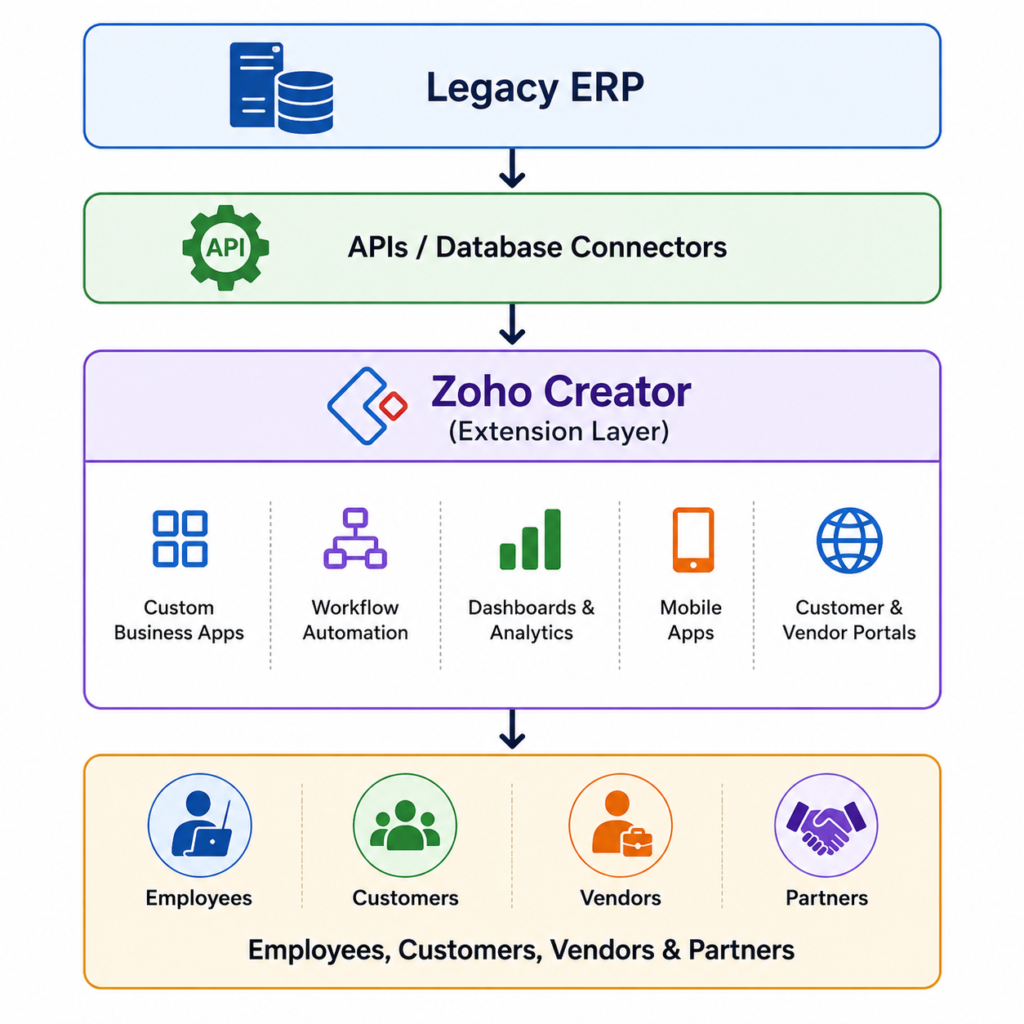
The ERP remains the system of record, while Zoho Creator manages flexible business processes and rapid innovation.
Connecting Through APIs Instead of ERP Customization
Rather than customizing the ERP for every new requirement, businesses build independent applications that connect through secure APIs. This allows them to:
- Retrieve and update ERP data in real time
- Trigger automated workflows
- Integrate third-party applications
- Synchronize data across systems
Keeping the ERP unchanged makes maintenance and upgrades much easier.
Acting as a Middleware Layer
Zoho Creator centralizes integrations between enterprise systems, reducing complexity. For example:
- ERP shares inventory with CRM
- CRM updates customer portals
- Purchase requests trigger approvals
- Approved transactions update ERP
- Executives access real-time dashboards
Enabling Workflow Automation
Zoho Creator automates processes beyond ERP boundaries, including:
- Vendor registration
- Customer onboarding
- Employee requests
- Field inspections
- Equipment maintenance
- Compliance documentation
Relevant data syncs back to the ERP automatically.
Delivering Better User Experiences
Organizations can create role-based applications for warehouse staff, managers, customers, vendors, and executives, providing modern, user-friendly interfaces while the ERP continues managing core business data.
Supporting Continuous Modernization
ERP extension enables continuous innovation. Businesses can introduce new applications as needs evolve without replacing the ERP, preserving existing investments while remaining agile.
Business Capabilities Enterprises Can Add Without ERP Replacement
Replacing an ERP isn’t the only way to gain modern capabilities. Businesses can extend existing ERP systems with targeted applications that improve productivity, collaboration, and customer experience while preserving core operations.
Key capabilities include:
- Workflow Automation: Automate purchase approvals, expense claims, leave requests, vendor onboarding, contracts, and compliance to reduce delays and improve visibility.
- Customer & Vendor Portals: Enable users to submit requests, track orders, view invoices, upload documents, monitor approvals, and access support through secure self-service portals.
- Mobile Business Apps: Support field inspections, maintenance reporting, delivery confirmation, inventory updates, sales visits, and service requests with real-time mobile access.
- Executive Dashboards & Analytics: Combine ERP and external data to monitor sales, financial KPIs, inventory, operations, production, and customer service for faster decisions.
- Department-Specific Applications: Build solutions for HR, procurement, quality, asset tracking, projects, compliance, and facilities while staying connected to the ERP.
- Enterprise Integrations & AI: Connect CRM, HR, accounting, eCommerce, BI, and logistics platforms while adding AI features like document processing, predictive alerts, AI-assisted approvals, and smart workflows.
This modular approach keeps the ERP as the operational backbone while enabling continuous innovation without the cost or disruption of full replacement.
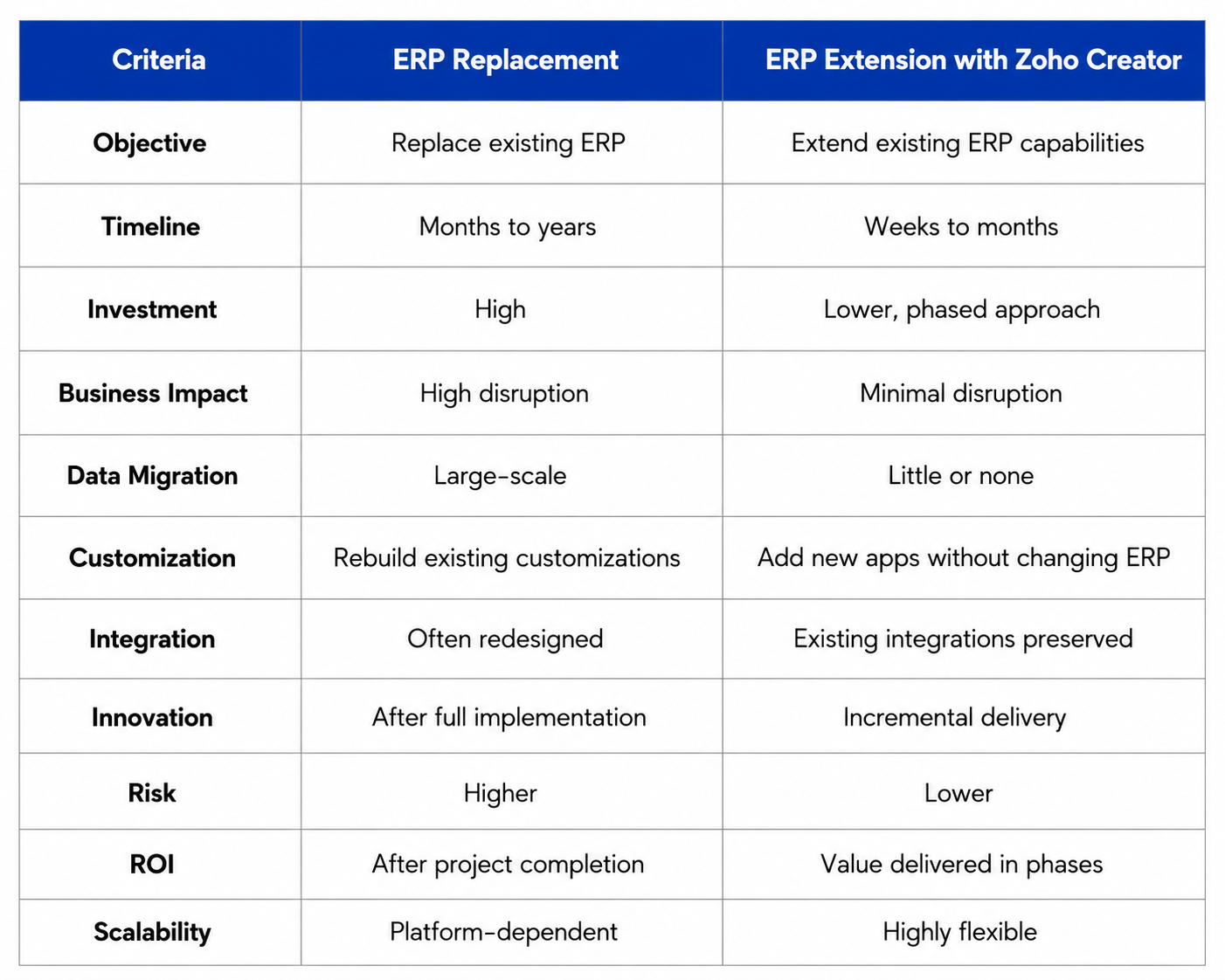
ERP Replacement vs ERP Extension: A Strategic Comparison
ERP modernization doesn’t always require replacing your existing system. Organizations can either replace their ERP or extend it using low-code platforms like Zoho Creator. The right approach depends on your ERP’s current state, business objectives, available budget, and future innovation requirements. If your ERP still handles core operations effectively, extending it is often the smarter, lower-risk option.
When to Replace Your ERP
Replace your ERP if it is unsupported, obsolete, unable to meet business or compliance requirements, difficult to integrate, or more expensive to maintain than replace.
When ERP Extension Is Better
Choose extension when your ERP remains reliable but you need custom apps, workflow automation, mobile access, SaaS integrations, dashboards, or phased modernization with minimal risk.
The Composable Enterprise Approach
Modern businesses increasingly keep the ERP as the system of record while using Zoho Creator to add new applications, automate workflows, integrate cloud systems, and innovate without disrupting core operations. This strategy helps organizations preserve their existing ERP investment while supporting ongoing modernization and innovation.
Signs Your Business Should Extend Rather Than Replace Its ERP
Not every legacy ERP needs to be replaced. In many cases, the ERP continues to perform its primary responsibilities effectively, while business challenges arise from disconnected workflows, limited integrations, or outdated user experiences. Recognizing these indicators can help organizations choose a more practical modernization strategy.
Your business should consider ERP extension if:
- Your ERP reliably manages core operations such as finance, procurement, inventory, or manufacturing.
- Employees frequently rely on spreadsheets, emails, or manual processes to complete business tasks.
- Different departments require specialized applications that the ERP cannot easily support.
- Your organization uses multiple software platforms that need seamless integration.
- Mobile access, workflow automation, or real-time dashboards have become business priorities.
- Reporting requires manual consolidation across multiple systems.
- You want to modernize gradually without disrupting day-to-day operations.
If these situations sound familiar, the ERP itself may not be the problem. Instead, the organization likely needs an extension layer that adds flexibility while preserving the stability of the existing system.
By extending rather than replacing the ERP, businesses can address operational gaps, improve employee productivity, and introduce modern digital capabilities without exposing the organization to the cost and risk of a complete ERP migration.
A Practical Enterprise Roadmap for ERP Extension
Successful ERP modernization is most effective when approached in phases rather than through a single large-scale implementation. A structured roadmap helps organizations reduce risk, deliver measurable value faster, and continuously improve business operations.
Phase 1: Assess the Existing ERP Environment
Begin by evaluating the current ERP landscape to identify operational bottlenecks, manual processes, reporting limitations, and integration gaps. This assessment helps prioritize areas that will benefit most from modernization.
Phase 2: Connect the ERP
Integrate the ERP with other enterprise applications using APIs and integration services. Establishing seamless data flow creates a strong foundation for future digital initiatives.
Phase 3: Extend Business Processes
Develop custom applications, employee portals, customer portals, and mobile solutions that address specific business needs while keeping the ERP as the system of record.
Phase 4: Automate Workflows
Digitize repetitive tasks, approvals, notifications, and cross-functional processes to improve productivity, reduce manual effort, and increase operational efficiency.
Phase 5: Expand the Digital Ecosystem
Integrate CRM, HR, finance, analytics, and other SaaS applications while introducing AI-assisted workflows, predictive reporting, and intelligent business insights.
Phase 6: Continuously Optimize and Scale
ERP modernization is an ongoing journey. Continuously refine workflows, deploy new applications, and adopt emerging technologies to support changing business needs without replacing the core ERP system. This phased approach enables sustainable growth while maximizing existing ERP investments.
Why Businesses Partner with OfficeHub Tech for ERP Extension
Extending an ERP requires more than a low-code platform—it demands expertise in legacy systems, integrations, and business processes. As a Legacy ERP extension Provider and Top Zoho Creator Developer and Implementation Partner In USA, India, KSA and UAE, OfficeHub Tech helps businesses modernize existing ERP systems without costly replacements.
Every project begins with assessing current ERP capabilities, operational bottlenecks, integration opportunities, and future business goals to maximize existing ERP investments. Using Zoho Creator, OfficeHub Tech develops custom applications such as approval systems, customer portals, inventory extensions, dashboards, and mobile apps tailored to existing workflows.
Enterprise integrations connect ERP with CRM, HR, accounting, document management, and BI platforms, enabling secure data flow and reducing manual effort. Workflow automation digitizes approvals, notifications, task assignments, and document routing to improve productivity without modifying the core ERP.
An API-first approach ensures secure real-time integrations between cloud and on-premise systems while supporting future scalability. Instead of replacing legacy ERP systems managing finance, procurement, manufacturing, and inventory, OfficeHub Tech enhances them with modern capabilities.
Through business process discovery, solution design, development, testing, deployment, training, and ongoing optimization, organizations achieve phased ERP modernization, improved operational efficiency, and long-term business agility while preserving existing ERP stability.
Best Practices for a Successful ERP Extension Strategy
A successful ERP extension strategy is built on more than technology—it requires a strong foundation of governance, scalability, and business alignment. Following a few core principles can help organizations maximize the value of their modernization initiatives.
First, keep the ERP as the system of record. Core business data should remain centralized within the ERP, while extension applications access and update information through secure integrations to maintain data consistency.
Second, adopt an API-first architecture. Standardized APIs simplify integrations with enterprise applications, improve scalability, and make it easier to incorporate future technologies without disrupting existing operations.
User adoption is equally important. Design role-based, intuitive, and mobile-friendly applications that align with employees’ daily workflows to encourage faster adoption and higher productivity.
Organizations should also establish strong governance and security through role-based access controls, audit trails, API authentication, and compliance policies to protect critical business information.
Finally, treat ERP extension as a continuous improvement initiative. Regularly measure key performance indicators such as workflow efficiency, user adoption, and operational ROI to identify new opportunities for optimization. This ensures the ERP ecosystem continues to evolve alongside changing business needs while delivering long-term value.
The Future of Enterprise ERP Is Extension, Not Replacement
The future of ERP lies in extension, not replacement. Modern businesses are adopting composable ERP by integrating low-code platforms, AI, CRM, BI tools, and industry-specific applications through APIs. Instead of costly ERP replacements or periodic upgrades, organizations are embracing continuous innovation with workflow automation, mobile apps, analytics, and AI-powered capabilities. Integration-first architectures enable real-time data flow and connected business processes while existing ERP systems continue managing finance, procurement, inventory, manufacturing, and compliance. By extending rather than replacing ERP, businesses gain greater agility, scalability, and operational efficiency while preserving the stability and value of their core enterprise systems.
Conclusion
ERP modernization no longer means replacing existing systems. If your ERP effectively manages core operations, extending it with modern applications, workflow automation, integrations, analytics, and mobile capabilities is often a smarter, lower-risk approach.
By using low code Zoho Creator for Legacy ERP modernization, businesses can preserve their existing ERP investment while accelerating digital transformation through phased, cost-effective modernization.
As enterprise technology evolves toward API-driven, composable, and AI-enabled ecosystems, ERP extension is becoming the preferred strategy for improving agility, operational efficiency, and scalability. The future of ERP is not replacement—it is building connected, flexible business environments that maximize existing investments while enabling continuous innovation.
Ready to Extend Your ERP with Zoho Creator?
Modernize your existing ERP without the cost and disruption of a full replacement. With Zoho Creator, you can build custom applications, automate workflows, integrate business systems, and add new capabilities while keeping your ERP at the core of your operations.
Create your Zoho Creator account using the link below and start building ERP extensions tailored to your business. If you need help with implementation, integrations, or custom ERP extensions, OfficeHub Tech’s Zoho Creator experts are here to help: