The Smarter Approach to Legacy ERP Modernization
Legacy ERP systems continue to support critical business functions, but many struggle to meet today’s demands for workflow automation, real-time visibility, mobile access, and seamless software integrations. Although replacing an existing ERP may seem like the best option, it often involves high costs, lengthy implementation cycles, operational disruption, and significant business risk.
A smarter approach is to Extend Legacy ERP Systems with Zoho Creator rather than replacing them. As a powerful low-code platform, Zoho Creator enables businesses to build custom applications, automate workflows, create real-time dashboards, and integrate third-party systems without modifying the ERP’s core architecture. This extension-first strategy helps organizations modernize while preserving their existing ERP investment.
This guide outlines a practical roadmap for extending a legacy ERP system using Zoho Creator. It covers assessing your ERP environment, identifying modernization opportunities, designing a scalable extension architecture, implementing secure integrations, and deploying new capabilities in phases—allowing businesses to innovate without disrupting daily operations or replacing their core ERP system.
Why Traditional ERP Replacement Creates Business Disruption
Replacing a legacy ERP may seem like the fastest way to modernize, but it often introduces significant operational and financial challenges. Instead of delivering immediate improvements, large-scale ERP replacement projects can disrupt daily business operations and delay expected outcomes.
Lengthy Implementation Timelines
ERP replacement projects often take months or even years to complete. During this period, businesses must redesign processes, configure the new system, conduct extensive testing, and train employees, which can temporarily reduce productivity.
Complex Data Migration
Migrating customer records, financial data, inventory details, and historical transactions to a new ERP requires careful planning. Inaccurate migration can lead to reporting errors, operational disruptions, and compliance risks.
Integration Challenges
Most ERP systems are connected to CRM platforms, HR software, warehouse management systems, accounting tools, and other business applications. Rebuilding these integrations in a new environment can be technically complex, time-consuming, and expensive.
Higher Costs and Business Risks
Unexpected implementation costs, project scope changes, employee resistance, and temporary interruptions to business operations are common during ERP replacement projects.
A More Practical Alternative
Instead of replacing the entire ERP, businesses can extend its capabilities using modern low-code platforms. This approach allows organizations to introduce automation, integrations, and new applications while maintaining operational continuity, reducing implementation risks, and protecting their existing ERP investment.
What Does “Legacy ERP Extension” Actually Mean?
Legacy ERP extension is a modernization approach that enhances an existing ERP system without replacing its core functionality. Instead of investing in a complete ERP replacement, businesses retain their ERP as the primary system of record while extending its capabilities with Zoho Creator. Acting as a low-code application layer, Zoho Creator connects to the ERP through APIs, middleware, or database connectors to build modern business applications without modifying the ERP itself.
This approach enables organizations to add features such as workflow automation, mobile applications, customer and vendor portals, AI-powered processes, real-time dashboards, and third-party integrations while preserving existing business operations. Because new functionality is developed outside the ERP, future upgrades become easier and require fewer customizations. Businesses can modernize one process at a time, reducing implementation risks and avoiding operational disruption. By adopting a phased extension strategy, organizations create a scalable, future-ready ERP ecosystem that supports continuous innovation while maximizing the value of their existing ERP investment.
Why Zoho Creator Is Ideal for Legacy ERP Extension
Choosing the right platform is essential for successfully extending a legacy ERP system. Zoho Creator provides a low-code environment that helps businesses modernize faster without replacing their existing ERP.
- Low-Code Development: Build enterprise applications quickly using drag-and-drop tools, visual workflows, and reusable components.
- Seamless Integrations: Connect with legacy ERP systems through REST APIs, webhooks, database connectors, custom functions, and third-party applications.
- Workflow Automation: Automate approvals, notifications, task assignments, document generation, and routine business processes without modifying ERP code.
- Enterprise Security: Ensure secure access with role-based permissions, audit trails, and built-in governance features.
- Mobile & AI Ready: Develop mobile applications, AI-assisted workflows, and real-time dashboards to improve productivity and decision-making.
- Scalable Architecture: Add new applications and integrations as business needs evolve while keeping the ERP stable.
- Faster Digital Transformation: Reduce development time, lower implementation costs, and modernize operations with minimal business disruption.
By combining speed, flexibility, scalability, and secure integrations, Zoho Creator is an ideal low-code platform for extending legacy ERP systems while maximizing existing technology investments.
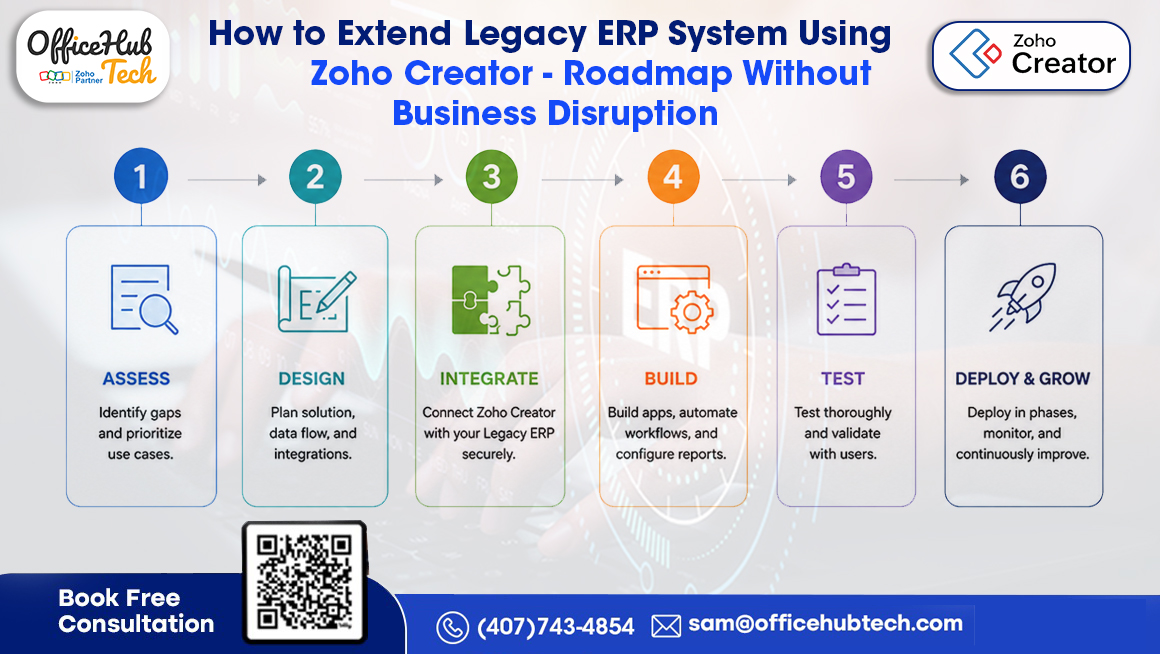
Step-by-Step Roadmap to Extend a Legacy ERP System Using Zoho Creator
Step 1 – Assess Your Existing ERP Environment
A successful ERP extension begins with a clear understanding of your existing system. Before introducing automation or custom applications, evaluate how your ERP supports current business operations and identify areas where modernization will deliver the greatest value.
Start by reviewing the ERP modules in use, such as finance, procurement, inventory, CRM, sales, manufacturing, and HR, to determine which processes should be prioritized. Next, assess the technical environment, including the ERP version, deployment model, APIs, database architecture, integration capabilities, authentication methods, and existing customizations. If APIs are limited, consider alternatives like middleware, database connectors, or secure file exchanges.
Beyond the technical assessment, identify operational bottlenecks such as manual approvals, spreadsheet-based reporting, disconnected systems, duplicate data entry, limited mobile access, and slow decision-making. Finally, define measurable business goals, including improved automation, faster process turnaround, enhanced reporting, better customer experience, or increased workforce productivity. A thorough assessment ensures your ERP extension strategy aligns with both business priorities and technical feasibility.
Step 2 – Identify Processes That Need Modernization
Modernizing a legacy ERP doesn’t mean redesigning every process at once. A smarter approach is to prioritize workflows that deliver the greatest business impact while requiring minimal changes to the ERP’s core system. Start by identifying manual, repetitive processes such as approvals, purchase requests, service management, inventory updates, maintenance tracking, expense approvals, and document management, as these are ideal candidates for extension using Zoho Creator.
It’s equally important to improve customer and employee experiences. Legacy ERP systems often lack modern self-service capabilities, making customer portals, vendor portals, employee applications, and mobile interfaces valuable opportunities for modernization. Organizations should also address limited operational visibility by replacing spreadsheet-based reporting with real-time dashboards and analytics.
When planning extensions, consider future business needs such as AI-powered automation, predictive analytics, IoT integration, digital forms, and cloud connectivity. By focusing on high-value processes first, businesses can achieve quick wins, demonstrate measurable ROI, and build a scalable modernization strategy without disrupting existing ERP operations.
Step 3 – Prioritize High-Impact Business Processes
After identifying modernization opportunities, the next step is prioritizing initiatives that deliver the greatest business value. A successful Legacy ERP Extension strategy focuses on high-impact processes rather than technical complexity. Evaluate each process based on its business impact and implementation effort. Prioritize workflows that improve productivity, customer experience, compliance, or operational visibility with minimal integration effort, such as approval workflows, employee self-service portals, inventory dashboards, service request management, and automated notifications.
It’s also important to consider project dependencies, as capabilities like executive dashboards or AI-powered analytics often rely on integrations implemented in earlier phases. Involving department heads, process owners, IT teams, and business leaders ensures priorities align with organizational goals and expected ROI. By implementing high-value initiatives first, businesses can achieve quick wins, encourage user adoption, reduce implementation risks, and establish a scalable roadmap for continuous ERP modernization and long-term digital transformation.
Step 4 – Design a Scalable ERP Extension Architecture
After identifying modernization priorities, the next step is to design an extension architecture that adds new capabilities without disrupting the stability of the existing ERP. The recommended approach is to keep the legacy ERP as the System of Record (SoR) for core functions like finance, inventory, procurement, and accounting, while using Zoho Creator as the application and workflow layer for custom apps, automation, dashboards, approvals, and integrations.
Instead of modifying the ERP’s core code, Zoho Creator communicates through secure APIs, middleware, web services, or database connectors. This loosely coupled architecture protects existing functionality, simplifies future ERP upgrades, and keeps business logic outside the ERP environment.
The architecture should also define how data flows between systems. Businesses need to determine which information syncs in real time, which updates periodically, and which workflows require event-driven automation. Maintaining clear data ownership ensures consistency across applications. Finally, a scalable design should support future expansion, allowing AI services, analytics platforms, and third-party applications to integrate easily without major architectural changes, enabling continuous innovation while protecting the ERP investment.
Step 5 – Build Independent Business Applications Around the ERP
One of the biggest advantages of Zoho Creator is its ability to build independent business applications that extend your legacy ERP without modifying its core functionality. Instead of recreating ERP modules, businesses can develop custom solutions for employee self-service, customer and vendor portals, field service management, maintenance requests, production tracking, quality inspections, approval workflows, and executive dashboards. Each application should address a specific business need while securely accessing only the required ERP data, reducing system complexity and improving performance.
These applications also provide a modern user experience through mobile-friendly interfaces, digital forms, automated notifications, customizable dashboards, barcode scanning, and offline access. Since they operate independently of the ERP, organizations can continuously enhance features, adapt workflows, and introduce new capabilities without affecting core ERP operations. This modular strategy provides enhanced flexibility, accelerates innovation, and helps organizations achieve maximum long-term value from their existing ERP investments.
Step 6 – Connect Your Legacy ERP Through Secure APIs and Integrations
A successful ERP extension depends on secure and reliable integration with the existing ERP system. Without seamless data exchange, even the most advanced applications cannot deliver their full value.
Most ERP modernization projects use REST APIs to enable secure communication between applications. If the legacy ERP supports REST or SOAP APIs, Zoho Creator can create, update, retrieve, and synchronize records without modifying the ERP’s core database. For systems without API support, businesses can use middleware, secure database connectors, scheduled synchronization, or file-based integrations.
Real-time integrations are ideal for customer records, inventory updates, order processing, approvals, and service requests, while less critical data can be synchronized on scheduled intervals to optimize performance.
Security is equally important. Authentication methods such as OAuth, API tokens, and encrypted credentials help protect data, while logging and monitoring simplify troubleshooting. Organizations need to integrate error-handling capabilities that monitor transaction failures, fix data synchronization conflicts, and automatically recover interrupted workflows.
A well-designed integration framework enables organizations to modernize confidently while preserving the stability and reliability of their existing ERP infrastructure.
Step 7 – Streamline business workflows while keeping your core ERP system Unchanged.
Many legacy ERP systems manage transactions effectively but lack modern workflow automation. With Zoho Creator, businesses can automate approvals, repetitive tasks, and business processes without modifying the ERP’s core logic. Using secure APIs, organizations can seamlessly connect Zoho Creator to their existing ERP while keeping the core system unchanged.
Common use cases include purchase and expense approvals, invoice validation, employee onboarding, maintenance requests, leave management, procurement, customer support, and document routing. Rule-based automation enables automatic task assignments, approval routing, escalations, and SLA management, while AI capabilities such as predictive recommendations and intelligent document processing further improve efficiency. This approach creates faster, more transparent, and highly efficient workflows, helping businesses modernize operations and improve productivity without disrupting their existing ERP system.
Step 8 – Test Every Extension Before Production Deployment
A successful ERP extension depends not only on development quality but also on thorough testing. Since ERP systems support mission-critical business operations, every integration, workflow, and custom application should be validated before deployment. Testing should begin in a dedicated development or sandbox environment that closely replicates the production ERP. Functional testing ensures applications meet business requirements, while integration testing verifies accurate and consistent data exchange between Zoho Creator and the ERP.
User Acceptance Testing (UAT) should involve representatives from different departments to identify usability issues, workflow gaps, and real-world business scenarios that may have been overlooked during development. Performance testing helps confirm that applications remain responsive under expected workloads, especially during peak business hours. Security testing should cover authentication, role-based access, API authorization, encryption, and vulnerability checks, while backup and recovery processes ensure business continuity. Instead of deploying all extensions at once, organizations should adopt a phased rollout, beginning with a pilot department to gather feedback, fine-tune workflows, and minimize operational risks. A structured testing approach improves solution reliability, increases user confidence, and supports a smoother enterprise-wide implementation.
Step 9 – Enable User Adoption Through Structured Change Management
The success of an ERP extension depends as much on user adoption as it does on technology. Even the best applications will fail to deliver value if employees are unwilling or unprepared to use them. Effective change management begins with transparent communication about why new applications are being introduced and how they will simplify daily work while preserving the existing ERP system.
Training should be tailored to different user groups, including finance teams, warehouse staff, procurement officers, field engineers, and executives, ensuring each receives relevant guidance. Practical workshops, video tutorials, knowledge bases, and hands-on demonstrations can improve confidence and accelerate adoption. Organizations should also identify departmental champions who can support colleagues during implementation, encourage acceptance, and provide valuable user feedback.
User adoption should continue beyond deployment. Monitoring application usage, collecting employee feedback, and reviewing support requests help identify opportunities to improve workflows and introduce additional automation. Since Zoho Creator enables rapid updates, businesses can continuously refine applications based on real operational needs. Successful ERP modernization is an ongoing partnership between business users and IT teams, driven by continuous improvement rather than a one-time implementation.
Step 10 – Scale Your ERP Modernization Journey Incrementally
One of the key benefits of extending a legacy ERP with Zoho Creator is the ability to modernize gradually instead of replacing the entire system. Businesses can roll out new applications in phases, reduce implementation risks, and achieve faster ROI while keeping operations uninterrupted. After the initial deployment, organizations should establish a continuous improvement roadmap by introducing customer and supplier portals, AI-powered analytics, mobile applications, executive dashboards, IoT integrations, and other business-specific solutions. Regular performance reviews help identify manual processes and operational bottlenecks that can be automated next.
To support sustainable scalability over time, organizations should establish strong governance frameworks that include API documentation, integration guidelines, security protocols, and effective application lifecycle management. With Zoho Creator’s rapid low-code development capabilities, organizations can continuously adapt to evolving business needs, maximize their existing ERP investment, and build a secure, scalable, and future-ready digital ecosystem.
Technical Architecture of Legacy ERP Extension Using Zoho Creator
A well-designed Legacy ERP Extension architecture enables businesses to modernize existing ERP systems without changing the core application. The framework is designed around several core components
- Legacy ERP as the System of Record – Continues managing finance, inventory, procurement, sales, manufacturing, and other core business data.
- Integration Layer – Uses REST APIs, SOAP services, middleware, webhooks, or database connectors for secure and reliable data exchange.
- Zoho Creator as the Application Layer – Hosts custom applications, workflow automation, dashboards, portals, and business processes.
- Modular & Scalable Design – Built with a modular and scalable structure, the system is designed to support future expansion through integrations with AI technologies, analytics platforms, cloud services, IoT devices, and external applications.
With this layered architecture, business logic remains outside the ERP, reducing customization and making future ERP upgrades easier. Each application operates independently while sharing only the required data, improving maintainability and scalability. This approach allows organizations to extend their ERP gradually, introduce modern capabilities faster, and build a secure, future-ready digital ecosystem without disrupting existing business operations.
Below image shows a scalable architecture for extending legacy ERP systems using Zoho Creator with seamless integration, automation, and future-ready business transformation:
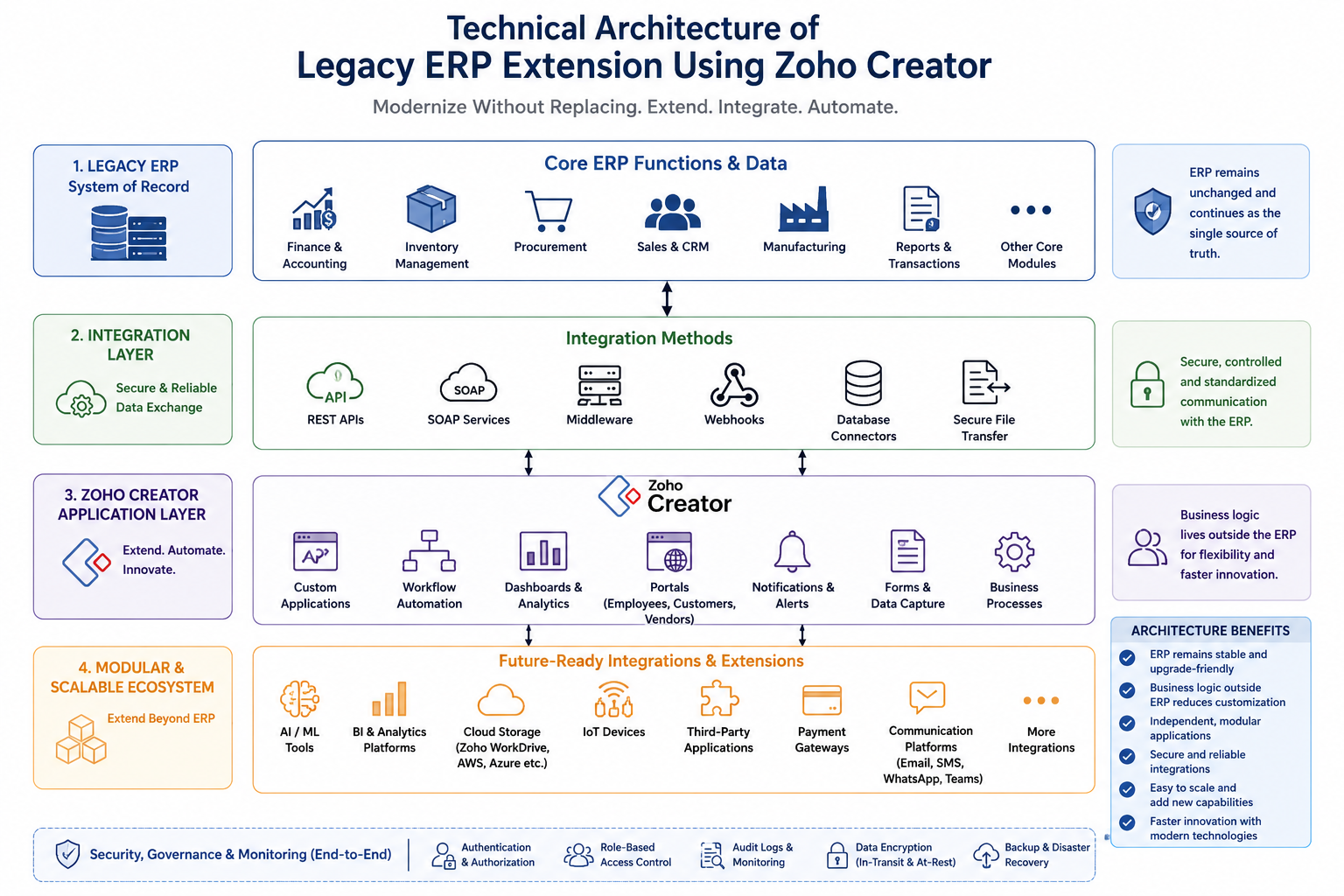
Technical Architecture of Legacy ERP Extension Using Zoho Creator
Security Considerations Before Extending a Legacy ERP
A secure ERP extension strategy protects business-critical data while ensuring compliance, operational continuity, and stakeholder confidence. Below are the key security areas businesses should address before extending their legacy ERP with Zoho Creator.
-
Implement Strong Authentication & Access Control
- Use secure authentication methods such as OAuth, API tokens, Single Sign-On (SSO), or Multi-Factor Authentication (MFA).
- Apply Role-Based Access Control (RBAC) to ensure users can only access data relevant to their roles.
-
Secure API Communication
- Use encrypted HTTPS connections for all data exchanges.
- Protect APIs with authentication, request validation, rate limiting, token expiration, and activity logging to prevent unauthorized access.
-
Protect Sensitive Business Data
- Encrypt data both in transit and at rest, especially financial records, customer information, confidential documents, and personally identifiable information (PII).
- Follow industry security standards to support regulatory compliance.
-
Enable Audit Logs & Monitoring
- Maintain detailed logs for user logins, approvals, workflow executions, data changes, and API activities.
- Use audit trails for compliance reporting, troubleshooting, and security investigations.
-
Prepare Backup & Disaster Recovery
- Establish regular backups, automated recovery processes, and business continuity plans to minimize downtime during failures or cyber incidents.
-
Conduct Regular Security Reviews
- Perform periodic vulnerability assessments, penetration testing, access reviews, and continuous monitoring as new applications and integrations are added.
By prioritizing these security practices, businesses can confidently modernize their legacy ERP while maintaining a secure, compliant, and resilient digital environment.
Common Mistakes Businesses Should Avoid When Extending a Legacy ERP
-
Trying to Modernize Everything at Once
Attempting to transform every business process simultaneously often leads to longer implementation timelines, higher costs, and lower user adoption. A phased approach delivers faster results while minimizing operational risks.
-
Skipping Business Process Assessment
Automating inefficient workflows only speeds up existing problems. Evaluate and optimize current processes before building new applications to ensure meaningful business improvements.
-
Poor Integration Planning
Developing applications without standardized APIs, proper documentation, or governance can result in data inconsistencies and synchronization issues. A well-defined integration architecture is essential for long-term scalability.
-
Over-Customizing the ERP
Excessive ERP customization makes future upgrades more complex and expensive. Instead, build new functionality in Zoho Creator while keeping the ERP core unchanged.
-
Ignoring User Adoption
Even the best solution can fail without proper training and change management. Clear communication, role-based training, and continuous user feedback are key to successful adoption.
-
Overlooking Security
Weak authentication, unsecured APIs, and excessive user permissions increase cybersecurity risks. Ensuring security at every phase of development and deployment is essential for building reliable systems.
-
Treating Modernization as a One-Time Project
ERP modernization is an ongoing journey. Regular improvements, new applications, and process optimization help businesses stay competitive and maximize the long-term value of their ERP investment.
Real-World Business Scenario: Modernizing Without Replacing the ERP
PrecisionFlow Manufacturing Pvt. Ltd. had been using the same on-premise ERP for over 15 years to manage finance, procurement, inventory, and production. However, manual approvals, spreadsheet-based reporting, limited mobile access, and disconnected workflows were reducing operational efficiency. Instead of replacing the ERP, the company chose to extend it using Zoho Creator.
Key Modernization Initiatives
- Automated purchase approval workflows
- Mobile-based maintenance request management
- Digital quality inspection forms
- Real-time production and executive dashboards
- Secure ERP integration using REST APIs
Business Outcomes
- 60% faster approval cycles
- Significant reduction in manual paperwork
- Improved reporting accuracy and real-time visibility
- Higher employee adoption through mobile-friendly applications
- No disruption to production or core ERP operations
By keeping the ERP as the central system while extending its capabilities with Zoho Creator, the company modernized critical business processes, improved operational efficiency, and protected its existing ERP investment without undergoing a costly replacement project.
Benefits of Following This Legacy ERP Extension Roadmap
Preserves Existing ERP Investment: Retain your current ERP, historical data, and business processes while adding modern capabilities.
- Minimizes Business Disruption: Modernize gradually without interrupting day-to-day operations.
- Faster Implementation: Deploy applications in phases instead of waiting for a full ERP replacement.
- Lower Costs: Reduce migration expenses, retraining efforts, and implementation risks compared to ERP replacement.
- Greater Flexibility: Use Zoho Creator’s low-code platform to quickly build applications, automate workflows, and adapt to changing business needs.
- Scalable Modernization: Easily add customer portals, supplier portals, AI automation, mobile apps, dashboards, and industry-specific solutions over time.
- Better Decision-Making: Gain real-time insights through centralized dashboards, automated reporting, and synchronized data.
- Supports Continuous Digital Transformation: Build a future-ready technology ecosystem that encourages innovation, improves operational efficiency, and supports long-term business growth.
Why Businesses Choose OfficeHub Tech for Legacy ERP Extension
Modernizing a Legacy ERP System requires expertise in business processes, integration architecture, and long-term digital transformation. At OfficeHub Tech, we help businesses extend their existing ERP systems without disrupting daily operations. We begin by assessing your ERP environment, identifying operational challenges, and creating a practical modernization roadmap aligned with your business goals. Instead of recommending costly ERP replacements, we maximize your existing investment through Zoho Creator, low-code application development, workflow automation, secure API integrations, and process optimization.
Our team develops scalable solutions such as employee and customer portals, approval workflows, production management systems, field service applications, dashboards, AI-powered automation, and third-party integrations while keeping your ERP as the central system of record. We also focus on solution architecture, security, governance, user adoption, and continuous optimization. As a top-notch ERP extension and modernization services provider and an authorized Zoho and n8n partner, we deliver secure, scalable, and future-ready ERP modernization solutions.
Conclusion
Extending a legacy ERP system using Zoho Creator enables businesses to modernize existing operations without the cost and disruption of a complete ERP replacement. By assessing the current ERP environment, identifying high-impact processes, designing a scalable architecture, integrating systems securely, automating workflows, and implementing changes in phases, organizations can improve efficiency while keeping daily operations uninterrupted. This approach preserves existing ERP investments, reduces implementation risks, accelerates ROI, and provides the flexibility to add mobile applications, AI-powered automation, real-time dashboards, and third-party integrations as business needs evolve.
Instead of treating modernization as a one-time project, businesses can continuously enhance their ERP ecosystem and adapt to changing market demands with confidence. If you’re looking to improve business operations through Legacy ERP Extension and Modernization, partnering with experienced experts can help you build a secure, scalable, and future-ready solution tailored to your business goals while maximizing the value of your existing ERP system.
Start Extending Your Legacy ERP with Zoho Creator
Modernizing your legacy ERP doesn’t have to involve a costly replacement or disrupt your day-to-day operations. With Zoho Creator, you can build custom ERP extensions, automate business processes, and connect existing systems to meet evolving business needs—at your own pace.
Create your Zoho Creator account using the link below and begin extending your ERP today. Need expert support? OfficeHub Tech can help you design, develop, and integrate scalable ERP extensions tailored to your business.
Get Started with Zoho Creator: