##Quick Answer
An ERP Extension Strategy allows businesses to modernize their existing ERP system without replacing it. Instead of migrating to a new ERP, organizations use a low-code platform like Zoho Creator to build custom business applications, automate workflows, integrate third-party software, enable mobile access, create executive dashboards, and introduce AI-powered capabilities while keeping the ERP as the central system of record.
This approach reduces implementation costs, minimizes business disruption, accelerates digital transformation, and protects existing ERP investments. It is especially valuable for organizations using ERP platforms such as SAP, Oracle, Microsoft Dynamics 365, Infor, Sage, Epicor, and other legacy enterprise systems.
##Key Takeaways
- Understand why leading enterprises are shifting from ERP replacement to an ERP Extension Strategy.
- Learn how ERP extension modernizes operations without disrupting the existing ERP system.
- Discover the business and technical advantages of extending legacy ERP systems.
- Explore how Zoho Creator enables secure, scalable ERP modernization through low-code development.
- Understand the importance of APIs, workflow automation, AI, and multi-software integration in enterprise transformation.
- Learn the architecture, implementation roadmap, governance practices, and enterprise use cases behind successful ERP extension initiatives.
Why Smart Enterprises Are Rethinking ERP Modernization
Enterprise Resource Planning (ERP) systems have long served as the operational backbone of businesses, managing finance, procurement, inventory, manufacturing, HR, customer data, and other critical processes. While many ERP platforms continue to perform these core functions effectively, they often struggle to meet modern demands for agility, automation, seamless integrations, mobile accessibility, and AI-driven decision-making.
Traditionally, organizations addressed these limitations through complete ERP replacements, but this approach often resulted in lengthy implementations, high costs, operational disruption, complex data migration, and increased business risk. As a result, many enterprises are adopting an ERP Extension Strategy instead of replacing stable systems.
ERP Extension with Low Code Zoho Creator enables organizations to enhance existing ERP capabilities by building custom applications, automating workflows, integrating business systems, creating executive dashboards, launching customer and employee portals, and supporting AI-powered processes while retaining the ERP as the central system of record.
In this, you’ll learn why ERP extension has become the preferred modernization strategy, how it works from both business and technical perspectives, and how Zoho Creator helps organizations modernize legacy ERP environments without replacing their core systems.
What Is an ERP Extension Strategy?
An ERP Extension Strategy is an enterprise modernization approach that enhances an existing ERP system without replacing its core functionality.
Instead of customizing the ERP itself, organizations build an independent extension layer using platforms such as Zoho Creator. This extension layer provides:
- Workflow automation
- Custom business applications
- Mobile apps
- Customer and vendor portals
- Executive dashboards
- AI-powered business processes
- Multi-software integrations
The ERP continues managing financial transactions, inventory, procurement, manufacturing, and master data while the extension layer delivers innovation independently.
Why Enterprises Are Moving Away from Monolithic ERP Modernization
Independent industry research supports the shift toward ERP extension. Gartner reports that organizations are moving from monolithic ERP systems to composable ERP, using modular technologies, APIs, AI, and low-code platforms for incremental modernization. Gartner also predicts that by 2027, over 70% of ERP initiatives will fail to fully achieve their business goals, with up to 25% failing catastrophically. These findings highlight the need for lower-risk modernization strategies that preserve the ERP core while enabling continuous innovation through an extension-first approach.
Why Traditional ERP Replacement Has Become Increasingly Risky
For years, organizations viewed ERP replacement as the primary strategy for modernizing operations and supporting business growth. While this approach may still be appropriate in some cases, it has become one of the most complex, expensive, and high-risk transformation initiatives. Because ERP systems manage critical functions such as finance, procurement, inventory, manufacturing, HR, and customer operations, replacing them affects the entire organization. These projects often require months or even years of implementation, extensive process redesign, employee training, and rigorous testing before organizations can fully realize business value.
Key challenges of ERP replacement include:
- Lengthy implementation timelines that delay modernization and business outcomes.
- High implementation costs for licensing, consulting, customization, migration, testing, and training.
- Business disruption that impacts productivity, customer service, and day-to-day operations.
- Complex data migration involving years of financial, operational, and customer records.
- Integration rebuilding with CRM, HR, payroll, warehouse, manufacturing, procurement, and third-party applications.
- Employee adoption challenges due to new interfaces, workflows, and business processes requiring extensive training.
- Loss of existing customizations, requiring organizations to recreate valuable business logic developed over time.
- Future maintenance and upgrade challenges, especially in highly customized ERP environments.
As business requirements continue to evolve, many enterprises are reconsidering whether replacing a stable ERP system is the best investment. Instead, they are adopting ERP extension strategies that enhance existing ERP systems with automation, integrations, AI capabilities, dashboards, and custom applications—delivering faster modernization while minimizing cost, risk, and operational disruption.
Why Enterprises Are Looking Beyond ERP Replacement
ERP modernization is no longer about replacing software but enabling continuous innovation with minimal risk. If an existing ERP reliably manages core business processes, replacing it often delivers limited business value.
This insight has changed the conversation from, “Which ERP should replace our current system?” to “How can we modernize our ERP without replacing it?” That question has become the foundation of the ERP Extension Strategy, where organizations preserve the stability of their existing ERP while extending its capabilities through modern technologies such as low-code development, workflow automation, APIs, AI, and enterprise integrations.
Understanding the ERP Extension Strategy
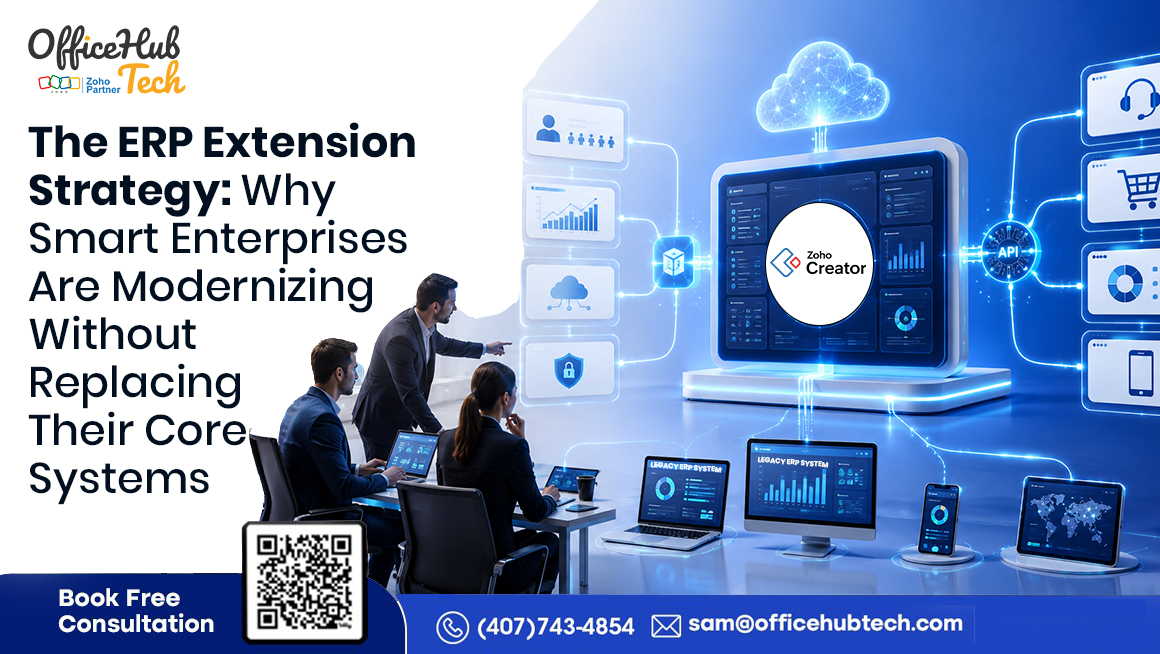
Enterprise modernization no longer requires replacing a stable ERP. An ERP Extension Strategy enhances existing ERP capabilities through an extension layer that delivers custom applications, workflow automation, dashboards, portals, mobile apps, AI, and integrations. With Zoho Creator, organizations can modernize faster, reduce risk, and preserve the ERP as the trusted System of Record without modifying its core.
Core Principles of an ERP Extension Strategy
- ERP remains the System of Record for transactions and master data.
- The extension platform manages workflows, automation, dashboards, AI, integrations, and user experiences.
- APIs and secure integrations synchronize data between the ERP and extension layer in real time.
This layered architecture gives organizations the flexibility to modernize individual business functions faster while minimizing cost, risk, and dependence on ERP customizations.
What Can Be Extended Beyond the ERP?
An ERP Extension Strategy enables enterprises to introduce capabilities that are often difficult, expensive, or impractical to build directly within traditional ERP platforms.
- Custom Business Applications: Develop department-specific applications for procurement, production, maintenance, compliance, quality management, project tracking, and internal operations.
- Workflow Automation: Automate approvals, notifications, escalations, document routing, and repetitive manual tasks across departments.
- Executive Dashboards & Reporting: Build real-time dashboards that combine ERP data with information from CRM, HR, finance, logistics, and other enterprise applications.
- Customer & Vendor Portals: Provide secure self-service portals where customers and suppliers can access orders, invoices, service requests, documents, and approvals.
- Mobile Business Applications: Enable employees, managers, sales teams, and field personnel to securely access ERP-connected business processes from any location.
- Multi-Software Integration: Connect ERP systems with CRM platforms, accounting software, HR solutions, document management systems, cloud storage, payment gateways, collaboration tools, and industry-specific applications through secure APIs.
- AI-Enabled Business Processes: Introduce conversational interfaces, predictive insights, intelligent recommendations, document processing, and AI-assisted decision-making without rebuilding the ERP environment.
Benefits of Choosing Extension Over Replacement
An ERP Extension Strategy enables organizations to modernize while preserving existing ERP investments. Instead of replacing stable systems, businesses extend their ERP with new capabilities where innovation is needed most. This approach reduces implementation risk, speeds development, simplifies future upgrades, and provides a scalable foundation for continuous digital transformation, allowing organizations to adapt quickly to evolving business and technology needs.
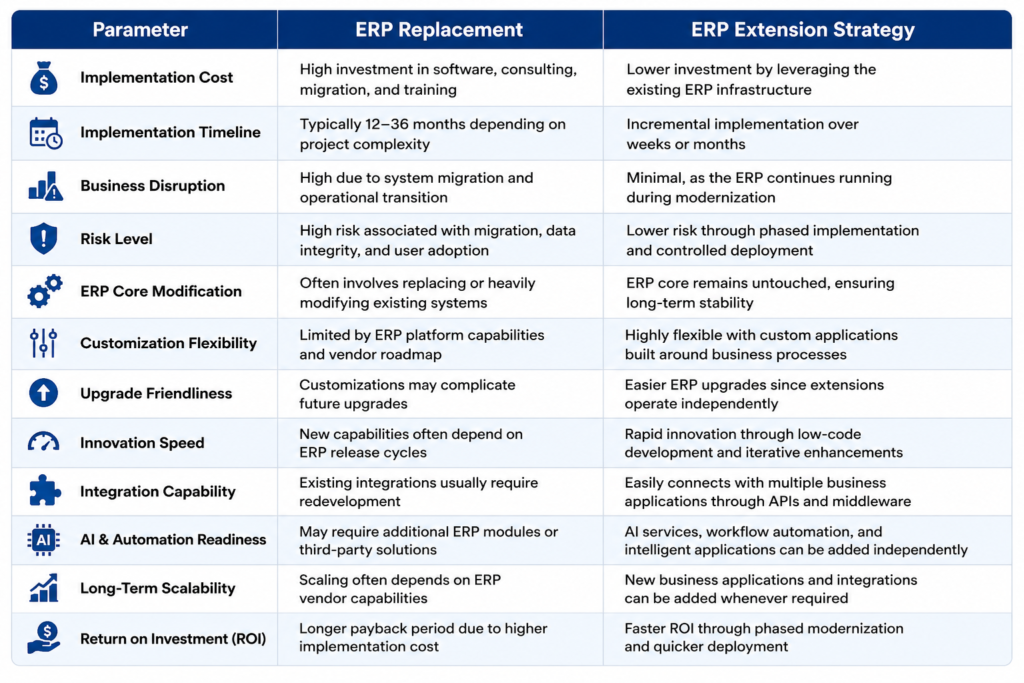
ERP Replacement vs ERP Extension: Which Strategy Delivers Better Business Value?
Enterprise modernization is about choosing the strategy that delivers the greatest business value with the lowest risk. While ERP replacement rebuilds the technology landscape, an ERP Extension Strategy enhances existing ERP systems with workflow automation, custom applications, AI, mobile capabilities, and integrations. For organizations with a stable ERP foundation, extension often provides a faster, more cost-effective path to modernization. The comparison below highlights the key differences between ERP replacement and ERP extension strategies.
Which Strategy Makes More Business Sense?
For organizations using outdated or unsupported ERP systems that no longer meet core business needs, a complete replacement may still be necessary. However, such occurrences are becoming less common. Most enterprises already have ERP systems that effectively manage finance, inventory, procurement, manufacturing, and order processing.
The real challenge lies in manual workflows, disconnected applications, limited reporting, poor user experiences, and increasing demands for automation and AI.
An ERP Extension Strategy with Zoho Creator addresses these gaps by adding custom applications, automated workflows, dashboards, portals, mobile solutions, and AI capabilities without disrupting the existing ERP, enabling faster, lower-risk modernization.
Expert Recommendation
If your ERP remains a reliable System of Record, consider an extension-first strategy instead of a full replacement. Extending your ERP with modern capabilities protects existing investments, reduces implementation risk, accelerates innovation, and enables continuous modernization with minimal business disruption.
Signs Your Enterprise Needs ERP Extension Instead of ERP Replacement
Not every ERP challenge requires a complete system replacement. If your ERP continues to manage core operations effectively, extending it may be the smarter modernization strategy. Consider ERP extension when your organization faces:
- Core ERP functions remain stable, handling finance, inventory, procurement, manufacturing, and other critical operations efficiently.
- Manual processes and approvals slow productivity and decision-making.
- Disconnected applications and spreadsheets create data silos and duplicate work.
- Limited reporting and visibility make it difficult to access real-time business insights.
- Poor user experience and limited mobility reduce employee efficiency.
- Growing demand for automation, AI, and integrations that the existing ERP cannot easily support.
- Need for faster innovation without disrupting daily operations or replacing the ERP.
An ERP Extension Strategy addresses these gaps by adding custom applications, workflow automation, dashboards, customer portals, mobile solutions, AI capabilities, and seamless integrations through an independent extension layer. This approach modernizes business processes while keeping the existing ERP secure, stable, and the trusted system of record.
How ERP Extension Modernizes Enterprise Operations Without Touching the ERP Core
Modern ERP modernization no longer requires modifying or replacing the ERP itself. Instead, organizations decouple transaction management from business innovation using an ERP Extension Strategy. The ERP remains the trusted System of Record, while a low-code platform like Zoho Creator serves as an extension layer to build applications, automate workflows, integrate business systems, and improve user experiences through secure APIs. This approach enables continuous innovation without affecting ERP stability, simplifying upgrades and reducing long-term maintenance.
- Workflow Automation: Automate procurement approvals, expense claims, leave requests, document routing, compliance processes, and other workflows without customizing the ERP. Business rules, notifications, and approval hierarchies can be updated quickly as requirements evolve.
- Custom Business Applications: Develop applications for production planning, maintenance, quality inspections, project tracking, asset management, supplier collaboration, and compliance. Zoho Creator keeps these applications synchronized with ERP data in real time.
- Mobile Workforce Enablement: Provide secure mobile access for managers, field staff, warehouse teams, and service personnel to work orders, approvals, inventory, customer data, and dashboards without changing the ERP.
- Customer & Vendor Self-Service Portals: Create secure portals where customers and suppliers can track orders, submit requests, upload documents, download invoices, and monitor projects while maintaining centralized ERP data.
- Executive Dashboards & Real-Time Analytics: Combine ERP, CRM, HR, finance, and operational data into centralized dashboards, giving leaders real-time visibility into KPIs, project status, inventory, and financial performance.
- AI-Enabled Business Processes: Integrate AI-powered assistants, predictive analytics, intelligent document processing, anomaly detection, approval recommendations, and automated reporting without modifying the ERP core.
- Cross-Platform Integration: Connect ERP with CRM, HR, accounting, warehouse, collaboration, payment, cloud, and business intelligence platforms using APIs. This eliminates duplicate data entry and creates a connected enterprise ecosystem.
The Outcome: Continuous Modernization Without Continuous Disruption
ERP extension transforms modernization into a continuous capability rather than a one-time project. Organizations can continuously deploy applications, automate workflows, integrate new technologies, and enhance user experiences while keeping the ERP secure and stable, accelerating digital transformation and maximizing existing ERP investments.
Technical Architecture of a Modern ERP Extension Strategy
A modern ERP Extension Strategy uses a layered architecture that separates core ERP operations from business innovation. The ERP remains the System of Record, while an extension layer delivers custom applications, workflow automation, integrations, dashboards, mobile experiences, and AI capabilities through secure APIs. Zoho Creator acts as the innovation layer, enabling organizations to modernize processes without modifying the ERP core.
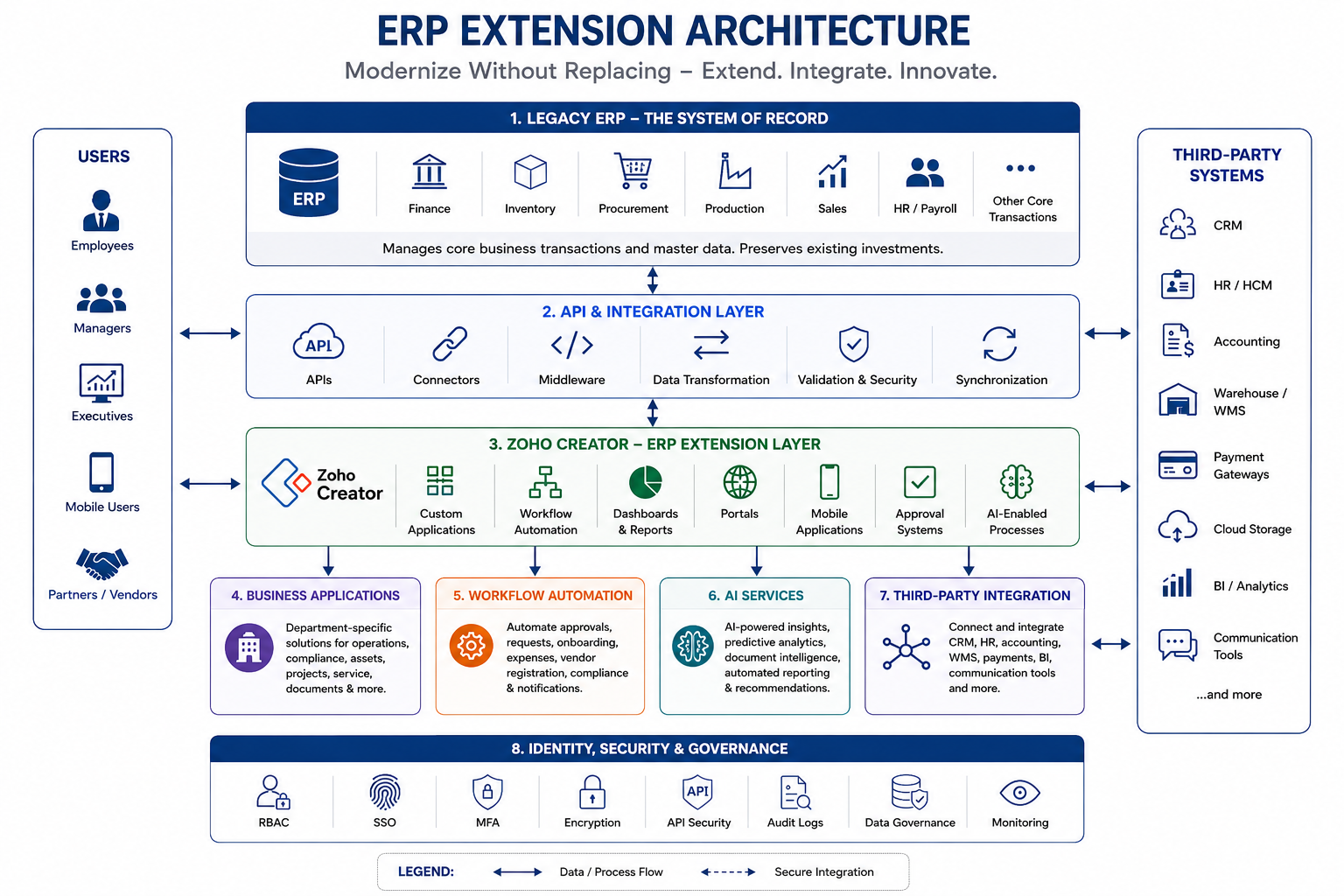
This modular, API-driven architecture enables organizations to modernize incrementally, simplify ERP upgrades, reduce risk, and continuously innovate while maximizing existing ERP investments.
Why Zoho Creator Is an Ideal Platform for ERP Extension
Choosing the right platform is essential for a successful ERP Extension Strategy. Zoho Creator enables organizations to modernize ERP without modifying the core system. Its low-code platform allows businesses to rapidly build custom applications, automate workflows, integrate enterprise systems, and deliver modern user experiences while preserving existing ERP operations. This approach enables continuous innovation without costly ERP replacements or upgrades.
- Low-Code Development Accelerates Innovation: Zoho Creator’s visual development environment enables business and IT teams to quickly build and improve applications, reducing development time and accelerating innovation.
- Rapid Deployment Without Business Disruption: Applications can be deployed independently of the ERP, allowing phased implementation with minimal downtime, lower risk, and better user adoption.
- Enterprise-Grade Integration: Zoho Creator integrates ERP with CRM, HR, accounting, warehouse, document management, and other business applications using REST APIs, webhooks, database connectors, custom functions, and middleware, creating a connected enterprise ecosystem.
- Workflow Automation: Automate approvals, vendor onboarding, employee requests, compliance reviews, contract management, maintenance, quality inspections, and other business processes without modifying ERP logic.
- Custom Business Applications: Build applications for procurement, inventory, production, maintenance, quality, asset management, project tracking, compliance, reporting, and internal portals tailored to business needs.
- Mobile & AI Capabilities:Enable secure mobile access for employees while extending ERP with AI-powered assistants, predictive analytics, intelligent document processing, automated reporting, and process intelligence.
- Enterprise Security & Governance: Built-in features such as RBAC, MFA, encryption, audit trails, secure API authentication, permission management, and compliance controls help maintain enterprise-grade security and governance.
- Scalable for Long-Term Modernization: As business needs evolve, organizations can continuously add applications, workflows, integrations, and AI capabilities without replacing or heavily customizing the ERP, creating a scalable foundation for ongoing digital transformation.
Enterprise ERP Extension Roadmap
Implementing an ERP Extension Strategy is most successful when approached in structured phases rather than attempting to modernize every business process simultaneously. A phased roadmap minimizes operational risk, accelerates user adoption, and delivers measurable business value while preserving the existing ERP as the system of record.
Step 1: Assess the Existing ERP Environment
Begin by evaluating your current ERP landscape to understand what is already working well and where operational gaps exist. The objective is to identify opportunities for modernization without disrupting core business functions.
Key Activities
- Evaluate existing ERP capabilities
- Review business processes and workflows
- Identify manual operations and bottlenecks
- Assess reporting limitations
- Document current integrations and dependencies
Step 2: Identify Business Bottlenecks
Analyze business processes that rely on spreadsheets, emails, manual approvals, or disconnected applications. These areas typically offer the fastest return on investment when modernized through ERP extension.
Key Activities
- Identify repetitive manual tasks
- Review approval workflows
- Analyze data duplication issues
- Identify disconnected business systems
- Gather user feedback across departments
Step 3: Prioritize Extension Opportunities
Not every process should be modernized at once. Prioritize initiatives based on business impact, implementation complexity, expected ROI, and organizational urgency.
Key Activities
- Rank modernization initiatives
- Estimate business value
- Define project priorities
- Create phased implementation plans
- Align projects with business objectives
Step 4: Design the Integration Architecture
Develop a secure architecture that defines how the ERP will communicate with Zoho Creator and other enterprise applications using APIs and integration services.
Key Activities
- Design API architecture
- Define data synchronization strategy
- Establish security and authentication
- Plan governance policies
- Define integration standards
Step 5: Develop Low-Code Business Applications
Build modern business applications using Zoho Creator to extend ERP functionality without modifying the ERP core.
Key Activities
- Develop custom applications
- Build dashboards and reports
- Create customer and vendor portals
- Develop mobile applications
- Configure role-based access
Step 6: Automate Business Workflows
Replace manual business processes with intelligent workflow automation to improve efficiency and reduce operational delays.
Key Activities
- Automate approvals
- Configure notifications
- Implement document routing
- Create escalation rules
- Automate repetitive tasks
Step 7: Roll Out in Phases
Deploy applications gradually by department or business function to reduce implementation risk and improve user adoption.
Key Activities
- Conduct user training
- Pilot selected departments
- Gather user feedback
- Optimize workflows
- Expand deployment incrementally
Step 8: Monitor, Optimize & Scale
ERP extension is a continuous modernization strategy. Measure performance, identify improvement opportunities, and expand the extension ecosystem as business needs evolve.
Key Activities
- Monitor KPIs and adoption
- Optimize business processes
- Improve application performance
- Extend additional workflows
- Introduce AI and new integrations
Outcome
By following this structured roadmap, organizations can modernize their ERP environment incrementally while minimizing risk, preserving existing ERP investments, and continuously extending business capabilities through Zoho Creator, workflow automation, enterprise integrations, and AI-powered solutions.
Representative ERP Extension Success Stories
Every enterprise has unique operational challenges, but the business outcomes are often similar. The following representative case studies illustrate how organizations modernized their legacy ERP environments using an ERP Extension Strategy with Zoho Creator. Company names have been changed to protect client confidentiality while accurately reflecting the implementation approach and business outcomes.
Case Study 1: Apex Precision Manufacturing (Company Name Changed for Confidentiality)
Business Overview
Apex Precision Manufacturing is a global manufacturing enterprise operating multiple production facilities across different regions. The organization relied on Microsoft Dynamics 365 to manage finance, procurement, inventory, production planning, and supply chain operations. While the ERP effectively supported core business processes, many operational workflows outside the ERP remained manual and disconnected.
Business Challenges
As the company expanded, several operational inefficiencies began affecting productivity and decision-making.
- Purchase requisitions and approvals were managed through emails, causing approval delays.
- Preventive maintenance requests were tracked using spreadsheets, making equipment monitoring difficult.
- Supplier onboarding involved manual documentation and approval processes.
- Production managers lacked real-time dashboards for monitoring operational KPIs.
- Plant supervisors lacked secure mobile access to ERP-linked workflows on the shop floor.
OfficeHub Tech Solution
Instead of replacing or heavily customizing Microsoft Dynamics 365, OfficeHub Tech implemented an ERP Extension Strategy using Zoho Creator. A secure extension layer was developed to integrate seamlessly with the existing ERP through APIs while keeping Microsoft Dynamics 365 as the organization’s trusted system of record.
The implementation included:
- Automated purchase approval workflows
- Digital maintenance management application
- Supplier self-service portal
- Mobile applications for plant managers and supervisors
- Executive dashboards with real-time ERP insights
- Automated notifications and workflow escalations
- API-based integration with Microsoft Dynamics 365
Business Outcome
The organization successfully modernized its operational processes without disrupting its existing ERP environment.
Key Results
- Reduced manual approval processes through workflow automation
- Accelerated purchase approval turnaround times
- Improved production and maintenance visibility with real-time dashboards
- Eliminated spreadsheet-based operational tracking
- Enabled secure mobile access for plant managers and supervisors
- Improved supplier collaboration through self-service portals
- Preserved Microsoft Dynamics 365 as the central system of record
- Modernized business operations without the cost and risk of ERP replacement
Case Study 2: NorthBridge Distribution Group (Company Name Changed for Confidentiality)
Business Overview
NorthBridge Distribution Group is a rapidly growing distribution and wholesale enterprise operating multiple warehouses and regional distribution centers. The company used SAP Business One to manage inventory, procurement, finance, and order processing. Although the ERP efficiently handled core transactions, warehouse operations relied heavily on spreadsheets and disconnected tools, limiting operational visibility and inventory accuracy.
Business Challenges
As order volumes increased, manual warehouse processes became increasingly difficult to manage.
- Inventory reconciliation across warehouse locations was time-consuming.
- Dispatch approvals relied on emails and manual coordination.
- Duplicate data entry existed between warehouse systems and SAP Business One.
- Warehouse managers lacked real-time inventory and logistics dashboards.
- Stock movement and replenishment decisions were delayed due to limited operational visibility.
OfficeHub Tech Solution
OfficeHub Tech extended SAP Business One using Zoho Creator, developing a centralized warehouse and logistics management platform integrated with the ERP through secure APIs. The solution automated warehouse workflows while providing real-time visibility across inventory and dispatch operations.
The implementation included:
- Barcode-enabled inventory management
- Warehouse and dispatch management applications
- Automated logistics and shipment workflows
- Real-time inventory dashboards
- Mobile applications for warehouse supervisors
- Automated stock movement and replenishment alerts
- Secure API integration with SAP Business One
Business Outcome
By extending SAP Business One instead of replacing it, the organization transformed warehouse operations while protecting its existing ERP investment.
Key Results
- Improved inventory accuracy across multiple warehouse locations
- Streamlined dispatch and logistics operations
- Eliminated duplicate data entry through automated ERP synchronization
- Increased warehouse productivity with workflow automation
- Enabled real-time inventory monitoring and executive reporting
- Enhanced supply chain visibility across distribution centers
- Improved decision-making through centralized dashboards
- Extended SAP Business One capabilities without disrupting existing ERP operations
Common ERP Modernization Mistakes (and How to Avoid Them)
Many ERP modernization initiatives encounter delays, cost overruns, or poor user adoption because organizations focus on replacing technology rather than improving business processes. A successful ERP Extension Strategy modernizes operations while preserving the ERP as the system of record. Avoid these common pitfalls for a smoother transformation.
1. Replacing the Entire ERP: Replacing an ERP system entirely often raises costs, extends timelines, and disrupts operations.
Best Practice: Extend your existing ERP with Zoho Creator to add automation, custom applications, dashboards, and AI without replacing the core system.
2. Over-Customizing the ERP Core: Excessive ERP customization complicates upgrades and increases maintenance.
Best Practice: Keep business logic and new functionality in the extension layer while leaving the ERP focused on core transactions.
3. Poor Integration Planning: Disconnected applications create duplicate data and manual work.
Best Practice: Use an API-first integration strategy to securely connect ERP with CRM, HR, finance, and other enterprise systems.
4. Delaying Workflow Automation: Manual approvals and repetitive processes reduce productivity.
Best Practice: Automate approvals, notifications, and business workflows during ERP extension instead of waiting for a future ERP upgrade.
5. Ignoring Security & Governance: Weak access controls and inconsistent security policies increase compliance risks.
Best Practice: Implement role-based access control, multi-factor authentication, audit logs, encryption, and centralized governance from the start.
6. Building Large Monolithic Applications: Large all-in-one applications become difficult to maintain and scale.
Best Practice: Develop modular applications for individual business processes such as procurement, inventory, maintenance, or quality management.
7. Overlooking User Adoption: Modern applications fail if employees struggle to use them.
Best Practice: Design intuitive, role-specific applications and involve end users throughout development and testing.
8. Treating Modernization as a One-Time Project: Business requirements continue to evolve after implementation.
Best Practice: Adopt a continuous improvement approach using Zoho Creator to extend and optimize ERP capabilities as new business needs emerge.
The Future of Enterprise ERP Modernization
Enterprise ERP modernization is moving beyond traditional automation toward intelligent, connected, and adaptive business ecosystems. Organizations are no longer focused solely on digitizing manual processes—they are creating platforms that continuously evolve alongside business needs.
Artificial Intelligence, low-code development, hyperautomation, and composable enterprise architecture are reshaping how enterprises extend ERP capabilities. Instead of waiting years for major ERP upgrades, organizations will increasingly introduce new business applications, AI assistants, predictive analytics, and intelligent workflows through extension platforms.
Future ERP extension strategies will increasingly include:
- AI-powered business assistants
- Conversational enterprise applications
- Predictive operational insights
- Intelligent workflow orchestration
- Process mining
- Hyperautomation
- Event-driven integrations
- Composable enterprise architecture
Platforms like Zoho Creator enable organizations to continuously innovate without replacing their ERP infrastructure. By intelligently extending existing ERP systems, businesses gain the agility, scalability, and resilience needed to support continuous modernization and compete in an increasingly digital environment.
Conclusion
Modernizing enterprise operations no longer requires replacing a stable ERP system. For organizations whose ERP continues to manage core business functions effectively, an ERP Extension Strategy offers a smarter, faster, and lower-risk path to digital transformation. By extending existing Legacy ERP systems with Zoho Creator, businesses can develop custom applications, automate workflows, connect enterprise software, provide mobile access, build real-time dashboards, and leverage AI-driven capabilities—all while maintaining the ERP as the central system of record.
As business needs continue to evolve, an extension-first approach provides the flexibility to innovate without the cost, complexity, and disruption of a full ERP replacement. By combining the reliability of legacy ERP systems with the agility of low-code development, organizations can improve operational efficiency, accelerate innovation, and maximize the value of their existing ERP investments for long-term growth.
Start Your ERP Extension Journey with Zoho Creator
Modernize your existing ERP with Zoho Creator’s low-code platform. Build custom applications, automate workflows, integrate legacy systems with modern business tools, and add new capabilities without replacing your ERP.
Create your Zoho Creator account using the link below and begin your ERP extension journey. For expert support with ERP modernization, integrations, and workflow automation, OfficeHub Tech is ready to assist.
Why Choose OfficeHub Tech?
OfficeHub Tech is a Leading Legacy ERP Extension and Modernization Services Provider specializing in helping enterprises modernize existing ERP systems without the cost, complexity, and disruption of a full ERP replacement. With 22+ years of enterprise digital transformation expertise and 100+ successful enterprise implementations, our team delivers secure, scalable solutions built on Zoho Creator.
As a Top Zoho Certified Partner In USA, UAE, KSA and India, we help organizations extend Legacy ERP System Like SAP, Oracle, Microsoft Dynamics, Epicor, Sage, Infor, and other ERP platforms with custom business applications, workflow automation, AI-powered processes, enterprise integrations, dashboards, and self-service portals—enabling faster innovation while protecting existing ERP investments.