
##Quick Answer
US AV installation managers improve technician utilization by getting three things right: each tech’s real available hours, the reason behind every non-billable hour, and job assignments based on skills, licensing, and site readiness. A Custom Field Service Management platform built on Zoho Creator brings all three into one system. It turns everyday field data into weekly utilization dashboards that managers can use to plan the week ahead.
##Key Takeaways
- If PTO, training, shop time, and overtime limits aren’t counted, your utilization number is a guess.
- Give every non-billable hour a reason code so you know what to fix first.
- Readiness checks hold up better when the system enforces them.
- Skill- and license-aware dispatch protects your senior techs’ time and keeps you compliant across states.
- Zoho Creator lets the platform follow AVSI install phases from pre-wire to commissioning.
- Review utilization weekly, by crew and by job type.
What Technician Utilization Means When You’re Running AV Crews in the US
When we sit down with installation managers at AV integrators, the first conversation usually sounds the same. Three crews, five active jobs, a GC who just moved the ceiling inspection, and a labor budget that was set before anyone walked the site. Most of the week goes to juggling.
On paper, utilization is easy: billable hours divided by available hours. Billable hours are usually tracked reasonably well. Available hours is where the number goes wrong. Most teams default to 40 a week, which ignores the tech who’s out Thursday for a Crestron class, the half day spent building racks in the shop, and the fact that anything past 40 hours costs time and a half.
Productivity is a different measure. Utilization tells you how much paid time went to billable work. Productivity tells you what that time produced. A crew can sit at 85% utilization and still lose money on a job if a third of those hours went to redoing a trim-out.
These are the numbers we recommend tracking from day one:
| Metric | Formula | What It Shows |
|---|---|---|
| Technician utilization | Billable hours ÷ available hours × 100 | Share of available time spent on billable work |
| Wrench time | Hands-on install hours ÷ total paid hours × 100 | How much paid time goes to actual installation |
| First-time completion rate | Jobs closed without an unplanned revisit ÷ total jobs × 100 | How well jobs are prepared before dispatch |
| Return-trip rate | Unplanned revisits ÷ total jobs × 100 | How often avoidable repeat visits happen |
| Travel-to-work ratio | Travel hours ÷ on-site work hours | Travel time compared with time spent at the site |
| Schedule adherence | Jobs started within the scheduled window ÷ scheduled jobs × 100 | How consistently teams follow their schedules |
| Labor budget variance | Actual labor hours − estimated labor hours | Gap between the quote and the field |
These are working definitions, not industry standards. Decide once what counts as available hours, for example whether training, shop time, and travel are in or out, and apply the same rule to every tech, every week. Otherwise the comparisons won’t hold up.
A spreadsheet can handle this for a team of four. With more people, the data shows up late and messy, and by the time someone reads it the week is over. That’s usually when integrators start talking to us about a Custom FSM platform for AV system integrators that captures hours and job status while the work is happening.
Five Blind Spots That Keep Technician Utilization Low
Ask an installation manager why utilization is low and you’ll often hear “I’m not really sure.” In our discovery sessions, the reasons usually come down to these five gaps.
-
Real capacity is unclear
PTO requests sit in email. Training days are on a separate calendar. Nobody has checked who’s already at 38 hours by Thursday. So the schedule gets built on capacity that isn’t there.
-
Non-billable time has no label
A timesheet shows eight hours. It doesn’t show the 90 minutes of driving, the 45 minutes waiting for the electrician, or the hour spent going back for a missing HDMI extender. Without a reason attached, you can’t tell those hours apart from productive ones.
-
Skills and licenses aren’t visible
Who’s certified on Q-SYS? Whose low-voltage license is valid in the neighboring state? Who has an OSHA 30 card? When that lives in one person’s memory, jobs go to whoever happens to be free.
-
Readiness is tracked by text message
Kit status, site access, and GC progress get confirmed through calls and texts. Crews arrive at jobs that can’t start, and the morning is gone.
-
Overruns can’t be traced to a phase
You know the job ran 30 hours over. You don’t know whether it was rough-in, rack build, or commissioning, so the next proposal uses the same estimate.
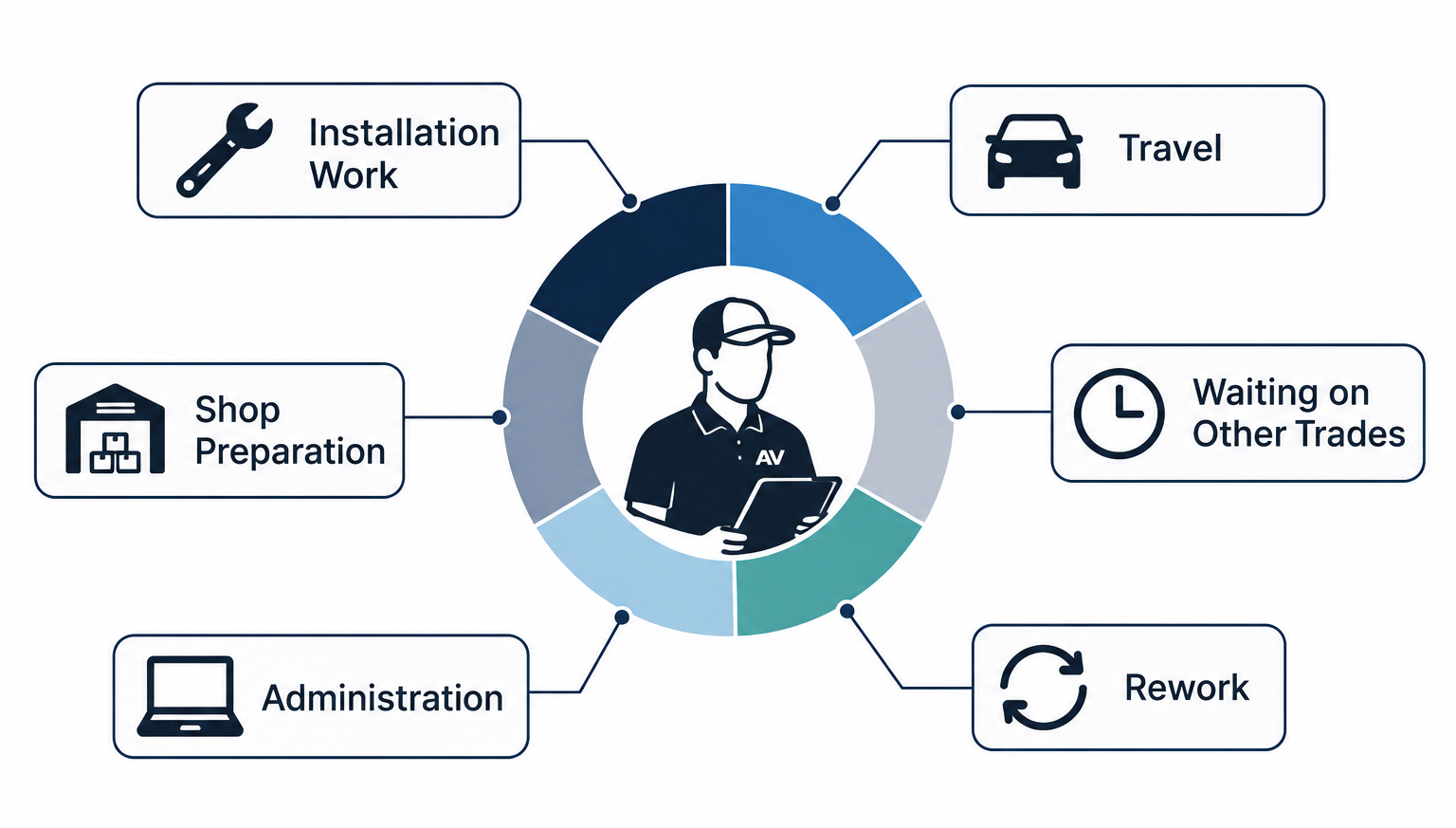
Residential and commercial teams hit these in different places. Residential managers deal with builder delays and homeowner schedules across phases that stretch for months. Commercial managers deal with after-hours windows, GC coordination, and union or prevailing-wage rules on public jobs.
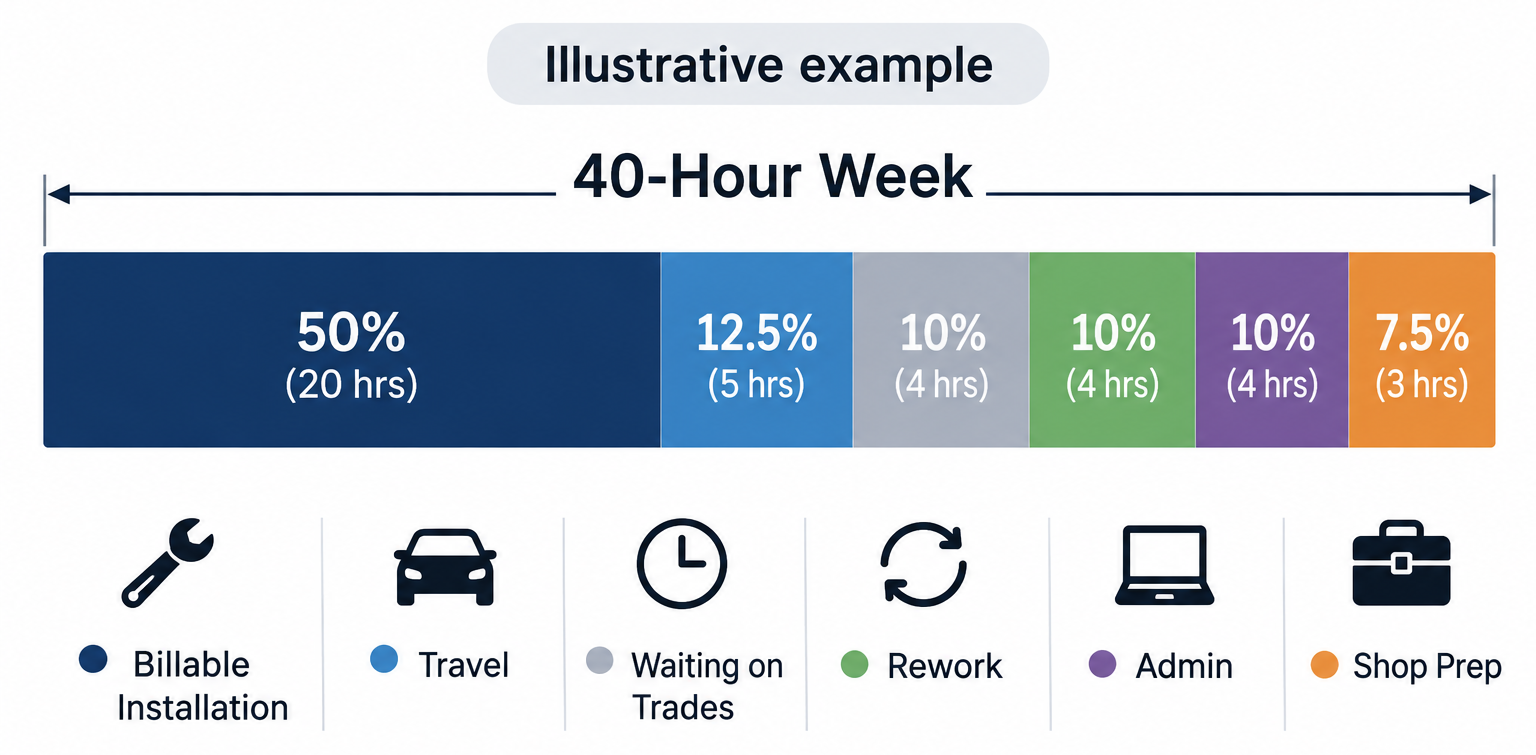
[Infographic showing how an AV technician’s 40-hour week splits between billable installation work, travel, waiting, rework, admin, and shop preparation]
The Utilization Control Loop: Plan, Prepare, Dispatch, Execute, Measure, Adjust
When we design a field service platform for an AVSI, we build it around six stages the installation manager goes through every week. Here’s what the manager is trying to do at each stage, and what the Zoho Creator platform takes off their plate.
| Stage | What You’re Trying to Do | How the Zoho Creator Platform Supports It |
|---|---|---|
| Plan | Know true capacity | Capacity calendar with leave, US holidays, and overtime thresholds |
| Prepare | Avoid scheduling unready jobs | Blueprint readiness gate plus kit status from inventory |
| Dispatch | Right tech, right job, right state | Deluge assignment logic using skills, licenses, distance, and time zone |
| Execute | Capture work as it happens | Creator mobile app with GPS clock-in, photos, and scanning |
| Measure | See lost time by cause | Time entries with reason codes, rolled into Zoho Analytics |
| Adjust | Fix the biggest source of lost time | Automated alerts and a weekly review dashboard |
Each stage feeds the next. Friday’s review shows where time was lost, and that shapes Monday’s plan and readiness checks. After a month or two, schedules start holding up better because they’re based on real numbers.
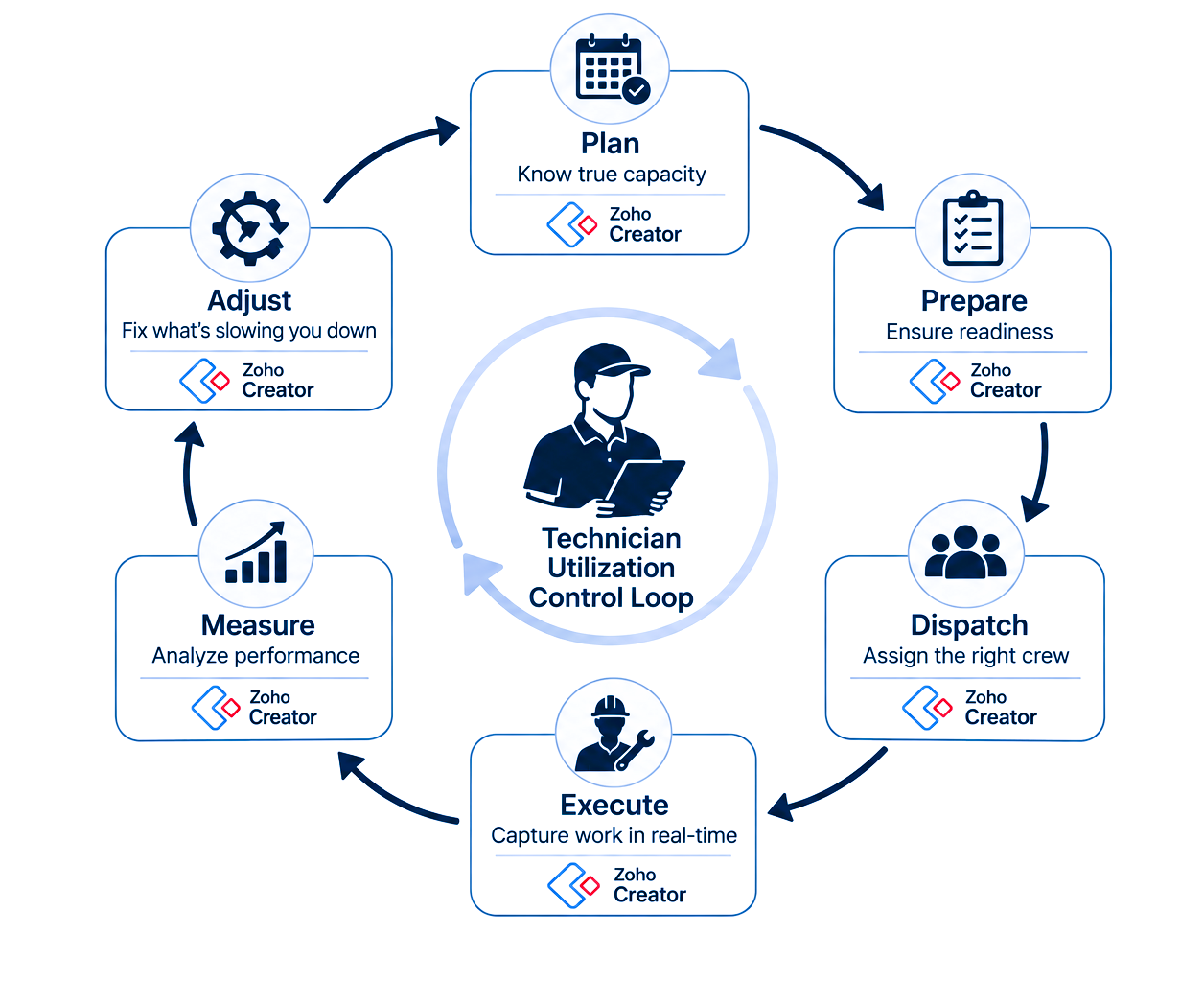
[Diagram showing technician utilization control loop: plan, prepare, dispatch, execute, measure, adjust, each mapped to a Zoho Creator component.]
Technical Deep Dive: How a Custom FSM on Zoho Creator Measures and Raises Utilization
This is how we typically put the platform together. Every build is adjusted to the client’s process, but the core pieces stay fairly consistent.
The data model
The main forms are Technicians, Skills, Licenses, Availability, Work Orders, Job Phases, Time Entries, Kits, and Sites. Time Entries do the most work. Each one records start and end time, the job phase, a billable flag, and a reason code whenever the time wasn’t billable.
Getting available hours right
Availability combines approved leave (from Zoho People, if you use it, or a leave form inside the app) with US federal and company holidays. Training and shop days get their own category. The scheduler also tracks the 40-hour threshold the FLSA sets for overtime. If a draft schedule would push someone past it, the manager gets a warning before it goes out.
Lost-time reason codes
Keep the list short. Techs tend to tap the first option on a long one. Six codes cover most situations:
- Travel
- Waiting on another trade
- Missing material
- Rework
- Admin
- Shop prep
After three or four weeks of coded entries, one or two causes usually stand out, and they aren’t always the ones managers expect.
Move suitable work into the shop
Rack assembly, equipment labeling, pre-configuration, and initial testing can often be completed before the installation team reaches the site. Preparing these items in the shop reduces the amount of work that must be completed during a limited site-access window.
Skill- and license-aware assignment
A Deluge function scores each available tech against a work order:
score = skill_match + license_valid + proximity + open_capacity − schedule_conflicts
Manufacturer certifications, phase experience, state low-voltage license status, and OSHA cards all go into the score. Each license and certification is stored with an expiry date, and the system can send a reminder 30 days before it lapses. The scheduler sees a ranked shortlist and makes the final pick.
Time zones and multi-state work
For AVSIs running regional or national rollouts, each site’s scheduling window is stored in its local time zone. A 7 a.m. start in Phoenix stays 7 a.m. Phoenix time, wherever the dispatcher sits.
Prevailing wage jobs
Public projects like schools and government buildings can be flagged when the job is created. Hours are then logged against the right labor classification, and the platform produces reports your payroll team can use when preparing certified payroll.
Readiness enforcement
A Blueprint workflow holds each work order in “Pending” until four items are confirmed: site access, trade status, kit complete, and the current drawing revision. Crews sometimes find it strict at first. Most come around once they stop showing up to sites that can’t start.
The mobile app
Techs see the day’s job pack, clock in with a GPS location check, take photos tagged to the phase, scan serial numbers, add punch items, and collect customer sign-off. Zoho Creator’s mobile app supports offline data entry, so core records like time, photos, and checklists can be captured without signal and synced later. We test the offline flow on real job sites during rollout, because some features need a connection. Mileage can be logged per trip and calculated at the current IRS standard mileage rate.
The utilization engine
A scheduled Deluge function runs each night and rolls the day’s time entries into utilization records by tech, crew, and job type. A separate rule can send an alert when a job phase reaches a set share of its labor budget, often 80%, while there’s still time to adjust.
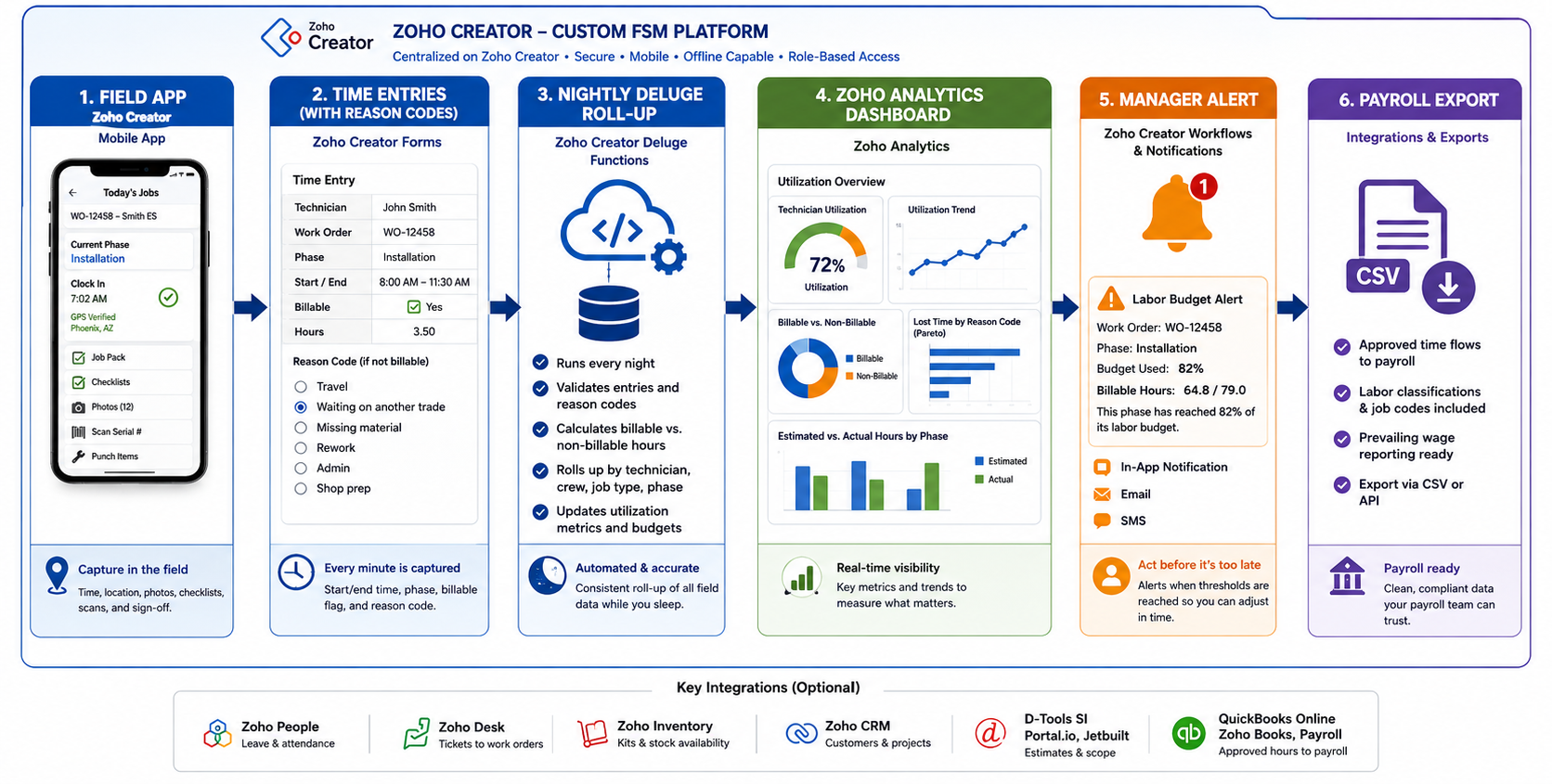
[Fig: Data flow diagram showing how field time entries in a Zoho Creator FSM roll up into utilization dashboards, alerts, and payroll exports]
Dashboards, AI, and integrations
Zoho Analytics gives managers three main views: the utilization trend, a lost-time Pareto chart, and estimated vs. actual hours by phase. An AI assistant on top of the data can answer plain-language questions, for example which techs lost the most time waiting on other trades last month. These capabilities are decision-support tools, not replacements for experienced installation managers. A system cannot make a reliable recommendation when job records are incomplete or the underlying data is inconsistent.
On the integration side, proposal systems such as D-Tools SI, Portal.io, and Jetbuilt can provide estimated labor and project scope, and approved hours can go out to QuickBooks Online or Zoho Books, or to your payroll provider. Zoho Desk tickets can become work orders without retyping, while Zoho CRM manages customer and sales records and Zoho Inventory tracks stock and equipment availability. Integration scope depends on available APIs, permissions, data structures, and the requirements of each system, and fitting into the software an integrator already runs is one of the main reasons our clients choose a Custom FSM platform using Zoho Creator.
A Week in the Installation Manager’s Seat: Before and After
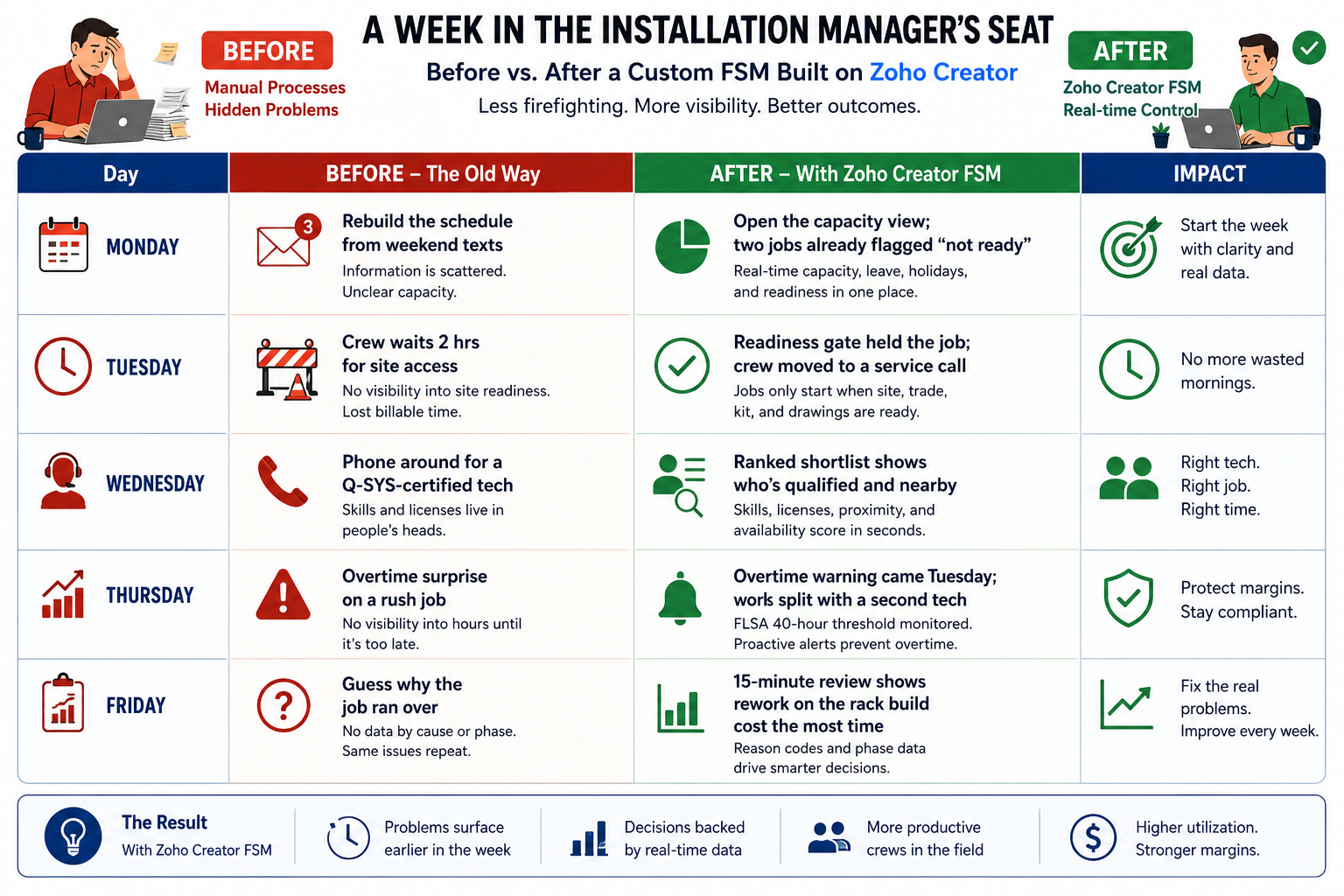
[Infographic: Before and after comparison of an AV installation manager’s week with and without a custom FSM built on Zoho Creator.]
The manager still has a full week. The difference is that problems surface on Monday instead of Thursday, with enough detail to do something about them.
Use Cases Across US AV Integrators
- Commercial multi-site rollouts. A client wants 30 meeting rooms finished across offices in three states. Standard room kits, a readiness check for each site, and time-zone-aware scheduling keep crews moving without overlap. This is a typical job for a Custom FSM for commercial AV integrators.
- Residential phased builds. A custom home moves from pre-wire to commissioning over four or five months. When the builder falls behind, every dependent work order gets flagged, so nobody drives out to an unfinished house. A Custom FSM for residential AV integrators is designed for that stop-start timeline.
- Programming and commissioning teams. Specialized programmers do not always need to travel to a site for every preparation task. Better access to project information, remote coordination, and pre-configuration can reduce unnecessary visits while preserving the need for on-site testing and commissioning.
- Filling the gaps. Utilization tends to dip between installs. Preventive maintenance visits under service contracts can be slotted into those open days.
- Sharing crews between branches. Integrators with two or three regional offices can see spare capacity in one branch and send techs to another for a week.
- Prevailing-wage projects. School districts and public buildings need hours tracked by labor classification, and having that built in saves payroll a lot of cleanup.
- Outside installers get limited access, and their hours and quality are recorded alongside your in-house crews.
All of these depend on handoffs between sales, operations, and the field that happen on time and with the right information. Our post on AV Business Workflow Automation goes deeper into how those handoffs are set up.
Benefits for Managers, Technicians, and Leadership
- Installation managers see blocked jobs, overtime risk, and labor overruns days earlier, while there’s still room to move people around.
- Technicians get complete job packs, make fewer wasted trips, and spend less time on paperwork after hours. Work gets spread more evenly across the crew, which matters a lot to the people doing it.
- Owners and operations leaders get labor margin by job and by phase. That changes how they price work, when they hire, and which projects they bid on.
Case Study: How Northstar AV Solutions Improved Technician Utilization and Field Productivity
Northstar AV Solutions, a commercial AV integration company with 18 field technicians, faced challenges with technician scheduling, incomplete job information, repeated site visits, and limited visibility into field performance.
To address these issues, the company implemented a custom Field Service Management (FSM) platform built on Zoho Creator. The platform centralized work orders, improved technician assignments based on skills and availability, enabled mobile job updates, and helped managers track estimated versus actual labor hours.
Results Achieved:
|
Performance Metric |
Before | After |
|---|---|---|
|
Technician utilization |
62% |
78% |
|
First-time job completion |
72% |
88% |
|
Return-trip rate |
28% |
12% |
| Weekly dispatch coordination | 10 hours | 4 hours |
| Labor budget overrun | 18% |
7% |
Business Impact
Following the implementation, technician utilization increased by 16 percentage points, while first-time job completion improved by 16 percentage points. Return trips decreased by 16 percentage points, and weekly dispatch coordination time dropped by 60%.
These improvements demonstrate how better scheduling, job readiness, and real-time field visibility can help AV integrators improve technician utilization and overall field productivity.
Business Outcomes and the Utilization ROI Math
We often start client conversations with a quick calculation like this one. It’s illustrative, but it shows the scale:
10 technicians × 3 recovered billable hours per week × $[your billable rate] × 48 working weeks = annual capacity recovered
At typical US billing rates, that lands in six figures. It’s billable work your current team can take on without adding headcount, and adding headcount isn’t getting easier. An AVIXA article on the NSCA 2024 State of the Industry report notes that 73% of NSCA member companies named access to qualified technical talent as their main constraint on growth. When hiring is that tight, getting more from the techs you already have is the most practical way to grow.
Other gains build up over a few months:
- Proposals get more accurate once actual phase hours feed back into estimating.
- Overtime spending drops because it’s flagged in advance.
- Callbacks fall as readiness improves.
- Retention often improves, since techs prefer predictable weeks.
Compare each of these against the baseline you recorded at the start.
When Does a Custom FSM on Zoho Creator Make Sense for Your AVSI?
People searching for the best field service management platform usually hope for one name. In our experience, the right choice depends on your size and how your jobs run.
A custom build is likely worth it if:
- You have eight or more field techs, or several crews
- Your jobs run through multiple install phases
- You use D-Tools, Portal.io, or Jetbuilt and re-enter data elsewhere
- You work across states or on prevailing-wage projects
- Your team has built workarounds to make your current tool fit
You can probably wait if you’re a small shop doing mostly straightforward service calls. A ready-made tool like Zoho FSM costs less to start with, and you can move to a custom platform later. We’ll tell you honestly if that’s the better fit.
Implementation Roadmap: 30-60-90 Days
Here’s how a typical phased rollout looks for us. Exact timing depends on scope and integrations.
- Days 1–30: Map and model. We interview installation managers and crew leads, document how jobs move today, design the data model, and set up a pilot crew.
- Days 31–60: Build the core. Readiness gates, dispatch logic, the mobile app, and priority integrations like D-Tools and QuickBooks. The pilot crew logs real jobs, and their feedback shapes the fixes.
- Days 61–90: Measure and expand. Dashboards and alerts go live, remaining crews come on board, and we run the first full utilization review together.
The point of phasing is to get usable data early, rather than waiting months for one big launch. If you’re comparing a Custom FSM implementation company in the USA, ask how they handle the pilot phase. It tells you a lot about how the rest of the project will go.
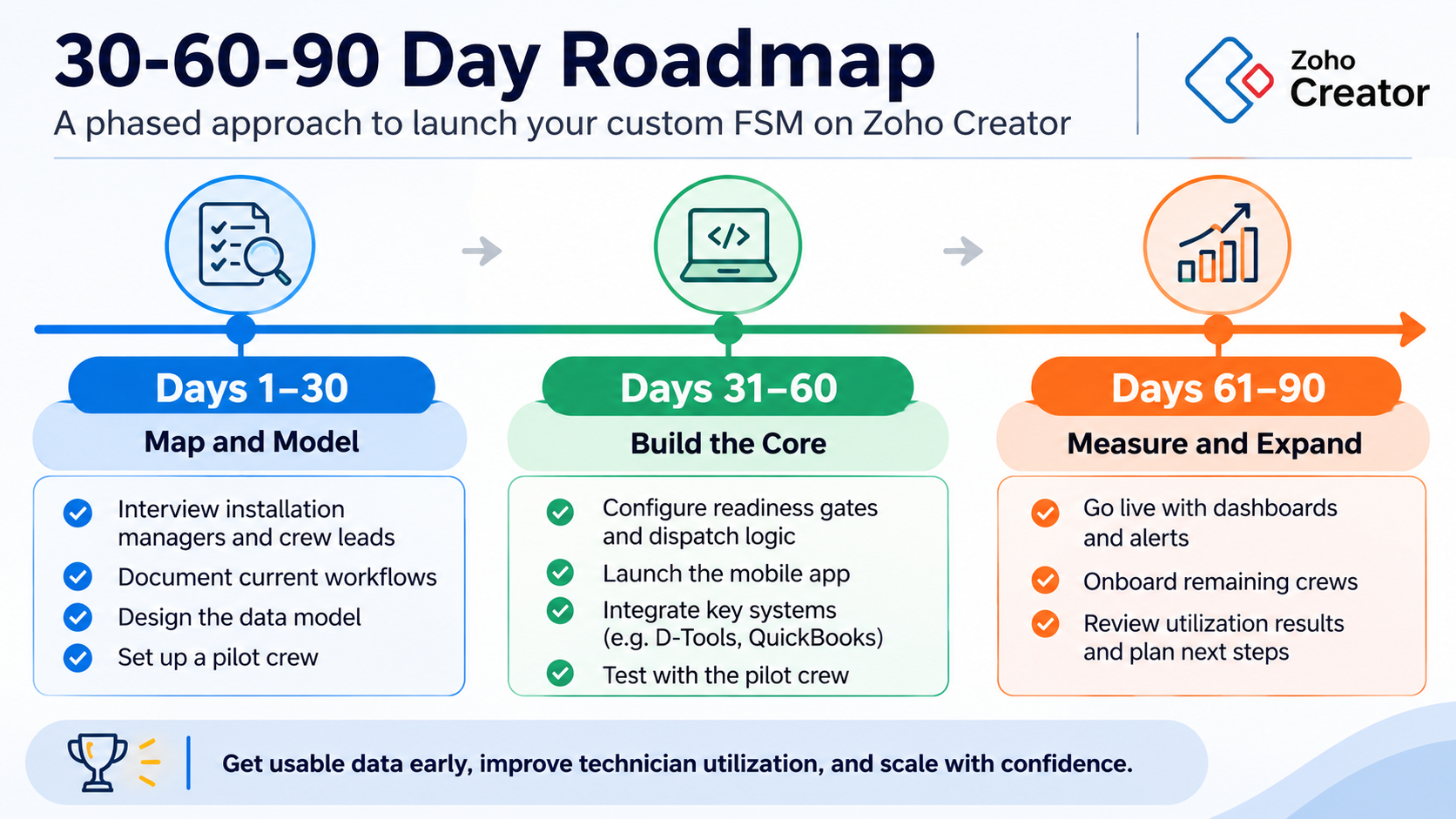
[Fig: Timeline showing a typical 30-60-90 day phased rollout of a custom field service management platform on Zoho Creator]
Conclusion
Improving technician utilization is not about keeping every employee occupied for every minute of the day. It is about giving technicians the right information, equipment, schedule, and support to complete their work without unnecessary delays.
For AV installation managers, the starting point is practical: establish a baseline for utilization and return visits, introduce a readiness check before dispatch, and review actual labor against project estimates every week.
As operations grow, connected scheduling, work orders, inventory, and mobile field reporting can make these activities easier to manage. The right custom field service management software helps managers see where time is going and where operational changes can make a difference.
The objective is straightforward: better use of the existing workforce, more predictable installation work, and fewer hours lost to avoidable problems.
Why OfficeHub Tech Is the Right Partner for Custom Field Service Management
At OfficeHub Tech, we build Custom Field Service Management platforms on Zoho Creator for AV System Integrators across the United States. As an Authorized Zoho Consulting and Implementation Partner, we bring deep Zoho Creator development experience, and we spend our days working inside AV workflows.
That means we already understand how your jobs move through pre-wire, rack builds, trim-out, and commissioning. We design around US requirements like FLSA overtime, prevailing-wage projects, state low-voltage licensing, and crews spread across time zones. We also connect the platform to the tools AVSIs already rely on: D-Tools, Portal.io, Jetbuilt, QuickBooks, and the wider Zoho suite, including CRM, Books, Inventory, Desk, and Projects.
Our team also builds for where the industry is heading. We created an open-source D-Tools MCP connector that links D-Tools proposal data with AI tools, so integrators can ask questions of their own project data in plain language.
Every project starts with a conversation with your installation managers and crew leads about how jobs actually run today. From there we map requirements, build the workflow, connect your systems, test it with one crew, and expand once it’s working. Training and ongoing support are part of the engagement, not an add-on. Some clients want a full customized Turnkey Workflow Solution. Others need a single module, like dispatch or time capture. Our Zoho Creator development services for AVSI cover everything from architecture to go-live. If you’re looking for a TurnKey business solution for AVSI in USA, OfficeHub helps AV integrators build a Customized Workflow Solution that connects their existing systems, field teams, and business operations.
Start Your Custom FSM on Zoho Creator
If your current scheduling, work order, and technician management processes rely on disconnected tools, start by reviewing the workflows that consume the most time. A focused assessment can help identify where automation and integration would make the biggest operational difference.