##Quick Answer
AI automation can help AV businesses move beyond standalone AI tools by connecting AI capabilities directly to the workflows and software they already use. n8n and Make workflow Template approaches can connect AI models with CRM, quoting, project management, field service, accounting, email, and calendar systems, allowing AI to interpret information while automation platforms trigger actions, apply business rules, and move data between applications.
For AV system integrators, this creates a practical path toward automating processes such as lead qualification, requirement extraction, proposal preparation, project updates, technician workflows, customer communication, and financial follow-ups. n8n and Make can both support these workflows, with the right choice depending on integration complexity, customization requirements, existing software, and technical resources.
##Key Takeaways
- AI becomes more valuable when it is connected to the business processes where AV teams actually work.
- n8n and Make can act as the orchestration layer between AI models and business applications.
- AI can interpret emails, meeting notes, documents, service requests, and other unstructured information.
- Automation can then use that information to update CRM records, create tasks, trigger notifications, schedule activities, or initiate the next business process.
- n8n can be particularly useful for API-heavy and highly customized automation architectures, while Make provides a visual scenario-based approach to connecting applications and AI services.
- Critical activities such as pricing, BOM approval, financial transactions, and technical decisions should include validation and appropriate human oversight.
- Successful AI automation requires more than connecting an AI model. Data quality, APIs, workflow logic, security, monitoring, and governance are equally important.
Why AV Businesses Need AI-Powered Workflow Automation
AV and low voltage system integrators already depend on multiple digital systems to run their businesses. A typical operation may involve CRM, quoting and BOM tools, project management software, accounting platforms, email, calendars, field-service applications, and customer communication channels.
The challenge is that valuable information does not always arrive in a structured format.
A customer may send an email describing a conference-room requirement. A salesperson may record project requirements in meeting notes. A technician may submit a free-text service report. A project manager may communicate status updates through email or chat.
Traditional automation can move structured data from one system to another, but it does not necessarily understand what those unstructured inputs mean.
This is where AI-powered workflow automation for AV system integrators becomes valuable.
AI can analyze data, categorize information, identify key details, create concise summaries, and produce relevant responses. Automation platforms such as n8n and Make can then process the AI output and connect it to the next business action, creating more efficient AV workflow automation across connected systems.
Instead of:
Email → Employee reads → Employee enters data → Employee sends notification → Employee updates CRM
an AI-enabled workflow can become:
Email → AI interprets → Automation validates → CRM updated → Team notified → Next action triggered
The objective is not to remove people from every process. It is to remove unnecessary manual handoffs so AV professionals can spend more time on design, consultation, engineering, project delivery, and customer relationships.
How AI, n8n, and Make Work Together
AI automation works best when every technology has a clearly defined role.
AI Provides the Intelligence
With AI models, businesses can process and understand information that goes beyond what simple rule-based automation can handle.
For an AV business, AI can:
- Extract customer requirements from emails
- Classify incoming enquiries
- Summarize discovery meetings
- Identify project requirements
- Analyze service requests
- Generate communication drafts
- Extract information from documents
- Identify missing information
- Assist with prioritization
n8n and Make Orchestrate the Process
The automation platform connects the AI capability to the rest of the workflow.
It can:
- Receive an event
- Retrieve information from another application
- Send selected data to an AI model
- Process the AI response
- Apply business rules
- Route information to different paths
- Update another application
- Create tasks or notifications
- Wait for approval
- Trigger the next workflow
n8n describes itself as a workflow automation platform that combines AI capabilities with business-process automation and can connect applications through APIs while transforming their data.
Business Systems Execute the Work
The final action typically occurs inside an existing business application, such as:
- CRM
- Quoting or BOM software
- Project management system
- Field-service platform
- Accounting software
- Calendar
- Customer portal
This creates a simple operating model:
AI provides intelligence → n8n/Make orchestrate → APIs and connectors move data → business systems execute the action.
How n8n Powers AI Automation for AV Businesses
n8n can be used as an orchestration layer for AI-powered workflows where an AV business needs multiple applications, custom logic, API calls, and conditional processes to work together.
Its workflow architecture can combine triggers, application nodes, AI capabilities, data transformation, conditions, and custom logic within one process. n8n also provides capabilities for inspecting workflow executions and monitoring AI behavior, which can be important when AI is being introduced into business-critical processes.
For an AV system integrator, this could look like:
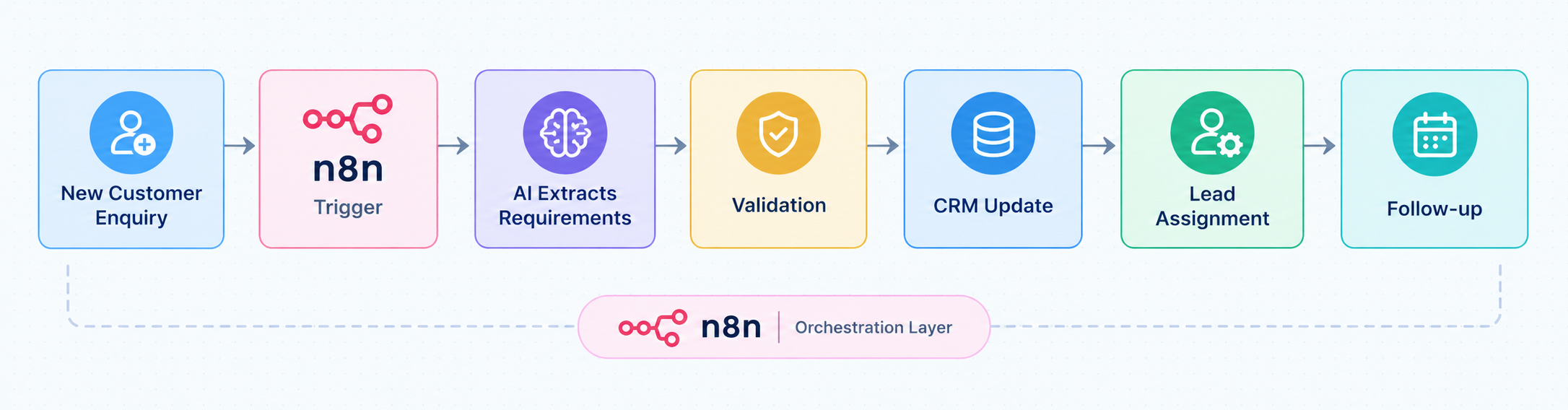
n8n becomes particularly useful when the workflow needs more than a simple trigger-and-action sequence.
For example, suppose a customer sends:
“We need a video conferencing system for four meeting rooms at our new office. The project should start next month.”
An AI step could identify:
- Project type
- Number of rooms
- Technology requirement
- Location
- Expected timeline
n8n could then validate the information, map it to the CRM’s fields, create or update the opportunity, assign it to the appropriate salesperson, and trigger a scheduling workflow.
The AI interprets the message. The workflow determines what should happen next.
How Make Powers AI Automation for AV Businesses
Make provides a visual environment for connecting applications, AI services, data, and business processes through multi-step scenarios.
Instead of treating AI as a standalone tool, an AV business can use Make to connect an AI capability with the applications already involved in its day-to-day operations. Scenarios can include application modules, filters, routers, data transformation, and API connections to determine how information moves from one system to another.
A simple AI-enabled Make scenario might look like:
Website enquiry → Make → AI classification → CRM → Sales notification → Follow-up task
This approach can help AV businesses connect AI-powered processing with existing sales, project management, customer service, and administrative workflows.
Practical Make Example for an AV Business:
Consider an AV system integrator that receives project documents such as equipment lists, scope documents, or customer requirement files during the sales and project-planning process.
Make can help automate the handling of this information by connecting document sources with AI services and downstream business applications.
The workflow could work as follows:
Step 1. Document received: Make detects when a new project document is added to the connected application or storage system.
Step 2. AI processes the document: Relevant content is sent to an AI service to identify predefined information such as equipment requirements, room quantities, project details, or important dates.
Step 3. Information is validated: Make applies filters or predefined business rules to check whether the extracted information meets the required conditions.
Step 4. Business records are updated: The structured information can then be passed to the relevant CRM, project management, or other business application.
Step 5. Tasks and notifications are triggered: Make can create tasks for the project team and notify the appropriate employees when further action is required.
As the business process evolves, additional applications, routers, filters, approval steps, and APIs can be added to the scenario.
This illustrates the role of Make clearly: AI performs the interpretation or processing, while Make connects that capability to the wider business workflow.
For AV businesses, this can turn individual AI capabilities into repeatable processes that connect sales, project operations, service, and administrative systems.
AI Automation Use Cases Across the AV Business Lifecycle
The biggest opportunity is not automating one isolated task. It is connecting AI to the processes that run throughout the AV business lifecycle.
1 AI-Powered Lead Intake
AV enquiries frequently arrive through websites, email, forms, and other communication channels.
AI can extract:
- Customer information
- Project type
- Technology requirements
- Number of rooms
- Location
- Expected timeline
- Other requirements
n8n or Make can then:
- Validate the extracted information.
- Check for duplicate CRM records.
- Create or update the lead.
- Assign the lead to a salesperson.
- Trigger a follow-up.
- Schedule the next action.
This reduces manual CRM entry while creating a structured starting point for the sales process.
2 AI-Assisted Lead Qualification
Once a lead is captured, AI can help analyze information such as:
- Project scope
- Budget information
- Timeline
- Location
- Requirements
- Customer intent
The automation platform can apply predefined qualification rules and update the CRM accordingly.
For example:
Lead data → AI analysis → qualification rules → CRM stage → owner assignment → notification
AI can assist sales teams, but the qualification criteria should remain controlled by the business.
3 AI-Powered Sales Follow-Ups
Sales teams spend significant time reading messages, reviewing previous conversations, and preparing follow-ups.
AI automation can help by:
- Summarizing conversations
- Identifying customer questions
- Drafting follow-up emails
- Detecting unanswered messages
- Updating CRM activities
- Scheduling reminders
A salesperson can review an AI-generated message before sending it, while the automation platform ensures that the follow-up process is not forgotten.
4 AI-Assisted AV Requirements and Quoting
Quoting is one of the areas where AV businesses can benefit from combining AI with structured automation.
AI can help extract requirements from:
- Customer emails
- Discovery notes
- Meeting transcripts
- Documents
- Project briefs
The information can then be structured into fields such as:
- Room
- Device type
- Quantity
- Requirement
- Installation scope
- Customer preference
n8n or Make can pass the structured information to the appropriate quoting or product system through an API or connector.
However, AI should not be treated as an unrestricted source of truth for product compatibility, pricing, margins, or final BOM approval. Those decisions should rely on validated product data and appropriate human review.
Pre-Built n8n Automation Templates for AV Integrators:
For AV businesses looking to accelerate AI automation implementation, pre-built n8n workflow templates can provide a practical starting point instead of building every process from scratch. OfficeHub Tech offers customized n8n automation templates designed around common AV business processes.
For residential AV system integrators, an AI-powered lead-to-quote workflow can capture enquiries, extract project requirements, structure customer information, and pass the data into CRM and quoting workflows.
For commercial AV system integrators, an AI-powered project and field-service workflow can connect CRM, project management, scheduling, and service systems while using AI to summarize project information, classify service requests, and structure technician updates.
These pre-built workflows can be adapted to an AV company’s existing applications, business rules, approval processes, and data requirements, providing a reusable foundation for AI-powered automation.
5 AI-Powered Project Management
Once a project moves into delivery, AI can help transform project information into actionable work.
For example:
Project meeting → AI summary → action items → automation → project tasks → team notifications
AI can assist with:
- Meeting summaries
- Action-item extraction
- Project-status summaries
- Identifying missing information
- Drafting stakeholder updates
- Highlighting potential exceptions
The automation layer can then update the project system, assign tasks, and notify the relevant team members.
6 AI Automation for Field Service
Field-service operations generate large amounts of information that may arrive as free text.
A customer might report:
“The presentation is not appearing on the display in Conference Room 3.”
AI can classify the request and identify useful information such as:
- Equipment issue
- Location
- Room
- Service category
- Urgency indicators
n8n or Make can then create or update a work order, notify the appropriate team, and initiate the next service process.
AI can also assist with:
- Technician note summarization
- Service-request classification
- Installation documentation
- Completion summaries
- Customer notifications
- Work-order categorization
This is particularly relevant for AV businesses managing a large volume of installation and service activity.
7 AI-Powered Customer Support
AI automation can help customer-service teams process incoming requests more consistently.
A workflow could:
- Receive an email or support request.
- Classify the request using AI.
- Identify the customer and related project.
- Create or update a support record.
- Generate a response draft.
- Route technical issues to the appropriate team.
- Notify the customer when the status changes.
This allows AI to handle information processing while employees retain control over customer-facing decisions.
8 AI Automation for Invoicing and Payment Follow-Ups
Finance workflows can also benefit from automation.
AI can assist with:
- Understanding invoice-related emails
- Classifying payment queries
- Drafting payment reminders
- Summarizing customer correspondence
- Identifying messages requiring finance-team attention
n8n or Make can connect accounting data with CRM and communication systems.
For example:
Invoice status → scheduled check → payment status → automation → reminder draft → approval → customer communication
Financial records and payment actions should remain governed by validated accounting data and appropriate approval rules.
Technical Architecture Behind AI Automation With n8n and Make
A reliable AI workflow requires more than connecting an LLM to an application. It needs an architecture that controls how information enters the workflow, how AI processes it, and how the resulting action is validated.
Recommended architecture:
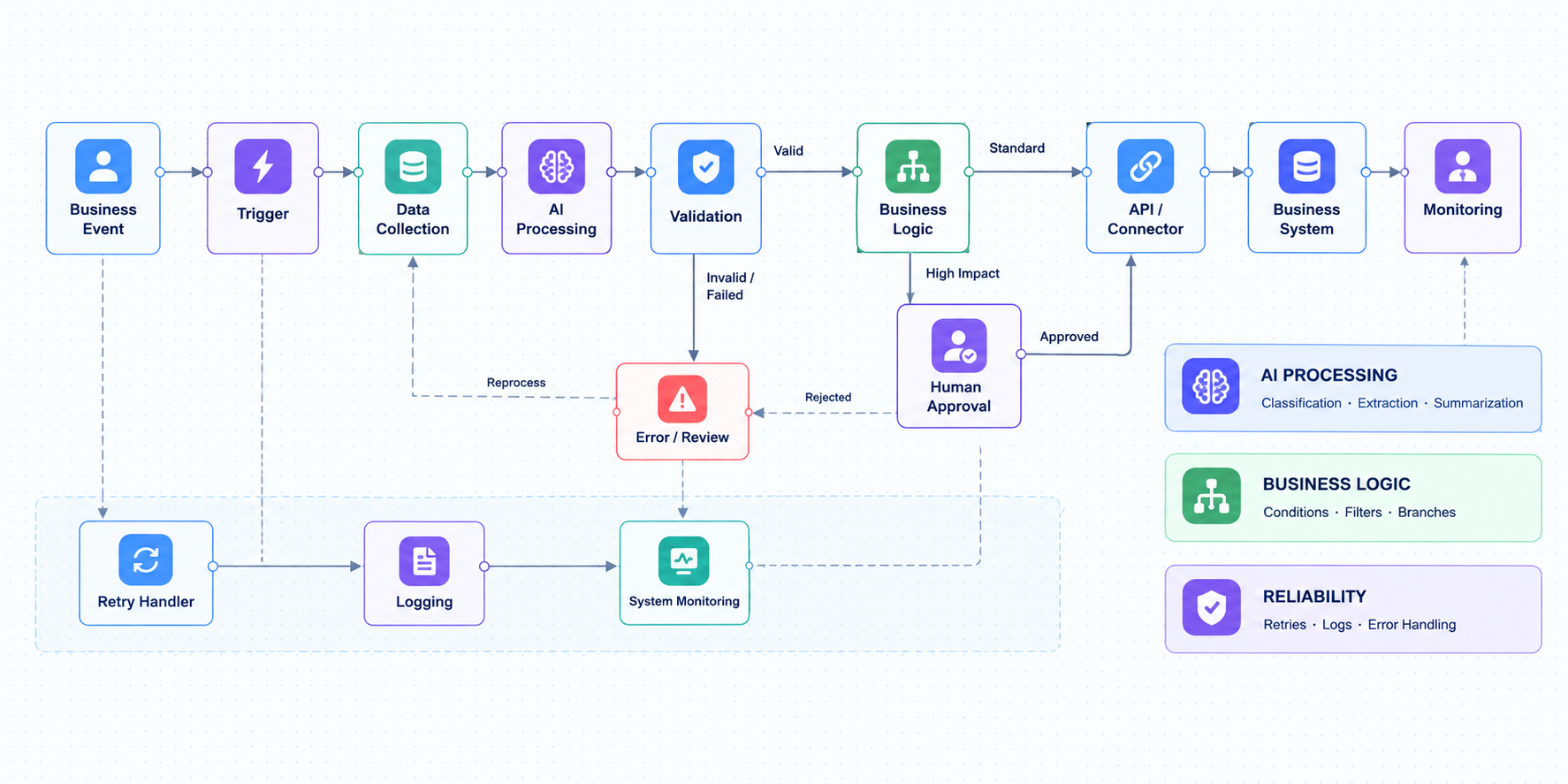
Technical Architecture Behind AI Automation With n8n and Make
Triggers
Workflows can start from:
- Webhooks
- New emails
- CRM events
- Application updates
- Scheduled jobs
- Form submissions
AI Processing
The AI layer may perform:
- Classification
- Information extraction
- Summarization
- Content generation
- Requirement analysis
- Structured output generation
Data and API Layer
This layer connects the workflow to business applications using:
- REST APIs
- Webhooks
- OAuth
- API keys
- JSON payloads
- Field mapping
- Data transformation
Business Logic
The workflow then determines what happens next using:
- Conditions
- Filters
- Routers
- Branches
- Loops
- Variables
- Sub-workflows
Validation and Human Oversight
For higher-impact activities, introduce an approval stage before the workflow performs an irreversible action.
For example:
AI prepares proposal information → validation → sales approval → proposal sent
rather than:
AI prepares proposal information → proposal automatically sent
Reliability and Monitoring
Production workflows should also account for:
- API failures
- AI errors
- Invalid data
- Duplicate records
- Authentication failures
- Rate limits
- Retry requirements
- Logging
- Workflow monitoring
n8n’s AI tooling, for example, emphasizes execution visibility, evaluation, monitoring, and the ability to inspect how AI outputs move through workflows.
n8n vs Make: What Should an AV Business Consider?
Both platforms can support AI-powered automation, so the decision should be based on the business environment rather than a universal “better platform” claim.
| Requirement | What an AV Business Should Evaluate |
| AI integration | Required AI models and services |
| AV software | APIs, webhooks, and available connectors |
| Workflow complexity | Branching, conditions, and multi-step logic |
| Customization | Custom code and business rules |
| Data processing | Mapping, transformation, and validation |
| Development | Technical expertise available internally |
| Scalability | Workflow volume and architecture |
| Security | Credential and access management |
| Monitoring | Execution visibility and error tracking |
| Existing ecosystem | Compatibility with current applications |
When n8n May Be a Suitable Choice
n8n can be a strong fit when an AV organization needs:
- Complex API orchestration
- Custom business logic
- Advanced workflow branching
- Data transformation
- Greater technical control
- Highly customized integrations
- More control over workflow architecture
Its documentation specifically highlights API connectivity, customizable workflows, and options including cloud and self-hosted deployments.
When Make May Be a Suitable Choice
Make can be a practical option when an organization prioritizes:
- Visual scenario development
- Rapid application integration
- Low-code workflow configuration
- Standard SaaS integrations
- Easy visualization of multi-step processes
The decision should ultimately reflect the AV company’s applications, technical requirements, workflow complexity, and internal capabilities.
Designing Safe and Reliable AI Automation for AV Operations
AI automation should be designed around business controls rather than maximum autonomy.
Several principles are particularly important for AV companies.
Do Not Automate a Broken Process
If a sales or project workflow is already inconsistent, adding AI may simply make the inconsistency happen faster.
First standardize the process, then automate it.
Use AI Where Interpretation Is Valuable
AI is useful for tasks involving:
- Unstructured text
- Classification
- Summarization
- Information extraction
- Natural-language communication
Deterministic rules may be preferable for simple calculations and fixed business conditions.
Validate Critical Outputs
Human review or deterministic validation should be considered for:
- Product selection
- BOMs
- Pricing
- Discounts
- Customer commitments
- Financial actions
- Technical decisions
Monitor the Workflow
A production AI workflow should have visibility into:
- What triggered it
- What data was processed
- What the AI returned
- What business rules were applied
- What action was taken
- Whether an error occurred
This makes troubleshooting and continuous improvement much easier.
How to Start AI Automation in an AV Business
AV companies do not need to automate every process at once.
A structured approach is more practical.
Step 1: Map Existing Processes
Identify repetitive work across:
- Sales
- Quoting
- Projects
- Field service
- Customer support
- Finance
Look for manual data entry, repetitive emails, duplicated information, and slow handoffs.
Step 2: Identify AI-Suitable Activities
Prioritize processes involving:
- Unstructured information
- Classification
- Extraction
- Summarization
- Repetitive communication
Step 3: Identify Automation Requirements
For every candidate process, determine:
- What starts the workflow?
- What data is required?
- Where does the data need to go?
- Which systems need to communicate?
- What rules must be applied?
- Where is human approval required?
Step 4: Select the Automation Platform
Evaluate n8n or Make against the existing software stack and technical requirements.
Step 5: Add Validation and Monitoring
Do not treat a workflow as complete simply because it runs successfully once. Test edge cases, failures, incorrect AI responses, duplicate records, and API errors.
Step 6: Measure and Expand
Once a workflow demonstrates measurable value, replicate the architecture across other business processes.
What Recent AI Research Means for AV Businesses
The broader business environment shows why workflow-level AI automation deserves attention.
McKinsey’s State of AI 2025 survey found that 88% of respondents said their organizations were regularly using AI in at least one business function, yet only about one-third reported that their organizations had begun scaling AI programs across the enterprise. The same research found that 62% were at least experimenting with AI agents, while 23% reported scaling an agentic AI system somewhere in the enterprise. McKinsey also identified workflow redesign as an important factor in capturing greater value from AI.
For AV businesses, the implication is practical: adopting an AI tool is different from embedding AI into the workflows that connect sales, operations, project delivery, field service, and finance.
Example: Connecting an AV Business From Enquiry to Delivery With AI
Consider an AV integrator receiving a new customer enquiry.
The process could work as follows:
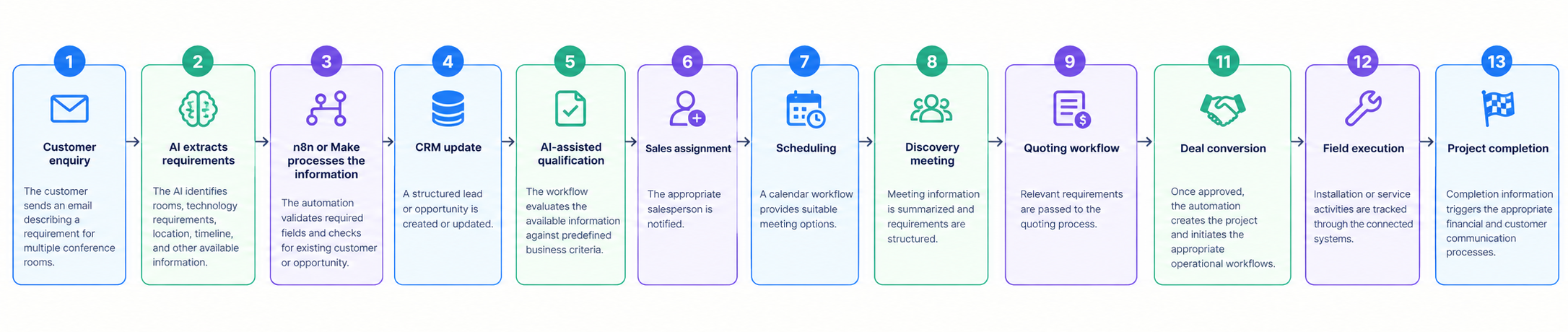
This example illustrates the real value of AI automation: AI does not operate separately from the business. It becomes an integral part of the business process.
Measuring the Business Impact of AI Automation
AI automation should be measured using business outcomes rather than simply counting how many workflows were created.
Sales
Measure:
- Lead response time
- Lead processing time
- Follow-up completion
- Lead-to-meeting time
Quoting
Measure:
- Requirement-processing time
- Quote preparation time
- Number of revisions
- Data-entry errors
Project Management
Measure:
- Project setup time
- Task creation time
- Reporting effort
- Handoff delays
Field Service
Measure:
- Work-order processing time
- Response time
- Administrative workload
- Service communication time
Finance
Measure:
- Invoice processing time
- Payment follow-up consistency
- Payment-cycle metrics
Overall Automation
Track:
- Manual hours saved
- Processing time
- Error frequency
- Workflow volume
- Cost per process
- Exception rate
The best approach is to establish a baseline before automation and compare it with performance after implementation.
Conclusion
AI automation for AV businesses is not simply about adding an AI chatbot or connecting an AI model to one application. The larger opportunity comes from connecting AI intelligence with the workflows that move information through the business.
n8n and Make can provide that orchestration layer.
AI can interpret a customer enquiry, summarize a meeting, classify a service request, or extract project requirements. n8n or Make can then take that information, apply business logic, communicate with APIs, update business systems, and trigger the next step.
For AV system integrators, this can create connected workflows across sales, quoting, project management, field service, customer support, and finance.
A more effective strategy is to automate processes selectively rather than automating everything. It is to identify high-value processes, standardize them, introduce AI where interpretation adds value, establish validation and human oversight, and measure the resulting business impact.
When designed properly, AI + workflow automation + connected AV business systems can turn isolated AI capabilities into repeatable operational processes that are easier to manage, measure, and scale.
How OfficeHub Tech Helps AV Businesses Implement AI-Powered Automation
AI automation delivers the most value when built around an AV business’s actual processes. Beyond connecting an AI model to an application, reliable automation requires workflow architecture, integrations, business rules, validation, and appropriate human approval points.
OfficeHub Tech helps AV system integrators build connected automation environments using n8n, Make, Zoho, APIs, and multi-software integrations. We integrate AI into workflows across sales, quoting, project management, field service, customer support, and finance.
Our solutions include:
- AI-powered workflow automation for repetitive AV processes
- n8n and Make workflows connecting AI with business applications
- Zoho integrations across CRM, Projects, Books, Desk, and other systems
- Anything-to-anything integrations using APIs, webhooks, and custom data mapping
- AI-assisted lead processing, qualification, communication, and follow-ups
- AI-enabled project and field-service workflows
- Quoting and requirement-processing automation with validation and approval controls
- Custom workflow logic, monitoring, and error handling for reliable automation
As a certified Zoho Implementation, n8n and Make workflow Automation Expert, OfficeHub Tech combines business-process automation with AV industry workflow knowledge. Our experience across CRM, quoting, project management, field service, accounting, and communication systems enables us to design automation architectures that connect the complete AV business lifecycle.
OfficeHub Tech is actively involved in leading AV communities, including CEDIA, AVIXA, InfoComm, ISO Expo, and Lightapalooza. We help AV companies move from AI experiments to connected, scalable business automation.
Explore Top AV Business Workflow Implementation and Consultation Provider in USA to learn more about OfficeHub Tech’s approach to building customized automation solutions for AV businesses.