##Quick Answer
AV system integrators can use Agentic AI to interact with authorized D-Tools data through natural-language prompts instead of manually navigating multiple records and screens. An AI model can interpret the user’s intent, use an integration layer such as the Model Context Protocol (MCP) to access defined tools and resources, retrieve relevant D-Tools information, and return a contextual response. Depending on the tools and permissions implemented, the same architecture can also support approved business actions and workflow orchestration.
The goal is not to replace D-Tools. It is to make the information and business capabilities already available through D-Tools more accessible, conversational, and actionable.
##Key Takeaways
- D-Tools can serve as the operational data foundation for an Agentic AI workflow.
- Agentic AI allows AV teams to ask questions about projects, proposals, products, drawings, service information, and other connected records using natural language.
- MCP can provide a standardized interface between an AI application and external tools or data sources.
- A well-designed Agentic AI workflow can interpret intent, select appropriate tools, retrieve relevant information, and return a contextual response.
- The strongest use cases focus on repetitive information retrieval, cross-record context, business intelligence, and approved workflow execution.
- AI access should be controlled through authentication, permissions, validation, and clearly defined tool boundaries.
- D-Tools remains the underlying business system; Agentic AI becomes an intelligent interaction and orchestration layer around it.
Why D-Tools Data Is Valuable for Agentic AI in AV Integration
AV system integrators already work with large volumes of structured business and project information. D-Tools can contain information related to projects, proposals, products, drawings, integrations, service tickets, and other operational records.
The challenge is not necessarily the absence of data. It is how quickly a team can find, understand, and use the right information.
A project manager may need to understand the current state of a project. A salesperson may need proposal or equipment information. A service team may need project context before responding to a customer. An operations manager may need information from several related records before making a decision.
Traditionally, these tasks require users to navigate through software interfaces, search for records, open individual sections, apply filters, and manually connect the information.
Agentic AI introduces a different interaction model.
Instead of asking employees to remember where information is stored, the system can allow them to describe what they need in natural language.
For example:
“Show me all the information currently available about the Convention Center AV project.”
The AI can interpret the request and, where the required tools and permissions are available, retrieve relevant project information through the connected D-Tools environment.
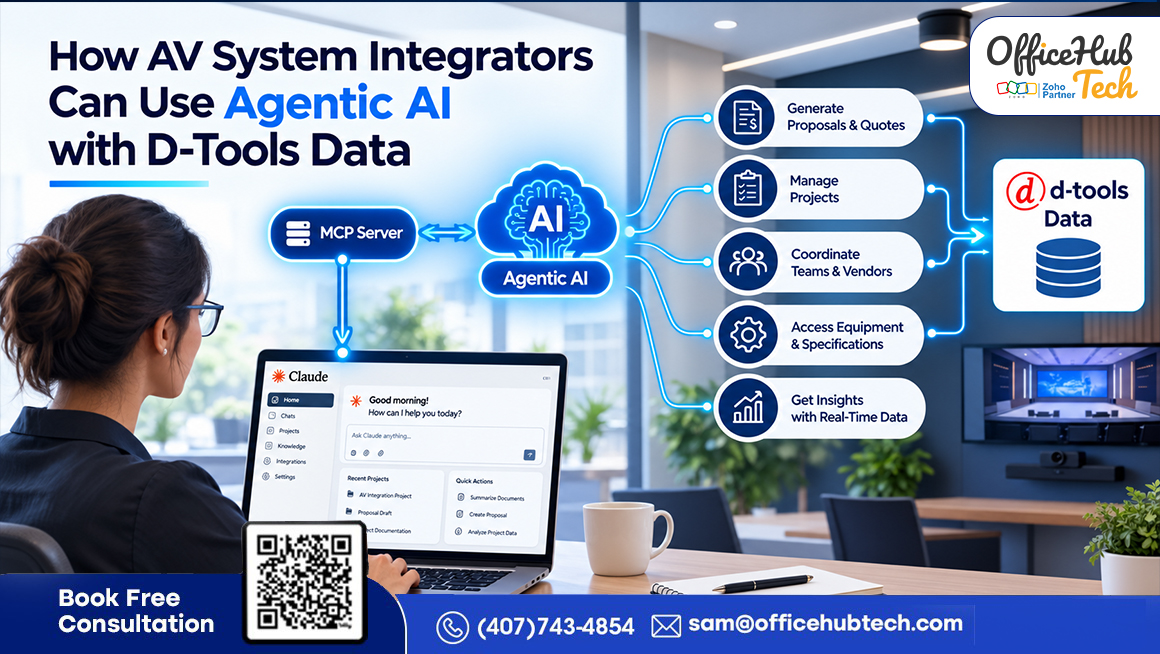
This is where the combination of Claude AI and D-Tools, connected through an MCP server, becomes particularly useful. Claude can provide the reasoning and natural-language interaction layer, while MCP provides a standardized mechanism for connecting the AI application with external tools and resources. Anthropic defines MCP as an open protocol designed to standardize the way applications deliver contextual information to large language models.
The result is a shift from manually searching business data toward conversational interaction with business data.
From D-Tools Records to an Agentic AI Layer
A conventional software interface is designed around menus, modules, fields, filters, and predefined workflows. Users need to know how the application is organized before they can efficiently retrieve information.
Agentic AI changes the interaction layer.
A user can communicate an objective rather than a sequence of clicks.
Traditional interaction
Open system → Search record → Navigate modules → Review information → Combine context → Make a decision
Agentic interaction
Ask → Interpret → Select tools → Retrieve context → Reason → Respond or perform an approved action
The key difference is that Agentic AI goes beyond functioning as a chatbot layered over D-Tools.
An agentic process can be configured to assess:
- What the user is asking for
- Which information is relevant
- Which tool or resource should be used
- What additional information may be required
- How retrieved information should be organized
- Whether an approved action should be performed
For example, a request such as:
“Give me the project information and related equipment details for the conference room installation.”
may require the system to identify the project, retrieve the associated equipment information, organize the result, and present it in a useful format.
The intelligence comes from the combination of natural-language understanding, tool access, business context, and controlled execution.
What D-Tools Data Can Agentic AI Work With?
The exact capabilities depend on the D-Tools environment, APIs, MCP tools, permissions, and implementation. However, an Agentic AI architecture can be designed around several important categories of AV business information.
Project Data
Project-related information can provide the foundation for contextual queries.
Potential interactions include:
- Retrieve project information
- Search projects
- Review project status
- Identify associated records
- Summarize available project information
Proposal and Sales Data
Proposal information can help AI answer questions about the commercial and technical scope of an opportunity or project.
Potential queries include:
- What is included in this proposal?
- Which products are associated with the proposal?
- What information is available for this project?
- Which proposal is associated with a particular project?
Product and Equipment Data
AV projects depend heavily on product and equipment information.
An AI agent can potentially support queries such as:
- Find a specific product
- Retrieve product information
- Identify equipment associated with a project
- Search products based on defined criteria
- Summarize equipment information
Drawings and Project Documentation
Where the implementation exposes the relevant information, Agentic AI can help users locate or retrieve project-related documentation and drawing information.
For example:
“What drawings are associated with this project?”
The AI can use an appropriate tool or resource to retrieve available information rather than requiring the user to manually navigate through the system.
Service Information
Service-related records can provide valuable context for ongoing customer relationships and project support.
Potential questions include:
- Which service tickets are associated with this project?
- What service information is available?
- What project context should the service team review?
The important principle is that the AI should only claim access to information that the connected tools actually expose.
Technical Architecture: How Agentic AI Connects With D-Tools Data
This is the core technical section of the article. The architecture should remain centralized here rather than repeating separate flowcharts throughout the blog.
Recommended Architecture:
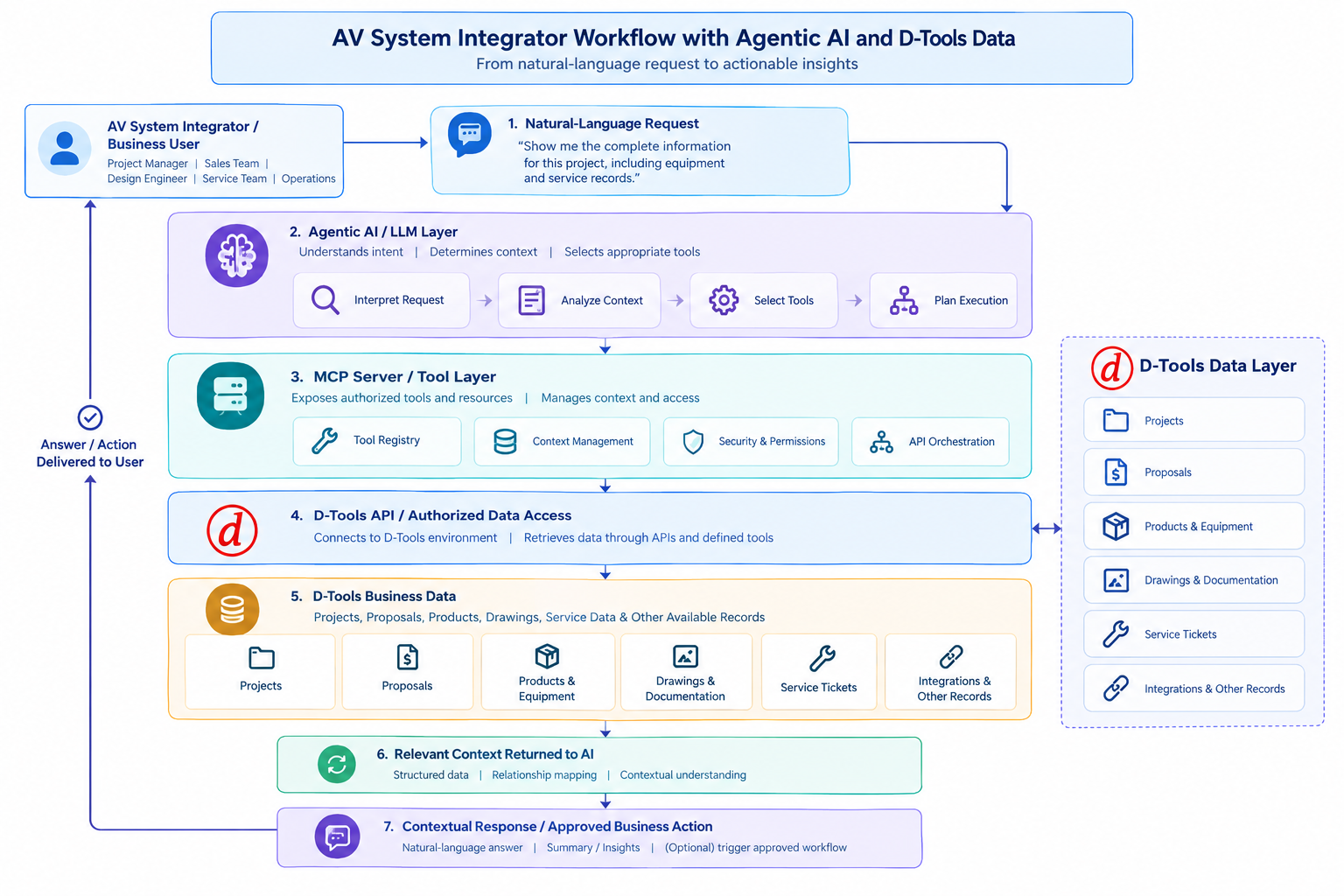
Agentic AI connects natural-language requests with authorized D-Tools data through an MCP-based tool and integration layer.
1. User Interaction Layer
The process starts with a natural-language request.
Instead of navigating through multiple screens, an AV team member can describe the information or outcome they need.
For example:
“Retrieve the relevant records for the Convention Center AV project, including equipment information and service history.”
2. Agentic AI Layer
The AI model interprets the request and identifies the user’s intent.
It determines what information is needed and which available tools may be relevant.
This is different from a simple keyword search because the AI can interpret the meaning and context of the request.
3. MCP Server and Tools
MCP establishes a consistent framework that enables AI applications to connect with and use external tools and data sources. The MCP specification describes tools as executable functions that models can use to retrieve information or perform actions, while resources provide structured contextual information.
In a D-Tools implementation, the MCP server can expose carefully defined capabilities such as project retrieval, product lookup, or other supported business operations.
The supplied OfficeHub Tech implementation reference follows this model: MCP tools and resources are defined within the server, with D-Tools integration and business logic exposed for Claude to consume.
4. API and D-Tools Layer
The MCP tools communicate with the underlying D-Tools environment through the appropriate integration mechanism.
D-Tools remains responsible for its underlying business records.
AI is not responsible for maintaining the system’s official records.
Instead:
D-Tools stores and manages business information.
MCP exposes approved capabilities.
The AI interprets intent and orchestrates interaction with those capabilities.
5. Response and Action Layer
Once the relevant information is retrieved, the AI can organize it into a human-readable response.
Where write-enabled tools and appropriate authorization exist, the architecture can also support approved actions.
This distinction is important. A read-only implementation is fundamentally different from an agent that can modify records or trigger workflows.
How AV Integrators Can Use Agentic AI With D-Tools
The practical value of the architecture becomes clearer when mapped to everyday AV workflows.
1. Retrieve Complete Project Information
One of the simplest use cases is conversational project retrieval.
Instead of manually opening several project sections, an integrator could ask:
- “Show me the available information for the Convention Center AV project.” Based on the connected systems and tools, the response can consolidate relevant project data, including project details, proposals, equipment records, drawings, integrations, and service-related information. This provides a comprehensive view of the project in one place, reducing the need to search across multiple systems and manually compile the information.
- Example in Action: “Show me the available information for the Convention Center AV project, including associated proposals and service records.” The agent orchestrates a multi-record lookup through the MCP server, assembling project details, attached equipment, and ticket histories into a single cohesive response.
2. Ask Questions About Proposals
Sales and project teams frequently need to understand what has been proposed. An Agentic AI interface could support questions such as:
- What products are included in this proposal?
- Which proposal is associated with this project?
- What information is available for this proposal?
- Give me a summary of the proposal information available in D-Tools. The AI becomes a conversational access point for authorized proposal information.
- Example in Action: “What products are included in the proposal for the downtown boardroom installation?” The AI analyzes D-Tools proposal and product data, identifies key commercial and technical details, and delivers relevant answers without requiring manual data filtering.
3. Retrieve Equipment Information
Equipment data is central to AV system integration. Instead of manually searching product records, users could ask:
- “What equipment is associated with this project?”
- or: “Collect the available details about the display equipment associated with the project. The AI can access the relevant tool to retrieve the required information and organize it in a clear, easily accessible format.”
- Example in Action: “Find the available information for the display equipment in this project.” The model queries the product and equipment data layer through defined tools to surface specific model numbers, quantities, and specifications.
4. Connect Project and Service Context
Service teams often need project history before responding to a customer. A conversational workflow could allow a technician or service coordinator to ask:
- “Retrieve the service information associated with this project.” When connected tools contain the relevant records, the AI can gather and present the information in a unified response instead of requiring users to locate each record individually.
- Example in Action: “Show me the service information associated with this project before I respond to the customer.” The system cross-references project identifiers with active or historical service tickets, giving the support team immediate operational context.
5. Make Cross-Record Questions Easier
The biggest opportunity comes when users need information that spans multiple records. For example:
- “Provide the customer’s project information, related equipment details, proposal data, and any available service history.” Rather than requiring users to search for each piece of information individually, the agentic layer can orchestrate multiple tool calls, gather the relevant data, and consolidate it into a single, structured response. This illustrates how Agentic AI can provide a more intelligent and coordinated experience than a conventional search interface.
- Example in Action: “Give me the project details, associated equipment, proposal information, and available service records for this customer in one view.” Instead of treating each record as a separate search task, the agent coordinates multiple tool calls across different D-Tools data categories to synthesize a unified overview
Agentic AI Use Cases Across the AV Integration Lifecycle
D-Tools data can support different teams throughout the project lifecycle when the appropriate tools and permissions are available.
Sales:
Sales teams can use conversational access to:
- Retrieve project information
- Review proposal data
- Search product information
- Understand available project context
Design and Engineering:
Design teams can potentially use AI to:
- Retrieve equipment information
- Locate project-related records
- Access available drawing context
- Search project information
Project Management:
Project managers can ask for:
- Project information
- Associated records
- Equipment details
- Service information
- Operational summaries
Installation and Field Operations:
Field teams can benefit from faster access to project and equipment context without requiring extensive navigation through business systems.
Service:
Service teams can use conversational queries to retrieve available project and service context before working on a customer request.
Leadership and Operations:
Managers can use AI-assisted queries to obtain business information and summaries without relying on manually prepared reports for every question.
What Makes an Agentic D-Tools Workflow Different From Traditional Automation?
Traditional automation usually follows a predefined path.
For example:
Trigger → Condition → Action → Result
Agentic workflows introduce an additional intelligence layer.
The system can interpret the user’s objective and determine which available tools are relevant to the request.
This does not mean the AI should have unrestricted freedom.
In a production environment, agentic behavior should operate inside clearly defined boundaries.
A useful model is:
User Intent → AI Reasoning → Approved Tool → Validated Operation → Result
This gives AV integrators the flexibility of natural-language interaction while retaining control over the underlying business operations.
Anthropic’s guidance on agent tools emphasizes that tools should have clear purposes, well-defined inputs and outputs, and be evaluated against realistic tasks.
Example in Action:
- Traditional Automation: If a project status changes to “Installation Complete,” a rigid script might automatically trigger a static email survey to the client. It cannot adapt if a key piece of equipment was actually backordered.
- Agentic Workflow: An agent can interpret the user’s broader objective—such as checking why an installation is delayed—reason across project notes, equipment status, and service tickets, and decide whether to alert the project manager or draft a customized update.
Security, Permissions, and Governance Matter
Connecting AI to business data should never mean giving an AI unrestricted access to every system or record.
A production-ready D-Tools Agentic AI implementation should consider:
Authentication
The connected environment must be accessible exclusively to authorized users and applications.
Role-Based Access
AI operations should be governed by the permissions assigned to the relevant user and workflow.
Tool-Level Controls
Each MCP tool should have a defined purpose and clearly understood inputs and outputs.
Read vs. Write Permissions
Read-only information retrieval is different from creating, updating, or deleting business records.
Write-enabled actions should require stronger controls and, where appropriate, human approval.
Validation
Inputs should be validated before being passed to business systems.
Auditability
Organizations should be able to understand what tools were invoked and what actions were performed.
Controlled Context
AI systems should be provided only with the data necessary to complete a specific task. This becomes especially important when AI agents have access to multiple tools, applications, and connected systems.
Anthropic’s research on agent tool design emphasizes clear tool boundaries, meaningful context, and evaluation of real-world tasks rather than simply exposing every available API endpoint.
How to Start Implementing Agentic AI With D-Tools
AV system integrators do not need to begin by trying to automate every business process. A phased implementation is generally easier to evaluate and govern.
Step 1: Identify High-Value Questions
Start with repetitive information requests.
Examples:
- “Show me this project’s information.”
- “Find the equipment associated with this project.”
- “Retrieve proposal information.”
- “Show related service records.”
Step 2: Identify Available D-Tools Data
Determine which records, APIs, and data points can actually be accessed.
Step 3: Define AI Tools
Create focused tools around meaningful business functions rather than exposing an unstructured collection of API endpoints.
Step 4: Build the MCP Layer
Connect the AI model to the approved tools and resources through MCP.
Step 5: Add Permissions and Validation
Establish authentication, authorization, input validation, logging, and read/write boundaries.
Step 6: Test Real AV Scenarios
Evaluate the system using realistic project, proposal, equipment, and service questions.
Step 7: Expand Into Workflow Execution
After information retrieval is reliable, organizations can evaluate more advanced workflows such as approved record updates, notifications, project actions, or multi-system orchestration.
This approach reduces implementation risk while allowing the AI environment to evolve around actual business requirements.
Recent D-Tools Development: Live AI Access to Integrator Data
The direction of D-Tools itself makes this topic particularly relevant.
In its 2026 industry update, D-Tools reported the introduction of AI Assisted Workflows, including AI Quote Assist and Ask D-Tools, designed to work with an integrator’s business data. D-Tools also announced a Read-Only MCP Server that connects Claude and ChatGPT directly to an integrator’s D-Tools Cloud account. According to D-Tools, this allows teams to build dashboards and custom queries using their own live business data.
This development is significant because it demonstrates that AI access to AV integration business data is moving beyond generic chat interfaces toward direct interaction with operational information.
D-Tools describes its 2026 AI capabilities as working with inputs such as meeting transcripts, emails, voice memos, and notes, while its MCP capability extends AI access to live account data.
For AV system integrators, the implication is straightforward: the opportunity is not simply to add an AI chatbot to an existing system. It is to create controlled AI interactions around the business data that already drives projects, proposals, equipment, operations, and service.
Turning D-Tools Data Into an Intelligent AV Operations Layer
D-Tools data becomes significantly more useful when employees can interact with it according to business intent.
Consider the difference between these two models.
Traditional Model
Store → Search → Navigate → Review → Interpret → Act
Agentic Model
Ask → Understand → Retrieve → Reason → Respond → Act
The second model does not eliminate the underlying business system.
Instead, it creates a new interaction layer around it.
For an AV system integrator, this can eventually extend beyond D-Tools alone.
An Agentic AI architecture can be designed to connect approved capabilities across systems such as:
- CRM
- Project management
- Inventory
- Finance
- Field service
- Document management
- Proposal platforms
This creates an opportunity to move from isolated application workflows toward intelligent orchestration across the AV technology stack.
However, every additional system increases the importance of permissions, tool design, data consistency, validation, and governance.
The objective should therefore be controlled orchestration, not unrestricted automation.
Conclusion:
D-Tools can hold valuable information across projects, proposals, products, drawings, service records, and other operational areas. But the value of that information depends partly on how easily teams can access and use it.
Agentic AI introduces a conversational layer that can change this interaction.
Instead of manually navigating through records, AV system integrators can use natural-language requests to retrieve authorized information, connect related context, and support business workflows.
With an MCP-based architecture, the AI can interact with defined tools and resources while D-Tools continues to serve as the underlying business-data environment. The AI provides reasoning and orchestration; the connected tools provide controlled access to business capabilities.
The most practical starting point is not unrestricted automation. It is identifying high-value information requests, exposing focused tools, implementing appropriate permissions, validating results, and gradually expanding into more advanced workflows.
As AI capabilities and D-Tools integrations continue to evolve, D-Tools Agentic AI for AV system integrators can become an important way to turn existing business information into a more conversational and actionable operational resource.
Building D-Tools Agentic AI Workflows With OfficeHub Tech
Implementing Agentic AI for an AV system integrator requires more than connecting an LLM to an API. The solution needs to reflect how AV businesses actually manage projects, proposals, products, service operations, and connected software. OfficeHub Tech focuses on designing AI-driven workflows around real AV business processes, including D-Tools integrations, MCP-based architectures, AI assistants, workflow orchestration, and multi-software connectivity.
The implementation can be tailored around:
- D-Tools data access
- MCP server architecture
- Claude and other AI models
- Custom AI tools
- Project information retrieval
- Product and equipment intelligence
- Workflow orchestration
- CRM and project-system integration
- Field-service workflows
- Inventory and operational systems
- Permission and validation controls
To bridge operational silos further, OfficeHub Tech also deploys specialized engineering capabilities across the US market, including Custom Field Service Management tools, anything-to-anything multi-software integrations, ready-to-deploy n8n automation templates, and custom low-voltage software connectors.
For AV system integrators looking to move from isolated automation toward connected AI-driven operations, Custom Agentic AI Implementation Services and Turnkey workflow solutions for AVSI in USA can provide a foundation for designing workflows around the organization’s existing software environment.
The goal is not to force an AV business into a new operating model. It is to make the existing technology stack more intelligent, connected, and accessible while maintaining appropriate control over business data and actions.
Explore how Claude AI and MCP bridge natural-language intent with live D-Tools environments—streamlining everything from project creation and product lookups to advanced multi-step workflows.
Get a detailed look at the live demonstration & underlying architecture, presented by Kuzhalan (Sam K) Samydurai, CEO of OfficeHub Tech:
Ready to experience intelligent AV operations firsthand?
Explore and deploy the open-source “D-Tools MCP” project today: