##Quick Answer:
Zoho Creator fits into a legacy ERP architecture as an application and workflow extension layer that adds new business capabilities without requiring changes to the ERP’s core functionality. It connects with the existing ERP through APIs, webhooks, middleware, database connectors, or secure file transfers, depending on the available integration interfaces.
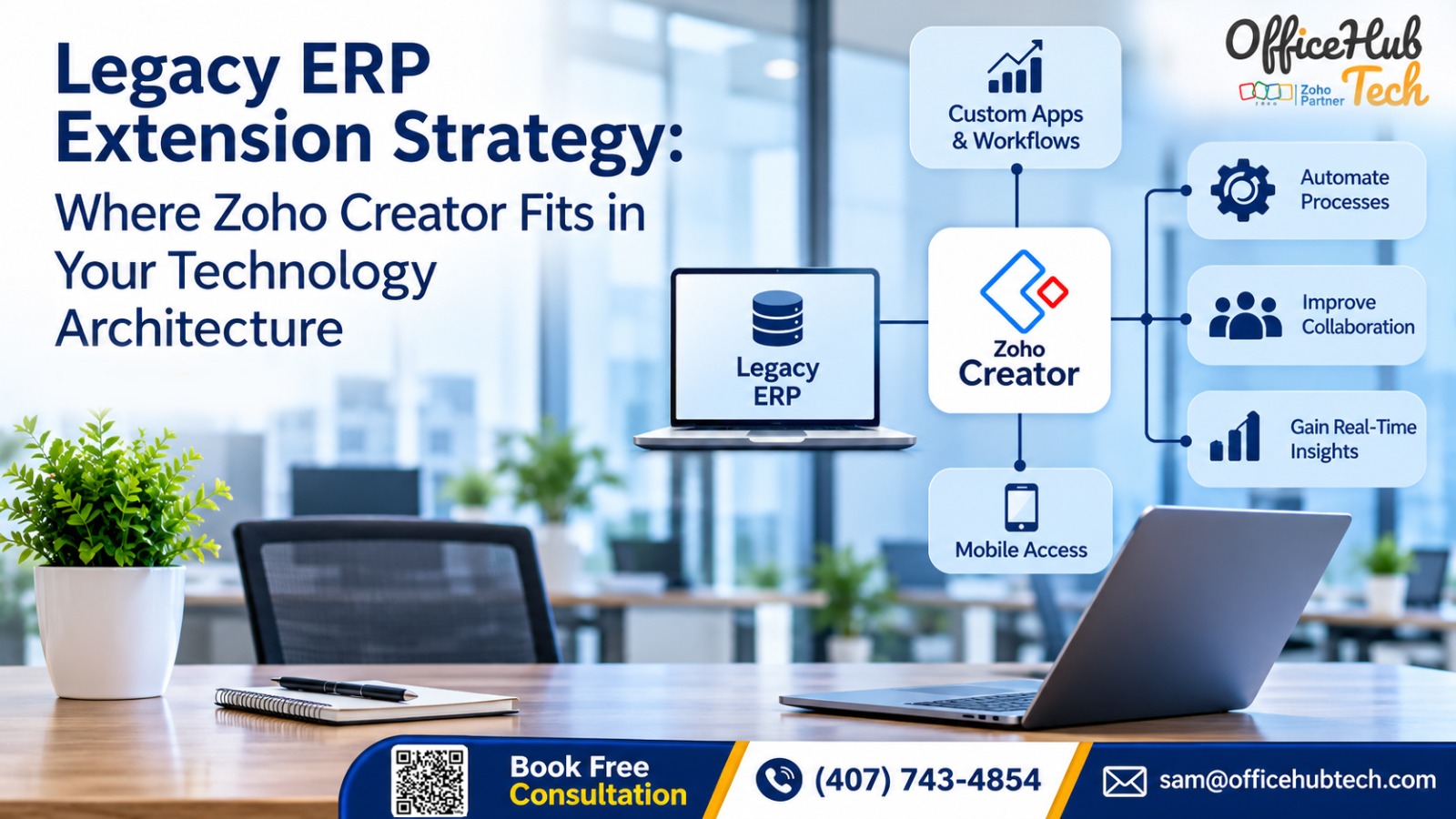
While the ERP continues managing its established functions, such as finance, inventory, procurement, and core transactions, Zoho Creator provides custom applications, workflow automation, dashboards, portals, and mobile interfaces around those processes.
This approach allows businesses to extend existing technology investments, address operational gaps, and introduce new capabilities without immediately replacing their legacy ERP.
##Key Takeaways:
- Zoho Creator acts as an application extension layer alongside the existing ERP rather than replacing its core functionality.
- Integration methods such as REST APIs, SOAP services, middleware, and webhooks enable controlled communication between systems.
- Custom applications and workflows help address business requirements that existing ERP modules may not adequately support.
- Data ownership, synchronization rules, authentication, and access control are essential for maintaining a reliable extension architecture.
- A modular approach allows businesses to introduce new applications and integrations as operational requirements evolve.
- Legacy ERP extension provides a practical route toward modernization while preserving established business processes.
Extending Legacy ERP Capabilities Without Replacing Core Systems
Legacy ERP systems continue to support important business operations, from financial transactions and inventory management to procurement and production. However, as business requirements evolve, the applications and workflows surrounding these systems often need more flexibility than the original ERP architecture provides.
Replacing the entire platform is not always necessary to address these gaps. A more practical approach can involve Zoho Creator – A low code platform for ERP Extension, where an additional application layer connects with the existing ERP and introduces capabilities that its current modules may not adequately support.
The important consideration is understanding where this extension layer belongs, how it communicates with the ERP, and which responsibilities each system should retain.
Why Legacy ERP Systems Need an Extension Layer
An ERP platform is generally designed to manage established business functions through connected modules. Over time, however, businesses introduce new departments, approval requirements, customer-facing processes, and external applications. These requirements can expose limitations in the original architecture.
Where Traditional ERP Architecture Starts Showing Limitations
One common issue is the difficulty of accommodating new requirements without modifying existing ERP modules. A business might need a custom vendor portal, a specialized approval process, or an application for field employees. If the ERP does not provide the required functionality, additional customization or separate development may become necessary.
Other limitations can include:
- Rigid workflows that are difficult to adapt to changing business processes.
- Limited mobile interfaces for employees working outside the office.
- Dependence on custom development for department-specific requirements.
- Restricted integration options with newer cloud applications.
- Limited visibility across disconnected operational processes.
- Increasing maintenance complexity as customizations accumulate.
These limitations do not necessarily mean that the ERP has stopped serving its purpose. They indicate that the surrounding application architecture may need to evolve.
The Gap Between Core ERP Functions and Modern Business Requirements
Consider a company using its ERP to manage procurement, inventory, accounting, and manufacturing. These functions may work reliably, but employees might still depend on spreadsheets and emails to manage purchase approvals, quality inspections, or internal requests.
The distinction is between managing core transactions and supporting the additional processes surrounding those transactions.
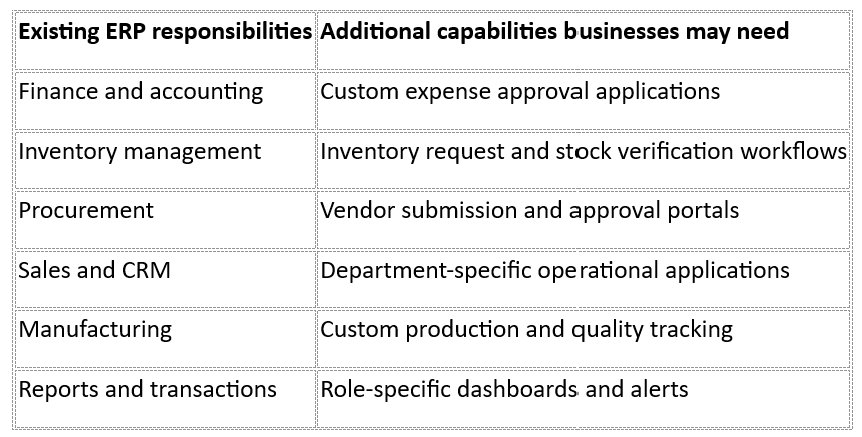
An extension layer helps bridge this gap without unnecessarily rebuilding existing ERP functionality.
Why Extending the ERP Can Be More Practical Than Modifying Its Core
Modifying an established ERP can introduce dependencies between custom code, existing modules, and future upgrades. Every additional customization may require testing to ensure that existing processes continue working correctly.
An extension-first approach separates additional application requirements from the ERP’s core responsibilities. Businesses can develop new interfaces and workflows independently while maintaining controlled communication with the existing platform.
This does not eliminate integration or maintenance responsibilities. It changes where additional functionality is developed and how it interacts with the core system.
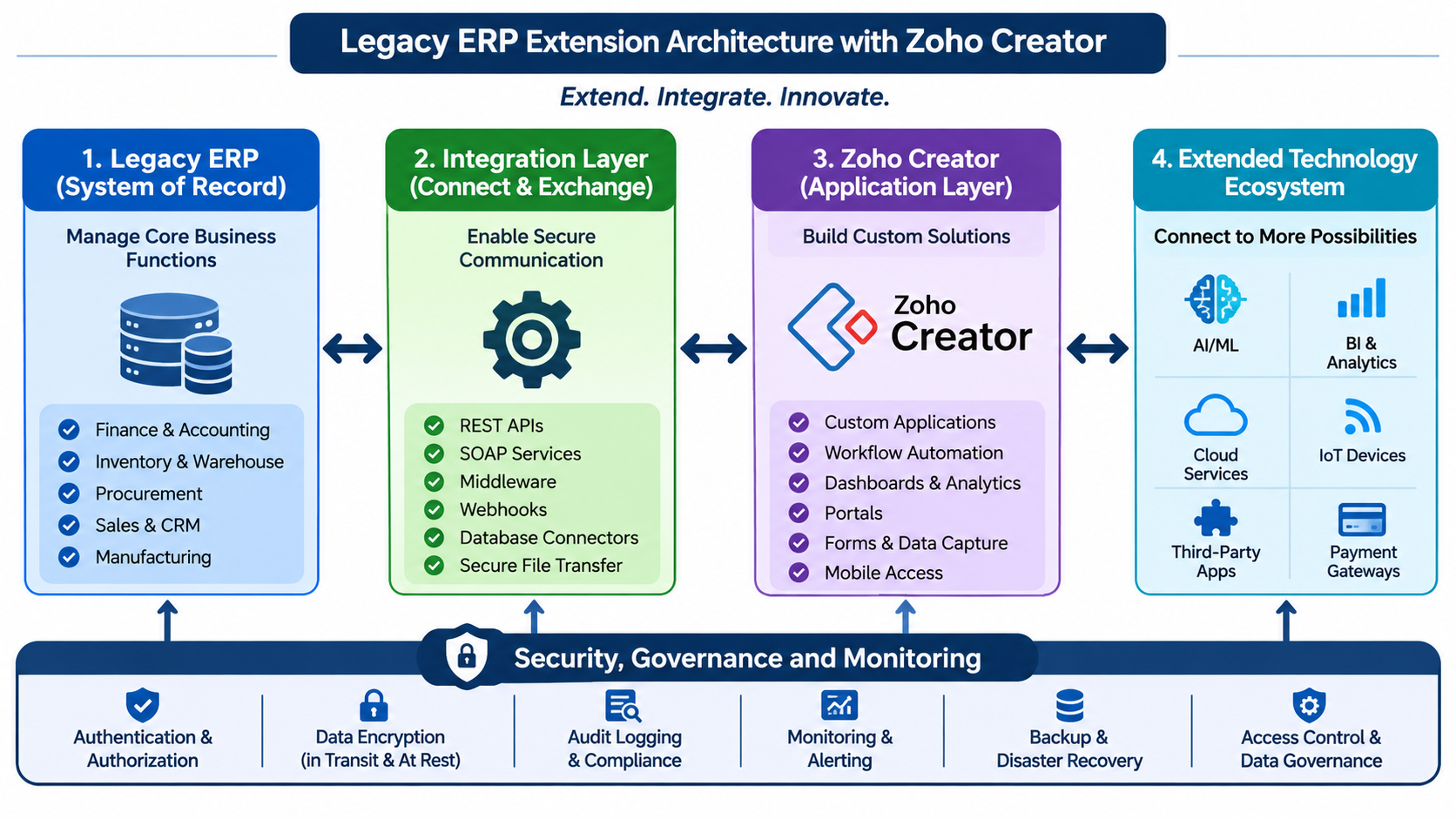
Understanding the Legacy ERP Extension Architecture: Where Each Technology Fits
A successful extension strategy depends on defining the responsibilities of each technology layer. Zoho Creator should not simply be connected to an ERP without first establishing how information moves between the systems and which application owns each business record.
Layer 1: Legacy ERP – The Existing System of Record
The existing ERP continues managing the business functions for which it is already configured.
Depending on the organization, these may include:
- Finance and accounting transactions.
- Inventory and warehouse records.
- Procurement and purchase orders.
- Sales and customer records.
- Manufacturing and production data.
- Core reports and operational transactions.
For example, if the ERP owns inventory quantities, Creator should not independently maintain a competing inventory balance. Instead, Creator can retrieve approved inventory information, present it through a custom interface, and submit authorized requests that the ERP processes.
This separation helps preserve data ownership and reduces the risk of conflicting records.
Layer 2: Integration Layer – Connecting the ERP with Zoho Creator
The integration layer manages communication between the ERP and the Creator applications. It determines how information is retrieved, transformed, validated, and transmitted.
Different integration methods may be appropriate depending on the ERP’s capabilities.
REST APIs: Allow applications to exchange structured information through HTTP requests and responses. They are useful for retrieving records, submitting updates, and connecting custom applications.
SOAP services: Support communication with ERP platforms that expose SOAP-based web services. This can be relevant when working with established enterprise environments.
Middleware: Provides an intermediary layer for data transformation, routing, orchestration, and communication between multiple systems.
Webhooks: Trigger communication when specific events occur, such as a new record, an approval, or a status change.
Database connectors: Provide access to approved database interfaces where supported and permitted by the ERP architecture.
Secure file transfer: Supports scheduled exchange of structured files when direct API connectivity is unavailable or unsuitable.
The integration layer should also handle authentication, field mapping, validation, error responses, retries, and logging. These responsibilities become particularly important when multiple systems participate in the same business process.
Layer 3: Zoho Creator – The Application and Workflow Extension Layer
Zoho Creator provides the additional application capabilities that businesses need around their existing ERP.
Rather than changing the ERP’s core transaction engine, organizations can develop custom applications to support processes that require different interfaces, approvals, or user interactions.
Its application layer can include:
Custom applications: Develop business-specific applications for internal requests, production tracking, quality inspections, asset management, and other operational requirements.
Workflow automation: Configure approval sequences, notifications, task assignments, and status transitions around existing business processes.
Dashboards and analytics: Present relevant operational information through customized views for employees, managers, and other authorized users.
Portals: Provide controlled interfaces for employees, customers, suppliers, and vendors.
Forms and data capture: Collect structured information and validate submissions before sending relevant data to connected systems.
Mobile applications: Give employees access to supported applications and workflows while working remotely or in the field.
The key architectural principle is that Creator manages additional application-level functionality while the ERP retains responsibility for its designated core records and transactions.
Layer 4: Modular and Scalable Technology Ecosystem
The extension architecture does not have to stop at the ERP and Creator connection.
Depending on business requirements, Creator applications can also participate in a broader technology ecosystem involving:
- AI and machine learning services.
- Business intelligence and analytics platforms.
- Cloud storage services such as AWS and Microsoft Azure.
- IoT devices and connected equipment.
- Third-party business applications.
- Payment gateways.
- Email, SMS, and communication platforms.
For instance, an organization might use an IoT-connected application to collect equipment information, Creator to manage service workflows, and the ERP to process the relevant financial or inventory transactions.
Each additional connection should have a defined purpose, data boundary, and security requirement.
End-to-End Security, Governance, and Monitoring
Security should be designed across the entire architecture rather than treated as a final deployment step.
The implementation should establish authentication and authorization rules, role-based access, appropriate encryption, audit logging, and monitoring for integration activity.
It should also define which users and applications can read, create, or update particular records. Backup and disaster recovery arrangements should account for the systems involved and their respective responsibilities.
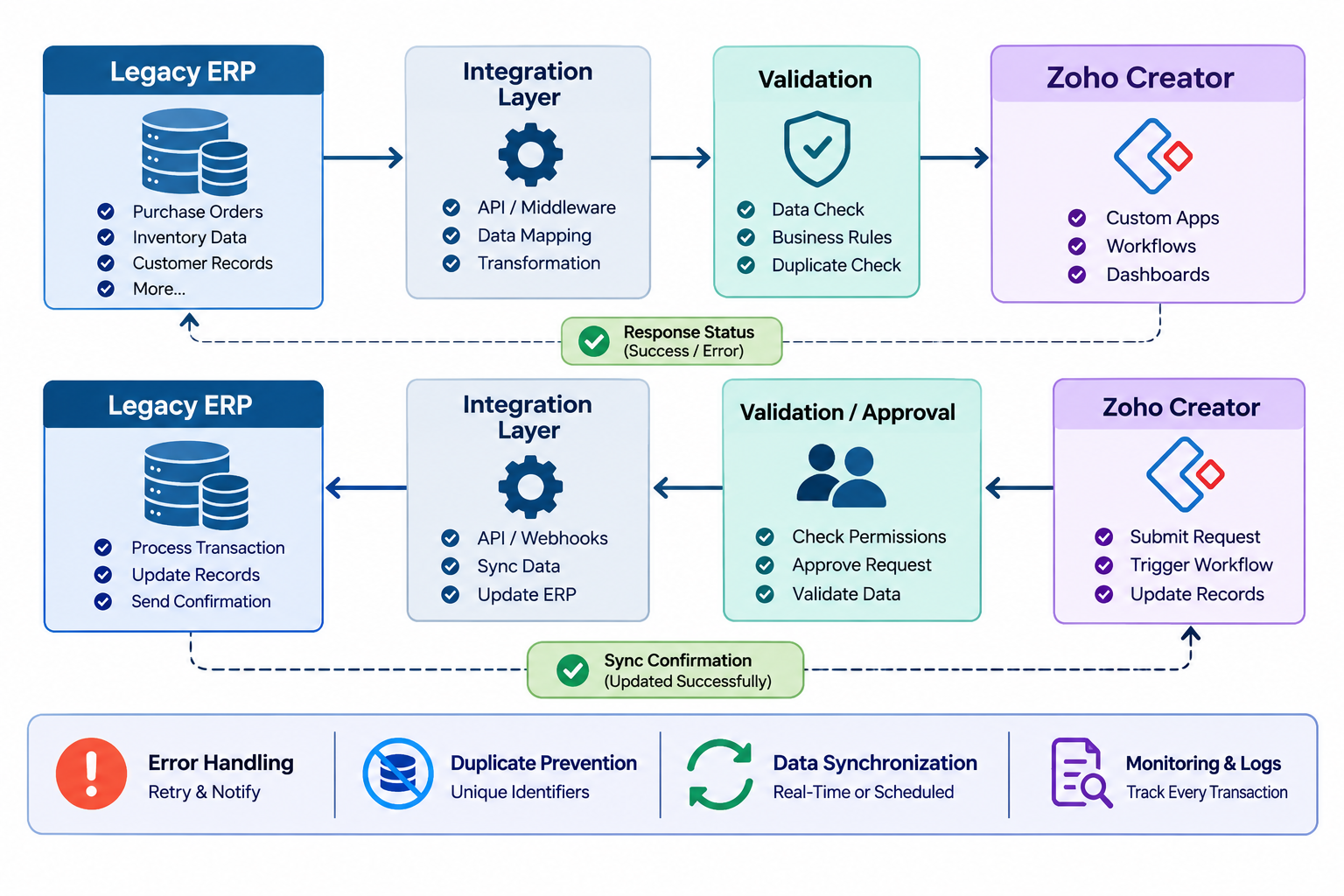
How Data Flows Between Legacy ERP and Zoho Creator
Connecting two applications is only part of an extension strategy. The more important question is how data moves between them and how each system handles the information it receives.
ERP-to-Creator Data Exchange
Consider a business where purchase orders are managed in the ERP, but employees need a separate application to review procurement information and coordinate internal approvals.
The process could work as follows:
- A purchase order is created in the ERP.
- An integration process retrieves the required purchase order information through an approved interface.
- The integration layer maps and validates the data.
- The information becomes available in the relevant Creator application.
- Authorized employees review the record and perform additional operational activities.
The Creator application can provide a more focused interface without requiring employees to navigate every ERP module.
Creator-to-ERP Data Exchange
The reverse direction is equally important.
Suppose an employee submits an inventory request through a Creator application.
The application validates the submitted information and checks the required approval conditions. Once the request is authorized, the integration layer transmits the relevant information to the ERP.
The ERP then processes the transaction according to its existing business rules and returns a response. Creator can display the resulting status to the employee.
The ERP remains responsible for processing the actual inventory transaction.
Real-Time vs Scheduled Synchronization
Not every integration requires immediate synchronization. The appropriate method depends on how quickly information must be available and how frequently the underlying data changes.
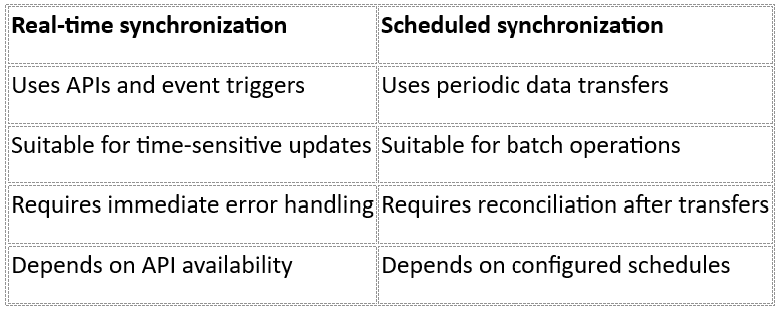
For example, a purchase approval status may require near-real-time updates, while a historical reporting dataset might only need periodic synchronization.
Maintaining Data Consistency Across Both Systems
A reliable extension architecture must prevent the same record from being created or updated inconsistently across multiple applications.
Start by identifying the system of record for each data entity. Define unique identifiers, field mappings, validation rules, and update permissions.
Integration processes should also account for duplicate requests, failed transactions, API timeouts, and conflicting updates. Idempotency controls can help ensure that retrying a request does not unintentionally create duplicate transactions.
Monitoring and reconciliation provide visibility into records that failed to synchronize or require manual attention.
What Can Businesses Build on Top of Legacy ERP Using Zoho Creator?
The practical value of an extension architecture becomes clearer when it is connected to actual business requirements.
Custom Applications for Business-Specific Requirements
A business may already have ERP modules for purchasing and inventory but still need applications for quality inspections, internal requests, equipment tracking, or production monitoring.
Creator can provide these applications without requiring every requirement to become a modification to the ERP itself.
Workflow Automation Across Departments
Many operational delays occur between departments rather than within individual ERP modules.
For example, a purchase request may involve an employee, department manager, procurement team, and finance department. A Creator workflow can coordinate submissions, approvals, notifications, and status updates while communicating with the ERP when an approved transaction needs to be processed.
Dashboards and Operational Visibility
Different departments often need different views of the same business information.
A management dashboard might show pending approvals and procurement activity, while an inventory team needs stock-related information and request statuses.
Creator applications can present relevant information through customized dashboards, subject to data access and synchronization rules.
Employee, Customer, and Vendor Portals
Portals can provide authorized users with access to selected business processes without giving them unrestricted ERP access.
Examples include customer order tracking, vendor document submissions, employee self-service, and supplier information updates.
Mobile Applications and Field Operations
Businesses with employees working outside the office may require mobile interfaces for inspections, service updates, equipment verification, and operational requests.
Creator can provide mobile access to supported applications, while relevant information can be exchanged with the ERP through the defined integration architecture.
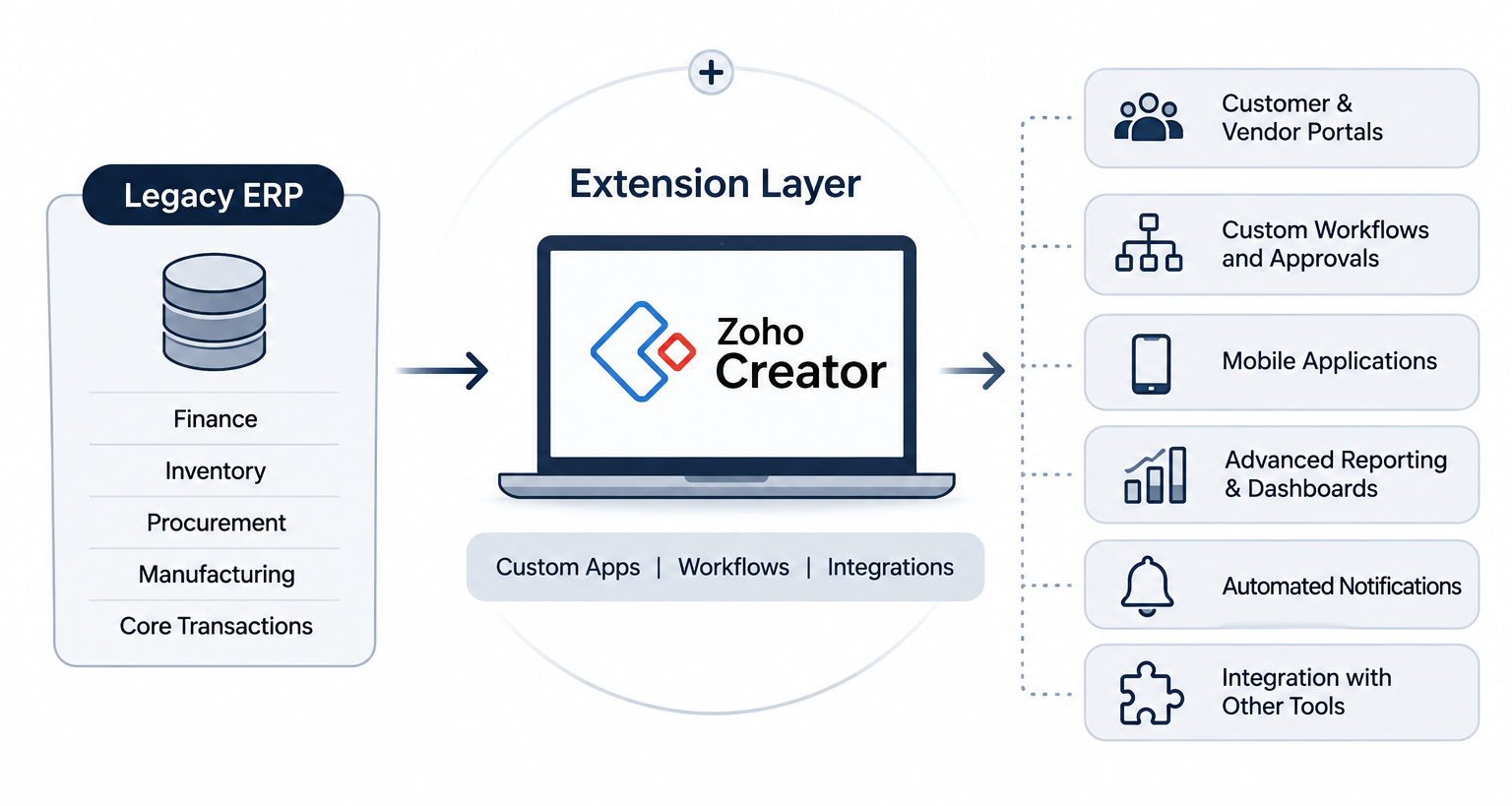
[Image Showing five capability groups branching from Zoho Creator: Custom Applications, Workflow Automation, Dashboards, Portals, and Mobile Applications. Connect each group to relevant business departments.]
How to Implement Zoho Creator as a Legacy ERP Extension Layer
A structured implementation process helps businesses avoid building disconnected applications or introducing unnecessary integration complexity.
Step 1: Assess the Existing ERP Architecture
Begin by identifying the ERP platform, version, existing modules, customizations, and external dependencies.
Review available APIs, web services, database interfaces, authentication methods, and existing integration arrangements. Document the processes that currently depend on the ERP.
This assessment establishes what can be extended and which technical constraints must be considered.
Step 2: Identify Functional Gaps and Extension Opportunities
Not every ERP limitation requires a new application.
Identify the processes that genuinely need additional functionality. These may include manual approval sequences, repetitive data entry, department-specific applications, or limited operational visibility.
Prioritize requirements according to business impact, implementation complexity, and integration feasibility.
Step 3: Define the Target Extension Architecture
Before development begins, establish how the ERP and Creator will work together.
Define the system of record for each data entity, integration methods, communication direction, synchronization frequency, user roles, and authentication requirements.
Documenting these decisions prevents overlapping responsibilities between applications.
Step 4: Develop Custom Applications and Workflows
Configure Creator applications around the approved business requirements.
This includes designing forms, data structures, user interfaces, workflow rules, approval conditions, and role-specific access.
Business logic should be placed in the appropriate system. Core financial or inventory transactions, for example, should continue following the ERP’s established controls where it remains the system of record.
Step 5: Configure ERP Integration and Data Exchange
Establish the required API connections, authentication mechanisms, field mappings, and request-response handling.
Test how both systems handle successful transactions, invalid information, unavailable endpoints, duplicate requests, and synchronization failures.
Integration logging should make it possible to identify what was transmitted, when it was processed, and whether an exception occurred.
Step 6: Test, Validate, and Deploy
Before production deployment, conduct functional, integration, security, and user acceptance testing.
Validate that information moves correctly between applications and that existing ERP transactions remain unaffected.
Production deployment should follow a controlled release process with appropriate rollback and recovery arrangements.
Step 7: Monitor and Scale the Extension Architecture
After deployment, monitor integration activity, application performance, failed requests, and user access.
As requirements change, additional applications and integrations can be introduced through the same architectural approach, provided they follow established governance and security standards.
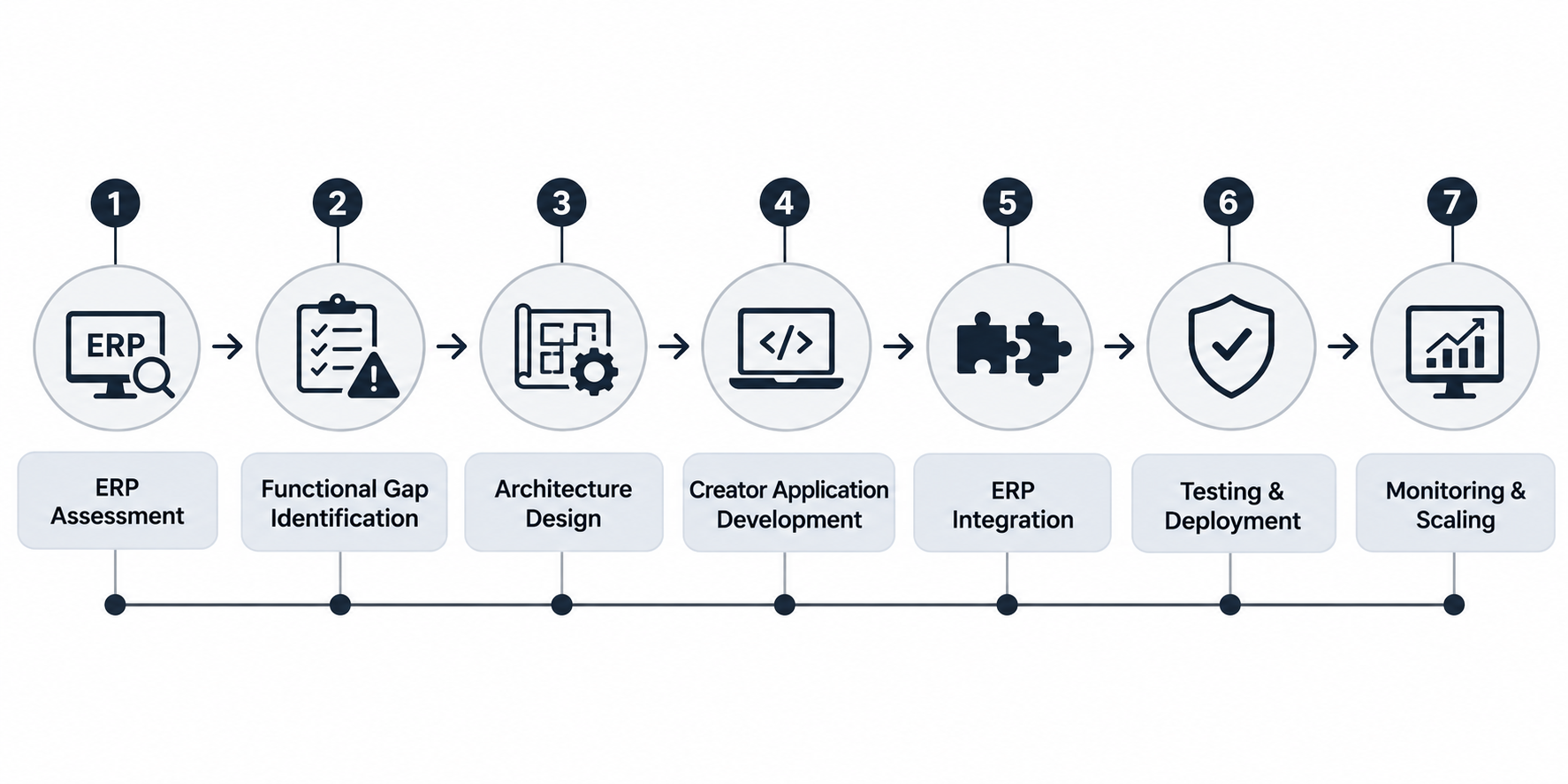
[Image: ERP Assessment → Gap Identification → Architecture Design → Creator Development → Integration Configuration → Testing and Deployment → Monitoring and Scaling.]
Common Technical Challenges in Legacy ERP Extension and How to Address Them
Even when the extension architecture is well defined, integration challenges can arise from differences in ERP capabilities, data structures, and business rules.
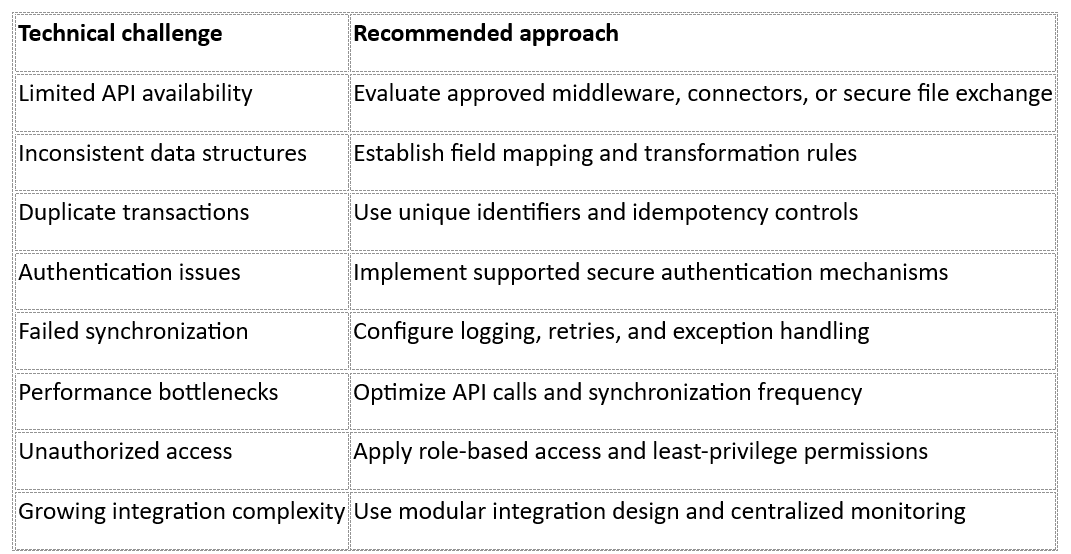
Avoiding Unnecessary Changes to Core ERP Modules
An extension application should not introduce conflicting business logic or duplicate existing ERP responsibilities.
If the ERP already manages purchase orders, for instance, Creator can provide an additional approval interface without independently creating a second purchase order management system.
Maintaining Data Integrity and Ownership
Businesses should define which application owns each record, which systems can modify it, and how updates are validated.
This is particularly important when multiple applications interact with customer records, inventory information, financial data, or procurement transactions.
Managing Integration Failures and Business Continuity
Integration failures should be anticipated rather than treated as unexpected exceptions.
Retry policies, failure notifications, transaction logs, reconciliation procedures, and recovery arrangements help organizations identify and resolve communication problems before they create wider operational issues.
Business Benefits of a Well-Designed ERP Extension Architecture
The value of ERP extension is not limited to introducing additional applications. Its broader benefit comes from improving how existing technology supports business operations.
1. Extend Existing ERP Investments
Organizations can retain established ERP functions while adding capabilities around them. This helps make better use of existing systems without requiring an immediate platform replacement.
2. Reduce Dependency on Extensive ERP Customization
Additional applications can be developed independently where appropriate, reducing the need to modify every new business requirement into the ERP’s core modules.
3. Improve Cross-Department Workflow Efficiency
Connected applications can help reduce manual handoffs, repetitive data entry, and disconnected approval processes.
4. Increase Operational Visibility
Customized dashboards and applications give employees access to information relevant to their responsibilities, subject to appropriate data permissions.
5. Support Business Growth Through Modular Applications
Businesses can introduce new applications and integrations as operational requirements evolve instead of redesigning the entire ERP environment for every new requirement.
6. Enable a Gradual Path Toward Future Modernization
An extension-first strategy can become part of a broader modernization roadmap. It allows organizations to address immediate operational gaps while evaluating longer-term technology requirements.
Industry Research: Why Low-Code Is Becoming Relevant to Enterprise Architecture
The growing interest in low-code development is not limited to simple forms or departmental applications. Enterprises are increasingly evaluating how these platforms fit into their broader software architecture.
KPMG’s 2025 report, Accelerating Digital Transformation with AI and Low-Code, surveyed 2,170 IT and business executives across industries and geographies.
Some of its findings are particularly relevant to legacy ERP extension:
- 28% of companies extensively leverage low-code to develop complex enterprise applications, compared with 18% in 2022.
- 85% identify security as a priority when selecting a low-code platform.
- 84% prioritize ease of integration.
- 83% highlight backend integration and API management as important selection factors.
Source: KPMG – Accelerating Digital Transformation with AI and Low-Code
These findings highlight an important consideration for ERP extension projects. Businesses are not simply looking for faster application development. They also need platforms that can operate within existing technology environments, communicate with backend systems, and support appropriate security and governance practices.
For organizations considering Zoho Creator, this reinforces the importance of designing the integration architecture alongside the applications themselves.
Conclusion: Build on Your Existing ERP Instead of Starting Over
Legacy ERP modernization does not always require replacing the technology that already supports essential business operations. In many situations, the more practical starting point is understanding what the existing ERP does well, identifying where additional functionality is needed, and determining how those capabilities can be introduced without disrupting established processes.
A well-designed extension architecture provides this separation. The ERP continues managing its core records and transactions, the integration layer controls communication, and Zoho Creator introduces additional applications, workflows, dashboards, portals, and mobile capabilities. Zoho Creator ERP integration solutions help establish this connected environment by linking existing ERP systems with custom applications and extended business workflows.
However, the success of this approach depends on more than connecting two applications. Data ownership, synchronization, authentication, error handling, and governance must all be considered during implementation.
A structured Legacy ERP system Extension strategy allows businesses to build on their existing technology foundation while making their operations more connected, adaptable, and ready for future requirements.
How OfficeHub Tech Helps Businesses Extend Legacy ERP Systems with Zoho Creator
Legacy ERP extension requires expertise in understanding existing ERP architectures, identifying functional gaps, designing integrations, and developing applications that support established business processes.
OfficeHub Tech helps businesses evaluate their existing ERP environments, identify extension opportunities, and determine which capabilities should remain within the ERP and which can be developed through Zoho Creator.
Based on operational requirements, businesses can develop custom applications, approval workflows, dashboards, employee and vendor portals, forms, and mobile interfaces.
OfficeHub Tech also focuses on controlled ERP integration through APIs, middleware, data synchronization, authentication, and exception handling. This approach helps connect additional applications while maintaining data ownership and existing ERP responsibilities.
With experience in legacy ERP extension and modernization approaches, OfficeHub Tech supports businesses working with platforms such as SAP, Oracle, Microsoft Dynamics, Infor, Sage, and Epicor. As the Best Legacy ERP Modernization Services Provider in USA, India, UAE, and KSA, OfficeHub Tech helps organizations extend their existing ERP environments through tailored Zoho Creator applications, integration solutions, and modernization strategies aligned with their operational requirements.
Through its Zoho Creator development and implementation services, OfficeHub Tech helps businesses build a more flexible, connected, and scalable technology environment without unnecessarily replacing their existing ERP systems.
Start Building with Zoho Creator
Ready to extend your existing business systems with greater flexibility? Explore how Zoho Creator’s low-code platform can help you build custom applications, automate workflows, create dashboards and portals, and address operational gaps without replacing your existing ERP.
Create your Zoho Creator account today and discover how low-code development can support your business requirements. Whether you want to simplify internal processes, connect applications, or develop new business capabilities, Zoho Creator provides a flexible starting point for your next development initiative.