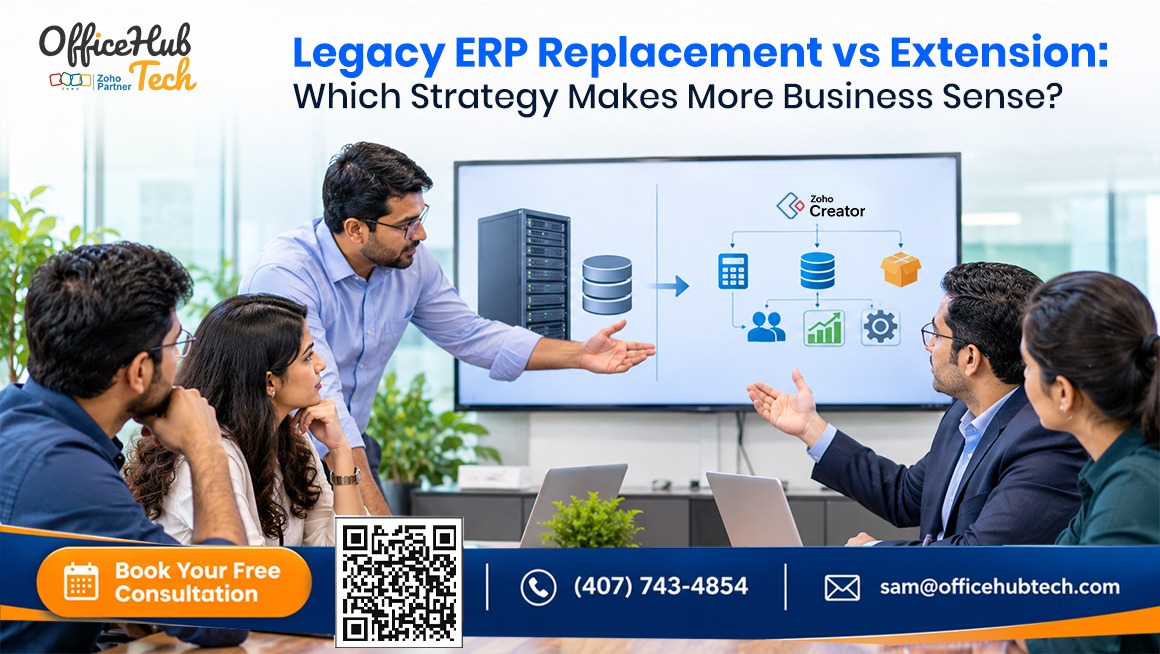
Introduction:
A practical guide to evaluating ERP replacement, ERP extension, integration architecture, implementation costs, and long-term business value.
An ERP system can continue supporting essential business transactions long after its architecture, integrations, and user experience begin showing their age. The challenge is deciding whether to replace the entire platform or build modern capabilities around the existing system. Neither approach is universally better. The right decision depends on the condition of the ERP, business requirements, integration feasibility, security, and the total cost of ownership.
This guide examines legacy ERP modernization and extension from both technical and business perspectives, helping organizations identify the strategy that makes more sense for their long-term operations.
##Quick Answer:
ERP replacement makes more sense when the existing system has fundamental architectural, security, performance, or scalability limitations that cannot be resolved sustainably.
ERP extension is often more practical when the existing ERP reliably manages core transactions but lacks modern workflows, integrations, dashboards, portals, and custom applications.
A phased hybrid approach can also make sense when certain modules require replacement while other ERP capabilities remain valuable.
The deciding factor is not the age of the ERP. It is whether the existing system can continue supporting the business reliably, securely, and economically.
##Key Takeaways
- ERP replacement involves migrating to a different core platform, while ERP extension adds capabilities around the existing system.
- Replacement requires careful planning for data migration, integrations, testing, employee adoption, and business continuity.
- Extension can preserve established ERP processes while introducing modern applications and workflows.
- APIs, middleware, and low-code platforms such as Zoho Creator can connect existing ERP environments with modern business applications.
- Security, data ownership, synchronization, and integration reliability are essential to sustainable ERP extension.
- A hybrid strategy can combine selective replacement with extensions to avoid unnecessary large-scale transformation.
- Total cost of ownership, technical feasibility, and measurable business outcomes should guide the final decision.
Understanding ERP Replacement vs. ERP Extension
Before comparing the two strategies, it is important to understand what actually changes in each approach.
What Is Legacy ERP Replacement?
Legacy ERP replacement involves retiring an existing ERP system and transitioning business operations to a different platform.
It requires more than installing new software. Businesses must assess processes, migrate historical data, rebuild integrations, configure workflows, and validate the new environment.
A typical replacement project involves:
- Selecting and configuring a new ERP.
- Extracting, cleansing, and mapping legacy data.
- Rebuilding external integrations.
- Reconfiguring workflows and permissions.
- Conducting functional, security, and performance testing.
- Planning deployment, cutover, and system decommissioning.
Organizations may consider replacing older SAP, Oracle, Microsoft Dynamics, Infor, Sage, or Epicor systems when they no longer meet operational or technical requirements.
What Is Legacy ERP Extension?
ERP extension enhances an existing ERP without replacing its core system. The ERP continues managing essential transactions, while additional applications address missing capabilities.
For example, manufacturers can retain ERP for purchasing, inventory, and finance while adding applications for production reporting, warehouse operations, and approvals.
Extensions can use:
- REST and SOAP APIs.
- Webhooks and middleware.
- Low-code application development.
- Custom portals and dashboards.
- Mobile applications and workflow automation.
Platforms such as Zoho Creator provide an application layer for developing these additional business capabilities.
ERP Replacement vs. Extension: A Practical Comparison
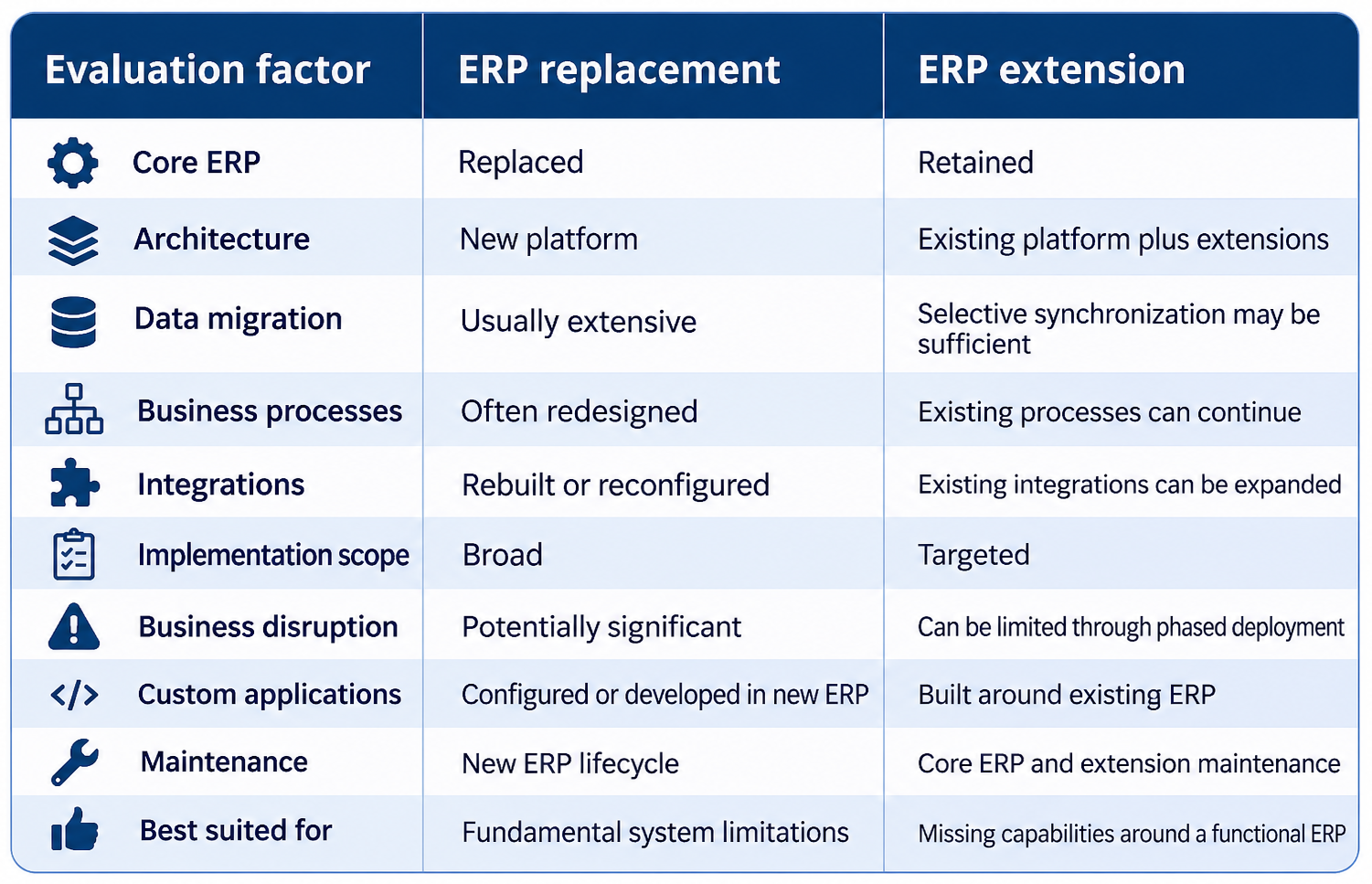 Neither strategy is automatically less expensive. The actual difference becomes clear only after evaluating the existing architecture, implementation scope, and long-term maintenance requirements.
Why Businesses Face the ERP Replacement vs. Extension Decision
The decision begins when an existing ERP can no longer support changing business requirements.
Existing ERP Systems Struggle With Changing Requirements
Businesses may need mobile applications, customer portals, additional approvals, or specialized workflows. When ERP modules cannot support these requirements, employees rely on spreadsheets, emails, and disconnected applications, creating fragmented information and manual work.
Customization Is Becoming Difficult to Maintain
Years of ERP modifications can create complex dependencies. Changes in one area may affect others, making upgrades, testing, and maintenance increasingly difficult and requiring specialized technical resources.
Integration Gaps Create Operational Silos
When ERP, CRM, project management, and accounting systems cannot exchange data reliably, employees repeatedly enter information. This leads to duplicate records, inconsistencies, delayed approvals, and manual reconciliation.
Replacing the ERP Creates Its Own Challenges
ERP replacement can resolve fundamental limitations but requires data migration, integration rebuilding, employee training, and process changes. Businesses must also manage parallel operations, cutover planning, and unexpected costs.
The decision is not simply whether an ERP is outdated, but whether replacement delivers greater business value than extending its existing capabilities.
When Does Replacing a Legacy ERP Make More Business Sense?
ERP replacement makes more sense when limitations exist within the core platform rather than its surrounding workflows.
Fundamental Architectural Limitations
An ERP relying on unsupported operating systems, outdated databases, or incompatible architecture may struggle with integration, performance, and future development. Adding extensions may only delay the underlying problem.
Security and Compliance Risks
Unsupported ERP versions may lack essential security updates. Weak access controls, limited audit capabilities, and unpatched vulnerabilities can also create compliance risks that external applications cannot resolve.
Maintenance Costs Exceed Business Value
Evaluate maintenance costs against ERP value, including:
- Infrastructure and database maintenance.
- Specialized technical support.
- Customization and upgrades.
- Integration repairs.
- Security remediation and downtime.
If costs keep increasing without sustainable improvements, replacement deserves consideration.
Performance and Scalability Are No Longer Adequate
Growing transaction volumes, multiple locations, and complex operations may expose architectural limitations. If supported modernization cannot improve performance, replacement may offer a stronger foundation.
Critical Business Processes Cannot Be Supported
If essential processes cannot be addressed through configuration, extensions, or reliable integrations, a different ERP platform may be necessary.
Business perspective: Replacement is justified when the existing core system becomes a barrier to reliable operations, security, or future growth.
When Does Extending a Legacy ERP Make More Business Sense?
Not every outdated ERP needs replacement. Many organizations have systems that handle essential transactions reliably but lack flexibility for modern operations.
The ERP Still Handles Core Transactions Reliably
An existing ERP may continue managing general ledger, purchasing, inventory, sales orders, customer and vendor data, and production transactions. Replacing it solely to add new applications may create unnecessary transformation work.
New Business Requirements Have Outgrown Existing Functionality
A distribution business may need vendor portals, mobile warehouse applications, and multi-level approval workflows. ERP extensions can introduce these capabilities while retaining existing inventory and purchasing functions.
Existing ERP Data Is Accessible Through Supported Interfaces
Extension is more practical when the ERP supports REST APIs, SOAP services, webhooks, middleware connectors, or scheduled data exchanges. API limits, authentication, and transaction capabilities must be assessed before implementation.
The Business Wants Incremental Modernization
Businesses can modernize one high-impact workflow at a time, validate the integration architecture, and gradually introduce additional applications. This limits implementation scope while preserving established ERP processes.
ERP Replacement vs. Extension: A Business and Technical Decision Matrix
Choosing between the two approaches requires more than comparing software features. Businesses need to evaluate the condition of their existing ERP, the cost of maintaining it, and the feasibility of introducing new capabilities.
Evaluate the Current ERP Environment
Start with a technical assessment of the existing system.
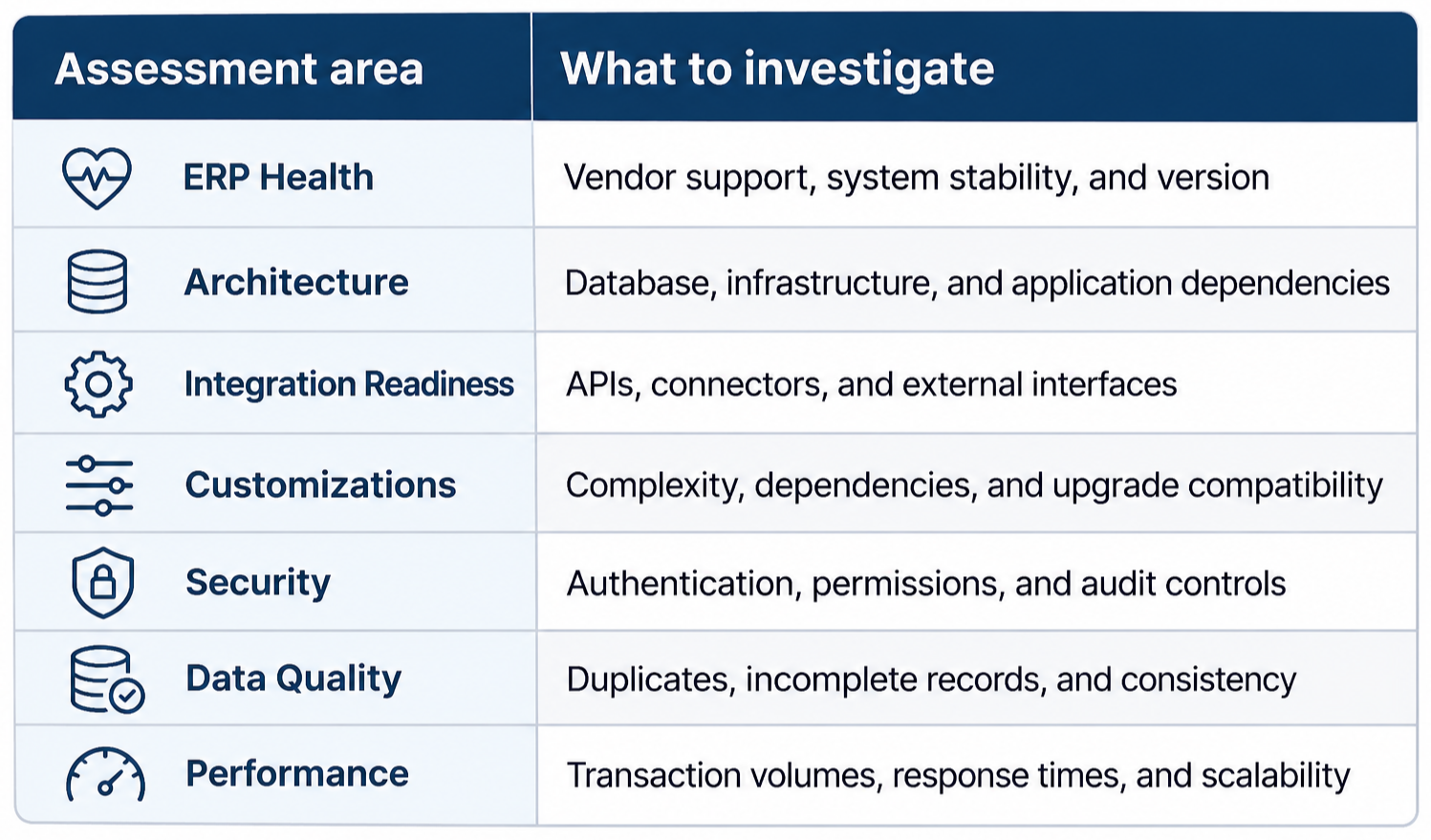
This assessment helps determine whether the ERP needs additional capabilities or fundamental architectural changes.
Compare the Total Cost of Ownership
The initial implementation cost rarely represents the full financial commitment.
An ERP replacement project may involve licensing, infrastructure, consulting, data cleansing, migration, integration development, training, testing, and decommissioning.
An extension project has a different cost structure, including application development, platform licensing, API connectivity, middleware, hosting, monitoring, and ongoing maintenance.
A useful comparison is to calculate the expected total cost over three to five years.
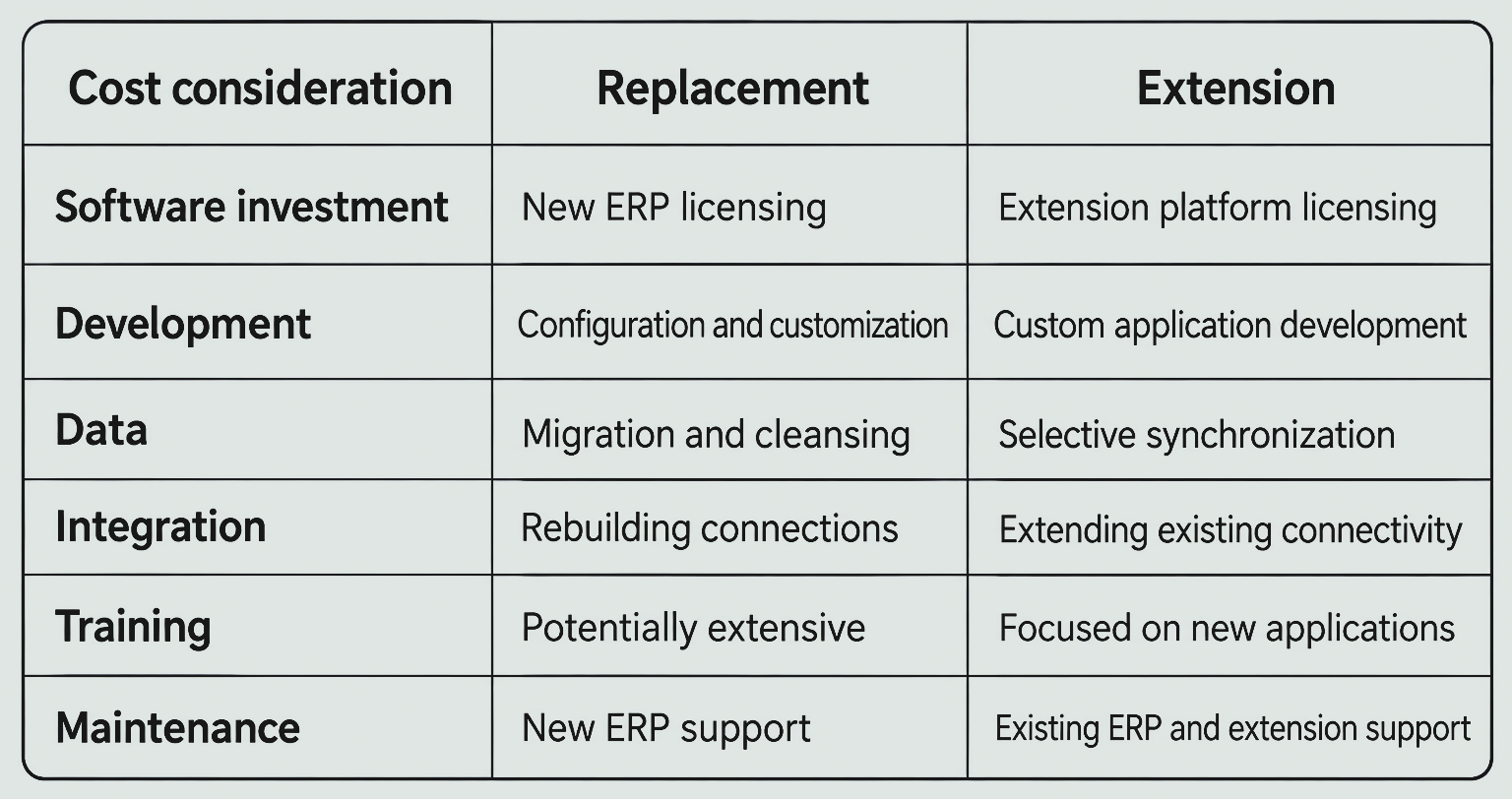
The objective is not to prove that one strategy is always cheaper. It is to understand which investment produces better business value over its expected lifecycle.
Assess Operational Risk and Business Continuity
A replacement project can affect several departments simultaneously. Businesses must plan data migration, parallel operations, cutover, employee training, and recovery procedures.
Extension can reduce the scope of change, but it introduces its own risks. A poorly designed integration may create duplicate transactions, inconsistent records, or failed workflows.
Both strategies require testing, validation, access controls, monitoring, and documented recovery procedures.
Evaluate Future Scalability and Flexibility
Ask whether the proposed approach can accommodate new departments, locations, applications, transaction volumes, and changing business requirements.
An extension architecture should not become another disconnected collection of applications. Its interfaces, ownership boundaries, and maintenance responsibilities must be clearly defined.
Determine Which Strategy Creates Better Business Value
A practical evaluation should consider seven factors:
- Technical feasibility.
- Business process alignment.
- Three-to-five-year total cost of ownership.
- Implementation and operational risk.
- Integration complexity.
- Security and compliance.
- Long-term scalability.
The final decision should reflect the organization’s priorities rather than a preference for either legacy or modern technology.
The Technical Architecture: How ERP Replacement and Extension Differ
The biggest technical difference between these approaches is how they handle the existing ERP, its data, and the applications connected to it.
Architecture of a Complete ERP Replacement
In a replacement project, the existing ERP is gradually retired, and its essential business data and processes are transferred to a new platform.
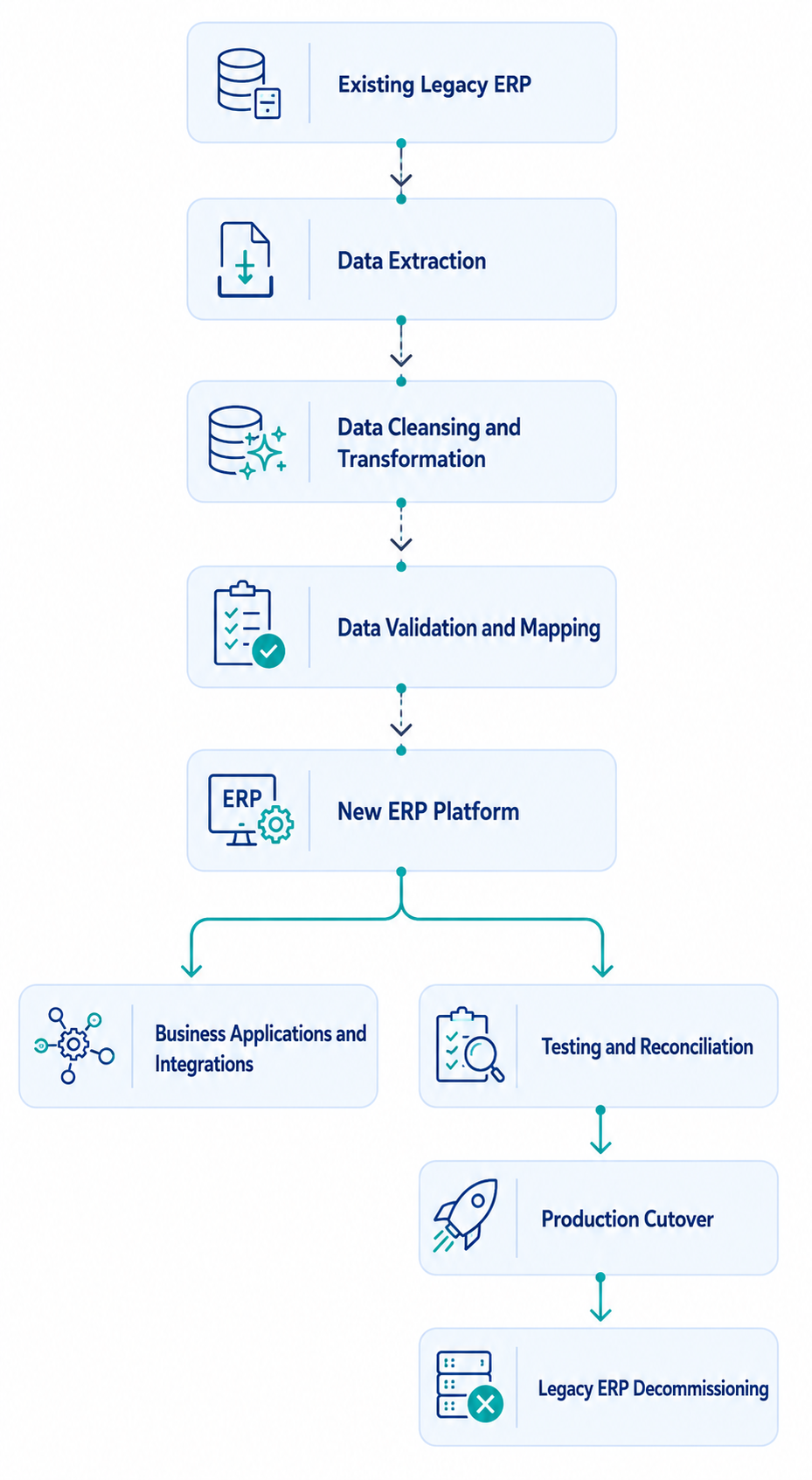
The process involves extracting historical records, master data, and transaction histories; mapping legacy data structures to the new ERP; validating migrated records; rebuilding integrations; and testing critical business workflows before cutover.
Businesses must also establish deployment, rollback, and recovery procedures to protect operational continuity.
Architecture of a Legacy ERP Extension
An extension architecture retains the existing ERP for its designated core transactions while introducing Zoho Creator as an operational application and workflow layer.
A typical structure looks like this:
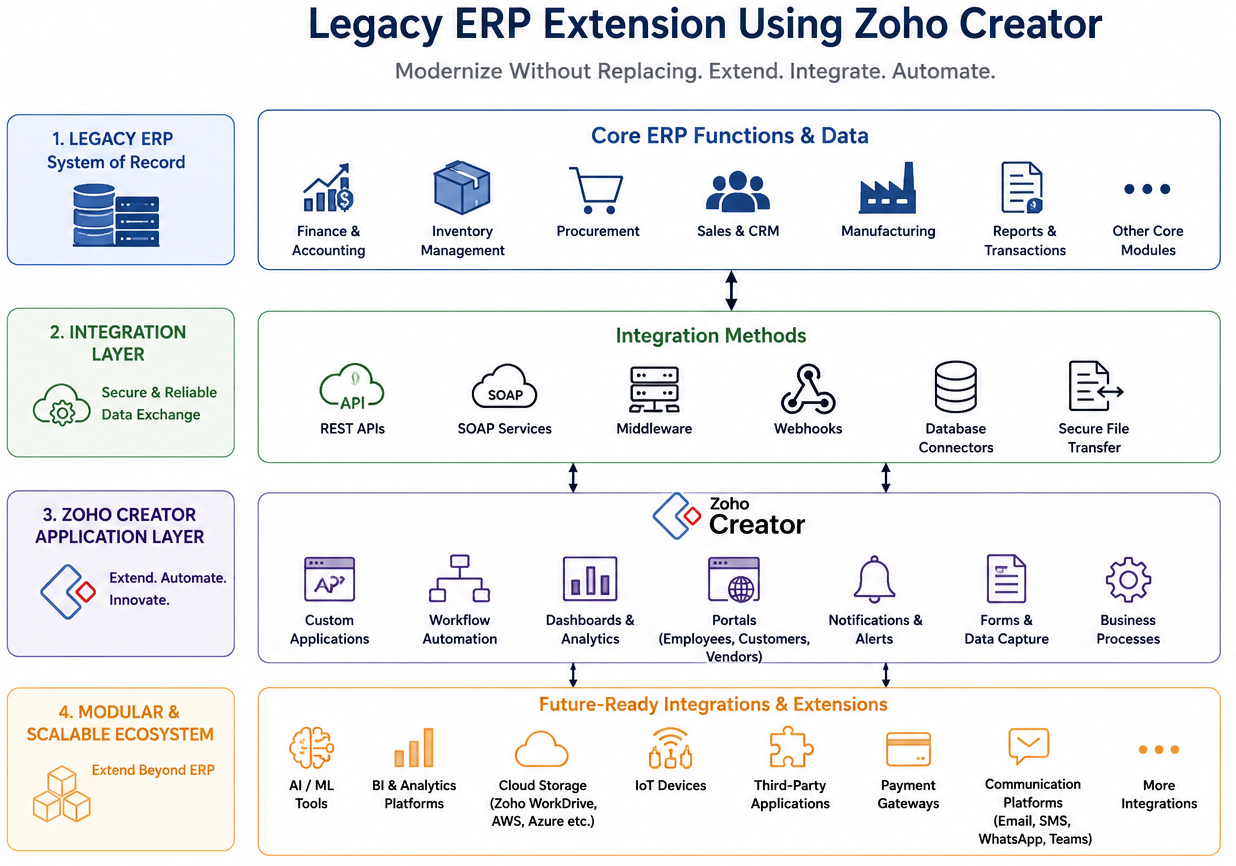
Zoho Creator can support custom departmental applications, approval workflows, employee and customer portals, mobile applications, and operational dashboards. These applications connect with the ERP and other business platforms through APIs, webhooks, middleware, or scheduled data exchanges.
For example, an employee can submit a purchase request through a Zoho Creator application. The application validates the information, routes it through the required approval workflow, and sends the approved request to the ERP through a supported integration interface. The ERP processes the transaction and returns its status to the application.
The integration architecture determines how information moves between systems without unnecessarily duplicating core ERP functionality.
Data Ownership and System-of-Record Management
Each business record should have a clearly designated system of record. For example, the ERP may own inventory and financial transactions, while Zoho Creator manages purchase request workflows and approval statuses.
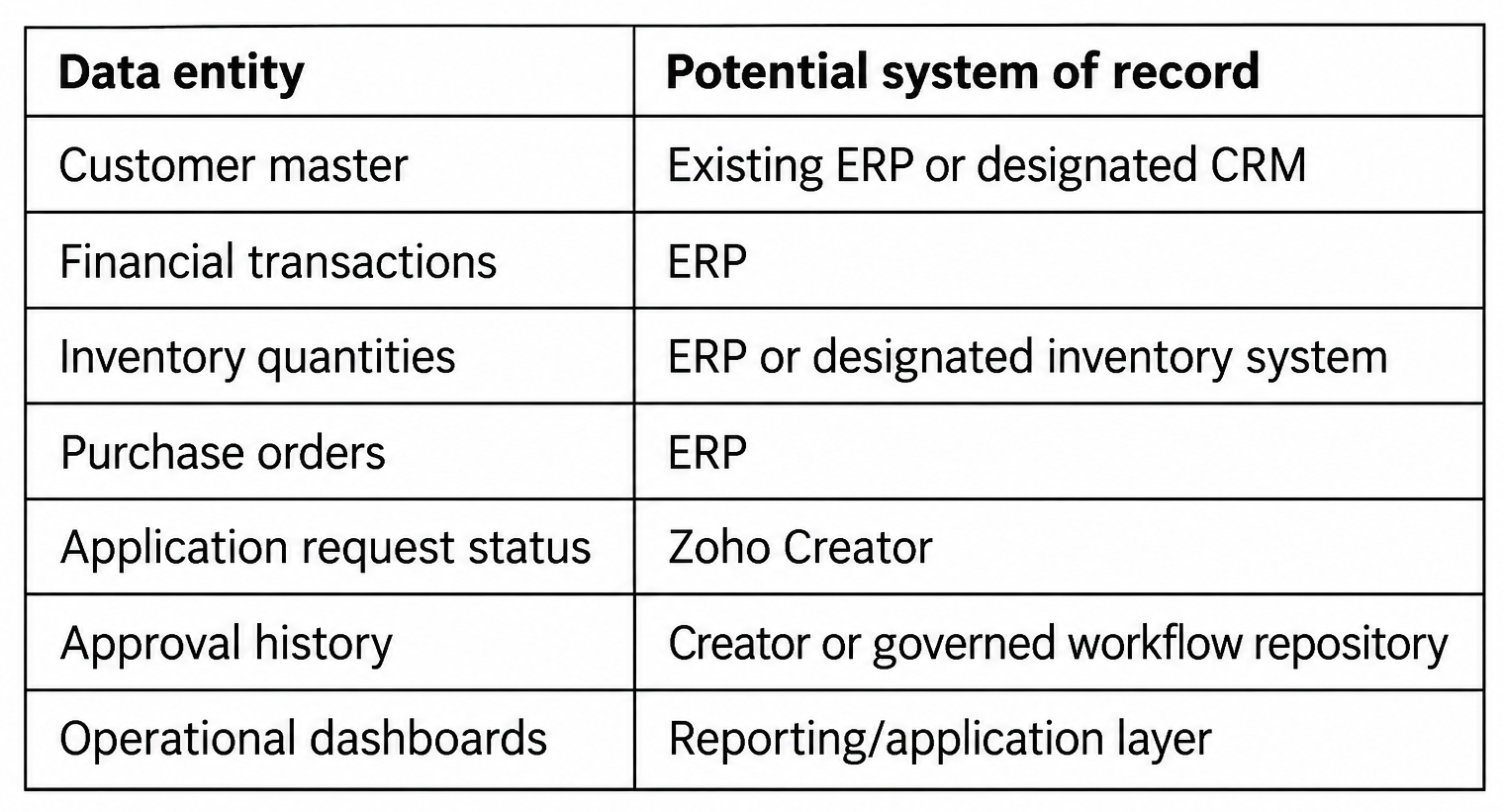
This separation helps prevent conflicting updates and establishes clear responsibility for business data.
API Integration and Middleware Considerations
APIs provide the communication mechanism between the ERP and external applications.
Depending on the environment, integration may involve:
- REST APIs for application-level data exchange.
- SOAP services where supported by the existing ERP.
- Webhooks for event-driven updates.
- Middleware for routing and transformation.
- Scheduled synchronization for bulk or periodic data exchange.
OAuth 2.0, API keys, or other supported authentication methods should be selected according to the ERP and integration platform’s capabilities.
Direct API integration may be sufficient for a limited number of straightforward connections. Middleware becomes more valuable when several applications need coordinated data exchange, complex transformations, or centralized error handling.
Data Synchronization and Transaction Reliability
Successful integration requires more than sending information from one system to another.
The architecture must address:
- Real-time versus scheduled synchronization.
- Incremental data updates.
- Unique transaction identifiers.
- Idempotency to prevent duplicate processing.
- Retry mechanisms.
- Conflict resolution.
- Failed transaction queues.
- Data reconciliation.
For example, if an API request times out after the ERP has already processed a purchase order, blindly submitting the same request again could create a duplicate. An idempotency strategy or transaction-status check helps prevent this.
Security, Permissions, and Governance
Connecting applications creates additional access points that must be governed.
A secure implementation should include role-based access control, least-privilege permissions, secure credential storage, encrypted communication, audit logging, and appropriate data-retention policies.
Development, testing, and production environments should also be separated to prevent experimental changes from affecting live ERP transactions.
Error Handling, Monitoring, and Recovery
Integration failures should be expected and managed rather than treated as exceptional events that nobody monitors.
A practical workflow should distinguish between authentication failures, invalid payloads, API timeouts, ERP service interruptions, and partially completed transactions.
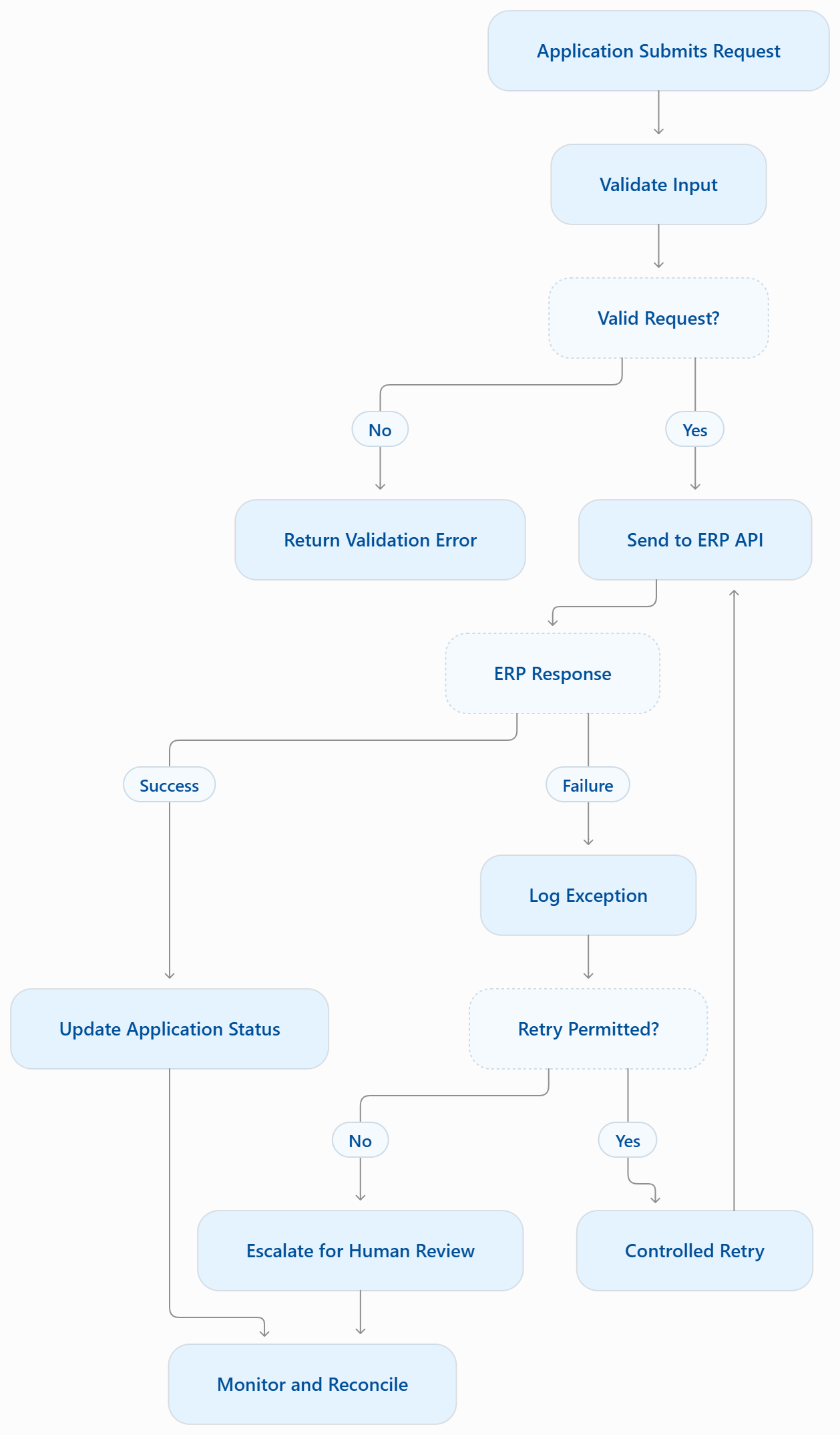 Monitoring should capture failed requests, retry counts, response times, unresolved exceptions, and reconciliation differences.
This is what makes an extension architecture dependable over time.
How Each Strategy Solves Business Challenges
The business value of modernization becomes clearer when the same operational problem is examined through both approaches.
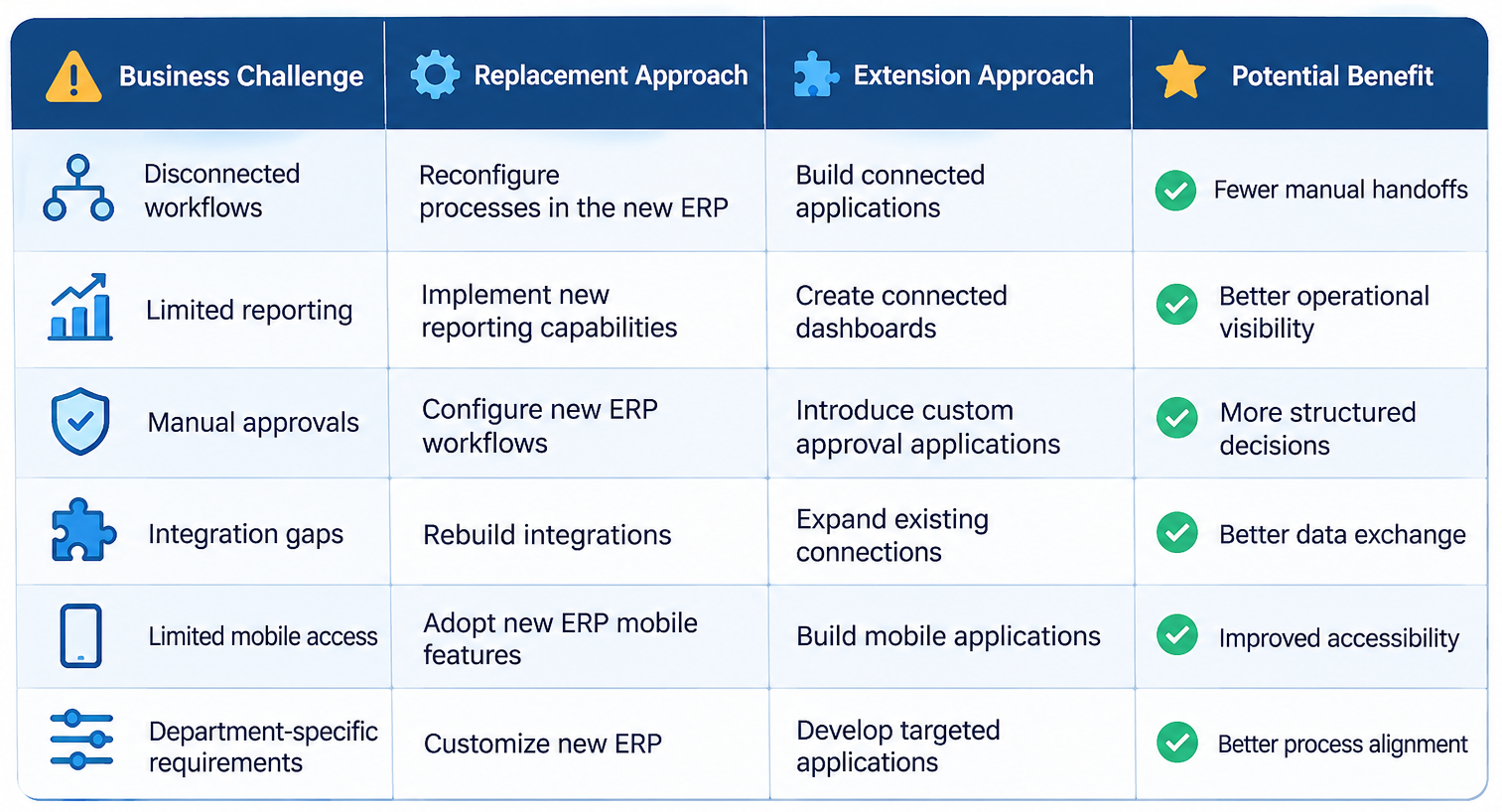
Business Benefits of ERP Replacement
A successful replacement can provide a modernized core architecture, more standardized business processes, improved platform support, and better alignment with long-term enterprise requirements.
It can also reduce dependence on unsupported technologies and fragmented legacy customizations.
Business Benefits of ERP Extension
Extension focuses on improving specific operational gaps.
A business may introduce a mobile application for warehouse employees, a vendor portal for purchasing, or a dashboard for management without rebuilding its entire ERP environment.
This can help reduce manual work, improve process visibility, and deliver targeted improvements in stages.
Which Approach Helps Reduce Business Disruption?
Extension can limit the number of systems and departments affected by an initial implementation. However, it still requires controlled deployment, integration testing, and user acceptance testing.
Replacement generally requires broader transition planning because core business processes and data move to another platform.
The better approach is the one that manages the organization’s actual operational risk—not simply the one with fewer implementation steps.
Case Studies: ERP Replacement vs. Extension
The following illustrative scenarios show how different business requirements can lead to different ERP modernization decisions. These are hypothetical examples, not verified client projects or measured implementation results.
Case Study 1: Manufacturing Business Chooses ERP Extension
Business situation: A manufacturing company uses an established ERP for finance, purchasing, inventory, and production but relies on spreadsheets and disconnected applications for daily operational activities.
Challenges:
- Manual production updates and approval processes.
- Limited mobile access for warehouse employees.
- Disconnected operational data and reporting.
- Repeated information entry across applications.
Implementation approach: Instead of replacing its core ERP, the business introduces custom Zoho Creator applications for production reporting, warehouse operations, and approval workflows. Employee portals provide controlled access to operational information, while dashboards offer better visibility into business activities. APIs and middleware connect these applications with the existing ERP, with data validation and synchronization controls.
Potential outcome: Improved operational visibility, reduced manual coordination, and more connected business workflows while retaining the existing ERP for core transactions.
Case Study 2: Growing Enterprise Chooses ERP Replacement
Business situation: A growing enterprise operates an unsupported ERP with serious security limitations, poor performance, and integration constraints.
Implementation approach: The organization evaluates alternative ERP platforms, maps business processes, migrates and validates essential data, rebuilds integrations, and conducts testing before deployment.
Potential outcome: A supported ERP foundation better aligned with its security, operational, and scalability requirements.
Key difference: The manufacturing business needs additional capabilities around a functioning ERP, while the growing enterprise needs a fundamentally different core platform.
Use Cases: Where Replacement or Extension Makes More Sense
The right approach can also differ between departments within the same industry.
Manufacturing and Production
Manufacturers often rely on ERP platforms for BOM management, purchasing, inventory, production planning, and financial records.
Extension opportunity: Introduce shop-floor reporting applications, work-order interfaces, quality inspection forms, and production dashboards.
Replacement consideration: The existing ERP cannot reliably support essential manufacturing transactions, production requirements, or required system capacity.
Wholesale and Distribution
Distribution businesses need accurate inventory, purchasing, order management, and warehouse coordination.
Extension opportunity: Add vendor portals, warehouse applications, purchase approval workflows, and multi-location dashboards.
Replacement consideration: The underlying ERP cannot manage required transaction volumes, inventory complexity, or essential distribution processes.
Finance and Accounting
Financial operations depend on accurate transaction processing and controlled access.
Extension opportunity: Add expense applications, invoice approval workflows, reporting interfaces, and payment-status visibility while retaining the designated accounting system as the financial record owner.
Replacement consideration: The core financial platform cannot meet essential security, compliance, or transaction-processing requirements.
Professional Services and Project-Based Businesses
Organizations managing multiple projects may need additional visibility into resources, timesheets, approvals, and service activities.
Extension opportunity: Introduce project tracking applications, timesheet portals, resource dashboards, and automated notifications.
Replacement consideration: The ERP’s core project and financial capabilities cannot support the organization’s operational model.
Retail and Multi-Location Businesses
Retail organizations require coordination between locations, inventory, suppliers, and financial operations.
Extension opportunity: Build store-level applications, supplier coordination workflows, and branch reporting dashboards.
Replacement consideration: The existing ERP cannot support essential multi-location transactions or required operational scale.
What Does a Phased ERP Extension Strategy Look Like?
Extending a legacy ERP requires a structured approach that connects existing business systems with new applications without disrupting essential operations. OfficeHub Tech approaches ERP extension through the following phases:
Phase 1: Assess the Existing ERP Environment
Evaluate the ERP architecture, existing customizations, APIs, connected applications, data dependencies, and operational limitations. Identify which core functions should remain within the ERP.
Phase 2: Map Business Processes and Identify Extension Opportunities
Analyze departmental workflows to identify manual tasks, integration gaps, approval delays, and missing applications. Prioritize processes that can benefit from modernization.
Phase 3: Design the Integration Architecture
Define application boundaries, data ownership, API connectivity, middleware requirements, authentication, permissions, and synchronization rules.
Phase 4: Develop Custom Applications Using Zoho Creator
Build applications, employee portals, approval workflows, mobile interfaces, and operational dashboards according to business requirements.
Phase 5: Integrate and Test Connected Systems
Connect the applications with the existing ERP using supported integration methods. Validate data exchange, transaction accuracy, permissions, error handling, and workflow execution.
Phase 6: Deploy, Monitor, and Improve
Introduce applications in stages, monitor integration performance, resolve exceptions, and identify further extension opportunities as business requirements evolve.
This phased approach helps businesses modernize existing ERP environments while preserving valuable core functionality and supporting future growth.
Suggested implementation roadmap:

Business Outcomes: How to Measure Whether Your ERP Strategy Is Working
An ERP modernization project should produce measurable improvements, not simply a newer interface or additional software.
1. Operational Efficiency
Measure workflow completion time, approval turnaround time, manual data-entry steps, spreadsheet dependence, and the frequency of manual reconciliation.
These indicators help determine whether the implementation is genuinely reducing operational friction.
2. Integration Performance
Track API success rates, synchronization delays, failed transaction volumes, duplicate transaction frequency, and exception resolution time.
A well-designed extension should make information exchange more dependable rather than introducing another source of data inconsistency.
3. Financial Performance
Evaluate the actual implementation expenditure against the planned budget.
Also track infrastructure costs, maintenance expenditure, application licensing, integration support, and the ongoing cost of operating both the ERP and its extensions.
4. User Adoption and Process Visibility
Application adoption, workflow completion rates, dashboard usage, and employee dependence on manual workarounds provide useful indicators of implementation success.
5. Long-Term Modernization Readiness
Review whether the architecture can accommodate new integrations, applications, departments, and transaction volumes without introducing unnecessary technical debt.
The most meaningful outcome is an ERP environment that remains reliable while becoming easier to integrate, maintain, and adapt to changing business requirements.
Recent Industry Research: Why Businesses Are Rethinking ERP Modernization
Enterprise modernization is not always about replacing existing technology. According to Ensono’s 2026 State of IT Modernization Report, published on September 15, 2026, 78% of surveyed IT decision-makers say legacy systems have become more important to their organizations than they were two years ago. Meanwhile, 52% favor optimizing and extending existing systems rather than replacing them outright.
The research also highlights modernization challenges: 71% reported projects exceeding their original budgets, while 61% had paused, delayed, scaled back, or abandoned initiatives. Additionally, 54% said AI accelerated their modernization efforts. The study surveyed 500 IT decision-makers and business leaders across the US and UK.
For ERP decision-makers, these findings reinforce the importance of evaluating existing systems before committing to replacement. Businesses should identify which core capabilities remain valuable, where extensions can address operational gaps, and which components genuinely require replacement.
Research context: These findings cover broader IT modernization, not ERP-specific strategies.
Why OfficeHub Tech Is the Right Partner for Legacy ERP Extension
Extending a legacy ERP requires more than connecting applications. It requires an understanding of existing system architecture, business processes, data dependencies, and integration requirements.
At OfficeHub Tech, we help businesses modernize and extend their existing ERP environments using Zoho Creator, custom business applications, workflow automation, and tailored integration architectures. As a Trusted Legacy ERP Extension and Modernization Services Provider, Authorized Zoho Partner in the USA, India, UAE, and KSA, we focus on adding the capabilities your ERP lacks while allowing it to continue managing its core business operations.
Extend Your ERP Capabilities Without Unnecessary Replacement
We help businesses build modern operational capabilities around established ERP platforms, including SAP, Oracle, Microsoft Dynamics, Infor, Sage, and Epicor.
Our implementation approach can include:
- Custom Business Applications: Develop applications for specific departmental and operational requirements using Zoho Creator.
- Workflow Automation: Automate manual approvals, data entry, notifications, and repetitive business processes.
- ERP and SaaS Integrations: Connect existing ERP environments with modern business applications through APIs, middleware, and supported integration methods.
- Employee and Customer Portals: Build dedicated interfaces for controlled access to business information and workflows.
- Operational Dashboards: Bring relevant information from connected systems into unified operational views.
- Data Synchronization: Establish structured data exchange, validation, and error-handling processes to support data consistency.
Build a More Connected and Flexible ERP Environment
Rather than adding unnecessary complexity to your existing ERP, OfficeHub Tech focuses on identifying the right extension opportunities, designing suitable integration architectures, and developing applications that support evolving business requirements.
Whether you need to automate departmental workflows, connect multiple business applications, or introduce custom operational tools, we help bridge the gap between your existing ERP capabilities and modern business needs.
Ready to Extend Your Legacy ERP With Zoho Creator?
Zoho Creator provides a low-code application development platform for building custom business applications, connecting business systems, and automating workflows. It offers businesses a way to introduce additional operational capabilities around their existing ERP without unnecessarily replacing the core system.
Create your Zoho Creator account using the link below and explore what’s possible.
Need expert assistance with ERP extensions, custom applications, or system integrations? Connect with OfficeHub Tech to discuss your modernization requirements.
Conclusion:
Choosing between legacy ERP replacement and extension requires more than evaluating software age or features. Businesses must consider system architecture, operational requirements, integration feasibility, security, implementation costs, and long-term scalability.
Replacement is appropriate when fundamental limitations affect the reliability, security, or performance of the existing ERP. Extension makes more sense when core operations remain reliable but require additional applications, integrations, and automated workflows.
For businesses pursuing extension, Legacy ERP Extension with Zoho Creator offers a practical way to introduce custom applications, connect business systems, and automate operational processes while retaining valuable ERP functionality.
As discussed, a phased modernization strategy allows organizations to assess existing capabilities, prioritize improvements, and replace components only when necessary. With the right architecture and implementation approach, businesses can improve operational efficiency, maintain business continuity, and prepare their ERP environments for future requirements.
Ultimately, the goal is not simply to replace or retain an ERP, but to build a reliable, connected, and adaptable business environment.