##Quick Answer
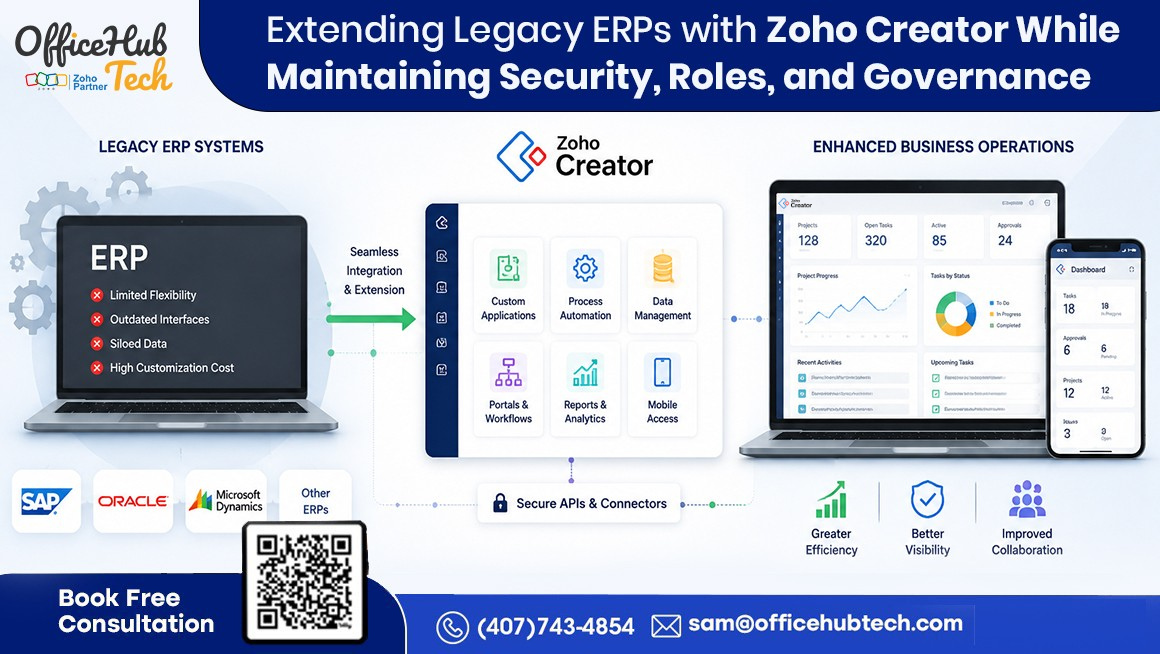
Extending legacy ERPs with Zoho Creator, a powerful low-code development platform, allows businesses to modernize existing ERP systems without replacing them while maintaining enterprise-grade security, role-based access, and governance. By using secure APIs, role-based permissions, workflow controls, audit logs, encryption, and centralized governance, organizations can build custom business applications, automate processes, and integrate modern cloud services without compromising data security, compliance, or operational continuity.
##Key Takeaways
- Extend legacy ERP systems without replacing core business operations
- Keep the ERP as the system of record while adding modern capabilities
- Maintain role-based access control (RBAC) across applications and users
- Secure ERP integrations using APIs, authentication, and encryption
- Automate workflows without exposing sensitive business data
- Strengthen governance with audit logs, user activity tracking, and approval controls
- Build secure custom applications using Zoho Creator’s low-code development platform
- Reduce security risks while accelerating ERP modernization
- Support enterprise compliance and scalable digital transformation
- Future-proof legacy ERP systems with a secure, API-first architecture
Why Secure ERP Extension Matters More Than Ever
Legacy ERP systems continue to support critical business operations, including finance, procurement, inventory, and manufacturing. However, as organizations pursue digital transformation, they face the challenge of integrating modern applications, automating workflows, and adopting cloud technologies without compromising security, governance, or compliance. Every new API, integration, mobile app, or third-party connection can introduce risks if not implemented with proper controls.
Rather than replacing an ERP, businesses can securely modernize it with Zoho Creator, a powerful low-code platform. It enables organizations to build custom applications, automate workflows, create dashboards, develop mobile solutions, and integrate enterprise systems while keeping the existing ERP as the central system of record. With features like role-based access, secure APIs, audit trails, and enterprise-grade security, organizations can modernize confidently without disrupting core operations.
This guide explains how to extend legacy ERP systems securely, implement governance best practices, address common security challenges, and build a scalable modernization strategy that balances innovation with security, compliance, and long-term operational stability.
Why Security and Governance Have Become Critical in Legacy ERP Modernization
Modernizing a legacy ERP is no longer just about improving user experience or adding new business applications. Today’s organizations operate in highly connected digital ecosystems where ERP systems exchange data with CRM platforms, cloud applications, customer portals, mobile devices, analytics tools, and third-party services. While these integrations improve business agility, they also create additional access points that must be protected.
The business impact of weak security has never been greater. According to IBM’s Cost of a Data Breach Report 2024, the global average cost of a data breach reached USD 4.88 million, the highest ever recorded, with 70% of organizations reporting significant or moderate business disruption following a breach. These findings demonstrate that cybersecurity incidents are no longer just IT problems—they directly affect operational continuity, financial performance, regulatory compliance, and customer trust.
For organizations extending their legacy ERP systems, this reinforces the importance of adopting a security-first modernization strategy. Every new application, API integration, workflow, or mobile solution should be designed with secure authentication, role-based access control (RBAC), encrypted communication, and governance policies from the beginning—not added later as corrective measures.
By using Zoho Creator, a low-code development platform, businesses can extend their existing ERP systems through secure APIs while keeping the ERP as the system of record. This enables organizations to build modern business applications, automate workflows, and improve operational efficiency without compromising enterprise security, user roles, or governance standards.
The Biggest Security Challenges When Extending Legacy ERP Systems
Extending a legacy ERP enables innovation but also introduces new security and governance challenges. As businesses connect more users, applications, and cloud services, the ERP’s attack surface expands, increasing the risk of security breaches and compliance issues if not properly managed.
One major concern is unauthorized data access. Without role-based permissions and the principle of least privilege, employees may access sensitive financial, customer, or operational data beyond their responsibilities.
Insecure API integrations are another common risk. Since APIs connect the ERP with external applications, they must be protected through strong authentication, encryption, and access controls to prevent unauthorized access.
Organizations also face shadow IT, where employees adopt unofficial tools because the legacy ERP cannot support evolving business needs. These disconnected systems create data silos, weaken governance, and increase security risks.
Additional challenges include manual workflows, duplicate data, inconsistent user management, and limited audit visibility, making it difficult to maintain compliance and operational control. A successful legacy ERP extension strategy should embed security, governance, and scalable integration into the architecture from the outset, ensuring modernization without compromising enterprise security.
Understanding Security, Roles, and Governance in ERP Extension
Successful ERP extension relies on three interconnected pillars—security, role-based access, and governance. Together, they protect enterprise systems while ensuring employees have the right level of access to perform their roles efficiently.
Enterprise Security
Enterprise security safeguards business applications, data, and integrations from unauthorized access, cyber threats, and accidental misuse. This includes securing APIs, encrypting data, authenticating users, monitoring system activity, and protecting communication between legacy ERP systems and connected applications. Strong security enables organizations to modernize confidently without compromising the integrity of core business operations.
Role-Based Access Control (RBAC)
Role-Based Access Control (RBAC) grants system access based on job responsibilities rather than individual users. For example, finance teams access accounting data, warehouse staff manage inventory, managers approve requests, and executives view dashboards. This approach minimizes security risks, simplifies user management, and supports compliance while ensuring employees only access the information they need.
Enterprise Governance
Governance establishes the policies and controls that keep ERP extensions secure, compliant, and aligned with business goals. It defines who can develop applications, approve integrations, manage permissions, and oversee system changes. Key practices include change management, version control, approval workflows, audit logs, documentation, access reviews, and compliance monitoring, ensuring visibility and consistency as systems evolve.
Why These Three Pillars Matter
Security protects enterprise data, RBAC limits access to authorized users, and governance ensures both are applied consistently. Together, these pillars enable organizations to extend legacy ERP systems, adopt modern applications, and automate workflows while maintaining operational control, regulatory compliance, and long-term scalability. This integrated approach forms the foundation of a secure and future-ready ERP modernization strategy.
Can You Extend Legacy ERP Without Compromising Security?
Yes—but only when ERP extension is built with a security-first architecture. Extending a legacy ERP doesn’t inherently increase security risks; the real risk comes from poor implementation, such as disconnected applications, spreadsheets, shared user accounts, and unmanaged integrations.
A modern ERP extension separates business innovation from core ERP operations. The legacy ERP remains the system of record, securely managing core transactions and master data, while platforms like Zoho Creator extend its capabilities with custom applications, workflow automation, dashboards, mobile experiences, and API-based integrations. At the same time, IT teams enforce governance, identity management, and security policies across the ecosystem.
This architecture offers several key benefits:
- Protects core ERP data and processes.
- Allows custom applications to evolve independently.
- Enables centralized role-based access control.
- Uses secure, authenticated APIs for integrations.
- Supports upgrades and changes without disrupting operations.
Enterprise-grade security is further strengthened through encrypted communication, multi-factor authentication (MFA), API authentication, audit logging, continuous monitoring, and role-based permissions. These controls ensure only authorized users can access sensitive information while maintaining full visibility into system activity.
Rather than asking whether ERP extension creates security risks, organizations should focus on its implementation. When built using modern security, governance, and integration best practices, legacy ERP extension not only maintains existing system stability but also improves agility, compliance, and long-term scalability without compromising enterprise security.
How Zoho Creator as a Low-Code Development Platform Supports Secure ERP Extension
Modern ERP extension requires more than rapid application development. Organizations need a platform that combines flexibility with enterprise-grade security, governance, and scalability. Zoho Creator, a low-code development platform, enables businesses to securely extend existing ERP systems instead of replacing them, while maintaining centralized control over users, data, and business processes.
Role-Based User Permissions
Different employees require different levels of access. Zoho Creator supports role-based permissions, allowing administrators to define what users can view, edit, approve, or manage. It also offers record-level permissions, ensuring users can only access specific records based on business rules. This reduces unnecessary data exposure while enabling secure collaboration across departments.
Secure Authentication and Identity Management
Protecting enterprise applications starts with verifying user identities. Zoho Creator supports secure authentication and integrates with enterprise identity management solutions. When paired with multi-factor authentication (MFA), organizations enhance application security and minimize unauthorized access risks.
Secure API Connectivity
ERP extension relies on secure communication between systems. Zoho Creator supports authenticated and encrypted REST API integrations, enabling legacy ERP systems to connect with CRM, accounting software, customer portals, analytics platforms, and third-party applications. Organizations can further strengthen governance by maintaining separate development, testing, and production environments to validate changes before deployment.
Workflow-Level Security
Business workflows often span multiple departments with distinct responsibilities. Zoho Creator allows organizations to enforce security rules directly within workflows, ensuring only authorized users can approve requests or access sensitive information. This strengthens operational efficiency while maintaining compliance standards.
Audit Logs and User Activity Tracking
Enterprise governance requires visibility into system activity. Zoho Creator provides audit logs that track user actions, workflow changes, and application events. These logs improve accountability, simplify investigations, and support internal governance, security monitoring, and compliance initiatives.
Secure Mobile Access
With hybrid work becoming the norm, employees need secure access from anywhere. Zoho Creator enables businesses to build secure mobile applications that provide role-based access to ERP-connected data while maintaining centralized security controls across devices.
Built for Enterprise Scalability
As organizations grow, security and operational requirements evolve. Whether expanding into new markets, adding departments, or integrating additional business applications, Zoho Creator allows businesses to extend existing ERP systems without redesigning the entire architecture. This flexibility advances long-term ERP modernization while upholding strong governance, operational control, and enterprise-grade security.
Secure ERP Extension Architecture Using Zoho Creator
A secure ERP extension strategy starts with a well-designed architecture. By adding a separate application layer connected through secure APIs, businesses can innovate faster while protecting the integrity of their core ERP.
A simplified architecture looks like this:
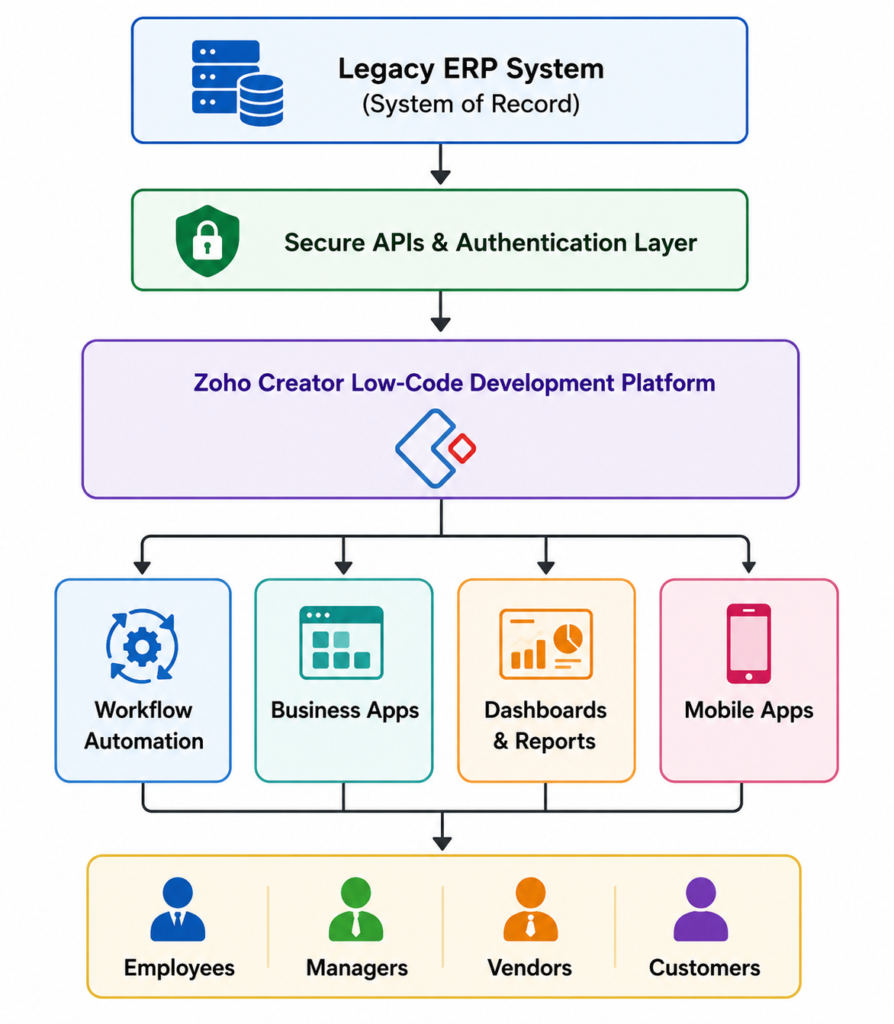
In this architecture, the ERP continues managing transactions, master data, and core business rules, while Zoho Creator acts as the extension layer for custom applications, workflow automation, and third-party integrations.
Secure APIs, encrypted communication, and role-based access ensure protected data exchange between systems. By keeping custom business logic outside the ERP, organizations can add new capabilities, improve user experiences, and automate processes without disrupting core operations.
Centralized governance enables administrators to manage permissions, monitor integrations, and maintain compliance. This layered approach delivers the flexibility to innovate while preserving enterprise-grade security, operational stability, and long-term scalability.
Best Practices for Maintaining Security While Extending Legacy ERP
Extending a legacy ERP successfully requires more than choosing the right technology. Organizations need a security strategy that evolves alongside their modernization initiatives. Using proven enterprise practices enables businesses to minimize cybersecurity risks, maintain compliance, and ensure ERP extensions remain scalable as applications and integrations expand.
Below are some of the most important best practices every organization should adopt.
Follow the Principle of Least Privilege
Every employee should have access only to the information and functions required for their role.
Granting excessive permissions increases the likelihood of accidental data exposure and unauthorized changes. Role-based access should be reviewed regularly to ensure users retain only the privileges they need as responsibilities change.
Secure Every API Connection
Modern ERP extension relies heavily on APIs.
Each integration should use secure authentication, encrypted communication, API keys or tokens, and proper validation mechanisms. Organizations should also monitor API usage to identify unusual activity before it becomes a security incident.
Centralize Identity and Access Management
Managing user accounts across multiple applications independently often creates inconsistencies.
Instead, businesses should implement centralized identity management so authentication, authorization, and user lifecycle management remain consistent across the ERP ecosystem. This simplifies administration while improving security.
Encrypt Sensitive Business Data
Data should remain protected whether it is stored in databases or transmitted between systems.
Encryption helps safeguard financial information, customer records, employee data, and operational information from unauthorized access during storage and communication.
Monitor, Audit, and Review Continuously
Security is not a one-time activity.
Organizations should regularly review user permissions, monitor audit logs, perform vulnerability assessments, and evaluate workflow changes. Continuous monitoring helps identify security issues early and supports regulatory compliance.
Build Security into Every Modernization Phase
Rather than treating security as a final checklist before deployment, it should be incorporated throughout planning, development, testing, and implementation. This proactive approach reduces remediation costs and creates a stronger foundation for future ERP expansion.
Ultimately, secure ERP extension is achieved through consistent governance, disciplined architecture, and continuous operational oversight—not simply through software features.
Business Benefits of Secure ERP Extension
A secure ERP extension strategy delivers much more than stronger cybersecurity. It enables organizations to modernize with confidence while creating measurable business value across operations, compliance, and long-term growth.
When security, governance, and business processes are aligned, organizations gain the flexibility to innovate without exposing critical enterprise systems to unnecessary risk.
Accelerated Digital Transformation
Businesses can launch new applications, automate workflows, and integrate cloud services much faster without waiting for major ERP upgrades or replacement projects.
This allows organizations to respond quickly to changing customer expectations and market demands.
Reduced Operational Risk
Maintaining the existing ERP as the system of record minimizes disruption while reducing the risks commonly associated with large-scale ERP replacement initiatives.
Employees continue using familiar systems while benefiting from modern applications built around them.
Improved Compliance and Governance
Role-based permissions, audit trails, centralized access management, and documented workflows help organizations meet internal governance requirements as well as industry regulations.
This strengthens accountability across departments, simplifies compliance reporting, and provides greater visibility into user activities across connected business systems.
Strong governance also helps organizations align with internal security policies and regulatory requirements by maintaining consistent access controls, audit trails, documented operational processes, and controlled application changes across ERP extensions and integrated business applications.
Better Employee Productivity
Secure workflow automation eliminates repetitive manual tasks while ensuring employees only access information relevant to their responsibilities.
This improves efficiency without compromising enterprise security.
Future-Ready Enterprise Architecture
As organizations adopt AI, advanced analytics, IoT devices, and additional cloud applications, a secure ERP extension architecture provides the flexibility to integrate emerging technologies without redesigning the entire technology landscape.
Instead of becoming a limitation, the ERP becomes the stable foundation upon which future innovation can be built.
Modernization That Supports Business Growth
Perhaps the greatest advantage of secure ERP extension is confidence. Business leaders can pursue modernization initiatives knowing that innovation, security, governance, and operational continuity are advancing together rather than competing against one another.
This balanced approach enables sustainable digital transformation while protecting one of the organization’s most valuable assets—its enterprise data while preparing the business for future growth.
Common Mistakes Businesses Make During ERP Extension
ERP extension failures usually happen due to poor planning, weak governance, and lack of scalability—not because of the technology itself. Avoiding these mistakes helps businesses achieve secure and sustainable modernization.
- Excessive User Permissions: Granting broad access to business data increases security risks. Implement role-based access control (RBAC) from the beginning to ensure users only access required information.
- Disconnected Applications: Building isolated solutions without integration planning creates duplicate data, inconsistent reporting, and inefficient workflows.
- Poor API Governance: APIs should be managed as enterprise assets with proper authentication, documentation, monitoring, and lifecycle management to prevent security gaps.
- Ignoring Governance Planning: Security reviews, audit policies, documentation, and access management should be established before deployment, not after implementation.
- Lack of Future Scalability: Solutions designed only for current requirements often require expensive redevelopment when new users, departments, or technologies are introduced.
- Treating ERP Extension as Only Development: Successful ERP extension requires secure architecture, integration strategy, governance controls, and long-term planning.
By avoiding these mistakes, organizations can extend their ERP systems effectively, maintain security and compliance, and build a scalable technology foundation that supports future business growth.
Future of Secure Legacy ERP Modernization
Enterprise ERP modernization is shifting from system replacement to secure extension strategies that improve agility while maintaining security, governance, and operational resilience. Businesses are focusing on extending existing ERP capabilities through modern technologies without disrupting core operations.
The demand for secure ERP modernization and low-code application development is growing rapidly. According to Gartner, by 2029, 80% of mission-critical applications will include low-code capabilities, increasing from 15% in 2024. This highlights the growing adoption of platforms that enable faster application development with strong governance, security, and scalability.
[Reference: Gartner]
Future ERP architectures will increasingly adopt Zero Trust Security, where every user, application, device, and API must be continuously authenticated and authorized. AI-powered security monitoring will also help organizations detect threats, analyze user behavior, and improve incident response in real time.
Additionally, API-first architecture and composable enterprise models will become essential for connecting ERP systems with CRM platforms, analytics tools, mobile applications, and cloud services. Instead of relying on one large system, businesses will build flexible ecosystems around their existing ERP.
Zoho Creator, as a low-code development platform, will play a key role in this transformation by enabling organizations to build secure applications, automate workflows, integrate systems, and extend legacy ERP capabilities while maintaining governance and control.
For business leaders, secure ERP extension is becoming a long-term digital transformation strategy that combines security, automation, scalability, and continuous innovation.
Case Study: How Orion Manufacturing Securely Extended Its Legacy ERP
Company Profile
- Global industrial automation manufacturer with 1,500+ employees
- Used a legacy ERP for nearly 20 years to manage procurement, inventory, finance, production, and supply chain operations
Challenge
- Needed mobile applications, workflow automation, and real-time dashboards without compromising ERP security, user roles, or governance
Solution
- Extended legacy ERP capabilities using Zoho Creator, a low-code application platform
- Built secure mobile apps, approval workflows, vendor portals, executive dashboards, and API-based integrations
- Implemented Role-Based Access Control (RBAC), secure API authentication, audit logging, and centralized governance to protect enterprise data
Business Outcomes
- 40% faster procurement and production approval cycles
- 60% reduction in manual data entry through workflow automation
- 100% role-based access to business applications, improving data security
- 50% faster management reporting with real-time dashboards
- Successfully modernized business operations while maintaining the stability, security, and governance of the existing ERP—without requiring a full ERP replacement.
Why Businesses Partner with OfficeHub Tech for Secure Legacy ERP Extension
Extending a legacy ERP is not simply an application development project—it is an enterprise transformation initiative that requires a deep understanding of business processes, enterprise architecture, security, integrations, and governance. A successful ERP extension strategy modernizes operations while maintaining the stability, security, and reliability of existing business systems.
This is why organizations often choose experienced implementation partners who can bridge the gap between business objectives and technical execution.
As a Best Zoho Solution provider Company in USA, India, UAE and KSA, and an Authorized Zoho & n8n Partner, OfficeHub Tech helps organizations modernize legacy ERP systems through a structured, security-first approach. Instead of recommending ERP replacement by default, the focus is on identifying where extension delivers the greatest business value with the least operational risk.
OfficeHub Tech’s approach includes:
- Legacy ERP Assessment to evaluate existing systems, business processes, and modernization opportunities.
- Zoho Creator Low-Code Development for building secure business applications, portals, dashboards, and workflow solutions.
- Enterprise API Integration to connect ERP systems with CRM platforms, cloud applications, analytics tools, and third-party software.
- Workflow Automation to eliminate manual processes while maintaining governance and approval controls.
- Security and Governance Planning through role-based access, secure authentication, audit logging, and integration best practices.
- End-to-End Implementation encompassing solution architecture, development, testing, deployment, user adoption, and continuous optimization.
By combining enterprise consulting with technical expertise, OfficeHub Tech helps businesses expand their ERP with confidence, accelerate digital transformation, and develop scalable, secure solutions that drive long-term business growth.
Conclusion
Extending Legacy ERPs with Zoho Creator while maintaining security, roles, and governance enables organizations to modernize without compromising enterprise security, compliance, or operational control. As discussed throughout this guide, businesses can securely extend existing ERP systems using a low-code development platform to build custom applications, automate workflows, implement role-based access control, secure APIs, and strengthen governance while keeping the ERP as the system of record. Rather than replacing a stable ERP, organizations can create a secure extension layer that accelerates innovation, reduces risk and costs, and supports scalable digital transformation without disrupting mission-critical operations.
As a Best Legacy ERP Extension and Modernization Services Company, OfficeHub Tech helps businesses plan, design, and implement secure legacy ERP extension solutions tailored to their operational needs. From ERP assessment and enterprise integrations to workflow automation, API development, governance planning, and end-to-end implementation, our team helps organizations modernize strategically while maintaining enterprise-grade security and long-term scalability.
Ready to Extend Your Legacy ERP with Zoho Creator?
Your legacy ERP is a valuable business asset that doesn’t need to be replaced to support modern operations. With Zoho Creator, a powerful low-code development platform, you can securely extend your ERP by building custom applications, automating workflows, integrating enterprise systems, and enabling mobile access. Whether your goal is to improve operational efficiency, streamline processes, or accelerate digital transformation, Zoho Creator provides the flexibility to innovate while maintaining security, governance, and business continuity. Start building a future-ready ERP ecosystem with confidence.
Sign up for Zoho Creator and explore what’s possible with a secure, low-code ERP extension: