The Missing Operating Model Behind AI-Powered AV Businesses
AV integration businesses already use specialized applications to manage sales, proposals, engineering, project delivery, procurement, finance, and customer service. Yet, having software for every department does not necessarily mean these functions work together. Employees still transfer information, follow up on pending tasks, coordinate handoffs, and collect project updates across disconnected systems.
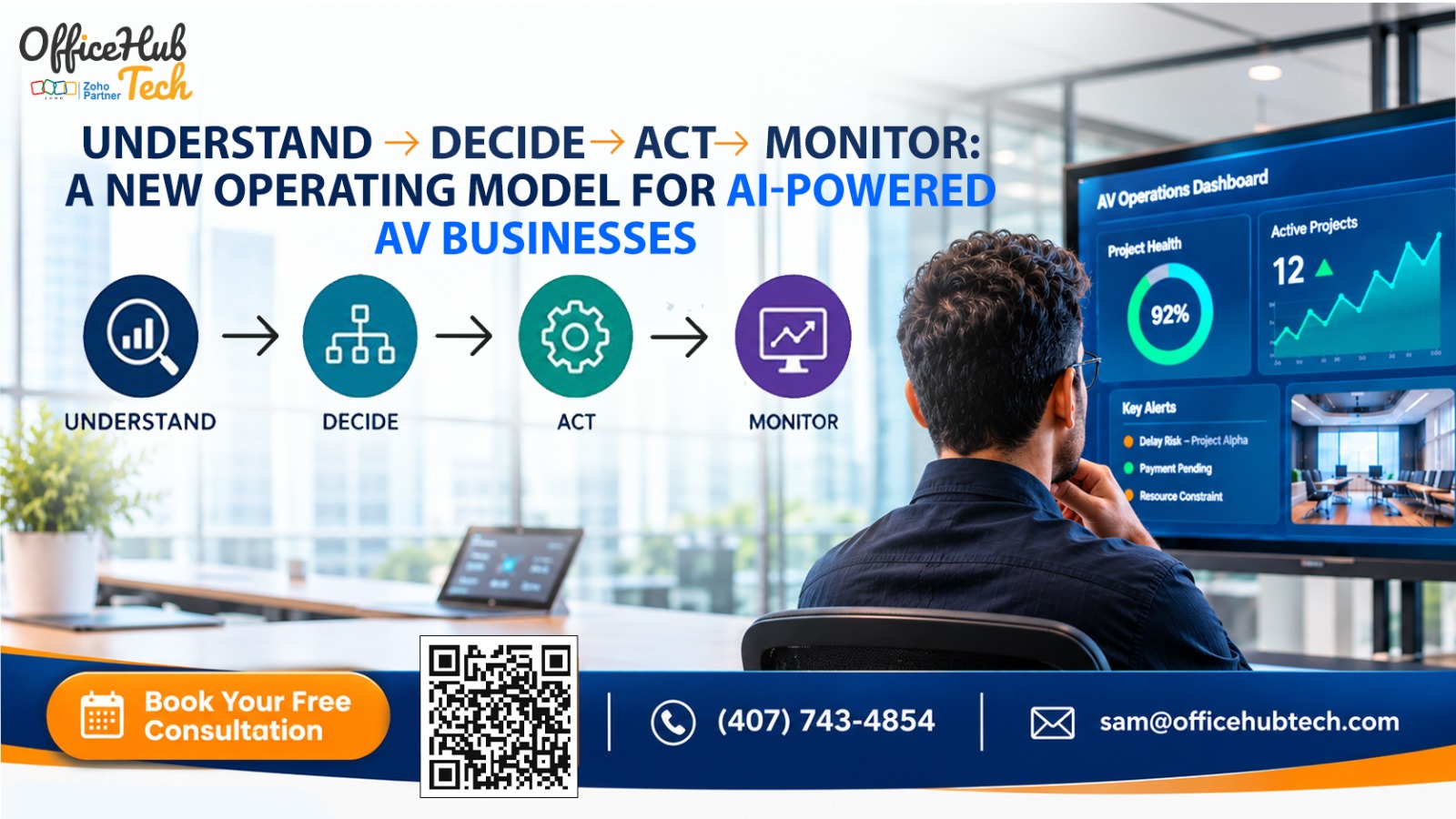
The next step in AV business automation is not simply adding another application or chatbot. It is creating an intelligent operating model that connects existing tools and coordinates work across departments. Through AI-powered AV workflow automation services in the USA, businesses can bring intelligence and execution together through four connected stages: UNDERSTAND → DECIDE → ACT → MONITOR.
##Quick Answer:
The Understand → Decide → Act → Monitor model is a continuous operating framework for AI-powered AV businesses. It enables an AI operating layer to gather information from existing business systems, evaluate operational context, initiate approved actions, and monitor execution. Rather than replacing CRM, D-Tools, project management, accounting, or service applications, it coordinates workflows across them. This helps AV integrators reduce manual handoffs, identify operational issues earlier, and improve visibility across departments.
Why Traditional AV Business Operations Need a New Operating Model
AV integrators often work with a combination of specialized software platforms. A CRM manages customer relationships, D-Tools supports AV proposals and engineering workflows, project management applications coordinate delivery, and accounting systems handle financial operations.
Although each application may function efficiently on its own, challenges arise when data needs to flow seamlessly between different systems.
AV Businesses Already Have the Tools, but Workflows Remain Disconnected
Consider what happens after an AV company wins a project. Sales may update the CRM, but project managers still need to collect proposal details, confirm the scope, prepare tasks, coordinate engineering, and communicate with procurement.
The same pattern continues throughout project delivery. Teams depend on emails, spreadsheets, notifications, and manual status checks to keep work moving.
Common Operational Pain Points
- Manual sales-to-project handoffs: Employees transfer customer, proposal, and project information before execution can begin.
- Repeated data entry: Teams enter similar information into multiple applications, increasing the possibility of inconsistencies.
- Disconnected engineering information: Technical requirements and equipment details may not reach project teams at the right time.
- Reactive project management: Managers discover schedule conflicts and delays through manual follow-ups.
- Limited financial visibility: Project milestones, procurement activity, and billing processes are not always coordinated.
- Delayed service coordination: Installation and deployment information may not reach service teams in a structured manner.
- Executive follow-up burden: Business leaders spend time collecting updates instead of focusing on decisions and exceptions.
Why Adding More Standalone AI Tools Is Not Enough
An AI chatbot can answer questions. A task-level automation can execute a predefined action when a particular event occurs. An AI agent can execute specific tasks through tools it has been permitted to access.
However, AV businesses need these capabilities to work together across their operational systems.
An AI operating layer for business operations addresses this broader requirement. It connects business information, decision-making, workflow execution, and monitoring into one coordinated model.
Understanding the Four-Stage Operating Model
The four stages represent different responsibilities within a continuous operational cycle.
| Stage | Core question | Main responsibility |
| UNDERSTAND | What is happening? | Gather signals and establish business context. |
| DECIDE | What should happen next? | Evaluate conditions, priorities, and permitted actions. |
| ACT | How should it be carried out? | Execute approved actions across connected systems. |
| MONITOR | Did it happen correctly? | Track results, detect exceptions, and trigger further attention. |
These stages are interconnected. Monitoring may reveal a new issue, which sends the workflow back through the cycle. Similarly, a new CRM update or project event can initiate another operating sequence.
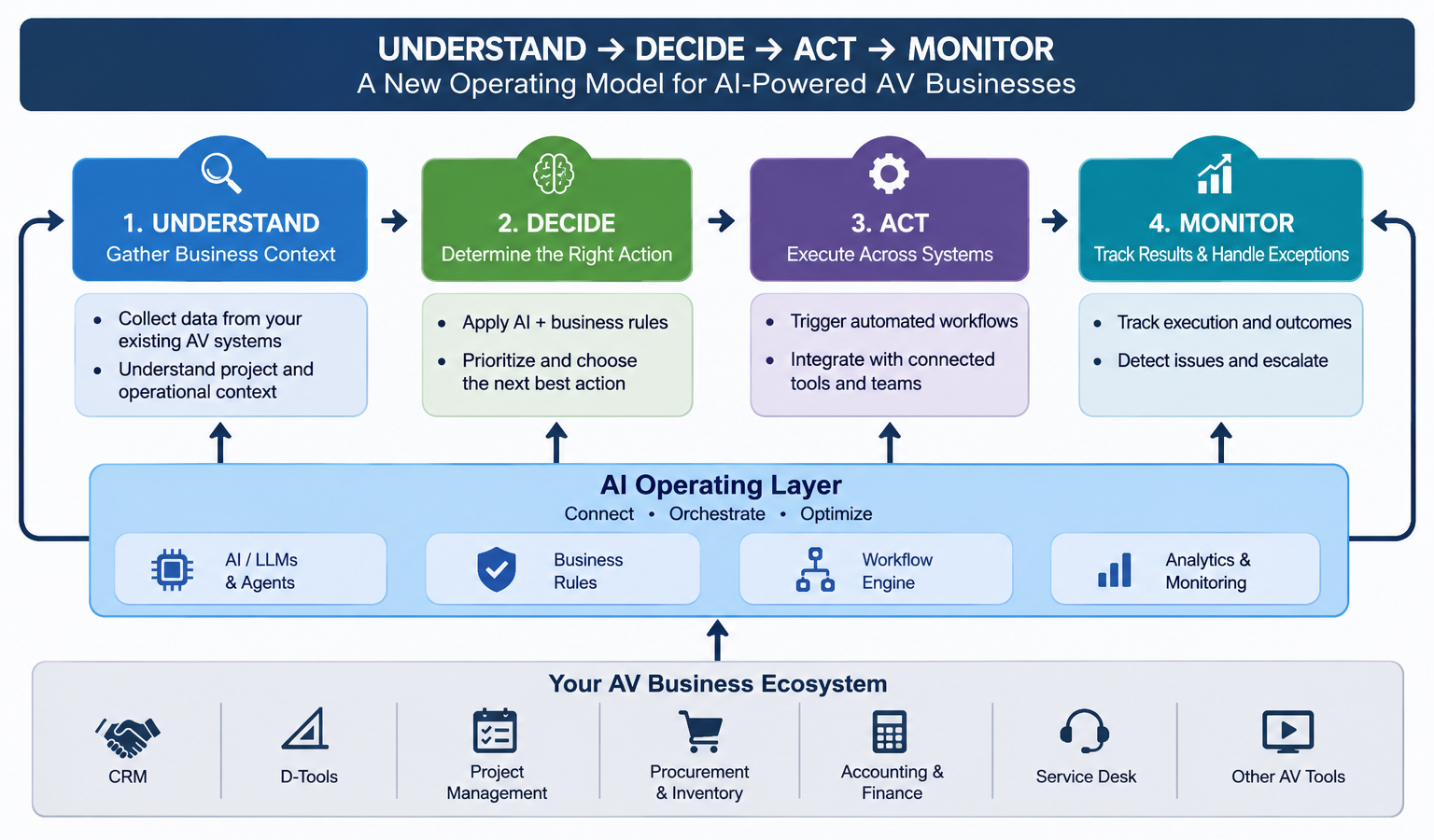
The objective is not to make every process autonomous. AI reasoning, predefined business rules, system validations, and employee approvals should each have a clearly defined role.
1. UNDERSTAND: Give AI the Operational Context of Your AV Business
The first stage is about understanding what is happening across the business. An AI operating layer must gather relevant information from existing applications before it can evaluate a situation or recommend an action.
Connecting Existing AV Business Systems
Depending on the applications and their available integration capabilities, information can be exchanged through:
- REST APIs and application connectors.
- Webhooks and event notifications.
- Middleware and integration platforms.
- Scheduled data synchronization.
- Controlled file-based exchanges for systems with limited integration options.
The connected environment may include CRM, D-Tools, project management, accounting, procurement, inventory, and service desk applications.
Collecting Signals Across Departments
The operating layer can retrieve or receive relevant business events, such as:
- A CRM opportunity changing to Won.
- A proposal reaching an approved status.
- A project task becoming overdue.
- An equipment order receiving a status update.
- A project milestone becoming eligible for a financial action.
- A service ticket approaching its SLA threshold.
These events provide the starting point for understanding operational activity.
Building Context Instead of Just Moving Data
Collecting a status update is not the same as understanding its business significance.
For example, when a CRM opportunity is marked Won, the operating layer may need to retrieve associated customer information, approved proposal details, technical scope, equipment requirements, and delivery expectations.
By connecting these records, it can establish whether the project has the information required for the next stage.
Technical Components Behind the Understand Stage
The technical foundation may include API and webhook listeners, data mapping, normalization, entity relationships, event timestamps, source-system references, and permission-aware data retrieval.
Validation is also important. Incomplete or inconsistent records should be identified rather than silently passed into downstream workflows.
Business benefit: Teams spend less time gathering information manually, while decisions can be based on a more complete view of operational activity.
2. DECIDE: Turn Operational Information into the Right Business Decision
Once the operating layer understands an event and its context, the next responsibility is determining what should happen.
This is where AI can help move beyond basic trigger-based automation.
From Business Signals to Operational Decisions
Suppose a CRM opportunity is marked Won. Instead of immediately creating a project, the operating layer can evaluate whether the approved proposal, customer information, technical scope, and required delivery details are available.
If everything is ready, it can prepare the next workflow. If important information is missing, it can request clarification or route the issue to the responsible employee.
AI Reasoning, Business Rules, and System Validation
A reliable decision process should not depend on an AI model alone.
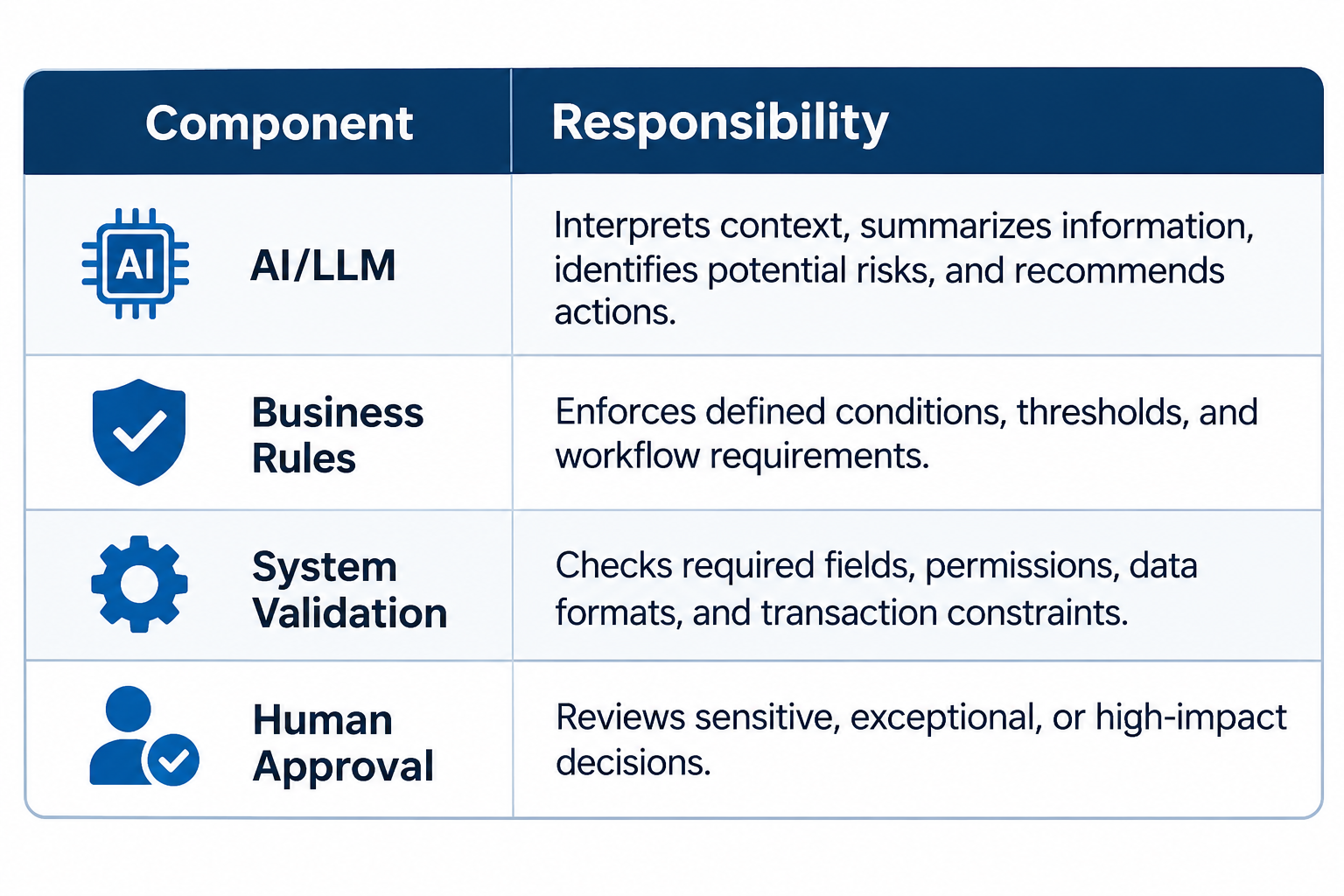
For example, AI may identify a potential project schedule risk, but a defined business rule can determine the escalation threshold. A project manager may then approve a proposed resource adjustment.
What Can the Operating Layer Evaluate?
Depending on the workflow, it can help answer questions such as:
- Is the project ready for kickoff?
- Are the required technical documents available?
- Are installation resources available?
- Could equipment availability affect the delivery schedule?
- Does a milestone delay require escalation?
- Is a project variance significant enough to require management attention?
- Should a service issue be prioritized?
Context-Aware Prioritization and Risk Detection
A single status update may not reveal the full situation.
For instance, a project deadline may appear manageable when viewed alone. However, when combined with incomplete procurement, an unresolved engineering dependency, and limited technician availability, it may represent a significant delivery risk.
AI can help interpret these signals together and prepare a more useful assessment.
Human-in-the-Loop Decision Making
Not every decision should be automated. Financial commitments, customer-facing changes, sensitive data updates, and significant resource decisions may require human authorization.
The operating layer should make it clear which actions are recommendations, which are approved, and which have actually been executed.
Business benefit: AV companies can prioritize operational issues more effectively and identify risks before they become larger delivery problems.
3. ACT: Convert Decisions into Coordinated Actions Across AV Systems
Understanding a situation and recommending a decision are useful, but operational value comes when the approved decision is translated into action.
The ACT stage connects the decision process with the applications where business work actually happens.
From Approved Decisions to System-Level Execution
Through APIs, connectors, and workflow orchestration, the operating layer can initiate permitted actions in connected applications.
Examples include:
- Creating a project after the required sales handoff conditions are met.
- Transferring approved customer and technical information.
- Generating tasks and milestones from defined project templates.
- Notifying procurement when equipment requirements reach an approved stage.
- Routing service tickets to the appropriate team.
- Sending notifications when a task requires employee attention.
Example: Automating the Sales-to-Project Handoff
Consider a typical AV project handoff:
- The CRM records an opportunity as Won.
- The operating layer retrieves the relevant opportunity and approved proposal information.
- It validates whether mandatory project details are available.
- The AI layer identifies the applicable project setup requirements.
- After the required conditions and approvals are satisfied, the workflow creates or prepares the project in the connected project management platform.
- Relevant tasks, milestones, and notifications are initiated.
- Any missing information or failed action is routed for review.
This creates a structured handoff instead of relying on employees to manually coordinate every step.
D-Tools Integration Automation Within the Operating Model
For AV companies using D-Tools, relevant proposal, design, and technical information can be connected with downstream business workflows, depending on the available integration interfaces.
This can help make approved scope and equipment information accessible to project execution teams, reduce repeated data entry, and improve continuity between engineering and delivery.
The architecture should reflect the customer’s actual software environment. Not every AV company uses the same proposal or project management platform.
Technical Controls Required Before Actions Are Executed
A production-ready workflow needs more than an API connection. Important controls include:
- Authentication and authorization.
- Role-based permissions.
- Input and output validation.
- Idempotency to prevent duplicate actions.
- Transaction status verification.
- Retry and exception handling.
- Approval checkpoints.
- Action logs and traceability.
For example, if a project creation request times out, the system should verify whether the project was actually created before attempting another request. Otherwise, it may create duplicate records.
Business benefit: Approved decisions become coordinated actions across existing applications, reducing manual handoffs and inconsistent execution.
4. MONITOR: Maintain Visibility After the Workflow Has Started
Executing an automation does not mean the process is complete. A downstream application may reject a request, a task may remain unfinished, or a dependency may change after the workflow begins.
The MONITOR stage checks what actually happened.
What Should the Operating Layer Monitor?
Depending on the business requirements, monitoring can cover:
- Project status and milestone progress.
- Task completion and overdue activities.
- Resource availability and schedule changes.
- Procurement and equipment dependencies.
- Project financial and billing milestones.
- Unresolved service tickets and SLA status.
- Failed integrations and incomplete transactions.
Detecting Exceptions and Triggering Escalations
Consider a project that is approaching its installation date, but a required equipment order remains unresolved.
The operating layer can identify the affected project, retrieve relevant procurement information, evaluate the dependency, and notify the responsible manager.
Other examples include:
- A project milestone becoming overdue.
- A task remaining incomplete beyond its expected timeline.
- A service issue approaching its SLA threshold.
- An API request failing or returning an unexpected response.
- Conflicting information appearing across connected applications.
Depending on the configured permissions, the system can send an alert, prepare an exception summary, request approval, or initiate an authorized recovery workflow.
Executive Visibility Without Manual Status Collection
Instead of asking multiple departments for updates, business leaders can access a consolidated view of:
- Projects progressing as expected.
- Projects requiring attention.
- Delays and their underlying dependencies.
- Departments responsible for unresolved tasks.
- Pending approvals and decisions.
This does not eliminate the need for project managers or department heads. It helps them focus on situations that require their involvement.
Closing the Loop: Monitoring Feeds the Next Decision
Monitoring makes the operating model continuous.
For example, when a procurement delay is detected, the system can gather the affected project details, evaluate the potential schedule impact, recommend a response, route an approval if necessary, and continue monitoring the updated procurement status.
Business benefit: AV businesses gain better operational visibility and can respond to exceptions without depending entirely on manual status checks.
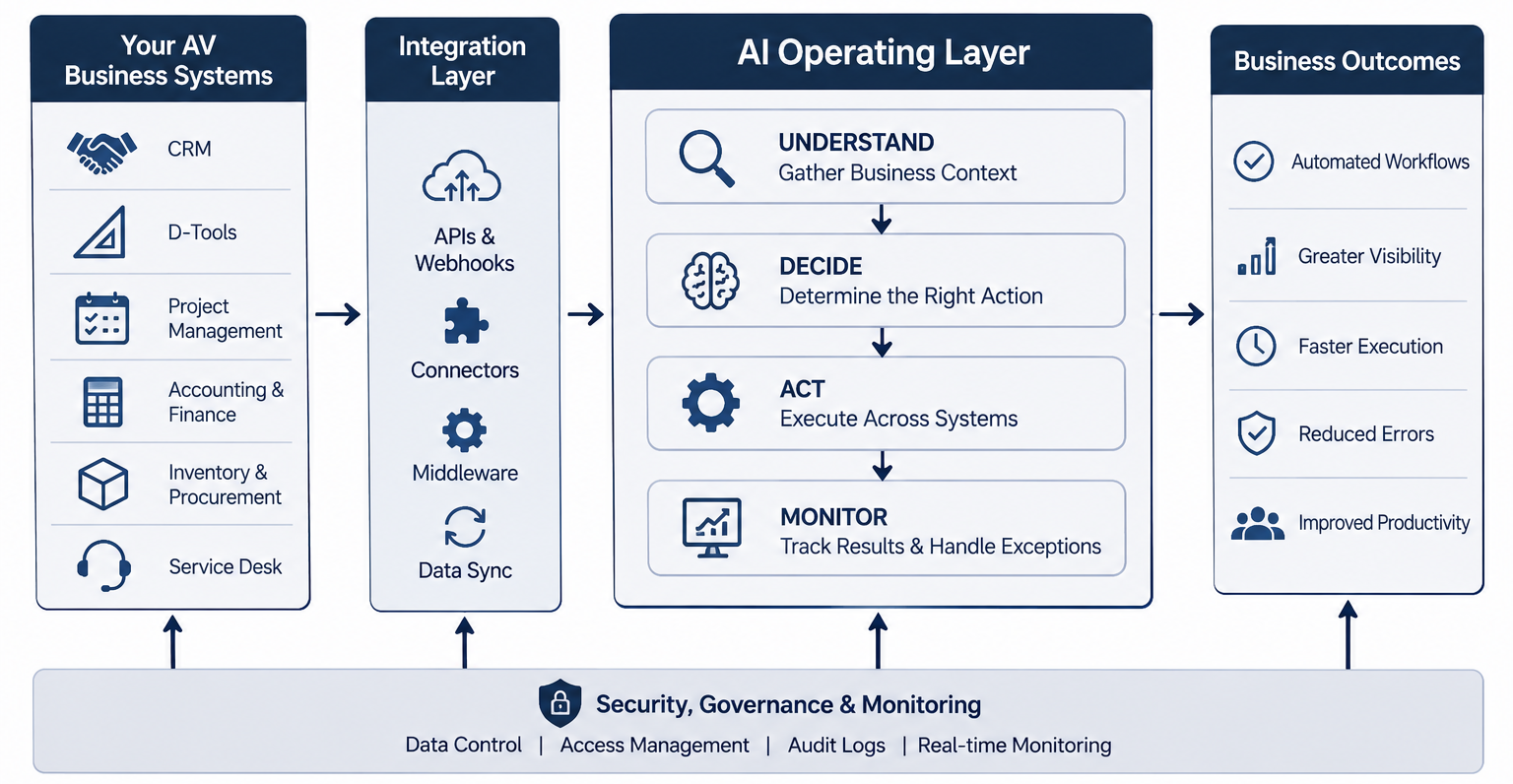
The Technical Architecture Behind the Four-Stage Operating Model
The four stages need a supporting architecture that connects business applications, AI capabilities, workflow execution, and operational controls.
1. Existing AV Business Applications
These are the systems the business already relies on, such as CRM, D-Tools, project management, accounting, procurement, inventory, and service platforms.
They generally remain the primary systems of record for their respective business functions.
2. Integration and Connectivity Layer
This layer handles communication between applications and the operating layer through APIs, webhooks, connectors, middleware, and scheduled synchronization.
The integration approach depends on each application’s capabilities and the customer’s infrastructure.
3. Data and Context Layer
This layer maps information across applications, maintains relevant business relationships and identifiers, and supports validation.
It helps the AI system retrieve the context needed to interpret a business event.
4. AI Intelligence and Decision Layer
LLMs and AI agents can interpret information, summarize operational issues, identify potential risks, and recommend actions.
Business rules and validation controls establish the boundaries within which these recommendations can be used.
5. Workflow Orchestration and Execution Layer
This layer coordinates tasks, dependencies, approvals, and actions across connected applications. It also manages execution status and exceptions.
6. Monitoring, Governance, and Visibility Layer
This layer tracks workflow execution, verifies system responses, maintains logs, identifies exceptions, and provides operational visibility.
How AI Agents, LLMs, and MCP Fit In
These technologies have different responsibilities:
- LLMs: Interpret business context, summarize information, and support decision-making.
- AI agents: Perform defined tasks using authorized tools and workflows.
- MCP: Provides a structured way for compatible AI clients and models to access approved tools and resources.
- APIs and connectors: Provide the communication paths to business applications.
- Workflow orchestration: Coordinates the sequence, dependencies, and status of operational actions.
MCP does not replace APIs, databases, or integration engineering. It can provide a structured interface for AI systems to access tools, while the underlying integrations still require authentication, permissions, validation, and monitoring.
Data Ownership, Security, and System Boundaries
Before implementation, the business should establish:
- Which application owns each business record.
- Which system is authorized to update particular fields.
- Whether the operating layer stores information or retrieves it when needed.
- How credentials and API permissions are managed.
- Which actions require human approval.
- How conflicting updates are reconciled.
- How AI recommendations are distinguished from verified system data.
Reliability, Failure Handling, and Human Oversight
The architecture should also account for API timeouts, unsuccessful responses, retry policies, duplicate-action prevention, integration health checks, error logs, and recovery procedures.
If the system cannot confidently complete an action, it should route the exception to an appropriate employee rather than silently proceeding.
A dependable AI operating layer is therefore built on more than AI reasoning. It requires integration engineering, workflow governance, and a reliable way to verify important actions.
How the Operating Model Improves AV Business Operations
When the four stages work together, their value extends across departments.
Reduced manual handoffs: Understand gathers relevant information, Decide evaluates the next step, and Act coordinates the handoff.
Better operational visibility: Monitor brings project progress, delays, unresolved tasks, and exceptions into a more accessible view.
More consistent workflows: Defined processes reduce repeated administrative steps and variations in how departments handle similar activities.
Proactive project coordination: Monitoring project signals and dependencies can help teams identify potential problems earlier.
Better use of existing software: An operating layer can connect current applications rather than requiring businesses to replace every system.
More focused executive attention: Leaders can receive information about important exceptions instead of manually chasing updates across departments.
Measuring Business Outcomes
AV companies should establish a baseline before implementing automation and measure changes afterward.
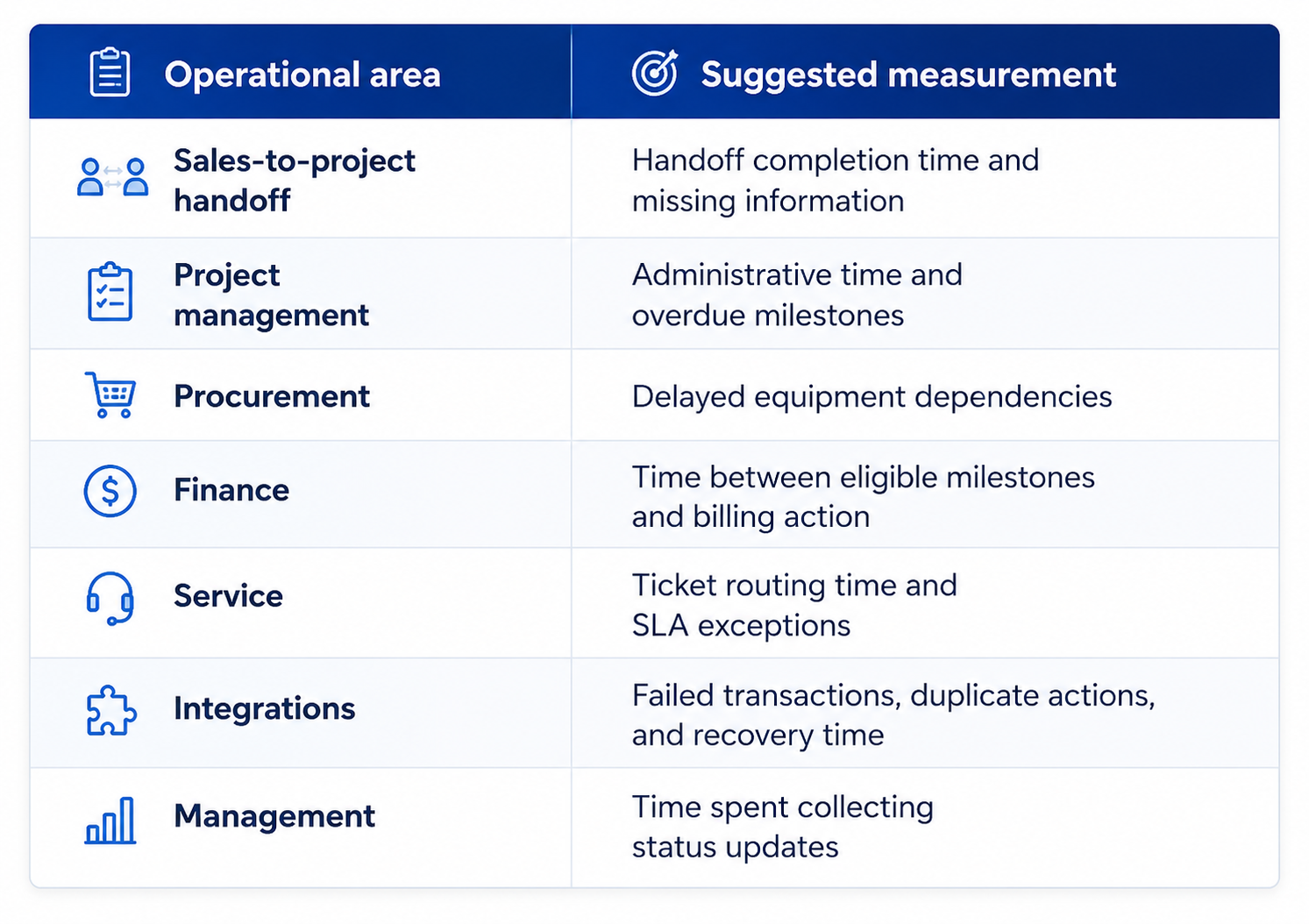
This provides a practical way to evaluate whether the operating model is improving business processes without relying on unsupported ROI claims.
Practical Use Cases: Applying the Four Stages Across AV Departments
The operating model can support different workflows across an AV business. The exact implementation depends on the applications involved, available integrations, and the level of automation approved by the company.
1. Sales-to-Project Handoff Automation
- Understand: Detect a Won opportunity and retrieve approved deal and proposal information.
- Decide: Check project readiness and identify missing details.
- Act: Prepare project setup, create tasks, and notify relevant teams.
- Monitor: Track project creation and unresolved handoff requirements.
Business outcome: More structured project kickoffs and less manual information transfer.
2. Engineering-to-Project Coordination
- Understand: Retrieve relevant technical scope, equipment, and engineering information.
- Decide: Identify missing technical details or project dependencies.
- Act: Make approved information available to project teams and initiate relevant tasks.
- Monitor: Track outstanding engineering requirements and handoff completion.
Business outcome: Better continuity between design and project execution.
3. Project Schedule and Resource Coordination
- Understand: Gather project milestones, task status, and resource availability.
- Decide: Identify schedule conflicts and potential capacity issues.
- Act: Recommend resource adjustments or initiate approved reassignment workflows.
- Monitor: Track changes and subsequent project progress.
Business outcome: Better resource coordination and earlier visibility into schedule risks.
4. Procurement and Inventory Dependencies
- Understand: Read equipment requirements, procurement status, and availability.
- Decide: Identify items that may affect project delivery.
- Act: Notify procurement, prepare purchasing tasks, or route approval requests.
- Monitor: Track order status and unresolved equipment dependencies.
Business outcome: Better coordination between project delivery and equipment availability.
5. Project-to-Finance Coordination
- Understand: Identify relevant project milestones and financial status.
- Decide: Determine whether a milestone meets the conditions for a billing action.
- Act: Prepare or initiate the approved financial workflow.
- Monitor: Track invoice status, payment updates, and exceptions.
Business outcome: Better alignment between project progress and financial processes.
6. Installation-to-Service Continuity
- Understand: Gather installation completion details, equipment information, and service history.
- Decide: Identify support requirements and routing criteria.
- Act: Create or route service records and notify the appropriate team.
- Monitor: Track ticket progress, priority, and SLA status.
Business outcome: A more consistent transition from project delivery to ongoing customer support.
What AV Businesses Should Evaluate Before Adopting an AI Operating Layer
Before implementation, AV businesses should assess their workflows, systems, and technical requirements.
- Start With One Workflow: Identify a process with frequent handoffs, repetitive tasks, or limited visibility, such as sales-to-project handoff.
- Review Existing Applications: Check API and webhook availability, data ownership, and integration requirements. Legacy systems may need middleware or scheduled synchronization.
- Define AI and Human Responsibilities: Decide which tasks require AI interpretation, predefined rules, automation, or employee approval.
- Establish Security and Governance: Define data access, credentials, permissions, hosting, audit logs, and sensitive data handling.
- Test Before Expanding: Validate data accuracy, integration reliability, and exception handling. Expand to other departments once the initial workflow is stable.
How OfficeHub Tech Can Help AV Businesses Move to This Operating Model
OfficeHub Tech helps AV businesses connect their existing software and operational processes through custom integrations, workflow automation, and AI-driven solutions.
The objective is not to force every AV company into a fixed software stack. It is to design an operating layer around the tools, workflows, and requirements the business already has.
Work With Your Existing AV Software and Business Processes
An implementation can be designed around the applications currently used by the business, including:
- CRM and sales platforms.
- D-Tools and other AV proposal or engineering applications.
- Project management software.
- Procurement and inventory systems.
- Accounting and finance platforms.
- Service desk and field service applications.
The integration approach depends on the capabilities of each application and the customer’s technical environment.
Customize the Four-Stage Model Around Your Workflow
OfficeHub Tech can help configure each stage according to the business process:
- Understand: Connect relevant applications and retrieve the information required for each workflow.
- Decide: Configure AI reasoning, business rules, decision criteria, and human approval points.
- Act: Build integrations and workflow orchestration to execute approved actions across connected systems.
- Monitor: Establish status tracking, exception detection, notifications, and operational visibility.
This makes the operating model adaptable to different AV business structures and departmental requirements.
Build Around Your Existing Tools, Not a Fixed Software Stack
An AV integrator using D-Tools, a CRM, and a project management platform may need a different integration architecture from a company using customized ERP software and internal applications.
OfficeHub Tech’s AVSI business automation services in the USA focus on designing workflows and integrations around the customer’s existing technology environment. Depending on the requirements, the solution can involve APIs, webhooks, middleware, connectors, and custom workflow components.
Own Your AI: Deployment and Maintenance Approach
OfficeHub Tech’s Own Your AI approach is designed around customer control of the AI environment.
The proposed deployment model can include:
- Hosting the AI environment on the customer’s own server or private infrastructure.
- Customer control over the deployed AI environment and its operational data.
- Maintenance handled by the customer’s IT team or through OfficeHub Tech’s managed support.
- A deployment model designed to avoid recurring per-token AI usage charges and a separate core AI subscription, where supported by the agreed architecture.
Actual hosting, model licensing, infrastructure, third-party software, and maintenance terms should be defined during implementation. These costs and responsibilities may vary by deployment.
Start With One Workflow and Expand
A practical implementation can follow these steps:
- Assess the current AV technology stack and operational bottlenecks.
- Select a workflow with clear business value.
- Define the integration architecture and decision boundaries.
- Build and test the operating workflow.
- Validate execution, monitoring, and exception handling.
- Expand into additional departments and processes.
Want to see how an AI operating layer can work with your existing AV software and workflows? Connect with OfficeHub Tech to discuss an implementation approach built around your business processes.
Conclusion: Move Beyond Isolated Automation to a Connected AV Operating Model
AV businesses do not necessarily need more standalone applications to improve operational efficiency. They need a structured way to connect information, decisions, execution, and oversight across their existing systems.
The four-stage model provides that structure: UNDERSTAND what is happening, DECIDE what should happen next, ACT through connected applications, and MONITOR execution and exceptions.
An AI operating layer for AV businesses brings these responsibilities together through AI intelligence, integration engineering, workflow automation, and human oversight. When designed around existing tools and business processes, it gives AV integrators a practical path toward more connected and coordinated operations.