##Quick Answer
Zoho Software Trading LLC is listed by the UAE Ministry of Finance as an accredited eInvoicing Service Provider (ASP), with accreditation number 121988. This matters for businesses evaluating Zoho for UAE eInvoicing.
The framework combines three components: PINT-AE defines invoice data requirements, Peppol enables structured invoice exchange, and the ASP performs designated service-provider functions. Zoho Books serves as the accounting application, while accreditation and exchange functions have separate responsibilities. Businesses must understand how accounting data, validation, transmission, reporting, and exception handling connect before implementation.
##Key Takeaways
- Zoho’s Accreditation: Zoho Software Trading LLC is listed by the UAE Ministry of Finance as an accredited eInvoicing Service Provider (No. 121988).
- PINT-AE: Defines UAE-specific invoice data structures and business rules.
- Peppol: Enables interoperable exchange of structured electronic documents.
- ASP Responsibilities: Accredited Service Providers support required invoice exchange and related processes.
- Zoho Books’ Role: Manages business and invoice data, while ASP connectivity is handled separately.
- Data Quality: Accurate customer, supplier, product, service, and tax information supports valid invoices.
- Integration Planning: Assess compatibility, field mapping, validation, exception handling, reconciliation, security, and ongoing support.
What Does Zoho’s UAE eInvoicing ASP Accreditation Actually Mean?
The UAE’s shift to structured eInvoicing requires businesses to exchange invoice data in a format that systems can process electronically. This makes it important to evaluate both accounting software capabilities and the service provider connecting the invoicing environment to the national framework. Businesses may also require Zoho implementation services in UAE to configure their accounting environment and align existing workflows with eInvoicing requirements.
In this context, Zoho Software Trading LLC’s accreditation by the UAE Ministry of Finance establishes its role as an accredited service provider, giving businesses a starting point for understanding Zoho’s position within the PINT-AE and Peppol ecosystem. OfficeHub Tech can complement this by supporting Zoho implementation and integration based on each organization’s operational requirements.
Zoho Software Trading LLC on the UAE Ministry of Finance ASP List
An Accredited Service Provider (ASP) is an organization authorized to provide eInvoicing services under the UAE’s regulatory and technical framework. The Ministry of Finance maintains an official directory listing accredited legal entities, their accreditation numbers, and contact details.
The directory lists Zoho Software Trading LLC under accreditation number 121988, allowing businesses to verify Zoho as eInvoicing accredited service providers.
However, accreditation applies to the listed legal entity, not automatically to every associated product, integration, or customization. Businesses should confirm the services covered, accounting system connectivity, and their own responsibilities before implementation.
What Does ASP Accreditation Mean for Zoho Books Users?
Zoho Books manages invoices, customers, vendors, payments, and financial records, while an ASP performs designated services within the UAE eInvoicing framework. These roles are related but distinct. The accounting application manages the business transaction, while the ASP supports the required eInvoicing services and exchange processes. PINT-AE defines the structured invoice format, and Peppol provides the framework for standardized electronic exchange.
For a Zoho Books user, the important questions are therefore:
- How is invoice information prepared for the required structured format?
- Which validation activities are performed, and at what stage?
- How is the invoice transmitted through the required exchange arrangement?
- How are acknowledgements, rejections, and corrections communicated?
- What information is available to the business for tracking and reconciliation?
- Which functions are provided by Zoho Books, and which are handled by the ASP service?
Businesses should confirm the availability and scope of the relevant Zoho Books UAE functionality and service arrangements before implementation. An accreditation listing establishes the provider’s status, but the business still needs to understand the exact capabilities and operating process available for its requirements.
PINT-AE and Peppol: Understanding the Two Foundations of UAE eInvoicing
Understanding Zoho’s role in UAE eInvoicing requires distinguishing PINT-AE from Peppol. PINT-AE defines the structure and meaning of invoice data, while Peppol provides the framework for exchanging structured documents. An ASP connects these requirements with the services businesses use to send and receive eInvoices.
What Is PINT-AE?
PINT-AE (Peppol International Invoice – UAE) is the UAE-specific implementation of the Peppol International Invoice specification. It standardizes invoice data through common fields and business rules, including supplier and buyer details, invoice references, product descriptions, quantities, prices, tax information, and payable amounts.
Businesses must map their accounting data correctly to these structured fields. Incomplete records, incorrect mappings, or invalid tax information may cause validation failures. PINT-AE therefore ensures that different systems can consistently interpret invoice information.
What Is Peppol?
Peppol is an interoperability framework that enables participating organizations to exchange structured electronic documents through standardized technical arrangements.
Unlike PDF invoices sent by email, which often require manual review and data entry, Peppol allows receiving systems to process structured invoice information electronically.
Its key capabilities include:
- Standardized document exchange: Uses agreed technical specifications.
- Participant identification: Identifies organizations involved in document exchange.
- Service-provider connectivity: Enables service providers to connect participating businesses.
- Interoperability: Allows different accounting applications to exchange information without requiring the same software.
- Defined exchange processes: Supports consistent communication between sending and receiving systems.
Peppol is not an accounting application, invoice-generation tool, or tax calculation engine. It provides the exchange framework, while business applications and service providers perform their respective functions.
PINT-AE vs. Peppol vs. ASP: What Is the Difference?
Understanding the distinction between these components is essential when evaluating an E-Invoice Management Software solution in the UAE.
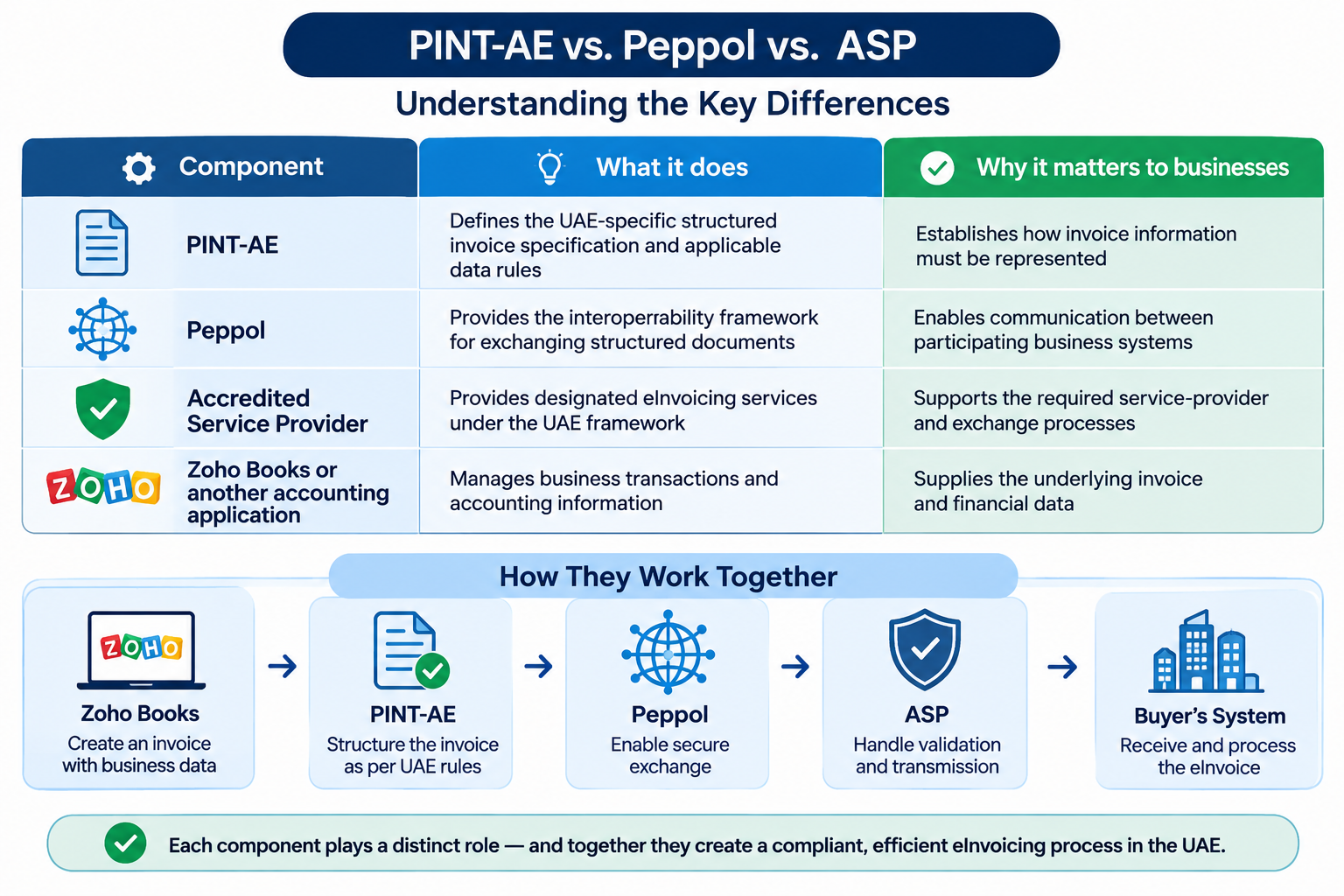
For example: A supplier creates an invoice in Zoho Books. The invoice includes buyer details, item descriptions, applicable tax data, and the total amount payable. The information must be prepared in the appropriate structured format according to PINT-AE. The service-provider arrangement then supports the required processing and exchange through the Peppol-based framework.
Each component has a distinct responsibility. PINT-AE determines the invoice structure, Peppol supports exchange, the ASP provides designated services, and Zoho Books manages the accounting information.
This is why evaluating an e-invoicing platform requires more than checking whether it can create invoices. Businesses must understand how the complete process works.
How Zoho, PINT-AE, and Peppol Work Together in a UAE eInvoice Transaction
The relationship between Zoho, PINT-AE, and Peppol becomes clearer when viewed through an actual business transaction.
Imagine a UAE-based company supplying equipment to another business. Its sales team confirms the order, the accounting department prepares the invoice, and the customer expects to receive the invoice electronically.
Under a structured eInvoicing process, the invoice must move through a connected sequence of data preparation, validation, exchange, and processing activities.
From Invoice Creation to Structured eInvoice Data
The process begins with the supplier’s business application.
The finance team prepares an invoice using the information maintained in the accounting system. Depending on the transaction, this may include:
- Supplier and buyer information.
- Customer tax registration details, where applicable.
- Invoice date and document reference.
- Product or service descriptions.
- Quantities and unit prices.
- Tax categories and calculated amounts.
- Subtotals, invoice totals, and payable amounts.
Although this information may already exist in Zoho Books, it must be represented correctly for the structured eInvoice process.
This involves mapping the business application’s fields to the corresponding elements in the applicable invoice specification.
For instance, a product description in the accounting application must be associated with the appropriate invoice line information. Tax amounts must correspond to the relevant tax categories and calculations. Buyer and supplier details must be represented in the required identification fields.
This mapping is important because different applications may store similar information using different field names, formats, or internal structures.
An implementation should therefore review the source data rather than assume that every field is automatically ready for electronic exchange.
How the ASP Validates and Exchanges Invoice Data
Once invoice information is prepared in the required structured format, it enters the applicable service-provider process.
The ASP supports designated eInvoicing services, including validation and exchange activities under the UAE framework. Validation checks whether invoice data meets applicable technical and business rules, helping identify missing information, invalid values, calculation inconsistencies, or incorrect document structures.
After the required processing, the invoice proceeds through the designated exchange arrangement. However, successful invoice generation does not necessarily confirm that all validation, transmission, or reporting steps are complete. Businesses should understand which checks occur during preparation, which are performed by the ASP, and what status information is returned.
The exact sequence should be verified against current provider documentation and UAE technical requirements.
What Happens When the Buyer Receives the eInvoice?
The receiving process is equally important, as the buyer may use a different accounting application or ERP system. The receiving service-provider arrangement delivers the structured invoice to the buyer’s environment, where compatible systems can process the information.
The buyer can then use the data for internal activities such as:
- Matching invoices with purchase orders.
- Verifying quantities against goods received.
- Reviewing tax information.
- Routing invoices for approval.
- Recording payables and preparing payments.
- Completing reconciliation.
Structured data reduces the need to manually extract information from documents, provided the receiving system is configured to process it.
However, electronic delivery does not automatically approve an invoice for payment. Purchase-order matching, internal controls, approval policies, and accounting procedures remain the buyer’s responsibility.
A Practical Invoice Journey: Zoho Books to the Buyer
The following illustrates the high-level relationship between the supplier’s accounting application, the ASP, the Peppol exchange framework, and the buyer’s system.
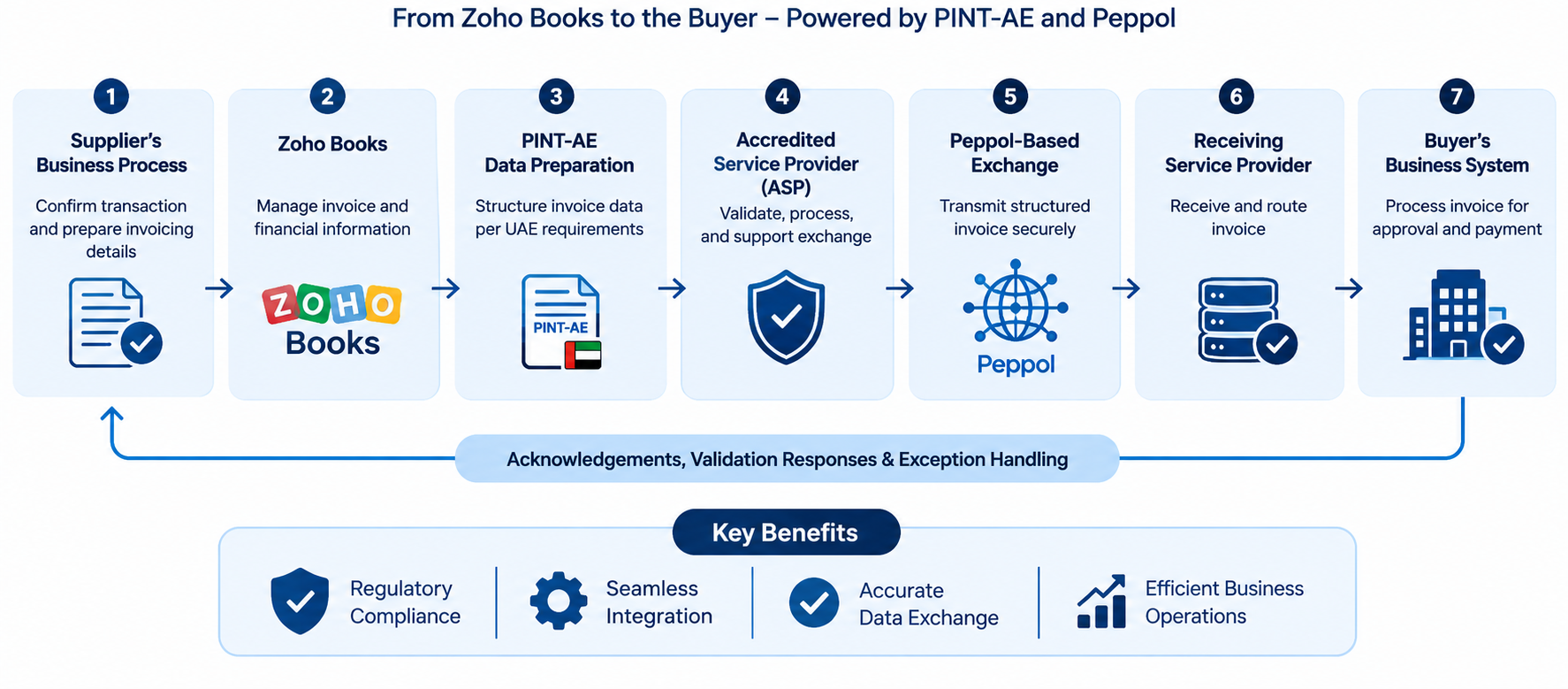
Each stage has a different purpose:
- Supplier’s business process: The business confirms the transaction and prepares the information required for invoicing.
- Zoho Books: The accounting application manages the invoice and its underlying financial information.
- PINT-AE data preparation: The invoice information is represented according to the applicable UAE structured invoice requirements.
- Accredited Service Provider: The provider supports the designated validation, processing, and exchange functions.
- Peppol-based exchange: The structured invoice is exchanged through the applicable interoperability framework.
- Receiving service-provider arrangement: The invoice is delivered through the receiving side of the exchange process.
- Buyer’s business system: The buyer processes the invoice through its accounting, approval, and payment workflows.
The process may also involve acknowledgements, validation responses, reporting, and exception handling. These should be shown at the appropriate stages in the actual implementation rather than treated as one generic confirmation.
For businesses evaluating Zoho Peppol integration, this workflow demonstrates why the accounting application, provider service, and exchange framework must be considered together.
What Makes PINT-AE Data Compliance Important for Zoho-Based Invoicing?
A structured eInvoicing process depends on accurate and complete invoice information. Even with a capable accounting application and an accredited service provider, incorrect source data can create validation and processing issues. Therefore, data quality is essential when implementing Peppol e-invoicing compliance software.
Mandatory Invoice Information and Data Mapping
Data mapping connects information stored in business applications to the corresponding elements required by the structured invoice specification.
For example, customer details, billing addresses, tax registration numbers, invoice references, and payment terms must be mapped to the appropriate fields.
Businesses should verify the accuracy of:
- Supplier and buyer identification: Business details and tax registration information.
- Invoice details: Invoice numbers, dates, document types, and references.
- Product and service information: Descriptions, quantities, units, and prices.
- Tax information: Tax categories, rates, taxable amounts, and calculated values.
- Financial totals: Line amounts, subtotals, tax totals, and payable amounts.
- Currency and transaction references: Consistent currency values and supporting references.
Having these fields in an accounting application is not enough. Businesses must ensure that the information follows the expected formats and maps correctly to the structured invoice requirements. Where multiple applications are involved, customer, product, tax, and transaction data flows also need to be reviewed.
Validation Rules and Common Data Issues
Validation identifies information that could prevent an invoice from being processed correctly. Issues may originate in the accounting application, data transformation, or system integration.
Common examples include:
- Missing buyer or supplier identification details.
- Incomplete customer or vendor records.
- Incorrect tax categories or rates.
- Mismatches between line-level tax amounts and invoice totals.
- Invalid invoice dates or document references.
- Missing product details or inconsistent currency and unit information.
For example, if customer tax registration details are incomplete in a CRM and transferred to Zoho Books without correction, the resulting invoice may contain incomplete information. Incorrect field mapping in a customized integration can create similar problems.
Validation should therefore begin before invoice data reaches the service-provider process. Reviewing master records, mapping rules, and transaction information helps reduce avoidable exceptions.
Credit Notes, Rejected Invoices, and Corrections
A reliable eInvoicing process must also address rejected invoices, incorrect information, and subsequent adjustments.
Rejections may result from missing fields, invalid values, or structural issues. The appropriate response depends on the error and the invoice’s processing stage.
A practical exception-handling process should:
- Capture the rejection or validation response.
- Identify the affected invoice and reason.
- Determine whether the issue originates in source data, mapping, configuration, or exchange.
- Correct the underlying information where necessary.
- Follow the applicable resubmission or correction procedure.
- Retain status records and supporting information for reconciliation.
Credit notes require separate consideration because they document adjustments to previously issued invoices under applicable rules. Not every rejected invoice requires a credit note, nor is editing an issued invoice always appropriate. The correct treatment depends on the transaction, its status, and the applicable requirements.
Zoho Peppol Integration: What Businesses Need to Verify Before Going Live
Selecting an accredited service provider is an important decision, but it is not the final step in preparing a business for eInvoicing.
The accounting application, invoice data, connected systems, provider services, and internal finance processes must work together. Businesses should therefore evaluate the complete implementation rather than focus exclusively on the availability of a particular software feature.
Product Support and ASP Service Boundaries
The first step is to understand the exact scope of the Zoho Books UAE eInvoicing arrangement.
Businesses should establish which capabilities are available within the accounting application and which are provided through the accredited service-provider service.
Questions to clarify include:
- Which invoice types and transaction scenarios are supported?
- How is invoice information converted into the required structured format?
- Which validation checks are performed?
- How are invoices transmitted and tracked?
- How are acknowledgements and rejected transactions communicated?
- What information is available for reporting and reconciliation?
- What onboarding or configuration activities are required?
- Which support responsibilities belong to the software provider and which belong to the ASP?
These questions help businesses understand the actual service they are adopting.
A product’s ability to generate an invoice does not, by itself, establish that the entire eInvoicing lifecycle is supported. Similarly, the provider’s accreditation should not be interpreted as confirmation that every third-party customization or connected application is automatically compliant.
Integrating Zoho Books With Existing Business Systems
Many UAE businesses do not manage every operational process within one application.
A company may use a CRM for customer records, an ERP for inventory, a separate order-management application for sales, and Zoho Books for accounting. In such environments, invoice data may originate in one system and pass through several applications before reaching the accounting workflow.
This creates integration considerations.
For example:
- Customer and supplier details may need to synchronize between systems.
- Product and service records must remain consistent.
- Tax-related information must be transferred accurately.
- Invoice references should remain traceable across applications.
- Duplicate invoice creation must be prevented.
- Data transfer issues should be detected and corrected promptly.
Where APIs, connectors, or custom integrations are required, businesses should review field mapping, authentication, permissions, data validation, and error handling.
A reliable integration should also define which system owns each data element. If a customer address is maintained in the CRM but used in Zoho Books, the implementation should establish which application is the authoritative source and how updates are synchronized.
Without clear data ownership, conflicting records can create invoice errors even when the integration itself is technically operational.
Testing the Complete Invoice Lifecycle
Before production, businesses should test representative transactions across the accounting application, structured data preparation, ASP processing, and exchange workflow.
A practical testing plan should cover:
- Invoice creation: Verify invoice information generated by the business application.
- Data mapping: Check that source fields appear correctly in the structured invoice.
- Validation: Test mandatory fields, tax details, totals, and document rules.
- Exchange: Confirm the intended invoice transmission process.
- Status handling: Verify acknowledgements, validation responses, and rejection statuses.
- Credit notes and corrections: Test adjustment scenarios.
- Incoming invoices: Check how received invoices enter accounting and approval workflows.
- Reconciliation: Ensure invoice records and processing statuses are traceable across systems.
Use realistic scenarios covering different customers, transaction types, tax treatments, and workflows—not just a single sample invoice—to identify issues before go-live.
What Happens When an Integration or Exchange Fails?
Invoices may encounter API failures, missing fields, validation errors, or incorrect status synchronization during processing. Without a defined exception process, finance teams may struggle to determine whether an invoice was created, transmitted, rejected, or successfully processed.
A reliable process should include:
- Error identification: Capture integration and validation failures.
- Transaction tracking: Link source invoices to their processing status.
- Controlled retries: Prevent duplicate submissions during recovery.
- Exception ownership: Assign responsibility for resolving issues.
- Reconciliation: Compare invoice records across connected systems.
- Escalation: Refer unresolved issues to the software provider, ASP, or technical support team.
These controls are essential for businesses handling high invoice volumes or multiple connected applications.
Choosing an eInvoicing Platform: Questions UAE Businesses Should Ask
An eInvoicing platform should be evaluated based on the business’s complete invoicing requirements, not just its ability to generate electronic invoices. Businesses should assess provider accreditation, technical compatibility, data management, service responsibilities, and ongoing operational needs.
Is the Service Provider Currently Accredited?
Accreditation should be an initial verification point. Businesses should check the provider’s legal entity against the current Ministry of Finance directory and confirm its accreditation details.
They should also identify which entity will deliver the service. A product brand, implementation partner, reseller, and accredited legal entity may be different organizations. Understanding these roles clarifies service responsibilities and support channels.
Does the Solution Support PINT-AE and Required Exchange Processes?
A suitable solution should support applicable UAE structured invoice requirements and exchange arrangements. Businesses should understand how the provider handles:
- Structured invoice preparation and PINT-AE data requirements.
- Invoice validation and error responses.
- Sending and receiving invoice information.
- Required reporting and transaction status visibility.
- Rejected invoices, corrections, and reconciliation.
The focus should be on how these functions work in practice rather than general compliance claims.
Will It Work With the Existing Accounting or ERP Environment?
Replacing an established accounting or ERP platform may not be necessary to introduce eInvoicing. Businesses should evaluate whether the selected solution can work with their existing systems.
Key considerations include:
- Native integrations, APIs, and supported connectors.
- Invoice data mapping and record synchronization.
- Handling of customized workflows.
- Support for expected transaction volumes.
For Zoho Books users, this assessment should include existing accounting configurations, product capabilities, connected applications, and the required ASP service arrangement.
What Are the Operational and Commercial Considerations?
Beyond subscription or transaction charges, businesses should evaluate the total cost of implementation and ongoing operations, including:
- Provider onboarding, setup, and data preparation.
- Integration development and customization.
- Additional service and support charges.
- Data access, retention, and export arrangements.
- Security, access management, and service availability.
- Incident support, maintenance, and system updates.
A solution with a lower initial price may require additional integration or support work. Evaluating the total operating cost helps businesses make a more informed decision.
Your Business for Zoho-Based UAE eInvoicing
Once the business understands the relationship between Zoho, PINT-AE, Peppol, and the ASP, the next step is to prepare its systems and processes.
A structured implementation approach helps identify data issues, integration dependencies, and operational responsibilities before production use.
Assess the Current Invoicing Environment
Begin by documenting how invoices are currently created and processed.
Identify the accounting application, ERP, CRM, order-management system, inventory application, and other tools that contribute information to the invoicing process.
Review:
- Where customer and supplier information is maintained.
- How product and service details are managed.
- Where tax-related information is configured.
- How invoice numbers and references are generated.
- Which teams approve and issue invoices.
- How incoming invoices are processed.
- Which activities depend on spreadsheets or manual data entry.
This assessment establishes the starting point for the implementation.
It also helps identify whether the business can use its existing accounting environment or requires additional integration work.
Confirm Provider Selection and Onboarding
After reviewing the requirements, businesses should confirm the appropriate service-provider arrangement.
Verify the provider’s accreditation status and understand the scope of its services. Review onboarding requirements, responsibilities, supported transaction scenarios, and any dependencies on the accounting application.
The business should also identify internal owners for the implementation.
Finance teams typically understand invoice data and accounting requirements, while IT or implementation teams manage integration, access, and system configuration. Both aspects play an essential role in ensuring a successful implementation.
Configure, Integrate, and Test
The configuration stage should focus on preparing accurate invoice information and connecting the relevant systems.
This may involve:
- Reviewing customer and supplier master data.
- Checking product and service information.
- Reviewing applicable tax configurations.
- Mapping accounting fields to structured invoice data.
- Configuring supported integrations.
- Testing invoice generation and validation.
- Verifying exchange and status handling.
- Testing rejection and correction procedures.
The objective is to establish a complete, traceable invoice process rather than simply activate an electronic invoicing feature.
Establish Governance and Ongoing Monitoring
eInvoicing should be treated as an ongoing business process, not a one-time software configuration.
Businesses should assign responsibility for data quality, invoice processing, exception resolution, and provider coordination.
They should also establish controls for:
- User access and permissions.
- Transaction monitoring.
- Failed integration alerts.
- Invoice-status reconciliation.
- Audit records and document retrieval.
- Data retention and security.
- Support escalation.
- Periodic review of system configuration and provider arrangements.
These controls help maintain consistency as transaction volumes increase and business processes evolve.
Why OfficeHub Tech Is the Best Choice for Zoho eInvoicing Implementation
Selecting an accredited service provider is essential for UAE eInvoicing, but businesses must also ensure their accounting and operational systems can support the required invoicing workflows. This is where implementation and integration expertise becomes important.
OfficeHub Tech supports Zoho implementation, workflow configuration, and system integration, helping businesses align their applications with existing operational processes. This support is separate from the official accreditation held by an ASP.
Connecting Zoho Books With Existing Business Systems
Invoice information often originates across multiple applications. Customer details may come from a CRM, product data from an inventory system, and transaction records from an ERP or order-management platform.
OfficeHub Tech can assess these dependencies and plan integrations based on the organization’s technology environment. This may involve:
- Reviewing Zoho Books configuration and data structures.
- Mapping customer, supplier, product, and transaction data.
- Assessing API, connector, and integration requirements.
- Defining data ownership and synchronization processes.
- Designing workflows for invoice-related activities.
The objective is to ensure that connected systems exchange consistent information throughout the invoicing process.
Identifying Implementation Gaps Before Go-Live
Successful connectivity does not automatically guarantee accurate invoice records. Incorrect field mappings, incomplete tax information, or inconsistent transaction references can affect downstream processes.
OfficeHub Tech can help identify these issues through integration planning and testing. Depending on the project scope, this may include validating data flows, documenting exceptions, and establishing error logging, status tracking, reconciliation, and escalation procedures.
Zoho Books Implementation Support in the UAE
A successful implementation should address more than initial accounting configuration. It should reflect the organization’s invoicing processes, tax requirements, reporting needs, data structure, and integration environment.
As an Authorized Zoho Books Implementation and Consultation Service Provider in UAE, OfficeHub Tech can support businesses with Zoho Books configuration, customer and vendor data management, UAE VAT-related workflows, application integrations, automation, reporting, and implementation testing.
VAT and corporate tax requirements should remain distinct workstreams, while UAE eInvoicing requirements must be assessed separately against the applicable framework.
Plan Your Implementation
Before going live, businesses should understand how invoice information moves between their systems and identify the configuration or integration work required.
Want to prepare your Zoho environment for UAE eInvoicing? Connect with OfficeHub Tech to discuss your accounting setup, integration requirements, and implementation scope.
Conclusion:
Zoho’s accreditation as a UAE eInvoicing Service Provider is an important development for businesses considering Zoho-based invoicing. However, successful adoption requires understanding how the wider framework operates.
PINT-AE defines UAE invoice requirements, Peppol enables structured document exchange, accredited service providers perform designated eInvoicing functions, and Zoho Books manages accounting and invoice information.
Businesses must ensure accurate data mapping, tax information, system integration, validation, transaction tracking, and exception handling.
Therefore, choosing E-Invoice Management Software in the UAE involves more than comparing invoice-generation features. Organizations should assess provider accreditation, PINT-AE and Peppol compatibility, integration capabilities, and implementation requirements.
For businesses considering Zoho Peppol integration, OfficeHub Tech can help assess existing systems and plan the integration needed to connect Zoho workflows with wider business operations.
Frequently Asked Questions (FAQs)
Q1. Is Zoho an Accredited Service Provider for UAE eInvoicing?
Ans: Yes. Zoho Software Trading LLC is listed by the UAE Ministry of Finance as an accredited eInvoicing Service Provider (No. 121988). Verify its current accreditation and service scope before implementation.
Q2. What Is the Difference Between PINT-AE and Peppol?
Ans: PINT-AE defines UAE-specific invoice data structures and business rules, while Peppol provides the interoperability framework for exchanging structured electronic documents.
Q3. Is Zoho Books an ASP or an Accounting Application?
Ans: Zoho Books is an accounting application for managing financial transactions and invoices. Zoho Software Trading LLC is the legal entity listed as an accredited service provider. These roles should be distinguished.
Q4. Does Zoho Books Automatically Make Every Invoice UAE eInvoicing-Compliant?
Ans: No. Compliance depends on supported functionality, accurate data, configuration, structured formatting, validation, and the required exchange process.
Q5. Are PDF Invoices Accepted Under the UAE eInvoicing Framework?
Ans: No. PDFs, scanned documents, images, and email attachments are not structured eInvoices. Compliant eInvoices must use the required electronic data format.
Q6. How Does Zoho Peppol Integration Work?
Ans: Invoice data is prepared in the accounting application, converted into the required structured format, and processed through the accredited service-provider arrangement for Peppol-based exchange.
Q7. Can Zoho Books Be Connected to an Existing ERP or CRM?
Ans: Integration depends on API or connector availability and system compatibility. Planning should cover data mapping, authentication, ownership, duplicate prevention, and error handling.
Q8. What Happens If an eInvoice Fails Validation?
Ans: The issue, such as missing information or incorrect data, must be identified and corrected before following the applicable resubmission procedure. Retain transaction records for reconciliation.
Q9. Do Businesses Need an ASP for Both Sending and Receiving eInvoices?
Ans: Businesses should confirm their applicable framework requirements and provider arrangements for outbound and inbound invoice exchange, including delivery and processing responsibilities.
Q10. How Should a Business Choose an Accredited Service Provider in the UAE?
Ans: Verify accreditation and assess PINT-AE and Peppol support, validation, reporting, integration, security, exception handling, pricing, and ongoing support.
Q11. Can OfficeHub Tech Help With Zoho Books eInvoicing Implementation?
Ans: Yes. OfficeHub Tech can assess Zoho Books workflows, identify integration needs, plan data mapping, and support implementation and testing. This does not replace the accredited service provider’s responsibilities.