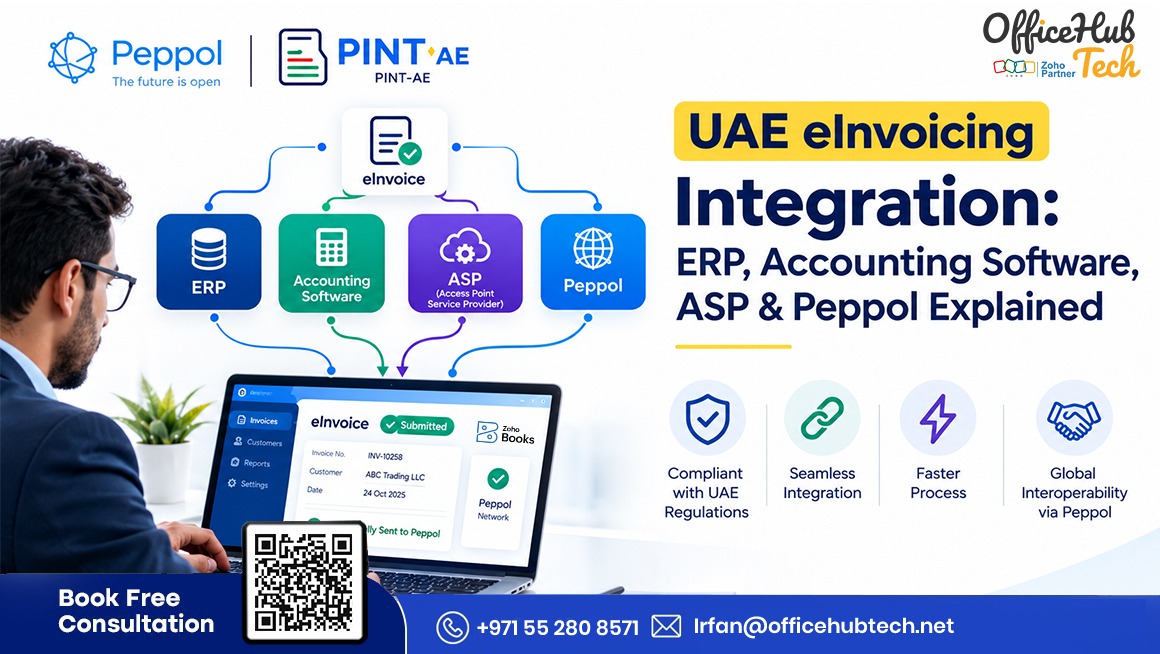
Why UAE eInvoicing Requires More Than Invoice Generation
UAE eInvoicing involves more than enabling electronic invoices in accounting software. Businesses must connect existing financial systems to the UAE framework while maintaining accurate data and established accounting processes.
ERP, accounting, and customized finance applications require careful planning around system compatibility, data ownership, integration methods, and operational responsibilities. A suitable architecture helps businesses implement eInvoicing without disconnected workflows or unnecessary system replacement.
Choosing the right E-Invoicing Software for UAE Businesses also helps organizations assess their integration requirements, structured invoice processing capabilities, and ongoing operational needs before implementation.
##Quick Answer
UAE eInvoicing integration connects ERP or accounting software to the framework through an appropriate integration method and an Accredited Service Provider (ASP). Invoice data is mapped and validated, Peppol supports interoperable exchange, and PINT-AE defines UAE-specific invoice requirements. The integration must also address applicable FTA reporting, status tracking, rejection handling, duplicate prevention, and accounting reconciliation.
##Key Takeaways
- ERP and accounting software: Provide invoice and financial transaction data.
- Integration layer: APIs, connectors, middleware, or custom services transfer and transform data.
- Accredited Service Provider: Provides accredited services for connecting businesses to the eInvoicing framework.
- Peppol: Supports interoperable exchange of structured electronic invoices.
- PINT-AE: Defines UAE-specific invoice data requirements and applicable business rules.
- Data quality matters: Incorrect identifiers, tax details, totals, or missing required fields can cause failures.
- Operational readiness: Testing, security, monitoring, exception handling, and reconciliation support reliable integration.
Understanding the Main Components of UAE eInvoicing Integration
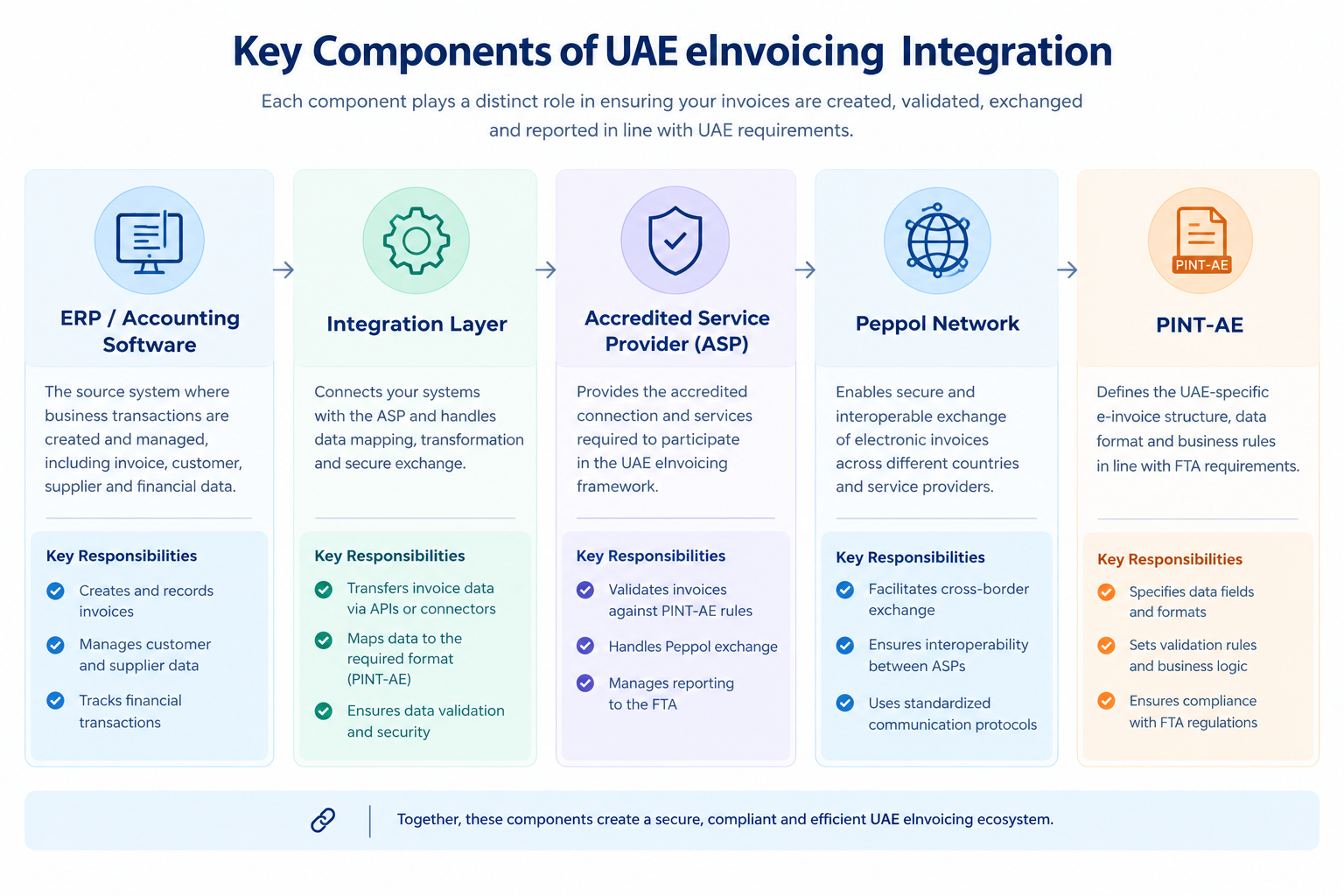
Before choosing an eInvoicing solution, businesses need to understand the role of each component. These technologies are related, but they do not perform the same function.
ERP and accounting software: Where invoice data originates
An ERP or accounting platform records the commercial transactions behind invoices, managing customer and supplier records, orders, product details, tax calculations, payment terms, invoice numbers, and financial postings. Examples include SAP, Oracle, Microsoft Dynamics, Sage, QuickBooks, and Zoho Books.
During UAE eInvoicing integration, the existing system should retain its role as the financial system of record wherever practical. Introducing an eInvoicing platform should not create a competing record of the same transaction.
For example, when an invoice is created in the ERP, the integration can retrieve its data, transform it into the required structured format, and submit it through the connected service. The ERP can retain the original invoice and accounting entries while receiving processing updates where supported by the integration.
The integration layer: Connecting different applications
The integration layer transfers data between the source application and the eInvoicing service.
Its implementation may be relatively simple or involve multiple components, depending on the existing software and business requirements.
Common approaches include:
- Native connectors: Built-in connections provided by the software vendor or service provider.
- REST APIs: Interfaces that allow applications to exchange data programmatically.
- Webhooks: Events that notify another application when a defined activity occurs.
- Middleware or integration platforms: Tools that coordinate data movement, transformations, routing, and monitoring.
- Custom integration services: Software developed for legacy, proprietary, or highly customized environments.
- Scheduled exchange: Controlled data processing at defined intervals, where supported and appropriate for the applicable requirements.
A direct integration may be sufficient when the source application has suitable interfaces and the workflow is straightforward. Middleware may be more appropriate when multiple applications need to be connected or when the organization requires centralized monitoring, transformation, retry handling, or routing.
The correct approach depends on the capabilities of the source system, the ASP’s supported interfaces, the transaction requirements, and the business’s operational needs.
Accredited Service Provider: The connection to the framework
An Accredited Service Provider (ASP) is approved under the UAE’s eInvoicing framework to provide relevant services. Depending on its accreditation and implementation, an ASP may support onboarding, system connectivity, structured invoice processing, validation, transmission, exchange, reporting-related functions, and transaction-status tracking.
Services, connectors, integration methods, and support arrangements vary between providers and should be verified during selection.
The ASP is distinct from the accounting application and integration developer. One system may generate invoices, another connect business applications, and the ASP provide accredited eInvoicing services.
For current accreditation details, consult the UAE Ministry of Finance’s official ASP list.
Peppol: Enabling interoperable invoice exchange
Peppol provides a framework for interoperable electronic document exchange. It helps participating organizations exchange structured business documents through compatible service providers rather than requiring a separate, custom connection between every trading partner.
In a typical four-corner model, the supplier uses its service provider to send an electronic invoice. The recipient’s service provider receives and routes the document to the buyer. The buyer can then process the structured invoice within its own business system.
This model supports interoperability between organizations using different ERP and accounting platforms.
However, Peppol should not be confused with the entire UAE compliance process. The national framework includes UAE-specific invoice requirements and reporting obligations. The exact services and sequence depend on the applicable rules and implementation.
PINT-AE: Defining the UAE-specific invoice structure
PINT-AE is the UAE-specific implementation of the Peppol International Invoice specification. It defines the structured invoice information and applicable business rules used in the UAE framework.
It is therefore different from Peppol itself.
Peppol provides the interoperability framework and network, while PINT-AE specifies how the invoice information should be represented for the UAE implementation.
This distinction has direct implications for software selection. A system that exports a PDF, spreadsheet, or generic XML document is not necessarily capable of producing an invoice that meets the required PINT-AE specifications.
Businesses need to verify that the proposed solution can map their source data to the applicable structure, apply the necessary validation rules, and handle the supported transaction types.
UAE eInvoicing Integration Architecture: How the Systems Connect
A well-designed UAE eInvoicing architecture separates invoice creation, data transformation, service-provider connectivity, electronic exchange, reporting, and monitoring. Each component should have clearly defined responsibilities.
Source Systems and Data Ownership
The ERP or accounting application typically owns the original invoice transaction. Customer and supplier details may reside in master-data systems, product information in inventory applications, and invoice numbers, tax calculations, credit notes, and general-ledger records in finance systems.
Defining data ownership prevents conflicting records and unauthorized changes across connected applications. The integration should also establish how corrections are handled, including whether an invoice can be updated or requires another permitted procedure.
Invoice Data Extraction and Transformation
After invoice creation, the integration retrieves data through a supported interface and maps it to the required structured format.
Mapping activities include matching source fields to required invoice elements, standardizing identifiers, converting dates and currency representations, mapping tax categories, validating totals, and handling discounts, charges, and line-level amounts. Missing or inconsistent information should be identified before submission.
Documented mapping rules and testing help prevent errors caused by source-system changes or software updates.
Connecting to the ASP
The integration submits the structured invoice through the connection supported by the Accredited Service Provider (ASP). Depending on the implementation, this may involve API authentication, payload submission, request identifiers, and response processing.
An API acknowledgement does not necessarily confirm that an invoice has passed all validation checks, reached the buyer, or completed the required reporting process. Transaction tracking should therefore capture the identifiers and status information provided by the connected service.
Peppol Exchange and FTA Reporting
The invoice is processed through the applicable framework and exchanged with the buyer using the relevant network arrangements. Required invoice information must also be reported to the Federal Tax Authority (FTA) according to applicable UAE requirements.
Buyer delivery and government reporting are distinct activities. The architecture should identify which component handles each responsibility and how the source system receives the information needed for financial operations.
Status Synchronization and Monitoring
The integration should track available status information, such as submission acknowledgements, validation results, delivery updates, and rejection details.
Finance teams need visibility into whether an invoice has been created, submitted, is awaiting a response, or requires intervention. Recording actual transaction states rather than treating every submission as successful helps teams resolve exceptions promptly and prevent reconciliation issues.
ERP and Accounting Software Integration: What Needs to Be Connected?
The integration approach depends on whether the organization uses a modern ERP, a cloud accounting application, a legacy platform, or several connected systems.
Integrating a Modern ERP
Modern ERP platforms may provide APIs, events, workflows, or integration services for transferring invoice data. Implementation should define how invoices are retrieved, mapped, submitted, and tracked, including how asynchronous responses are linked to the original invoice.
Key considerations include authentication, permissions, API rate limits, error logging, software upgrades, and duplicate-submission prevention.
Integrating Accounting Software
Accounting software may support invoicing, credit notes, tax configuration, and native eInvoicing functionality. Before building a separate integration, businesses should identify which capabilities are already available and which require additional configuration or development.
For example, Zoho Books UAE documentation provides information about UAE-specific eInvoicing. Businesses evaluating Zoho Peppol integration should review supported workflows, onboarding requirements, invoice and credit-note handling, and transaction-status visibility.
If other ERP or operational applications are involved, the integration must also define how data moves between those systems. eInvoicing functionality in one application does not automatically connect the entire business environment.
Integrating a Legacy or Customized System
Legacy systems may have limited APIs, proprietary data formats, older database structures, or customized invoice logic. Depending on the system’s capabilities and applicable requirements, integration may use an existing interface, middleware, a custom service, or controlled file exchange.
The chosen approach must support reliable data transfer, validation, transaction tracking, and error recovery. Businesses should also assign responsibility for maintaining the integration and testing changes to database fields, tax logic, authentication, or invoice templates.
One-Way Versus Two-Way Integration
A one-way integration transfers invoice information from the source system to the eInvoicing service. A two-way integration also returns supported processing responses or delivery statuses to the source environment.
One-way integration may suit simple data-transfer needs but offers limited visibility without separate monitoring. Two-way integration can help finance teams identify pending or failed transactions within familiar systems, although it requires additional mapping, response handling, and status-update rules.
The appropriate design depends on business workflows and the capabilities of the connected applications.
Invoice Data Mapping and PINT-AE Validation
A successful connection does not guarantee accurate invoice data. Data mapping and validation ensure that information transferred from business systems meets the applicable UAE eInvoicing requirements.
Map source fields to the required invoice structure
The source system should provide the information required for the relevant transaction type, including:
- Invoice number, issue date, and invoice type.
- Supplier and buyer legal details and identifiers.
- Tax registration information, including TRNs where required.
- Invoice line descriptions, quantities, unit prices, and discounts.
- Tax categories, taxable amounts, VAT amounts, and totals.
- Currency and payment information.
- Original invoice references for credit notes or adjustments, where applicable.
Use current PINT-AE specifications and official guidance to identify mandatory, conditional, and optional fields for each transaction type. A field should not be considered universally mandatory simply because it appears in a sample invoice.
Validate master data before submission
Incorrect master data can cause repeated submission failures. Common issues include incomplete buyer details, invalid identifiers, inconsistent tax classifications, outdated supplier records, and mismatched references.
The integration should validate relevant data before transmission and provide actionable error messages. Assigning ownership of master-data fields also helps ensure corrections are made by the appropriate team.
Validate calculations and structured data
Invoice calculations must remain consistent between the source transaction and the structured output. Validation should cover line amounts, quantities, prices, discounts, charges, tax bases, VAT, rounding, and document totals under applicable rules.
For example, different tax-rounding methods may produce mismatched totals. The integration should not silently change figures to pass validation without a documented, approved calculation rule. Testing must confirm that the structured invoice accurately represents the original transaction.
Handle failed validations
A controlled error-handling process should:
- Capture the validation result and transaction reference.
- Identify the cause, such as source data, mapping, configuration, connectivity, or service failure.
- Correct the source record or integration rule.
- Revalidate the information.
- Resubmit through the supported process.
- Record the resolution and retain an audit trail.
Distinguish automatically recoverable errors from those requiring human review. Temporary connection failures may allow controlled retries, whereas incorrect buyer identifiers generally require correction before resubmission.
What Happens During the End-to-End eInvoice Lifecycle?
Understanding the invoice lifecycle helps businesses see where their existing processes connect to the electronic invoicing framework.
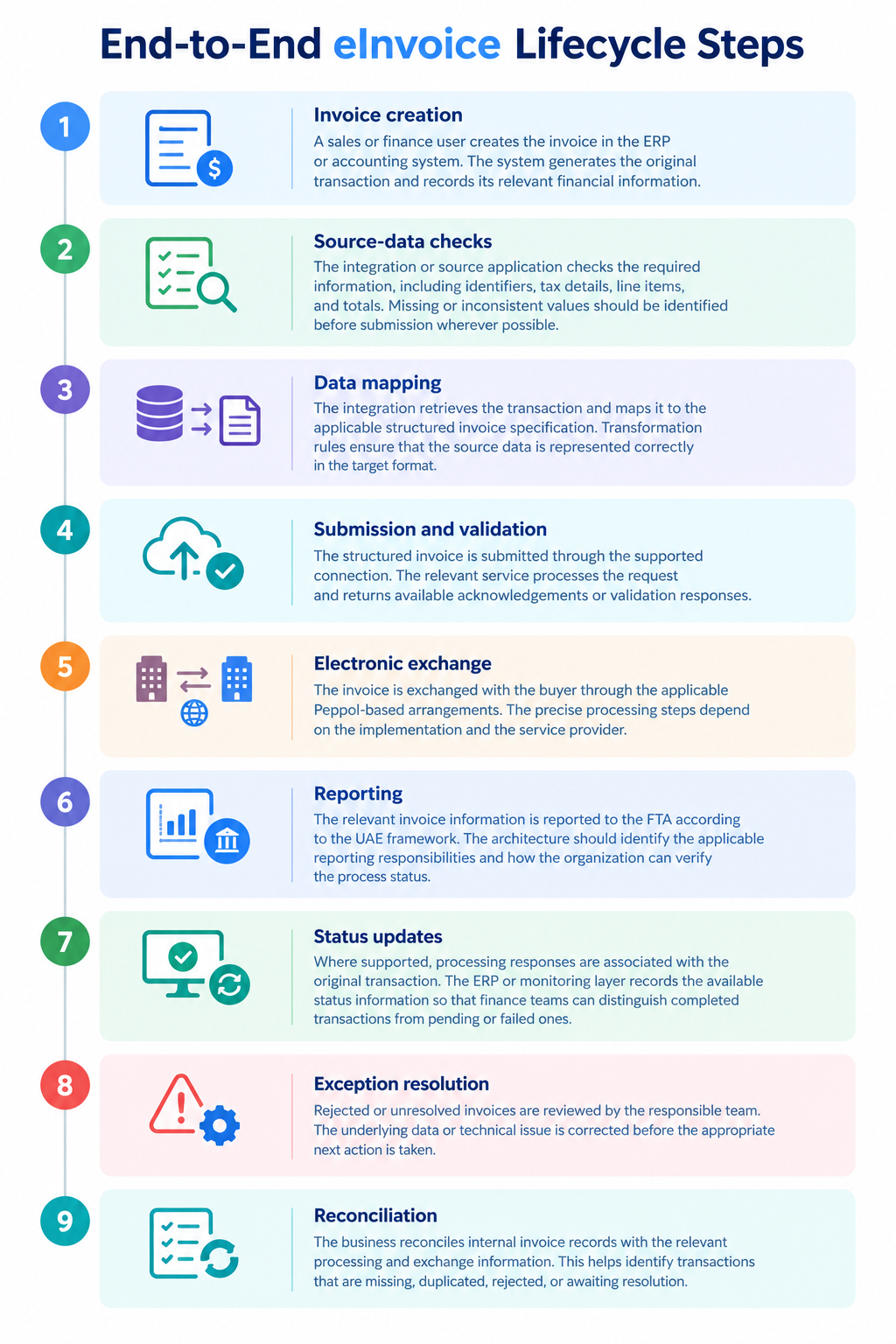
These stages should be treated as separate operational events. Saving an invoice, receiving an API acknowledgement, passing validation, completing exchange, and satisfying reporting requirements are not necessarily the same event.
Integration Scenarios for Different Business Environments
Businesses using accounting software with built-in eInvoicing
When the existing accounting platform supports the required eInvoicing workflow, native functionality may reduce the need for a separate integration layer.
However, businesses still need to verify supported transaction types, configure their organization and tax information, complete the necessary onboarding, validate data quality, and understand how errors are handled.
Native functionality should be evaluated against actual requirements rather than assumed to cover every workflow.
Businesses using an ERP and a separate ASP
In this scenario, the ERP remains the source of invoice data, while the integration transfers the required information to the ASP.
The architecture must establish the supported submission method, field mapping, authentication, transaction identifiers, status updates, and reconciliation process.
The main objective is to connect the existing finance workflow to the eInvoicing service without creating competing invoice records or losing visibility into transaction outcomes.
Businesses using multiple finance and operational systems
Some businesses create sales transactions in one application, maintain customer data in another, and manage accounting in a separate ERP.
These environments require explicit data ownership rules. The integration must determine which system generates the invoice, which system supplies reference data, and where the authoritative financial record is maintained.
Duplicate prevention is particularly important when several applications can trigger the same transaction. Unique identifiers and controlled submission rules help prevent an invoice from being sent more than once because of repeated events or retries.
Businesses using a legacy or custom-built application
For a custom-built system, the first step is to assess how invoice data can be accessed and whether the existing application can supply the required information reliably.
The business may need a custom connector, transformation service, middleware, or another supported integration method.
Testing should cover the full transaction lifecycle, including rejected invoices, connectivity failures, retries, and reconciliation. The design should also account for future changes to the source application and its underlying data structures.
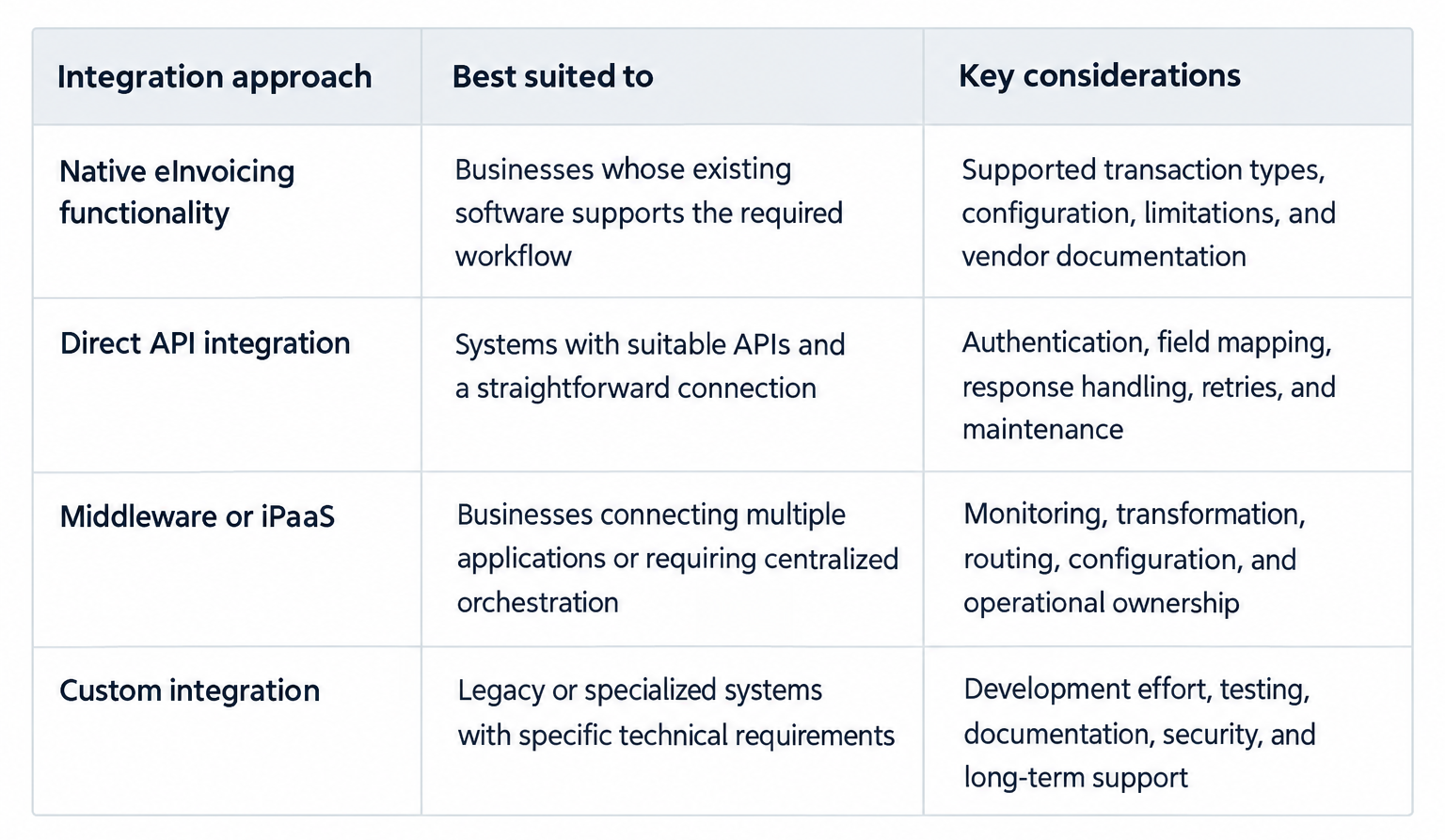
Choosing an eInvoicing Integration Approach
The most appropriate integration approach depends on the complexity of the existing environment and the business’s requirements.
When evaluating an eInvoicing platform or software for e-invoicing, consider the following questions:
- Can it connect to the existing ERP or accounting application using a supported method?
- Does the proposed solution support the applicable PINT-AE requirements?
- Is the relevant service provider currently accredited?
- Can the implementation support the required inbound and outbound invoice workflows?
- How are validation errors and transaction statuses surfaced?
- Can failed submissions be investigated and safely resubmitted?
- How are duplicate transactions prevented?
- What security, access-control, and audit capabilities are available?
- What are the onboarding, integration, transaction, and maintenance costs?
- Who is responsible for monitoring the integration and supporting it after go-live?
These questions help businesses evaluate E-Invoicing Software For UAE Business requirements against the actual capabilities of each proposed solution.
How to Select an Accredited Service Provider in the UAE
Choosing an Accredited Service Provider (ASP) is an important integration decision because its capabilities determine how existing business systems connect to the UAE eInvoicing framework.
Verify current accreditation
Check the provider’s legal entity and accreditation status against the official Ministry of Finance ASP list. For example, businesses evaluating Zoho as an eInvoicing accredited service provider should verify the relevant entity’s current listing rather than relying on brand recognition or general Peppol compatibility claims.
Assess technical compatibility
Confirm support for required APIs, connectors, or interfaces, including documentation for data submission, transaction identifiers, status retrieval, and response handling.
Confirm relevant invoice workflows
Check support for required inbound and outbound invoices, credit notes, validation failures, and corrections, where applicable.
Review security and operational support
Evaluate authentication, access controls, encryption, service continuity, incident escalation, and responsibilities for resolving errors across source systems, integration layers, and provider services.
Understand the commercial model
Compare onboarding fees, recurring charges, transaction-based pricing, development costs, and maintenance. Lower initial pricing may lead to higher costs if extensive customization or manual exception handling is required.
Use the Ministry of Finance’s official eInvoicing portal as the primary reference for current accreditation information and published guidance.
Zoho Peppol Integration: How It Fits Into the UAE Workflow
Zoho Books may suit businesses evaluating accounting software and eInvoicing solutions, depending on their workflow requirements, configuration, and existing applications.
The role of Zoho Books
Zoho Books supports accounting processes such as invoice creation and credit-note management. Businesses should consult current UAE-specific documentation to confirm available eInvoicing functions and determine whether additional integration is necessary.
Connecting the accounting workflow to Peppol
Businesses evaluating Zoho Peppol integration should verify setup requirements, organization and tax details, supported transaction types, submission procedures, and available status information. They should also establish how failed submissions are reported and resolved. Confirm capabilities using the latest official Zoho Books UAE documentation.
When Zoho Books may be suitable
Zoho Books may be appropriate when its capabilities align with a business’s accounting and eInvoicing requirements. Organizations with complex ERP environments, multiple accounting systems, or specialized invoice-generation processes should assess additional integration needs before finalizing their architecture.
Integrating Zoho Books with an external ERP
When an ERP generates transactions and Zoho Books handles specific accounting activities, the integration must define ownership of invoices and financial records.
The design should establish:
- Which system creates and owns each invoice.
- How customer, supplier, tax, and transaction data are mapped.
- Which application submits invoices through the supported workflow.
- How transaction identifiers and statuses are synchronized.
- How duplicate submissions and conflicting updates are prevented.
- How accounting reconciliation is performed.
Available connectors and integration methods vary by product, so the architecture should reflect the actual interfaces supported by the selected systems.
Questions to resolve before implementation
Before implementation, verify the relevant service provider’s current accreditation status, available functionality, supported transaction types, failure-handling procedures, and onboarding and support responsibilities.
This assessment helps determine whether native capabilities are sufficient or whether a connector, middleware, or custom integration is required.
Integration Testing, Security, and Operational Controls
Testing should cover the complete invoice lifecycle rather than only checking whether the connection works.
Functional and compliance testing
Test representative invoices and credit notes against the applicable requirements. Verify mandatory and conditional fields, supplier and buyer details, tax calculations, totals, currency handling, and supported transaction types.
Testing should establish that the structured output accurately represents the original transaction.
Negative and exception testing
Simulate missing fields, invalid identifiers, incorrect calculations, duplicate requests, rejected payloads, API timeouts, and temporary service outages.
The purpose is to verify that the integration identifies failures, preserves transaction traceability, and provides an appropriate route for correction.
Retry and duplicate prevention
A failed network request does not always mean the receiving service failed to process the transaction. Retrying without checking the available response or transaction reference could create a duplicate.
Where supported, the integration should use idempotency controls or an equivalent duplicate-prevention mechanism. It should distinguish between temporary technical failures and business-data errors that require correction.
Security and access controls
The integration may process sensitive financial and commercial information. It should therefore use supported authentication mechanisms, secure credential storage, appropriate encryption, and least-privilege access.
Access to transaction logs and error details should also be controlled. API credentials should not be embedded in exposed client-side code or shared through unsecured channels.
Auditability and reconciliation
The system should retain relevant transaction identifiers, timestamps, responses, status changes, and correction history.
Reconciliation should compare the original accounting records against available processing and exchange information to identify missing, duplicated, rejected, or unresolved transactions.
These controls provide the operational visibility needed to manage an eInvoice system after implementation.
UAE eInvoicing Implementation Roadmap
A structured rollout helps businesses address technical and operational dependencies before production use.
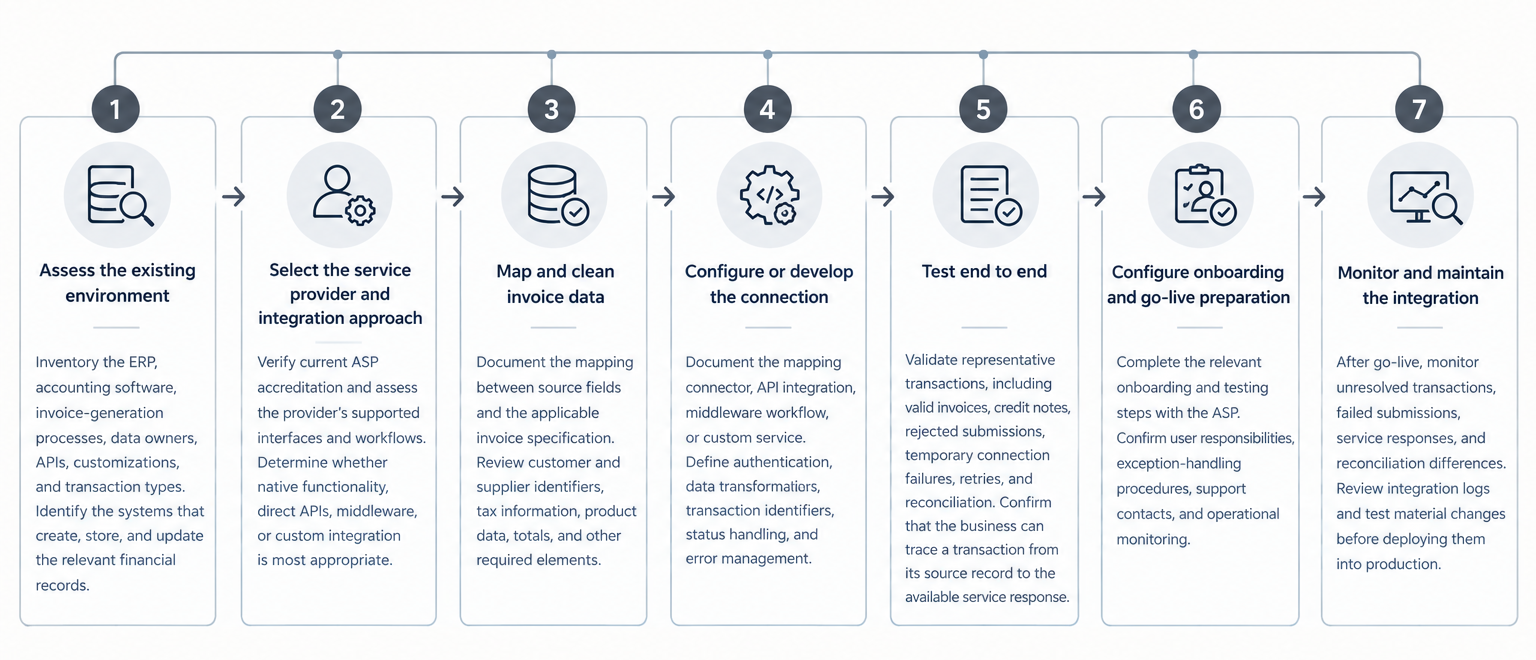
Businesses should confirm their applicable implementation dates and obligations against the latest official UAE guidance. Technical readiness and regulatory applicability should be assessed together, not as separate activities.
Recent Regulatory Update: UAE Revises ASP Accreditation Procedures
On 9 October 2026, the UAE Ministry of Finance announced Ministerial Decision No. 168 of 2026, updating the eligibility criteria and accreditation procedures for eInvoicing Service Providers. The decision took effect on 1 October 2026 and replaced the earlier accreditation decision and its amendments.
According to the Ministry, the revised framework removes the previous pre-approval stage and moves toward direct accreditation, requiring service providers to complete the defined assessment and testing requirements before accreditation is granted. It also addresses renewal, ongoing evaluation, termination, and transitional arrangements for certain providers previously granted preliminary approval.
For businesses planning ERP or accounting software integration, the practical implication is clear: provider selection should include verification of current accreditation, not just a review of product demonstrations or technical compatibility.
The business should also confirm the provider’s onboarding process, supported integration methods, testing responsibilities, and operational support arrangements before finalizing the design.
How OfficeHub Tech Can Support UAE eInvoicing Integration
Implementing an eInvoicing connection often requires more than configuring a finance application. Businesses may need to review existing workflows, establish data ownership, connect applications, and create a reliable process for handling validation errors and transaction responses.
OfficeHub Tech’s software integration and development approach can support businesses in assessing and connecting their existing systems, subject to the selected products’ capabilities and the project’s requirements.
For businesses seeking Top E-invoicing implementation and Zoho integration Service providers in UAE, aligning existing accounting workflows with the applicable eInvoicing requirements can help establish a more reliable invoice exchange process.
Relevant areas of support may include:
- Integration assessment: Reviewing ERP and accounting workflows, available interfaces, invoice-generation processes, and system dependencies.
- Architecture planning: Defining the responsibilities of source applications, integration components, and the selected ASP.
- Data mapping: Identifying the fields and transformation rules needed to represent invoice data correctly.
- Custom integration: Connecting supported applications through APIs, middleware, or appropriate custom development.
- Exception handling: Designing workflows for failed submissions, data corrections, status tracking, and reconciliation.
- Zoho-related integration: Assessing how Zoho Books and other relevant systems fit into the existing business environment.
The final implementation should be based on the current UAE requirements, the selected ASP’s documented capabilities, and the actual interfaces available in the organization’s software.
Planning your UAE eInvoicing integration? Connect with OfficeHub Tech to assess your ERP or accounting workflows and identify a practical integration approach.
Conclusion
UAE eInvoicing integration is a coordinated process involving existing business applications, data transformation, an accredited service provider, structured invoice requirements, electronic exchange, and the applicable reporting framework.
ERP and accounting systems continue to play an important role as sources of business and financial data. The integration layer connects these systems to the relevant service, while Peppol supports interoperability and PINT-AE defines the UAE-specific invoice structure.
The technical work does not end when an invoice can be transmitted. Businesses also need to validate data, track responses, prevent duplicate processing, handle exceptions, secure credentials, and reconcile invoice records with their financial systems.
The most suitable approach depends on the existing software, integration capabilities, transaction requirements, and operational responsibilities. A structured assessment of these factors helps businesses choose an appropriate eInvoicing solution while preserving established workflows wherever practical.