##Quick Answer
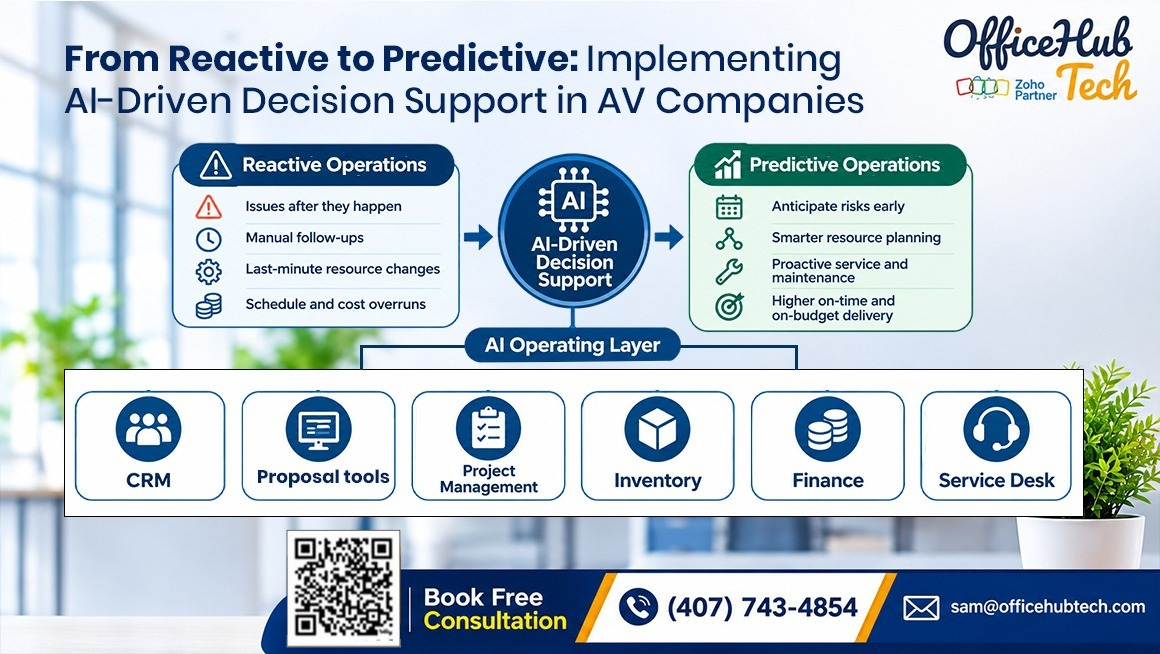
Implementing AI-driven decision support in AV companies means deploying an intelligent AI operating layer for AV integrators that continuously reads operational signals across your CRM, D-Tools, project management, procurement, finance, workforce, and service desk platforms to spot risks early and recommend timely interventions. Unlike static dashboards or passive chatbots that only summarize what happened yesterday, predictive decision support analyzes live cross-system context—flagging schedule slippage, engineering bottlenecks, technician capacity shortages, supplier lead-time collisions, mid-project margin erosion, and SLA threats before they disrupt delivery. Working alongside your existing AV business automation software rather than replacing it, this approach pairs deterministic business rules with contextual AI reasoning and human approval gates so leadership can shift from constant status chasing to proactive, exception-based management.
##Key Takeaways
- Proactive Beats Reactive: Reactive management scrambles to fix problems after deadlines slip; predictive decision support surfaces early warning signals across departments while adjustments are still inexpensive.
- Cross-System Context Is Essential: Single-app metrics rarely tell the full story in Audio-Visual Systems Integration (AVSI); reliable risk prediction requires correlating commercial, engineering, inventory, workforce, and financial records simultaneously.
- Predictions Must Connect to Execution: Forecasting a delay only creates value when paired with prescriptive recommendations, authorized workflow actions, and continuous outcome monitoring.
- Preserve Your Existing Tech Stack: A B2B AI operating system for operations sits above your CRM, D-Tools, ERP, and field service platforms via APIs and webhooks—eliminating the disruption of ripping and replacing core software.
- Hybrid Architecture Protects Accuracy: Deterministic rules handle strict validations, calculations, and routing, while AI models interpret unstructured scope changes, score risks, and draft decision briefs under human-in-the-loop governance.
- Control Data and Economics With “Own Your AI”: Private or dedicated-server deployment models give AV firms strict data sovereignty while helping eliminate unpredictable per-token API fees and recurring AI subscription bloat.
Why AV Companies Need to Move From Reactive Management to Predictive Decision-Making
Walk into almost any growing Audio-Visual Systems Integration (AVSI) firm on a Monday morning, and you will see the same exhausting routine playing out. Project managers cross-check spreadsheets against Gantt charts, procurement coordinators chase vendor tracking numbers over email, engineering leads answer last-minute scope questions, and leadership jumps across four or five tabs just to see which jobs are actually healthy. Even firms that already use AV business automation software often end up fighting daily fires, learning about equipment shortages, schedule clashes, or margin leaks only after crews hit the job site.
An AV integration business rarely runs inside one tool or one department. Sales, engineering, project management, procurement, installation, finance, and service all depend on clean handoffs between people and software. The breakdown usually happens in the gaps between systems, where updates sit in separate inboxes, spreadsheets, or modules and nobody sees how they connect until a project is already hurt.
Consider how four separate systems can hold clues to the same looming problem without anyone linking them right away. Procurement may show a delayed shipment for key hardware. Project management may show installation starting next week. Workforce scheduling may show limited technician availability. Finance may show costs already creeping above budget. Each piece of information is useful on its own, yet without a connected view, the combined risk stays hidden until work stalls.
What Reactive Management Looks Like in an AV Business
Reactive management focuses on fixing trouble after it becomes visible on site or with a client. Picture a commercial AV installation covering multiple meeting rooms, displays, speakers, control processors, network gear, rack builds, programming, testing, and commissioning. When an issue is handled reactively, the sequence often plays out step by step: installation begins on the planned date, a needed part turns out to be missing or delayed, the crew reports the snag on site, the project manager calls procurement, buyers check backup suppliers, the schedule gets pushed back, the client hears about the delay, and extra labor plus coordination costs pile up. The exact same reactive loop happens with late engineering approvals, missed task dependencies, technician clashes, last-minute scope changes, or slow customer payments.
TYPICAL REACTIVE AV WORKFLOW:
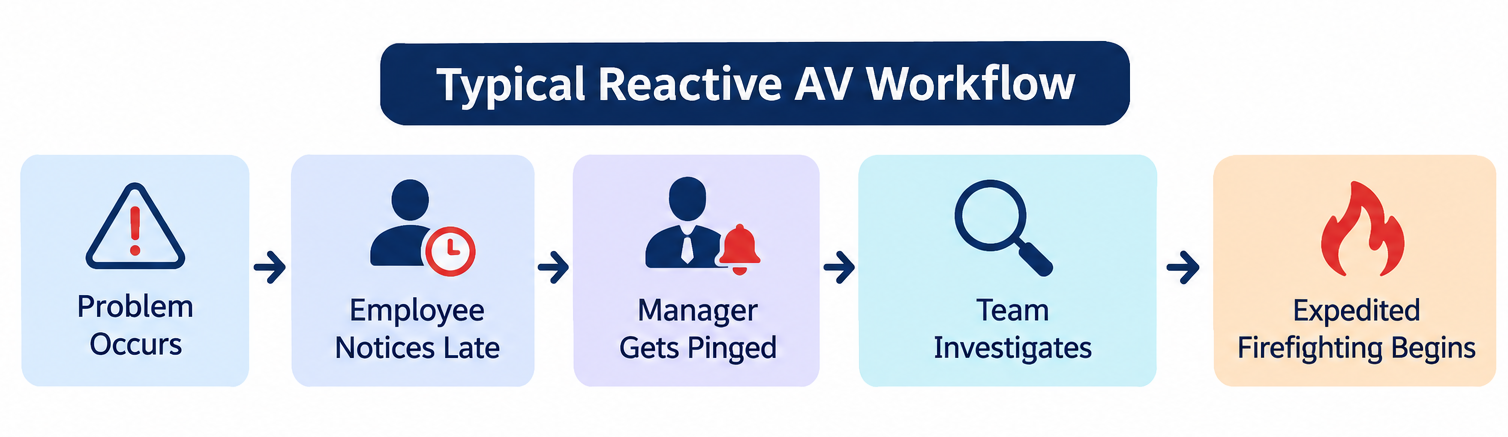
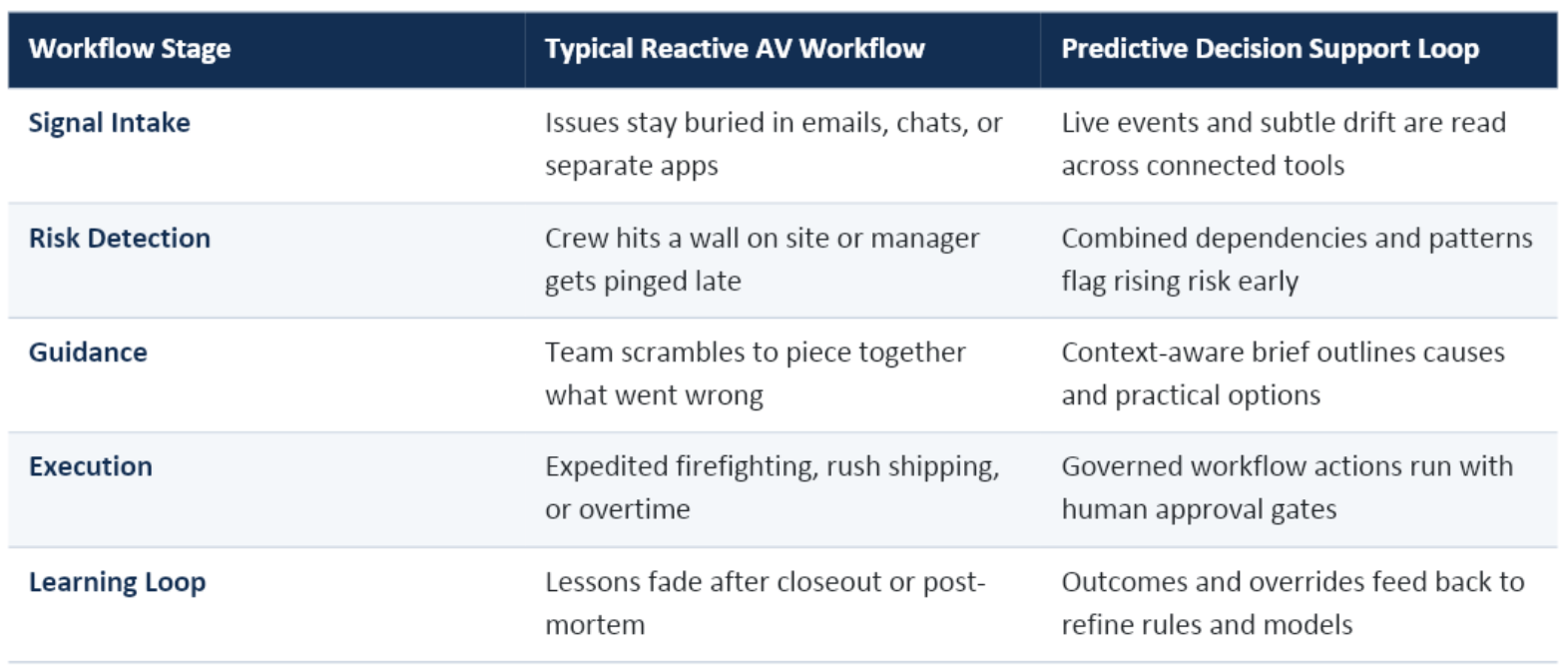
By the time a reactive issue comes up in a weekly production meeting, engineering may have drawn outdated schematics, technicians may be booked onto an impossible week, and the firm may eat overnight freight or unbilled overtime just to keep the client happy.
Why Traditional Reports and Dashboards Are Not Enough
Dashboards and reports are genuinely helpful for checking current status and reviewing past performance. They can show completed tasks, billed revenue, technician hours, stock counts, and open invoices. Still, standard reporting mostly looks backward or captures a single point in time, leaving managers to spot patterns manually and often too late to prevent a delay.
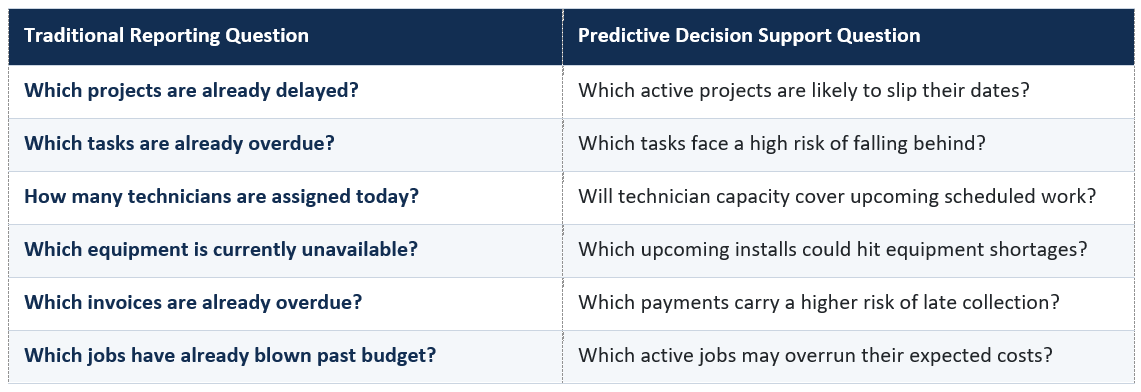
A green bar on a project schedule looks reassuring until you check procurement and find ceiling microphones still on backorder, or check labor plans and find your lead programmer booked elsewhere. Knowing a problem exists after the fact does not give managers enough runway to prevent it.
What Changes When AV Companies Adopt Predictive Decision Support
Predictive decision support adds a forward-looking intelligence layer onto everyday workflows. Instead of waiting for someone to notice a snag manually, the system watches ongoing signals for unusual shifts or compounding risks. If several installation steps depend on gear whose arrival is unconfirmed, the system can flag the job early so the project manager can review delivery options, check installation order, coordinate crew availability, and talk with the client before mobilization day. AI does not need to make the final call; its real value is surfacing the situation sooner with clear context so the right person can act.
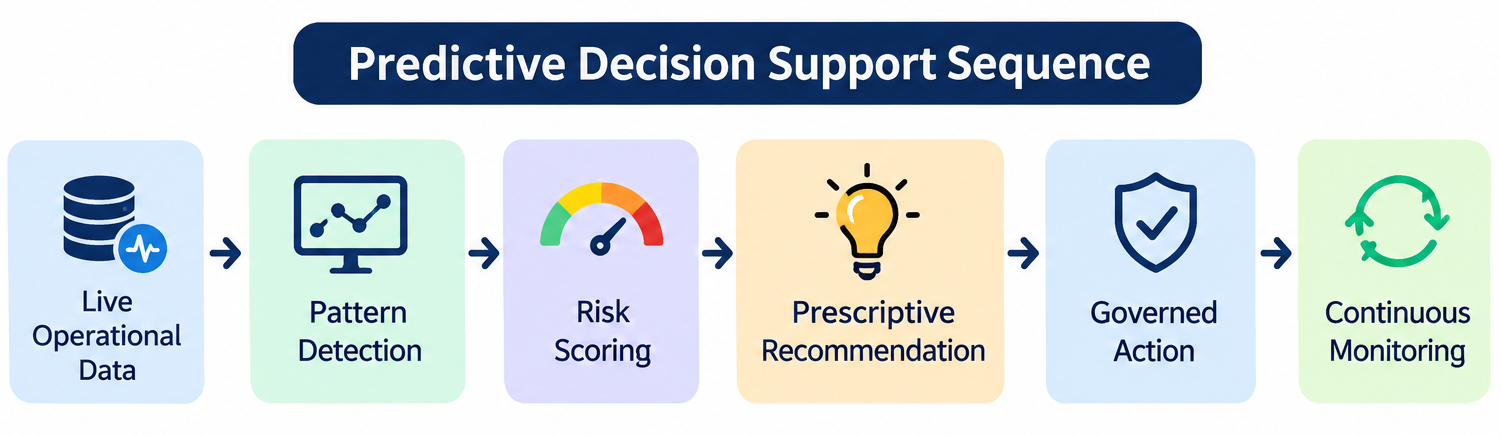
In practice, that shift moves a team through a steady loop from early signals to guided action.
PREDICTIVE DECISION SUPPORT SEQUENCE:
What AI-Driven Decision Support Is and Why Context Matters in AV
AI-driven decision support brings together operational telemetry, predictive analytics, contextual reasoning, and business rules to estimate likely outcomes, weigh multi-factor risks, and recommend practical next steps before bottlenecks hit. Instead of forcing staff to check another standalone tool, it acts as an AI operating layer for AVSI businesses that connects existing platforms so insight flows straight into daily execution.
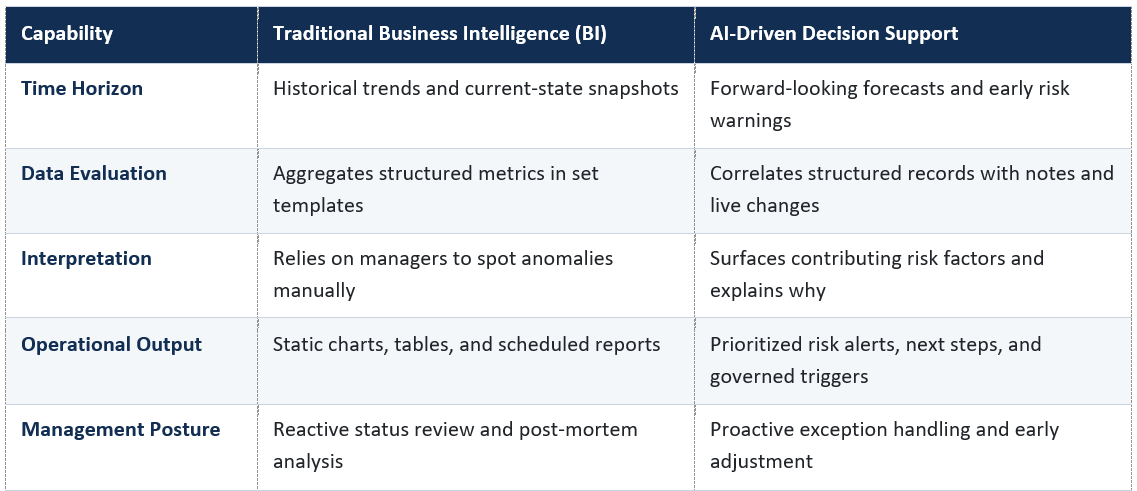
AI Decision Support vs. Traditional Business Intelligence
It is also important not to confuse a basic chatbot with a decision support system. A chatbot may answer simple status questions from a narrow set of records, whereas decision support reads schedules, task links, equipment status, technician skills, and historical patterns together to spot trouble brewing across departments.
Predictive Analytics vs. Prescriptive Recommendations
Understanding the difference between predictive analytics and prescriptive recommendations matters whenever AV leaders evaluate artificial intelligence for AV business solutions.
- Predictive Analytics (“What is likely to happen?”): Weighs historical patterns alongside current signals to estimate risk—for instance, flagging a 78% chance that a corporate boardroom build will slip commissioning due to pending architectural drawings and backordered gear, while keeping in mind that any forecast is an estimate built from available data, not a guarantee.
- Prescriptive Recommendations (“What should we do about it?”): Goes a step further by weighing business rules, capacity, and constraints to point teams toward practical options—such as escalating engineering sign-off, checking an approved alternate switcher, or shifting a crew to rough-in while the manager keeps authority over the final choice.
Why AV Businesses Need Context-Aware AI
In AV integration, isolated status fields rarely tell the full truth. An overdue task does not automatically mean a project is in trouble if there is schedule float, if it sits off the critical path, or if it is waiting on a non-blocking sign-off. Likewise, a task marked In Progress on a $15,000 classroom retrofit carries very different stakes from a $650,000 hospital auditorium with strict infection-control windows, custom rack builds, and tight commissioning deadlines.
To give teams guidance they can actually trust, AI for AV integration business workflows needs to look at how records connect across the whole job: D-Tools bill of materials (BOM) dependencies, room-by-room technical needs, technician certifications and workload, vendor lead times, contract penalties or client scope changes, and labor or cost burn. Weighing those pieces together is what separates genuinely useful decision support from noisy, out-of-context alerts.
How AI-Driven Decision Support Works: From Operational Data to Predictive Decisions
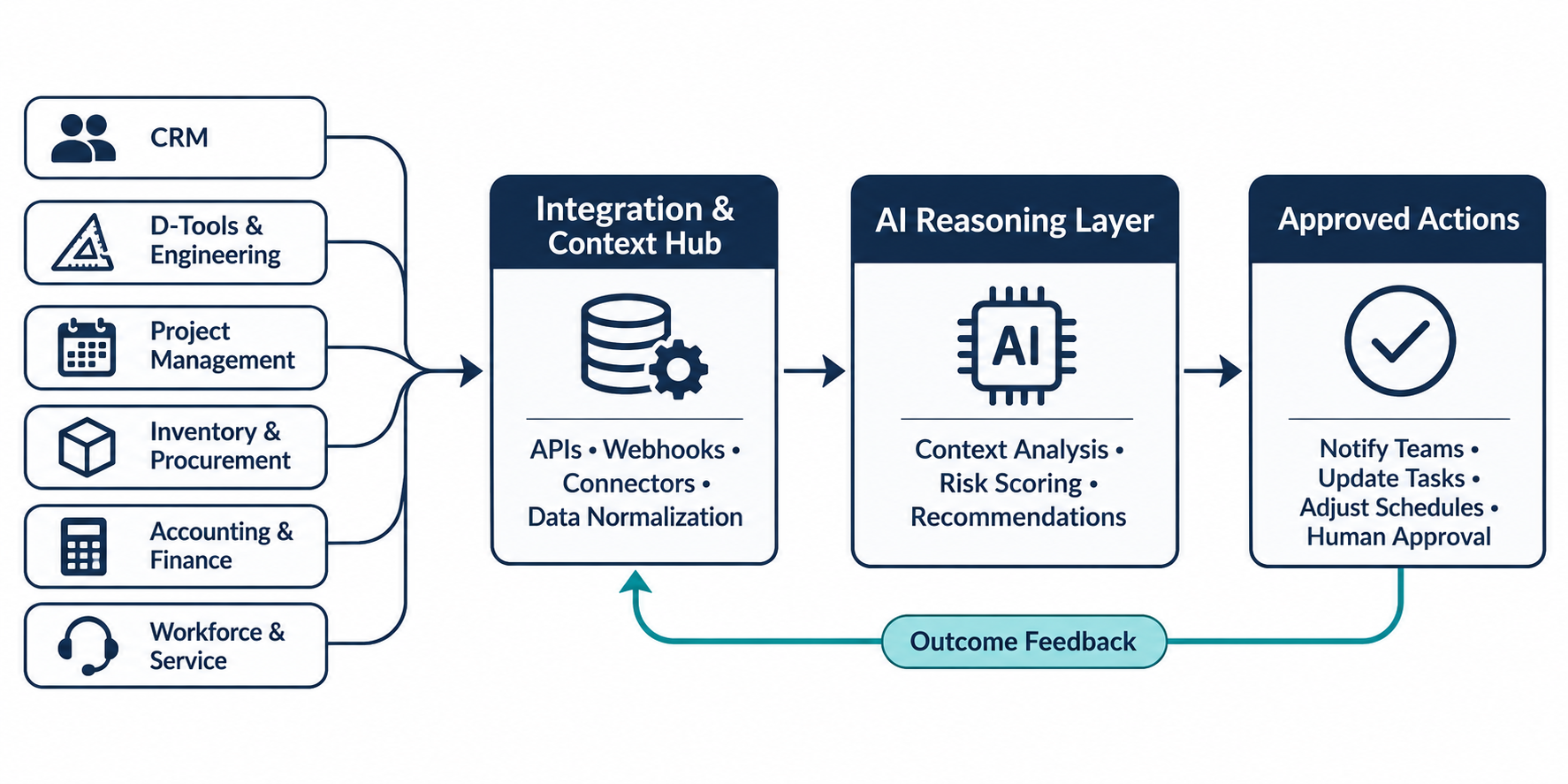
Turning raw software activity into reliable operational foresight requires a disciplined technical pipeline. When we design AI integration solution, the intelligence engine moves through four connected engineering stages.
Collecting Operational Signals From Existing AV Business Systems
Predictive models are only as perceptive as the signals they ingest. Rather than forcing employees to enter duplicate updates, the operating layer listens continuously to the tools your departments already use every day:
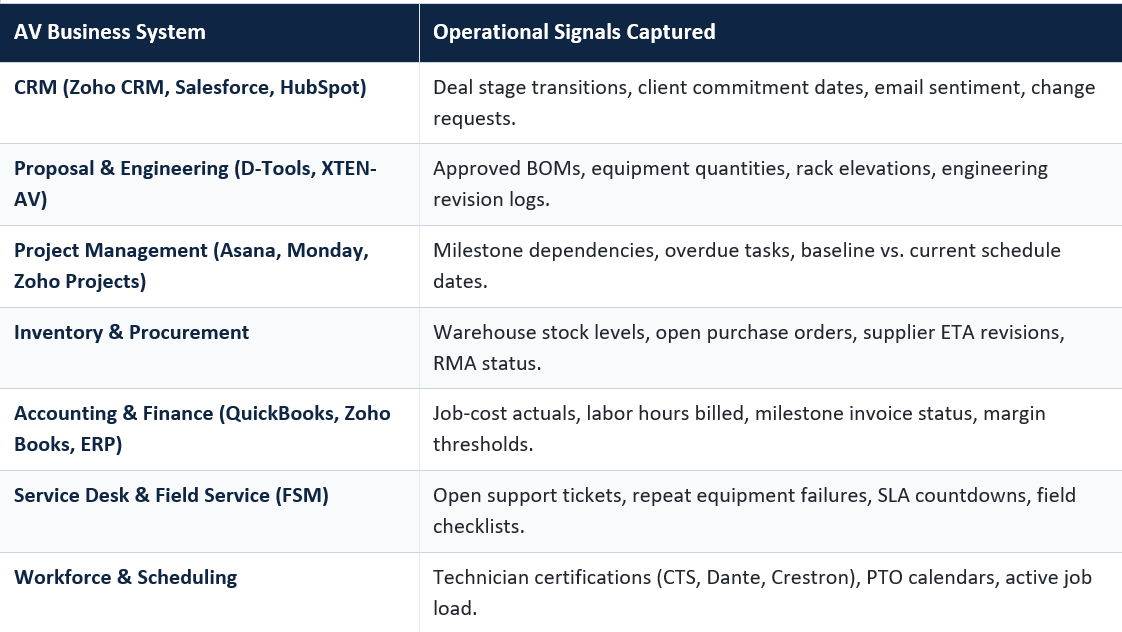
Through REST APIs, event webhooks, and scheduled incremental syncs, every meaningful state change—like a vendor pushing a shipment date by ten days—becomes an immediate, structured event inside the orchestration pipeline.
Data Integration, Normalization, and Context Building
Software tools rarely use identical IDs, date formats, currencies, or status labels. One project may carry a CRM deal ID, a D-Tools project code, and a separate purchase order number, while the same hardware item appears under slightly different naming across purchasing and stock records. Before any model scores risk, the integration layer cleans and aligns these records.
Practical normalization work includes mapping customer, project, task, part, and technician IDs; standardizing dates, units, currencies, and statuses; resolving duplicates or conflicts; linking related records; defining clear system-of-record ownership per data type; keeping timestamps and history; and checking for missing prerequisites, such as a won deal missing site contacts or network details, before crews waste time chasing them.
Pattern Recognition, Risk Scoring, and Recommendations
Once records are aligned, analytical methods can be matched to the specific operational question rather than forcing one model onto every task. Classification models can estimate whether a job faces elevated risk, regression or time-series models can forecast costs, hours, or demand, anomaly detection can flag unusual cost or task behavior, and natural language processing can extract details from client notes, emails, or service logs.
A strong recommendation clearly states what risk was spotted, which signals drove it, what data is missing or uncertain, what practical steps to consider, and who owns the decision, helping managers judge the reasoning instead of treating an alert as an unchallengeable order.
Governed Actions and Continuous Feedback
Insight is most useful when it connects smoothly to the workflows where work gets done. Once a risk is flagged, an automated workflow can log a risk record, notify the project manager, attach relevant project and procurement context, open a review task, route a schedule change for approval, and update connected systems once approved, keeping tight approval gates wherever contracts, budgets, client messages, or staffing assignments are affected.
Just as important is closing the loop over time. Tracking the original alert, inputs, recommendation, reviewer, approved action, and actual result shows whether guidance helped, spots model drift when processes or vendors change, and lets teams tune thresholds so false alarms drop.
Technical Architecture, Hybrid Intelligence, and Own Your AI
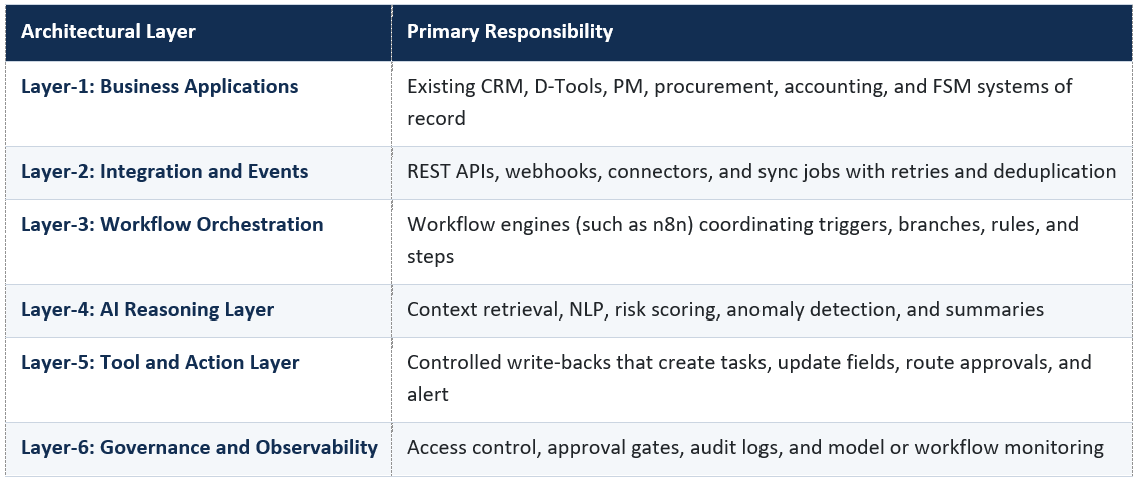
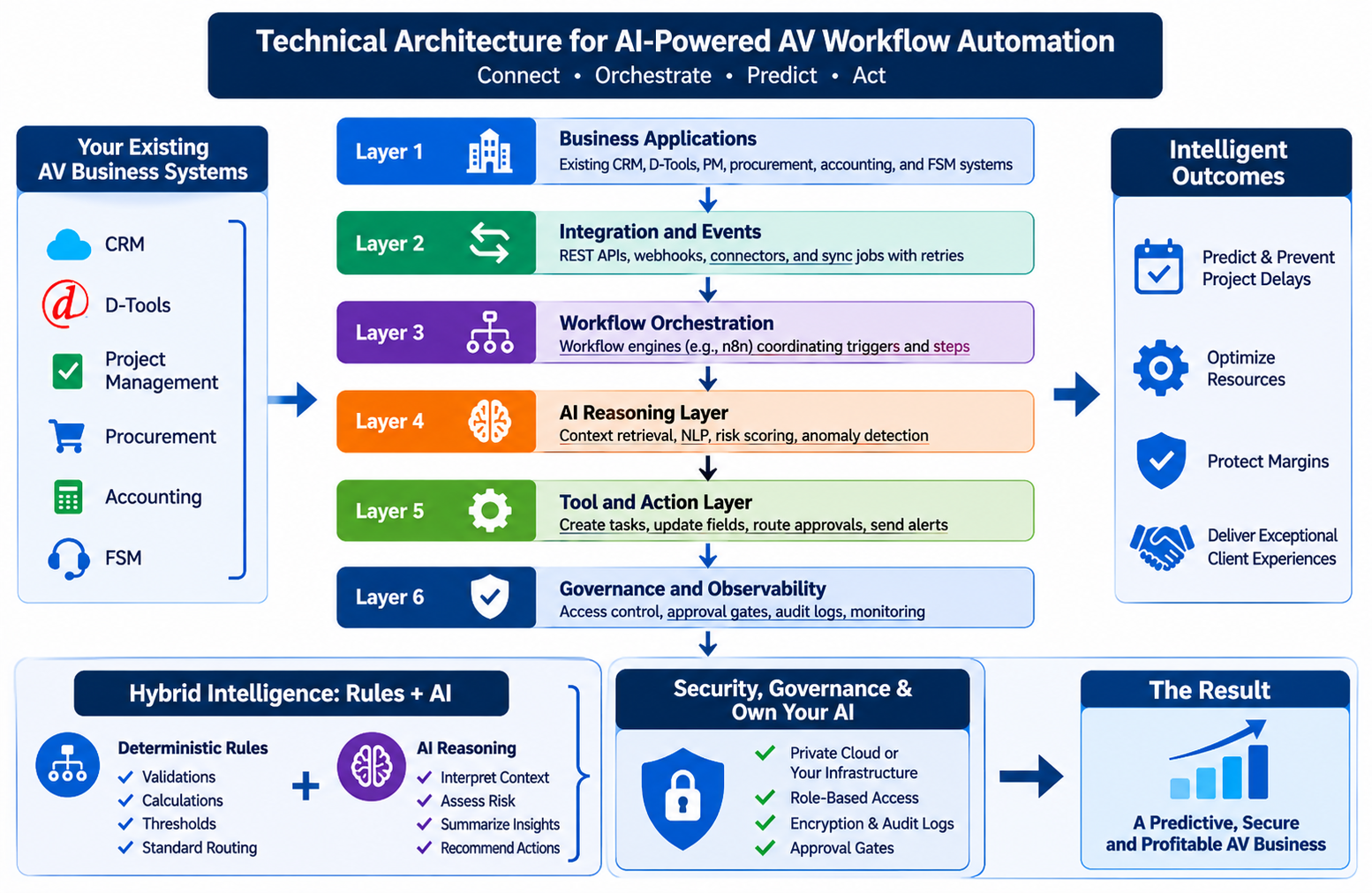
Building reliable AI-powered AV workflow automation across a growing integration firm requires a clean architecture that separates record systems, event transport, orchestration, reasoning, write-backs, and security controls.
Hybrid Intelligence: Deterministic Rules Plus AI Reasoning
AI reasoning and workflow automation do different jobs and work best together. Deterministic rules and workflow nodes handle strict validations, calculations, thresholds, and standard routing with repeatable precision. AI models add value where unstructured language and layered project context need interpretation, such as reading scope notes, weighing multiple risk signals, or drafting clear summaries, while controlled execution stays inside clear permission limits.
Security, Governance, and Own Your AI
AV integrators regularly handle sensitive floor plans, network designs, security layouts, client contacts, and vendor pricing. Routing all of that through third-party public APIs raises privacy and governance questions, while metered per-token pricing can become unpredictable as workflows scale.
An Own Your AI approach, deploying orchestration and models in a private cloud, dedicated environment, or company-controlled infrastructure paired with role-based access, encryption, audit logs, human approval gates, and clear terms around hosting, model ownership, inference costs, and maintenance, gives leaders stronger control over data and long-term economics. Hosting privately does not automatically make a model proprietary or zero-cost on its own, so clarifying exact commercial and technical terms upfront is essential.
Core Features of an “Own Your AI” Solution for AV Businesses
Unlike off-the-shelf SaaS bots that charge per user or meter every API call, an AI for AV integrators built on an Own Your AI model gives you complete technical and financial control:
- Zero Per-Token Fees: Run continuous, multi-step risk checks across projects without unpredictable usage-based token bills.
- No Recurring AI Subscription Lock-In: Eliminate per-seat software fees for your core AI layer.
- Private Server Hosting: Deploy models directly on your company’s server or dedicated cloud so sensitive drawings and pricing stay internal.
- Flexible Maintenance: Manage the environment with your in-house IT team or rely on ongoing managed support from OfficeHub Tech.
Six Critical Areas Where Predictive AI Improves AV Business Decisions
When connected across your core software stack, predictive decision support solves six persistent operational pain points unique to AV and low-voltage integrators.
-
Predicting Project Delays and Delivery Risks
AI analyzes milestones, overdue tasks, approvals and supplier updates to flag schedule risks. If rack fabrication still awaits client sign-off 18 days before an auditorium installation, managers are alerted immediately.
-
Predicting Engineering and Technical Risks
Through D-Tools integration automation, AI compares scopes with client messages and field notes. Changes to display mounts or video-conferencing endpoints can affect power, cabling, and DSP channels. The system flags these impacts for engineering review.
-
Predicting Resource and Technician Capacity Constraints
Predictive scheduling compares project phases with technician skills, workload, and leave. When projects need commissioning support at once, it identifies skill shortages early, so managers can rebalance crews.
-
Predicting Procurement and Equipment Availability Risks
By linking BOMs with purchase orders, inventory, and vendor lead times, AI flags backorders that may miss installation or rack-build dates. Procurement and engineering can assess alternatives and avoid rush freight.
-
Predicting Financial and Project Profitability Risks
The system compares labor hours, purchase commitments, and billing milestones against AV project management software AI estimates to flag margin risks. Teams can address unbilled changes and rising labor costs before profitability suffers.
-
Predicting Customer and Service Risks
AI analyzes ticket frequency, repeat equipment failures, warranties, and SLA deadlines alongside deployments to identify accounts needing attention. Predictive workflows prioritize support and dispatch field engineers before issues trigger escalations or maintenance contracts.
From Predictive Insights to Action: A Practical AV Project Scenario
To see how these layers work together in practice, consider a multi-floor corporate headquarters AV rollout managed by a mid-sized integrator.
END-TO-END PREDICTIVE PROJECT INTERVENTION LOOP:
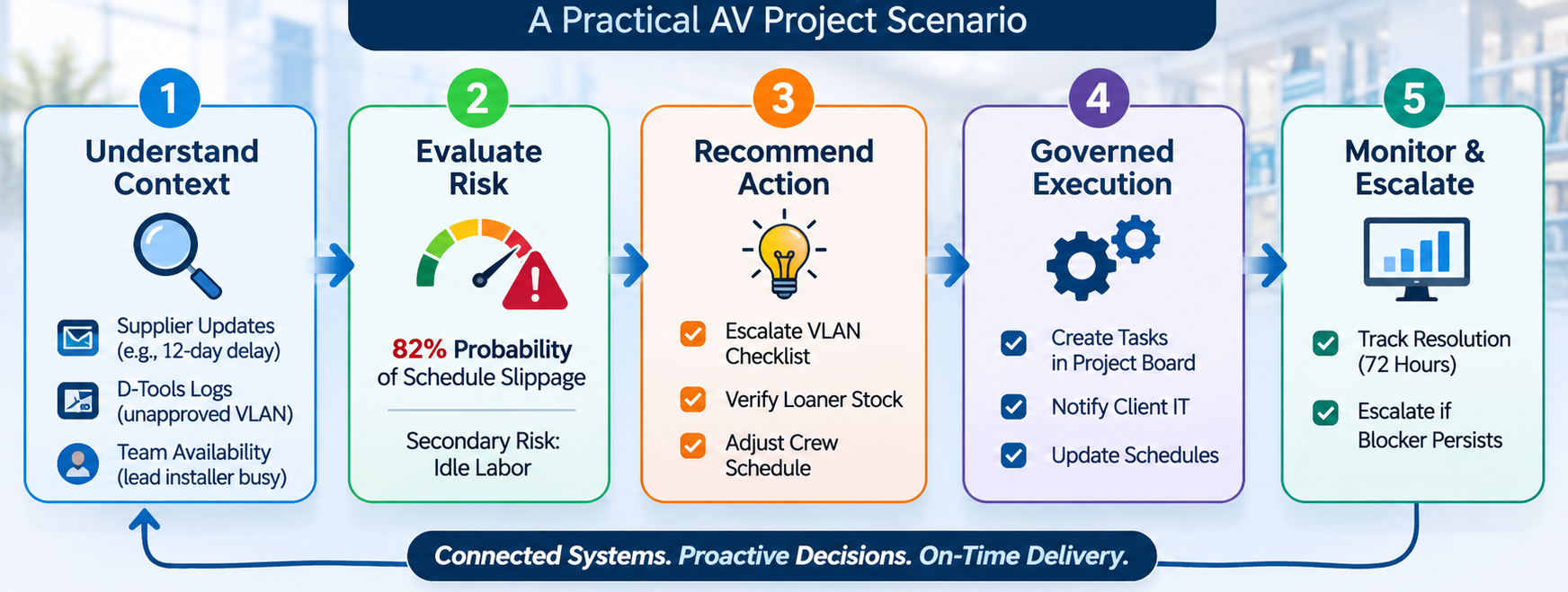
- Step 1 — Understand the Project Situation: Four weeks before the client’s executive briefing center installation, the operating layer ingests a routine supplier webhook showing a 12-day shipping delay on two custom touch panels, alongside D-Tools engineering logs showing an unapproved network VLAN checklist and workforce data showing the assigned lead installer is currently tied up on a delayed hospital job.
- Step 2 — Identify and Evaluate the Risk: Individually, each signal looks minor. Evaluated together against the fixed client move-in deadline, the AI reasoning engine calculates an 82% probability of critical-path schedule slippage and flags a secondary risk of idle technician labor on-site.
- Step 3 — Recommend the Next Best Action: The system generates a concise decision brief for the Project Manager and Engineering Lead: *(a)* escalate the overdue VLAN checklist with the client’s IT director today, *(b)* verify warehouse loaner stock for temporary touch-panel commissioning, and *(c)* swap installation crew assignments with a flexible corporate retrofit scheduled the following week.
- Step 4 — Execute Approved Actions: With one click from the Project Manager, the orchestration engine creates prioritized tasks in the project board, dispatches an automated escalation email to the client IT contact, notifies warehouse logistics to reserve loaner units, and updates tentative crew schedules.
- Step 5 — Monitor the Outcome: Over the next 72 hours, the system tracks whether the VLAN checklist is signed and loaner inventory is confirmed—automatically escalating to the Director of Operations if either blocker remains open past Thursday afternoon.
Implementation Roadmap and Measuring Predictive Business Impact
Rolling out intelligent AV business management software does not require a complete overhaul. A phased approach helps integrators introduce predictive capabilities while minimizing disruption.
- Pinpoint One High-Friction Bottleneck: Start with a measurable issue, such as Sales-to-Engineering handoffs, BOM delays, or margin tracking.
- Audit Data Readiness and System Ownership: Check API and webhook access, clean duplicate project IDs, and define master-record ownership.
- Define Risk Thresholds and Baseline KPIs: Set actionable warning criteria and record 60–90 days of baseline performance where data is available.
- Select the Right Analytical Mix: Combine deterministic rules with forecasting, anomaly detection, or NLP based on the workflow.
- Launch in Human-in-the-Loop Advisory Mode: Let AI generate alerts and recommendations for manager review before enabling automated actions.
- Connect Workflows and Expand: Once the pilot demonstrates measurable benefits, extend predictive workflows across procurement, finance, and service operations.
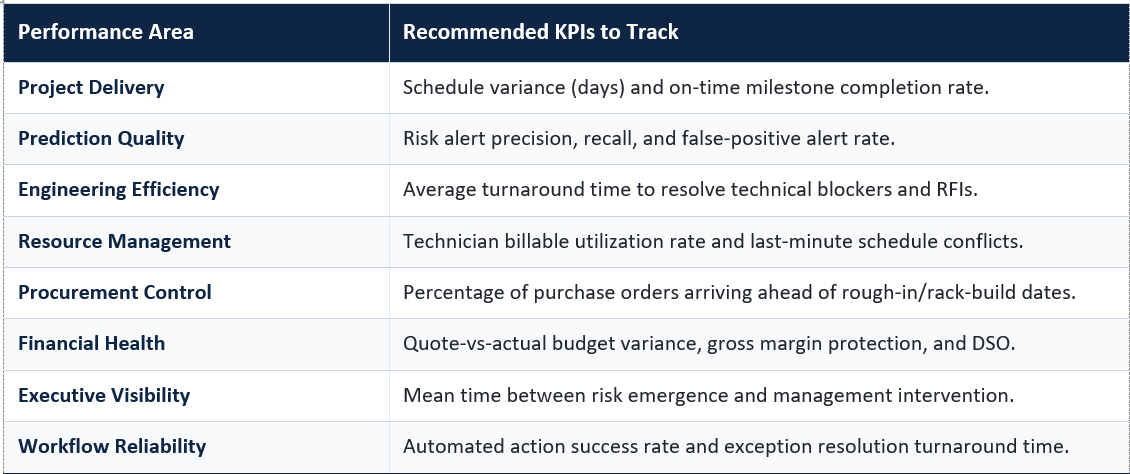
Measuring Business Impact: Recommended KPI Framework
Measure these KPIs against pre-implementation baselines to evaluate operational improvements and actual ROI:
Case Study: How Apex Sight & Sound Cut Project Slippage by 42% With Predictive AI
Apex Sight & Sound, a mid-market AV integrator managing commercial projects, faced recurring delays caused by disconnected systems, late engineering approvals, and unpredictable equipment availability.
Project managers spent hours reconciling updates across Salesforce, D-Tools SI, Asana, and QuickBooks Enterprise. Procurement gaps often surfaced close to installation, leaving teams with limited time to respond.
To address these challenges, the company introduced a predictive AI operating layer using n8n and dedicated AI models. It connected existing business systems, monitored project readiness, and flagged risks involving engineering handoffs, supplier lead times, resource availability, and project schedules.
Representative 90-day results:
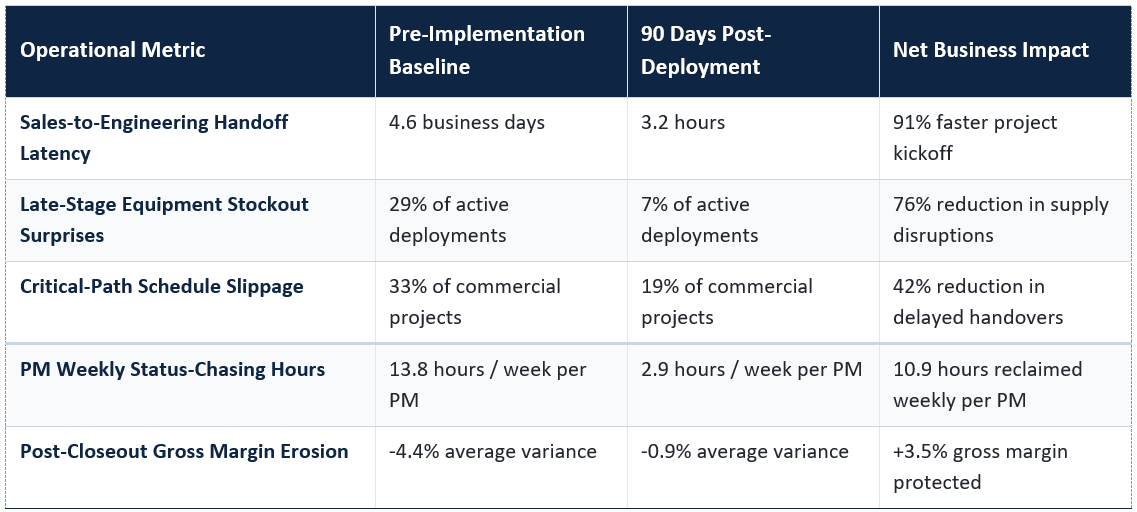
By identifying missing approvals and supplier delays earlier, predictive workflows helped shift project management from reactive follow-ups to proactive execution.
Industry Validation: What 2026 Research Says About AI-Driven Project Decision-Making
Independent industry research reinforces why connecting AI directly to live project workflows matters far more than buying standalone AI tools. According to PM Solutions’ benchmark study, The State of Project Management 2026: Project Management in an AI-Focused World (based on a survey of 99 project management leaders across industries), 74% of surveyed organizations already use AI-supported practices to help achieve project goals, and 82% expect AI to have a great or very great impact on project management by 2030.
Notably, the study highlights a sharp divide between average teams and high-performing organizations: top performers reported significantly higher adoption of AI-supported practices for real-time project monitoring (scoring 3.3 versus 2.1 on a five-point scale compared with lower-performing peers). At the same time, 63% of respondents identified integrating AI into existing workflows as a primary adoption barrier. For AV integrators, the takeaway is clear: simply giving staff access to a standalone generative AI prompt will not fix project delays. Measurable performance gains happen when predictive intelligence is woven directly into your existing project, engineering, and procurement workflows to power real-time monitoring and early intervention.
Conclusion: Building a Predictive and Proactive AV Business
AI-driven decision support is not about replacing the systems your team already uses. It is about making better use of the information those systems generate every day. When project updates, engineering data, procurement status, technician schedules, and financial records are connected, your team can identify potential risks earlier and make decisions with greater confidence.
For AV integration companies, this creates the foundation for an AI operating layer for AV integrators—one that works alongside existing business systems to improve visibility, coordination, and operational planning.
Every AV integration firm has its own mix of projects, tools, and workflows. The right approach is to start with the operational challenges that matter most, connect the relevant data, and build decision support around how your teams actually work.
How OfficeHub Tech Transforms Your Existing AV Stack Into a Predictive Engine
At OfficeHub Tech, we help AV and low-voltage integrators build practical, predictive workflows tailored to how their teams actually work. As an AI integration solution provider for AV integrators in the USA and an official Zoho Partner and n8n partner, we bring AVSI workflow automation experience to connect D-Tools, XTEN-AV, CRM, project boards, procurement, inventory, accounting, and field service platforms through custom Zoho Creator apps, n8n orchestration, governed AI workflows, and private Own Your AI deployment options.
By starting with clear workflows, clean data contracts, and human-in-the-loop checkpoints, our team helps you turn scattered updates into reliable daily execution across estimation, engineering, procurement, scheduling, billing, and customer support. Whether you want to start with one focused use case or connect broader operations across your company, book a free AI for AV consultation with our team today to identify a practical next step for your field and office crews.
Ready to Move From Reactive Firefighting to Predictive Control?
Are project delays, technician scheduling conflicts, or late margin surprises holding back your AV operations? Book a free AI for AV consultation with OfficeHub Tech to evaluate your current tech stack and map out your first predictive workflow.
Other AVSI Business Solutions Offered by OfficeHub Tech
Beyond predictive AI operating layers, OfficeHub Tech delivers focused solutions built around how AV and low-voltage integrators run day-to-day operations:
- Multi-Software Enterprise Integration: Bi-directional data syncing across CRM, engineering, procurement, accounting, and ticketing platforms using APIs and webhooks
- Custom AV Field Service Management (FSM): Tailored Zoho Creator apps supporting technician dispatch, mobile work orders, site-readiness checklists, customer portals, and milestone billing
- Lightweight D-Tools and Zapier Connectors: Practical connectors for smaller integrators that want reliable data sync without heavy infrastructure
- AV Equipment Rental and Asset Management: Custom tracking for gear reservations, maintenance logs, and billing across staging and rental teams
- Governed Agentic AI and ERP Extensions: Task-specific AI agents with human approval gates, alongside custom extensions that modernize older ERP systems without full migrations.