##Quick Answer
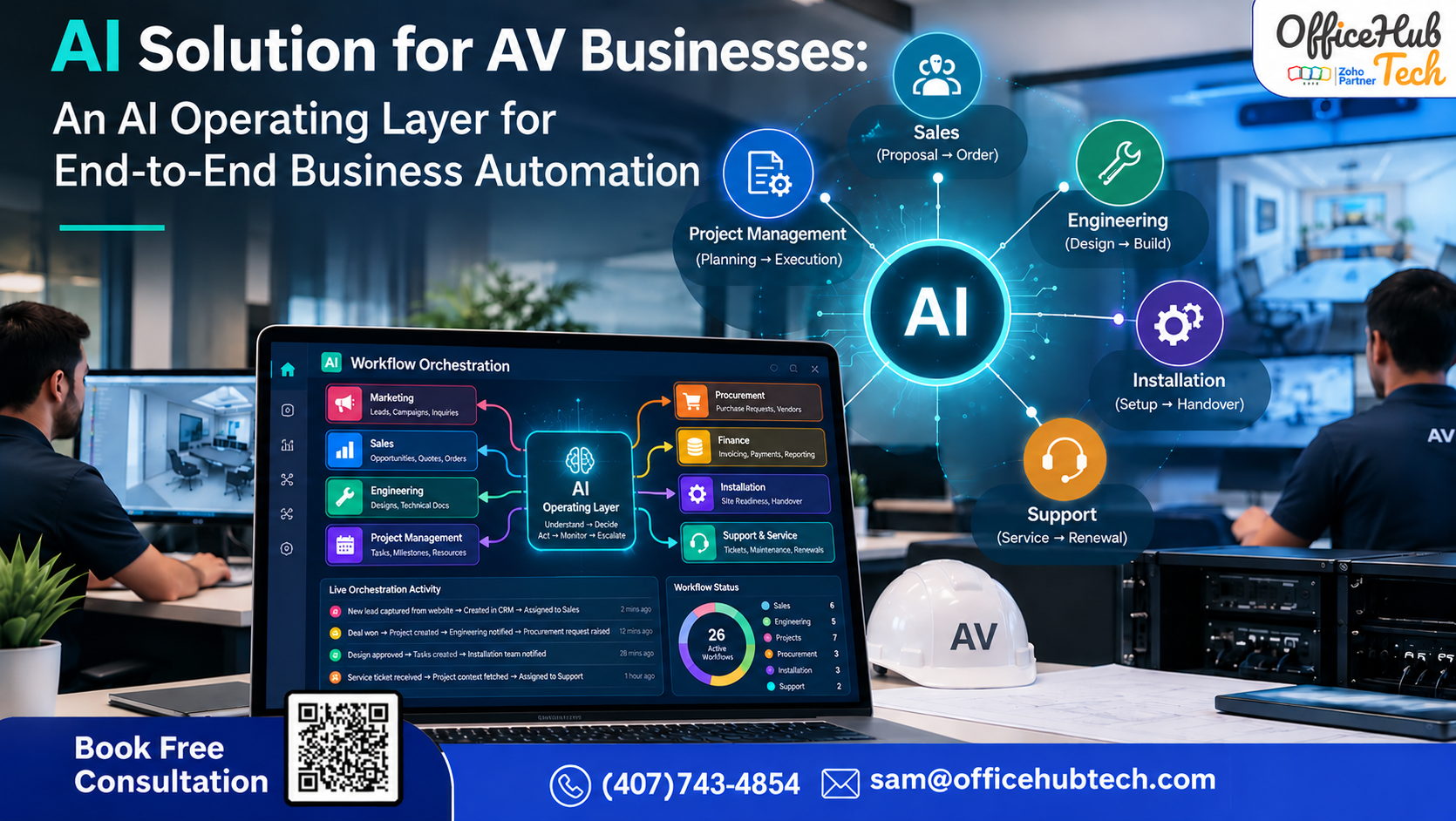
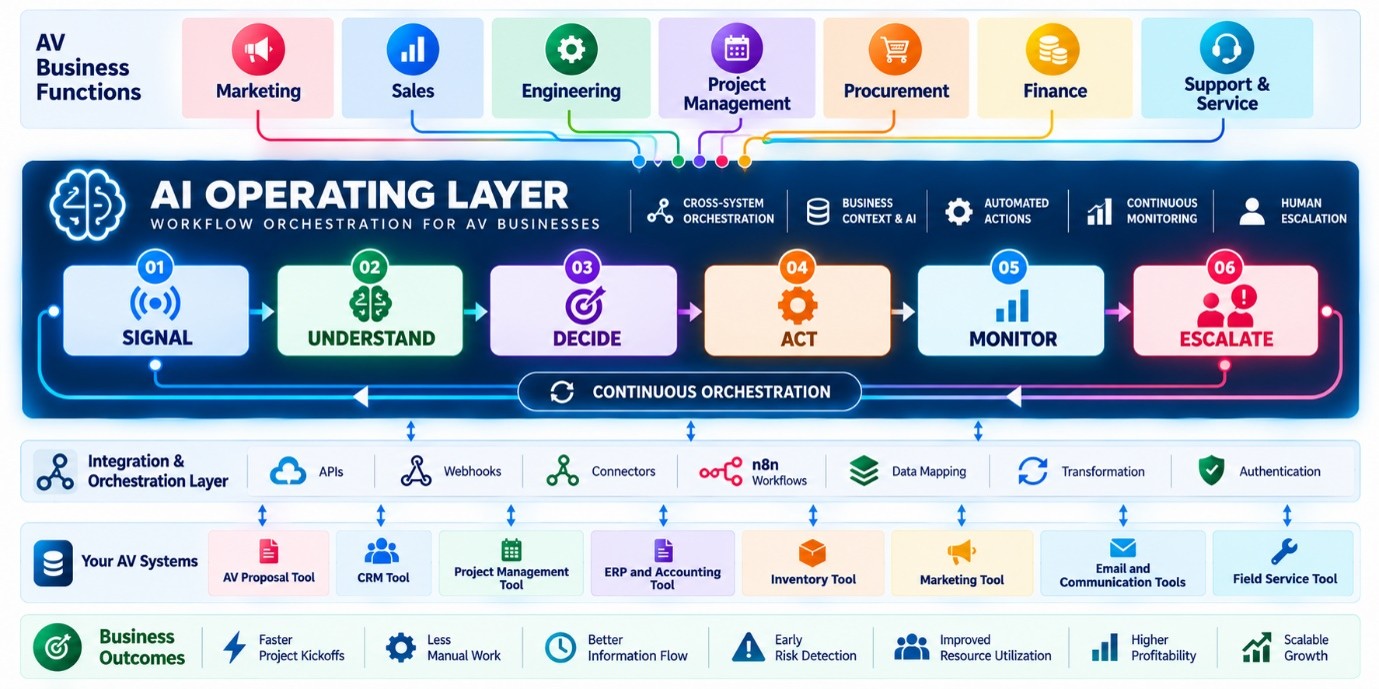
An AI solution for an AV business is an intelligent operating layer that connects the systems, departments, and workflows already used by the business. Instead of replacing your CRM, AV proposal software, project management platform, ERP, finance system, inventory tools, or service software, the AI layer works across them to coordinate what happens next.
It can understand business signals, evaluate context, decide the appropriate next action, execute approved workflows, continuously monitor what happens, and escalate important exceptions to the right person.
For an AV business, this means connecting workflows across Marketing → Sales → Engineering → Project Management → Procurement → Finance → Installation → Support & Service.
The objective goes beyond automating individual tasks. It is to turn disconnected systems and manual departmental handoffs into a connected, intelligent operating workflow that helps the business respond faster, identify risks earlier, maintain information continuity, and scale with less administrative coordination.
##Key Takeaway:-
- AI works across existing AV software rather than requiring businesses to replace their CRM, proposal, project management, finance, or service systems.
- AI streamlines operational handoffs between Marketing, Sales, Engineering, Project Management, Finance, and Support & Service teams.
- The core operating model is Understand → Decide → Act → Monitor → Escalate.
- n8n and integration technologies can orchestrate workflows between APIs, webhooks, connectors, and existing business applications.
- AI delivers the most value in workflows that depend on context and decision-making, while routine and predictable tasks can still be handled effectively through traditional automation.
- The goal is not to replace people, but to reduce repetitive coordination, improve information continuity, identify risks earlier, and bring humans into decisions that require judgment and accountability.
The Hidden Operational Gap Between AV Business Systems
AV businesses already use specialized software for CRM, sales, proposals, engineering, project management, finance, procurement, installation, and service. The challenge is not necessarily a lack of software. The challenge is what happens between those systems and departments.
A lead arrives, but someone has to qualify it. A customer response comes in, but the next action still needs to be identified. A deal is won, but someone has to initiate the project. Engineering requirements need to reach the right people. Project risks need to be identified. Finance needs to know when an operational event requires attention. Service teams need project context when customers need support.
This creates a continuous coordination burden.
An AI solution for AV businesses can address this gap by acting as an AI operating layer across the existing technology environment.
Instead of replacing the CRM, AV proposal software, project management platform, finance system, or service platform, the AI layer connects relevant systems and coordinates what should happen next.
The core operating model is:
UNDERSTAND → DECIDE → ACT → MONITOR → ESCALATE
The AI interprets business signals, analyzes the available information, selects the most suitable action, carries out approved processes, tracks the results, and alerts human teams when an exception requires their judgment.
For AV businesses, this model can extend across:
Marketing → Sales → Engineering → Project Management → Finance → Support & Service
The goal is not to replace people.
The goal is to reduce repetitive coordination, improve information continuity, identify problems earlier, and allow people to focus on decisions that require expertise and accountability.
What Is an AI Solution for an AV Business?
An AI solution for an AV business is an intelligent operating layer that connects the software and workflows already used by the company and helps coordinate business activity across departments.
It is different from simply adding an AI chatbot or using AI to generate emails.
The AI can work with business signals from connected systems and determine what should happen next.
For example, when a new lead arrives, an AI-powered workflow can:
- Capture or update the lead in CRM
- Understand the available customer and company information
- Qualify and prioritize the opportunity
- Identify missing information
- Draft an appropriate response
- Send an approved email
- Monitor the customer’s reply and activity
- Determine the next action
- Create follow-up tasks
- Notify the salesperson when human attention is required
The same model can continue beyond Sales.
A qualified opportunity can move into proposal and engineering workflows. A won deal can trigger project setup. Project-related information can reach procurement and finance teams efficiently. Installation information can become part of the service context.
This creates a connected operational model rather than a collection of isolated automations.
What the AI Operating Layer Is Not
The AI operating layer is not intended to become another:
- CRM
- Project management platform
- Accounting system
- AV design platform
- ERP
- Helpdesk
- Generic chatbot
The purpose is to work across these systems.
The existing software remains responsible for the functions it was designed to perform.
The AI operating layer provides intelligence and orchestration across them.
The AV Business Problem: The Software Exists, but the Handoffs Are Manual
A typical AV business may use several applications across its operational lifecycle:
CRM → Proposal/Design → Engineering → Project Management → Procurement → Finance → Installation → Service
Each system may work well individually.
The difficulty appears when information moves from one stage to another.
For example, when Sales marks an opportunity as Won, the CRM knows the deal has been won. But several operational activities may still depend on employees:
- Creating the project
- Reviewing customer requirements
- Passing information to Engineering
- Creating milestones
- Creating tasks
- Assigning resources
- Starting procurement
- Informing Finance
- Preparing installation
- Carrying project context into Service
The software has recorded the event.
The business is still responsible for coordinating the response.
The same problem occurs throughout the organization.
A project manager may need to check multiple systems to understand project health. A CEO may need to ask several people for updates. Finance may wait for project information. Sales may manually remember which prospects require follow-up. Service may receive customer issues without complete project context.
This is the operational gap an AI solution can address.
From Manual Coordination to Intelligent Orchestration
Traditional process:
Event → Employee notices → Employee decides → Employee acts → Employee checks result
AI operating model:
Event → Understand → Decide → Act → Monitor → Escalate
The difference is not simply automation.
It is the ability to create a continuous operating workflow around business events.
How the AI Operating Layer Works
The AI operating layer follows five connected stages.
1. Understand
The AI receives signals from connected systems.
These may include:
- New leads
- CRM updates
- Customer replies
- Proposal approvals
- Deal-stage changes
- Technical requirements
- Project updates
- Schedule changes
- Procurement events
- Invoice and payment activity
- Service tickets
- Documents
- Customer communications
The AI evaluates the available context to understand what has changed and why it may matter.
For instance, an email from a customer stating, “Please update the proposal to cover two more conference rooms,” contains more than just a simple request.
It may represent a change to:
- Project requirements
- Equipment
- Scope
- Pricing
- Engineering
- Procurement
- Project timeline
The AI layer can identify that context and route the event into the appropriate workflow.
2. Decide
After understanding the signal, the AI determines what should happen next.
Depending on the workflow, this could involve:
- Lead qualification
- Opportunity prioritization
- Follow-up recommendation
- Technical risk identification
- Project risk detection
- Resource considerations
- Schedule risk
- Payment follow-up
- Ticket prioritization
- Management escalation
Not every decision needs to be made autonomously.
Business rules and approval gates can determine which actions the AI can execute and which require human approval.
3. Act
Once an action is approved or falls within defined execution rules, the workflow can interact with connected systems.
Actions may include:
- Creating or updating CRM records
- Drafting or sending emails
- Creating projects
- Creating tasks
- Assigning work
- Updating statuses
- Notifying employees
- Triggering procurement workflows
- Initiating financial follow-up
- Creating service context
- Escalating an issue
4. Monitor
The workflow can continue beyond the initial action.
The AI can continue evaluating relevant business signals.
For example:
Lead receives email → AI monitors reply → customer replies → AI analyzes response → next workflow is triggered.
Similarly:
Project starts → AI monitors project signals → potential delay appears → AI identifies exception → project manager is notified.
This creates continuous workflow intelligence rather than one-time automation.
5. Escalate
Some situations require human judgment.
When a workflow reaches a defined exception or high-impact decision, the AI can escalate it to the appropriate person.
This creates a practical balance:
Automation for predictable actions.
AI for contextual reasoning.
Humans for accountability and judgment.
Example: From New AV Lead to AI-Managed Sales Workflow
One of the clearest applications of an AI solution for an AV business is lead management.
Consider a new lead arriving from a website form, marketing campaign, email, or another connected source.
Traditionally, several manual steps may follow:
Lead enters → CRM updated → salesperson reviews → company researched → response prepared → email sent → follow-up remembered → reply reviewed → next action decided.
An AI operating layer can coordinate this process.
Step 1: Lead Arrives
The lead information is automatically captured or synchronized with the CRM.
Step 2: AI Understands the Lead
The AI evaluates available information such as:
- Company
- Contact
- Location
- Industry
- AV requirements
- Lead source
- Previous interactions
- Available company information
- Potential opportunity characteristics
Step 3: AI Decides
Based on the configured workflow and available context, AI can determine:
- Whether the lead appears relevant
- How it should be prioritized
- What information is missing
- Whether sales attention is required
- What type of response is appropriate
- What the next action should be
Step 4: AI Acts
The workflow can:
- Create or update the CRM record
- Assign the lead
- Draft a personalized response
- Send an approved email
- Create a follow-up task
- Notify the salesperson
Step 5: AI Monitors
The workflow can continue watching:
- Customer replies
- Follow-up status
- CRM activity
- New requirements
- Buying signals
- Changes in opportunity status
Step 6: AI Escalates
If the customer requests a proposal, provides technical requirements, shows strong buying intent, or requires human intervention, the workflow can route the opportunity to the appropriate person.
The result is:
Lead → Understand → Decide → Respond → Monitor → Follow Up → Escalate
The AI is not simply writing an email.
It is coordinating the operational journey around the lead.
AI Across the AV Business
The same AI operating model can extend across six major business functions.
Marketing: Lead and Campaign Intelligence
Marketing teams can use AI to analyze signals across campaigns and prospects.
Potential use cases include:
- Lead and campaign intelligence
- High-value opportunity identification
- Customer and company research
- Campaign performance analysis
- Recommended next action
AI can identify potentially valuable opportunities and surface signals that require marketing or sales attention.
Business outcome: Marketing can act on opportunities earlier instead of relying only on retrospective campaign analysis.
Sales: AI Lead Qualification and Follow-Up
Sales workflows can include:
- AI lead qualification
- Lead scoring and prioritization
- Automated follow-up
- Quote and deal risk detection
- Deal conversion intelligence
- Recommended next action
AI can evaluate available customer and opportunity signals, identify buying signals, coordinate follow-up, and surface opportunities that require sales attention.
Business outcome: Sales teams can spend more time on stronger opportunities while reducing missed follow-ups.
Engineering: Technical Requirement and Risk Intelligence
Engineering workflows can include:
- Technical requirement analysis
- Engineering risk detection
- Resource and capacity monitoring
- Delay and blocker detection
- Engineering escalation
AI can evaluate available project and technical information, identify missing information or potential risks, and route relevant issues to the appropriate person.
Business outcome: Technical risks and potential delays can be identified earlier.
Project Management: Continuous Project Intelligence
Project management workflows can include:
- Project health monitoring
- Schedule and delivery risk prediction
- Task and responsibility coordination
- Client communication intelligence
- Automatic project escalation
AI can continuously evaluate available project signals and identify projects or activities that require attention.
Business outcome: Problems can surface while there is still time to intervene rather than after a deadline has already been missed.
Finance: Invoice, Payment and Margin Monitoring
Finance workflows can include:
- Invoice and payment monitoring
- Cash-flow risk detection
- Quote-versus-actual analysis
- Margin and profitability monitoring
- Payment and collection follow-up
AI can evaluate financial and operational signals and identify events that require financial action.
Business outcome: Faster follow-up, fewer missed payment actions, and earlier visibility into potential margin problems.
Support & Service: Customer Issue Intelligence
Support and service workflows can include:
- Ticket prioritization
- Customer issue intelligence
- SLA and risk monitoring
- Automatic escalation and assignment
- Proactive customer support
AI can evaluate service signals, prioritize issues, and route them to the appropriate team.
Project information can also provide additional context when service teams handle customer issues.
Business outcome: Critical issues reach the right person faster and customers receive more consistent support.
From Deal Won to Project Execution
The Sales-to-Project handoff is another strong example of AI orchestration.
Traditional Process:
Deal Won
↓
Sales informs the team
↓
PM reviews the opportunity
↓
Requirements are gathered
↓
Project is created
↓
Milestones and tasks are created
↓
People are assigned
↓
Engineering receives information
↓
Procurement begins
↓
Finance receives required information
This can involve multiple emails, systems, manual checks, and employee coordination.
AI-Orchestrated Process
DEAL WON
↓
UNDERSTAND
AI evaluates available customer, commercial, technical, and project context.
↓
DECIDE
The workflow determines which operational actions are required.
↓
ACT
The workflow can:
- Create the project
- Prepare milestones
- Create defined tasks
- Carry relevant information forward
- Notify Engineering
- Trigger procurement workflows
- Initiate financial workflows
↓
MONITOR
AI evaluates available project signals.
↓
ESCALATE
Defined delays, blockers, missing information, resource issues, or other exceptions are routed to the appropriate person.
The proposal therefore becomes more than a sales record.
The deal becomes an operational trigger.
Technical Architecture: Existing AV Software + n8n + AI
An AI solution for an AV business does not necessarily require replacing the existing technology stack.
Instead, the architecture can connect the applications already used by the business.
1. Existing Business Systems
These may include:
- AV Proposal Tool
- CRM Tool
- Project management Tool
- ERP and accounting Tool
- Inventory Tool
- Marketing Tool
- Email and communication tools
- Filed Service Tool
These applications continue to perform their specialized functions.
2. Integration and Orchestration
The integration layer can use:
- APIs
- Webhooks
- Connectors
- Middleware
- Data mapping
- Authentication
- n8n workflows
- Approved integrations
n8n can orchestrate the movement of events and actions between connected applications.
3. AI Intelligence
AI adds capabilities such as:
- Context interpretation
- Document understanding
- Lead qualification
- Classification
- Risk identification
- Prioritization
- Exception detection
- Recommended next actions
- Decision support
4. Controlled Execution
Where appropriate, AI-powered workflows can retrieve information, interact with approved tools, update records, create tasks, coordinate workflows, and escalate decisions.
The key principle is controlled execution.
AI should operate within defined permissions, business rules, approval requirements, and governance policies.
5. Monitoring and Escalation
After an action occurs, the workflow can continue monitoring relevant signals.
When a specific condition is met, it can initiate another workflow, alert an employee, seek approval, or escalate the matter.
This creates a continuous operational loop rather than a single automation.
AI vs Traditional Automation for AV Businesses
Not every workflow requires AI.
Traditional automation remains highly effective when a process follows a predictable rule.
For example:
When an opportunity becomes Won, create a project.
That is a straightforward automation.
AI becomes more useful when the workflow requires interpretation or contextual reasoning.
For example:
A customer replies with new technical requirements. Understand the request, determine whether project scope may have changed, identify the appropriate next action, and route it to the right person.
Traditional Automation
Best suited for:
- Fixed triggers
- Structured data movement
- Repetitive rules
- Standard notifications
- Predictable actions
AI-Powered Automation
More useful for:
- Context interpretation
- Document understanding
- Lead qualification
- Risk identification
- Dynamic prioritization
- Exception detection
- Next-best-action recommendations
- Natural-language information
The strongest AV automation strategy combines:
Rules + AI + Human Judgment
Rules handle predictable processes.
AI handles contextual reasoning.
Humans handle accountability, authorization, and high-impact decisions.
What Changes for the AV Business?
The value of an AI operating layer is not simply fewer clicks.
It is the ability to make the business more responsive.
Faster Lead Response: New opportunities can enter defined workflows immediately.
Consistent Follow-Up: Customer follow-up can be coordinated instead of relying entirely on individual memory.
Faster Project Kickoff: A won deal can initiate the operational process faster.
Less Administrative Coordination: Employees spend less time moving information between systems.
Better Information Continuity: Customer, technical, project, financial, and service context can move through the business lifecycle.
Earlier Risk Detection: Potential project, technical, procurement, payment, resource, and customer issues can be surfaced earlier.
Better Management Visibility: Business leaders can see the operations that require attention without manually checking every system.
Better Scalability: More projects and customers can be supported without administrative coordination increasing at the same rate.
From Managing by Asking to Managing by Exception
For an AV business owner, CEO, COO, or operations leader, the larger value of AI can be visibility.
Instead of repeatedly asking:
- Which projects are delayed?
- Which deals need attention?
- Has this customer replied?
- Why has procurement not started?
- Which invoices require follow-up?
- Which technical issue is blocking delivery?
- Which customer needs attention?
the AI operating layer can evaluate defined business signals and surface the exceptions.
The goal is:
Don’t make the CEO monitor everything. Make the system identify what actually needs the CEO.
Normal operations can continue through defined workflows.
Minor exceptions can go to the appropriate team.
Important operational risks can be escalated.
High-impact decisions can require human approval.
This creates a management model based more on exception visibility and less on manual status chasing.
How an AV Business Can Start With AI
An AV business does not need to automate its entire operation immediately.
Start with one high-friction workflow.
1. Identify the Workflow
Examples:
Lead → Sales
Sales → Engineering
Sales → Project
Project → Procurement
Project → Finance
Project → Service
2. Map the Current Process
Identify:
- Trigger
- Systems involved
- Information required
- Decisions
- Manual actions
- Exceptions
- Approvals
- Desired outcome
3. Decide What Needs AI
Separate the process into:
Rules: predictable actions
AI: contextual reasoning
Human: approval and judgment
4. Connect the Systems
Evaluate APIs, webhooks, connectors, authentication, data mapping, and available write-back capabilities.
5. Measure the Result
Track:
- Response time
- Handoff time
- Manual touches
- Administrative hours
- Missed follow-ups
- Project kickoff time
- Errors
- Exception resolution
- Procurement delays
Then expand to additional workflows.
One workflow → Connect systems → Prove value → Expand across operations.
AI-Powered AV Business Automation With OfficeHub Tech
OfficeHub Tech approaches AI automation from the perspective of the AV business workflow rather than starting with another generic software platform.
The objective is to connect the systems an AV business already uses and create intelligent workflows across its operational lifecycle.
The approach can support workflows across:
- Marketing
- Sales
- Engineering
- AV proposals
- Project management
- Procurement
- Finance
- Installation
- Support
- Service
Depending on available integration capabilities, workflows can connect CRM, AV proposal platforms, project management systems, finance applications, service platforms, and other business tools.
The architecture combines:
Integration + n8n Orchestration + AI + Automation + Monitoring + Escalation
The starting point is not:
“Which AI feature should we sell?”
The starting point is:
“What operational challenge is currently affecting the business through lost time, increased costs, limited visibility, or poor coordination?”
From there, the workflow can be mapped, connected, automated, monitored, and expanded.
The Future of AI for AV Businesses Is Connected Operations
The next stage of AI adoption for AV businesses is not necessarily another standalone software application.
Most AV businesses already have systems for CRM, proposals, engineering, project management, finance, procurement, and service.
The opportunity is to make those systems work together more intelligently.
An AI solution for an AV business can act as an operating layer across those systems:
UNDERSTAND → DECIDE → ACT → MONITOR → ESCALATE
A new lead can become an intelligently managed sales workflow.
A won deal can become an operational trigger.
A project can be monitored for defined risks.
A financial event can trigger follow-up.
A service issue can be prioritized using available customer and project context.
Management can receive attention-worthy exceptions instead of manually chasing updates.
The objective is not to automate people out of the business.
It is to automate repetitive coordination, preserve business context, identify important signals earlier, and allow people to focus on decisions that require expertise and accountability.
Build an AI Operating Layer for Your AV Business
OfficeHub Tech helps AV and low-voltage businesses explore AI-powered workflow orchestration across their existing technology environment.
Identify the workflow → Connect the systems → Add AI where it creates value → Automate approved actions → Monitor the outcome → Expand.
For an AV business, AI should not simply answer questions.
It should help the business understand what is happening, determine what should happen next, take the appropriate action, monitor the result, and bring the right person into the loop when human judgment is required.
That is the role of an AI operating layer for the AV business.