##Quick Answer
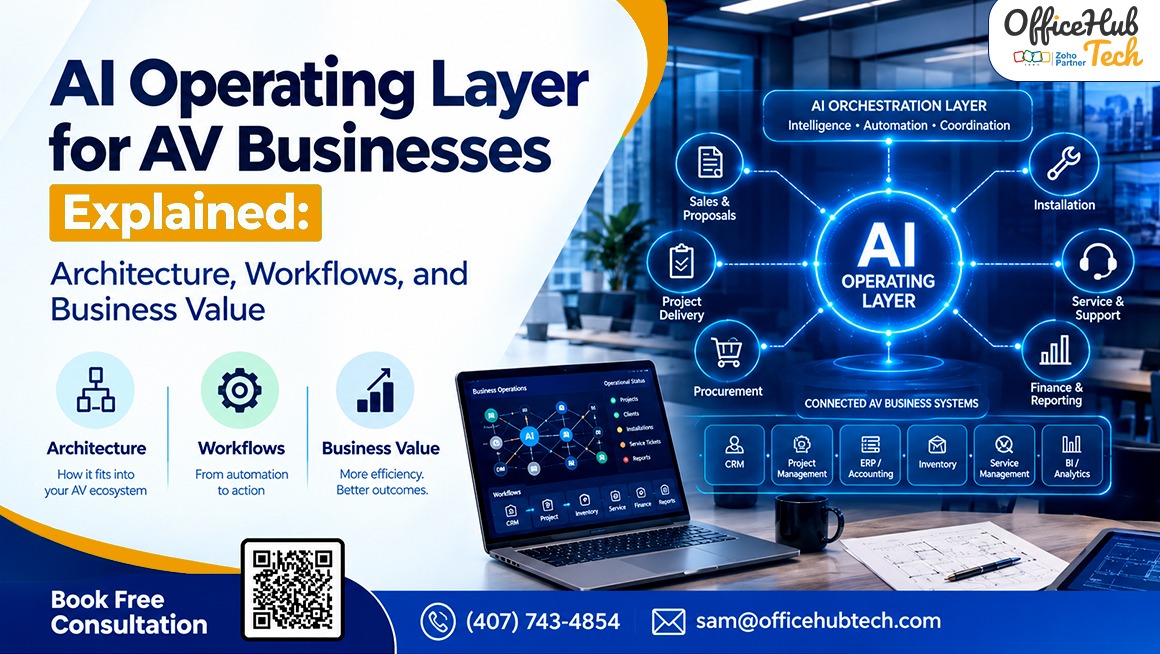
An AI Operating Layer for AV businesses connects existing applications, interprets operational events, evaluates business context, executes authorized actions, monitors results, and escalates exceptions. It combines system integrations, workflow orchestration, AI reasoning, and governance to coordinate processes across Sales, Engineering, Project Management, Procurement, Finance, Installation, and Service. Its effectiveness depends on integration capabilities, data quality, security controls, deployment architecture, and measurable business outcomes.
##Key Takeaways
- An AI Operating Layer coordinates workflows across existing AV business applications instead of functioning as another isolated software tool.
- Its architecture combines systems of record, APIs, workflow orchestration, AI reasoning, authorized execution, and monitoring.
- The operational lifecycle follows Signal → Understand → Decide → Act → Monitor → Escalate.
- AI supports contextual interpretation, while deterministic automation handles predictable rules and validations.
- An Own Your AI approach can prioritize control over the AI environment, deployment, usage economics, and maintenance.
- Zero per-token usage fees, model ownership, subscription terms, and private-server hosting are distinct considerations that require technical and commercial verification.
- Business value should be measured through handoff time, manual touches, project kickoff delays, data errors, and exception resolution.
- Starting with one measurable workflow allows AV businesses to validate an implementation before expanding across departments.
What Is an AI Operating Layer for an AV Business?
AV businesses manage proposals, customer relationships, technical requirements, project schedules, procurement, installation, and service across multiple applications. When these systems operate independently, employees often bridge the gaps through emails, spreadsheets, repeated data entry, and manual follow-ups. AI-powered AV workflow automation services can address these coordination challenges by connecting existing systems and orchestrating the actions required to move work forward.
Defining the AI Operating Layer
An AI Operating Layer is an intelligent coordination layer that brings together system integration, workflow automation, AI-assisted reasoning, and controlled execution. It interprets operational signals, retrieves relevant context, determines appropriate next steps, and coordinates authorized actions across connected applications.
Unlike a standalone chatbot or copilot, an operating layer focuses on the workflow connecting multiple business activities. It can help coordinate what happens after a deal is approved, a project milestone changes, a purchase order is delayed, or a customer submits a service request.
The objective is not necessarily to replace existing AV business automation software. It is to make the applications an AV integrator already relies on work together more intelligently.
Why AV Businesses Need an Operating Layer
A proposal approval may require project creation, technical validation, procurement preparation, scheduling, and finance coordination. When these activities depend on separate systems and manual handoffs, important information can be delayed, duplicated, or overlooked.
An operating layer helps address this problem by coordinating the dependencies between applications and departments. It can preserve relevant context, validate required information, initiate supported actions, and identify situations that require human attention.
AI Operating Layer vs. Traditional AV Business Software
| Component | Primary responsibility |
| Existing AV applications | Manage specialized operational records |
| APIs, webhooks, and connectors | Exchange information and operational events |
| Workflow automation | Execute predefined rules and sequences |
| AI reasoning | Interpret context and support decisions |
| Agentic execution | Coordinate multiple authorized tool actions |
| Human oversight | Approve consequential decisions and resolve exceptions |
These components complement one another. AI does not eliminate the need for reliable integrations, deterministic rules, or human accountability.
What Does the Operating Layer Replace?
An AI Operating Layer does not automatically replace CRM, proposal software, ERP, project management, or service applications. Those systems can continue to manage their respective records while the operating layer coordinates interactions between them.
The degree of integration depends on each application’s APIs, connectors, permissions, data structures, and supported read and write operations.
AI Operating Layer Architecture: Components, Integrations, and Data Flow
A practical AI Operating Layer combines several technical components to move from an operational event to a verified outcome.
Architecture: From Business Systems to Coordinated Actions
The architecture can be organized into six layers:
- Business application layer: CRM, proposal and design software, project management, inventory, procurement, accounting, and service applications.
- Integration and event layer: APIs, webhooks, native connectors, scheduled synchronization, and event ingestion.
- Workflow orchestration layer: Triggers, conditions, routing, dependencies, retries, and execution sequences.
- AI reasoning layer: Context retrieval, information extraction, classification, prioritization, and decision support.
- Tool and action layer: Authorized record creation, updates, task generation, notifications, and supported transactions.
- Governance and observability layer: Authentication, authorization, approvals, audit trails, monitoring, exception handling, and reconciliation.
Security and reliability controls apply across these layers rather than belonging to only one component.
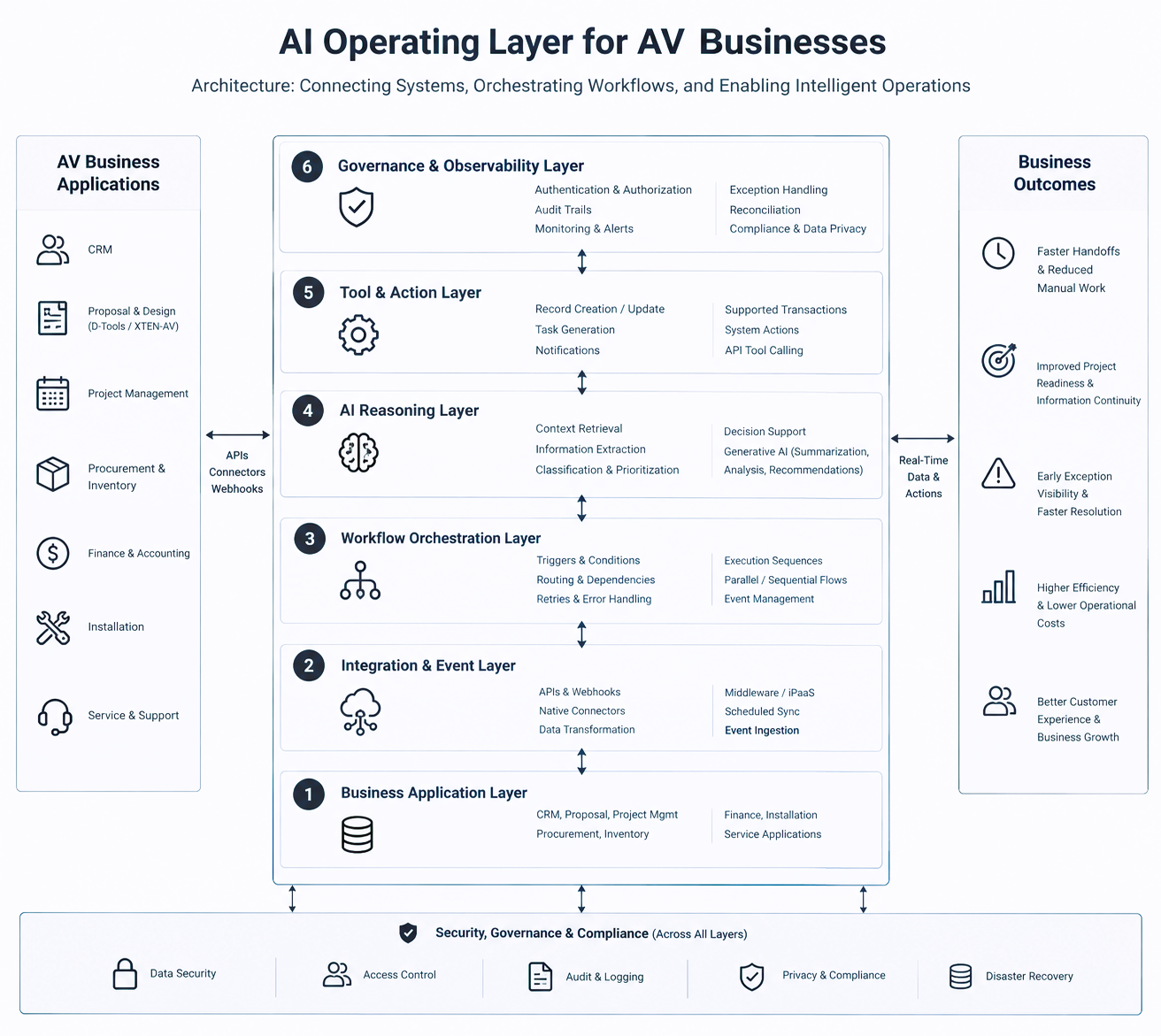
[Diagram: Illustrate the six layers, with events and context flowing toward the reasoning and orchestration components, authorized actions returning to connected applications, and monitoring feeding exceptions back into the workflow.]
The Six-Stage Operational Lifecycle
The operating layer follows a continuous lifecycle: Signal → Understand → Decide → Act → Monitor → Escalate.
- Signal: Detect an event from a connected application. Examples include a won opportunity, an approved proposal, a delayed purchase order, or a new service request.
- Understand: Retrieve relevant customer, project, equipment, technical, and commercial information. Validate mandatory fields and identify missing or conflicting data.
- Decide: Apply business rules and AI-assisted interpretation to determine the next appropriate step. Evaluate whether the action is permitted or requires approval.
- Act: Execute authorized operations through supported integrations, such as preparing project records, creating tasks, updating statuses, or notifying the responsible team.
- Monitor: Check execution results, downstream confirmations, deadlines, and dependencies to determine whether the intended outcome occurred.
- Escalate: Route failed actions, missing information, policy conflicts, and consequential decisions to the appropriate human owner.
Escalation can return the workflow to an earlier stage after an issue is resolved. This makes the lifecycle a monitored operational loop rather than a one-way automation sequence.
How APIs, Webhooks, and Middleware Connect AV Applications
APIs provide supported methods for retrieving or changing records. Webhooks can notify connected workflows when relevant events occur, while scheduled synchronization can be useful when real-time event delivery is unavailable or unnecessary.
Middleware and orchestration platforms can coordinate multi-step processes across applications. For example, D-Tools integration automation may pass supported proposal or project information into downstream CRM or project workflows, subject to the relevant APIs, permissions, and integration capabilities.
A well-designed integration also addresses data transformation, rate limits, timeouts, duplicate events, partial failures, and unsupported operations.
Data Contracts and System-of-Record Ownership
Reliable orchestration requires clear data ownership. An implementation should define which application is authoritative for customers, opportunities, projects, equipment, and financial records.
Field mappings, unique identifiers, validation rules, and required data should be documented. These controls help prevent duplicate records, inconsistent updates, and the loss of technical or commercial context between departments.
Reliability and Operational Monitoring
The architecture should include appropriate retry mechanisms, duplicate-event prevention, recovery procedures, execution logs, alerts, and reconciliation. If an action fails, the workflow should identify the failure and route it for resolution rather than repeatedly executing an unsuccessful operation.
How AI, Workflow Automation, and Agentic Execution Work Together
An effective AI operating layer does not use AI for every task. It assigns responsibilities according to the complexity, predictability, and risk of each operation.
Deterministic Automation for Predictable Tasks
Fixed rules are appropriate for mandatory-field checks, standard notifications, predefined routing, calculations, and routine status updates. These operations should remain consistent and testable.
AI Reasoning for Context-Dependent Tasks
AI can help interpret unstructured customer emails, extract technical requirements, summarize project information, classify service requests, and identify missing details. These capabilities are useful when the input varies and cannot be handled adequately through fixed rules alone.
Agentic Execution for Multi-Step Workflows
Agentic execution can coordinate multiple tool calls, inspect their results, and determine subsequent steps within defined permissions. For example, an approved event could trigger information retrieval, validation, task preparation, and notifications across connected systems.
The agent should operate through explicitly authorized tools rather than unrestricted access to business applications.
Human Approval and Decision Boundaries
High-impact decisions may require human review. Depending on company policy, these can include financial commitments, contractual changes, equipment substitutions, or changes to an approved technical scope.
Generative AI for AV Business Operations
Generative AI can assist with summarization, information extraction, contextual recommendations, and natural-language interpretation. Structured validations, access controls, and critical business constraints should remain enforceable through the surrounding architecture.
AV-Specific Workflow Orchestration: From Proposal to Service
The value of an AI Operating Layer becomes clearer when applied to the operational handoffs that occur throughout an AV project.
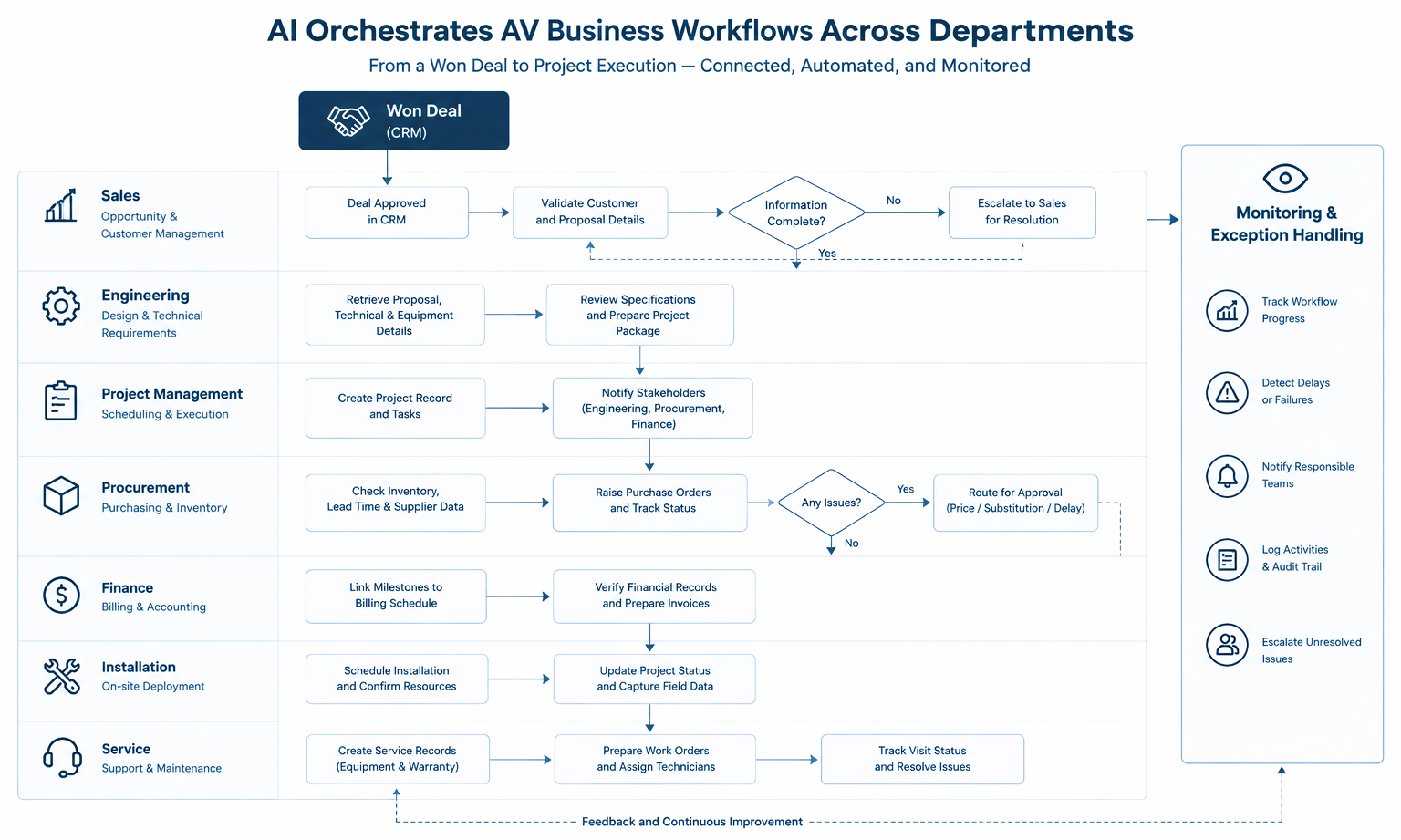
Sales-to-Project Handoff
When a deal reaches an approved or won state, the workflow can retrieve the relevant customer, proposal, commercial, and technical information. It validates mandatory fields, prepares or creates supported project records, generates appropriate tasks, and notifies Engineering and Project Management.
If essential specifications are missing or records conflict, the workflow can escalate the issue before the project proceeds.
This is more than copying CRM fields into another application. It coordinates the next operational steps and checks whether those steps have been completed.
Engineering-to-Procurement Coordination
Approved equipment lists, quantities, and specifications can be passed into procurement workflows where integrations support the required data. Connected inventory or supplier information may help identify availability constraints and lead-time risks.
Discrepancies, substitutions, and cost-impacting decisions should be routed for review rather than automatically treated as approved changes.
Project Management and Finance Coordination
Project milestones can trigger billing preparation, finance notifications, or other supported downstream activities. The workflow can identify overdue dependencies and inconsistencies between project and finance records.
Financial postings and other consequential transactions should follow the business’s authorization and approval policies.
Installation-to-Service Continuity
Available equipment details, serial numbers, warranty information, customer records, and installation history can be carried into service workflows. A service request can trigger context retrieval, missing-information checks, work-order preparation, and dispatch coordination.
Monitoring can then identify incomplete visits, unresolved issues, or missing updates.
Cross-Department Visibility
When workflow states and exceptions are recorded consistently, operational leaders can gain better visibility into delayed handoffs, blocked dependencies, and failed updates. The completeness and timeliness of that visibility depend on the connected systems and their data.
Technology Stack and Implementation Considerations
An AI Operating Layer can coordinate different tools without requiring every AV integrator to adopt the same software stack.
Connecting Existing AV Applications
Depending on the business, the architecture may connect proposal and design applications such as D-Tools or XTEN-AV with CRM, project management, procurement, finance, inventory, and service systems.
These are examples of alternative applications within a broader stack, not an assumption that every AV integrator uses them together.
APIs, Webhooks, Middleware, and AI Tool Calling
APIs provide access to supported data and operations. Webhooks communicate events, middleware coordinates workflows, and AI tool calling allows a model to request specific operations through defined interfaces.
The existence of an integration does not grant unrestricted access. Authentication, authorization, validation, and application-side permissions still govern which operations can be executed.
Where n8n and Make Fit
Platforms such as n8n and Make can support workflow triggers, conditional branches, data transformations, API calls, notifications, and AI-assisted steps. They can coordinate deterministic business logic with AI services and route exceptions to the appropriate team.
The choice between middleware, direct integration, and custom development depends on workflow complexity, maintainability, control requirements, and available connectors.
Building a B2B AI Operating System for Operations
A B2B AI operating system for operations is best understood as an architectural approach combining application connectors, workflow orchestration, context retrieval, defined tools, business policies, approval mechanisms, and monitoring.
It is not necessarily one packaged software product. The implementation should reflect the operational requirements and technical environment of the AV business.
Own Your AI: Deployment Architecture, Usage Economics, and Maintenance
The Own Your AI approach emphasizes control over the AI environment, deployment, data governance, usage economics, and maintenance. These benefits should be evaluated separately.
What Does Own Your AI Mean?
A privately deployed or customer-controlled AI environment can provide greater control over component hosting, access permissions, and operational data. However, model ownership, licensing, deployment control, and data ownership are distinct concepts determined by the model, infrastructure, contracts, and implementation.
Zero Tokens and Unlimited Usage
Hosted AI services may charge for input and output tokens, making frequent, multi-step workflows more expensive. A zero per-token usage-fee model can remove these specific charges where the solution’s terms support it.
However, this does not mean zero total operating costs. Infrastructure, electricity, maintenance, support, and third-party services may still incur expenses. Unlimited usage should only be claimed when contractually supported and technically feasible.
Own Your AI and Own Your LLM
Businesses can choose hosted, privately deployed, or hybrid AI models. Each offers different levels of control, performance, and data handling.
Before claiming LLM ownership, clarify whether the offering provides model ownership, a licensed model deployed privately, or control over the AI environment. Private deployment alone does not transfer model ownership. Data transmission, retention, and training policies should also be documented.
No Subscription for the Core AI Layer
A core AI layer without recurring subscription fees may offer a different cost structure from subscription-based services. However, third-party software, AI-provider usage, implementation, infrastructure, and support may still incur costs.
Hosting on Your Own Server
On-premises deployment can keep supported components within internal infrastructure, offering greater control over network access and sensitive information. Planning must account for server capacity, availability, backups, security updates, performance, and disaster recovery. Private or hybrid deployments may still depend on external services.
Flexible Maintenance: In-House or Managed Support
Businesses can maintain the environment using internal IT teams or managed support, depending on their resources and service arrangements. Internal teams need the skills to handle monitoring, updates, backups, security, and incidents. Managed support may cover troubleshooting, integration changes, and operational monitoring. Private hosting does not eliminate maintenance responsibilities.
Evaluating the Own Your AI Cost Model
Compare the complete operating model, including:
- Per-token fees, AI-provider charges, and core-layer licensing.
- Infrastructure, hosting, and implementation costs.
- Internal IT resources or managed support fees.
- Security, availability, performance, and capacity requirements.
- Expected workflow volume and total cost of ownership.
The goal is to evaluate the full cost and control model rather than a single pricing component.
Security, Governance, and Operational Control
An AI Operating Layer may interact with important commercial, technical, and customer records. Security and governance must therefore be part of the architecture from the beginning.
Authentication, Authorization, and Least-Privilege Access
Each application connection should use secure authentication and only the permissions required for its assigned tasks. Read, write, and approval privileges should be separated where appropriate, and credentials should be managed and revoked securely.
Human-in-the-Loop Approval Policies
Routine notifications or low-risk task creation may be suitable for automated execution. Financial commitments, contractual changes, technical substitutions, and actions involving conflicting information may require approval according to company policy.
Data Privacy and Deployment Boundaries
Define which information can be sent to AI models, how records are retained, who can access them, and whether external services are involved. Deployment choices should account for contractual requirements, data residency, and security policies.
Audit Trails and Accountability
Where technically supported, record the triggering event, relevant inputs, decision path, executed action, result, and approval history. Assign owners to failed workflows and establish procedures for incident response.
Managing AI Errors and Untrusted Inputs
Validate AI outputs before using them in structured records. Treat emails, documents, and external content as untrusted inputs, test for prompt injection, and prevent inferred information from silently becoming authoritative business data.
When information is ambiguous or a workflow cannot safely proceed, the system should use a defined fallback or escalation path.
Business Value: Measuring the Impact of an AI Operating Layer
The business value of an AI Operating Layer should be assessed through operational evidence rather than assumed savings.
Reduce Manual Coordination
Automated handoffs, context retrieval, task preparation, and notifications can reduce repetitive data entry and status chasing. The actual improvement depends on how much manual work the original process requires. In AV businesses, this can help teams coordinate sales, engineering, procurement, and project management with fewer repetitive follow-ups. Employees can spend more time on technical reviews, customer requirements, and decisions that require human judgment.
Improve Project Readiness and Information Continuity
Validating project information and carrying approved commercial and technical context into downstream workflows can help reduce missing information and avoidable rework. For example, project teams can receive relevant proposal details, equipment specifications, and agreed milestones before execution begins. This creates a more consistent handoff between departments, although data quality still depends on accurate source records and appropriate validation rules.
Improve Exception Visibility
Monitoring can surface delayed dependencies, failed integrations, and unresolved exceptions earlier when the necessary data is available. Rather than relying entirely on manual status checks, teams can receive alerts when required information is missing, an approval is pending, or a workflow fails. Defined escalation rules help route these issues to the responsible person while preserving visibility into the action taken and its resolution.
Establish a Measurement Framework
| Metric | What it measures |
| Handoff completion time | Time from a trigger to downstream readiness |
| Manual touches per workflow | Human interventions needed for routine processing |
| Project kickoff time | Time from deal approval to operational readiness |
| Data error rate | Frequency of incomplete, duplicate, or inconsistent records |
| Exception resolution time | Time required to resolve workflow failures |
| Workflow success rate | Share of runs completed without unresolved failure |
| Approval turnaround time | Time spent waiting for required decisions |
| Cost per completed workflow | Attributable operating cost divided by successful workflow runs |
Establish a baseline before implementation and compare results after the workflow stabilizes. Account for integration effort, infrastructure, support, and change management before estimating ROI. Where possible, compare equivalent workflows over similar periods and account for changes in project volume or complexity. This helps distinguish improvements associated with automation from changes caused by other operational factors.
Business Value Beyond Cost Reduction
An operating layer may also improve information continuity, handoff predictability, risk visibility, and customer communication. For AV integrators, consistent status updates and earlier identification of project dependencies can help teams set clearer expectations with customers. These outcomes should be measured where possible and presented as observed results only when supporting evidence exists.
Implementation Roadmap: From One Workflow to Connected AV Operations
Map the Current Workflow
Document the triggering events, applications, owners, data dependencies, decisions, manual steps, and exceptions. Identify where coordination creates the greatest operational friction.
Select a High-Value Starting Point
Potential starting workflows include won-deal-to-project handoffs, proposal validation, procurement alerts, project status coordination, and service request intake.
Choose a bounded workflow with a clear owner, manageable risk, and measurable baseline.
Confirm Technical Feasibility
Verify APIs, webhooks, connector availability, supported read and write operations, field mappings, permissions, validation rules, and recovery requirements. Evaluate deployment and usage-cost considerations before selecting the architecture.
Introduce AI Where It Adds Value
Use AI for contextual interpretation, classification, summarization, or variable-input handling. Keep fixed business constraints and critical validations deterministic wherever practical.
Pilot, Test, and Measure
Test normal operation, missing fields, duplicate events, conflicting records, failed integrations, approval requirements, and recovery paths. Compare results against the baseline before expanding.
Scale With Governance
Extend the operating layer to additional departments only when the initial workflow is stable, measurable, supportable, and accepted by its users.
Enterprise AI Is Moving Toward Operational Value
McKinsey & Company’s report, The State of AI in 2026: On the Road to ROI, published August 25, 2026, examines AI adoption, agentic systems, costs, and enterprise impact.
The report found that:
- 40% of respondents from organizations with annual revenue exceeding $1 billion reported scaling AI agents, up from 27% the previous year.
- 22% of respondents from smaller organizations reported scaling AI agents, a share that remained flat.
- 80% of respondents said AI had improved their individual productivity.
- 37% reported that AI had contributed positively to their organization’s EBIT.
- Approximately one in five respondents said AI-related operating costs, including token costs, constrained their organization’s AI use.
These findings illustrate an important distinction: increased AI adoption does not automatically translate into measurable enterprise-level financial impact. McKinsey also highlights workflow redesign and operational discipline as important factors in capturing value.
For AV businesses, the practical lesson is to design AI around complete workflows, supported integrations, permissions, monitoring, and measurable outcomes rather than treating an AI feature as a transformation by itself. These are general enterprise findings, not AV-specific performance benchmarks.
Conclusion: Building a More Intelligent Operating Model for AV Businesses
An AI Operating Layer connects operational signals, business context, decisions, authorized actions, monitoring, and escalation across an AV business. Its effectiveness depends on reliable integrations, clear data ownership, appropriate AI use, security controls, and a deployment model aligned with business requirements.
The Own Your AI approach adds another dimension to the decision: AV businesses should evaluate control over the AI environment, model arrangements, usage fees, hosting, maintenance, and total operating cost before selecting an architecture.
The most practical path is to begin with one high-value workflow, establish a baseline, validate the implementation, and expand based on measurable results. Businesses exploring an AI Operating Layer for AV businesses should prioritize an architecture that fits their existing software, operational dependencies, and governance requirements.
Why OfficeHub Tech Is the Right Partner for AV Business Automation
OfficeHub Tech focuses on AV-specific workflow design, application integration, and automation approaches intended to connect the processes that support sales, project execution, finance, installation, and service. As AVSI operational workflow automation experts in USA, OfficeHub Tech can help businesses assess their current systems, identify manual handoffs, and evaluate suitable integration and orchestration options.
Designing an Operating Layer Around Existing Systems
Potential implementation activities include connecting supported CRM, proposal, project management, procurement, finance, and service applications; designing workflow triggers and conditional logic; combining deterministic automation with AI-assisted reasoning; and establishing approval, monitoring, and exception-handling processes.
Deployment options and specific capabilities depend on the applications, APIs, permissions, infrastructure, and agreed project scope.
Other Solutions for the AV Industry
OfficeHub Tech offers tailored AV industry solutions, including Field Assist Management built on Zoho Creator for technician scheduling, dispatch, work orders, service visits, customer portals, dashboards, and billing workflows. Its services also include turnkey workflow solutions, Agentic AI for controlled automation across supported applications, D-Tools SI and Zoho CRM integration, and ERP-oriented solutions for AV businesses. Additionally, OfficeHub Tech provides adaptable n8n and Make automation templates for relevant business processes.
Contact OfficeHub Tech to evaluate your software stack, identify operational bottlenecks, and explore practical workflow improvements.