##Quick Answer
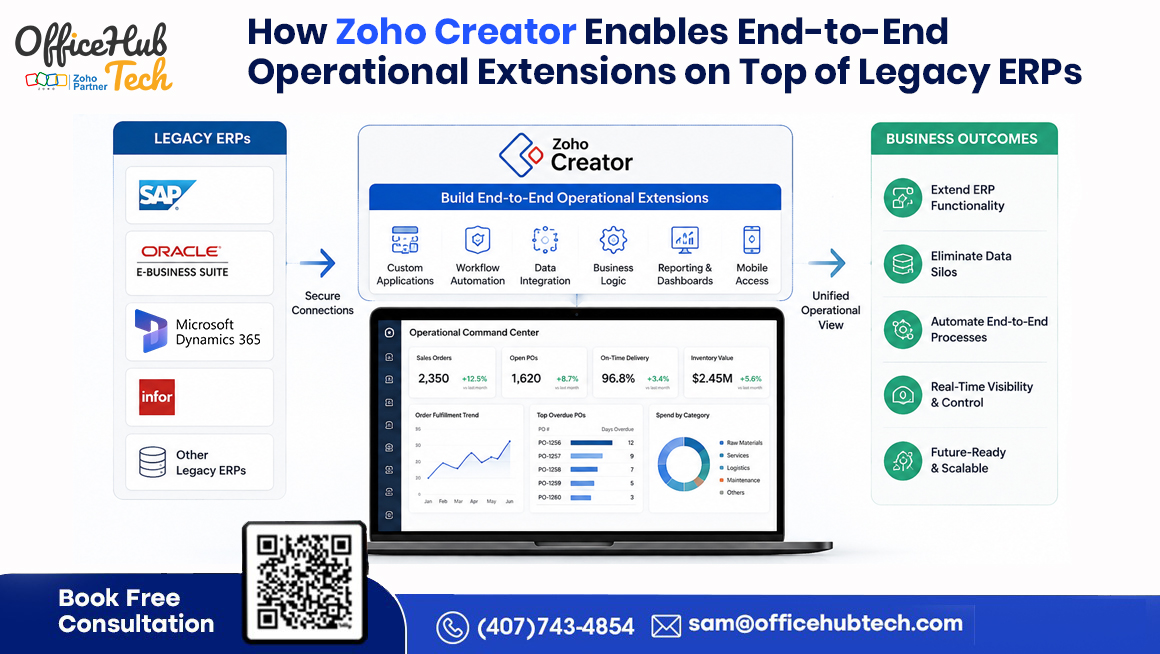
Zoho Creator can extend a legacy ERP by adding a flexible application, integration, workflow, and automation layer around the existing ERP core. Instead of replacing an ERP that still performs critical transactions effectively, organizations can use Zoho Creator to build custom applications, portals, mobile experiences, dashboards, and connected workflows while keeping the ERP as the system of record where appropriate. This approach enables incremental modernization without forcing every new business requirement into the ERP itself.
##What is legacy ERP extension?
Legacy ERP extension is the practice of adding modern applications, integrations, workflows, and user experiences around an existing ERP while preserving the ERP’s core transactional functions.
##Key Takeaways
- Legacy ERPs can remain the system of record while modern capabilities are introduced around them.
- Zoho Creator can function as an ERP extension layer for applications, workflows, integrations, portals, dashboards, and mobile experiences.
- End-to-end ERP extension connects multiple stages of a business process rather than addressing isolated software requirements.
- APIs, webhooks, database connectivity, data mapping, authentication, synchronization, and business rules provide the technical foundation.
- Enterprises can extend processes such as order-to-cash, procure-to-pay, field service, inventory, customer service, and approvals.
- Moving suitable operational capabilities outside the ERP core can reduce unnecessary customization and improve flexibility.
- A phased ERP extension strategy can modernize operations while protecting an existing ERP investment.
From “ERP System” to “ERP-Centered Operational Ecosystem”
Legacy ERP systems often remain at the center of enterprise operations because they manage processes that businesses cannot easily afford to disrupt. Financial transactions, procurement, inventory, order management, compliance records, and other core operational data may continue to run reliably even after the surrounding technology environment has changed considerably.
The challenge arises when the business needs to do more than the ERP was originally designed to support. Modern organizations increasingly depend on CRM platforms, SaaS applications, customer portals, mobile applications, analytics platforms, automation tools, and specialized departmental systems. Employees may also rely on spreadsheets or smaller applications to bridge gaps between these systems.
This does not necessarily mean that “the ERP cannot run the business.” In many cases, the more accurate statement is that “the ERP cannot efficiently support everything happening around its core.”
That distinction changes the modernization strategy. Instead of immediately replacing the ERP, enterprises can establish an ERP-centered operational ecosystem in which the ERP continues to manage core transactions while complementary applications extend its operational reach.
Organizations exploring Legacy ERP Extension and Modernization can therefore consider a model that preserves valuable ERP functionality while introducing modern capabilities where they are actually needed.
The following sections examine what end-to-end ERP extension means, where Zoho Creator fits into the architecture, which business processes can be extended, and how enterprises can approach modernization without unnecessarily disrupting their existing ERP environment.
Why ERP Modernization Is Moving Up the Enterprise Agenda
The pressure to modernize legacy technology is becoming increasingly visible across enterprise IT. In a July 2026 Reuters report, Capgemini said companies preparing to deploy AI at scale are entering a multi-year technology modernization cycle, with legacy systems, fragmented data, and technical debt among the major barriers. Capgemini also raised its 2026 revenue growth target to 8.5%–9%, while second-quarter bookings increased 9.2% to €6.55 billion, reflecting strong demand for transformation and modernization services.
For enterprises running established ERP platforms, the message is practical: modernization does not always have to begin with ERP replacement. Organizations can modernize the applications, integrations, workflows, and user experiences surrounding the ERP while preserving the core systems that still deliver business value. This is where an ERP extension strategy with Zoho Creator can provide a more incremental path to modernization.
Why Legacy ERPs Struggle With End-to-End Operational Requirements
Legacy ERPs are often highly capable transactional platforms, but their architecture may not be suited to every modern operational requirement. As organizations grow, departments introduce new processes, customer expectations change, and applications multiply. What was once a manageable ERP environment can gradually become surrounded by disconnected systems and manual workarounds.
One common response is to customize the ERP. While customization can solve a specific requirement, excessive customization can increase development complexity, make upgrades more difficult, and create dependencies on specialized ERP resources. A relatively small business-process change may then require significant analysis and testing.
Other limitations can appear outside the ERP itself. Employees may maintain spreadsheets because the ERP does not provide the required workflow. Customers may need a portal that the ERP cannot easily deliver. Field teams may require a mobile interface. Managers may need dashboards combining ERP information with data from CRM, service, or other systems.
Over time, these gaps can produce:
- Long development cycles
- Department-specific workarounds
- Spreadsheet dependency
- Disconnected applications
- Manual data entry
- Integration limitations
- Growing technical debt
- Poor visibility across processes
The result is an operational environment where the ERP remains important but is no longer sufficient on its own.
An extension strategy addresses this gap by separating core transactional responsibility from operational flexibility. Rather than continuously expanding the ERP core, organizations can introduce an extension layer for appropriate workflows, applications, interfaces, and integrations.
What Does “End-to-End Operational Extension” Actually Mean?
End-to-end operational extension means extending the ERP across an entire business process rather than solving one isolated requirement.
Consider a typical order lifecycle:
Customer → Quote → Order → Approval → Inventory → Fulfillment → Invoice → Payment → Customer Communication
Different stages may already exist in different applications. CRM may handle customer and opportunity information, the ERP may manage orders and financial transactions, warehouse systems may manage fulfillment, and customer communication may happen through another platform.
If employees manually transfer information between these systems, the business technically has multiple applications but not a connected end-to-end process.
Zoho Creator can provide an operational layer that connects appropriate stages of that process through custom applications, workflows, automation, portals, mobile interfaces, and integrations.
This involves more than data movement. A properly designed extension considers:
- Process continuity — ensuring each stage connects logically to the next.
- Data relationships — understanding how records relate across systems.
- Business rules — applying validation and decision logic.
- Automation — reducing repetitive manual actions.
- User interfaces — giving each role an appropriate experience.
- Portals — enabling controlled interaction with customers or vendors.
- Mobile experiences — supporting field and remote operations.
- Cross-system workflows — coordinating actions across applications.
The objective is therefore not simply software connectivity. It is end-to-end process continuity.
The ERP can continue handling the transactions for which it is designed, while the extension layer addresses the operational activities surrounding those transactions.
The Role of Zoho Creator as an Extension Layer
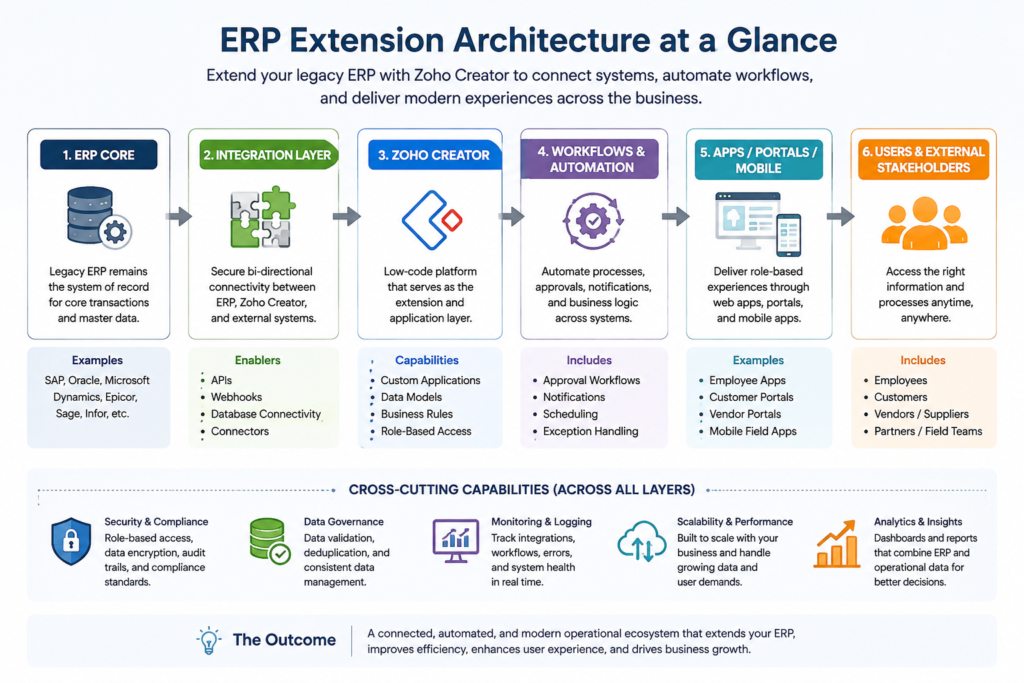
Zoho Creator can operate alongside a legacy ERP as a flexible application and orchestration layer. Its role is not necessarily to duplicate the ERP. Instead, it can provide the applications, workflows, interfaces, and integration logic required to support processes that extend beyond the ERP’s standard capabilities.
A representative architecture looks like this:
Legacy ERP / ERP Core
↓
APIs + Webhooks + Database Connectivity
↓
Zoho Creator Extension Layer
↓
Business Logic + Workflows + Automation + Data Relationships
↓
Custom Apps + Portals + Mobile + Dashboards
↓
Employees + Customers + Vendors + Field Teams
Each layer has a defined responsibility.
The ERP remains the transactional authority and system of record where appropriate. Zoho Creator provides operational flexibility through custom applications, workflow automation, interfaces, and process logic. External applications continue to provide specialized capabilities, while the integration layer manages controlled communication between systems.
This architecture can also reduce pressure to modify the ERP every time the organization introduces a new requirement.
For example, a company may not need to alter its ERP simply because it wants a new approval application, customer portal, field-service interface, or department-specific workflow. These capabilities can potentially be delivered through the extension layer while the ERP continues managing the underlying transactions.
This creates a more flexible approach to ERP modernization: preserve what works, extend what does not, and replace only what genuinely needs replacement.
What Can Enterprises Extend Around a Legacy ERP With Zoho Creator?
The range of ERP extension opportunities depends on the organization’s processes, but several categories consistently benefit from a flexible application layer.
Custom Business Applications
Organizations can build applications for business requirements that the ERP does not efficiently support. These may include sales operations, compliance processes, service workflows, warehouse activities, internal requests, or specialized departmental applications.
Approval and Workflow Extensions
Many organizations still manage approvals through email, spreadsheets, or informal communication. Creator can provide structured workflows with routing rules, notifications, status tracking, and escalation logic.
Customer and Vendor Portals
A portal can provide customers or vendors with controlled access to relevant information and processes without requiring direct access to the entire ERP environment.
Mobile Applications
Field teams, warehouse employees, sales personnel, and remote workers may need mobile-first workflows. A purpose-built interface can simplify operational activities while connecting relevant information with the ERP.
Operational Dashboards
Organizations can create dashboards that combine relevant ERP information with data from external applications, helping users understand process status without manually reconciling multiple sources.
Department-Specific Applications
A finance team, procurement department, service group, or warehouse operation may require specialized workflows that are difficult to accommodate efficiently within a standard ERP interface.
Legacy Application Replacement
Spreadsheets, Access databases, and aging custom applications surrounding the ERP can also become modernization candidates.
The common objective is to extend the ERP’s operational reach without turning the ERP core into an increasingly complex collection of custom processes.
Start Extending Your ERP With Zoho Creator
Once an organization identifies a process where its existing ERP is creating operational friction, the next step is to evaluate whether an extension approach can solve the problem without unnecessary disruption.
Creating a Zoho Creator account can provide an initial opportunity to explore the platform’s application capabilities. However, enterprise ERP extension requires more than building a standalone application. The important questions are architectural: Which system owns the data? How should information move between applications? What triggers a workflow? How are permissions managed? What happens when an integration fails?
Organizations can therefore move from platform exploration toward a structured implementation strategy covering:
- Custom business applications
- ERP integrations
- Workflow automation
- API integrations
- Customer and vendor portals
- Operational dashboards
- Enterprise modernization
For organizations ready to explore Zoho Creator, Create Your Zoho Creator Account can be a starting point.
The more important step, however, is identifying a high-value business process where extension can produce measurable improvement. A well-defined use case gives the organization a practical way to evaluate integration requirements, user adoption, process performance, and long-term scalability before extending the approach to other departments.
Extending the Entire Business Process: Real-World Use Cases
The value of end-to-end ERP extension becomes clearer when applied to real business processes.
Order-to-Cash Extension
CRM → ERP → Inventory → Approval → Fulfillment → Finance → Customer
Creator can connect operational gaps between customer-facing applications and ERP transactions. Approval workflows, notifications, dashboards, and customer communications can be coordinated without forcing every requirement into the ERP.
Procure-to-Pay Extension
Purchase Request → Approval → Vendor → Purchase Order → Receipt → Invoice → Payment
Organizations can use custom applications to manage purchase requests, approval routing, vendor interactions, notifications, and related workflows while the ERP continues managing formal procurement and financial transactions.
Field Service Extension
Service Request → Assignment → Mobile App → Field Activity → Parts → Completion → Billing
Field personnel can capture service information through mobile workflows, record parts usage, update job status, and submit completion information that feeds the appropriate downstream processes.
Inventory and Operations Extension
Demand → Stock Check → Procurement → Warehouse → Fulfillment
Creator can coordinate operational activities around ERP inventory information, reducing spreadsheet-based coordination and providing better workflow visibility.
Customer Service Extension
Customer → Order → Product → Service Case → Resolution → Feedback
A connected service application can provide employees with relevant customer and ERP context while creating a more structured process for case handling, resolution, and follow-up.
These examples demonstrate why ERP extension should be viewed as process modernization, rather than simply application integration.
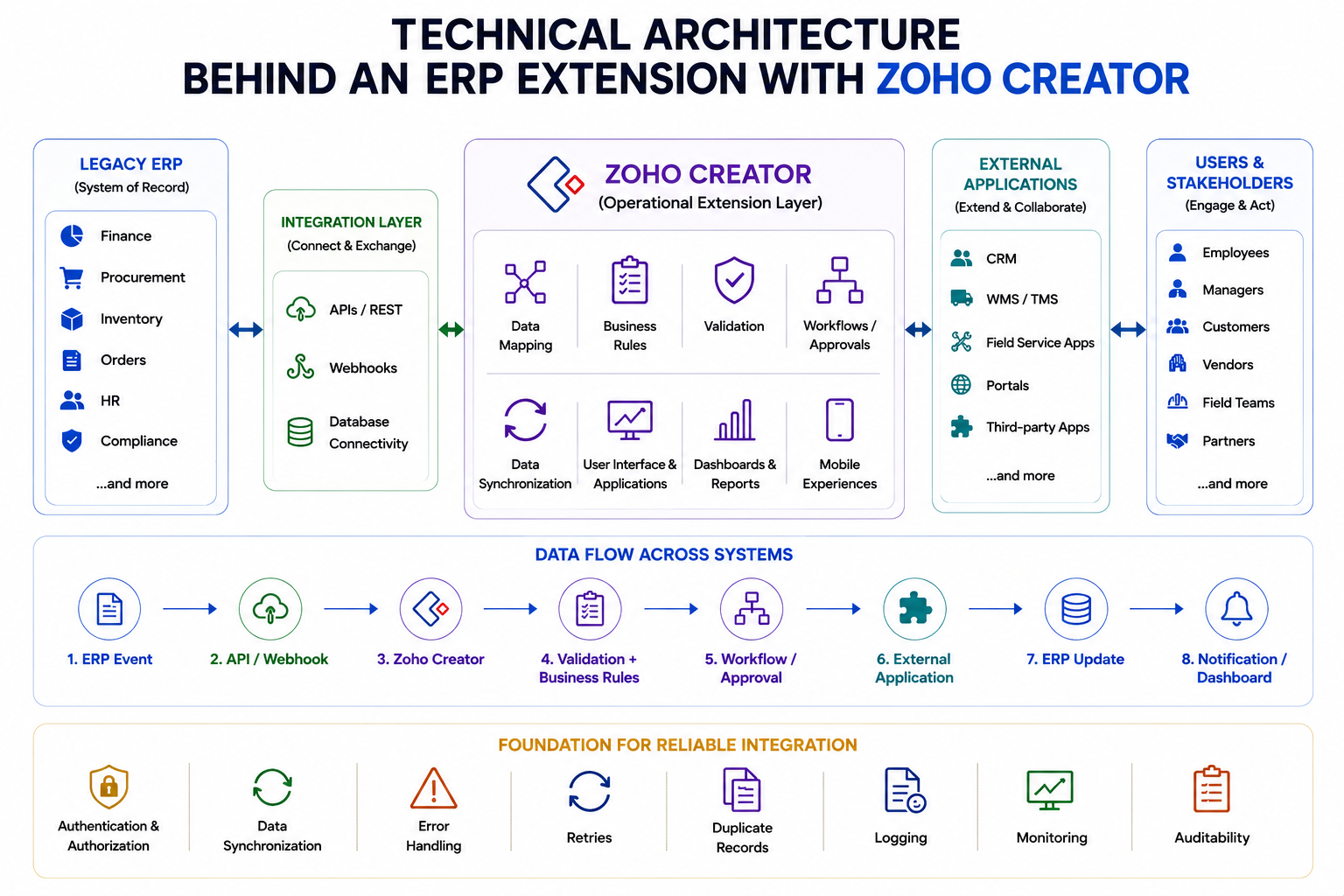
Technical Architecture Behind an ERP Extension With Zoho Creator
An effective ERP extension is more than connecting two systems. It requires a well-defined architecture for data, integrations, security, business rules, synchronization, and exception handling.
At the core, the architecture connects:
Legacy ERP
↓
APIs / Webhooks / Database Connectivity
↓
Zoho Creator
↓
Validation + Business Rules
↓
Workflows / Approvals
↓
External Applications
↓
ERP Updates + Notifications / Dashboards
Key Architecture Components
| Component | Role |
|---|---|
| APIs & Webhooks | Connect the ERP, Creator, and external applications |
| Database Connectivity | Access legacy database information where appropriate |
| Data Mapping | Align records, fields, structures, and identifiers |
| Business Rules | Manage validation, routing, approvals, and calculations |
| Authentication & Authorization | Control access to information and operations |
| Data Synchronization | Keep information aligned in real time, near real time, or on a schedule |
| Error Handling & Monitoring | Manage retries, duplicates, failed validations, logging, monitoring, and auditability |
The key principle: Zoho Creator should extend the ERP—not create another disconnected system. Clear data ownership and system-of-record responsibilities help maintain a controlled, scalable architecture.
How Data Flows Between the ERP and Zoho Creator
Data flow should be designed around the business process and clearly defined system responsibilities.
ERP Event → API / Webhook → Zoho Creator → Validation + Business Rules → Workflow / Approval → External Application → ERP Update → Notification / Dashboard
Different processes may require different integration patterns:
- ERP → Creator: ERP information is made available for operational processing.
- Creator → ERP: Completed workflows or approved actions update the ERP.
- ERP ↔ Creator: Both systems exchange information as part of a coordinated process.
- Creator → Multiple Applications: Creator connects several applications as an operational layer.
- Multiple Applications → Creator → ERP: Information from multiple sources is consolidated before an appropriate ERP update.
Why Extending the ERP Core Can Be Better Than Customizing the ERP Core
ERP customization has a legitimate role when functionality genuinely belongs within the ERP. The problem arises when every new operational requirement becomes another customization.
As custom logic accumulates inside the ERP, the core platform can become more difficult to maintain. Upgrades may require extensive regression testing, specialized development resources may become necessary, and changes made for one department can affect other processes.
An extension architecture can place suitable operational logic outside the ERP while preserving the ERP’s focus on core transactions.
| Traditional ERP Customization | Zoho Creator Extension |
| Logic is embedded within the ERP | Suitable operational logic can sit outside the ERP |
| Core environment can become more complex | ERP core can remain focused |
| Changes may affect upgrades | Extensions can evolve independently |
| Development may depend on ERP-specific skills | Low-code application development can support faster iteration |
| ERP interface may constrain specialized experiences | Custom web and mobile interfaces can be created |
| Changes may follow ERP release cycles | Surrounding processes can evolve independently |
This does not mean that extension is always the better option. The appropriate decision depends on process ownership, integration requirements, security, performance, compliance, and long-term maintenance.
Extension is particularly attractive when the ERP remains effective for core transactions but struggles with rapidly changing workflows, portals, mobile applications, custom interfaces, or cross-system processes.
Business Outcomes of End-to-End ERP Extension
A successful ERP extension strategy should produce measurable operational value.
Faster Process Execution
Automating approvals, notifications, data transfers, and repetitive handoffs can shorten process cycles and reduce waiting time between departments.
Reduced ERP Customization
Moving suitable operational capabilities outside the ERP can reduce the pressure to modify the core system for every new requirement.
Better Employee Experience
Purpose-built applications can simplify complex processes and present users with only the information and actions relevant to their role.
Improved Customer Experience
Customer portals, connected workflows, and faster internal processing can improve responsiveness without requiring customers to interact directly with complex ERP interfaces.
Better Cross-System Visibility
When ERP and external application information participate in a coordinated workflow, users can gain a more complete view of process status.
Reduced Operational Friction
Automation can reduce spreadsheet dependency, duplicate data entry, manual reconciliation, and repeated follow-ups.
Greater Business Agility
New workflows and applications can be introduced incrementally rather than waiting for large ERP development or replacement projects.
However, these benefits do not come automatically from implementing a low-code platform. The outcome depends on selecting the right processes, defining data ownership, designing reliable integrations, and aligning the technology with measurable business objectives.
How to Decide What Should Stay in the ERP and What Should Be Extended
A clear boundary between the ERP and the extension layer is essential for long-term maintainability.
Keep in the ERP
Core financial transactions, general ledger activities, established inventory records, regulatory information, core transaction processing, and important ERP-controlled master data will often remain within the ERP.
Consider Extending Outside the ERP
Suitable extension candidates may include:
- Custom workflows
- Department-specific applications
- Customer portals
- Vendor portals
- Mobile applications
- Field-service applications
- Approval processes
- Cross-system automation
- Specialized dashboards
- AI-assisted operational workflows
The decision should not be based solely on whether something can technically be built in Creator. Instead, organizations should consider where the capability belongs from a business and architectural perspective.
Questions worth asking include:
- Is this a core transactional responsibility?
- Which system should own the data?
- How frequently will the requirement change?
- Does the process cross multiple applications?
- Does it require a specialized user interface?
- Would modifying the ERP increase upgrade or maintenance risk?
- Can the requirement be integrated securely?
A useful principle is:
Keep the ERP responsible for what it does best; extend around it where the business needs flexibility and speed.
How to Implement an End-to-End ERP Extension Without Business Disruption
A phased implementation approach can reduce risk and make ERP modernization more manageable.
Phase 1 — Assess
Document existing ERP capabilities, surrounding applications, business processes, pain points, data sources, and integration points.
Phase 2 — Prioritize
Select a high-value process where the current operational friction is measurable. Beginning with a specific use case makes it simpler to demonstrate value.
Phase 3 — Design
Define the architecture before development begins. Establish systems of record, data ownership, integrations, security, workflows, permissions, and exception handling.
Phase 4 — Build
Develop the Creator applications, interfaces, workflows, and integration components according to the approved architecture.
Phase 5 — Test
Validate not only individual applications but the complete process. Test data consistency, permissions, integrations, business rules, failure scenarios, and user workflows.
Phase 6 — Deploy
Introduce the solution in a controlled environment with appropriate monitoring, documentation, and user support.
Phase 7 — Expand
Once the first implementation demonstrates value, extend the architecture to additional processes or departments.
This approach supports incremental modernization instead of a big-bang ERP transformation. It also allows organizations to learn from each implementation and refine integration, governance, and security practices before expanding.
When Zoho Creator ERP Extension Is the Right Strategy—and When It Isn’t
ERP extension should be evaluated objectively rather than treated as a universal replacement for ERP modernization.
Extension May Be Appropriate When:
- The ERP’s core processes remain reliable.
- The existing platform continues to provide significant business value.
- New requirements primarily involve workflows, applications, portals, integrations, or mobile experiences.
- Appropriate integration methods are available.
- The organization wants to modernize incrementally.
- Replacing the ERP would create unnecessary disruption or cost.
ERP Replacement May Be Better When:
- Core ERP functionality is fundamentally inadequate.
- The architecture prevents essential integrations.
- Vendor support is ending.
- Security or compliance requirements cannot be met.
- Long-term ownership costs make continued extension impractical.
- The underlying ERP no longer aligns with the organization’s strategic direction.
Extension and replacement are also not mutually exclusive. An organization can use an extension strategy to solve immediate operational gaps while developing a longer-term ERP modernization or migration roadmap.
The right choice depends on the ERP’s current value, technical constraints, integration capabilities, business requirements, cost structure, and future strategy.
Conclusion: Extend the ERP, Expand What the Business Can Do
A legacy ERP does not have to be replaced simply because the business needs capabilities that the platform was not originally designed to provide. In many enterprises, the ERP remains valuable for financial transactions, procurement, inventory, compliance, order management, and other core operations.
The challenge is extending those capabilities into a modern operational environment that includes CRM systems, SaaS applications, mobile users, portals, analytics, automation, and specialized departmental processes.
Zoho Creator can provide the application and operational layer around the ERP through custom applications, APIs, integrations, workflows, portals, dashboards, and mobile experiences. The ERP can remain the transactional foundation while the extension layer addresses requirements that demand greater flexibility.
In short:
Legacy ERP → Stable Core
Zoho Creator → Extension & Application Layer
APIs / Integrations → Connectivity
Workflows → Process Automation
Apps / Portals / Mobile → Modern User Experience
Business → End-to-End Operational Capability
For organizations considering legacy ERP extension and modernization, the best starting point is not to replace technology simply because it is old. Instead, identify where the existing ERP continues to deliver value, where operational gaps exist, and which capabilities can be extended safely around the core.
This approach can provide a practical path between maintaining the status quo and undertaking a disruptive ERP replacement. With the right architecture, enterprises can preserve their existing ERP investment while creating the flexibility needed to support changing processes, connected operations, and future digital initiatives.
Why Choose OfficeHub Tech for Zoho Creator ERP Extension?
OfficeHub Tech approaches ERP extension as a business and architecture challenge rather than simply a low-code development exercise. With 22+ years of enterprise digital transformation expertise and 100+ successful enterprise implementations, the company brings experience in evaluating complex technology environments and connecting existing systems with modern operational capabilities.
As a Best Zoho Consultation and Implementation Partner in the USA, UAE, KSA, and India, OfficeHub Tech works with organizations looking to extend ERP platforms including SAP, Oracle, Microsoft Dynamics, Epicor, Sage, and Infor through modern application and integration strategies.
Its capabilities span:
- Zoho Creator implementation
- Custom business applications
- ERP and third-party integrations
- API and database integrations
- Workflow automation
- Operational dashboards
- Customer and vendor portals
- Enterprise modernization
The practical value of this experience becomes especially relevant when teams are spending significant time reconciling ERP, CRM, finance, inventory, and spreadsheet information. Instead of assuming that another application is the answer, a focused assessment can identify where information breaks down, which workflows create the most friction, and whether a connected Zoho Creator solution is appropriate.
Organizations can explore Legacy ERP Extension and Modernization Services to understand how an extension strategy can fit into an existing ERP environment.
OfficeHub Tech can then help evaluate the current architecture, identify suitable extension opportunities, define integration boundaries, and establish a phased modernization roadmap based on actual business requirements. Our approach starts with process and system assessment, followed by architecture design, integration planning, application development, testing, deployment, and continuous optimization.