##Quick Answer
A UAE e-invoicing readiness checklist helps businesses assess compliance, invoice data, software, integrations, processes, and technical controls. It covers ten areas: regulatory deadlines, ASP arrangements, master data, invoice requirements, software capabilities, integrations, transaction workflows, security, employee responsibilities, and go-live monitoring. Evaluating suitable E-invoicing solutions can also help businesses determine whether their existing systems and processes support these requirements.
Readiness involves more than simply creating an invoice electronically. Businesses must assess how invoice information is structured, validated, exchanged, tracked, corrected, and retained through the relevant compliant processes.
##Key Takeaways
- Confirm which entities and transactions fall within the applicable UAE e-invoicing requirements and identify the relevant implementation deadlines.
- Verify the status and capabilities of your selected Accredited Service Provider.
- Audit customer, supplier, product, and tax data before configuring the e-invoicing system.
- Assess whether your existing accounting or ERP software can support the required structured invoice data and exchange workflows.
- Review PINT-AE, Peppol connectivity, APIs, data mapping, and exception handling where relevant.
- Test invoices, credit notes, rejections, transmission failures, and reconciliation before go-live.
- Establish clear ownership across finance, tax, IT, procurement, and operations.
- Treat readiness as an ongoing operational responsibility, not a one-time software installation.
10 Things UAE Businesses Should Review Before E-Invoicing Implementation
The UAE’s e-invoicing framework introduces requirements for invoice preparation, electronic document exchange, and tax reporting. Businesses must assess whether their existing accounting processes support the complete workflow.
The Ministry of Finance defines a UAE e-invoice as structured invoice data electronically exchanged between suppliers and buyers, with reporting to the Federal Tax Authority (FTA). PDFs, scanned invoices, images, and email attachments do not qualify.
Therefore, businesses using accounting software and digital records may still need structured data, provider connectivity, validation, and transaction-status management. The following checklist helps identify readiness gaps before implementation.
1. Confirm Your Business’s Regulatory Scope and Compliance Deadline
The first step is to establish which entities and transactions are covered by the UAE e-invoicing requirements and when the relevant obligations apply. Selecting software before understanding the scope can lead to unnecessary configuration, missed requirements, or an implementation plan based on the wrong deadline.
What should you review?
Start by documenting your UAE legal entities, business activities, invoicing processes, and transaction types, including supplier invoices and separate accounting systems.
Review applicable B2B and B2G rules, exclusions, and special treatments rather than assuming identical requirements across all transactions. Verify the implementation timeline against the Ministry of Finance’s official eInvoicing portal and relevant legislative decisions.
According to current published guidance, implementation follows these principal phases:
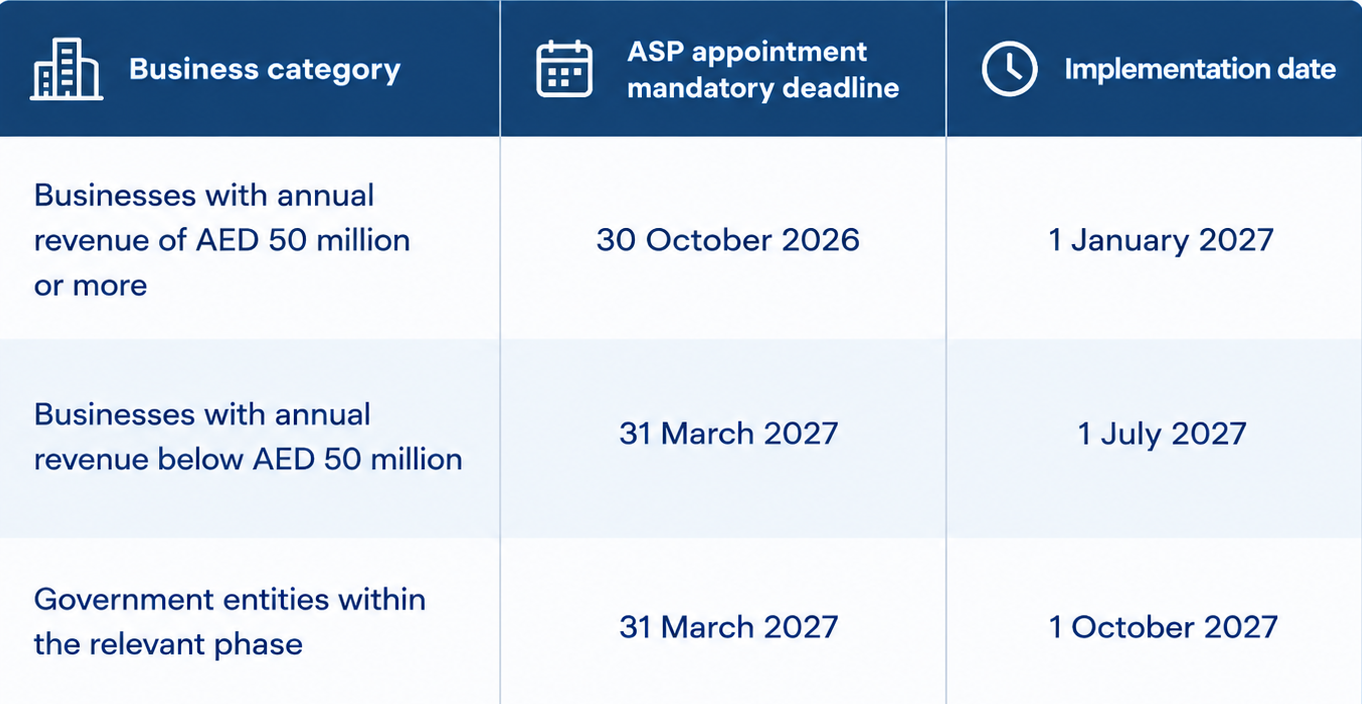
These dates should be verified against the latest official requirements before a business finalizes its compliance plan. Applicability depends on the relevant rules and business circumstances, not solely on which accounting software the company uses.
How do you establish readiness?
Prepare a scope register covering each legal entity, its relevant revenue classification, the transactions it processes, the systems involved, and the applicable deadlines. Assign a business owner to confirm the regulatory assessment and document any questions requiring professional tax advice.
Also identify dependencies. For example, a business operating several entities through a shared ERP may need separate configurations, identifiers, approval processes, or implementation workstreams.
Readiness test: Can your business explain which obligations apply, when they apply, which transactions are in scope, and who is accountable for meeting them?
2. Verify Your Accredited Service Provider (ASP) Arrangements
An Accredited Service Provider (ASP) validates, exchanges, and reports structured invoice data within the UAE e-invoicing framework. Before choosing an implementation architecture, businesses should verify each provider’s accreditation, technical expertise, and ability to meet their integration requirements.
What should you review?
First, verify the provider’s current accreditation status through the official Ministry of Finance ASP listing.
Pay attention to the provider’s accreditation status. Providers undergoing final production assessment should not automatically be considered fully accredited. The Ministry’s published listing distinguishes these stages.
Evaluate the provider’s capabilities against your requirements:
- Structured e-invoice and electronic credit-note processing.
- Technical validation and invoice exchange.
- Transaction-status messages and error reporting.
- Tax-data reporting responsibilities.
- Accounting or ERP integration options.
- Support, incident escalation, and service continuity.
- Data access, retention, security, and operational responsibilities.
Do not select a provider solely because it offers e-invoicing services or Peppol connectivity. UAE requirements include specific accreditation and implementation considerations.
Use the Ministry of Finance’s published guidance for selecting an Accredited Service Provider as part of your evaluation.
How do you establish readiness?
Document your provider-selection decision, confirm the provider’s status, identify the required onboarding steps, and agree on the responsibilities of your finance, IT, and implementation teams.
Ask the provider how your business will receive error notifications, monitor transaction statuses, access records, and resolve failed submissions.
Readiness test: Have you verified the provider’s current status and confirmed that its capabilities, onboarding process, and support arrangements meet your business requirements?
3. Audit Customer, Supplier, and Product Master Data
Data quality is essential for successful e-invoicing. Incomplete, inconsistent, or misclassified records can cause invoice errors. Before integration, businesses should review existing customer, supplier, product, service, and tax data to ensure it meets required invoice fields and validation rules..
What should you review?
Customer and supplier records: Verify legal names, addresses, tax identifiers, and required business details. Identify duplicates, inactive accounts, inconsistent naming, and missing information.
Products and services: Check descriptions, item codes, units, quantities, prices, discounts, and tax classifications. Ensure ERP records align with invoice data requirements.
Tax configuration: Review VAT categories, rates, taxable amounts, exemptions, and calculation rules. Apply treatment according to the transaction and relevant tax legislation, not merely product names or default settings.
Transaction references: Verify purchase orders, delivery details, payment terms, invoice identifiers, and links between original invoices and credit notes where required.
Why is field mapping important?
Master data is maintained in fields specific to each application, whereas structured e-invoices must adhere to a standardized data format.
For example, a customer’s tax registration number in an ERP must map to the correct e-invoice field. Missing, incorrectly mapped, or invalid values may cause validation failures.
A data-mapping specification should identify:
- Source application and field.
- Corresponding e-invoice field.
- Mandatory, conditional, or optional status.
- Transformation or formatting rule.
- Pre-transmission validation.
- Owner responsible for correcting invalid data.
How do you establish readiness?
Run a data-quality assessment and categorize issues by severity. Correct missing mandatory information first, then address duplicates, inconsistent tax settings, and other defects that may affect invoice processing.
Readiness test: Can your systems consistently produce the required invoice data from accurate, controlled, and properly mapped business records?
4. Validate PINT-AE and Structured Invoice Requirements
Choosing an e-invoicing platform is not enough; businesses must understand UAE technical requirements for invoice representation, validation, and exchange.
PINT-AE defines the UAE-specific Peppol invoice specification, including structured XML documents, mandatory fields, code lists, and validation rules for compliant electronic invoice exchange.
What should you review?
Start by checking whether your invoicing software can generate the required structured invoice data directly or needs an integration or conversion layer.
Review the following areas:
- Required and scenario-specific fields: Determine which information must be provided for each transaction type.
- Invoice structure: Verify supplier and buyer details, line items, totals, and tax information.
- Tax calculations: Ensure tax amounts, categories, and treatments are calculated and mapped consistently.
- Document references: Check required links between credit notes and original transactions.
- Code lists and validation rules: Ensure codes and field values meet applicable technical specifications.
- Validation feedback: Confirm errors are identified before invoice transmission.
A PDF may display invoice details but lack the structured data required by the UAE e-invoicing framework. Choose compliance software that supports structured document generation, validation, and specifications—not just PDF templates or email delivery.
How do you establish readiness?
Obtain sample structured invoices representing the transactions your business processes. Validate them against the applicable technical requirements, document the results, and resolve mapping or configuration issues before production use.
Include ordinary sales invoices and relevant credit-note scenarios. If the business handles different tax treatments or transaction types, the test set should reflect that variation.
Readiness test: Can your system generate structured invoices that meet the applicable PINT-AE requirements, and can your team identify and resolve validation errors?
5. Evaluate Whether Your Existing Invoicing Software Is Ready
Businesses do not necessarily need to replace their entire accounting or ERP system to prepare for e-invoicing. However, they must verify whether the existing software can support the required data, integrations, workflows, and operational controls.
A product that generates invoices successfully under the current process may still need configuration, additional functionality, or an integration with an accredited provider.
What should you review?
Assess the capabilities of your current system against the requirements of the complete invoicing workflow.
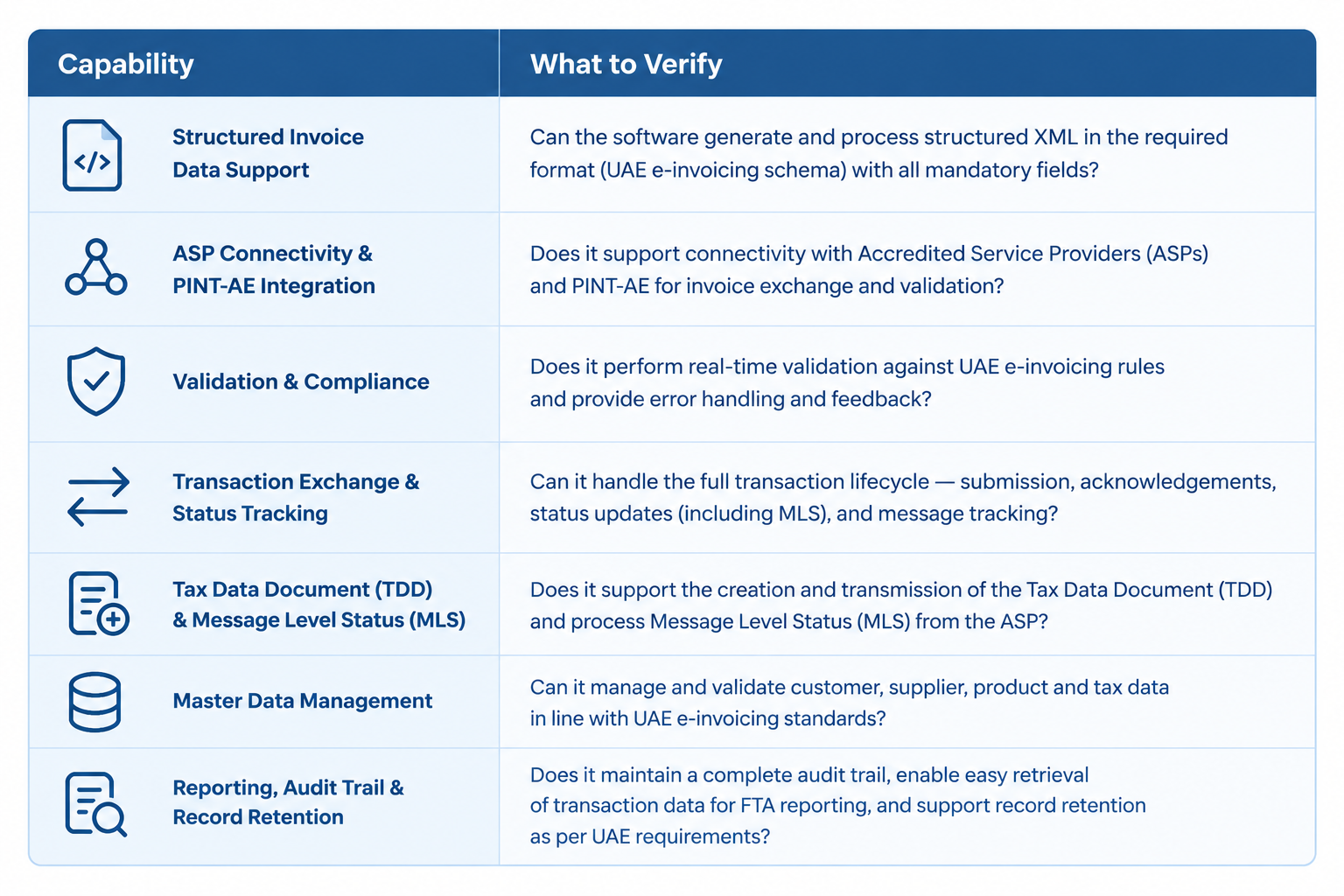
The assessment should distinguish between standard product capabilities, configuration options, third-party services, and custom development. A product’s classification as an e-invoicing platform does not necessarily mean that all required features are included.
Should you replace your accounting software?
The answer depends on the gap assessment.
If the current application supports the required data and workflows, configuration and integration may be sufficient. Otherwise, an additional integration layer, separate e-invoicing solution, or different platform may be necessary.
For instance, an ERP system may handle order processing, inventory tracking, and financial records, while a dedicated platform manages the exchange of structured electronic invoices. The ERP remains the source of financial transactions, while the e-invoicing layer manages exchange processes.
The key is ensuring the combined solution works reliably, not housing every capability in one product.
How do you establish readiness?
Create a capability matrix showing what the current system supports, what requires configuration, what depends on the ASP, and what needs development.
For businesses evaluating e-invoicing software, e-invoicing solutions, or an E-Invoice Management Software in the UAE, this provides a more useful basis for comparison than a feature list alone.
Readiness test: Do your existing software systems and integrated services cover the entire required workflow, with verifiable documentation confirming each essential capability?
6. Review ERP, Accounting, and Peppol Integration Requirements
E-invoicing connects ERP, CRM, and accounting systems with the selected ASP. Integration design ensures invoice data moves consistently between applications, enabling errors to be detected and resolved efficiently.
What should you review?
Map the current architecture
Identify where each transaction originates and where its data is stored. Document the applications involved in sales, procurement, inventory, billing, accounting, and approval workflows.
Define the data flow
Establish how invoice data moves from the source application to the e-invoicing process. Determine which system is authoritative for customer details, tax information, product codes, invoice numbers, and transaction totals.
Verify connection methods
Review supported APIs, webhooks, connectors, file exchanges, and middleware. APIs exchange data, webhooks notify services of events, and middleware manages transformation, routing, validation, and exceptions.
Address reliability and duplication
Plan for timeouts, outages, repeated events, and incomplete responses. Use transaction IDs, status tracking, retries, and idempotency controls to prevent duplicate invoices. Reconcile source records and track unresolved transactions.
Confirm Peppol connectivity
Verify how the selected Accredited Service Provider (ASP) manages Peppol identification, routing, validation, and provider communication. Review the entire UAE e-invoicing process, covering tax reporting and invoice status updates alongside invoice transmission.
What about Zoho Peppol integration?
For a business using Zoho Books, the assessment should examine how invoice data is captured in the accounting application, how the relevant e-invoicing functionality is configured, and how the selected service handles structured invoice exchange.
Zoho’s UAE documentation describes e-invoicing capabilities for sending and receiving structured invoices through the Peppol network. Businesses should verify the current functionality available to their specific organization, its configuration, and any dependencies before assuming that every required workflow is ready.
If your business uses additional platforms, determine whether Zoho Books needs to be integrated with your ERP, inventory management, procurement, or other operational systems to ensure seamless data flow.
How do you establish readiness?
Prepare an architecture diagram, a data-flow map, an interface inventory, and an exception-handling plan. Identify who owns each integration and how failures will be reported, investigated, and reconciled.
Readiness test: Can your systems exchange the required data accurately and securely, while preserving transaction traceability and preventing unresolved failures or duplicate submissions?
7. Test Complete Invoice and Credit-Note Workflows
A successful test of invoice creation is not proof that the entire e-invoicing process works. An invoice can be generated correctly but encounter a validation error, transmission failure, or rejection further along the exchange process.
Businesses should verify the entire transaction workflow, from initiation through validation, data exchange, reporting, and the receipt of status updates.
What should you test?
Standard sales invoices
Generate sample invoices using realistic customer, product, tax, and transaction details.
Incoming supplier invoices
Evaluate invoice intake, supplier verification, and financial review workflows.
Credit notes and corrections
Verify adjustment scenarios and links to original transactions. Ensure corrections follow approved procedures.
Rejected invoices
Test missing or invalid information. Confirm errors are clear and assigned to the appropriate owner.
Transmission failures
Simulate service outages and timeouts. Verify error logging, retries, and duplicate prevention.
Reconciliation
Match ERP or accounting records against e-invoice statuses so finance teams can track and clear pending invoices.
Understand the UAE’s five-corner model
The UAE framework uses a five-corner model involving the supplier, the supplier’s ASP, the buyer’s ASP, the buyer, and the FTA.
At a high level, the supplier provides invoice data to its ASP. The provider validates the data and exchanges the structured invoice with the buyer’s ASP. The framework also includes tax-data reporting and status messages. The providers’ responsibilities and the transaction’s outcome determine the subsequent steps.
[The diagram shows invoice exchange through ASPs, alongside tax-reporting and status-response flows involving the FTA.]
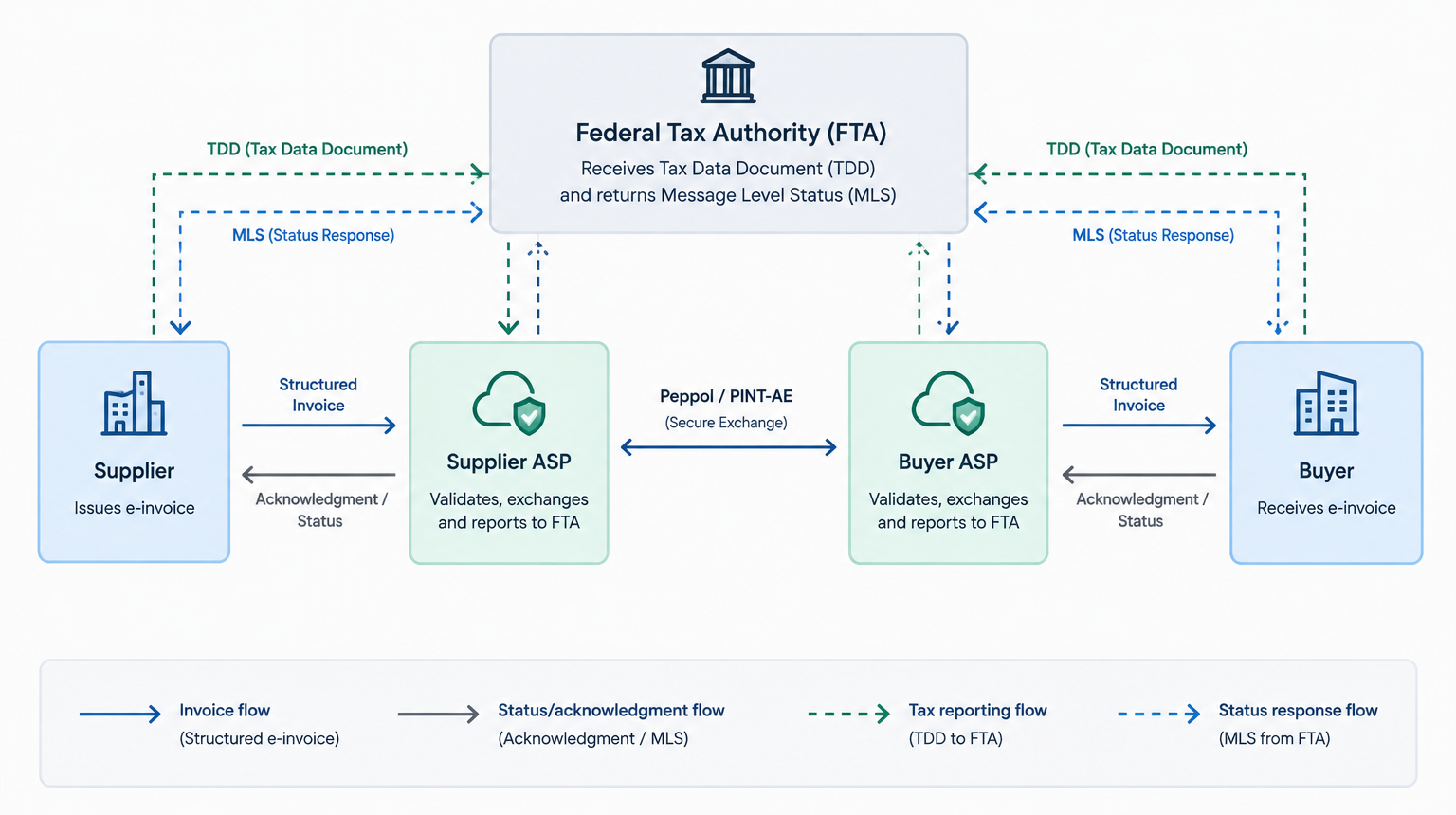
This matters operationally because sending an invoice is only one event in a wider process. Finance teams must identify which statuses confirm successful exchange, reflect reporting results, or call for corrective action.
How do you establish readiness?
Maintain a test plan that records each scenario, expected result, actual result, defect, resolution, and approval. Include both successful and unsuccessful transaction paths.
Readiness test: Can your team demonstrate that invoices and relevant credit notes can be processed end to end, and that failures are detected, assigned, corrected, and reconciled?
8. Check Security, Access Controls, and Auditability
E-invoicing introduces additional electronic data exchanges involving financial information, customer records, supplier details, and tax-related transaction data. Security and auditability should therefore be assessed alongside functionality and integration.
A system that can generate and exchange invoices but cannot adequately control access or trace important changes may create operational and governance risks.
What should you review?
User roles and permissions
Define who can create invoices, approve transactions, configure integrations, access sensitive records, and resolve errors. Separate responsibilities to prevent unrestricted control over financial transactions.
Authentication and integration credentials
Review authentication methods for users and applications. Protect API credentials, limit permissions, and rotate or revoke credentials where supported.
Data protection
Verify how applications and service providers protect data in transit and at rest. Examine security records, contractual duties, and incident-reporting protocols.
Audit trails
Maintain records of invoice data, approvals, validation results, submission timestamps, returned statuses, corrections, and user actions to support transaction traceability.
Retention and retrieval
Document how invoice records and evidence are retained and retrieved. Clarify responsibilities across the business, software provider, and ASP.
Business continuity
Prepare for outages, failed integrations, and connectivity disruptions. Recovery procedures should preserve transaction traceability and prevent duplicate processing.
How do you establish readiness?
Create an access-control matrix, review provider security arrangements, document audit requirements, and test record retrieval. Assign owners for security incidents and operational recovery.
Readiness test: Can your business restrict access appropriately, protect financial data, reconstruct relevant transaction events, and recover from system disruptions?
9. Prepare Finance Teams, Internal Controls, and Operating Procedures
E-invoicing implementation changes how people create, review, exchange, and resolve invoices. Even a technically sound system can encounter avoidable problems if responsibilities are unclear or staff do not understand the new workflows.
Readiness must therefore include the people and procedures surrounding the technology.
What should you review?
Assign cross-functional responsibilities
Finance and tax teams should validate invoice requirements and tax configuration. IT should manage integrations, access controls, monitoring, and support. Procurement and sales should correct supplier, customer, and transaction data. Define ownership for approvals, provider relationships, rejected invoices, and unresolved statuses.
Update standard operating procedures
Create documented instructions for:
- Creating and approving invoices.
- Validating customer and supplier information.
- Reviewing transaction statuses.
- Correcting errors and managing rejected documents.
- Processing applicable credit notes.
- Reconciling accounting records with e-invoicing records.
- Escalating technical failures.
- Retaining and retrieving relevant documentation.
Train users by role
Finance staff need training in invoice statuses, exceptions, and reconciliation. Administrators must understand configuration and access permissions, while IT personnel need integration monitoring, error logs, and recovery procedures. Use realistic business scenarios rather than relying solely on generic product demonstrations.
Plan for exceptions
Define responses to missing data, rejected invoices, provider outages, and unresolved transactions. Clarify when employees can correct issues, when approval is required, and when escalation is necessary. All contingency procedures must comply with applicable legal requirements. Manual workarounds must not be assumed to replace mandatory electronic exchanges.
How do you establish readiness?
Create a responsibility matrix, approved operating procedures, training records, and an escalation directory. Test whether the relevant teams can complete common tasks without relying on informal instructions from the implementation team.
Readiness test: Do employees understand their responsibilities, and are approved procedures available for routine processing, exceptions, reconciliation, and escalation?
10. Establish Go-Live Validation and Ongoing Compliance Monitoring
Readiness does not end when the software is configured or the first invoice is successfully transmitted. Businesses need a controlled transition into production and a process for monitoring performance after implementation.
What should you review?
Define go-live acceptance criteria
Define production-readiness criteria covering invoice validation, integration testing, approved access controls, critical defect resolution, user training, documented support, real transaction scenarios, and applicable implementation requirements.
Monitor operational exceptions
Determine how to identify rejected invoices, failed or delayed submissions, unresolved statuses, duplicate or inconsistent records, integration errors, reconciliation differences, and recurring data-quality failures. Assign an owner and escalation path to each category.
Establish monitoring and reporting
Use dashboards, notifications, and exception reports to track unresolved transactions. Prioritize urgent issues, monitor invoice rejections, validation failures, and resolution times as internal metrics, not official compliance thresholds..
Manage regulatory and software changes
Assign responsibility for reviewing official updates, technical specifications, provider communications, and software releases affecting invoicing. Assess, test, and document changes before production deployment where appropriate.
Review readiness periodically
Repeat the assessment when introducing a new legal entity, changing the ERP, modifying tax configurations, adopting a new ASP, or materially changing transaction workflows.
How do you establish readiness?
Prepare a signed go-live checklist, a monitoring plan, an incident-response procedure, and a schedule for reviewing relevant controls and configurations.
Readiness test: Can the business demonstrate that its e-invoicing process works under normal conditions, that exceptions are detected and managed, and that operational controls remain effective after go-live?
How to Select the Best E-Invoicing Software for Your UAE Business
After completing the ten checks, determine whether configuration, integration, additional applications, or broader system changes are needed, prioritizing compliance, financial processes, technical compatibility, and support over feature quantity.
Verify accreditation and required capabilities
Check the provider’s current status through the Ministry of Finance’s official ASP listing. If you are considering Zoho for your e-invoicing requirements, you can review the official listing to verify its status, as Zoho is registered as an accredited service provider in the UAE.
Confirm that the proposed solution supports the workflows your business requires, including structured invoice processing, validation, exchange, relevant reporting, and transaction-status handling.
Do not treat marketing terms such as compliance-ready or Peppol-enabled as sufficient evidence on their own.
Assess Compatibility with Existing Systems
Check whether the solution integrates with your existing accounting or ERP systems. Review supported APIs, connectors, data formats, authentication, and error handling. For multiple applications, evaluate the complete data flow rather than just invoice generation.
Evaluate Exception Handling and Visibility
Ensure the solution helps users identify failed transactions, track invoice statuses, retrieve error details, retry failed processes, and reconcile transactions. Check whether relevant records are accessible for audits and internal investigations.
Compare Implementation and Operating Requirements
Evaluate configuration, data cleanup, integration development, migration, employee training, provider support, and ongoing maintenance. A lower subscription cost may result in higher overall expenses if extensive customization or manual reconciliation is required.
Base the final selection on a documented gap assessment and verified capabilities.
Where Zoho Books and Peppol Integration Fit Into Your Readiness Plan
For businesses already using Zoho Books, the readiness assessment should establish how the accounting application fits into the wider UAE e-invoicing process.
Zoho Books’ UAE documentation describes e-invoicing functionality for creating and exchanging structured invoices through the Peppol network, including invoice and credit-note workflows. Whether it meets a business’s needs depends on its features, configuration options, transaction volume, and implementation approach.
What should existing Zoho Books users check?
Review the following areas before assuming the current setup is ready:
- Organization setup: Confirm the UAE business entity, tax configurations, and invoice processing procedures.
- Master data: Validate customer and supplier records, tax identifiers, product details, and required invoice information.
- Structured invoice generation: Confirm support for applicable PINT-AE requirements and transaction scenarios.
- Provider connectivity: Confirm ASP registration and Peppol network integration.
- Credit-note processing: Review applicable credit notes and adjustments.
- Testing and monitoring: Validate invoice transmission, response statuses, error handling, and reconciliation processes.
Businesses using additional ERP, inventory, procurement, or sales applications should assess integration requirements. For example, when sales orders originate in an ERP but invoices are created in Zoho Books, define data ownership, update transfers, failure reporting, and reconciliation procedures.
OfficeHub Tech’s existing UAE e-invoicing guide for Zoho Books provides additional product-specific context. This readiness article complements the guide by outlining essential checks before relying on a chosen setup.
Software capabilities, provider accreditation, and organizational readiness are separate considerations. Even capable software cannot compensate for poor data, incorrect tax configuration, incomplete integrations, or undocumented procedures.
Turning the Checklist Into an Action Plan
Completing the ten checks is useful only when findings lead to assigned actions. Businesses should convert the assessment into a prioritized implementation plan.
Step 1: Record the Current State
Record current systems, vendors, processes, data sources, and controls.
Step 2: Identify and Prioritize Gaps
Address regulatory obligations, deadlines, structured invoice generation, provider onboarding, and critical transactions.
Step 3: Assign Owners and Dependencies
Allocate responsibilities across finance, tax, IT, procurement, and operations, identifying provider onboarding and development dependencies.
Step 4: Test and Validate
Test invoices, credit notes, validation failures, transmission errors, and reconciliation.
Step 5: Approve and Monitor
Secure sign-off against acceptance criteria and establish monitoring, escalation, and periodic reviews.
A practical readiness scorecard
Use this table to document each assessment result.
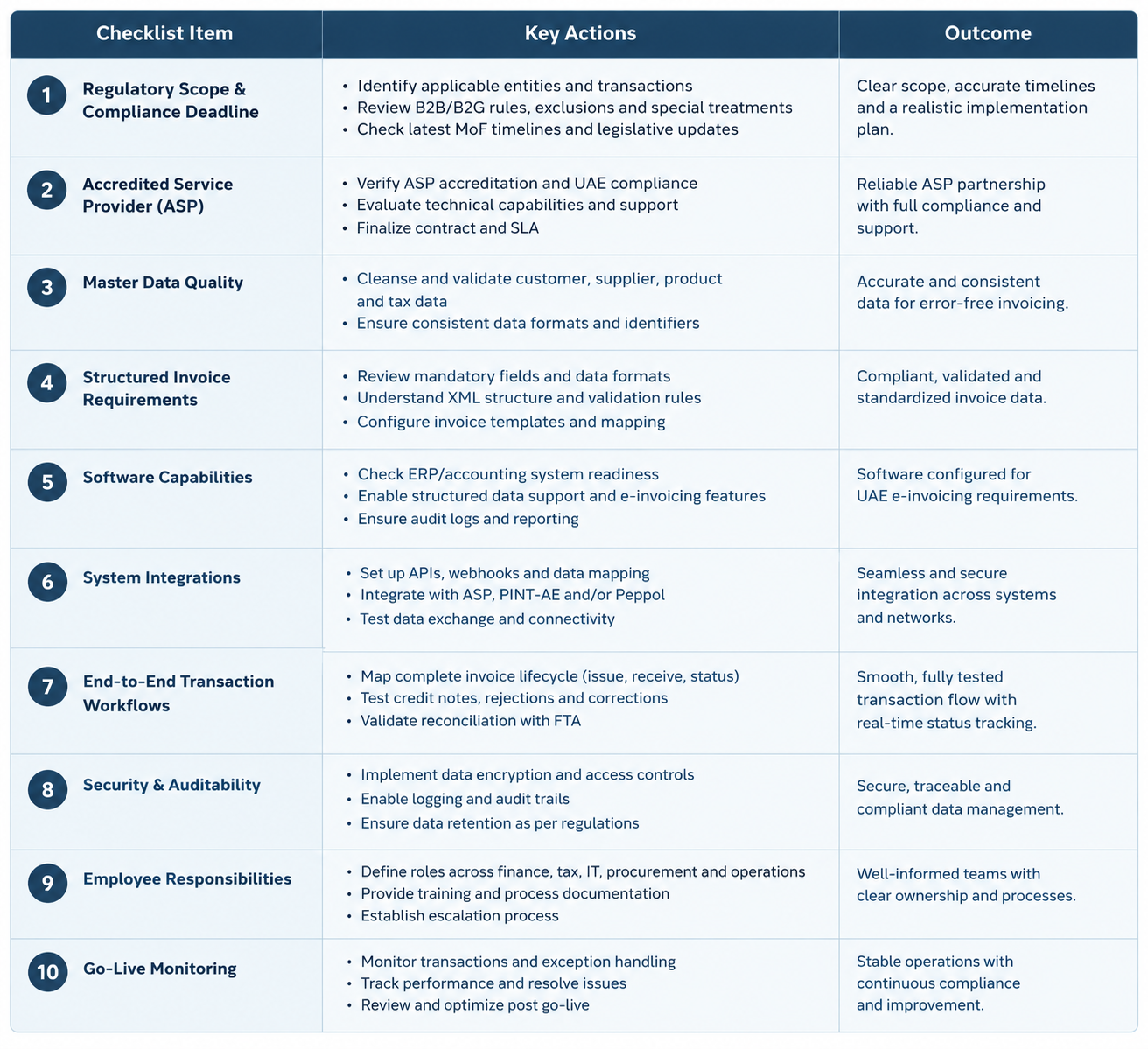
Record each item’s owner, target completion date, dependencies, and sign-off evidence. This scorecard is an internal planning aid, not official Ministry of Finance certification or a compliance guarantee. Verify applicable requirements and seek professional advice when necessary.
Conclusion
Preparing for UAE e-invoicing requires more than purchasing software or enabling electronic invoicing. Businesses must assess regulatory requirements, verify provider arrangements, validate invoice data, confirm structured invoice capabilities, and ensure connected systems support the complete exchange process.
The ten-point readiness checklist helps identify implementation gaps and establish clear responsibilities for finance, tax, IT, and operational teams, including testing, error resolution, and ongoing monitoring.
For businesses using existing accounting or ERP systems, the priority is to determine what already works, what requires configuration, and where additional integration or development is necessary. This supports informed solution selection without unnecessary system replacement.
Ultimately, readiness must be demonstrated through documented requirements, validated data, tested workflows, appropriate controls, and clear operational ownership—not simply assumed from purchasing software.
Why Choose OfficeHub Tech for UAE E-Invoicing Implementation?
UAE e-invoicing readiness requires more than invoicing software. Businesses must assess existing systems, invoice data, integrations, and workflows to support accurate electronic invoicing.
OfficeHub Tech helps businesses prepare through software implementation, system integration, data migration, and custom application development. Our approach identifies existing gaps and defines an implementation strategy aligned with business requirements.
Our support includes:
- Readiness and Workflow Assessment: Review accounting processes, invoicing systems, and operational gaps.
- Zoho Books Configuration: Configure invoicing workflows based on business needs.
- System and API Integration: Evaluate connections between accounting software, ERP systems, business applications, and e-invoicing service providers.
- Data Preparation and Migration: Enhance the accuracy and uniformity of customer, supplier, and invoice records.
- Workflow Design and Testing: Validate invoice processing, exception handling, and reconciliation.
- Implementation and User Support: Provide process documentation, validation assistance, and user training for a smoother transition.
As an E-invoicing implementation and Zoho integration service provider in UAE, OfficeHub Tech helps businesses evaluate their existing technology, identify implementation requirements, and build a practical approach aligned with their operational needs.
The right solution depends on your current software, integration landscape, and readiness gaps. OfficeHub Tech can help you assess these factors and plan the next steps toward e-invoicing implementation.