When Business Growth Outpaces Your Existing ERP
A legacy Enterprise Resource Planning (ERP) system may manage financial transactions, inventory, purchasing, and operations while becoming harder to adapt. Growing teams often introduce spreadsheets, manual approvals, disconnected applications, and workarounds to overcome limitations.
These workarounds create friction. Employees may duplicate data entry, managers may struggle to track approvals, and operations teams may rely on manually compiled reports to monitor performance.
Replacing the ERP is one option, but it may not be the best first step. Businesses can identify capabilities needing improvement and extend the existing environment through custom applications, integrations, and workflow automation.
Extend Legacy ERP Systems with Zoho Creator by identifying workflows that need improvement and building custom applications around existing ERP capabilities. This approach can help businesses streamline processes without unnecessarily replacing core systems, provided the required integration methods are supported.
The challenge is deciding where to begin. A legacy ERP extension strategy prioritizes improvements by business impact, technical feasibility, operational risk, and measurable outcomes. Modernization can start with one specific operational problem and expand as business needs evolve.
##Quick Answer
Growing businesses should modernize ERP workflows that cause measurable operational friction and are technically feasible to extend. Common starting points include manual approvals, spreadsheet-based processes, self-service portals, and reporting. Assess business impact, integration readiness, security, and complexity before implementation. Zoho Creator can extend legacy ERP capabilities through custom applications and workflows, enabling measurable improvements without requiring complete system replacement.
##Key Takeaways
- Start with an operational bottleneck, not simply the oldest ERP module.
- Prioritize workflows according to business value, integration readiness, dependencies, and risk.
- Keep stable ERP capabilities in place when they continue to meet business requirements.
- Use Zoho Creator for suitable custom applications, approvals, portals, dashboards, and workflow automation.
- Establish clear data ownership, access controls, synchronization rules, and failure-handling procedures.
- Measure the first extension before committing to additional modernization projects.
- Reassess whether to extend, upgrade, or replace the ERP as business and technical requirements evolve.
Identify the ERP Limitations That Are Slowing Business Growth
The first step is to understand why the current environment is creating friction. Not every operational problem requires a new application, and not every limitation can be solved through an external extension.
Operational bottlenecks
Growing businesses often encounter problems in the processes surrounding their ERP rather than in its core transaction engine.
For example, purchase requests may arrive through email, approvals may depend on individual managers, and employees may maintain separate spreadsheets to track progress. Even if the ERP records the final purchase transaction correctly, the process leading up to that transaction may remain slow and difficult to monitor.
Other warning signs include:
- Repeated entry of the same data across applications.
- Delays caused by manual approvals and follow-ups.
- Limited visibility into outstanding requests and exceptions.
- Reports assembled manually from multiple data sources.
- Difficulty giving employees, customers, or vendors access to relevant information.
- New business requirements that require costly or complex ERP customizations.
These issues should be documented as specific process problems rather than grouped under a general label such as outdated technology.
Functional and technical limitations
A separate assessment should establish whether the issue originates in the ERP’s functionality, configuration, architecture, or integration capabilities.
An existing feature may simply be poorly configured. In another situation, a required workflow may not exist, or the ERP may lack a supported interface for exchanging data with another application.
The assessment should review available APIs, authentication mechanisms, data models, customization dependencies, software support, transaction limits, and the ability to test changes safely.
It should also identify business logic embedded in database procedures or custom code that other processes depend on. Moving a workflow outside the ERP without understanding these dependencies can introduce inconsistencies or disrupt critical transactions.
Separate the symptom from the root cause
Consider a purchasing team struggling with delayed approvals. Building a new application may improve visibility but will not resolve unclear approval rules or undefined responsibilities. First, map the existing workflow, identify root causes, and simplify processes. Then determine whether configuration, integration, low-code development, an upgrade, or ERP replacement best addresses the problem.
Businesses can use this assessment to establish a baseline for processing time, manual effort, error frequency, outstanding requests, and other relevant indicators. These measurements will later help determine whether the selected modernization project has delivered value.
What Should You Modernize First? Prioritize These ERP Extension Candidates
No single sequence is suitable for every organization. The best starting point depends on the business’s operational priorities, the condition of its ERP, and the feasibility of separating the chosen process from the core system.
The following candidates are useful starting points for assessment.
1. Manual Approvals and Exception-Handling Workflows
Approval workflows are suitable for ERP extension because they follow defined rules, responsibilities, and outcomes. Typical use cases include purchase requisitions, expense authorization, supplier registration, and requests to update records.
When standard ERP workflows lack flexibility or visibility, a low-code application can capture requests, validate information, route approvals, notify employees, and maintain approval histories. Approved transactions can then be submitted to the ERP through supported integrations.
The design must also handle rejected requests, changes after approval, and failed ERP updates. Importantly, approval completion does not guarantee successful ERP transaction processing. Clear status tracking and error handling are essential to maintain data accuracy and operational reliability.
Business outcomes to measure: Approval turnaround time, pending requests, follow-up efforts, missing information in submissions, and exceptions that need manual resolution.
2. Spreadsheet-Based Processes and Repetitive Data Entry
Spreadsheets can be useful for analysis, but they become difficult to govern when they serve as unofficial operational systems.
Employees may maintain separate records for inventory movements, purchasing requests, order tracking, or operational status. Different versions can circulate, validation rules may vary, and information may not reach the ERP until someone manually enters it.
A custom application can replace selected spreadsheet-driven processes with structured forms, controlled fields, validation rules, and defined ownership. It can also provide a consistent interface for submitting or reviewing information.
However, the new application should not automatically become a second master database. If the ERP owns a particular customer, supplier, inventory, or financial record, the extension should respect that ownership and synchronize changes through a controlled process.
Business outcomes to measure: Duplicate entry, record discrepancies, data correction effort, processing time, and the delay between an operational event and its recording in the ERP.
3. Department-Specific Applications and User Interfaces
An ERP may manage core operations while offering a cumbersome experience for warehouse staff, purchasing teams, project coordinators, and field personnel. Low-code applications can provide role-specific interfaces with relevant fields, task queues, dashboards, guided data entry, and mobile-friendly workflows.
However, extensions must enforce appropriate permissions and data validation. Critical ERP business rules should remain enforced by the authoritative system or be replicated only through a governed, thoroughly tested design to maintain data integrity and security.
Business outcomes to measure: Task completion time, training requirements, input errors, support requests, and user adoption.
4. Customer, Vendor, and Employee Self-Service
Email-based requests often cause delays when users repeatedly request updates, resend documents, or contact staff to check progress.
A self-service portal allows authorized users to submit requests, upload supporting documents, track permitted status information, and receive notifications when action is required.
For example, a vendor portal can collect supplier details, validate required fields, and route submissions for review and approval before creating or updating ERP records.
Access controls must restrict users to authorized information. Introducing a portal should not expose internal ERP data or sensitive business records to external users without appropriate permissions and security safeguards.
Business outcomes to measure: Email volume, request turnaround time, incomplete submissions, repeated inquiries, and staff time spent coordinating requests.
5. Operational Reporting and Cross-Department Visibility
Reporting can be a useful starting point when managers spend significant time collecting data across systems. An operational dashboard can consolidate information on pending approvals, purchase orders, inventory exceptions, order progress, and service activities to support decisions.
Its effectiveness depends on data reliability, freshness, and clear presentation. The architecture should distinguish between live queries, event-driven updates, and scheduled synchronization. Dashboards relying on periodic updates should not be described as real-time when delays are possible.
Consistent data definitions are equally important. Departments must align terms such as order status, available inventory, and completed work before combining records across systems.
Business outcomes to measure: Report preparation time, discrepancies between reports, data freshness, and the time needed to identify operational exceptions.
6. Cross-System Workflow Automation
Some workflows span multiple applications. For example, a purchasing process may begin with a request, require approval, create an ERP purchase order, and update reporting or notification systems.
An extension can coordinate these steps using supported APIs, webhooks, middleware, or scheduled jobs, depending on each system’s integration capabilities.
Reliable workflows must also handle partial failures. If an ERP creates a purchase order but a notification fails, the system should track completed actions and retry only the failed step where appropriate, preventing duplicate transactions and maintaining data consistency.
Business outcomes to measure: Manual handoffs, failed updates, duplicate transactions, processing delays, and time spent investigating integration errors.
The best first project is the candidate that addresses a meaningful business problem while remaining manageable in scope and risk. A high-value process with complex financial dependencies may need further preparation before it is suitable for an initial extension.
How to Choose the Right First Modernization Project
Once the business has identified possible candidates, it needs a consistent way to compare them. Without a prioritization framework, teams may choose projects based on personal preference, development convenience, or the visibility of a particular department’s complaints.
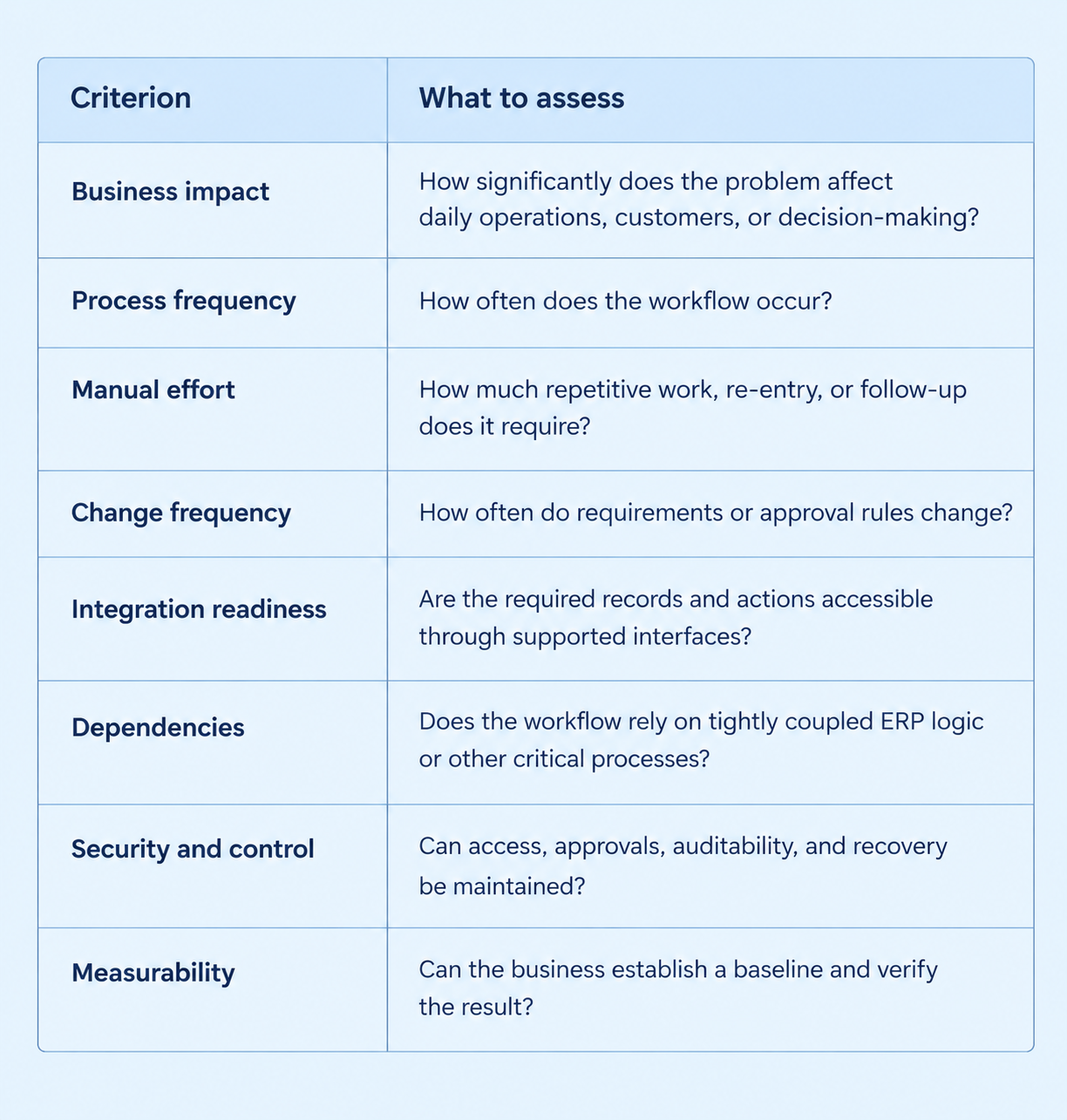
A practical framework evaluates business impact alongside technical feasibility and operational risk.
Use scoring to compare candidates, not to replace judgment
Businesses can score each criterion from one to five and assign weights based on priorities. Business impact and manual effort may receive greater weight, while integration readiness and risk remain essential constraints.
For example, a manual approval workflow with clear rules may be a better starting point than complex production planning involving inventory dependencies.
Before implementation, document the workflow scope, expected outcomes, dependencies, owner, baseline metrics, and acceptance criteria to support transparent, measurable decisions.
Choose the Right Extension Approach: Configuration, Low-Code, Integration, or ERP Upgrade?
Legacy ERP modernization is not a single technical activity. Different problems require different interventions.
ERP configuration is appropriate when existing functionality can address the requirement through supported settings, workflow rules, or standard features. This is usually worth evaluating before building a separate application.
Low-code application development is suitable when users need custom forms, portals, dashboards, approval processes, or department-specific workflows that the existing ERP cannot provide efficiently.
Application integration is the better fit when another system already provides the required capability, but information or events do not flow between the applications. In this case, the main challenge is connectivity, data mapping, and process coordination rather than building another application.
An ERP upgrade or replacement deserves consideration when the problem lies in unsupported core functionality, severe platform limitations, unmaintainable customizations, or requirements that cannot be met safely through an extension.
These approaches can also be combined. A business might simplify an approval process, build a low-code interface, and integrate it with the existing ERP without changing the core purchasing module.
The decision should account for long-term maintenance, security, licensing, integration complexity, and the risk of duplicating business logic. The cheapest or fastest initial build is not necessarily the least expensive solution to operate over time.
How Zoho Creator Can Support a Legacy ERP Extension Strategy
Zoho Creator is a low-code application development platform that helps businesses build custom applications and workflows around existing ERP systems. As a low-code platform for ERP extension and modernization, it adds operational capabilities without requiring every change to be implemented within the ERP.
Build the Operational Capabilities the Business Needs
Zoho Creator supports custom forms, role-based dashboards, mobile interfaces, approval workflows, notifications, and self-service portals. Its business logic can validate submissions, route approvals, and coordinate processes, while supported APIs and other integration methods enable data exchange with the ERP.
For example, a distributor can use a purchasing application to validate requests, manage approvals, and submit approved transactions to the ERP for official purchase order creation.
Preserve Stable ERP Capabilities
An extension should complement existing ERP functionality rather than duplicate it unnecessarily. Core responsibilities such as financial postings, inventory valuation, and supplier balances can remain within the ERP.
The extension can manage data collection, approvals, and workflow coordination while the ERP enforces its business rules. Clear data ownership, conflict resolution, and authoritative record definitions help prevent inconsistencies.
Evaluate Technical and Operational Suitability
Before implementation, assess ERP interfaces, authentication, access permissions, API limits, data structures, transaction volumes, synchronization, and performance requirements.
Consider licensing, application ownership, ongoing support, change management, and integration maintenance as both systems evolve.
Although low-code accelerates development, sound architecture, testing, security, and data governance remain essential. Clear integration boundaries and careful planning help maintain reliability, prevent duplicated logic, and minimize operational disruption.
With Zoho Creator, businesses can extend existing ERP capabilities through custom applications, automated workflows, and connected systems. Explore Zoho Creator and sign up today to take the next step toward ERP modernization.
Technical Architecture for Integrating Zoho Creator with Legacy ERP Systems
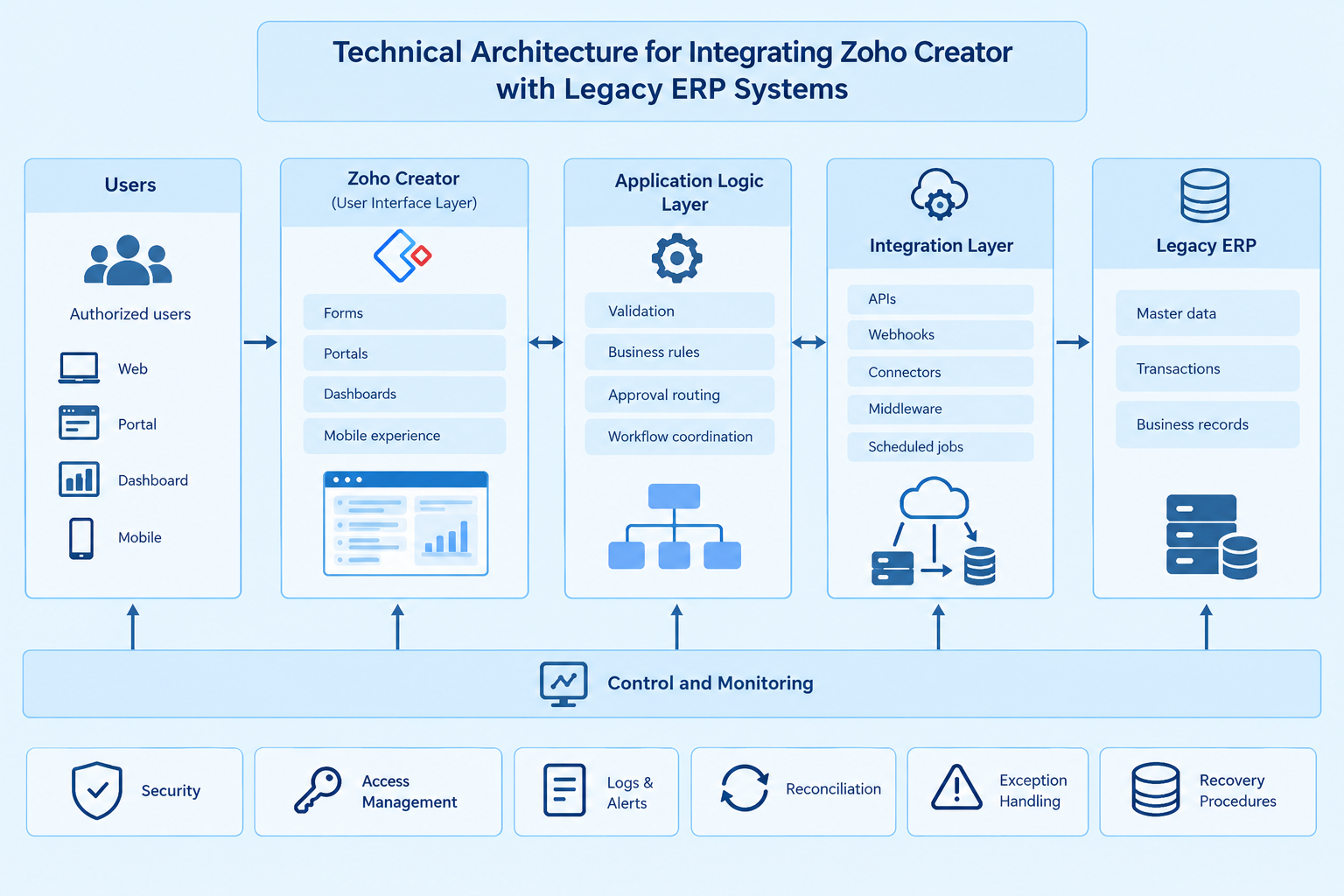
Integrating Zoho Creator with a legacy ERP requires clearly defined responsibilities for user interaction, business logic, data exchange, and operational control. The architecture must support secure communication, consistent data, and reliable business processes.
Application and Integration Layers
A typical architecture consists of five components:
- User Interface: Zoho Creator forms, portals, dashboards, and mobile applications for authorized users.
- Application Logic: Validation, business rules, approval routing, and workflow coordination.
- Integration Layer: APIs, webhooks, connectors, middleware, or scheduled jobs for exchanging data.
- Legacy ERP: The authoritative system for core records and transactions, where appropriate.
- Control and Monitoring: Access management, logs, alerts, reconciliation, exception handling, and recovery.
The implementation depends on ERP capabilities, transaction volumes, security requirements, and operational constraints.
APIs, Webhooks, and Synchronization
APIs retrieve data or execute supported operations, such as fetching supplier details or submitting approved requests. Webhooks notify connected applications when supported events occur, while scheduled synchronization suits systems with limited event support or non-urgent updates.
Each integration should define data mapping, validation, authentication, endpoint behavior, error handling, and API limits based on actual platform documentation.
Data Ownership and Consistency
Define which system owns each record and field to prevent conflicting data. Establish rules for creating, updating, validating, and reconciling records. Handle duplicate requests, delayed events, synchronization conflicts, and partial failures. For critical transactions, verify the resulting ERP status rather than relying solely on successful API responses.
Security and Governance
Apply least-privilege access, role-based permissions, secure credential storage, appropriate authentication, and audit logging. Protect sensitive data in transit and at rest, separate testing and production environments, and control changes to workflows and integrations.
Define failure alerts, exception ownership, and recovery procedures. Retain human approval for transactions requiring financial, regulatory, or management authorization.
A successful integration must be secure, observable, maintainable, and aligned with the ERP’s business controls.
A Practical, Phased Roadmap for Implementing the First Extension
Incremental modernization allows a business to address a specific problem while retaining existing capabilities that still provide value. Microsoft’s Strangler Fig pattern describes a related architectural approach in which selected functionality is gradually moved from a legacy system to newer components while the original system continues to operate.
A growing business can apply the underlying principle to its extension strategy without assuming that every project requires a formal proxy or that the ERP must eventually be retired.
Phase 1: Assess and establish a baseline
Map the current workflow, identify the people and systems involved, document the failure points, and collect baseline measurements. Confirm the business owner and define what success means before development begins.
Phase 2: Define the extension boundary
Specify which tasks the new application will handle and which remain in the ERP. Document the system of record for each important entity, the supported integration methods, the approval requirements, and the exception scenarios.
Phase 3: Design and build a focused extension
Develop the smallest useful application that addresses the selected problem. Include validation, access controls, integration logic, logging, and the required user experience. Avoid adding unrelated features simply because they may be useful in the future.
Phase 4: Test normal and failure scenarios
Test expected workflows as well as rejected requests, invalid data, expired credentials, API limits, duplicate submissions, unavailable endpoints, and partial failures.
Verify that unauthorized users cannot access protected records, that transactions are not duplicated during retries, and that important data can be reconciled. Conduct user acceptance testing and validate rollback or recovery procedures before release.
Phase 5: Deploy and monitor
Use a controlled rollout appropriate to the risk. Monitor processing time, integration failures, exception queues, user adoption, and the agreed business metrics. Assign clear ownership for support and ongoing maintenance.
Phase 6: Expand based on evidence
Review the results against the original baseline. Determine whether the extension has solved the intended problem, introduced new operational risks, or exposed other constraints.
Use these findings to choose the next workflow rather than automatically expanding the application. Each additional extension should have its own business justification, integration boundary, and acceptance criteria.
Legacy ERP Extension Use Cases and Business Outcomes
The following examples illustrate how a growing business might apply the strategy.
Use case 1: A manufacturer with slow purchasing approvals
Problem: Purchase requests arrive through different channels, approval status is difficult to track, and staff repeatedly follow up with managers.
Extension approach: A custom request application captures required details, applies approved routing rules, records decisions, and submits approved transactions through the ERP’s supported interface.
Business outcomes to measure: Approval cycle time, overdue requests, manual follow-ups, incomplete submissions, and failed ERP updates.
Use case 2: A distributor relying on spreadsheets
Problem: Operational teams maintain separate spreadsheets for stock-related requests or order progress, resulting in duplicate entry and inconsistent information.
Extension approach: A controlled application provides structured data entry and access to relevant ERP records. The integration validates changes and updates authoritative records through supported operations.
Business outcomes to measure: Data discrepancies, correction effort, duplicate entry, and the delay between operational activity and ERP updates.
Use case 3: A multi-department business with fragmented reporting
Problem: Managers compile reports manually from different systems and cannot easily identify outstanding actions or operational exceptions.
Extension approach: An operational dashboard combines relevant information from approved data sources, with documented refresh schedules, consistent definitions, and reconciliation controls.
Business outcomes to measure: Reporting preparation time, data discrepancies, information freshness, and time required to identify exceptions.
In all three cases, the business should compare results with the baseline established before implementation. Improvements depend on process design, integration quality, user adoption, and ongoing governance; they should not be assumed in advance.
Common Mistakes to Avoid When Extending a Legacy ERP
Choosing a project only because it is easy to build. A simple application may have little business value. Prioritization should begin with the operational problem and the expected outcome.
Recreating stable ERP functionality unnecessarily. Duplicate modules increase the number of places where business rules and data must be maintained.
Allowing multiple systems to own the same record. Unclear ownership creates conflicting updates and reconciliation problems.
Ignoring integration constraints. API availability, authentication, transaction limits, licensing, and vendor support must be verified before committing to an architecture.
Automating a broken process. Poorly defined approval rules or unclear responsibilities will remain problematic even when implemented in software.
Neglecting failure handling. Retries without duplicate protection, missing monitoring, and unclear exception ownership can turn a small integration issue into an operational problem.
Expanding without governance. Every additional application requires documentation, access management, testing, maintenance ownership, and a plan for future changes.
Assuming extension eliminates replacement decisions. An extension may solve immediate problems, but it cannot compensate indefinitely for an unsupported or fundamentally unsuitable ERP.
When Should You Extend Further, Upgrade, or Replace the ERP?
After the first extension is stable, the business should reassess the broader modernization roadmap.
Extend further when the initial application is delivering the intended value, the integration is supportable, and additional workflows can be separated without unacceptable risk.
Upgrade when supported versions, standard functionality, security updates, or core platform capabilities are the main constraint and an upgrade can address those limitations.
Replace the ERP when critical requirements cannot be met safely, the system is no longer supportable, integration paths are inadequate, or continued extension creates unsustainable cost and complexity.
These options are not mutually exclusive across an entire business. One department’s workflow may be extended while a core ERP component is upgraded or another system is evaluated for eventual replacement.
The decision should consider long-term operating costs, maintenance effort, technical dependencies, business continuity, security, and the consequences of continuing with the current platform. A useful extension strategy preserves valuable capabilities without treating the legacy system as untouchable.
Conclusion: Start with One Measurable, High-Value Extension
Modernizing a legacy ERP does not have to begin with a large migration project. Growing businesses can start by identifying workflows causing measurable friction and determining whether they can be safely extended beyond the ERP core.
Suitable projects may include approval workflows, spreadsheet-based processes, custom interfaces, portals, reporting, and cross-system automation. Prioritize them based on business impact, integration readiness, security, dependencies, and measurable outcomes.
Zoho Creator can support suitable extensions through custom applications and workflows around existing ERP systems. Success depends on sound integration design, clear data ownership, appropriate permissions, and reliable exception handling.
The goal is to improve specific business processes without creating disconnected applications or compromising core system integrity. After measuring the first extension’s results, businesses can prioritize further improvements and evaluate whether continued extension, an ERP upgrade, or eventual replacement best supports their evolving needs.
Modernizing Your Legacy ERP Systems with OfficeHub Tech
OfficeHub Tech focuses on extending and modernizing existing ERP environments through Zoho Creator, custom business applications, integrations, and workflow automation. The appropriate starting point depends on the business’s current processes, ERP capabilities, integration constraints, and operational priorities.
As a Trusted Legacy ERP Extension and Modernization Services Provider in USA, India, KSA and UAE, OfficeHub Tech helps businesses evaluate modernization opportunities and develop solutions aligned with their operational requirements.
An assessment-led approach can help identify which workflows are suitable for extension, where the ERP should retain control, and what technical safeguards are required before implementation.
If your ERP still supports core operations but struggles to accommodate changing business requirements, OfficeHub Tech can help you assess which workflow to modernize first and determine whether a Zoho Creator extension is appropriate for your environment.
FAQs:
Q1. What should you modernize first in a legacy ERP?
Ans: Start with a workflow that creates clear operational friction, has measurable business impact, and can be separated from critical ERP functions with manageable integration and security risks.
Q2. How do you prioritize legacy ERP modernization projects?
Ans: Evaluate business impact, process frequency, manual effort, integration readiness, technical dependencies, risk, and measurable outcomes. Use a consistent scoring framework, then validate the highest-priority candidates technically.
Q3. Can you extend a legacy ERP without replacing it?
Ans: Yes. Businesses can add custom applications, portals, integrations, and workflow automation around an existing ERP when the system remains suitable and the required integration methods are supported.
Q4. How does Zoho Creator help extend a legacy ERP?
Ans: Zoho Creator can support custom forms, applications, dashboards, portals, and workflows that exchange data with an existing ERP through supported APIs or other appropriate integration mechanisms.
Q5. Which ERP processes are suitable for low-code modernization?
Ans: Manual approvals, spreadsheet-based workflows, department-specific interfaces, self-service portals, and operational reporting can be suitable candidates when their requirements and dependencies are well understood.
Q6. What technical factors should be assessed before extending an ERP?
Ans: Review API availability, authentication, data ownership, synchronization, transaction limits, access controls, auditability, error handling, recovery requirements, and ongoing maintenance.
Q7. How do you prevent data inconsistencies between Zoho Creator and a legacy ERP?
Ans: Define the authoritative system for each record, validate updates, prevent duplicate processing, monitor synchronization failures, and reconcile important transactions.
Q8. When should a business replace its ERP instead of extending it?
Ans: Replacement may be appropriate when the system cannot meet critical requirements safely, is no longer supportable, lacks viable integration options, or creates unsustainable technical and operating costs.
Q9. How can a business measure the success of an ERP extension?
Ans: Compare baseline and post-deployment measures such as processing time, manual effort, error rates, overdue approvals, synchronization failures, reporting effort, and user adoption.
Q10. Is legacy ERP extension suitable for every growing business?
Ans: No. Suitability depends on the ERP’s condition, integration capabilities, workflow complexity, security requirements, performance needs, and long-term maintenance costs.