Quick Answer
Legacy ERP extension using Zoho Creator is a practical approach to modernize an existing ERP without replacing the entire platform. If an ERP still reliably manages core functions such as finance, procurement, inventory, manufacturing, purchasing, and financial records, enterprises can keep it as the system of record while extending its capabilities through Zoho Creator.
Legacy ERP extension takes a different approach: keep the existing ERP for core transactions while using Zoho Creator as a modern application and workflow layer for custom applications, integrations, mobile experiences, portals, analytics, automation, and AI.
This approach separates two different requirements. Stable, highly controlled transactions can remain inside the ERP, while rapidly changing business processes can evolve through Zoho Creator and integration layers.
For enterprises, this can mean less disruption, more controlled modernization, and faster delivery of business-specific capabilities. Zoho Creator can connect with an existing ERP through APIs, webhooks, middleware, and integration workflows.
The decision is no longer simply about choosing between an old ERP and a new one. It is a question of which parts of the enterprise architecture actually need to change and where Zoho Creator can extend the existing ERP.
##Key Takeaways
- ERP replacement is not always necessary for ERP modernization.
- A stable ERP can remain the system of record while modern applications operate around it.
- Many ERP problems actually exist in surrounding workflows, integrations, user experiences, and reporting.
- ERP extension can modernize these areas without disturbing core ERP transactions.
- APIs, webhooks, middleware, and integration platforms are central to an extension architecture.
- Zoho Creator can provide a low-code layer for custom applications and workflows around an existing ERP.
- ERP extension supports phased modernization instead of one large transformation event.
- Security, data ownership, governance, authentication, and reconciliation must be designed into the architecture.
- ERP replacement still makes sense when the underlying platform is fundamentally incapable of meeting business requirements.
- The best strategy should be based on business requirements, not simply the age of the ERP.
Why Enterprise Leaders Are Rethinking the ERP Replacement Decision
For years, ERP modernization was often presented as a binary decision: continue operating an aging platform or replace it with a new ERP. That assumption is becoming less practical as enterprises accumulate more integrations, applications, data, custom processes, and digital dependencies around their ERP.
The more important question is now: Is the ERP itself the problem, or are the limitations mainly around it?
An ERP may still perform critical functions reliably while surrounding operations remain highly manual. Finance may work correctly, but approvals may happen through email. Inventory may be accurate, but warehouse employees may lack a convenient mobile interface. Customer records may exist in the ERP, but sales teams may depend on a separate CRM. Management may have financial reports, but lack real-time operational visibility across systems.
This is why enterprises are increasingly evaluating ERP Extension and Modernization Using Zoho Creator as an alternative to immediately replacing the core platform. OfficeHub Tech’s existing ERP modernization material similarly distinguishes between extending stable ERP capabilities, rebuilding selected modules, and replacing systems when the underlying architecture genuinely requires it.
The strategic shift is simple: modernize the capabilities that need to change without automatically replacing the capabilities that already work.
The Real Problem: Your ERP May Not Be Broken
One of the most important distinctions in ERP modernization is separating ERP failure from operational friction.
An enterprise might have a stable ERP that handles general ledger, purchasing, inventory, order processing, manufacturing, taxation, and financial reporting correctly. Yet employees may still spend hours moving information between applications, requesting approvals manually, preparing spreadsheets, or searching for information that exists in another system.
In such cases, replacing the ERP may solve problems that do not actually originate inside the ERP.
Consider a procurement process. The ERP may already create and manage purchase orders perfectly. The problem may be the process before the purchase order: employees submit requests by email, managers approve them manually, budgets are checked separately, and finance re-enters information.
The same pattern can appear across field service, sales, inventory, HR, customer portals, project management, and reporting.
This creates an important modernization principle:
If the ERP core is stable but the surrounding operating model is inefficient, extend the ecosystem before replacing the core.
ERP extension therefore focuses on the gap between what the ERP does and what the modern business needs around it.
Why Full ERP Replacement Is Becoming Harder to Justify
Replacing an ERP is not equivalent to replacing an ordinary business application. The ERP is usually connected to years of transactional history, master data, integrations, custom logic, reporting, financial controls, and employee processes.
A replacement programme can therefore affect almost every department simultaneously.
The challenge begins with data migration. Customer records, suppliers, products, historical transactions, chart-of-accounts structures, inventory information, and custom fields may all need to be mapped and validated.
Then come integrations. CRM, e-commerce, warehouse applications, payroll, banking, project management, manufacturing equipment, reporting platforms, and other systems may all depend on the existing ERP.
There is also process migration. An enterprise may have spent years building workflows around the ERP, including custom approvals, notifications, reports, scripts, and departmental workarounds.
User adoption becomes another factor. Even technically successful implementations can create operational friction if employees must learn entirely different processes at once.
None of this means ERP replacement is wrong. It means the business case must justify the scale of disruption.
If the actual requirement is a mobile application, approval workflow, supplier portal, CRM integration, or operational dashboard, replacing the entire ERP may be disproportionate to the problem.
What Is ERP Extension?
ERP extension is a modernization strategy that preserves an existing ERP for core transactional responsibilities while adding an external layer of applications, workflows, integrations, portals, analytics, automation, and other capabilities.
The distinction can be summarized as:
| ERP Core | Extension Layer |
| Finance | Custom workflows |
| Procurement | Approval automation |
| Inventory | Mobile applications |
| Manufacturing | Operational applications |
| Core transactions | Portals |
| Master data | Dashboards |
| Compliance | Integrations |
| System of record | Automation and AI |
The ERP remains authoritative for the information it owns. The extension layer addresses business requirements that are changing faster than the ERP should be customized.
This creates a more modular architecture.
Instead of modifying the ERP every time the business needs a new application, an enterprise can develop that capability outside the ERP and connect it through controlled integration mechanisms.
This approach is particularly useful when ERP customization has become expensive or difficult to maintain.
The extension layer does not have to replace the ERP. Its purpose is to increase what the existing ERP can accomplish without turning the ERP core into an increasingly complex collection of custom modifications.
ERP Replacement vs. ERP Extension: What Actually Changes?
The difference is primarily architectural and operational.
| Factor | ERP Replacement | ERP Extension |
| Existing ERP | Retired/replaced | Preserved where valuable |
| Core data | Migrated | Remains in existing system where appropriate |
| Custom workflows | Rebuilt | Added or redesigned externally |
| Integrations | Rebuilt | Extended |
| Implementation | Large transformation | Phased modernization |
| Disruption | Typically higher | More controlled |
| Innovation | Dependent on new ERP capabilities | External layer can evolve independently |
| Existing investment | Partially retired | Preserved |
| Modernization model | Transformation event | Continuous evolution |
ERP extension does not mean refusing to modernize. It changes where modernization happens.
An enterprise can keep finance and accounting inside its established ERP while moving a supplier portal, mobile field application, approval workflow, or customer-facing process into a modern application layer.
This separation can also make future modernization easier. If the organization eventually decides to replace the ERP, the extension architecture and integration boundaries can provide a clearer starting point for that transformation.
In other words, ERP extension can be both a modernization strategy and a way of reducing dependency on a single monolithic platform.
ERP Modernization Is Moving Toward a Stable Core
A particularly relevant perspective comes from Deloitte’s August 4, 2026 analysis, “Is your back-office data ready to drive AI value?” Deloitte highlights that ERP systems continue to serve as reliable back-office systems of record, while AI is creating new opportunities in the surrounding technology layers through intelligent agents, automation, and advanced analytics. Its conclusion is that the future is not simply replacing ERP, but reinventing around a stable core.
The findings point to a significant gap in AI readiness. Gartner projects that by 2030, AI could autonomously handle more than half of core ERP activities. However, by 2027, only around 30% of organizations are expected to have the data quality necessary to take full advantage of advanced AI capabilities.
That distinction matters. AI, automation, and new applications still depend on reliable enterprise data, controls, governance, and transactional context. Replacing the ERP simply to introduce new technology can therefore be counterproductive if the underlying business data and processes are not ready.
For enterprise leaders, the implication is clear: preserve the trusted core where it remains valuable, while creating flexible layers around it that can evolve faster.
Source: Deloitte – Is your back-office data ready to drive AI value?
The ERP Extension Architecture: ERP Core + Modern Extension Layer
A technically sound extension strategy separates the stable transactional core from rapidly changing applications.
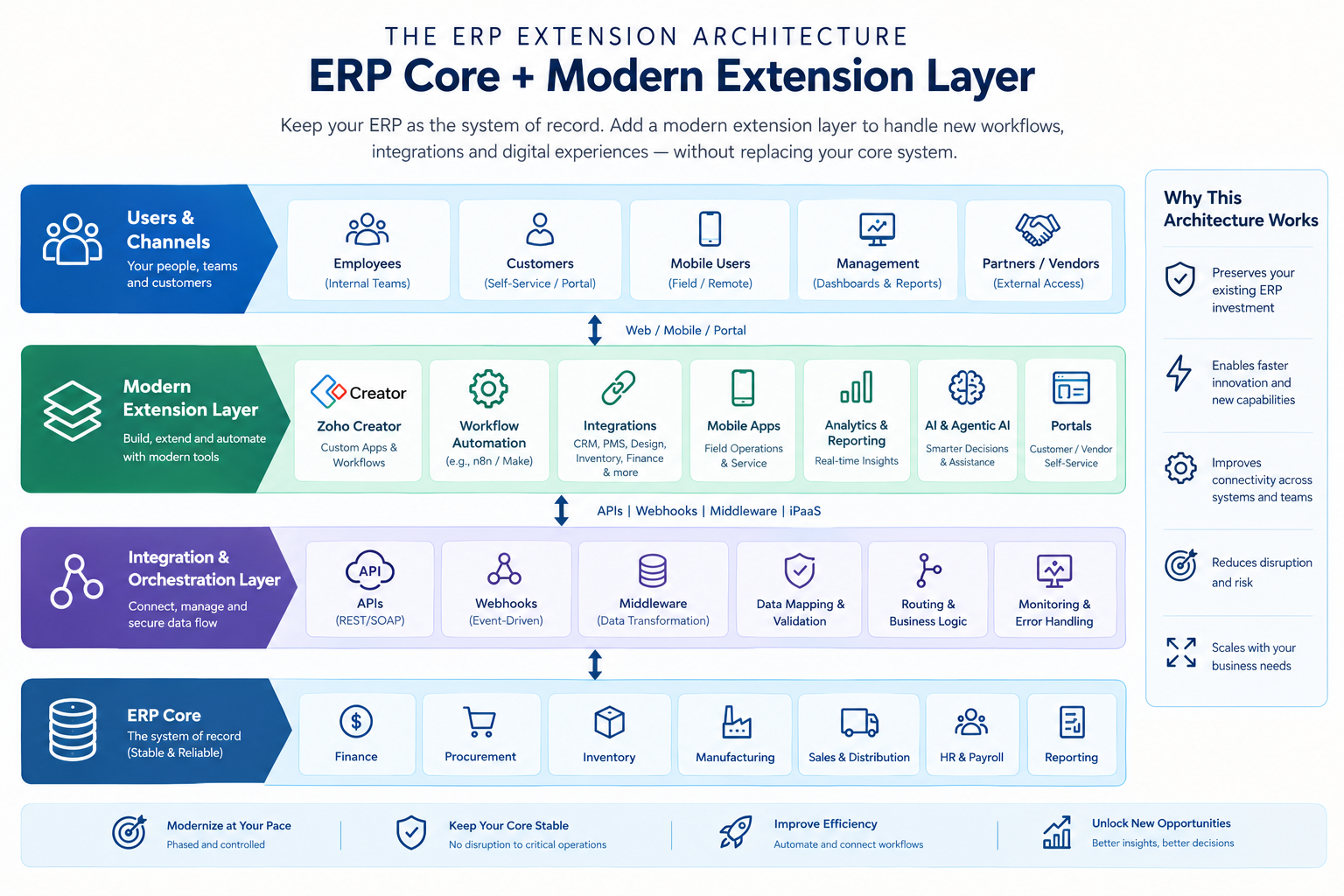
ERP Extension architecture
The architecture follows a simple principle:
ERP = system of record
Extension layer = system of engagement and orchestration
The extension layer should not unnecessarily duplicate financial or transactional data. Instead, it should retrieve the information it needs, apply business logic, and send validated transactions back to the appropriate system.
This approach also aligns with Deloitte’s current view that ERP can remain the trusted core while modular, API-driven layers support new capabilities around it.
How the ERP Extension Workflow Works
Consider a procurement request.
Instead of modifying the ERP to create an entirely new employee-facing procurement interface, the organization can introduce a custom application around the existing system.
Employee Creates Request
↓
Custom Application
↓
Manager Approval
↓
Budget / Business Validation
↓
API / Integration Layer
↓
ERP Creates Purchase Order
↓
ERP Returns Status
↓
Application Updates Request
↓
Employee Receives Notification
Here, the ERP continues performing the authoritative purchase-order transaction.
The extension application manages the user experience and approval process.
The same pattern can be used for:
- Expense approvals
- Customer onboarding
- Vendor registration
- Service requests
- Inventory requests
- Field inspections
- Project approvals
- Employee workflows
Technically, the workflow can involve REST APIs, authentication, JSON/XML data, webhooks, middleware, validation rules, logging, and error-handling mechanisms.
The benefit is architectural separation. The enterprise does not have to make the ERP responsible for every new interface or workflow.
Instead, the ERP performs what it is designed to do while the extension layer handles rapidly evolving operational requirements.
What Can Enterprises Add Without Replacing Their ERP?
ERP extension becomes valuable when enterprises identify specific capabilities that are missing from the existing environment.
- Custom business applications: Departments can receive purpose-built applications for operational processes that do not justify ERP customization.
- Workflow automation: Approvals, escalations, notifications, SLA tracking, and task assignments can be automated around ERP transactions.
- Mobile applications: Field employees, warehouse teams, technicians, and sales staff can access the information they need without requiring the ERP’s traditional interface.
- Customer and supplier portals: External users can submit requests, review information, upload documents, or monitor transaction status through controlled portals.
- Analytics: Data from ERP and other applications can be consolidated into management dashboards without turning the ERP into the enterprise’s only reporting interface.
- Integrations: CRM, e-commerce, project management, payment systems, HR platforms, inventory applications, and industry-specific software can be connected to ERP workflows.
- AI and automation: AI can operate on governed enterprise data to support search, summarization, classification, recommendations, and workflow assistance.
The objective is not to recreate the ERP outside the ERP. It is to add capabilities where they create measurable business value.
How Zoho Creator Extends Legacy ERP Systems
Zoho Creator is particularly relevant to an extension-first approach because it can be used to develop custom business applications and workflows without requiring every requirement to become a modification inside the ERP.
OfficeHub Tech’s existing modernization content describes Zoho Creator as an option for extending legacy ERP environments with custom applications, integrations, automation, and modern user experiences.
A typical architecture can involve:
Existing ERP → API → Zoho Creator → Business Logic → Workflow → User/Application
For example, Creator could provide a custom approval application while the ERP continues maintaining the underlying financial transaction.
Relevant technical capabilities can include:
- REST API integration
- Authentication and authorization
- Workflow automation
- Custom forms
- Role-based access
- Mobile applications
- Portals
- Webhooks
- Business rules
- Notifications
- Audit trails
- Third-party integrations
This makes Creator useful when the business needs a capability that is too specialized for standard ERP functionality but too important to manage through spreadsheets or email.
The key is implementation discipline. Creator should be positioned as an extension and application layer, with clear data ownership and integration boundaries, rather than creating another disconnected data silo.
How APIs, Middleware, Webhooks, and Integration Layers Enable ERP Extension
The technical foundation of ERP extension is integration.
APIs allow external applications to request or update data through defined interfaces. REST APIs are commonly used for modern application integration, while some older enterprise systems may expose SOAP services or other interfaces.
Webhooks provide event-driven communication. An ERP event can trigger an external workflow rather than requiring another application to repeatedly check whether something changed.
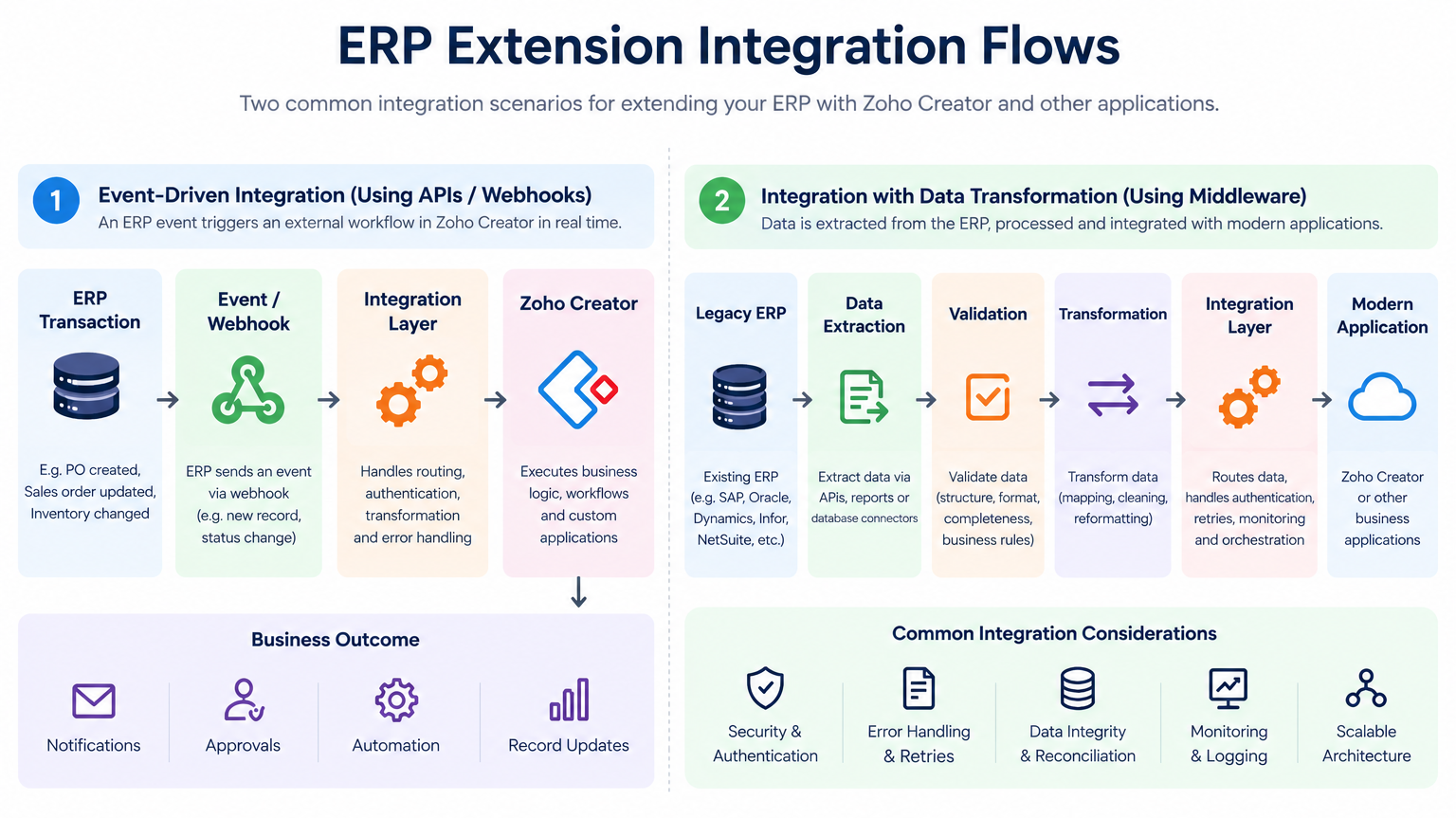
ERP extension integration flows using APIs, webhooks, middleware, and Zoho Creator.
Middleware becomes useful when the environment contains multiple systems and complex transformations. It can handle routing, authentication, data transformation, retries, logging, monitoring, and orchestration.
This is especially important for older ERPs whose data structures were not designed for modern cloud ecosystems.
A mature extension architecture should also account for API failures, duplicate records, timeouts, invalid data, authentication failures, reconciliation, and transaction logging.
Therefore, ERP extension is not simply “connect ERP to Zoho.” It is the design of a controlled enterprise integration architecture.
ERP Extension Use Cases Across Enterprise Operations
The strongest ERP extension strategies begin with specific business bottlenecks.
Procurement
The ERP remains responsible for purchase orders, vendors, and financial records. An extension application can manage purchase requests, approvals, budget checks, notifications, and escalation.
Field Service
The ERP can retain customer, product, inventory, and financial information while a custom mobile application provides technicians with work orders, forms, documents, photos, status updates, and operational workflows.
Inventory
ERP inventory records remain authoritative while an extension layer adds barcode scanning, mobile stock requests, warehouse workflows, custom approvals, or specialized inventory processes.
Customer Operations
Customer-facing applications can provide portals for service requests, documents, order status, onboarding, or support while keeping core transaction data within the ERP.
Management Reporting
Instead of forcing executives to work directly with ERP reports, an analytics layer can combine ERP information with CRM, project, inventory, and operational data.
Employee Operations
Custom applications can handle internal requests such as purchasing, travel, approvals, equipment requests, or administrative workflows while the ERP continues to manage the underlying financial or HR records.
The common pattern is consistent: Keep authoritative transactions in the appropriate system and modernize the experience and workflow around them.
Security, Governance, Data Ownership, and Scalability
An extension architecture creates flexibility, but it also creates new governance responsibilities.
The first requirement is data ownership. Every important data object should have a clearly defined source of truth.
For example:
ERP → Financial Transactions
CRM → Customer Relationships
Extension App → Operational Workflow
Analytics → Reporting / Visualization
The extension application should not silently become another master database for information that belongs to the ERP.
Security must also be designed into the architecture. Relevant controls can include role-based permissions, least-privilege access, API authentication, OAuth, encrypted communication, audit logs, and controlled service accounts.
Enterprise integrations should also include:
- Error handling
- Retry mechanisms
- Duplicate detection
- API monitoring
- Logging
- Reconciliation
- Transaction status tracking
- Exception management
Scalability matters as well. A company may begin with one integration and eventually connect dozens of applications. Point-to-point integrations can become difficult to maintain if every application communicates independently with every other application.
A centralized integration or orchestration layer can provide better control over routing, transformations, authentication, monitoring, and business rules.
The objective is therefore not merely to “add applications.” It is to create an architecture in which new capabilities can be added without continually destabilizing the ERP core.
When ERP Extension Is Better Than Replacement—and When It Isn’t
ERP extension should not be treated as a universal replacement for ERP transformation.
It can be a strong option when:
- Core ERP functions remain reliable.
- Financial and transactional data is trusted.
- The primary problems are workflows or integrations.
- The organization needs custom applications.
- Existing ERP APIs or integration mechanisms are available.
- The business wants phased modernization.
- Replacing the ERP would create disproportionate disruption.
- Existing ERP investments still provide substantial value.
Full replacement may be more appropriate when:
- The ERP architecture is fundamentally obsolete.
- Vendor support is ending.
- Serious security limitations cannot be resolved.
- Core business processes cannot be supported.
- Required scalability cannot be achieved.
- Integration capabilities are structurally inadequate.
- The cost of maintaining the platform exceeds the value it provides.
- Regulatory or operational requirements cannot reasonably be addressed through extension.
This distinction makes the strategy more credible.
ERP extension does not mean that an ERP should never be replaced.”
It is:
Do not replace the ERP until you establish that the ERP itself is the problem.
If the problem is primarily the operational ecosystem surrounding the ERP, modernization can often begin without replacing the core.
A Practical Roadmap for Moving From Legacy ERP to an Extended ERP Ecosystem
A successful extension strategy should be phased rather than treated as one large technology deployment.
Phase 1: Assess the ERP
Document core modules, customizations, integrations, databases, APIs, workflows, and data ownership.
Phase 2: Identify operational gaps
Rank processes according to business impact, manual effort, frequency, integration complexity, and potential ROI.
Phase 3: Design the architecture
Define the relationship between:
ERP Core → API Layer → Integration/Orchestration → Extension Applications → Analytics/AI
Phase 4: Start with one high-value workflow
A procurement approval, field-service process, customer portal, or inventory workflow can provide a practical pilot.
Phase 5: Integrate and test
Validate authentication, data mapping, business rules, error handling, security, performance, and reconciliation.
Phase 6: Expand
Once the architecture proves itself, add additional applications, workflows, mobile capabilities, dashboards, and integrations.
Phase 7: Introduce intelligent automation
AI can then be introduced on top of governed data and established workflows.
This approach turns modernization into a continuous capability rather than a once-in-a-decade ERP replacement event.
How OfficeHub Tech Helps Enterprises Extend and Modernize ERP Systems
ERP extension is not simply about adding a custom application around an existing ERP. It requires a clear understanding of the ERP’s architecture, data model, business rules, security controls, integration capabilities, and the operational gaps that are limiting the business.
As a Top Zoho Consultant in the USA, UAE, KSA, and India, and a certified Zoho Creator development team, OfficeHub Tech provides ERP Extension and Modernization Solutions using Zoho Creator. Our extension-first approach helps enterprises assess their existing ERP environment and determine which functions should remain within the ERP and which requirements can be addressed through Zoho Creator, integration, or automation. This helps enterprises preserve valuable ERP capabilities while modernizing the areas that have become difficult to adapt.
A typical engagement can follow:
Assessment → Process Mapping → Architecture Design → Custom Development → API Integration → Testing → Deployment → Optimization
Based on business and technical requirements, the extension layer can incorporate Zoho Creator, Zoho Flow, Zoho CRM, Zoho Books, Zoho Inventory, Zoho Analytics, APIs, middleware, and other third-party applications. This enables enterprises to introduce new workflows, custom applications, portals, mobile experiences, dashboards, automation, and integrations without forcing every new requirement into the ERP core.
OfficeHub Tech’s capabilities include:
- Legacy ERP assessment and modernization planning
- ERP extension strategy and architecture
- Legacy ERP extension using Zoho Creator
- Custom Zoho Creator application development
- ERP, CRM, finance, and business-system integration
- API development and integration
- Workflow and process automation
- Data migration and transformation
- Mobile and portal development
- Business dashboards and analytics
- Third-party application integration
- ERP transformation and business-process analysis
The approach is designed around the existing technology investment rather than assuming that a complete ERP replacement is necessary. Where the ERP continues to perform critical functions such as finance, procurement, inventory, manufacturing, or core transaction processing, OfficeHub Tech can help build the surrounding digital layer needed to improve connectivity, automation, and operational flexibility.
This makes ERP modernization an architecture and business-process exercise, not simply a software replacement project. With Zoho Creator as a flexible extension layer and our certified Zoho Creator development expertise, enterprises can create a more modular ERP ecosystem in which the core system remains stable while new capabilities can be added and evolved as business requirements change.
For enterprises evaluating Legacy ERP Extension and Modernization Solutions using Zoho Creator, OfficeHub Tech provides the consulting, architecture, development, and integration expertise needed to modernize existing systems, reduce unnecessary disruption, and create a technology environment that can evolve alongside the organization.
Conclusion: From ERP Replacement to ERP Evolution
The future of ERP modernization is not necessarily about abandoning existing systems. It is increasingly about determining what should remain stable and what should become flexible.
An ERP that continues to manage finance, procurement, inventory, manufacturing, compliance, and core transactions reliably still has significant enterprise value. Replacing it simply because employees need better workflows, mobile applications, integrations, portals, analytics, or automation can introduce unnecessary migration and operational risk.
ERP extension offers another path.
By combining the existing ERP with APIs, integration layers, custom applications, workflow automation, analytics, and AI, enterprises can modernize the areas that directly affect operational performance while protecting the transactional core.
Platforms such as Zoho Creator can provide the application and workflow layer around that core, while integration technologies connect the extension environment with existing ERP data and processes.
The decision should ultimately be based on business requirements, technical feasibility, data ownership, security, scalability, and the actual limitations of the existing ERP—not simply its age.
ERP replacement will remain necessary for some organizations. But for enterprises whose core ERP still works, ERP extension can turn modernization from a disruptive replacement project into a controlled process of continuous evolution.
Ready to Extend Your ERP Without Replacing What Works?
Modernize your business processes with Zoho Creator’s low-code platform and build the applications, workflows, portals, dashboards, and automations your existing ERP may not provide. Extend your ERP ecosystem at your own pace while keeping critical business data and core transactions where they already belong.
Create your Zoho Creator account today and explore how a flexible extension layer can support your next modernization initiative. If you need help designing the architecture, connecting your ERP with other business applications, or developing custom workflows, OfficeHub Tech can help turn your ERP extension strategy into a practical, scalable solution.