Connecting the Systems Behind a Modern AV Business
Quick Answer
AV integrators often rely on multiple business applications, including CRM platforms for customer and opportunity management, proposal and system-design software, document-management platforms, project-management tools, and applications for procurement or field operations.
The challenge is not the number of applications. It is how effectively they work together.
Connectors bridge these systems by transferring relevant data, synchronizing records, triggering workflows, and connecting business events across applications. For an AV integrator, this can create continuity from lead and proposal through documentation, project execution, procurement, field operations, and completion—without requiring teams to repeatedly enter the same information.
A connected AV workflow can look like:
CRM → Proposal → Documents → Project → Procurement/Field Operations → Completion
Instead of operating each application as an isolated system, connectors can turn the existing software stack into a coordinated business workflow.
Key Takeaways
- Connectors can bridge CRM, proposal, document, project-management, and operational systems used by AV integrators.
- The purpose of integration is not simply to transfer data; it is to connect business events, processes, and workflows.
- D-Tools SI can support important AV system-integration processes, while CRM, document, project-management, and automation platforms provide specialized capabilities.
- Zapier and other automation platforms can extend the ecosystem by connecting additional applications and triggering event-based workflows.
- Reliable connector architecture requires clear data ownership, field mapping, authentication, validation, error handling, and synchronization rules.
- A well-designed integration strategy can reduce duplicate data entry, manual handoffs, disconnected records, and delays between teams.
Why AV Integrators Need to Bridge CRM, Proposal, Document, and Project Systems
An AV project typically moves through multiple business functions before installation and service are complete.
A prospect may enter the CRM, move into a proposal or system-design platform, and generate drawings, revisions, and project documents stored in SharePoint or Google Drive. Once the proposal is approved, project information may need to move into project-management, procurement, scheduling, field-service, or financial systems.
The operational challenge begins when these applications do not communicate.
A sales representative may update customer information in the CRM while the proposal system contains different data. The latest drawing may exist in a shared folder while project status is tracked elsewhere.
This can result in:
- Repeated data entry
- Inconsistent customer information
- Manual project creation
- Delayed handoffs
- Duplicate documents
- Missing project context
- Status information spread across applications
- Increased administrative work
For AV businesses working across multiple applications, multi-software integration for AV businesses can connect these operational stages without requiring every function to operate inside a single platform.
D-Tools describes System Integrator (SI) as supporting areas such as system design, engineering documentation, procurement, project execution, and financial visibility. This makes it an important component within many AV workflows.
The next question is:
How can the rest of the business software stack connect to that workflow?
That is where connectors become important.
What Is a Connector in an AV Business Workflow?
A low-voltage software connector is an integration mechanism that allows one application to communicate with another through supported APIs, authentication methods, events, webhooks, or automation platforms.
In simple terms:
System A → Connector → System B
However, an effective AV workflow often requires more than transferring information from one application to another.
For example:
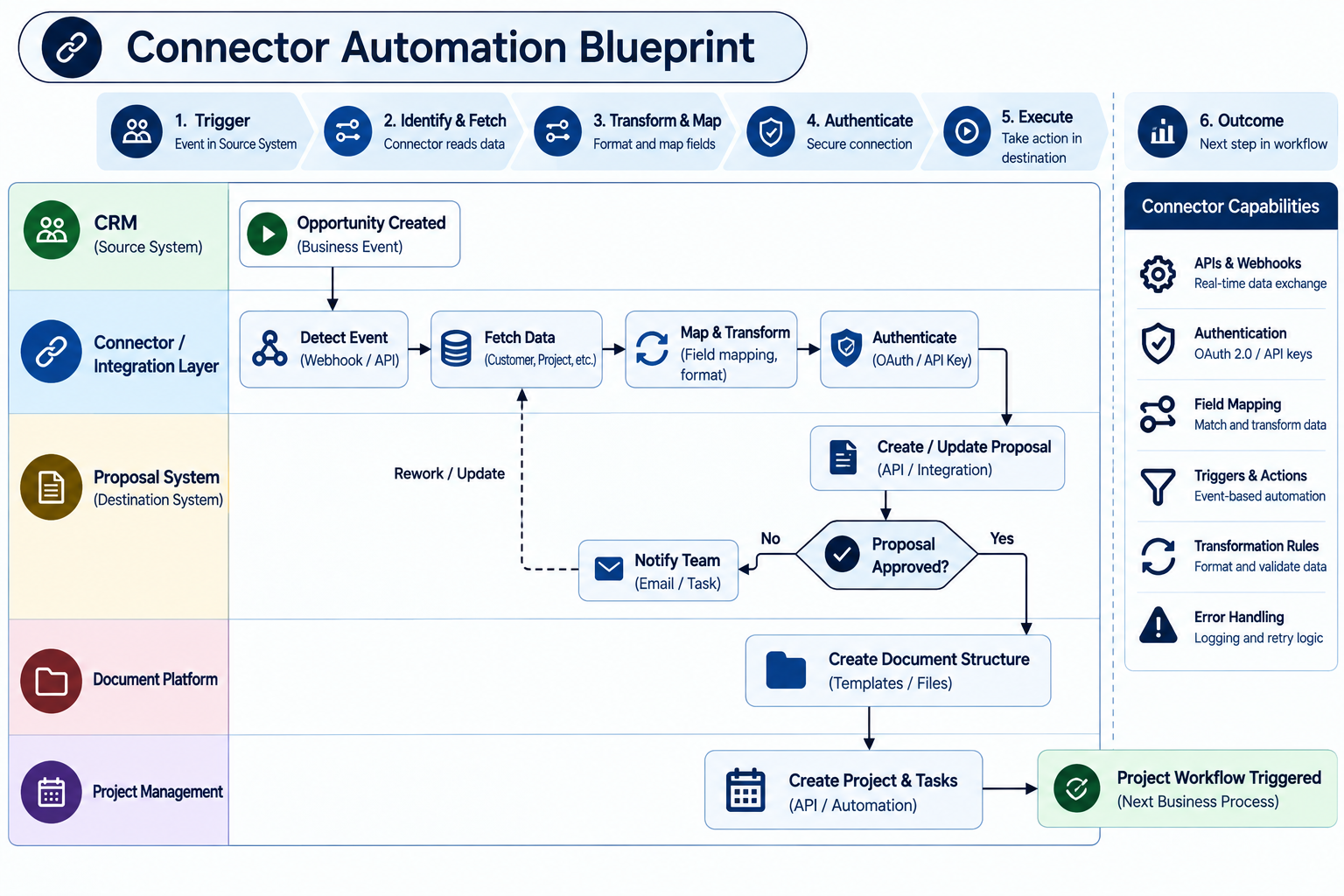
The connector therefore becomes part of the workflow logic, rather than functioning only as a data-transfer layer.
Depending on the applications involved, integrations can use APIs, webhooks, OAuth-based authentication, field mapping, triggers, actions, and transformation rules. Zoho documentation, for example, describes connectors for extending third-party integrations and supports OAuth 2.0 for authenticated connections
What can a connector move?
Depending on the systems and integration design, connectors can transfer or synchronize:
- Customer records
- Contacts
- Opportunities
- Project information
- Proposal information
- BOM-related data
- Product information
- Project status
- Milestones
- Tasks
- Documents and links
- Scheduling information
- Procurement information
- Service information
The key principle is to move the information required for the next business process, rather than automatically synchronizing every available field.
What Does “Bridging” Systems Actually Mean?
For an AV integrator, bridging systems means creating a connected path between business applications so that information and workflow actions can move with the project.
Consider a typical scenario.
A sales opportunity is marked as qualified in the CRM.
Instead of requiring a project manager to manually recreate customer and opportunity information in another application, a connector can transfer the required data into the proposal or project environment.
The proposal process can then continue.
When the project is approved, another workflow can trigger downstream actions such as project creation, document organization, task creation, or notifications.
This creates a connected flow:
CRM
Customer + Opportunity
↓
Proposal System
Scope + Design + Quote
↓
Document Platform
Drawings + Revisions + Project Files
↓
Project Management
Tasks + Milestones + Assignments
↓
Operations
Procurement + Scheduling + Field Execution
The connector provides the bridge between these stages.
Data Synchronization vs. Workflow Orchestration
These two concepts are related, but they serve different purposes.
Data synchronization keeps defined information consistent between systems.
For example:
Customer address changes → update the corresponding record
That is synchronization.
Workflow orchestration uses a business event in one system to initiate one or more actions in another.
For example:
Proposal approved → create project → create document structure → generate initial project tasks
That is workflow orchestration.
A mature AV integration strategy can use both. Synchronization keeps important records aligned, while orchestration connects business events to the actions required at each stage of the project lifecycle.
The Connector Architecture Behind a Connected AVSI Workflow
A practical connector architecture connects applications around defined business events rather than simply creating point-to-point data transfers.
A connected AVSI workflow can be represented as:
CRM → Proposal / D-Tools SI → Documents → Project Management → Operations
Each connection should have a clearly defined purpose, data flow, and ownership model.
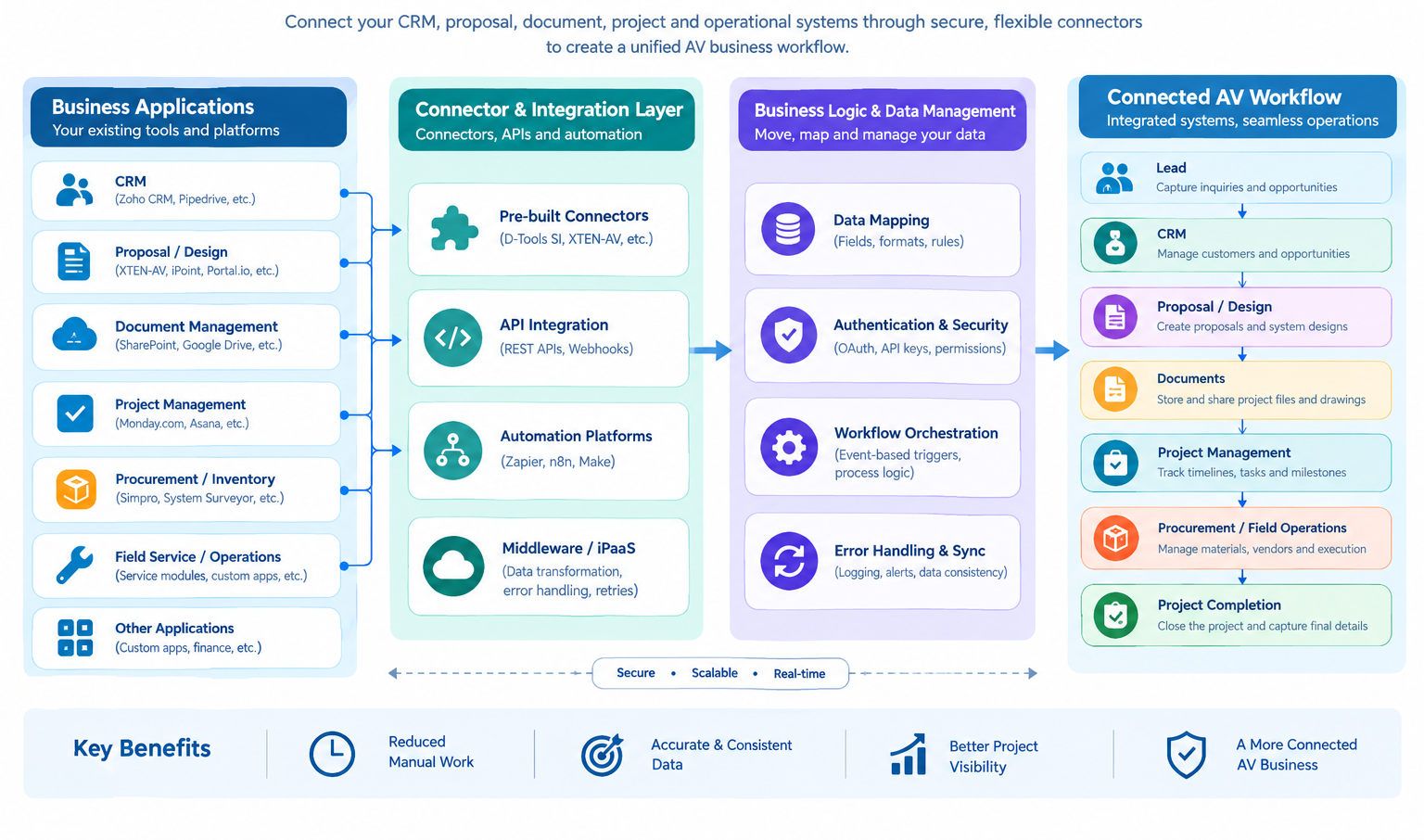
The architecture should answer five questions:
- What system owns the data?
- What business event triggers the workflow?
- What information needs to move?
- Where should that information go?
- What happens if synchronization or automation fails?
These questions help ensure that integration supports the business process instead of simply connecting applications.
For example, the CRM may remain the source of truth for customer and opportunity information, while D-Tools SI manages proposal, design, and project-related information. SharePoint or Google Drive may manage project documents, while a project-management platform handles tasks and milestones.
Clear ownership becomes especially important when multiple systems can modify related information. If the CRM and project platform can independently update the same customer data without defined rules, synchronization can create conflicts instead of resolving them.
A reliable connector architecture therefore needs defined data ownership, field mapping, business events, authentication, validation, synchronization rules, and failure handling.
D-Tools also documents API-based third-party integrations for areas such as project management and inventory management, demonstrating how an AV-focused platform can be extended through connected systems.
The objective is not to connect every available application.
The objective is to connect the systems that support the most important stages of the AV business workflow.
How an AV Connector Workflow Works From Lead to Project Completion
A connector-based AV workflow can connect the major stages of the project lifecycle:
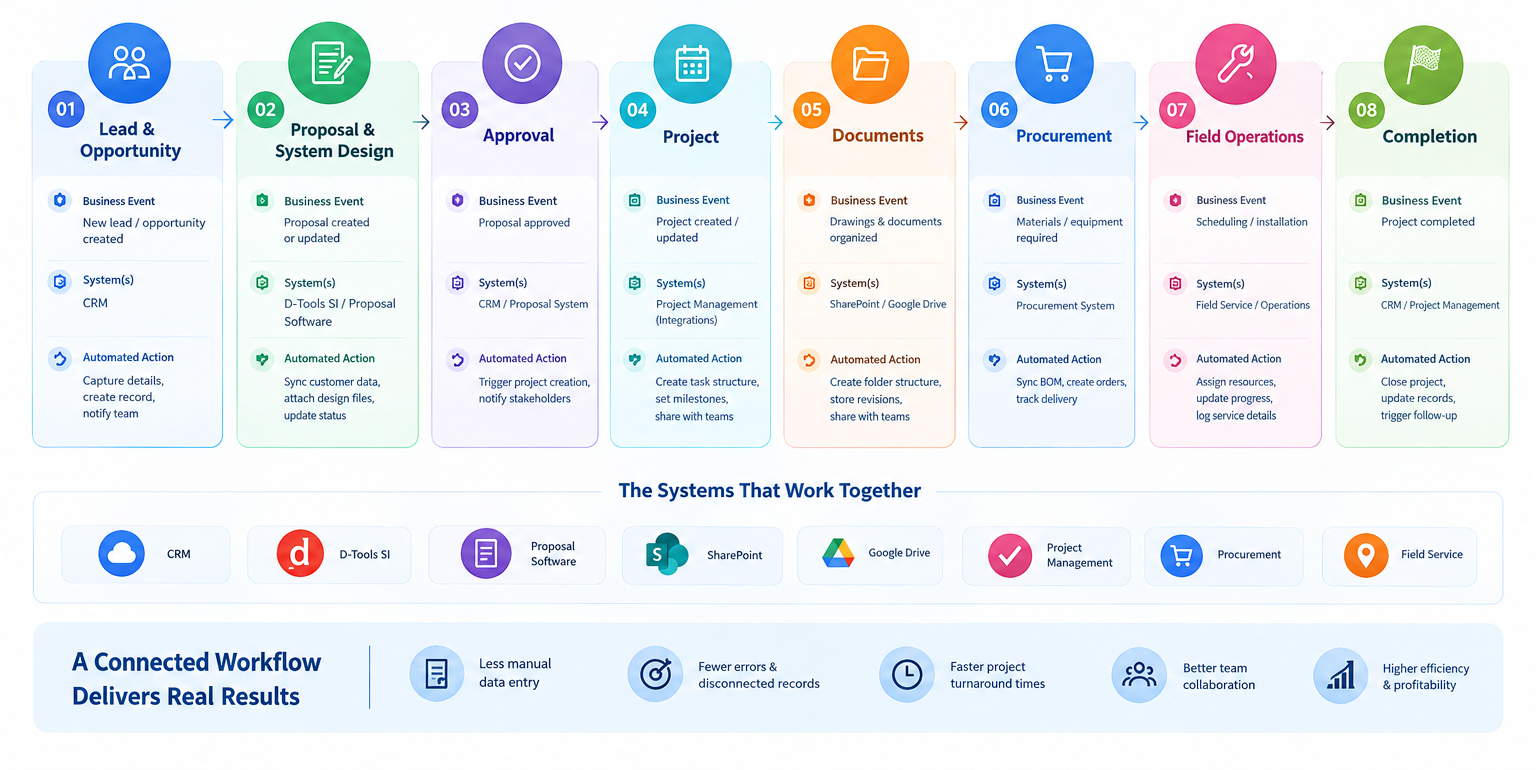
Example
A new opportunity enters the CRM with customer, contact, and opportunity information.
Once the opportunity reaches a defined stage, a connector can transfer the required information into the proposal or project environment. The proposal team can then develop the system design, scope, and commercial proposal.
When the proposal is approved, another workflow can initiate project-related actions.
For example:
- A project can be created or updated in the appropriate system.
- A project folder can be created in SharePoint or Google Drive.
- Project tasks and milestones can be created in a project-management platform.
- Relevant information can continue downstream toward procurement, scheduling, or field operations.
This creates continuity between sales, design, documentation, project execution, and operations.
The objective is not to eliminate the specialized applications already used by an AV business.
The objective is to make those applications work together around the same project lifecycle
The Core AVSI Connector Ecosystem
OfficeHub Tech’s AV-focused connector ecosystem includes integrations designed around software combinations commonly used by AV and low-voltage integrators. These include D-Tools SI integrations with Zoho CRM, SharePoint, Google Drive, Pipedrive, and Monday.com, along with Zapier-based connections to platforms such as XTEN-AV, Ipoint, Portal.io, Simpro, and System Surveyor.
The purpose of these connectors is to connect specific business events and information flows across the AV project lifecycle.
D-Tools SI ↔ Zoho CRM
CRM and proposal or project systems typically serve different business functions.
A connector can bridge them by transferring relevant:
- Customer information
- Contact information
- Opportunity information
- Project scope
- Sales-stage information
This reduces the need to recreate the same customer and project information manually across systems.
OfficeHub Tech also provides a D-Tools for Zoho CRM extension designed for AV, HVAC, and security businesses, supporting information exchange between Zoho CRM and D-Tools.
D-Tools SI ↔ SharePoint
Project documentation can become difficult to manage when folders and records are created manually.
A connector can support workflows involving:
- Project-specific folders
- Drawings
- Proposals
- Revisions
- Supporting documentation
- Access and organization
This creates a connection between the project record and its document environment, helping teams maintain project information and supporting files in a coordinated workflow.
D-Tools SI ↔ Google Drive
Google Drive can provide a collaborative document environment while D-Tools manages project-related information.
Connecting the two systems can help synchronize relevant project information and provide structured access to project documents.
The goal is to reduce situations where the project record exists in one application while its supporting documents are disconnected elsewhere.
D-Tools SI ↔ Pipedrive
For AV companies using Pipedrive for sales management, integration can connect sales-stage information with downstream project workflows.
A potential workflow is:
Deal stage changes → connector → project workflow action
This can create continuity between sales and operations without requiring project teams to manually monitor the CRM for every change.
D-Tools SI ↔ Monday.com
Monday.com can organize project tasks, assignments, milestones, and operational workflows.
A connector can transfer relevant project information and trigger actions based on defined project events.
For example:
Project created → create task structure
or:
Milestone reached → assign next operational task
This extends the integration from record synchronization into workflow automation.
Extending AV Workflows Through Zapier
The connector architecture can also extend beyond direct D-Tools integrations.
Zapier ↔ XTEN-AV
This connection can bridge proposal and design workflows with downstream business applications.
Relevant proposal information can trigger actions in connected systems, reducing repetitive manual transfer of information.
Zapier ↔ D-Tools SI
Zapier can act as an automation layer when an AV company needs to connect additional supported applications or create event-based workflows.
Instead of developing every integration independently, an automation platform can provide reusable trigger-and-action workflows.
This can become particularly useful as an AV company’s software stack grows.
Zapier ↔ Ipoint
Procurement and inventory activities can become disconnected from proposal and project workflows.
A connector can move relevant information between systems so material planning and procurement activities remain aligned with project requirements.
Zapier ↔ Portal.io
Portal.io can support customer-facing project communication.
Connecting it through an automation layer can help synchronize relevant project information, updates, or reporting workflows, creating greater continuity between internal project execution and client visibility.
Zapier ↔ Simpro
For businesses using Simpro for job management and field-service workflows, integration can connect project or job information with operational systems.
Depending on the workflow, this can synchronize:
- Job information
- Scheduling data
- Operational status
- Technician-related workflows
Zapier ↔ System Surveyor
Site surveys can provide information that influences project planning and execution.
A connector can move relevant survey information into downstream workflows, reducing manual document handling and improving continuity between site information and project planning.
| Integration | Primary Purpose | Example Workflow |
| D-Tools SI ↔ Zoho CRM | CRM + AV project data | Opportunity → Project |
| D-Tools SI ↔ SharePoint | Project documentation | Project → Folder |
| D-Tools SI ↔ Google Drive | Project files | Project → Documents |
| D-Tools SI ↔ Pipedrive | Sales → Operations | Deal stage → Workflow |
| D-Tools SI ↔ Monday.com | Project management | Project → Tasks |
| Zapier ↔ Simpro | Field service | Job → Schedule |
| Zapier ↔ Ipoint | Procurement | Requirement → Procurement |
| Zapier ↔ System Surveyor | Survey → Planning | Survey → Downstream workflow |
How These Connectors Work Together as One AVSI Ecosystem
Individual connectors solve specific integration requirements, but the greater value comes from connecting them into a coordinated AVSI workflow.
A typical architecture can look like:
CRM
Customer + Opportunity
↓
D-Tools SI
Proposal + Design + Project
↓ ↘
SharePoint / Google Drive Monday.com
Documents Tasks & Milestones
↓ ↘
Zapier Automation Layer
↓
XTEN-AV | Ipoint | Portal.io | Simpro | System Surveyor
In this model, each application continues to perform the function it was selected for, while connectors provide the communication layer between systems.
A connected architecture can support:
- Greater continuity between departments
- Less repetitive data entry
- Faster handoffs
- Better access to project information
- More consistent records
- More scalable automation
The key is to design the connections around the actual AV business process.
For example, customer and opportunity information may originate in the CRM, proposal and project information may be managed in D-Tools SI, documents may remain in SharePoint or Google Drive, and project tasks may be managed in Monday.com. An automation layer can then connect additional applications when specific business events occur.
The goal is not necessarily to replace every application with a single platform.
The goal is to connect the applications that already matter to the business and make them work together as one operational workflow.
Technical Mechanics: APIs, Webhooks, Events, Data Mapping and Error Handling
Behind a connected AV workflow are several technical components that determine how reliably information moves between applications.
APIs
APIs (Application Programming Interfaces) allow applications to exchange structured information through supported endpoints, permissions, and defined requests.
Webhooks
Webhooks allow one application to notify another when a specific event occurs.
For example:
Proposal status changed → webhook → integration workflow
The event can then trigger one or more actions in another connected application.
Data Mapping
Different applications rarely use identical field names or data structures.
For example:
CRM Company Name → D-Tools Customer Name
CRM Opportunity → D-Tools Project/Opportunity
Mapping rules determine how source fields correspond to destination fields and help ensure that information is transferred into the correct location.
Authentication
Integrations require controlled access to connected applications. Depending on the platform, authentication can use OAuth, API keys, access tokens, or other supported mechanisms.
Access should be configured according to the permissions required by the workflow.
Validation
Before creating or updating records, integration logic can validate required fields, formats, and other business rules.
This can prevent incomplete or invalid information from moving into downstream systems.
Error Handling
A production integration should define what happens when:
- An API becomes unavailable
- A required field is missing
- A record already exists
- Authentication expires
- Data fails validation
- A workflow partially completes
Depending on the architecture, failures may require retries, error logging, notifications, or manual intervention.
These controls help distinguish a reliable connector architecture from a collection of simple automations. A production-ready integration needs both connectivity and defined rules for how data, events, permissions, and failures are handled.
How to Design Connectors Without Creating More Technical Debt
Adding more integrations does not automatically create a better AV software architecture. Without clear rules, additional connections can increase complexity, duplicate data, and create new maintenance requirements.
AV integrators should establish integration rules before implementation.
Define System Ownership
Decide which application is authoritative for each type of information.
For example, the CRM may own customer and opportunity data, while D-Tools SI owns proposal and project information.
Map Only Necessary Data
Transfer only the fields required by the downstream process. Avoid synchronizing every available field simply because the integration makes it technically possible.
Standardize Business Events
Define meaningful triggers that represent actual stages of the AV workflow, such as:
- Opportunity qualified
- Proposal approved
- Project created
- Project milestone completed
- Job scheduled
Plan for Failures
Every critical workflow should have a defined method for detecting, logging, and resolving failed synchronization or automation.
Protect Access
Use appropriate authentication, permissions, and least-privilege principles to control access between connected applications.
Build for Change
An AV business may add a new CRM, proposal platform, field-service application, or automation platform as its requirements evolve.
A modular connector architecture makes it easier to add, replace, or modify individual integrations without redesigning the entire workflow.
The objective is to create an integration architecture that remains manageable as the AV business and its software ecosystem grow.
Practical AV Integrator Workflows Enabled by Connectors
Connectors can support specific business events throughout the AV project lifecycle. The following examples show how information or workflow actions can move between systems
| Business Event | Connector Workflow | Potential Outcome |
| New opportunity | CRM → D-Tools SI | Customer and opportunity information transferred |
| Proposal approved | Proposal → Project workflow | Project creation process initiated |
| Project created | D-Tools SI → SharePoint/Google Drive | Project document structure established |
| Project milestone reached | D-Tools SI → Monday.com | Next task or assignment triggered |
| Proposal information updated | Proposal platform → Automation layer | Connected systems updated |
| Procurement requirement identified | Project → Ipoint workflow | Procurement process initiated |
| Job scheduled | Project → Simpro workflow | Field-service information synchronized |
| Survey completed | System Surveyor → Workflow | Survey information made available downstream |
These examples demonstrate an important principle:
Connectors should follow the AV business process, rather than exist independently of it.
The integration should be designed around a specific business event, the information required by the next process, and the action that needs to occur in the destination system.
How to Measure the Impact of Connector-Based Workflows
The success of an integration should be measured by its impact on the business process, not simply by the number of applications connected.
Useful metrics include:
- Manual Data-Entry Reduction: How many records no longer need to be recreated manually across applications?
- Handoff Time: How long does it take information to move from sales to design, project management, or operations?
- Project Setup Time: How much time and effort are required to create and prepare a new project?
- Data Consistency: How often do teams encounter conflicting customer, project, product, or status information?
- Document Accessibility: How quickly can employees locate the correct drawings, proposals, revisions, and other project documentation?
- Workflow Failures: How often do synchronization or automation workflows fail and require manual intervention?
Tracking these measurements before and after implementation can help AV integrators determine whether a connector-based workflow is actually reducing operational friction.
The objective is not to measure how many integrations have been deployed.
The objective is to measure whether the connected workflow makes the business process faster, more consistent, and easier to manage
Why Connected Systems Matter for Modern Business Automation
The need for connected systems extends beyond the AV industry.
MuleSoft’s 2026 Connectivity Benchmark Report, based on a global survey of 1,050 IT leaders, reported that organizations manage an average of 957 applications, while only 27% of those applications are connected on average. The report also found that 82% of respondents consider data integration one of the biggest challenges when using AI.
For AV integrators, the broader lesson is straightforward: as businesses adopt more specialized applications, connecting those systems becomes an important part of the technology architecture.
The report also states that IT teams spend an average of 36% of their time designing, building, and testing custom integrations.
For AV businesses, this reinforces the importance of approaching integration systematically—with defined data ownership, reusable connectors, documented workflows, and appropriate automation layers.
Source: MuleSoft, 2026 Connectivity Benchmark Report
Building a Connected AV Workflow With OfficeHub Tech
OfficeHub Tech helps AV and low-voltage system integrators connect and automate the software they already use across sales, proposals, projects, documentation, procurement, and field operations.
AV-Focused Workflow Automation, Software Integration, Implementation Solutions
Our specialized AV business solutions include:
- Multi-software / Tools integration for AV and low-voltage businesses
- D-Tools For Zoho CRM Extension
- Low-voltage software connectors
- Turnkey workflow solutions built on the Zoho ecosystem
- n8n and Make workflow templates for AV system integrators
- Agentic AI Platform for AI-assisted AV workflows
- AI-powered Field Service Management Platform Built On Zoho Creator
These solutions are designed around existing applications and business processes, helping integrators automate data flows, reduce manual handoffs, and connect the systems involved in their project lifecycle.
Conclusion:
AV integrators do not necessarily need fewer software applications. They need a better way for the applications they already use to work together.
A CRM can manage customer relationships and opportunities.
A proposal platform can handle system design and quoting.
A document platform can organize drawings, revisions, and project files.
A project-management system can manage tasks and milestones.
A field-service platform can support operational execution.
The connector layer brings these functions together.
CRM → Proposal → Documents → Projects → Operations
When these systems are connected through APIs, connectors, automation workflows, and clearly defined data rules, AV businesses can create a more continuous operational flow with fewer manual handoffs and less duplicated information.
For residential and commercial integrators working across multiple low-voltage applications, low-voltage software connectors can further extend this architecture by connecting specialized software with the broader business workflow.
The real purpose of Low Voltage software integration for AV businesses is not simply to connect applications. It is to create a connected business workflow around how an AV project actually moves from opportunity to completion.