The Automation Imperative for AV Pros
The modern AV and low voltage integration landscape has undergone a profound transformation. What was once a predominantly hardware-driven business has evolved into a complex, software-orchestrated ecosystem. Today’s AV Pros are expected to manage multi-layered workflows involving CRM systems, quoting engines, project management tools, and financial platforms—all while delivering a seamless customer experience.
However, operational reality often tells a different story. Disconnected systems, manual interventions, and delayed processes create inefficiencies that compound over time. Leads are missed, follow-ups are delayed, and revenue cycles become unnecessarily prolonged. The result is not just operational friction, but a measurable impact on profitability and scalability.
This is precisely where workflow orchestration platforms like n8n redefine the playing field. By enabling event-driven automation and API-first integrations, n8n empowers AV businesses to create intelligent, self-operating systems that function with minimal human intervention. Instead of isolated tasks, entire business processes become automated pipelines.
For AV system integrators—whether operating in residential smart home environments or large-scale commercial deployments—the need is no longer automation in silos, but unified workflow intelligence. The adoption of n8n workflow templates for AV industry represents a strategic shift toward operational maturity, where every stage—from lead intake to payment collection—is interconnected, optimized, and continuously improving.
Understanding n8n in the Context of AV Integration
To fully appreciate the impact of n8n within AV and low voltage environments, it is essential to move beyond the notion of “automation” and understand it as a workflow orchestration engine. Unlike traditional tools that rely on linear trigger-action sequences, n8n enables multi-node, event-driven architectures with conditional logic, branching, and deep API integrations.
Here’s how a complete AV business workflow looks when orchestrated using n8n:
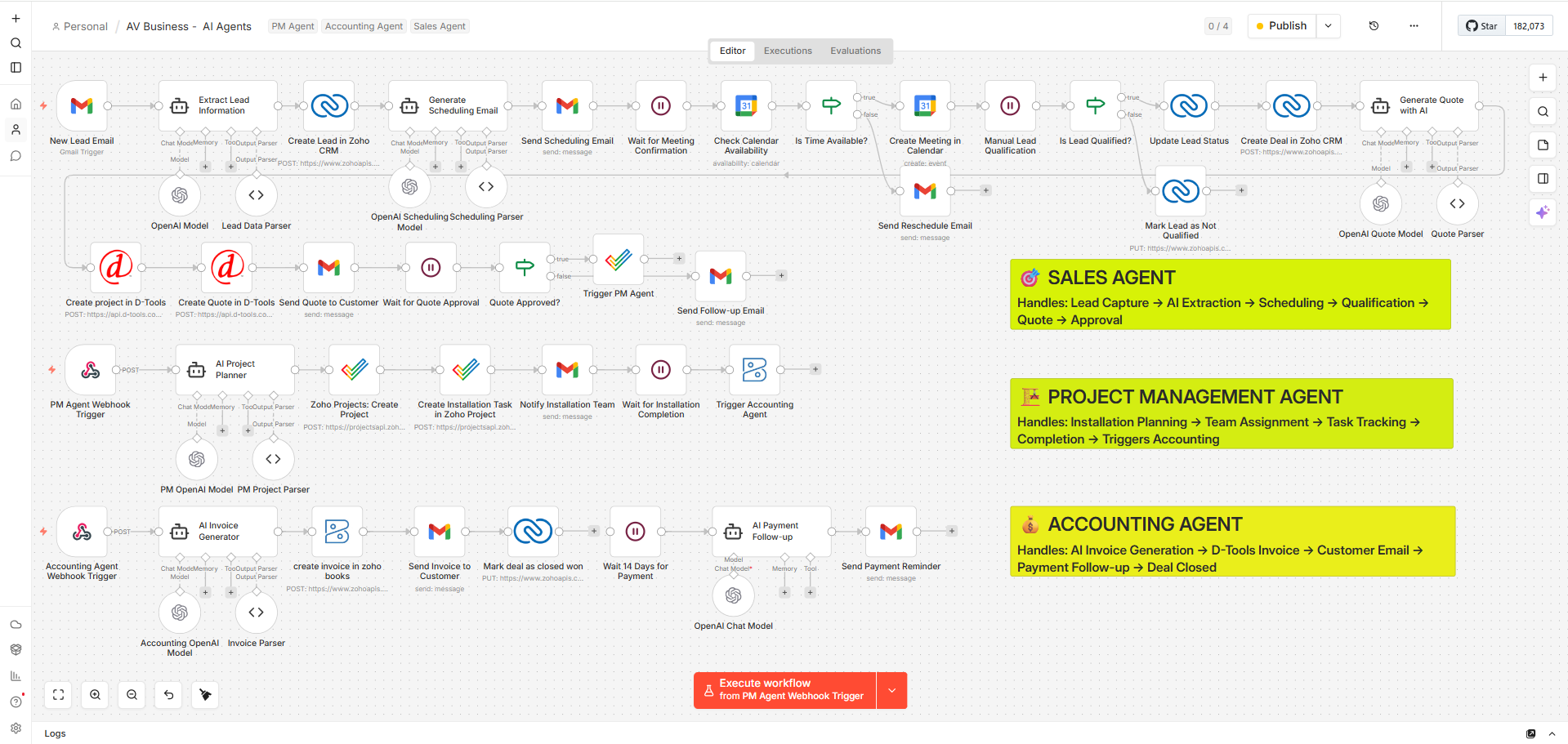
*End-to-end AV automation workflow covering Sales, Project Management, and Accounting agents*
What Makes n8n Technically Superior
- Node-Based Workflow Engine
Each function—API call, data transformation, webhook trigger—operates as an independent node. This modularity allows AV Pros to build scalable and reusable workflow architectures. - Event-Driven Execution
Workflows can be triggered by:- Incoming emails (IMAP/Gmail triggers)
- Webhooks from CRM or D-Tools
- Time-based schedulers (cron jobs)
- System state changes (e.g., deal stage updates)
- API-First Integration Layer
n8n interacts seamlessly with:- Zoho CRM (lead and deal lifecycle)
- Zoho Projects (task orchestration)
- Zoho Books (financial automation)
- D-Tools (BOM and quoting systems)
- Google Calendar (availability and scheduling)
- Custom Logic & Data Transformation
Using JavaScript function nodes, AV businesses can:- Normalize unstructured email data
- Apply conditional routing (if/else logic)
- Perform payload mapping across systems
Why This Matters for AV System Integrators
AV environments are inherently heterogeneous. A single project may involve multiple vendors, protocols, and software platforms. Traditional automation tools struggle with this variability.
n8n, however, thrives in such conditions because it acts as a middleware abstraction layer, enabling:
- Cross-platform data synchronization
- Real-time workflow orchestration
- Elimination of manual data duplication
- Seamless handoffs between departments
Practical Perspective
For AV Pros implementing n8n workflow templates for av business, this means:
- No more isolated systems operating in silos
- No dependency on rigid SaaS automation constraints
- Full control over business logic and process flows
Instead of adapting business processes to fit software limitations, n8n allows businesses to engineer workflows that mirror real-world AV operations—precisely, efficiently, and at scale.
Core Challenges Faced by AV & Low Voltage System Integrators
AV and low voltage system integrators operate in a highly fragmented and process-heavy environment. The core issue is not lack of tools—but lack of orchestration between them.
-
Fragmented Tech Stack
- CRM, quoting tools, project management, and accounting systems operate in silos
- No real-time data sync between platforms
- Manual duplication of data across systems
Impact: Inconsistent records, operational delays, and poor decision visibility
-
Manual Lead Handling
- Emails and enquiries are processed manually
- No structured data extraction or standardization
- Delayed CRM entry
Impact: Slower response times and reduced conversion rates
-
Scheduling Inefficiencies
- Multiple email exchanges for meeting confirmation
- No automated availability checks
- High chances of missed or delayed meetings
Impact: Extended sales cycles and poor client experience
-
Complex BOM & Quoting Process
- Heavy dependency on manual inputs in tools like D-Tools
- High probability of pricing or configuration errors
- Lack of automation in proposal generation
Impact: Increased turnaround time and reduced accuracy
-
Project Execution Gaps
- Manual project creation and task assignment
- Lack of standardized workflows
- Limited visibility across teams
Impact: Missed deadlines and coordination issues
-
Delayed Invoicing & Follow-Ups
- No automatic trigger from project completion
- Payment reminders handled manually
Impact: Cash flow delays and revenue leakage
Insight
These challenges are interconnected and require a unified solution. Implementing structured automation through n8n enables AV businesses to eliminate silos and build a fully synchronized operational system.
Workflow Template #1: Automated Lead Capture & CRM Sync
Workflow Logic
- Gmail/IMAP trigger captures incoming enquiry in real time
- AI parsing layer extracts structured data (name, contact, requirement, location)
- Data transformation node maps input into CRM-ready schema
- Deduplication check validates records using email/phone
- Lead is created or updated in CRM with tags and source attribution
Core Capabilities
- AI-driven unstructured → structured data conversion
- Real-time lead ingestion (event-based trigger)
- CRM schema normalization and field mapping
- Duplicate detection and record validation
- Automated tagging for segmentation (Residential / Commercial / AVSI)
Business Impact
- Eliminates manual lead entry completely
- Prevents lead leakage and missed enquiries
- Reduces response latency from hours to minutes
- Creates a clean, standardized CRM foundation
- Enables all downstream automation (scheduling, qualification, quoting)
Workflow Template #2: Intelligent Scheduling & Calendar Automation
Workflow Logic
- Triggered when a new lead is ready for scheduling (CRM/webhook event)
- Calendar API fetches real-time availability (free/busy slots)
- Logic layer applies rules (working hours, buffers, timezone adjustments)
- Automated email sends dynamic scheduling options to client
- On confirmation, meeting is created and synced to calendar + CRM
- If no response, follow-up or rescheduling workflow is triggered
Core Capabilities
- Real-time calendar availability synchronization
- Dynamic time-slot generation based on business rules
- Timezone-aware scheduling automation
- Automated email communication loop (invite + reminder + follow-up)
- Two-way sync between CRM and calendar
Business Impact
- Eliminates manual scheduling coordination
- Prevents double bookings and missed slots
- Reduces no-shows with automated reminders
- Shortens lead-to-meeting conversion time
- Improves overall customer experience and responsiveness
Workflow Template #3: Lead Screening & Opportunity Prioritization
Workflow Logic
- Triggered after meeting completion or CRM data update
- Pulls key inputs (budget, project scope, timeline, location)
- Scoring engine applies weighted rules or AI-based evaluation
- Decision logic classifies lead (Qualified / Nurture / Disqualified)
- CRM automatically updates stage and assigns ownership
- High-value leads trigger priority workflows or alerts
Core Capabilities
- Rule-based and AI-driven lead scoring models
- Custom weight allocation (budget, urgency, scope)
- Automated pipeline stage transitions
- Lead segmentation (Hot / Warm / Cold)
- Priority routing for high-intent opportunities
Business Impact
- Eliminates subjective qualification decisions
- Improves sales team focus on high-value leads
- Reduces time wasted on low-conversion prospects
- Increases overall conversion efficiency
- Creates a predictable and optimized sales pipeline
Workflow Template #4: Automated BOM & Pricing Proposal Generation
Workflow Logic
- Triggered when a lead is marked as qualified in CRM
- Pulls project requirements (rooms, devices, scope, preferences)
- Connects with D-Tools or product catalog via API
- BOM engine maps requirements → selects SKUs → builds structured list
- Pricing logic applies margins, discounts, and tax rules
- Quote is generated (PDF/Email) and logged back into CRM
Core Capabilities
- Automated requirement-to-product mapping (BOM generation)
- Live catalog integration (D-Tools/API-based)
- Dynamic pricing engine (margin, discount, tax logic)
- Auto-generated professional proposals
- CRM-linked quote tracking and version control
Business Impact
- Eliminates manual BOM creation and configuration errors
- Reduces quote turnaround from days to hours
- Ensures pricing consistency across all proposals
- Increases win rates through faster response
- Reduces dependency on technical teams for quoting
Workflow Template #5: Quote Approval & Deal Conversion Automation
Workflow Logic
- Triggered via approval signal (email response, webhook, or CRM status update)
- Validation layer confirms approval (status flag / digital confirmation)
- Decision logic updates deal stage (Approved → Closed Won, else follow-up)
- CRM is updated with deal value, probability, and status
- Automatically triggers project creation workflow
- Sends notifications to sales and operations teams
Core Capabilities
- Multi-source approval detection (email, CRM, webhook)
- Automated deal stage transition
- Conditional workflow branching (approve / reject / follow-up)
- Instant internal notifications
- Seamless handoff to execution workflows
Business Impact
- Eliminates delay between approval and execution
- Prevents missed or untracked approvals
- Reduces manual CRM updates
- Accelerates deal closure cycle
- Ensures smooth transition from sales to operations
Workflow Template #6: Project Creation & Task Assignment
Workflow Logic
- Triggered when deal stage changes to Closed Won in CRM
- Pulls deal data (scope, timeline, client, location)
- Creates project in Zoho Projects via API
- Task engine generates predefined phases (Site Prep, Installation, Testing)
- Assignment logic maps tasks to team members based on roles/availability
- Notifications are sent to the installation team
- Project ID and status sync back to CRM
Core Capabilities
- Automated project provisioning (CRM → Project tool)
- Standardized task templates for AV installations
- Role-based task assignment logic
- Real-time team notifications
- Bidirectional sync between CRM and project system
Business Impact
- Eliminates manual project setup delays
- Ensures consistent execution across all projects
- Improves team coordination and accountability
- Enables immediate project kickoff post-sale
- Reduces operational gaps between sales and delivery
Workflow Template #7: Installation Tracking & Completion Triggers
Workflow Logic
- Triggered by project updates via webhook/API from Zoho Projects
- Monitors task progress across key phases (Site Prep → Installation → Testing)
- Validation layer checks if all critical tasks are completed
- Marks project as completed in system
- Automatically triggers invoicing workflow
- Syncs completion status back to CRM
Core Capabilities
- Real-time project status monitoring (API/webhook-based)
- Milestone-driven completion validation
- Automated project closure detection
- Trigger-based downstream workflow execution
- Synchronization between project and CRM systems
Business Impact
- Eliminates dependency on manual project closure updates
- Prevents delays between installation and invoicing
- Ensures all execution steps are completed before closure
- Improves visibility across project lifecycle
- Accelerates transition from operations to billing
Workflow Template #8: Invoice Generation & Financial Automation
Workflow Logic
- Triggered when project status is marked as Completed
- Pulls client, deal, and financial data from CRM
- Creates invoice in Zoho Books via API
- Applies pricing rules (taxes, discounts, payment terms)
- Sends invoice to client via automated email
- Updates CRM with invoicing status
Core Capabilities
- Automated invoice generation (API-driven)
- Dynamic tax and pricing calculation
- Standardized invoice templates
- Auto email delivery with attachments
- CRM and accounting system synchronization
Business Impact
- Eliminates manual invoicing delays
- Ensures immediate billing after project completion
- Improves accuracy in financial records
- Accelerates revenue realization
- Reduces dependency on manual accounting processes
Workflow Template #9: Payment Follow-Ups & Revenue Recovery
Workflow Logic
- Triggered once an invoice is created in the accounting system
- Scheduler (cron) tracks due dates and predefined intervals
- Checks payment status via Zoho Books API
- Sends staged reminders (gentle → firm → escalation)
- Flags overdue invoices for internal action (tasks/calls)
- Stops workflow automatically upon payment confirmation and updates CRM
Core Capabilities
- Time-based automation using schedulers
- Multi-stage reminder sequences
- Real-time payment status verification
- Escalation rules for overdue invoices
- Automatic workflow termination on payment
Business Impact
- Eliminates manual payment follow-ups
- Reduces missed or delayed reminders
- Improves collection consistency
- Decreases Days Sales Outstanding (DSO)
- Strengthens cash flow predictability
Workflow Template #10: Multi-System Integration Hub (Anything-to-Anything)
Workflow Logic
- Triggered by events across multiple systems (CRM, Projects, Accounting, Email, Webhooks)
- Central n8n workflow acts as orchestration layer routing data between platforms
- API layer connects tools (Zoho CRM, Projects, Books, D-Tools, Gmail, etc.)
- Data transformation standardizes payloads across different schemas
- Conditional logic routes workflows based on business rules
- Ensures bidirectional sync across all connected systems
Core Capabilities
- Anything-to-anything API-based integration
- Centralized workflow orchestration engine
- Real-time cross-platform data synchronization
- Advanced conditional routing and logic handling
- Modular and scalable integration architecture
Business Impact
- Eliminates data silos across all business systems
- Removes manual data transfer between tools
- Ensures consistency across sales, operations, and finance
- Enables real-time decision-making with unified data
- Creates a scalable foundation for end-to-end automation
Advanced Strategies: Scaling n8n Workflows Across AV Enterprises
Scaling Approach
- Break large workflows into modular sub-workflows (lead, scheduling, quoting, execution, billing)
- Use queue-based execution (Redis mode) to handle high event volumes
- Separate environments (Dev / Staging / Production) for controlled deployment
- Maintain reusable workflow components for consistency across operations
System Reliability & Control
- Implement retry logic with exponential backoff for failed API calls
- Use fallback paths to handle temporary system failures
- Isolate failures to prevent workflow-wide disruption
- Introduce monitoring for execution status and failure tracking
Data & Integration Discipline
- Enforce consistent data schemas across CRM, PM, and Finance systems
- Standardize field mappings and validation rules
- Ensure clean, structured data flow between all integrated platforms
- Avoid dependency on manual corrections or overrides
Operational Outcome
- Stable performance under high workload
- Faster processing across multiple parallel workflows
- Reduced system failures and downtime
- Scalable infrastructure ready for business growth
Strategic Insight
At scale, n8n is no longer just an automation tool—it becomes a core operational infrastructure layer. Properly architected workflows ensure that AV businesses can grow without increasing operational complexity, maintaining speed, consistency, and control across every process.
Case Study: End-to-End Automation in a Commercial AV Firm
A mid-sized commercial AV integration firm—NovaTech AV Solutions—was operating with a fragmented workflow ecosystem. Their stack included CRM, D-Tools, project management, and accounting platforms, but none were synchronized. Each department functioned in isolation, creating operational bottlenecks across the entire lifecycle.
Before Implementation
- Lead response time exceeded 10–12 hours due to manual email processing
- Scheduling required multiple back-and-forth communications
- BOM and quote creation took 2–3 days, heavily dependent on technical teams
- Project setup was manual, often delayed by 1–2 days post deal closure
- Invoices were generated 3–5 days after project completion
- Payment follow-ups were inconsistent and untracked
Operational State:
Disconnected systems, high manual dependency, and delayed execution across all stages
After n8n Workflow Implementation
- Lead Capture: Automated email parsing reduced response time to under 5 minutes
- Scheduling: Instant calendar sync enabled same-day meeting bookings
- Qualification & Quoting: AI-assisted workflows reduced quote turnaround to 4–6 hours
- Project Creation: Automated setup triggered immediately after deal closure
- Installation Tracking: Real-time updates ensured zero delay in project completion visibility
- Invoicing: Generated instantly upon completion
- Payment Follow-Ups: Automated reminders improved collection cycles
Measured Outcomes
- 45% increase in operational efficiency
- 60% reduction in manual workload across teams
- 35% faster sales cycle
- 28% improvement in payment collection time
- Significant enhancement in customer response experience
Business Transformation Insight
The transformation was not limited to automation—it was architectural. By implementing n8n workflow templates for avsi, the company shifted from disconnected processes to a fully synchronized, event-driven system.
Every stage—lead, quote, project, invoice—became part of a continuous pipeline rather than isolated actions. This eliminated delays, reduced errors, and created a predictable, scalable operational model.
Key Takeaway
For AV Pros, the real value of automation lies not in individual workflows but in end-to-end orchestration. When systems communicate seamlessly, the business operates with precision, speed, and consistency—unlocking true scalability.
Case Study 2 : End-to-End Automation in a Residential AV Integration Firm
A premium residential AV and smart home integration company—LuxeHome Automation—specialized in high-end home theaters, lighting control, security systems, and full smart home ecosystems. Despite delivering exceptional installations, their internal operations were heavily manual and fragmented.
Before Implementation
- Enquiries from website and WhatsApp were not centrally captured
- Lead data was inconsistently entered into CRM
- Scheduling site visits required multiple follow-ups
- Quoting for customized home solutions took 2–4 days
- Project tracking lacked real-time visibility for homeowners
- Final invoicing was delayed, often dependent on manual confirmation
Operational State:
High-touch service model but low operational efficiency, leading to delays and inconsistent client experience
After n8n Workflow Implementation
- Lead Intake: Unified capture from email, website forms, and WhatsApp into CRM
- Smart Scheduling: Automated site visit booking with real-time availability
- Requirement Mapping: Structured intake of room-wise automation needs
- Quote Automation: Faster BOM generation for home theater, lighting, and security setups
- Project Updates: Automated client notifications at each installation stage
- Invoicing & Payments: Instant invoice generation with automated reminders
Measured Outcomes
- 50% reduction in lead response time
- 40% faster quote delivery for custom home projects
- 30% improvement in project communication transparency
- 25% increase in customer satisfaction scores
- Faster payment cycles with minimal manual follow-up
Business Transformation Insight
By implementing n8n workflow templates for low voltage system integrators, the company transitioned from a reactive service model to a proactive, system-driven operation.
Client interactions became structured, predictable, and significantly faster. Every homeowner received timely updates, accurate quotes, and a seamless experience from enquiry to installation completion.
Key Takeaway
In residential AV environments, where personalization is critical, automation does not reduce human touch—it enhances it. By removing operational friction, AV Pros can focus more on design, consultation, and delivering premium experiences while the system manages the backend complexity.
Conclusion
The modern AV and low voltage integration landscape demands more than isolated automation—it requires a fully orchestrated, event-driven business ecosystem. Throughout this article, we explored how strategically designed n8n workflow templates can transform every stage of operations—from lead capture and scheduling to quoting, project execution, invoicing, and payment recovery. Each workflow is not just a task automation, but a connected system component that eliminates manual intervention, reduces errors, and accelerates execution. The result is a streamlined pipeline where data flows seamlessly, decisions are automated, and operations scale without friction.
The AV & Low Voltage System Integrator ecosystem is entering a phase where efficiency, speed, and consistency define competitive advantage. Businesses that implement structured automation frameworks like n8n Templates for av industry position themselves ahead of the curve—operating with precision, delivering faster customer experiences, and unlocking scalable growth.
OfficeHub Tech: Powering Automation for AV & Low Voltage System Integrators
We don’t just implement workflows—we engineer complete AV business operating systems
OfficeHub Tech is at the forefront of transforming AV businesses through intelligent workflow automation and deep system integration. We specialize in delivering n8n Workflow Templates, Turn Key Workflow Solutions, and Multi-software (Anything to anything) Integration tailored specifically for AV & Low Voltage System Integrators. Our solutions are engineered to connect CRM, project management, quoting tools, and financial systems into one unified ecosystem. As a proud member and exhibitor of leading AV communities such as CEDIA (Booth #3839), AVIXA, InfoComm (Booth #C9904), ISO Expo, and Lightapalooza, we are actively contributing to the evolution of the AV industry through innovation and automation.
As a certified Zoho Partner and n8n Partner, OfficeHub Tech is recognized as the Top AV Business Workflow Implementation and Consultation Provider in USA. We help AV Pros design, implement, and scale automation architectures that are robust, flexible, and future-ready—ensuring long-term operational excellence and measurable business impact.
FAQs
Q1. What exactly are n8n workflow templates for AV businesses?
Ans: They are pre-architected, reusable automation frameworks designed specifically for AV and low voltage operations—covering lead intake, scheduling, quoting, project execution, invoicing, and payment follow-ups within a connected system.
Q2. How are n8n workflows different from tools like Zapier or Make?
Ans: Unlike linear automation tools, n8n provides advanced workflow orchestration with conditional logic, multi-step branching, custom code execution, and deep API control—making it suitable for complex AV business processes.
Q3. Can n8n handle multi-software integration in AV environments?
Ans: Yes. n8n acts as a middleware orchestration layer, enabling seamless integration between CRM, D-Tools, project management, accounting systems, communication tools, and custom APIs.
Q4. How do n8n workflows improve lead conversion rates?
Ans: By enabling real-time lead capture, instant scheduling, and automated follow-ups, n8n significantly reduces response time—one of the most critical factors in lead conversion.
Q5. Is it possible to automate D-Tools quoting using n8n?
Ans: Yes. Through API integration and workflow logic, n8n can automate BOM creation, pricing logic, and quote delivery—reducing manual dependency and turnaround time.
Q6. How scalable are n8n workflows for large AV enterprises?
Ans: n8n supports queue-based execution, modular workflows, and distributed architecture, making it highly scalable for businesses managing multiple projects and high lead volumes.
Q7. What level of customization is possible with n8n?
Ans: n8n offers full customization, including:
-
Custom logic via JavaScript
-
API integrations with any platform
-
Conditional workflows and dynamic routing
This allows workflows to match exact business requirements.