Why Businesses Need to Connect Legacy ERP Systems with Modern SaaS Applications
Enterprise technology ecosystems have evolved significantly over the last decade. Businesses today operate in an environment where cloud-based SaaS applications drive everything from customer relationship management and finance automation to project management, customer support, workflow automation, collaboration, and data analytics. At the same time, many organizations still depend on legacy ERP systems that continue to manage mission-critical operations such as procurement, inventory management, manufacturing workflows, supply chain coordination, finance operations, and enterprise reporting.
The challenge, however, is that most legacy ERP systems were originally designed in an era where modern SaaS ecosystems did not exist. As a result, these systems often struggle to communicate with modern cloud applications, creating operational silos, disconnected workflows, delayed data synchronization, and reduced organizational agility.
This is where businesses need a smarter modernization strategy. Instead of replacing existing ERP infrastructure entirely, organizations can extend their legacy ERP systems by integrating modern SaaS applications using Zoho Creator as a low-code integration and automation layer.
In this blog, we will explore how businesses can modernize existing ERP systems, overcome SaaS integration challenges, build scalable integration architecture using Zoho Creator, automate enterprise workflows, and create a future-ready operational ecosystem without replacing their existing ERP infrastructure.
Understanding the Growing Gap Between Legacy ERP Systems and Modern SaaS Ecosystems
Legacy ERP systems remain the operational backbone of many enterprises, managing critical functions such as finance, inventory, procurement, supply chain operations, manufacturing, vendor management, and compliance reporting.
However, modern businesses increasingly rely on specialized SaaS applications for CRM, customer support, project management, HR automation, workflow automation, business intelligence, marketing, and collaboration. While these tools improve agility and productivity, most legacy ERP systems were not designed to support today’s interconnected digital ecosystem.
This creates several operational challenges, including:
- Data silos across business applications
- Duplicate data entry and manual data transfers
- Delayed communication between departments
- Inconsistent operational and customer records
- Limited real-time visibility and reporting
- Difficulty scaling new software across teams
As organizations adopt more SaaS solutions, disconnected systems can significantly impact operational efficiency, decision-making speed, and long-term scalability. Bridging the gap between legacy ERP platforms and modern applications has become essential for creating a unified, data-driven business environment.
Why Traditional ERP Modernization Approaches Often Fail
When businesses begin experiencing limitations with legacy ERP systems, leadership teams often assume that replacing the ERP entirely is the best path toward modernization.
On paper, replacing outdated ERP systems may appear logical. In practice, however, large-scale ERP replacement projects often introduce more complexity than expected.
ERP systems sit at the center of enterprise operations. Replacing them means redesigning years of deeply integrated business processes that organizations rely on daily.
Why Full ERP Replacement Creates Major Challenges
-
Extremely High Transformation Costs
ERP migration projects often require significant capital investment involving:
- Software licensing costs
- Infrastructure upgrades
- External consulting services
- Internal implementation teams
- Long-term support contracts
Many projects exceed their original budget projections.
-
Operational Disruption During Migration
Replacing ERP infrastructure often interrupts critical business operations.
Businesses may experience:
- Procurement delays
- Inventory synchronization issues
- Finance reporting inconsistencies
- Supply chain disruptions
- Internal workflow interruptions
Even short operational downtime can create major financial impact.
-
Complex Data Migration Risks
Legacy ERP systems often contain years of operational and historical business data.
Migrating this data introduces risks such as:
- Data corruption during transfer
- Incomplete migration mapping
- Duplicate or inconsistent records
- Loss of historical transaction visibility
For highly operational businesses, data migration errors create serious long-term consequences.
-
Organizational Resistance to Change
ERP systems become deeply embedded into daily employee workflows.
Replacing systems often requires:
- Large-scale employee retraining
- Department-wide process restructuring
- New workflow adoption across teams
- Temporary productivity decline during transition
User adoption challenges frequently slow down implementation success.
Why Businesses Need a Better Approach
Instead of rebuilding enterprise architecture from scratch, organizations increasingly prefer modernization strategies that preserve existing ERP investments while enabling new capabilities externally.
The comparison below highlights why many organizations choose ERP extension over a complete ERP replacement strategy.
Legacy ERP Replacement vs. Legacy ERP Extension with Zoho Creator
| Legacy ERP Replacement | Legacy ERP Extension with Zoho Creator |
|---|---|
| Requires replacing the existing ERP system | Preserves the existing ERP while extending its capabilities |
| High implementation and migration costs | Lower modernization costs with phased implementation |
| Long deployment timelines | Faster deployment of new applications and workflows |
| High risk of business disruption | Minimal disruption to daily operations |
| Complex data migration and validation | Existing ERP data remains intact and synchronized |
| Extensive employee retraining | Employees continue using familiar ERP processes |
| Heavy dependence on ERP vendors and custom development | Low-code customization and integration using Zoho Creator |
| Difficult to introduce new SaaS applications quickly | Easily integrates CRM, HR, Finance, Inventory, and other SaaS applications |
| Higher implementation risk | Incremental modernization with reduced risk |
| Large one-time transformation project | Continuous innovation and scalable digital transformation |
Why Legacy ERP Platforms Struggle to Integrate Directly with Modern SaaS Solutions
Modern SaaS applications are built around flexible cloud-native architecture that depends heavily on API communication, real-time synchronization, and event-driven automation.
Legacy ERP systems were designed long before these technologies became standard.
As a result, most traditional ERP systems face major integration limitations when organizations attempt to connect external SaaS applications.
Modern SaaS Applications Depend on Technologies Such As
- REST API communication
- Cloud-native data architecture
- OAuth authentication frameworks
- Webhook-based event triggers
- Cross-platform application interoperability
- Real-time data synchronization
- Mobile-first application architecture
- Scalable automation workflows
Unfortunately, many older ERP systems were not designed for these requirements.
Common Legacy ERP Integration Limitations
- Limited API Accessibility
Many ERP systems offer restricted API access or outdated integration frameworks that make modern application connectivity difficult.
- Closed Monolithic Architecture
Legacy ERP platforms often rely on tightly connected internal architecture, making external software communication extremely limited.
- Difficult Custom Development Requirements
Building custom integrations directly inside ERP systems often requires expensive development resources and vendor-specific expertise.
- Slow Data Synchronization Processes
Instead of real-time communication, many ERP systems rely on scheduled data batch processing that delays operational visibility.
- Limited Third-Party Software Compatibility
Many external SaaS platforms cannot directly communicate with older ERP architecture without additional middleware layers.
Business Impact of These Limitations
When ERP systems cannot communicate effectively with SaaS applications, organizations face:
- Slower operational decision-making
- Delayed reporting visibility
- Manual intervention across departments
- Higher dependency on IT teams
- Poor workflow scalability
- Increased operational bottlenecks
This disconnect becomes a major obstacle to digital transformation.
The Smarter Approach: Extend Legacy ERP Instead of Replacing It
Modern enterprise modernization no longer requires organizations to replace their entire ERP infrastructure to remain competitive. Instead, many businesses are adopting an ERP extension strategy that preserves the stability of their existing systems while introducing modern capabilities through external applications and integrations.
With this approach, the legacy ERP continues to serve as the primary system of record for core business operations such as finance, inventory, procurement, manufacturing, and supply chain management. Rather than modifying the ERP itself, organizations build an intelligent operational layer around it using platforms like Zoho Creator.
This extension layer enables businesses to connect modern SaaS applications, automate cross-functional workflows, develop custom business applications, and exchange data securely across systems without disrupting the ERP’s core functionality.
By separating innovation from the core ERP, organizations gain the flexibility to introduce new technologies, respond to changing business needs more quickly, and modernize incrementally instead of undertaking lengthy and expensive ERP replacement projects.
Why Organizations Are Choosing ERP Extension
An ERP extension strategy provides several practical advantages for enterprises looking to modernize their technology landscape:
- Protect Existing ERP Investments: Continue using stable ERP infrastructure while expanding its capabilities through modern applications.
- Accelerate Innovation: Deploy new workflows, portals, and integrations without waiting for major ERP upgrades.
- Reduce Operational Risk: Modernize business processes while minimizing disruption to day-to-day operations.
- Increase Business Agility: Adapt quickly to changing requirements by adding new applications and automations as the business evolves.
- Create a Scalable Digital Ecosystem: Build a flexible architecture that supports future SaaS integrations, automation initiatives, and digital transformation goals.
Instead of viewing ERP modernization as a one-time replacement project, organizations can treat it as an ongoing process of continuous improvement. By extending rather than replacing their legacy ERP systems, businesses create a future-ready technology ecosystem that balances operational stability with long-term innovation.
How Zoho Creator Works as a SaaS Integration Layer for Legacy ERP Extension
Zoho Creator provides organizations with a low-code application development platform that can function as an external middleware and automation layer between legacy ERP systems and modern SaaS applications.
Rather than modifying ERP core architecture, Zoho Creator creates a flexible integration layer that manages communication between systems.
At a high level, the architecture works as follows:
ERP remains the operational backbone, while Zoho Creator acts as the orchestration engine connecting modern SaaS applications around the ERP ecosystem.
This architecture enables businesses to modernize without disrupting existing ERP infrastructure.
How Zoho Creator Supports ERP Extension Architecture
Zoho Creator can manage multiple modernization functions simultaneously.
API-Based ERP Integration
Zoho Creator securely connects with ERP systems using APIs, enabling bidirectional communication between applications.
This allows organizations to:
- Pull ERP data into external applications
- Push operational updates back into ERP systems
- Synchronize records across platforms in real time
SaaS Application Connectivity
Zoho Creator allows organizations to integrate multiple SaaS applications with ERP systems.
Examples include:
- CRM systems
- Accounting platforms
- Procurement software
- HR management systems
- Customer support platforms
- Inventory management tools
- Project management applications
Workflow Automation Layer
Zoho Creator automates business processes across systems.
Automation workflows can handle:
- Approval routing
- Invoice processing
- Procurement triggers
- Inventory notifications
- Employee onboarding workflows
- Customer service escalations
- Internal operational approvals
Custom Application Development
Businesses can extend functionality through lightweight applications without making changes to their ERP infrastructure.
Examples include:
- Vendor portals
- Customer self-service applications
- Field service mobile applications
- Internal employee dashboards
- Department-specific operational apps
Real-Time Data Synchronization
Zoho Creator ensures operational data moves seamlessly between ERP systems and connected SaaS applications.
This eliminates:
- Duplicate data entry
- Delayed reporting cycles
- Departmental communication gaps
- Data inconsistency across systems
The Strategic Advantage of Zoho Creator
Unlike traditional custom development projects, Zoho Creator enables businesses to build enterprise-grade integrations faster while maintaining flexibility for future expansion.
It creates an architecture where organizations can continuously modernize operations without rebuilding core ERP infrastructure every time new business requirements emerge.
This makes Zoho Creator one of the most practical platforms for businesses pursuing long-term legacy ERP modernization.
Typical Legacy ERP Integration Architecture
A successful ERP extension strategy relies on a well-defined integration architecture that enables legacy ERP systems and modern SaaS applications to exchange data securely and efficiently. Rather than replacing the ERP, organizations introduce an intelligent integration layer that orchestrates communication, automation, and data synchronization across multiple business applications.
A typical architecture follows this flow:
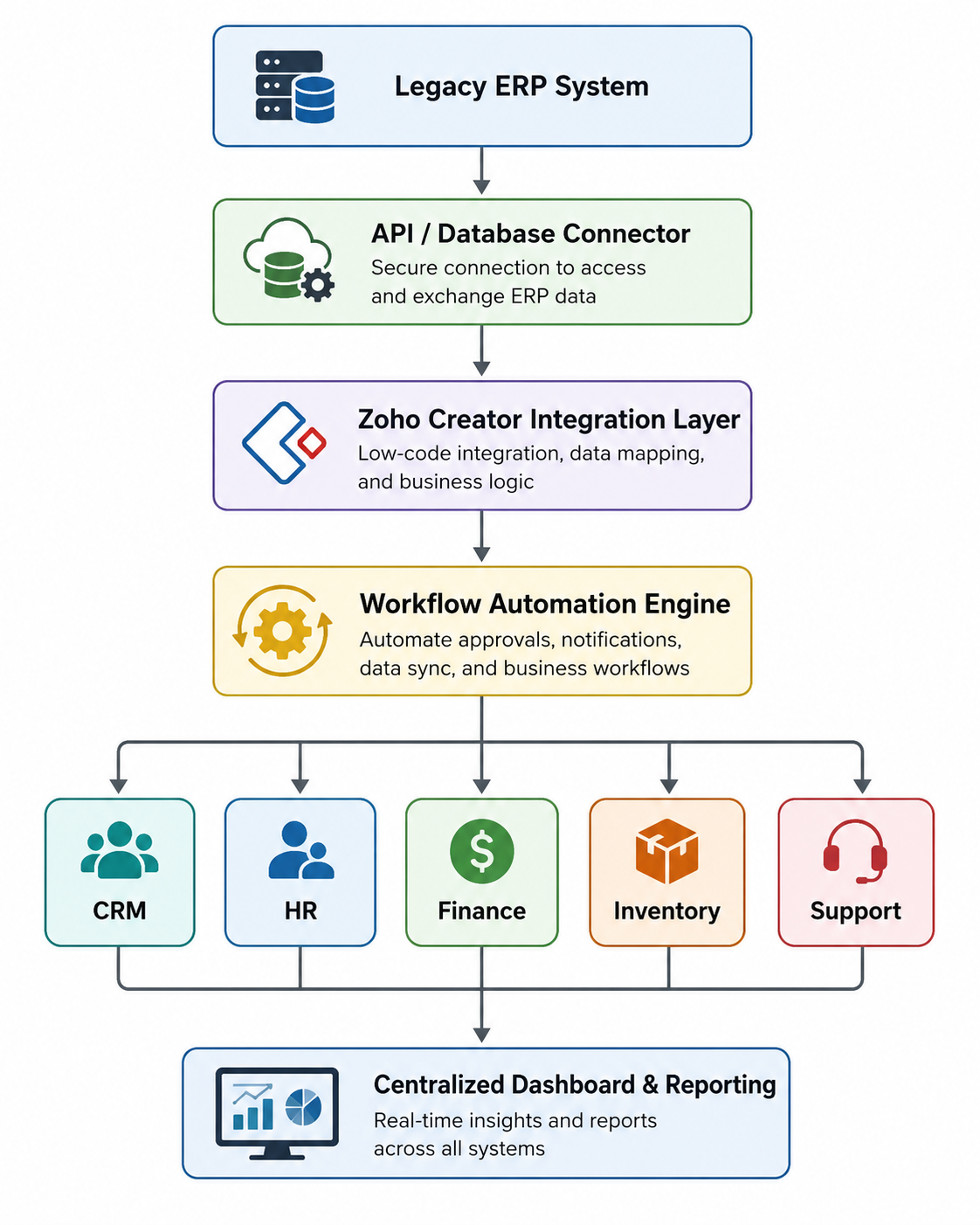
In this model, each component has a distinct responsibility:
- Legacy ERP System: Continues managing core business processes and serves as the primary system of record.
- API or Database Connector: Establishes secure communication between the ERP and external platforms.
- Zoho Creator Integration Layer: Orchestrates data exchange, manages business logic, and connects multiple SaaS applications.
- Workflow Automation Engine: Executes automated business processes such as approvals, notifications, and task assignments.
- Connected SaaS Applications: Enable specialized business functions while remaining synchronized with ERP data.
- Centralized Dashboard and Reporting Layer: Provides real-time operational insights by consolidating information from multiple systems.
For example, when a salesperson creates a new order in a CRM system, Zoho Creator can automatically validate inventory in the ERP, initiate approval workflows, update finance records, notify the warehouse team, and refresh executive dashboards—all without requiring manual intervention.
This architecture allows organizations to expand their technology ecosystem incrementally while keeping their legacy ERP stable, secure, and fully operational.
Step-by-Step Process to Extend Legacy ERP with Modern SaaS Applications Using Zoho Creator
Successfully extending legacy ERP systems with modern SaaS applications requires more than simply connecting APIs between software platforms. Businesses need a structured integration strategy that ensures operational continuity, secure data exchange, workflow alignment, and long-term scalability.
A phased implementation approach helps organizations modernize their technology stack while minimizing operational disruption.
Below is a practical framework enterprises typically follow when implementing legacy ERP extension architecture using Zoho Creator.
Step 1: Assess Existing Legacy ERP Infrastructure
The first step is understanding how the current ERP environment operates internally.
Organizations must evaluate:
- Existing ERP modules currently in use
- Core operational workflows running inside ERP
- Available API capabilities or integration endpoints
- Existing customization layers inside ERP architecture
- Data flow dependencies across departments
- Current operational bottlenecks slowing down processes
This assessment helps identify integration limitations and modernization opportunities.
Step 2: Identify SaaS Applications That Need ERP Connectivity
Modern enterprises rarely operate with ERP systems alone.
Organizations often use multiple SaaS applications for specialized business functions.
Common SaaS applications include:
- CRM systems for customer management
- Customer support and helpdesk platforms
- Finance and billing software
- Procurement automation systems
- HR and employee management applications
- Inventory and warehouse management platforms
- Collaboration and communication tools
- Business analytics and reporting platforms
At this stage, businesses define which SaaS applications need direct communication with ERP infrastructure.
Step 3: Build Secure API Connectivity Between ERP and Zoho Creator
Once integration requirements are identified, Zoho Creator acts as the communication bridge.
At this stage:
- API endpoints are configured
- Authentication protocols are implemented
- Data exchange rules are established
- Secure authorization policies are applied
- System communication architecture is designed
This layer ensures ERP systems and SaaS applications can exchange operational data securely.
Step 4: Design Workflow Automation Architecture
Once systems communicate successfully, organizations automate repetitive operational processes.
Automation workflows typically include:
- Purchase approval automation
- Invoice processing workflows
- Inventory reorder triggers
- Customer onboarding workflows
- Procurement request approvals
- Employee workflow automation
- Departmental notification systems
This significantly reduces manual intervention.
Step 5: Develop Custom Applications and Operational Dashboards
Many organizations require business applications that legacy ERP systems cannot support.
Zoho Creator allows businesses to build:
- Customer portals
- Vendor management applications
- Mobile workforce applications
- Internal operational dashboards
- Approval management systems
- Service request applications
These applications work independently while staying connected to ERP systems.
Step 6: Enable Real-Time Data Synchronization
Modern business operations require instant access to operational data.
Zoho Creator enables:
- Live synchronization between systems
- Real-time reporting dashboards
- Automatic operational updates
- Instant workflow triggers
- Centralized data visibility across departments
This improves enterprise-wide operational coordination.
Step 7: Scale Integration Across Business Functions
Once the initial implementation succeeds, organizations gradually expand integration architecture across departments.
This may include:
- Finance operations
- Sales teams
- Customer service departments
- Supply chain management
- Inventory management
- Manufacturing operations
- Vendor management workflows
This phased approach reduces implementation risk while enabling long-term digital transformation.
Common Challenges Businesses Face During Legacy ERP Extension Projects
Although extending legacy ERP systems is less risky than full ERP replacement, businesses often face technical and operational challenges during implementation. Identifying these challenges early helps organizations build a realistic modernization strategy and avoid costly integration failures.
One major challenge is limited API accessibility, as many older ERP systems were not built for modern cloud integrations and often rely on outdated or restricted integration frameworks. Another common issue is data mapping complexity, since legacy ERP systems usually store data in highly customized structures that require careful synchronization with SaaS applications.
Other implementation challenges include:
- Legacy database compatibility issues
- Security and authentication limitations
- Inconsistent workflow structures across departments
- Poor documentation of legacy ERP architecture
- Dependency on ERP vendors for customization
- Limited in-house technical expertise for integrations
In many organizations, workflows have evolved differently across departments, making automation design more complex.
A successful ERP extension strategy requires careful architecture planning, phased deployment, integration testing, and workflow standardization to ensure smooth implementation and long-term scalability.
Security and Compliance Considerations When Connecting Legacy ERP with SaaS Applications
For enterprise organizations, integrating legacy ERP systems with modern SaaS applications involves more than technical connectivity. Security, compliance, and data governance are critical because ERP systems manage mission-critical operational data that must remain protected during system communication.
One of the biggest priorities is API security management. Every connection between the ERP system, Zoho Creator, and external SaaS applications must use secure authentication protocols such as OAuth, API access tokens, and encrypted communication channels to prevent unauthorized access.
Organizations should also implement role-based access management to control user permissions and ensure only authorized teams can access sensitive operational data.
Key security considerations include:
- Secure API authentication and authorization
- End-to-end encrypted system communication
- Role-based user access control
- Protection against unauthorized external access
- Audit trail logging for transaction monitoring
- Secure backup and recovery systems
- Compliance with internal security and regulatory standards
For industries such as manufacturing, finance, healthcare, and logistics, building secure integration architecture from the beginning helps reduce long-term operational and compliance risks while ensuring safe and reliable data exchange across connected systems.
Business Benefits of Extending Legacy ERP with SaaS Applications Through Zoho Creator
Extending a legacy ERP system with Zoho Creator delivers more than technical integration—it enables organizations to operate more efficiently, respond faster to changing business needs, and maximize the value of their existing ERP investment. By connecting legacy systems with modern SaaS applications, businesses can improve collaboration, streamline operations, and build a more connected digital ecosystem.
Key business benefits include:
Accelerated Enterprise Modernization
Organizations can introduce new applications, workflows, and digital services without disrupting critical ERP operations, enabling faster innovation with lower implementation risk.
Increased Operational Efficiency
Automated workflows reduce repetitive manual tasks, improve process consistency, and allow employees to focus on higher-value activities instead of administrative work.
Better Cross-Department Collaboration
With connected business applications, information flows seamlessly between sales, finance, procurement, inventory, HR, and customer support teams, reducing communication gaps and improving coordination.
Improved Decision-Making
Access to synchronized business data and centralized reporting enables leaders to make faster, more informed decisions based on current operational insights rather than fragmented information.
Future-Ready Business Architecture
As business requirements evolve, organizations can integrate new SaaS platforms, develop custom applications, and expand automation capabilities without redesigning their existing ERP infrastructure.
By extending rather than replacing their ERP systems, businesses gain the flexibility to innovate continuously while maintaining the stability and reliability of their core enterprise operations.
Real-Time Business Use Cases of Legacy ERP Extension with Zoho Creator
Businesses across industries increasingly use ERP extension architecture to solve operational inefficiencies caused by disconnected software systems.
Below are some highly practical enterprise use cases.
CRM and ERP Integration
Sales teams often work on CRM platforms while operational teams depend on ERP systems.
Zoho Creator can synchronize:
- Customer records
- Sales pipeline updates
- Invoice generation
- Order processing data
- Payment tracking information
- Customer account activity
This creates a unified customer management ecosystem.
Procurement Workflow Automation
Procurement operations often involve multiple disconnected systems.
Businesses can automate:
- Purchase request generation
- Approval routing workflows
- Vendor communication triggers
- Inventory-based procurement alerts
- Purchase order synchronization with ERP systems
This improves procurement efficiency significantly.
Customer Support and ERP Integration
Customer support teams frequently need access to operational ERP data.
Zoho Creator enables direct access to:
- Order history
- Warranty information
- Product inventory status
- Customer account records
- Service contract details
This allows faster customer issue resolution.
Inventory and Warehouse Automation
Inventory management often requires constant data movement between systems.
Organizations can automate:
- Stock threshold monitoring
- Automated reorder requests
- Warehouse inventory synchronization
- Shipment status updates
- Vendor supply notifications
This reduces inventory management delays.
HR and Employee Management Integration
HR departments often rely on disconnected applications.
Zoho Creator helps automate:
- Employee onboarding workflows
- Payroll approval systems
- Attendance synchronization
- Leave approval automation
- Departmental workflow approvals
This improves workforce management efficiency.
Measurable Business Outcomes and ROI After Extending Legacy ERP Systems
For enterprise leaders, the success of an ERP modernization initiative is measured not only by technical implementation but also by the business value it delivers. Extending legacy ERP systems through Zoho Creator helps organizations achieve tangible operational improvements while maximizing the return on their existing technology investments.
Although results vary depending on business size, processes, and implementation scope, organizations commonly experience improvements in the following areas:
Increased Process Efficiency
Automating routine business processes reduces manual effort, minimizes delays, and accelerates approvals across departments, enabling teams to complete operational tasks more efficiently.
Improved Data Accuracy
Real-time synchronization between ERP systems and connected SaaS applications helps eliminate duplicate data entry, reduce inconsistencies, and ensure business users work with reliable, up-to-date information.
Lower Technology Investment
Instead of committing to a full ERP replacement, organizations can extend their existing infrastructure with modern capabilities, reducing implementation costs while preserving previous ERP investments.
Greater Business Agility
A connected application ecosystem allows businesses to respond more quickly to changing customer requirements, operational demands, and market opportunities without extensive system redesign.
Long-Term Return on Investment
By combining legacy ERP stability with modern automation, custom applications, and seamless SaaS integration, organizations create a scalable technology foundation that continues delivering value as the business grows.
Rather than viewing ERP modernization as a one-time technology project, organizations can adopt a phased extension strategy that delivers measurable business improvements while supporting continuous innovation and long-term operational excellence.
Why Zoho Creator Is an Ideal Platform for Legacy ERP SaaS Integration
Selecting the right integration platform is critical to the success of any ERP modernization initiative. While many tools offer application connectivity, enterprise organizations require a platform that combines rapid development, enterprise-grade security, scalability, and workflow automation without introducing unnecessary complexity.
Zoho Creator meets these requirements by providing a unified low-code platform for application development, system integration, and business process automation.
Enterprise-Ready Development Platform
Zoho Creator enables organizations to rapidly build custom business applications, customer portals, mobile apps, and internal operational tools without the lengthy development cycles associated with traditional software projects.
Seamless Integration Capabilities
The platform supports REST APIs, webhooks, third-party connectors, and secure authentication methods, making it easier to integrate legacy ERP systems with modern SaaS applications while maintaining reliable data exchange.
Built-In Workflow Automation
Organizations can automate approvals, notifications, task assignments, and cross-system business processes using a visual workflow engine, reducing manual effort and improving operational consistency.
Flexible Scalability
As business needs evolve, Zoho Creator allows organizations to add new applications, integrations, and automation workflows without requiring major changes to their ERP infrastructure, supporting long-term business growth.
Faster Time-to-Value
Compared to traditional custom development, Zoho Creator significantly reduces implementation time, allowing businesses to prototype, test, deploy, and refine solutions much faster while lowering overall development costs.
By combining low-code development, enterprise integration, workflow automation, and scalable application architecture in a single platform, Zoho Creator provides businesses with a practical foundation for extending legacy ERP systems and supporting long-term digital transformation initiatives.
Conclusion
Modernizing a legacy ERP system does not have to involve a costly and disruptive replacement project. By extending existing ERP infrastructure with modern SaaS applications through Zoho Creator, businesses can create a connected, scalable, and intelligent technology ecosystem that supports evolving operational needs while preserving the stability of their core enterprise systems.
By leveraging Zoho Creator as a low-code platform for application development, system integration, and workflow automation, organizations can seamlessly connect business applications, automate cross-functional workflows, build custom solutions, and improve enterprise-wide data accessibility without disrupting their existing ERP infrastructure. This enables faster innovation, greater operational efficiency, and a more agile foundation for future business growth.
As an Authorized Zoho and n8n Partner, OfficeHub Tech specializes in Legacy ERP Extension and Modernization services across the USA, India, UAE, and KSA. We help organizations integrate legacy ERP systems with modern SaaS applications, build custom business applications using Zoho Creator, automate complex workflows, and design scalable integration architectures tailored to their business requirements. Whether you’re looking to enhance your existing ERP, connect multiple business applications, or accelerate your digital transformation journey, our team can help you achieve your goals with minimal disruption and maximum return on your existing technology investment.
Ready to Modernize Your Legacy ERP?
Unlock the full potential of your existing ERP with Zoho Creator’s powerful low-code platform. Build custom applications, integrate modern SaaS solutions, automate manual processes, and bridge the gap between legacy systems and today’s business requirements—without the cost and disruption of a complete ERP replacement.
Create your Zoho Creator account today using the link below and start building modern extensions for your legacy ERP. If you need expert assistance with ERP modernization, custom applications, or system integrations, OfficeHub Tech is here to help.