Quick Answer
AI agents are changing how business applications can be created, managed, maintained, and continuously improved. Instead of using AI only to generate code or answer development questions, AI agents can participate across multiple stages of the application lifecycle—from understanding requirements and planning development tasks to creating application components, managing supported changes, generating logic, testing, documenting, maintaining, and enhancing existing applications.
For Zoho Creator development, this evolution is particularly relevant because business applications combine forms, fields, workflows, Deluge, reports, integrations, business rules, and continuously changing operational requirements.
The emerging model is:
Create → Manage → Maintain → Enhance → Optimize
An agent can help create a new application, work with an existing application, support approved modifications, assist with maintenance and troubleshooting, and help teams continuously improve the solution.
This does not mean giving AI unrestricted control over production systems. Enterprise implementations still require human oversight for architecture, security, permissions, integrations, testing, governance, and business-critical decisions.
The goal is human-directed, agent-assisted application development and lifecycle management.
Key Takeaways
- Autonomous development extends AI beyond code generation into multi-step application development and lifecycle management.
- AI agents can support the creation, management, maintenance, and enhancement of Zoho Creator applications within defined capabilities and permissions.
- Development agents help create and modify applications, while business AI agents perform intelligent tasks inside deployed applications.
- AI can assist with application components, workflows, Deluge, testing, documentation, integrations, and ongoing enhancements.
- Developers remain essential for architecture, security, complex integrations, testing, governance, and production decisions.
- Enterprise adoption requires permission controls, development environments, validation, auditability, and human approval.
- The objective is not maximum autonomy. It is appropriate autonomy—using AI where it can operate reliably while maintaining human control over important decisions.
What Is Autonomous Development?
Traditional application development follows a largely human-driven process:
Requirement → Design → Configuration → Coding → Testing → Deployment → Maintenance
AI-assisted development improves individual activities within this process. It can help generate code, explain errors, create documentation, suggest workflows, or assist with application configuration.
Autonomous development takes the concept further.
An AI agent can be given a broader objective and, within its available capabilities, tools, context, and permissions, help break that objective into tasks, select appropriate actions, execute supported changes, inspect results, and continue through the development process.
A practical enterprise lifecycle is:
Define → Plan → Create → Manage → Test → Maintain → Review → Approve → Deploy → Optimize
The important distinction is that the agent is not limited to generating a piece of code. It can participate across multiple stages of the application’s lifecycle.
That means autonomous development can support:
- Application creation
- Application management
- Application maintenance
- Application enhancement
- Testing and validation
- Documentation
- Integration work
- Continuous improvement
Autonomous development should therefore be understood as controlled AI participation across the application lifecycle, not unrestricted AI access to production systems.
Why Is Zoho Creator Moving Toward Agent-Driven Development?
Business application development involves many repetitive activities.
A typical requirement may involve determining:
- Which forms and fields are required
- How data relationships should work
- Which workflows should be triggered
- What permissions users need
- Which Deluge functions are required
- Which reports and dashboards should be created
- How notifications should work
- Which external systems need to be integrated
- How the application should be tested
AI can assist with portions of this process by translating natural-language requirements into application structures, development tasks, and implementation suggestions.
This creates a different development workflow:
Business requirement → AI interpretation → Development actions → Validation → Human approval → Deployment
The important shift is not simply that AI can generate a piece of Deluge code.
The larger opportunity is that an agent can participate throughout the application lifecycle—helping create a solution, work with an existing application, support approved changes, and assist with ongoing maintenance and enhancement.
AI-Assisted vs. Agent-Driven Development
The difference between an AI coding assistant and an AI development agent is important.
| Area | Traditional Development | AI-Assisted Development | Agent-Driven Development |
| Requirement interpretation | Human | Human + AI | Human + Agent |
| Planning | Human | Human | Agent + Human |
| Application creation | Human | AI-assisted | Agent-assisted |
| Application management | Human | AI-assisted | Agent-assisted |
| Maintenance | Human | AI-assisted | Agent-assisted |
| Tool usage | Human | Human-led | Agent can use approved tools |
| Testing | Human | AI-assisted | Automated + Human |
| Review | Human | Human | Human |
| Deployment | Human | Human | Controlled approval |
| Governance | Human | Human | Human-controlled |
An AI coding assistant generally helps with an individual development task.
An agent can work toward a broader objective by planning multiple steps and using available tools.
This distinction does not mean that agent-driven development should operate without supervision. Enterprise environments require clearly defined permissions, validation procedures, development environments, and approval boundaries.
What Are AI Agents in Zoho Creator?
The term AI agent can describe different capabilities depending on where the agent operates.
In a Zoho Creator environment, an agent can be connected to application capabilities, APIs, Deluge functions, and other approved tools. The basic concept is intent-driven execution: the user defines the desired outcome, while the agent determines the supported steps needed to work toward it.
There are two important categories to distinguish.
Development Agents That Help Build and Manage Applications
Development-oriented AI capabilities can assist with:
- Understanding requirements
- Creating application components
- Modifying forms and fields
- Configuring workflows
- Generating Deluge
- Refining existing applications
- Supporting development tasks
- Providing implementation guidance
Zoho’s Build Agent is an example of this development-oriented capability. It can interpret natural-language instructions and support proposed changes to supported Creator components.
The important point is that development-oriented AI is not limited to the initial application build.
It can also support work on an existing application as requirements change.
AI Agents That Operate Inside Applications
Business AI agents operate within deployed applications.
They can be configured with instructions and connected to functions that act as tools. Depending on their configuration and permissions, they can analyze information, determine appropriate actions, retrieve data, and initiate business processes.
For example, an agent could support an incident-management process by retrieving relevant information, analyzing the situation, updating records, and initiating an approved next step.
The distinction is straightforward:
Development agent: helps create, manage, maintain, and enhance the application.
Business AI agent: performs intelligent work inside the application.
Together, these capabilities represent two different layers of AI:
AI for building and managing the application
and
AI for operating business processes within the application.
What Can AI Agents Do Across the Zoho Creator Application Lifecycle?
The biggest opportunity is not simply using AI to build an application once.
It is allowing an agent to remain useful throughout the application’s lifecycle.
- Create Applications
At the beginning of a project, an agent can help translate a natural-language business requirement into an application structure.
Depending on supported capabilities, this can involve:
- Application structure
- Forms
- Fields
- Relationships
- Reports
- Dashboards
- Workflows
- Deluge logic
- HTML components
- Business rules
- Notifications
For example, a business could provide a requirement such as:
“Create a vendor onboarding application that collects vendor information, manages required documents, supports compliance verification, routes approvals, and tracks onboarding status.”
The agent can help interpret that requirement and turn it into structured development tasks.
- Manage Existing Applications
The agent’s role does not have to end after the initial application is created.
Existing applications continuously require changes.
A development agent can work with supported application components to help:
- Modify forms
- Add or update fields
- Change workflows
- Update Deluge logic
- Adjust reports
- Refine application behavior
- Support new business requirements
- Review proposed changes
This creates a shift from AI-assisted application creation toward AI-assisted application management.
Instead of manually implementing every supported change, developers can describe an intended outcome and use the agent to assist with the implementation.
- Maintain Applications
Application maintenance is often where enterprise development teams spend significant time.
Requirements change. APIs change. Workflows evolve. New departments are added. Existing logic needs modification.
An agent can support maintenance activities such as:
- Investigating application behavior
- Identifying areas requiring modification
- Updating supported components
- Generating or refining Deluge
- Creating test scenarios
- Supporting troubleshooting
- Updating documentation
- Assisting with repetitive enhancements
The agent can therefore remain useful after the application has gone live.
Instead of treating every change as a completely new development project, teams can use AI assistance to support the application’s ongoing maintenance lifecycle.
- Enhance and Optimize Applications
Maintenance keeps an application working.
Optimization focuses on making it better.
As business processes evolve, an agent can assist with approved improvements to:
- Workflows
- Automation
- Reports
- Integrations
- Business logic
- Documentation
- User-facing functionality
- Repetitive processes
The resulting lifecycle becomes:
Create → Manage → Maintain → Enhance → Optimize
This is broader than AI-assisted coding.
It represents a move toward AI-assisted application lifecycle management.
The Autonomous Application Lifecycle
A useful way to understand the model is:
Create
Turn business requirements into application structures and supported components.
Manage
Work with existing forms, fields, workflows, logic, reports, integrations, and other supported development elements.
Maintain
Support troubleshooting, modifications, testing, documentation, and ongoing application changes.
Enhance
Implement approved improvements as business requirements evolve.
Optimize
Continuously identify opportunities to improve workflows, processes, integrations, reporting, and application functionality.
This creates a continuous development cycle:
Business Requirement → Create → Manage → Maintain → Enhance → Optimize → Repeat
The application is no longer treated as something that is simply built and then handed over.
It becomes a continuously evolving business system supported by both humans and AI.
Autonomous Zoho Creator Development Architecture
A practical autonomous development environment requires more than an LLM connected to an application.
It needs:
- An AI agent
- Application context
- Development tools
- APIs and integrations
- Validation mechanisms
- Permission controls
- Human oversight
A conceptual architecture can be represented as:
User Intent → AI Agent → Tools / APIs / Deluge → Creator Application → Validation → Human Review → Approved Deployment
The Autonomous Zoho Creator Development Architecture: Agents, Tools and Human Control
Autonomous development requires more than an LLM connected to a Creator application. A practical enterprise architecture needs an agent, development tools, application context, validation mechanisms, permissions, and human oversight.
A suitable conceptual architecture is:
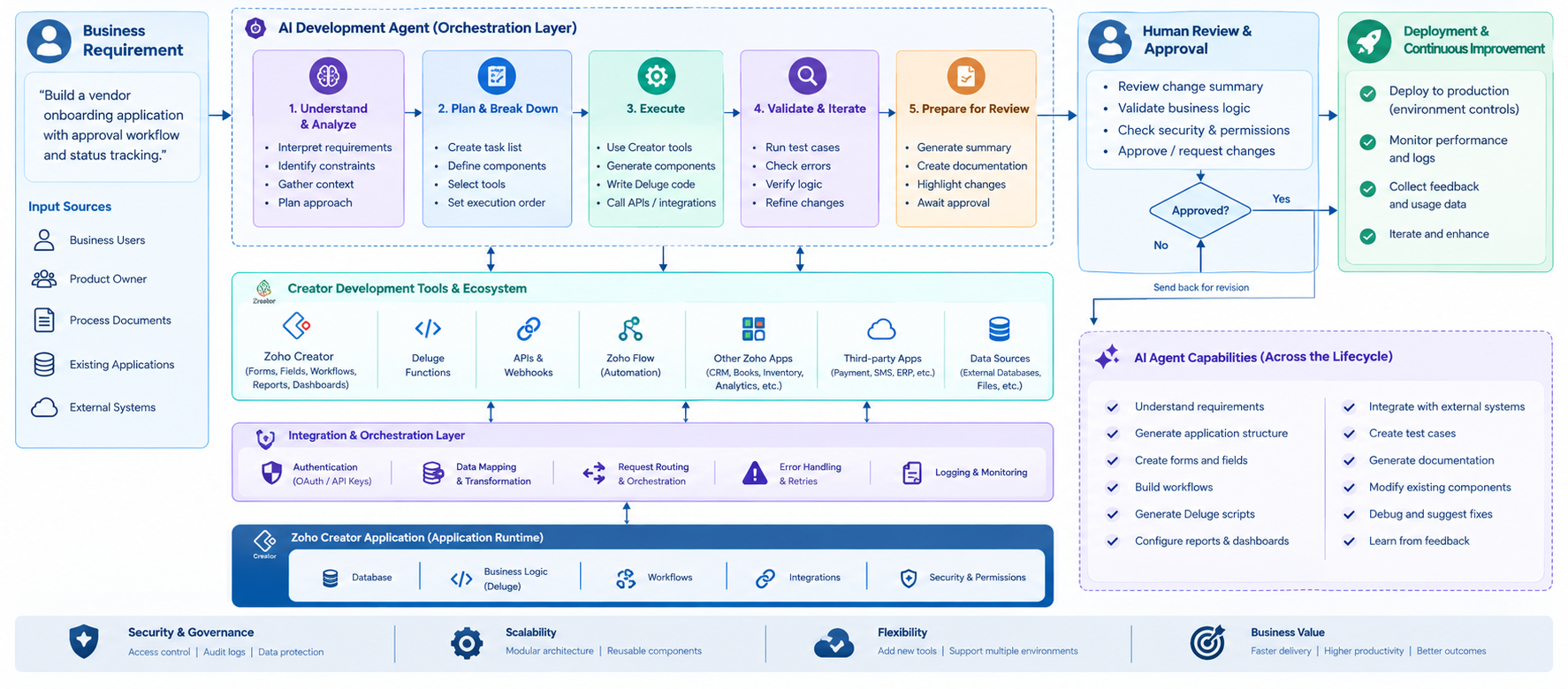
The Autonomous Zoho Creator Development Architecture: Agents, Tools and Human Control
The AI agent acts as an orchestration layer. It interprets the objective, determines which supported actions are required, and interacts with approved tools.
The architecture may include:
- Creator forms
- Reports
- Workflows
- Deluge
- APIs
- Integration services
- External business applications
- Testing utilities
- Documentation systems
The critical component is the validation layer.
An AI-generated change can be technically valid while still being wrong for the business.
For example, an agent might correctly create an automated purchase approval workflow while the resulting process violates the organization’s procurement policy.
Technical correctness and business correctness are not the same thing.
Therefore, the safer model is:
Agent → Execute → Validate → Review → Approve → Deploy
rather than:
Agent → Execute → Production
Example: Building and Managing a Zoho Creator Feature From Natural Language
Consider an enterprise that wants to add a vendor onboarding module to an existing Creator application.
The requirement might be:
“Implement a vendor onboarding module that manages vendor information, collects required documents, supports compliance verification and approval, and provides ongoing status tracking.”
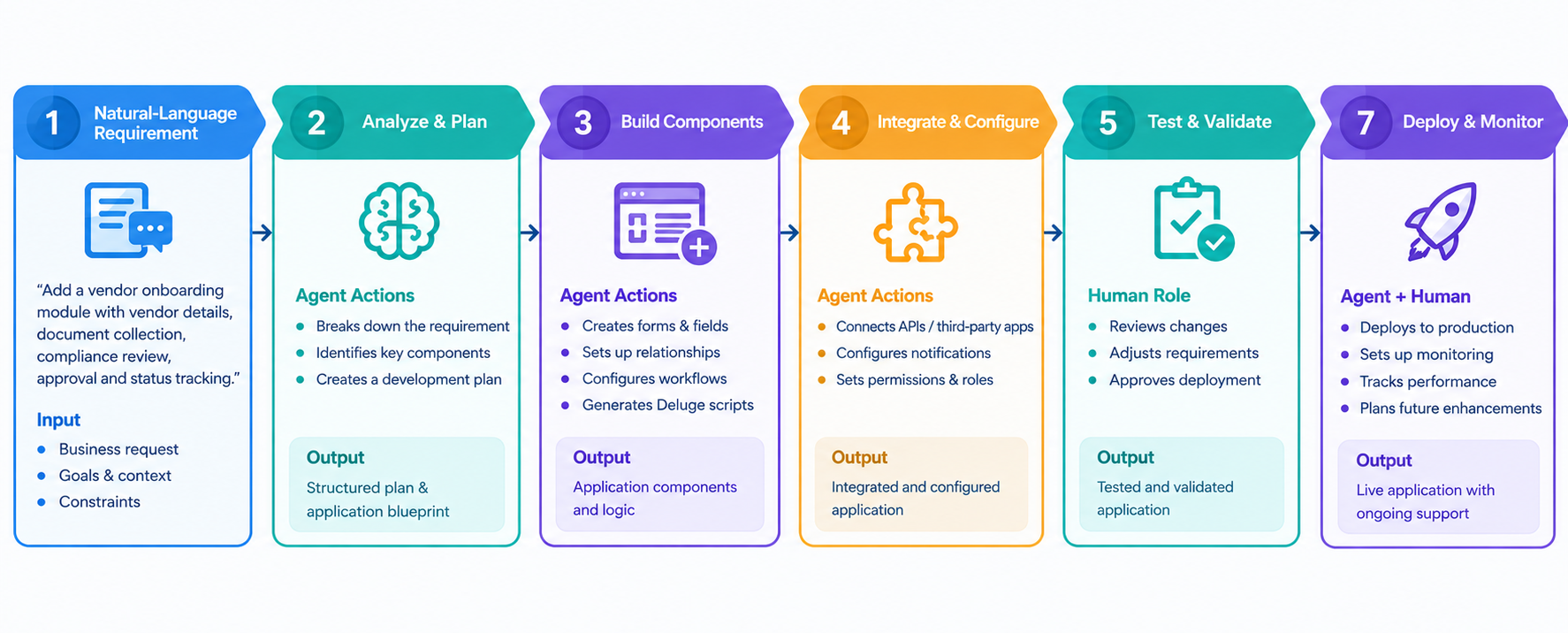
Natural-Language Application Development Flow
An agent could potentially help break the requirement into:
- Vendor master structure
- Required forms and fields
- Document requirements
- Review workflow
- Approval stages
- Status logic
- Notifications
- Reports
- Validation rules
- Supporting Deluge logic
After the initial implementation, the same application may require additional changes.
For example:
“Add a compliance expiry date, notify the compliance team 30 days before expiry, and add a report showing vendors with expired documentation.”
The agent can potentially help interpret the new requirement, identify affected components, propose or perform supported changes, and assist with testing.
The development process therefore becomes:
Requirement → Understand → Plan → Create → Manage → Test → Review → Maintain → Enhance → Deploy
This is where agent-driven development can provide value beyond the initial application build.
Where Human Developers Still Matter
Autonomous development does not eliminate the need for developers.
Instead, it changes where experienced developers can spend their time.
An AI agent can generate or modify a workflow, but it does not automatically understand every organizational consequence of that workflow.
Developers and solution architects still need to determine:
Business Architecture
Does the application actually solve the right business problem?
Data Architecture
Should information be stored in Creator, an existing CRM, ERP, or another system?
Integration Architecture
Should the application use APIs, webhooks, middleware, connectors, or another integration pattern?
Security
Who should access the data, and which operations require elevated permissions?
Performance
Will the design remain effective as users, records, integrations, and transaction volumes increase?
Exception Handling
What happens when an API fails, data is missing, an approval is rejected, or an external system becomes unavailable?
Governance
Which AI-generated changes can be approved through controlled workflows, and which require direct human review?
The developer’s role increasingly becomes:
Architect → Direct → Review → Govern → Optimize
The agent handles suitable execution work; the developer remains accountable for the system’s design, safety, quality, and business outcomes.
Traditional Development vs. Autonomous Low-Code
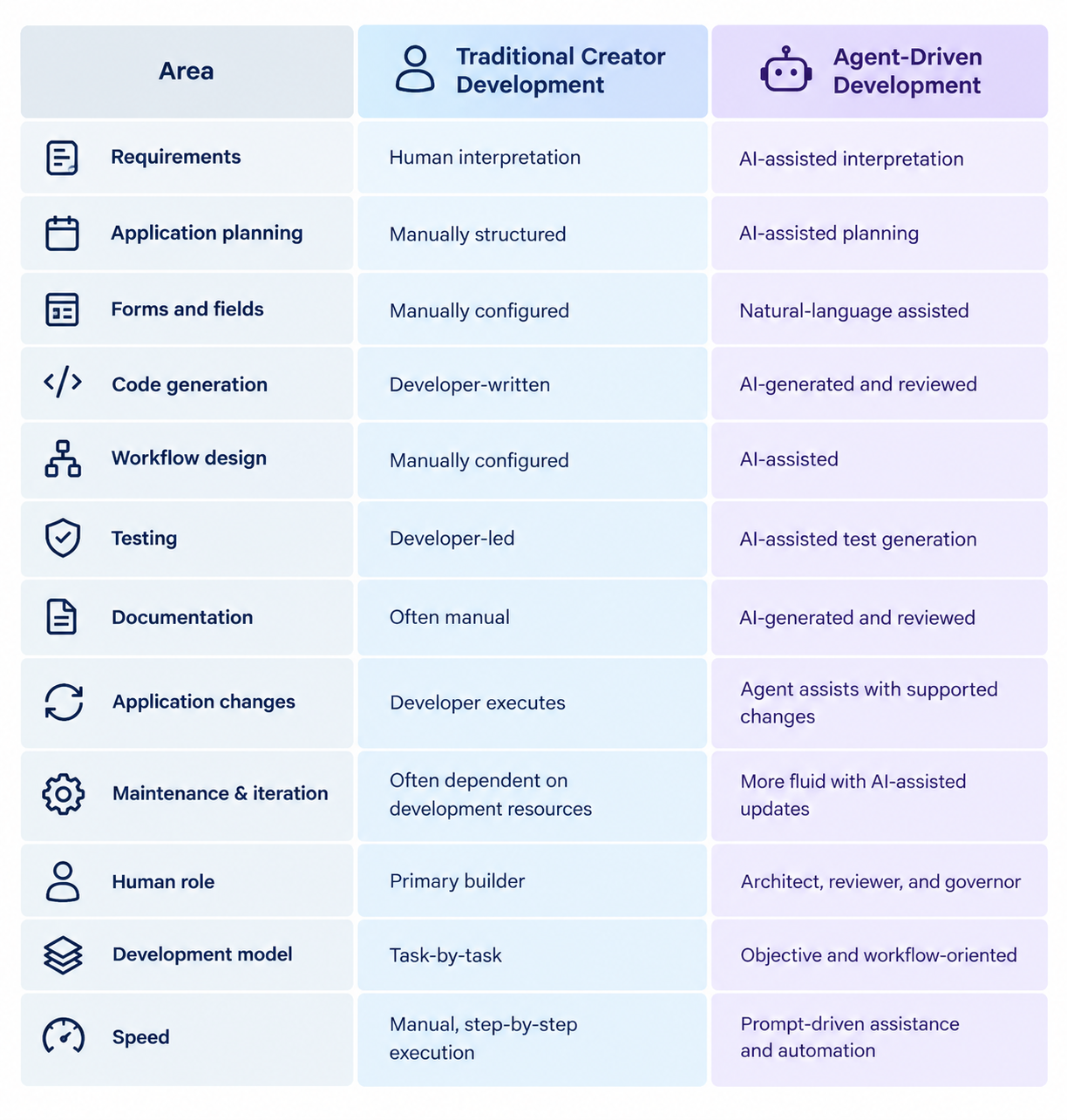
Traditional Development vs. Autonomous Low-Code – A Direct Comparison
Autonomous development does not remove the development lifecycle. It changes how work is distributed across humans, AI systems, and automated validation.
The most effective model is not one where AI performs everything. It is one where repetitive and predictable tasks are delegated while high-impact decisions remain under appropriate human control.
What Business Benefits Can Autonomous Development Deliver?
For enterprises using Zoho Creator, the value of autonomous development should be measured across the entire application lifecycle rather than by the number of lines of code generated.
Faster Application Creation
AI can help transform business requirements into early application structures and supported components more quickly.
Faster Application Management
When existing applications need changes, natural-language instructions can help teams initiate and implement supported modifications more efficiently.
More Efficient Maintenance
AI assistance can reduce repetitive effort involved in documentation, testing, logic updates, troubleshooting, and application enhancements.
Faster Prototyping
Organizations can evaluate application concepts more quickly before committing significant development resources.
More Developer Capacity
Developers can spend more time on:
- Architecture
- Complex integrations
- Security
- Performance
- Business logic
- Data strategy
- Quality assurance
- Governance
Continuous Application Evolution
The biggest long-term opportunity may be the ability to continuously improve business applications rather than treating development, maintenance, and optimization as completely separate activities.
Real-World Business Use Cases
Legacy Application Modernization
Organizations can use Zoho Creator as an application layer around older systems while AI-assisted capabilities help users interact with business data and initiate approved workflows.
Field Service Management
Creator applications can support service requests, technician assignment, work orders, inventory updates, scheduling, and invoicing. AI agents can provide a conversational layer for interacting with these processes.
An agentic development approach combining AI, MCP, Zoho Creator, and the wider Zoho ecosystem can provide developers with a conversational way to interact with application capabilities and development workflows.
Application Maintenance
Enterprises with large Creator applications can use AI assistance to support ongoing modifications, documentation, testing, and enhancement as business requirements change.
Faster Enterprise Application Delivery
Organizations can use AI-assisted development to translate requirements into functional Creator applications while reducing repetitive development work and shortening traditional IT queues.
What Are the Risks and Limitations of Autonomous Development?
Greater autonomy also introduces greater responsibility.
When AI can perform multiple actions quickly, organizations need controls that ensure those actions remain within their intended scope.
Incorrect Requirements
An agent can misunderstand ambiguous requirements.
Provide clear context, constraints, expected outcomes, and acceptance criteria before execution.
Incorrect Code or Logic
Generated Deluge or application logic can appear correct while failing under unusual conditions.
Code review and testing remain necessary.
Security Risks
An agent with excessive permissions could potentially make changes outside its intended scope.
Use least-privilege access and clearly defined permissions.
Integration Errors
AI-generated integration logic may make incorrect assumptions about fields, authentication, endpoints, or external systems.
Integration changes should therefore be validated against actual API documentation and appropriate development environments.
Technical Debt
If AI-generated components are repeatedly added without architectural review, applications can become difficult to maintain.
AI can accelerate development—and without governance, it can also accelerate technical debt.
Data and Privacy
AI architecture must consider what information an agent can access and where that information is processed.
When external LLM providers are involved, organizations should understand their data-handling model and avoid exposing sensitive or regulated information without appropriate controls.
Security and Governance for AI-Driven Creator Development
Enterprise autonomous development should be treated as a governed engineering capability.
Role-Based Access
Agents should receive only the permissions required for their assigned tasks.
Development and Production Separation
AI-generated changes should be tested before reaching production. Development environments provide an important boundary for experimentation and validation.
Human Approval
High-impact changes should require explicit human approval, particularly:
- Database structure changes
- Security changes
- Financial workflows
- Production integrations
- Permission changes
- Customer-facing workflows
Auditability
Organizations should be able to determine:
- Which agent acted
- What instruction it received
- Which tools it used
- What changes it proposed
- What was approved
- When the change occurred
Validation
Automated validation should be combined with human review for important application changes.
A useful principle is:
The more business-critical the action, the stronger the verification requirement.
When Should Enterprises Use Autonomous Development?
Autonomous development is particularly suitable for repetitive and relatively low-risk activities such as:
- Initial application scaffolding
- Standard forms
- Basic workflows
- Repetitive configuration
- Documentation
- Test-case generation
- Deluge first drafts
- Existing application enhancements
- Application maintenance
- Standard internal applications
- Prototyping
Human involvement should increase for:
- Complex enterprise integrations
- Sensitive information
- Financial systems
- Critical business processes
- Complex security models
- Highly customized business rules
- Production infrastructure
- Large-scale data migrations
The objective is not maximum autonomy.
It is appropriate autonomy.
A Practical Adoption Roadmap
Organizations do not need to transform every Creator project at once.
Phase 1: Identify Suitable Tasks
Start with repetitive, low-risk activities where AI assistance can provide measurable value.
Phase 2: Introduce AI-Assisted Development
Use AI for:
- Requirement refinement
- Deluge generation
- Documentation
- Test generation
- Application configuration
Humans remain responsible for execution and approval.
Phase 3: Introduce Agent-Driven Execution
Once teams understand AI behavior, controlled agents can be given access to specific development tools and tasks.
Phase 4: Expand Into Application Management and Maintenance
After establishing confidence, organizations can identify suitable areas where agents can assist with:
- Existing application modifications
- Maintenance
- Troubleshooting
- Documentation
- Testing
- Repetitive enhancements
Phase 5: Establish Governance
Define:
- Permission boundaries
- Approval requirements
- Development environments
- Testing standards
- Audit requirements
- Data-handling policies
Phase 6: Scale and Measure
Create reusable:
- Agent instructions
- Development patterns
- Tool configurations
- Testing procedures
- Governance standards
Then track:
- Development cycle time
- Rework
- Defect rates
- Development effort
- Deployment frequency
- Requirement-to-release time
- AI usage
- AI development costs
This turns autonomous development from an AI experiment into a measurable engineering capability.
What Industry Research Says About Agentic Development
The shift toward autonomous development is broader than low-code platforms.
McKinsey research on scaling agentic product development highlights the importance of redesigning development processes, redefining roles, establishing verification mechanisms, and managing organizational change rather than simply adding another AI tool.
This is relevant to Zoho Creator because AI delivers greater value when the development and application lifecycle itself evolves, not simply when developers gain access to another assistant.
The resulting model can move from:
Developer writes → Developer tests → Developer deploys → Developer maintains
to:
Human defines objective → Agent plans → Agent creates or modifies → Automated validation → Human reviews → Controlled deployment → Agent assists with ongoing maintenance and enhancement
How OfficeHub Tech Helps With AI-Powered Zoho Creator Development
Adopting AI-driven development requires more than enabling an AI feature. Enterprises need application architecture, business-process understanding, integration strategy, security controls, and development governance.
OfficeHub Tech works with enterprises on AI-powered Zoho Creator applications and related business-process solutions, including:
- Business-process analysis
- Zoho Creator application architecture and development
- AI-assisted application and Deluge development
- Workflow automation
- API and third-party integration
- Data migration and application modernization
- AI agent implementation
- Mobile and portal development
- Testing, deployment, and ongoing optimization
The objective is not to make every development task autonomous. It is to identify where AI can safely reduce repetitive work while experienced developers retain control over architecture, security, integrations, and business-critical decisions.
For enterprises evaluating AI-powered Zoho Creator Development and Agentic Solutions in the USA, KSA, UAE and India, OfficeHub Tech can help translate business requirements into practical, secure, and scalable applications.
Have an AI-powered Zoho Creator project in mind? Talk to OfficeHub Tech experts to evaluate your requirements, identify suitable automation opportunities, and plan an implementation aligned with your business processes.
Explore Zoho Creator for AI-Powered Development
Start building smarter business applications with Zoho Creator. Create, automate, and manage custom applications while leveraging AI-powered capabilities to accelerate development and streamline business processes.
Whether you’re building a new application, modernizing an existing solution, or exploring AI agents for Zoho Creator development, Zoho Creator provides a flexible platform to turn business requirements into scalable applications.
👉 Get Started with Zoho Creator:
AI Agent Readiness Checklist for Zoho Creator
Before introducing autonomous development into an enterprise project, evaluate:
- Is the business objective clearly defined?
- Are agent permissions explicitly scoped?
- Is there a development environment for testing?
- Are sensitive data and privacy requirements documented?
- Are API and integration permissions controlled?
- Are human approval points defined?
- Are test cases and acceptance criteria available?
- Is audit logging enabled where required?
- Is there a rollback or recovery strategy?
- Are production-access boundaries clearly defined?
If these controls are not established, increasing agent autonomy may create more risk than value.
Conclusion: From AI-Assisted Development to Autonomous Application Lifecycle Management
AI is moving beyond simple code generation toward systems that can understand objectives, plan tasks, use approved tools, create application components, modify existing functionality, support testing, maintain applications, and assist with continuous improvement.
For AI agents in Zoho Creator development, this evolution creates opportunities across the complete application lifecycle:
Create → Manage → Maintain → Enhance → Optimize
An agent can help organizations move faster during initial application development while also supporting the ongoing changes that business applications require after deployment.
But autonomous development does not remove the need for experienced developers.
Instead, it changes their role toward architecture, orchestration, validation, security, governance, and business problem-solving.
The key question is not:
“How much of the development process can be delegated to AI?”
It is:
“Which activities can AI agents perform consistently across the application lifecycle while people maintain control over architecture, risk, security, and business outcomes?”
For organizations using Zoho Creator, the future is likely to be increasingly human-directed, agent-assisted, and progressively autonomous—from creating applications to managing, maintaining, and continuously improving them.