##Quick Answer
Agentic AI is taking AI in AV businesses beyond chatbots, content generation, and simple automation. AI agents can interpret business objectives, retrieve information from connected systems, reason over data, use authorized tools, execute multi-step actions, and verify outcomes.
For AV System Integrators, this enables AI to work with existing systems such as CRM, D-Tools, XTEN-AV, project management, inventory, field service, finance, and custom applications. The result is AI-assisted, connected business operations. However, successful Agentic AI implementation requires more than an AI interface. It depends on secure integrations, defined permissions, reliable data, practical use cases, and well-designed workflows.
##Key Takeaways
- Agentic AI can reason, plan, use tools, and execute multi-step business workflows.
- AV businesses can apply agents across sales, proposals, projects, procurement, field service, inventory, and finance.
- APIs, MCP, integration layers, data access, and workflow orchestration form the technical foundation.
- Agentic AI can work with existing AV software rather than requiring businesses to replace their technology stack.
- Human approval, permissions, security, auditability, and governance remain essential.
- The strongest business cases focus on measurable operational problems rather than AI experimentation for its own sake.
- OfficeHub Tech can customize Agentic AI around AV-specific systems and workflows, including Zoho Creator and D-Tools environments.
Why AV Business Operations Are Moving Beyond Traditional Automation
AV System Integrators manage projects that rarely stay within one application. A typical project may involve CRM data, system design, proposals, equipment specifications, purchasing, inventory, project schedules, field installation, service records, and financial information.
The challenge is not simply having multiple software tools. It is the coordination between software, people, data, and decisions.
Traditional automation connects predefined events. For example, when a project reaches a specific stage, a notification can be sent or a record updated. This is valuable, but it depends on rules defined in advance.
AI assistants go further by helping employees search, summarize, write, and analyze information. Agentic AI adds another layer: the ability to pursue a defined objective through multiple steps using authorized tools.
For businesses exploring AV business automation solutions, this distinction matters because many operational challenges involve multiple actions. A project manager may need to identify delayed tasks, check equipment availability, review outstanding issues, and notify the right people before deciding what happens next.
Agentic AI is designed for this type of goal-oriented interaction.
The opportunity is not simply to add AI to an AV business, but to create an intelligent operating layer that works across the systems already supporting the business.
Agentic AI Is Becoming a New Business Orchestration Layer
The shift toward Agentic AI is already influencing how enterprises think about their technology architecture. Accenture’s December 2025 research, The New Rules of Platform Strategy in the Age of Agentic AI, found that 94% of business leaders expect their platform strategies to change, while 57% believe their platforms need reinvention as Agentic AI becomes more prominent.
Accenture identifies Agentic AI as an emerging orchestration layer across business platforms, capable of interacting with multiple systems and coordinating work dynamically. Organizations that align their AI, platform, and business strategies achieved, on average, 2.2× revenue growth and a 37% EBITDA lift.
For AV System Integrators, this is relevant because operations already span CRM, proposals, AV design, project management, inventory, field service, and finance. Rather than adding another standalone application, Agentic AI can serve as an intelligent layer across existing systems, making the AV technology ecosystem more connected, intelligent, and capable of coordinated execution.
What Is Agentic AI, and How Does It Differ From Conventional AI?
Agentic AI refers to AI systems designed to pursue objectives by reasoning through tasks, planning actions, interacting with tools, and adapting based on results.
A conventional AI assistant might answer:
“What is the status of Project 245?”
An agentic system could potentially handle a broader instruction:
“Examine Project 245, flag delayed tasks, verify equipment availability, outline potential risks, and recommend the next steps.”
The difference is the execution model.
| Traditional AI | Agentic AI |
| Generates an answer | Works toward an objective |
| Primarily conversational | Action-oriented |
| Often one-step | Can coordinate multiple steps |
| User performs the next action | Agent can perform authorized actions |
| Limited tool interaction | Uses connected business tools |
| Reactive | Can be goal-driven |
A practical agentic workflow can be represented as:
Understand → Reason → Plan → Use Tools → Execute → Verify → Escalate
This does not mean giving an AI unrestricted access to every business system. Enterprise Agentic AI should operate within defined permissions, business rules, authentication controls, and approval requirements.
That distinction is particularly important for AV businesses, where an AI agent might access project data but should not automatically approve a high-value purchase, alter customer pricing, or modify critical financial records without appropriate authorization.
From AI Assistant to AI Agent: What Changes Inside an AV Business?
The biggest change is the movement from information assistance to operational assistance.
Consider a project manager who asks an AI assistant to summarize a project. The assistant may produce a useful summary, but the project manager still has to open multiple applications, verify information, identify problems, contact team members, and update records.
An agentic workflow can potentially coordinate those steps.
For example:
Business objective:
“Prepare tomorrow’s installation team for Project A.”
The agent could be designed to:
- Retrieve project details.
- Check outstanding tasks.
- Review installation requirements.
- Check relevant equipment availability.
- Identify missing items.
- Review recent service or project notes.
- Prepare a field briefing.
- Notify responsible employees about exceptions.
- Update approved project records.
The agent does not need to replace the project-management platform, inventory system, or CRM. Instead, it operates across them through authorized integrations.
This changes the role of software from something employees constantly navigate to something that can increasingly coordinate work around business objectives.
For AV System Integrators, that distinction can be especially valuable because project execution often depends on information distributed across departments and applications.
Where Agentic AI Fits Into the AV Project Lifecycle
Agentic AI can potentially support almost every stage of an AV project’s lifecycle, provided the underlying systems expose reliable data and appropriate interfaces.
Sales: Agents can help qualify leads, retrieve customer history, summarize opportunities, and prepare follow-up information.
Proposal and Design: An agent can assist teams in retrieving project requirements, customer information, previous proposals, or relevant documentation from connected systems.
Project Management: Project agents can monitor milestones, identify exceptions, summarize progress, and prepare status reports.
Procurement: Agents can check equipment requirements against inventory information, identify shortages, and initiate approved purchasing workflows.
Field Operations: A field-service agent can provide technicians with project context, installation information, service history, and outstanding tasks.
Service: Agents can classify service requests, retrieve relevant customer and equipment information, and route issues according to predefined rules.
Finance: Agents can help identify billing readiness, missing documentation, or project information required before invoicing.
The common principle is that the agent should coordinate information and actions across the workflow, rather than becoming another isolated application.
High-Value Agentic AI Use Cases for AV System Integrators
The most valuable Agentic AI implementations are likely to begin with repetitive, information-heavy workflows where employees spend significant time coordinating systems.
Project Management Agent
A project agent can monitor milestones, identify overdue activities, summarize project health, and escalate exceptions.
Instead of manually reviewing multiple task lists, a project manager can ask for a project risk summary and receive information based on connected project data.
Field Service Agent
A field technician may need customer details, equipment information, previous service records, installation notes, and open tasks.
An agent can bring this context together before the technician begins work, reducing time spent searching through applications.
Inventory Agent
An inventory agent can check whether equipment required for upcoming projects is available, identify potential shortages, and notify procurement teams when approved conditions are met.
Customer Service Agent
Agents can retrieve customer and project context, classify incoming requests, prepare responses, and route complex issues to employees.
Management Intelligence Agent
Executives can ask questions such as:
“Which active projects have the highest operational risk?”
The agent can potentially gather information from project management, inventory, finance, and CRM systems and produce a consolidated response.
The value comes from connecting intelligence to operational context, not simply generating better text.
The Technical Architecture Behind Agentic AV Operations
A production-grade Agentic AI solution requires considerably more than an LLM.
A simplified architecture can look like:
User / Business Goal
↓
Agentic AI / LLM Layer
↓
Reasoning & Planning
↓
MCP / API / Integration Layer
↓
Business Applications
↓
CRM | D-Tools | Projects | Inventory | Finance | Field Systems
Each layer has a specific responsibility.
- LLM: Provides language understanding and reasoning capabilities.
- Agent Orchestrator: Determines the sequence of actions required to accomplish a task.
- MCP / APIs: Provide controlled access to business tools and data.
- Integration Layer: Handles transformations, authentication, routing, synchronization, and workflow coordination.
- Business Applications: Remain the systems where operational records actually reside.
- Security Layer: Controls identity, permissions, credentials, access, logging, and audit trails.
This architecture allows businesses to introduce intelligence around existing systems instead of rebuilding their entire technology environment.
The quality of the agent therefore depends heavily on the quality of its connected data, APIs, permissions, and business rules—not only on the intelligence of the underlying model.
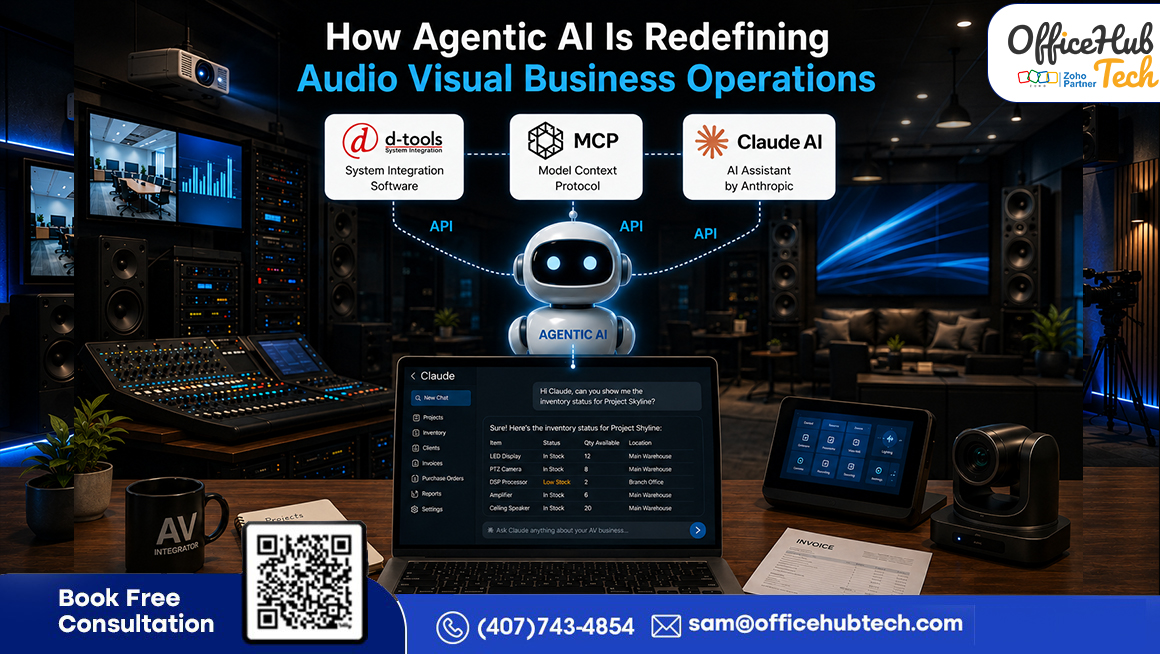
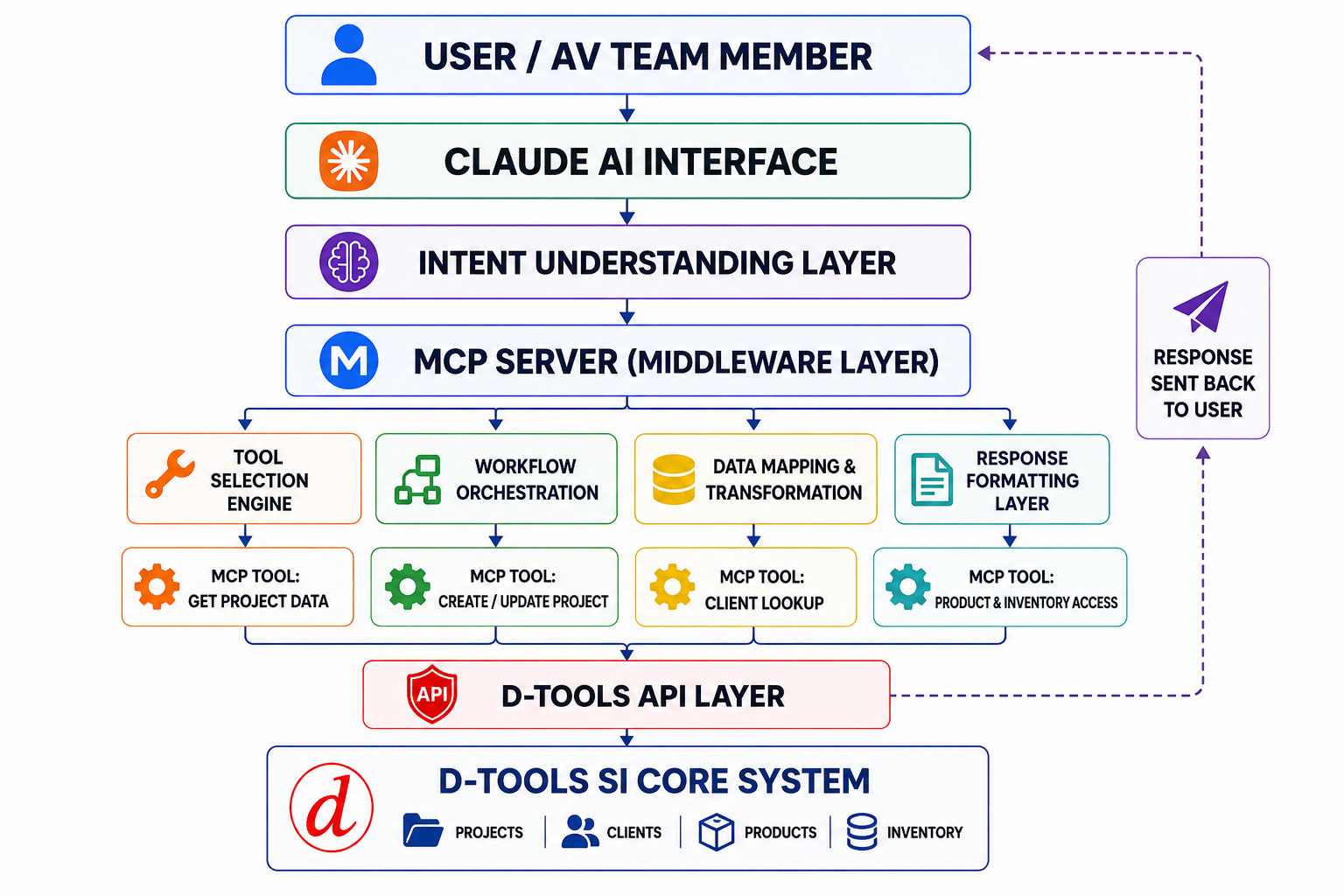
A practical example of this architecture can be seen in an AV environment where Claude AI works through MCP with D-Tools and connected operational data. The Agentic AI layer can interpret a business request, access authorized information, and return a context-aware response without requiring users to manually navigate multiple systems.
How MCP Enables AI Agents to Interact With AV Business Software
Model Context Protocol, or MCP, provides a structured way for AI applications to interact with external tools and resources.
For an AV business, the practical concept is straightforward:
Business Request → Claude AI → MCP → Authorized Tool/API → D-Tools & Business Data → Result → Claude AI
For example, a user could ask Claude to retrieve project or inventory information from connected AV systems. MCP provides the tool-access mechanism through which the agent can interact with the authorized business capabilities and return the relevant information.
Suppose a project manager asks:
“Check whether all equipment required for tomorrow’s installation is available.”
In this scenario, Claude interprets the request, MCP provides access to the required tool, and the connected AV system supplies the relevant inventory information. The agent can then return the result in a conversational format.
The agent needs more than language understanding. It needs access to project requirements and inventory information.
An MCP-enabled architecture can expose appropriate tools to the agent while maintaining controlled boundaries around what the agent can access and execute.
MCP is not a replacement for APIs. APIs remain fundamental interfaces for business applications. MCP can provide an AI-oriented tool-access layer through which an agent discovers and invokes permitted capabilities.
This distinction is important when designing enterprise architectures.
An AV organization may already have APIs connecting D-Tools, CRM, inventory, project management, or custom applications. Agentic AI can sit above these integrations and use approved capabilities to coordinate workflows.
The objective is not to make the AI “know everything.” It is to give the AI controlled access to the right information and tools at the right time.
That architecture is what transforms an AI model into something capable of participating in actual business operations.
Agentic AI + Multi-Software Integration: Connecting the AV Technology Stack
Most AV businesses do not operate from a single application.
They may use D-Tools for certain workflows, XTEN-AV for design and proposals, a CRM for sales, project-management software for execution, inventory systems for equipment, accounting software for finance, and field-management tools for installation and service.
This creates a significant opportunity for Agentic AI.
Instead of asking employees to manually coordinate these systems, an intelligent orchestration layer can potentially interact with multiple applications through APIs, connectors, middleware, MCP servers, or workflow automation platforms.
For example:
CRM Opportunity → Proposal Data → Project Record → Equipment Requirements → Inventory → Field Schedule
An agent could use this connected information to answer questions or initiate permitted actions across the workflow.
This is where Agentic AI becomes more valuable than an isolated chatbot.
The agent becomes an intelligence and orchestration layer, while the existing applications remain responsible for their specialized functions.
However, integration quality matters. Poorly structured data, inconsistent identifiers, missing APIs, duplicate records, or weak authentication can limit what an agent can reliably accomplish.
Therefore, Agentic AI should be treated as part of a broader business integration architecture, not as a standalone AI feature.
How Agentic AI Changes AV Business Workflows
Before Agentic AI: Manual and Rule-Based Workflows:
Before Agentic AI, complex AV workflows typically depend on human coordination:
- Manual information gathering: Employees open multiple applications to search for project, customer, inventory, scheduling, or service information.
- Data transfer between systems: Teams export, copy, compare, and re-enter information across different platforms.
- Cross-team coordination: Project managers often use email or messaging tools to communicate information gathered from multiple systems.
- Repetitive decision-making: Employees manually review data and determine the next action based on available information.
- Rule-based automation: Traditional automation can handle predictable conditions, such as sending a notification when a project reaches “Ready for Installation.”
- Limited contextual decision-making: More complex questions, such as determining whether a project is genuinely ready based on tasks, equipment, documentation, scheduling, and outstanding issues, still require human review.
- Cumulative operational effort: Individual steps may seem simple, but completing dozens or hundreds of them each week creates significant administrative workload.
After Agentic AI: Intelligent and Proactive Workflows:
Agentic AI can shift AV operations from isolated automation rules toward goal-oriented workflows:
- Understand the business goal: The agent receives an operational objective rather than simply executing a fixed rule.
- Retrieve relevant context: It can gather information from connected systems based on the task.
- Reason across information: The agent can evaluate multiple conditions before determining the appropriate action.
- Coordinate actions: It can initiate workflows or route information to the appropriate employee.
- Verify outcomes: The workflow can check whether the required conditions or actions have been completed.
- Identify exceptions: Issues such as unfinished tasks, missing equipment, outstanding approvals, incomplete documentation, scheduling conflicts, or open issues can be highlighted.
- Support proactive operations: For field service, an agent can assemble relevant project and service context before a technician needs to search for it.
- Keep humans in control: Human expertise remains essential for complex AV projects, while Agentic AI reduces manual searching, copying, checking, coordinating, and reporting.
The key shift is not more automation, but smarter coordination of information and actions, helping AV teams focus on business and project priorities instead of administrative tasks.
Security, Governance and Human Oversight for Agentic AI in AV
Agentic AI introduces a fundamentally different security consideration because the system may be able to take actions, not simply generate information.
An enterprise agent should therefore operate under explicit controls.
Identity and Authentication: Every agent needs an identifiable execution identity and secure credentials.
Authorization: Access should be limited to the applications, records, and actions required for the assigned workflow.
Least Privilege: A project-status agent may need read access to project information but should not automatically receive permission to modify financial records.
Human Approval: Sensitive actions such as purchasing equipment, changing pricing, approving payments, or modifying contractual information should generally include appropriate approval controls.
Auditability: Organizations should be able to determine:
- What the user requested
- What information the agent accessed
- Which tools it invoked
- What actions it performed
- What result was returned
Exception Handling: Agents also need defined behavior when information is missing, systems fail, or results conflict.
For AV businesses, the better approach is controlled autonomy—letting AI agents handle defined tasks while humans retain control over critical decisions, ensuring efficiency, security, and accountability.
What Agentic AI Should—and Should Not—Automate in an AV Business
Not every AV workflow should become autonomous.
The strongest candidates are usually processes that are repetitive, data-intensive, and relatively well-defined.
Good Candidates
- Project-status monitoring
- Information retrieval
- Report preparation
- Task creation
- Notifications
- Data synchronization
- Exception detection
- Routine workflow routing
- Service-ticket classification
- Inventory checks
These processes can provide measurable productivity benefits while maintaining manageable risk.
Require Greater Control
More sensitive activities include:
- Financial transactions
- Customer pricing changes
- Contract modifications
- High-value purchasing
- Critical project changes
- Record deletion
- Payroll or financial approvals
These may benefit from AI assistance but should incorporate stronger permissions and human approval.
A useful principle for AV businesses is:
Automate the repetitive. Assist the complex. Govern the critical.
This approach enables incremental adoption: start with one workflow, define its boundaries, measure performance, and expand once reliability is proven.
How AV Businesses Can Start Their Agentic AI Journey
Agentic AI adoption should begin with a business problem, not a technology demonstration.
Step 1: Identify High-Friction Processes
Look for workflows where employees spend significant time searching, copying, validating, or coordinating information.
Step 2: Map Existing Systems
Document where customer, project, inventory, financial, and field information resides.
Step 3: Assess APIs and Connectors
Determine which systems can expose reliable data and actions.
Step 4: Select One Controlled Use Case
Start with a workflow where the business outcome can be measured.
Step 5: Define Permissions
Specify exactly what the agent can read, create, update, or trigger.
Step 6: Build the Integration Architecture
Connect the required applications through APIs, MCP, middleware, or workflow platforms.
Step 7: Test With Human Oversight
Validate outputs, tool calls, exceptions, and security controls.
Step 8: Measure Results
Track time saved, response time, manual tasks removed, errors reduced, and employee adoption.
Step 9: Scale
Once the first agent is reliable, expand into adjacent workflows.
This approach reduces implementation risk while giving the organization practical experience with agent governance and AI-enabled operations.
Measuring the Business ROI of Agentic AI
The business case for Agentic AI should be measured through operational outcomes, not simply the number of AI workflows deployed. For AV System Integrators, value comes from reducing manual coordination, accelerating project execution, improving accuracy, and increasing team capacity.
Key metrics include:
- Productivity: Employee hours saved through reduced data entry, searches, reporting, and coordination.
- Operational Speed: Faster responses to customer, project, procurement, and field-service needs.
- Accuracy: Fewer duplicate entries, missed information, and workflow errors.
- Project Execution: Earlier identification of delays, bottlenecks, and missing requirements.
- Field Productivity: More technician time spent on installation and service rather than finding information.
- Management Visibility: Faster access to accurate operational data without relying on manually prepared reports.
ROI depends on workflow complexity, transaction volume, system connectivity, data quality, implementation scope, and employee adoption. Businesses should establish baseline measurements before deployment and compare them with post-implementation results.
The goal is not simply to introduce AI, but to achieve measurable improvements in productivity, speed, accuracy, visibility, and operational capacity. The strongest Agentic AI strategy connects every agent to a specific business objective and continuously measures its performance.
The Future: From Connected AV Software to Agentic AV Operations
Enterprise software is evolving through a clear progression:
Disconnected Applications → Integrated Systems → Automated Workflows → AI-Assisted Operations → Agentic Operations
For AV businesses, the next stage could involve multiple specialized AI agents working across connected business functions. Instead of relying on one general-purpose assistant, organizations could deploy purpose-built agents for specific responsibilities.
A project-management agent could monitor progress, identify delays, and flag risks. An inventory agent could check equipment availability and potential shortages. A field-service agent could prepare technicians with relevant project and service information, while a customer-service agent could handle routine requests and retrieve customer context. A management intelligence agent could consolidate data from multiple systems to provide decision-ready insights.
These agents could work together through governed workflows, creating an agentic AV operating model where employees focus on objectives, exceptions, and critical decisions while AI manages increasingly complex coordination.
The key advantage will not simply be access to an AI model. AV businesses will need the right data, integration, workflow, security, and governance foundation to support reliable AI operations.
In this model, Agentic AI becomes more than an assistant—it becomes an intelligent operational layer connecting people, processes, and business systems.
Why Choose OfficeHub Tech for Agentic AI Development?
Agentic AI becomes significantly more valuable when it can work with the software, data, and business processes an organization already uses. OfficeHub Tech approaches Agentic AI from an AV business workflow, integration, low-code, and AI perspective, rather than treating it as a standalone chatbot.
For AV businesses already using AV proposal and business management tools, OfficeHub Tech can design Agentic AI solutions around existing project and operational data, enabling teams to interact with business information through natural-language requests and controlled AI-driven workflows.
One example is the D-Tools Agentic AI solution, which demonstrates how Claude AI and MCP can connect with D-Tools to support AI-driven interactions with project and operational data.
👉 See how Claude AI and MCP can turn a natural-language request into actions inside D-Tools—from creating projects and finding products to running supported workflows.
Ready to explore D-Tools Agentic AI in action?
Explore the “D-Tools MCP” Project — Free & Open Source
Custom Agentic AI for Existing AV Tools
Every AV System Integrator has a different software environment. Rather than requiring businesses to replace their existing applications, OfficeHub Tech can design custom Agentic AI solutions around the tools and workflows an AV business already uses, where suitable APIs, connectors, or integration mechanisms are available.
Potential integration environments include:
- D-Tools
- XTEN-AV
- Portal.io
- WeQuote
- Jetbuilt
- ProjX360
- Simply Reliable
- iPoint Control
- Simpro
- Specifi.io
- Other API-enabled business software
The technical foundation can include MCP servers, LLMs, APIs, n8n, Make, workflow orchestration, connectors, and custom applications, depending on the requirements of the business and the systems being connected.
This approach enables OfficeHub Tech to build Agentic AI around an AV company’s existing technology ecosystem, helping connect fragmented workflows and make business operations more intelligent without necessarily replacing the applications teams already rely on.
If you are exploring how Agentic AI can work with your existing AV software and workflows, connect with OfficeHub Tech to discuss a practical, customized approach for your business.
Conclusion: Building the Next Generation of AV Business Operations
Agentic AI is giving AV System Integrators a new way to improve how people, software, data, and workflows work together. Instead of relying only on predefined automation or AI-generated responses, businesses can use intelligent agents to retrieve information, analyze situations, coordinate tasks, and execute authorized actions across connected systems.
From sales and project management to procurement, inventory, field service, and customer support, the potential value comes from reducing manual coordination and making critical information available when teams need it.
However, effective implementation involves more than simply integrating an AI model. Connected systems, reliable APIs, secure access, clear workflows, and appropriate human oversight are essential for building dependable agentic operations.
For AV businesses looking to move toward this model, Agentic AI solutions for Audio Visual System Integrators can provide a practical foundation for connecting existing software and turning fragmented workflows into more intelligent, responsive business operations.