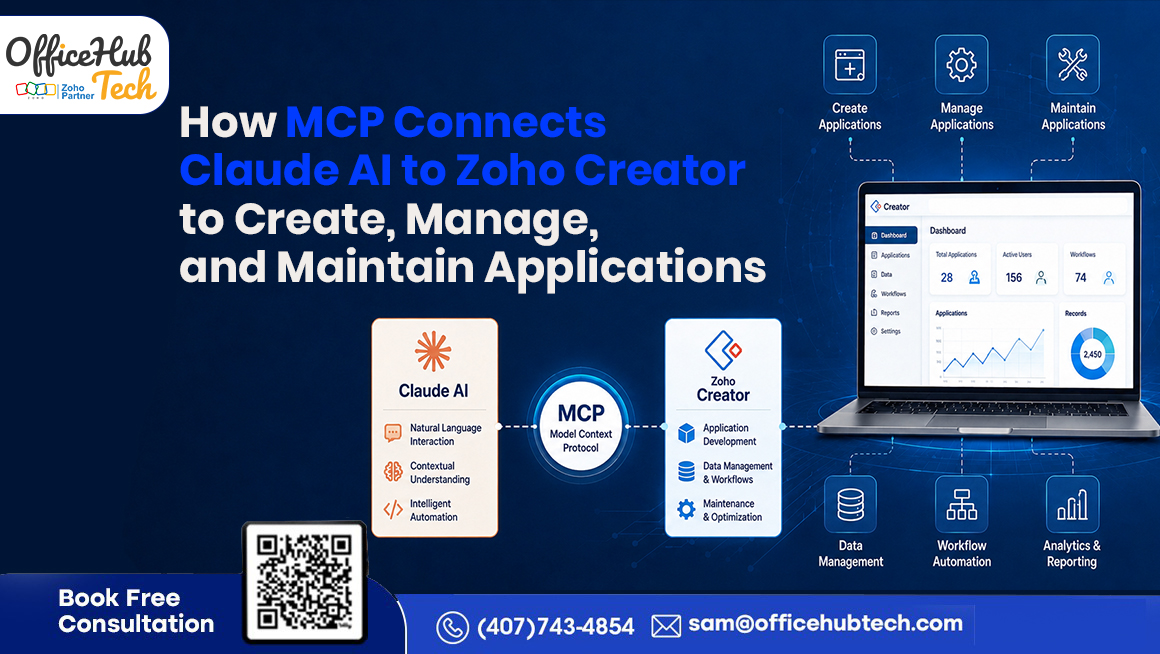
Quick Answer: How Does MCP Connect Claude AI to Zoho Creator?
Model Context Protocol (MCP) provides a standardized connection layer that allows AI applications such as Claude to interact with external systems through defined tools and actions. When connected to Zoho Creator through an appropriately configured MCP implementation, Claude can interpret natural-language requirements and invoke supported operations to create, manage, modify, and maintain business applications.
The workflow can be summarized as:
Business Requirement → Claude AI → MCP → MCP Server → Zoho Creator
Claude interprets the business requirement, MCP provides the standardized connection mechanism, the MCP Server exposes and executes permitted tools, and Zoho Creator provides the application environment where supported operations are performed.
This enables businesses to use AI-assisted workflows across the application lifecycle: Create → Manage → Maintain → Improve. Human validation, permissions, security controls, testing, and business logic review remain essential.
##Key Takeaways
- MCP provides a standardized way for AI applications to interact with external tools and systems.
- Claude AI interprets natural-language business requirements and determines the actions needed.
- MCP Server exposes and executes the permitted tools and operations.
- Zoho Creator provides the application environment where forms, fields, reports, workflows, records, and other components are managed.
- Businesses can use this architecture to create new applications, manage existing applications, and maintain and improve applications as requirements evolve.
- MCP does not eliminate human validation, permissions, security controls, testing, or business logic review.
- The approach can support applications across customer management, project management, inventory, service management, approvals, and other business processes.
What Happens When Claude AI Connects to Zoho Creator Through MCP?
The combination of Claude AI, MCP, and Zoho Creator creates a different way to interact with business applications.
Instead of navigating configuration screens for every change or translating every business requirement into technical instructions, a user can describe the desired outcome in natural language.
For example:
“Create a project management application with projects, tasks, deadlines, priorities, and status tracking.”
Claude can interpret the requirement and identify the application components needed. Through the available MCP tools, the request can then be translated into supported actions within the connected Zoho Creator environment.
The important distinction is between understanding a requirement and executing an action.
Claude provides the AI reasoning and intent interpretation. MCP provides the standardized mechanism for connecting the AI client with available tools. The MCP Server exposes the permitted operations and handles their execution.
Conceptually:
Business Requirement → Claude AI → MCP → MCP Server → Zoho Creator
The result is an interaction model in which AI can help connect business intent with application operations rather than limiting the interaction to explanations, recommendations, or generated code.
MCP Adoption Shows Why AI-to-Tool Connectivity Matters
MCP has moved beyond being a niche developer concept. In December 2025, Anthropic announced that it was donating the Model Context Protocol to the Agentic AI Foundation, supported by organizations including OpenAI, Google, Microsoft, AWS, Cloudflare, and Bloomberg. Anthropic reported that MCP had surpassed 10,000 active public MCP servers, while official MCP SDKs had reached more than 97 million monthly downloads across Python and TypeScript. MCP had also been adopted by products including ChatGPT, Gemini, Microsoft Copilot, Cursor, and Visual Studio Code.
These figures matter for businesses evaluating MCP because they indicate that the protocol is developing into a broader ecosystem for connecting AI systems with external tools and applications.
For Zoho Creator development, the underlying concept is particularly relevant: an AI model becomes more useful when it can interact with business systems instead of operating only as a conversational interface.
What Is MCP and Why Does Claude Need It to Work With Zoho Creator?
Model Context Protocol (MCP) is an open protocol designed to connect AI applications with external data sources and tools. The current MCP specification defines a standardized architecture involving hosts, clients, and servers, with servers able to expose capabilities such as resources, prompts, and tools.
Tools are particularly important for application interaction because they represent executable functions that an AI model can invoke.
Consider a requirement such as:
“Add an approval workflow to the employee expense application.”
Claude can understand what the user wants, but understanding the request does not automatically change the application.
The AI needs access to appropriate tools and permissions that allow the requested action to be performed.
This is where MCP becomes important.
The relationship can be understood as:
Claude / AI Client → MCP → MCP Server → Zoho Creator
MCP is the protocol that defines how the AI application can interact with available capabilities. The MCP Server exposes the tools and determines how supported operations are executed.
The current MCP specification also emphasizes user consent, authorization, tool safety, and human control when AI systems invoke tools.
How Claude AI Understands a Zoho Creator Requirement
Claude’s role begins with intent interpretation.
Consider a requirement such as:
” Develop a customer onboarding app with customer details, document submission, approval tracking, and automated notifications.”
Claude can identify:
- Required entities
- Fields
- Application components
- Workflow requirements
- Business process steps
- Desired outcomes
The process can be viewed as:
Natural-Language Requirement → Intent → Required Actions → Tool Selection → Execution
This is different from asking:
“How do I create a customer onboarding application in Zoho Creator?”
The second request primarily asks the AI to provide information.
The first describes an intended business outcome that can potentially be translated into actions when the required tools are available and permitted.
However, AI does not eliminate the need for clear requirements. The quality of the result depends on the clarity of the business requirement, the capabilities exposed through the MCP implementation, and the accuracy of the available tools.
How the MCP Server Converts Intent Into Zoho Creator Actions
Once Claude determines what needs to happen, MCP provides the mechanism through which the AI can interact with supported operations.
MCP tools can have defined names, descriptions, and input schemas that help the AI understand what each operation does and what information it requires.
The current MCP specification describes tools as executable functions that allow AI models to interact with external systems. It also recommends appropriate human oversight for tool invocation.
Depending on the implementation, available operations may include:
- Creating applications
- Creating forms
- Adding fields
- Managing records
- Creating or modifying reports
- Configuring workflows
- Editing existing applications
- Updating supported application components
Standard Zoho MCP vs OfficeHub Tech Implementation
It is important to distinguish standard Zoho MCP capabilities from the OfficeHub Tech implementation described in this article.
Zoho’s MCP capabilities provide an integration layer that allows supported AI clients to interact with authorized Zoho applications and services through exposed tools. The specific capabilities available depend on the tools, permissions, and MCP Server configuration.
The application-development capabilities described in this article are specific to the OfficeHub Tech Zoho Developer AI Agent implementation.
In this implementation, the MCP Server acts as the execution layer between Claude and Zoho Creator and executes supported application-development operations directly inside Zoho Creator through browser automation.
MCP provides the connection protocol; the underlying implementation determines how the available tools perform their operations.
Technical Architecture: Claude AI + MCP + Zoho Creator
The architecture is structured into four layers.
- Business Intent Layer
The user describes the required outcome in natural language.
Example:
“Create a service request application with customer information, issue details, priority, technician assignment, and status tracking.”
- Claude AI Layer
Claude interprets the requirement, identifies the required components, and determines which available tools may be relevant.
- MCP Layer
MCP provides the standardized communication mechanism through which the AI client can interact with the available tools.
- Zoho Creator Execution Layer
Zoho Creator provides the application environment where forms, reports, pages, workflows, records, and other business application components are created and managed.
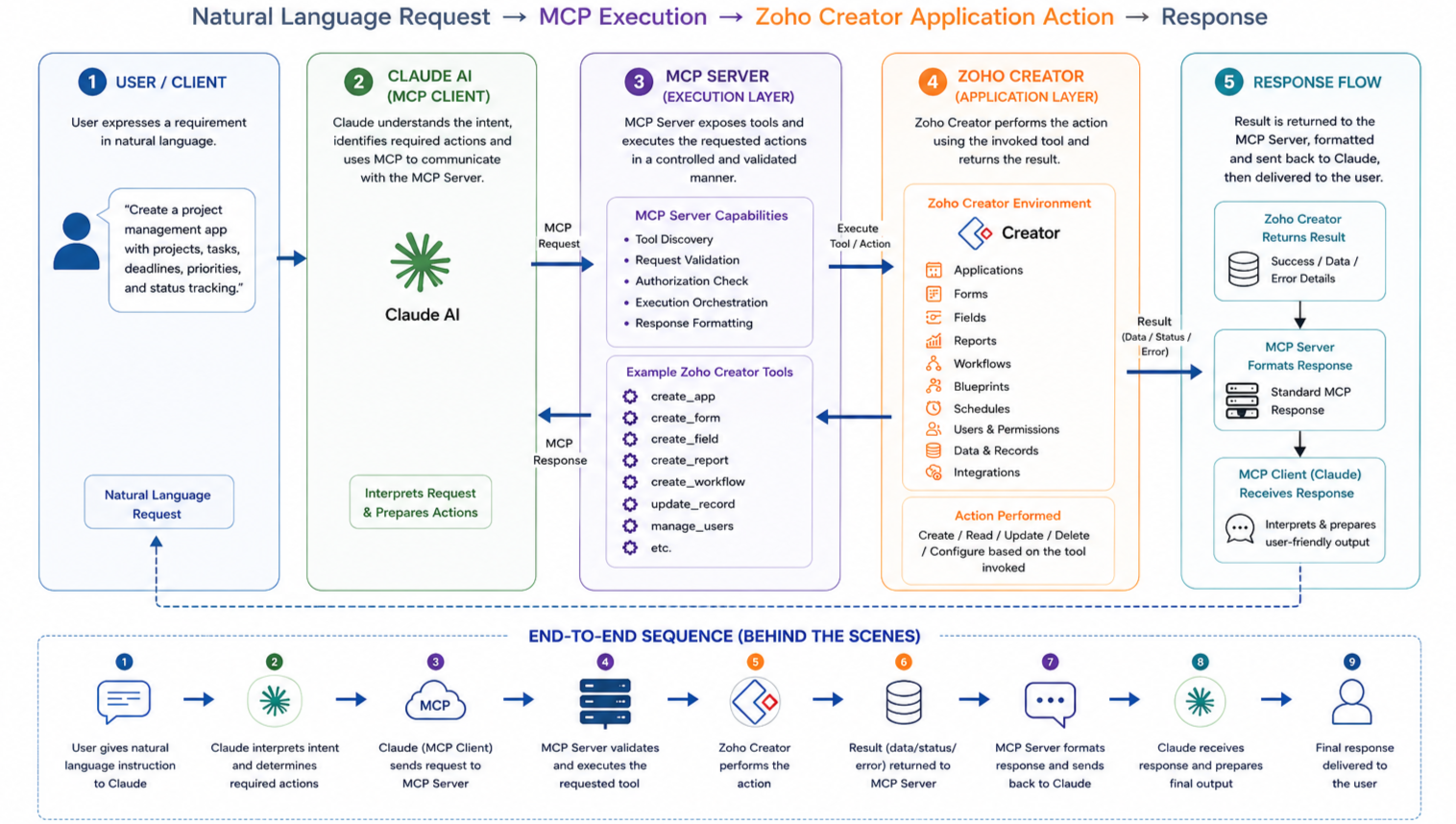
The lifecycle can therefore be represented as:
Business Intent → Claude AI → MCP → MCP Server → Zoho Creator
The outcome can then support three core application lifecycle activities:
CREATE
Build applications and supported components.
MANAGE
Work with existing applications, records, workflows, reports, and other supported capabilities.
MAINTAIN
Modify, refine, test, validate, and improve applications as business requirements change.
This lifecycle is what makes the architecture useful beyond initial application creation.
Zoho Creator Application Development With Claude + MCP
Application creation is the first part of the lifecycle.
A business user could describe the required application instead of beginning with individual configuration steps.
For example:
“Create a vendor management application with vendor details, onboarding status, document tracking, approval workflow, and reporting.”
In the OfficeHub Tech Zoho Developer AI Agent implementation, supported application-development operations can include creating applications, building forms and reports, adding fields, managing records, and editing existing applications through browser automation.
This approach can support Custom App Development using Zoho Developer AI Agent, where supported application operations are exposed through the connected AI and MCP environment.
The benefit is not simply that fewer configuration screens may be required. The larger benefit is that users can begin with the business outcome rather than the technical implementation process.
Manage Existing Zoho Creator Applications
Creating an application is only one part of application management.
Business applications continue to evolve as users, processes, data requirements, and operational needs change.
With the appropriate tools and permissions exposed through MCP, AI-assisted interaction can also support the management of existing applications.
Zoho’s current MCP documentation describes supported AI-driven operations such as retrieving information, creating or updating records, triggering workflows, scheduling automations, and coordinating tasks across connected applications. The specific tools available depend on how the MCP Server is configured.
Examples may include:
- Managing supported records
- Adding or modifying fields where the implementation supports it
- Updating forms and application components
- Creating or modifying reports where supported
- Adjusting supported workflows
- Reviewing application changes
- Refining existing business processes
This creates a more continuous relationship between the business user and the application.
Instead of treating application development as a one-time project, businesses can interact with their applications as evolving operational systems.
Maintain and Improve Applications as Requirements Change
Application maintenance is often where business applications require the most ongoing effort.
Processes change. Teams request new fields. Approval stages evolve. Reports need modification. New operational requirements emerge.
An MCP-enabled workflow can provide a natural-language interface for supported maintenance tasks.
For example:
” Insert a Quality Check step after Installation and revise the status workflow.”
Or:
” Include a customer approval field in the service request form.”
Or:
“Modify the project report to include overdue tasks.”
The workflow becomes:
Create → Review → Modify → Test → Improve
This does not mean every change should be executed automatically.
Changes should be reviewed according to their risk, complexity, permissions, and business impact. Production changes, sensitive data operations, and critical business logic may require additional approval and testing.
The value is that AI can potentially shorten the path between a changing business requirement and a supported application modification.
From Prompt to Application Change: Complete Workflow
Consider a company that wants to create or modify a vendor management application.
Step 1: Prompt
The business user describes the required outcome.
Step 2: Intent Interpretation
Claude identifies the entities, fields, workflows, relationships, and desired result.
Step 3: Tool Selection
The AI determines which available MCP tools are relevant.
Step 4: Tool Invocation
The appropriate structured request is sent through the MCP connection.
Step 5: MCP Server Execution
The MCP Server performs the permitted operation in the connected environment.
Step 6: Result
The execution result is returned to the AI or user.
Step 7: Validation
The user or technical team reviews whether the result matches the requirement.
Step 8: Refinement
Additional instructions can be used to request supported changes.
The resulting interaction model is:
Create → Review → Modify → Test → Improve
This lifecycle can continue throughout the application’s operational life.
What Can Businesses Create, Manage, and Maintain?
The architecture can support a wide range of custom business application scenarios when the required capabilities are exposed through the implementation.
Businesses can use this approach to create a custom app for business requirements instead of forcing operational processes into generic software.
The result can be a custom business application designed around the organization’s specific processes, data, workflows, and operational requirements.
- Customer Management: Create customer applications, onboarding forms, approval processes, customer records, and reporting components.
- Project Management: Build and manage projects, tasks, milestones, deadlines, assignments, and status tracking.
- Vendor Management : Manage vendor profiles, documents, approval stages, compliance information, and reporting.
- Inventory Operations: Create inventory applications and manage supported records, stock processes, purchase requests, and reporting.
- Service Management: Build service request applications, assign technicians, track statuses, and manage supported workflows.
- Internal Approvals: Create and maintain expense, purchase, leave, procurement, or other internal approval applications.
- AV System Integration: An AV integrator could use a custom Creator application to manage projects, equipment, installation tasks, service requests, and internal approvals.
The specific capabilities depend on the tools, permissions, application structure, and implementation available.
MCP vs APIs vs Traditional Low-Code Development
MCP, APIs, and low-code platforms solve related but different problems.
| Area | Traditional Development | Low-Code | Claude + MCP + Zoho Creator |
| Primary interaction | Code | Visual configuration | Natural-language intent |
| AI reasoning | Optional | Optional | Central to the workflow |
| Execution | Program code | Platform interface | MCP tools |
| Application changes | Developer-led | User/developer configuration | AI-assisted execution |
| Flexibility | High | High within platform | High for supported tools |
| Human validation | Required | Required | Required |
| Best use | Complex custom systems | Business applications | AI-assisted application lifecycle |
APIs remain important because they provide programmatic access to software capabilities.
MCP operates at a different layer. It standardizes how AI applications can discover and invoke available tools.
Therefore:
MCP complements APIs rather than replacing them in every use case.
An MCP Server may use APIs, SDKs, browser automation, or other mechanisms underneath, depending on the implementation.
What Can Claude Do With Zoho Creator Through MCP?
Claude can only perform actions that the connected MCP implementation exposes and permits. Depending on the implementation, supported operations may include creating applications and forms, adding fields, managing records, modifying reports or workflows, and updating existing application components.
The capability depends on the MCP tools, permissions, application structure, and underlying implementation. MCP itself does not independently create or modify Zoho Creator applications.
Claude interprets → MCP connects → MCP Server executes → Zoho Creator applies the change
Security, Permissions and Human Oversight
Connecting AI to a business application introduces an important question:
What should the AI be allowed to do?
The key security question is not simply whether AI can access an application, but which tools and actions it is permitted to invoke.
Zoho’s current MCP documentation describes administrator-controlled tool exposure and authorization, while the MCP specification emphasizes user consent, access controls, and appropriate oversight for tool invocation.
Enterprise implementations should consider:
- Authentication and authorization
- Least-privilege access
- Tool-level permissions
- Sensitive data handling
- Approval requirements
- Execution logging
- Error handling
- Validation and testing
- Deployment controls
Not every operation should execute automatically.
Creating a development form may carry less risk than deleting production records or changing critical business logic.
Human oversight therefore remains essential. AI can accelerate interpretation and supported execution while business and technical teams retain responsibility for validating the result.
What Are the Limitations of Claude + MCP + Zoho Creator?
MCP-based application interaction is powerful, but it is not unlimited.
- Tool availability: The AI can only perform operations that the connected MCP implementation exposes and permits.
- Application complexity: Simple forms and fields are different from complex permissions, integrations, multi-stage approvals, and custom business logic.
- Requirement quality: Ambiguous requirements can lead to incomplete or incorrect interpretations.
- Governance: Security, permissions, data quality, testing, and deployment decisions still require appropriate human review.
- No automatic guarantee of correctness: MCP does not guarantee that an AI-generated change will be correct. Results depend on the available tools, tool definitions, permissions, application structure, and clarity of the requirement.
The appropriate approach is therefore AI-assisted application lifecycle management with controlled human oversight, rather than unrestricted autonomous application development.
When Should a Business Use MCP?
MCP can be particularly useful when:
- Users need to interact with applications through natural language.
- AI needs to select and invoke business tools.
- Application requirements change frequently.
- Teams repeatedly modify business applications.
- Multiple application capabilities need controlled AI access.
- Businesses want AI-assisted creation, management, and maintenance.
MCP may not be necessary when:
- A simple API integration already solves the requirement.
- The workflow is completely deterministic.
- AI interpretation adds unnecessary complexity.
- The operation requires strictly predictable execution.
- The required application capability is not available through the connected tools.
The right architecture depends on the business requirement rather than the technology alone.
How Businesses Can Implement MCP With Zoho Creator
Businesses should begin with a specific operational or application requirement.
Step 1: Identify Application Tasks
Find repetitive creation, management, or maintenance activities.
Step 2: Define the Use Case
Determine whether AI-assisted interaction would genuinely improve the process.
Step 3: Map Creator Capabilities
Identify the forms, workflows, reports, records, and application components involved.
Step 4: Define MCP Tools
Determine which Creator operations should be exposed to the AI.
Step 5: Configure the AI Connection
Zoho’s current documentation provides a Claude connection workflow in which an administrator configures a Zoho MCP Server, selects the tools to expose, adds the MCP Server as a custom connector in Claude, and authorizes the requested permissions.
Step 6: Establish Permissions
Define which actions can be performed and under what conditions.
Step 7: Test Controlled Prompts
Start with low-risk creation and modification tasks.
Step 8: Validate Results
Have business and technical stakeholders review the changes.
Step 9: Deploy Carefully
Move validated changes through appropriate development and production controls.
Step 10: Expand the Toolset
Once the initial workflow is reliable, introduce additional supported operations.
This phased approach allows organizations to evaluate actual productivity and operational improvements before expanding the architecture.
Demo Preview: Zoho Developer AI Agent
The Zoho Developer AI Agent demonstrates how AI-assisted application interaction can work in practice.
The OfficeHub Tech implementation uses Claude and an MCP Server as the AI-to-application execution layer. According to the current OfficeHub Tech implementation, supported actions can be executed directly inside Zoho Creator through browser automation.
The workflow can be understood as:
Business Requirement → AI Interpretation → Tool Selection → Execution → Application Result → Validation
A demonstration can help businesses understand how natural-language requirements can translate into supported application actions.Watch the Zoho Developer AI Agent in action
Why Choose OfficeHub Tech for Claude + MCP + Zoho Creator Solutions?
Connecting Claude AI with Zoho Creator through MCP is only the beginning. To turn AI-assisted application development into a practical business solution, organizations also need the right application architecture, workflows, integrations, permissions, governance, and ongoing support.
This is where OfficeHub Tech brings together its expertise in Zoho Creator development, custom business application development, workflow automation, integrations, and agentic AI. The focus is not simply on connecting technologies, but on using them to create, manage, and maintain applications around real business requirements.
Built for Practical AI-Powered Application Development
OfficeHub Tech has developed the Zoho Developer AI Agent, an MCP-based solution designed to connect Claude with Zoho Creator and execute supported application-development operations through browser automation. It demonstrates how AI can move beyond conversational guidance and interact directly with the application environment.
Our approach spans the complete application lifecycle—from understanding business requirements and building applications to modifying workflows, improving existing applications, and supporting AI-assisted application operations.
As a Top Zoho Creator Developer and Agentic AI solutions provider serving businesses in the USA, India, UAE, and KSA, OfficeHub Tech helps organizations identify where AI and MCP can add practical value, determine which capabilities should be exposed, and implement appropriate permissions, controls, and human oversight.
Whether the requirement involves customer management, project management, service operations, inventory, approvals, or another business process, OfficeHub Tech develops solutions around how the business actually operates rather than forcing teams into generic workflows.
The goal is not to introduce AI simply because it is available. It is to use Claude AI, MCP, Zoho Creator, and agentic AI where they can reduce operational friction, simplify application lifecycle management, and help businesses respond faster to changing requirements while maintaining control over business logic, security, and governance.
Talk to OfficeHub Tech to explore how Claude AI, MCP, and Zoho Creator can support your application development and lifecycle management needs.
Conclusion
MCP provides a standardized connection layer that allows AI applications to interact with external tools and systems.
When Claude AI is connected to Zoho Creator through an appropriately configured MCP implementation, the opportunity extends beyond simply creating an application.
Businesses can use natural-language interaction to support the broader application lifecycle:
CREATE → MANAGE → MAINTAIN
Claude interprets the business requirement. MCP provides the structured connection to available tools. The MCP Server exposes and executes permitted operations, while Zoho Creator provides the environment where business applications and processes are managed.
This can make application changes more responsive to evolving business requirements while reducing repetitive configuration work.
However, MCP is not a replacement for sound application architecture, APIs, governance, security, testing, or human validation.
The strongest implementations will therefore combine AI-assisted execution with controlled permissions, appropriate tools, and human oversight.