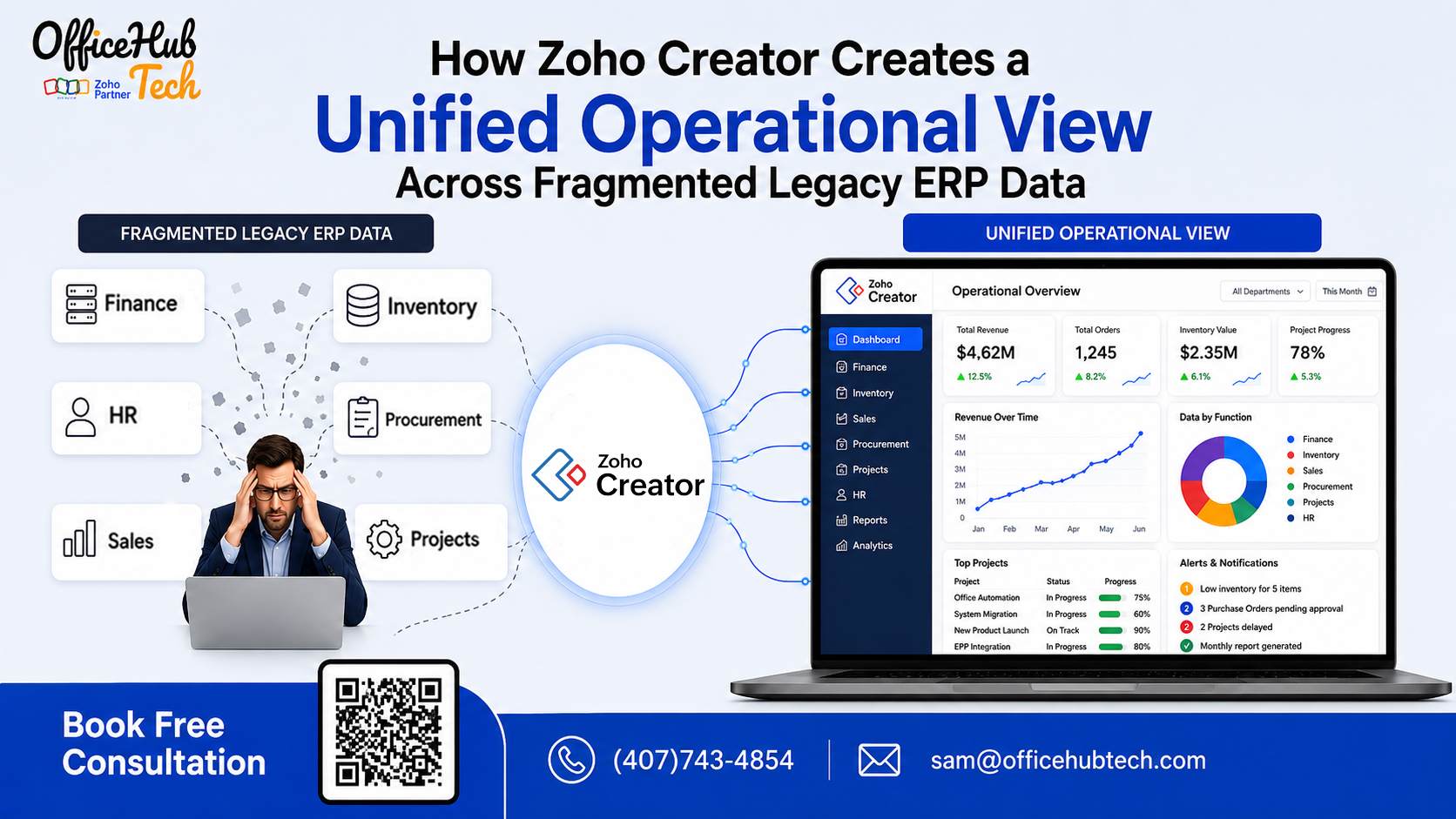
How Zoho Creator Creates a Unified Operational View Across Fragmented Legacy ERP Data
The Business Problem Behind Fragmented ERP Data
Enterprise data rarely lives in one place. A legacy ERP may hold financial and operational records, while CRM platforms manage customer information, inventory systems track stock, project tools manage delivery, and spreadsheets fill the gaps between them. The result is not necessarily a lack of data—it is a lack of connected visibility.
When decision-makers cannot see how information across these systems relates, even simple business questions can require hours of manual reconciliation. Zoho Creator can help address this problem by acting as a flexible application and integration layer that connects relevant business systems, relates information across processes, automates data movement, and presents it through role-specific applications, dashboards, and workflows.
The goal is not to force every business process into one platform. It is to make fragmented information work together as one operational picture.
##Quick Answer
Zoho Creator creates a unified operational view by connecting legacy ERP data with information from CRM, finance, inventory, databases, spreadsheets, and other business applications. Through APIs, integrations, workflows, data relationships, and custom applications, relevant information can be brought together and presented in a way that helps teams understand the complete business process.
For enterprises, this means moving from multiple disconnected records and reports to a connected view of customers, orders, inventory, projects, finances, and other operational activities—while allowing existing core systems to continue performing their primary roles.
##KeyTakeaways
- Fragmented ERP data can create visibility gaps across departments.
- A unified operational view is more than a consolidated dashboard; it connects information and business processes.
- Zoho Creator can integrate legacy ERP systems with modern business applications and databases.
- APIs, webhooks, data relationships, and workflows help connect information across systems.
- Different departments can access the operational information relevant to their responsibilities.
- Enterprises can improve visibility without automatically replacing their existing ERP.
- A phased legacy ERP data integration strategy can reduce disruption while delivering value incrementally.
Fragmented Legacy ERP Data Is Creating a Visibility Gap
A business leader may ask a straightforward question:
“What is the current progress of this customer order?”
The answer may require checking the CRM for the customer and opportunity, the ERP for the order, an inventory system for product availability, a project application for fulfillment, and the accounting system for invoice or payment status.
Each system may contain accurate information. Yet the organization still struggles to answer one business question quickly.
This is the legacy ERP data fragmentation problem.
Over time, enterprises accumulate applications around their ERP. New departments adopt specialized software. Acquisitions introduce different systems. Older databases remain operational because they still contain critical information. Spreadsheets emerge as temporary workarounds and eventually become permanent parts of business processes.
The result is a technology environment where information is distributed across multiple sources.
The challenge is therefore not simply modernizing an old ERP. It is creating a way for existing business data to become accessible, connected, and useful across the organization through legacy ERP modernization and integration solutions.
This is where a unified operational view becomes strategically important.
Instead of asking employees to search across multiple applications, organizations can create an operational layer that connects relevant information and makes the relationships between records easier to understand.
The Hidden Business Cost of Disconnected ERP Data
Data fragmentation becomes expensive when employees have to compensate for it manually.
Sales may know what has been promised to a customer, but not whether inventory is available. Operations may know what is being delivered, but not whether an invoice has been paid. Finance may have the financial record but limited visibility into the operational circumstances behind it.
These gaps create several business problems.
Conflicting Numbers
Different departments may report different versions of revenue, order status, inventory availability, or customer activity because they are working from different systems or reporting periods.
Delayed Decisions
Leadership may need to wait for teams to export, reconcile, and combine information before making a decision.
Duplicate Data Entry
Employees may manually copy customer, order, product, or financial information between applications.
Incomplete Customer Visibility
Customer information can become distributed across CRM, ERP, finance, support, and operational systems.
Manual Reconciliation
Teams spend valuable time comparing records instead of acting on the information.
Limited Cross-Functional Visibility
Each department can see its own operational data but may struggle to understand the complete process across departments.
These aren’t merely technology inconveniences. They can directly affect operational efficiency, customer experience, reporting accuracy, and decision-making speed.
Research Insight: Data Silos Are Already an Enterprise-Level Problem
The IBM Institute for Business Value’s 2025 Chief Data Officer Study, conducted with Oxford Economics, surveyed more than 1,700 Chief Data Officers across 19 industries and 27 geographies. IBM reported that 83% of CDOs said data silos hinder innovation, real-time analytics, and decision-making. The study also found that only 26% were confident their data capabilities could support new AI-enabled revenue streams.
This finding reinforces an important point for ERP leaders: the challenge isn’t simply collecting more data. Organizations need to make existing data accessible, connected, governed, and actionable.
For enterprises operating with fragmented legacy systems, creating that connected operational layer can be a practical step toward better visibility.
What Does a Unified Operational View Actually Mean?
A unified operational view does not necessarily mean moving every record from every application into one database.
It means giving the business a connected way to understand information that may continue to originate from different systems.
Consider a typical order lifecycle:
Customer → Opportunity → Order → Inventory → Fulfillment → Invoice → Payment
In a fragmented environment, each stage may exist in a different application.
A unified operational view connects the relationships between these stages so employees and decision-makers can understand the complete process.
For example, instead of simply seeing:
Order #1045 — Open
a connected operational application could provide relevant context:
- Customer: ABC Corporation
- Opportunity: Enterprise AV Deployment
- Order value: $125,000
- Inventory: 92% available
- Project status: Installation scheduled
- Invoice: Issued
- Payment: Pending
The underlying records can remain within their respective systems. What changes is how the organization accesses and relates that information.
A strong unified operational view should therefore provide:
- Connected information
- Clear relationships between records
- Consistent business rules
- Relevant synchronization
- Role-based visibility
- Automated workflows
- Actionable dashboards
- Controlled access
- Traceable data sources
The objective is simple:
Help people understand the business process, not just individual pieces of data.
Why Another Dashboard Doesn’t Solve Data Fragmentation
When organizations discover that data is fragmented, the natural response is often to build another dashboard.
Dashboards are useful—but a dashboard alone does not solve the underlying problem.
If information is manually exported from five systems and combined into a spreadsheet before reaching the dashboard, the organization still has the same underlying fragmentation.
Likewise, if two systems define “active customer” differently, simply displaying both numbers on a dashboard doesn’t resolve the inconsistency.
The organization needs to address what happens before the information reaches the dashboard.
That means understanding:
- Where the data originates.
- Which system is the source of truth.
- How records relate to one another.
- How information moves between applications.
- When data needs to be synchronized.
- Which business rules should trigger actions.
- Who should be granted access to the information.
This is why a unified operational layer can be more valuable than simply adding another reporting interface.
The dashboard becomes the visible part of the solution.
The real value comes from the integration, data relationships, workflows, and business logic underneath it.
How Zoho Creator Creates a Unified Operational View
This is where Zoho Creator can become valuable in a fragmented enterprise environment.
Rather than requiring businesses to immediately replace their ERP, Zoho Creator can operate as a flexible application and integration layer around existing systems.
Zoho Creator’s documentation describes capabilities for connecting applications, external services, databases, and privately hosted systems through integrations, APIs, connectors, and Databridge.
The process can be understood through six capabilities.
1. Connect
Zoho Creator can connect with existing business applications and data sources using integrations, APIs, database connections, and other mechanisms.
This can include legacy ERP systems, CRM platforms, accounting applications, inventory systems, and custom databases.
2. Consolidate Relevant Information
Not every piece of information needs to be copied into another system.
Instead, enterprises can identify the data needed for specific operational processes and bring the relevant information into a connected application experience.
3. Relate Business Records
A customer record can be related to opportunities, orders, products, invoices, projects, or service activities.
This creates context that may not be available when employees view each record separately.
4. Automate Data Movement
When an event occurs in one system, a workflow can trigger an action elsewhere.
For example:
ERP Order Created → Zoho Creator Workflow → Inventory Validation → Operations Notification
5. Present Information
The connected information can be presented through dashboards, custom applications, portals, reports, or mobile interfaces based on user requirements.
6. Enable Action
The final objective isn’t merely visibility.
Users should be able to take the next appropriate action—approve, assign, update, notify, investigate, or escalate—without manually coordinating information across multiple systems.
This is what transforms data integration into operational visibility.
From Fragmented Records to One Connected Business Process
The value of a unified operational view becomes clearer when information is connected around an actual business process.
Consider a typical enterprise order lifecycle:
Customer → Opportunity → Order → Inventory → Fulfillment → Invoice → Payment
In a fragmented environment, each stage may exist in a different application. Employees may therefore need to search multiple systems before they can understand the current status of a customer transaction.
Example: Connecting CRM, Legacy ERP, Inventory, and Finance
Consider an enterprise using:
- CRM for customer and opportunity management
- Legacy ERP for order processing
- Inventory system for product availability
- Finance system for invoices and payments
- Zoho Creator as the operational application layer
The sales team may know that an opportunity has been won, but still need to check the ERP to confirm whether the order was created.
Operations may then need to check inventory to determine whether the required products are available.
Finance may have separate information about whether the invoice has been issued or payment has been received.
Without integration, employees are forced to reconstruct the complete order status manually.
With a connected Zoho Creator application, the relevant information can be presented through one operational workflow:
CRM Opportunity → ERP Order → Inventory Validation → Fulfillment → Invoice → Payment
The underlying systems can remain responsible for the records they own.
For example:
- CRM: Customer and opportunity
- ERP: Order
- Inventory: Stock availability
- Finance: Invoice and payment
- Zoho Creator: Operational workflow, relationships, automation, and user experience
This distinction is important.
A unified operational view does not necessarily mean moving every record into Zoho Creator. It means connecting the information required to understand and act on the business process.
Example: Customer Service
A service representative may need to understand:
Customer → Order → Product → Invoice → Service History
Instead of searching several applications individually, a connected operational application can present the relevant context in one place.
Example: Procurement
Procurement may need visibility across:
Operational Demand → Purchase Request → Supplier → Inventory → Finance
Connecting these relationships helps teams understand not only what needs to be purchased, but also why it is required, what inventory is available, which supplier is involved, and what financial activity follows.
The goal across each example is the same:
Keep systems of record where they belong while connecting the information and workflows that the business needs to operate effectively.
How Different Departments Benefit From a Unified Operational View
A unified view becomes more valuable when each department receives the information needed to perform its role.
Finance: Finance teams can access relevant order, customer, invoice, and payment information without relying entirely on manually prepared reports.
Sales: Sales teams can see more than pipeline activity. They can understand customer orders, fulfillment progress, product availability, and financial status where appropriate.
Operations: Operations teams can connect orders with inventory, projects, resources, and fulfillment activities.
Procurement: Procurement teams can relate purchasing requirements to operational demand, supplier information, and inventory status.
Customer Service
Customer-facing teams can access relevant customer, order, invoice, and service information through one operational interface.
Leadership: Executives can gain a cross-functional view of business performance rather than relying on isolated departmental reports.
The important distinction is that the organization isn’t simply giving everyone more data.
It is giving the right people more useful context.
That is the real value of a unified operational view.
How APIs and Integrations Turn Fragmented Data Into Connected Data
Behind a unified operational experience is an integration architecture.
APIs allow applications to exchange structured information. Webhooks can help trigger workflows when specific events occur. Database connectivity can provide access to information stored in internal or legacy environments, subject to the appropriate security and architecture.
Zoho Creator provides REST APIs for interacting with Creator applications, including operations to add, fetch, update, and delete records.
Zoho also documents integrations with external databases and legacy environments, including secure approaches for systems that aren’t directly exposed to the internet. Zoho Creator’s Databridge enables applications to access supported services and databases hosted within a private network through an outbound connection, without requiring inbound access to those internal systems.
A practical integration architecture may therefore involve:
- REST APIs
- Webhooks
- Database connections
- Authentication
- Data transformation
- Synchronization rules
- Workflow automation
- Error handling
- Validation
- Access controls
The goal isn’t to connect every system simply because integration is technically possible.
The goal is to connect the systems and data flows that matter to the business process.
Where Zoho Creator Fits in the Legacy ERP Environment
A practical architecture can look like this:
Legacy ERP + CRM + Finance + Inventory + SaaS Applications
↓
APIs + Webhooks + Database Connectors
↓
Zoho Creator — Unified Operational Layer
↓
Business Rules + Automation + Data Relationships + Security
↓
Dashboards + Business Applications + Mobile + Portals + Reports
This approach allows the ERP to continue performing its core responsibilities while Zoho Creator provides a flexible layer for applications, workflows, integrations, and user experiences. Instead of replacing systems that still support critical business processes, enterprises can connect the information and capabilities they need around the existing ERP environment.
Zoho specifically positions Creator as an agility layer for ERP environments, including legacy ERPs, with capabilities for custom applications, dashboards, mobile apps, integrations, and workflow automation.
Zoho also states that Creator can connect with ERP systems such as SAP, Microsoft Dynamics, Infor ERP, and J.D. Edwards through custom integrations.
That makes this architecture particularly relevant when an enterprise’s core ERP remains valuable but the surrounding operational environment has become fragmented. For businesses considering this approach, the next step is to evaluate how Zoho Creator could fit into their existing ERP and application landscape.
If you’re ready to explore the platform, you can create your Zoho Creator account using the button below. For enterprises that need help designing and implementing the right architecture, OfficeHub Tech provides Zoho Creator implementation and consultation, including custom applications, workflow automation, API integrations, and legacy ERP extension strategies.
👉 Get Started with Zoho Creator:
What Enterprises Gain From a Unified Operational View
The business value of connected information becomes visible in everyday decision-making.
Faster Decisions
Leaders spend less time waiting for teams to consolidate information.
Less Manual Reconciliation
Employees spend less time comparing spreadsheets and system records.
Better Cross-Department Coordination
Teams can understand how their work affects other stages of the business process.
Improved Customer Visibility
Employees can access relevant customer context without searching multiple applications.
Faster Identification of Bottlenecks
Operational delays become easier to identify when process information is connected.
Better Accountability
Managers can see status, ownership, and next actions more clearly.
More Reliable Operational Reporting
Reports can be based on connected operational information rather than manually assembled datasets.
For enterprises considering legacy ERP modernization, these outcomes can be significant because they address a common problem without assuming that the entire ERP must be replaced.
How to Build a Unified Operational View With Zoho Creator
A successful Zoho Creator ERP integration should begin with the business problem—not the technology.
Step 1: Map Existing Data Sources
Identify the ERP, CRM, finance, inventory, project systems, spreadsheets, databases, and other applications involved in the process.
Step 2: Identify Systems of Record
Determine which system owns each critical piece of information.
For example:
ERP → Order
CRM → Opportunity
Finance → Payment
Inventory → Stock
Step 3: Identify Critical Business Questions
Ask what management and employees actually need to know.
Step 4: Map Data Relationships
Determine how customers, products, orders, projects, inventory, invoices, and payments relate.
Step 5: Define Integration Requirements
Determine whether each connection requires APIs, webhooks, database access, scheduled synchronization, or another approach.
Step 6: Build the Operational Layer
Develop the required Zoho Creator applications, workflows, dashboards, and interfaces.
Step 7: Establish Security and Governance
Define access permissions, data ownership, validation, monitoring, and audit requirements.
Step 8: Start With One High-Value Process
Instead of connecting everything simultaneously, begin with a process where fragmented data creates a measurable business problem.
Step 9: Expand Incrementally
Once the approach is validated, extend the connected operational model to additional departments and processes.
This phased approach helps organizations improve visibility without turning data integration into another large-scale transformation project.
ERP Extension vs ERP Replacement: How to Decide
Not every legacy ERP needs to be replaced.
In many organizations, the ERP continues to perform important core functions such as financial management, inventory, procurement, manufacturing, or order processing. The larger problem may exist around the ERP, where newer applications, spreadsheets, and departmental workflows have created disconnected information.
In these situations, extending the existing ERP environment can be a practical alternative to a complete replacement.
Consider Extending the ERP When:
- The existing ERP still handles core business processes effectively.
- The ERP remains the system of record for important transactions.
- Critical information is distributed across CRM, inventory, finance, project, or other applications.
- Employees rely heavily on spreadsheets or manual reconciliation.
- New business requirements need to be delivered faster than ERP customization allows.
- APIs, database connectivity, or other integration methods are available.
- The main challenge is connectivity, workflow, visibility, or user experience rather than the ERP’s core functionality.
Consider ERP Replacement When:
- The ERP can no longer support essential business requirements.
- Core financial or operational processes are fundamentally inadequate.
- Required integrations cannot reasonably be supported.
- The platform has become difficult or costly to maintain.
- Vendor support or product viability presents a significant long-term risk.
- Extensive customization has made the existing ERP difficult to evolve.
- The organization requires capabilities that cannot realistically be added around the existing platform.
ERP extension and ERP replacement are therefore not competing answers to the same problem.
The right decision depends on where the actual business problem exists.
If the core ERP remains reliable but information and workflows around it are fragmented, a connected operational layer may provide a lower-disruption modernization path.
If the ERP itself can no longer support the organization’s core requirements, replacement may be the more appropriate long-term strategy.
The key question is not simply “Should we replace the ERP?” It is “Is the problem inside the ERP, or is the problem the way the ERP connects with the rest of the business?”
Conclusion: From Fragmented ERP Data to One Operational Picture
Enterprise data fragmentation isn’t going away simply because a company adds another reporting tool.
When customer information sits in one system, orders in another, inventory somewhere else, and financial records in another application, employees need more than access to data. They need context.
That’s where a unified operational view becomes valuable.
Zoho Creator can help enterprises connect relevant information across legacy ERP systems and surrounding business applications, establish relationships between records, automate cross-system workflows, and present operational information through customized applications and dashboards.
The objective isn’t necessarily to move everything into one platform.
It is to make the systems the business already relies on work together more effectively.
For organizations pursuing legacy ERP integration, ERP modernization, or Zoho Creator ERP extension, this approach can provide a practical path toward better operational visibility while preserving valuable existing technology investments.
The real value isn’t having more data in one place. It’s understanding how the data connects—and being able to act on it faster.
Why OfficeHub Tech for Legacy ERP Extension and Integration?
Creating a unified operational view requires more than connecting two applications. The integration architecture needs to reflect how the business actually operates, which systems own specific records, how information moves between applications, and what users need to accomplish with that information.
OfficeHub Tech approaches legacy ERP extension and modernization by first understanding the existing technology environment and then identifying where a connected Zoho Creator application can provide measurable operational value.
Our approach typically includes:
- Assessing the existing ERP and application environment
- Mapping fragmented data and business processes
- Identifying systems of record
- Defining data relationships and integration requirements
- Designing the integration architecture
- Developing custom Zoho Creator applications
- Connecting APIs, databases, and third-party applications
- Automating cross-system workflows
- Building role-based dashboards and operational interfaces
- Establishing appropriate access and governance controls
- Implementing the solution in practical phases
The objective is not to add another disconnected application to the technology stack.
It is to determine:
Which system should remain the source of truth?
Which information needs to be connected?
Which processes should be automated?
Where can a Zoho Creator operational layer create measurable business value?
OfficeHub Tech brings more than 22 years of enterprise digital transformation experience and has delivered 100+ enterprise implementations. As a certified Zoho Developer and authorized partner serving organizations across the USA, UAE, KSA, and India, our team works with businesses looking to extend existing platforms and connect systems including ERP, CRM, inventory, finance, and other business applications.
Where appropriate, this can include extending platforms such as SAP, Oracle, Microsoft Dynamics, Epicor, Sage, and Infor through integrations and custom Zoho Creator applications.
For organizations considering legacy ERP modernization, the first step should not necessarily be choosing a new platform.
It should be understanding the current environment, identifying the biggest visibility and workflow gaps, and determining whether the existing ERP can be extended effectively.
That assessment provides the foundation for deciding whether ERP extension, integration, or replacement is the right modernization strategy.