Quick Answer
Disconnected software can create significant hidden costs for AV businesses even when each individual application performs its intended job. When CRM, proposal/design, project management, inventory, field service, and finance systems operate independently, employees spend more time transferring data, correcting errors, reconciling records, and coordinating updates. The result can be slower projects, higher administrative costs, weaker visibility, delayed billing, and reduced margins.
For AV System Integrators, the answer is not necessarily to replace specialized applications. A better approach is often to connect the systems already supporting the business through APIs, automation, middleware, and customized workflows, creating a connected operational ecosystem.
Key Takeaways
- Software silos create costs beyond application licensing fees.
- Manual data transfer increases administrative work and error risk.
- Disconnected systems can slow AV project delivery and billing.
- Field teams are particularly affected when project and equipment information is fragmented.
- Poor connectivity can create inventory, procurement, and customer-service problems.
- Point-to-point integrations can become difficult to maintain as the technology stack grows.
- APIs, webhooks, middleware, and workflow automation can create continuous data flow.
- AV businesses can connect specialized industry tools without necessarily replacing them.
- A connected software ecosystem provides better visibility, scalability, and operational control.
- OfficeHub Tech approaches AV connectivity through integrations, turnkey workflows, custom field solutions, low-voltage connectors, and automation.
Why Software Silos Are Becoming an Operational Problem for AV Integrators
An AV System Integrator rarely operates from a single application. A typical business may use separate platforms for CRM, proposals, AV design, project management, procurement, inventory, field operations, accounting, and customer communication. Using specialized tools is not inherently a problem. The real cost begins when these systems cannot exchange information reliably.
Consider a simple project lifecycle. A salesperson captures customer information in the CRM. A proposal team prepares the solution in another application. Project managers then recreate project information elsewhere, procurement works from equipment requirements, technicians receive field instructions, and finance waits for completion information. If each transition requires copying, exporting, emailing, or manually reconciling data, the business is paying for the same information multiple times.
This is why AV multi-software integration should be viewed as an operational strategy rather than merely an IT exercise. The objective is to make information move with the business process.
The hidden cost can be represented simply:
Manual handoffs → Duplicate work → Data errors → Rework → Delays → Higher operating cost
For an AV business managing a growing number of projects, even small inefficiencies at each handoff can accumulate into a significant productivity and margin problem.
Why Software Connectivity Has Become a Business Priority
The challenge of disconnected applications is not limited to AV businesses. According to MuleSoft’s 2026 Connectivity Benchmark Report, which is based on a survey of 1,050 IT leaders globally, found that organizations now manage an average of 957 applications, but only 27% of those applications are connected. The report also revealed that 82% of IT leaders consider data integration a major AI challenge, while IT teams dedicate an average of 36% of their time to developing, implementing, and testing custom integrations.
For AV System Integrators, this broader enterprise finding is particularly relevant because AV businesses often depend on numerous specialized applications that serve different stages of the same project lifecycle. The challenge, therefore, is not merely application volume; it is whether the applications operate within a connected business process.
The lesson for AV leaders is straightforward: adding another application does not automatically improve operations. Without a reliable connectivity strategy, every new system can introduce another data boundary and another manual handoff.
What Disconnected Software Looks Like Inside an AV Business
Disconnected software becomes visible when information has to be repeatedly recreated between departments.
A common AV workflow might look like:
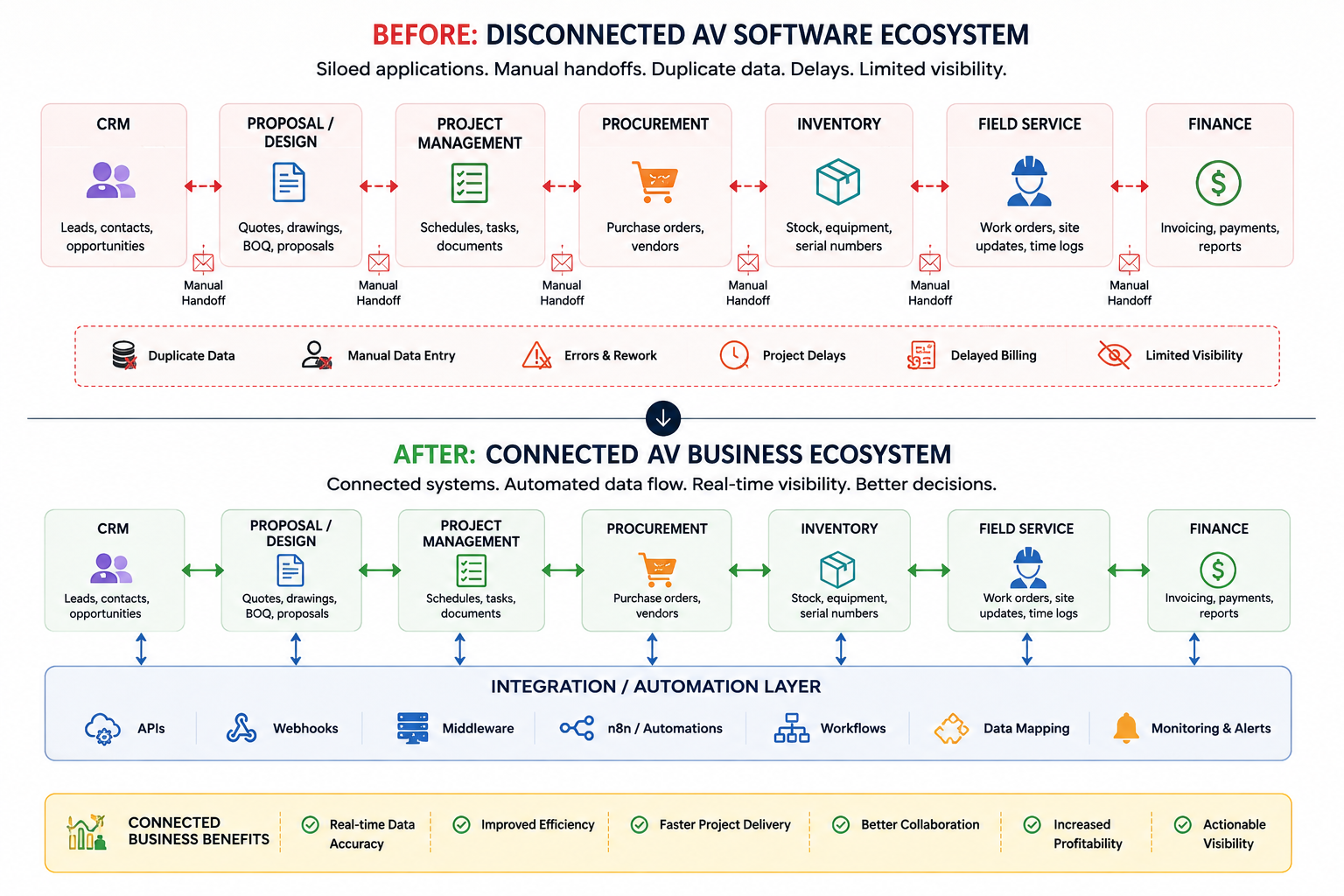
CRM → Proposal/Design → Project Management → Procurement → Inventory → Field Service → Finance
In a connected environment, an approved project can automatically transfer the relevant information required by the next stage. In a disconnected environment, each team may maintain its own version of the project.
For example, the project manager may update a project scope, while procurement continues working from an earlier equipment list. The field technician may receive a different version of the installation information, while finance waits for someone to confirm that the work has been completed.
This creates what can be called operational fragmentation.
The business may technically have all the necessary information, but employees cannot access it at the right time or in the right context.
The consequences include:
- Repeated data entry
- Conflicting records
- Manual reconciliation
- Delayed approvals
- Slower decision-making
- Increased dependency on individual employees
The important distinction is that an AV business does not necessarily need fewer software tools. It needs better information flow between the tools it already depends on.
The Financial Cost of Software Silos
The most dangerous cost of disconnected software is that it often does not appear as a single line item in the financial statements. Instead, it is distributed across employee time, project delays, rework, IT maintenance, and missed opportunities.
- Administrative Labor: Employees spend productive hours moving information between applications instead of managing customers, projects, or operations.
- Duplicate Data Entry: Customer, project, equipment, and financial information may be entered multiple times.
- Error Correction: Every manual transfer creates an opportunity for incorrect quantities, outdated statuses, missing information, or inconsistent records.
- Delayed Billing: If project completion, technician hours, customer approvals, or equipment information does not reach finance promptly, billing can be delayed.
- Revenue Leakage: Uncaptured labor, change orders, service work, or equipment consumption can affect project profitability.
- IT Maintenance: As integrations accumulate, IT teams may spend increasing amounts of time maintaining individual connections instead of improving the broader technology environment.
For AV businesses operating on project-based margins, these hidden costs matter. A small amount of wasted labor on every project can become substantial when multiplied across dozens or hundreds of projects.
How Disconnected Software Slows AV Project Delivery
AV projects depend on coordination between sales, engineering, project management, procurement, warehouse teams, field technicians, and finance. When these teams work from disconnected applications, project information does not move at the same speed as the project itself.
Suppose an approved design changes. If that change does not automatically reach project management, procurement, inventory, and field operations, employees must manually communicate and reconcile the update.
That creates waiting time.
A technician may be ready to install but lack the latest equipment information. Procurement may be waiting for confirmation from project management. Finance may be waiting for field completion data. The project itself has not necessarily become more technically difficult—the information flow has become the bottleneck.
This can produce:
- Longer project cycles
- Additional coordination effort
- Increased labor costs
- Schedule uncertainty
- More rework
- Reduced project margins
A connected workflow does not eliminate every project risk. Instead, it removes unnecessary information delays so employees can spend more time executing the project and less time searching for or recreating information.
Data Accuracy, Rework, and the Field-Service Problem
Disconnected systems create another major cost: working from the wrong information.
AV projects contain highly detailed information about equipment, quantities, locations, configurations, customer requirements, installation tasks, and documentation. When different teams maintain separate versions of that information, errors become increasingly difficult to prevent. The field team can be particularly vulnerable.
Technicians may need access to:
- Project scope
- Site information
- Equipment lists
- Drawings
- Installation instructions
- Work orders
- Service history
- Customer information
If this information is scattered across multiple systems, technicians may need to call project managers, search emails, or wait for documents before proceeding.
The result can be:
Incomplete information → Installation error → Rework → Additional labor → Schedule impact
A customized field-assist workflow can reduce this friction by presenting technicians with the relevant project information, digital checklists, work orders, photographs, documentation, and status updates through a mobile-friendly interface.
The objective is not simply to give technicians another application. It is to ensure that field execution is connected to the same business information driving the project.
Inventory, Procurement, Sales, and Customer Experience
Software disconnection affects more than project execution.
Procurement and Inventory
When approved equipment requirements do not flow automatically into procurement and inventory systems, businesses can experience:
- Incorrect purchasing
- Stock shortages
- Duplicate orders
- Poor project allocation
- Delayed installations
A connected workflow can move information through:
Approved project → Equipment requirement → Procurement → Inventory allocation → Installation
Sales
Disconnected customer information can prevent sales teams from seeing complete project and service history. This can make follow-ups less informed and create unnecessary requests for information.
Customer Experience
Customers ultimately experience the consequences of internal fragmentation. They may receive delayed updates, repeat information, or wait longer for approvals, service responses, or project completion.
This creates an important business principle:
A disconnected back office eventually creates a disconnected customer experience.
Software integration therefore has value beyond operational efficiency. It can improve the consistency and responsiveness of the entire customer journey.
The Technical Debt Behind Disconnected AV Software
As an AV business adds applications, integration complexity can grow faster than expected.
A basic point-to-point model may look like:
CRM ↔ Project Management
Then additional connections are added:
CRM ↔ Inventory
Project Management ↔ Finance
CRM ↔ Proposal
Inventory ↔ Field Service
Each connection introduces its own authentication, data mapping, error handling, maintenance requirements, and vendor dependencies. This creates integration debt.
Common technical problems include:
- Hard-coded integrations
- Inconsistent data structures
- Limited API capabilities
- Manual CSV transfers
- Batch synchronization
- Weak error handling
- No centralized monitoring
- Poor documentation
- Lack of integration governance
A connection that works today may become problematic when an application changes its API, business rules, data fields, or authentication method.
For this reason, AV businesses should think beyond individual integrations and consider an integration architecture that can evolve as the technology stack grows.
From Point-to-Point Connections to a Connected AV Architecture
A scalable approach introduces an integration or automation layer between business applications:
AV Applications → Integration Layer → Business Applications
The integration layer can manage data transformation, API communication, workflow orchestration, authentication, error handling, synchronization, and monitoring.
What a Connected AV Workflow Looks Like
The goal of integration should not be simply to move data from application A to application B. It should create continuity across the business process.
Consider a connected AV project:
CRM → Proposal → Project → Procurement → Inventory → Field → Finance
A customer is converted into an approved project. Relevant project information flows into project management. Equipment requirements can trigger procurement workflows. Inventory records reflect allocation. Technicians receive their work orders and relevant project information. Once field work is completed and approved, the appropriate completion information becomes available to finance.
Each department still uses the application best suited to its role. The difference is that employees no longer have to become the integration layer.
This produces several benefits:
- Less duplicate data entry
- Faster information transfer
- Better project visibility
- Fewer manual handoffs
- Reduced reconciliation
- More consistent customer information
- Easier management reporting
This is the real objective of multi-software integration for AV integrators: preserving specialized applications while creating one connected operational flow.
Practical AV Integration Use Cases
Lead-to-Project Workflow
CRM → Proposal → Project Management
Once an opportunity becomes a project, essential customer and project information can move automatically into the project workflow.
Project-to-Procurement
Approved Equipment List → Procurement
Required equipment information can trigger purchasing activities without manual re-entry.
Project-to-Field
Project Milestone → Work Order → Technician
When an installation phase becomes ready, the relevant field tasks can be created and assigned automatically.
Field-to-Finance
Completed Work → Approval → Billing
Technician completion data and customer sign-off can feed downstream billing workflows.
Inventory-to-Project
Equipment Allocation → Project → Field
Equipment movement can remain connected to the project that consumes it.
Service-to-CRM
Service Activity → Customer Record
Service events can update customer history so sales and support teams have better context.
These use cases demonstrate that integration is most valuable when it follows the actual business process, rather than simply connecting applications because APIs are available.
Case Study: Removing Operational Friction From an AV Workflow
Company: ApexVision Integrations
Industry: Audio Visual & Systems Integration
ApexVision Integrations had reached a point where growing project volume was exposing weaknesses in its software workflow. Sales, engineering, project management, procurement, field teams, and finance each relied on different systems, creating repeated manual handoffs.
An internal workflow review found that employees were spending approximately 22 hours per week transferring, checking, and reconciling information between applications. A typical project required manual entry or verification at six major handoff points, from approved proposal through billing.
Instead of replacing its existing software, ApexVision introduced an integration layer using APIs, webhooks, and automated workflows. Customer and project information was synchronized between systems, equipment requirements were connected to procurement and inventory, and field completion data was connected to billing.
After implementation:
- 22 → 7 hours per week spent on manual data reconciliation
- 6–8 hours → less than 1 hour for proposal-to-project handoff
- 2–3 days → same-day transfer of completed project information to finance
- 10 → 3 hours per week spent on inventory reconciliation
- 6 → 2 major manual handoffs across the core project workflow
The key improvement was not removing specialized applications. It was removing employees from the role of manually connecting them.
How OfficeHub Tech Helps AV Businesses Eliminate Software Silos
AV businesses rarely struggle because they lack software. The bigger challenge is making different systems work together as one connected business environment. OfficeHub Tech approaches this as a business-process, integration, and automation challenge, helping AV System Integrators connect the tools they already use while improving operational visibility and reducing manual work.
-
Custom Field Assist Management Portal
OfficeHub Tech builds Custom Field Assist Management Portal on Zoho Creator around an AV integrator’s actual field-service processes. These portals can bring technician activities, work orders, project information, service updates, and field workflows into a more structured environment, helping businesses improve coordination between office and field teams.
-
Turnkey Workflow Solutions
Using the Zoho ecosystem, OfficeHub Tech develops turnkey workflow solutions that connect business processes across CRM, projects, inventory, finance, service, and other functions. The objective is to reduce repetitive data entry, manual handoffs, and process gaps while creating a more consistent operational workflow.
-
Multi-Software / Tools Integration
AV businesses often depend on specialized proposal, CRM, project management, design, inventory, and finance applications. OfficeHub Tech connects these systems so information can move between applications without requiring teams to repeatedly enter or transfer the same data. This creates a more connected technology environment while allowing businesses to retain their preferred software.
-
Agentic AI Platform
OfficeHub Tech develops Agentic AI Platforms powered by MCP Servers and LLMs, enabling businesses to interact with connected operational data through natural language. Examples include D-Tools Agentic AI (Claude + MCP + D-Tools) for conversational access to D-Tools project data and the Zoho Developer AI Agent (Claude + MCP + Zoho Creator) for intelligent interaction with custom applications and business data. Instead of manually searching multiple systems, users can ask business questions and receive context-aware insights based on information retrieved from connected applications.
-
Low-Voltage Software Connectors & Extensions
When standard integrations are not sufficient, OfficeHub Tech develops low-voltage software connectors and extensions for specialized AV/LV applications. These solutions help bridge specific data or workflow gaps between industry tools and the broader business ecosystem.
-
Agentic AI Blueprints
OfficeHub Tech also develops reusable Agentic AI Blueprints using n8n and Make templates. These include pre-built templates for Residential AV System Integrators (AVSI) and Commercial AVSI businesses, providing a practical foundation for repeatable AI and automation workflows. This helps businesses accelerate implementation while adapting workflows to their specific operational requirements.
Together, these solutions focus on one objective: connecting existing systems, eliminating operational gaps, and turning fragmented business processes into intelligent, scalable workflows.
How to Measure the Hidden Cost of Disconnected Software
AV leaders can begin evaluating the problem without immediately purchasing another platform.
Start by identifying every major manual handoff.
For each workflow, calculate:
Manual hours × employee cost
Then add:
- Rework labor
- Data reconciliation time
- Delayed billing impact
- Integration maintenance
- IT support effort
- Estimated revenue leakage
For example, map:
Lead → Quote → Project → Purchase → Inventory → Installation → Billing
At every transition, ask:
- Is information entered manually?
- Is the same information stored in multiple systems?
- How often does an employee reconcile the data?
- What happens when synchronization fails?
- Who is responsible for fixing the problem?
- How long does the business wait for the information?
This exercise converts an abstract “integration problem” into an operational cost model.
The goal is not to integrate everything immediately. It is to identify the workflows where connectivity can produce the greatest business value.
Signs Your AV Business Has a Software Connectivity Problem
Your AV business may have a software connectivity problem if:
- Employees repeatedly enter the same information.
- Project managers depend on spreadsheets to reconcile systems.
- Technicians call the office for information already stored elsewhere.
- Sales and project teams maintain separate customer records.
- Inventory information is frequently outdated.
- Finance waits for project or field updates.
- Management lacks real-time project visibility.
- Teams frequently exchange CSV files.
- Integrations depend on individual employees.
- Adding new software creates another isolated workflow.
One sign alone does not necessarily justify an integration project. The stronger indicator is repetition.
If the same manual handoff occurs across dozens of projects, it is no longer an occasional inconvenience—it is a process that should be evaluated for automation.
Best Practices for Building a Connected AV Software Ecosystem
Successful integration starts with business architecture rather than technology selection.
Define Data Ownership: Determine which system is authoritative for customers, projects, equipment, inventory, financial records, and other critical data.
Map the Business Process: Understand how information actually moves from sales through delivery and service.
Prefer API-Based Connectivity: Use APIs and event-driven mechanisms where appropriate instead of relying heavily on spreadsheets and manual exports.
Standardize Data: Consistent naming, identifiers, fields, and data structures make synchronization more reliable.
Build Error Handling: Integration failures should generate alerts and recovery processes rather than silently losing information.
Apply Security: Use appropriate authentication, authorization, role-based access, audit trails, and secure data transmission.
Monitor Integrations: Track failures, synchronization status, latency, and workflow execution.
Design for Scalability: Build reusable workflows and integration components so future applications do not create unnecessary technical debt.
The best integration architecture is one that becomes less dependent on manual intervention as the business grows.
From Disconnected Applications to a Connected AV Business Ecosystem
The transformation can be summarized simply:
Before
Multiple Tools → Data Silos → Manual Work → Errors → Delays → Limited Visibility
After
Connected Tools → Automated Data Flow → Unified Workflows → Better Accuracy → Faster Operations → Visibility
This does not mean every AV business should eliminate its specialized applications. In many cases, those applications exist because they perform highly specific functions better than a general-purpose platform.
The smarter question is: How can the existing technology stack operate as one business ecosystem?
That may involve a CRM remaining the customer system, a proposal platform remaining the proposal system, a project-management platform remaining the project system, and an inventory application continuing to manage stock.
The integration layer becomes the connective tissue between them.
For AV System Integrators, this approach can support modernization without unnecessary disruption while creating a foundation for automation, analytics, and future AI initiatives.
Conclusion: The Real Cost Is the Friction Between Systems
Disconnected software costs AV businesses far more than application subscriptions. The real expense appears through manual work, duplicate data, errors, rework, project delays, delayed billing, poor field productivity, inventory problems, customer frustration, and growing integration debt.
For an AV System Integrator, these issues become increasingly important as project volume, technician teams, software applications, and customer expectations grow.
The solution is not automatically to replace every application. Specialized AV tools can continue delivering significant value when they are connected through a well-designed architecture.
A practical AV software integration strategy can connect CRM, proposal, project management, inventory, field service, finance, and other systems through APIs, webhooks, middleware, and workflow automation. This allows information to move with the business process instead of depending on employees to transfer it manually.
Ultimately, the goal of multi-software integration for AV integrators is simple: reduce the friction between systems so teams can execute projects faster, maintain better data accuracy, improve visibility, and protect operating margins.
The hidden cost of disconnected software is not the number of applications an AV business owns. It is the amount of business activity that gets trapped between them.
OfficeHub Tech: Your AV Integration Partner
For AV businesses, integration expertise must go beyond generic API connectivity. OfficeHub Tech understands how sales, proposals, projects, equipment, field operations, inventory, finance, and service work together within an AV business.
Its capabilities include turnkey workflow development, Zoho integration, custom Zoho Creator applications, multi-software connectivity, field-management solutions, low-voltage software connectors, and automation using platforms such as n8n and Make.
For businesses looking for Best AV Workflow and AV IT Solutions providers, OfficeHub Tech helps identify disconnected processes and design practical workflows that improve information flow across the business.
As a Top Zoho Consultation and implementation Partner in USA, India, UAE and KSA, OfficeHub Tech supports businesses in modernizing their technology ecosystem while retaining the specialized tools their teams already use. Start with a workflow assessment to identify gaps, prioritize integration opportunities, and determine the right approach. Connect with OfficeHub Tech experts today to explore a solution tailored to your business.