How AV System Integrators Can Manage Field Management Using a Unified Zoho Ecosystem
Managing Modern AV Field Operations Through a Connected Zoho Ecosystem
Field management has become one of the most critical operational functions for Residential and Commercial AV System Integrators. As AV projects become more sophisticated and customer expectations continue to rise, businesses must coordinate service requests, technician scheduling, installations, maintenance visits, inventory availability, customer communication, and billing activities with greater speed and accuracy than ever before.
The challenge is that many AV companies still rely on a combination of spreadsheets, emails, phone calls, and disconnected software applications to manage these activities. While each tool may perform its individual function effectively, the lack of connectivity between systems often creates delays, duplicate work, communication gaps, and operational inefficiencies.
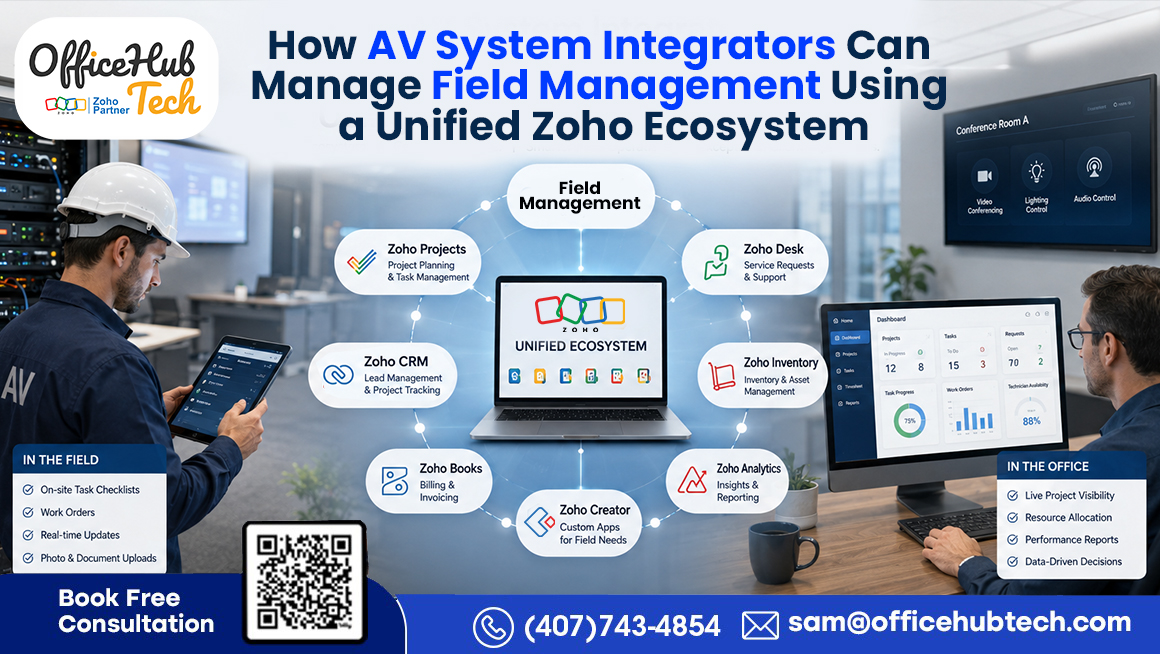
This is where a Unified Zoho Ecosystem creates significant value. Rather than managing field operations through isolated software applications, AV System Integrators can connect customer management, service operations, inventory tracking, project coordination, communication, reporting, and billing into one workflow-driven environment. At the center of this ecosystem sits a Custom Field Service Management Platform built on Zoho Creator, acting as the operational hub that connects people, processes, and systems.
In this blog, we will explore how Residential and Commercial AV System Integrators can manage field operations using a unified Zoho ecosystem, the challenges created by disconnected workflows, the role of different Zoho applications, how workflow automation improves service delivery, and how businesses can create a scalable, customized workflow solution for AV businesses that supports long-term growth.
Why Custom Field Management Has Become More Complex for AV System Integrators
Field management in the AV industry extends far beyond assigning technicians to service calls. Modern AV businesses are responsible for managing a wide range of operational activities across multiple customer environments.
For Residential AV System Integrators, this may include:
- Home automation systems
- Home theaters
- Whole-home audio
- Smart lighting solutions
- Security and surveillance systems
- Residential networking infrastructure
For Commercial AV System Integrators, field operations often involve:
- Conference room technologies
- Collaboration systems
- Digital signage networks
- Structured cabling projects
- Surveillance infrastructure
- Multi-site AV deployments
As service demand increases, operational complexity increases as well.
Common Challenges Faced by AV Businesses
Many AV companies struggle with:
- Service requests arriving from multiple channels
- Manual technician scheduling
- Limited visibility into technician workloads
- Delayed customer communication
- Inventory verification challenges
- Inconsistent service tracking
- Slow billing processes
- Lack of centralized reporting
These challenges become even more difficult when different departments rely on separate systems and manual coordination.
The Business Impact
Without a connected field management strategy, organizations often experience:
- Slower response times
- Increased administrative effort
- Reduced technician productivity
- Scheduling conflicts
- Higher operational costs
- Poor customer experiences
- Difficulty scaling service operations
As AV businesses grow, manual processes eventually become a barrier to operational efficiency. What worked for a small team handling a few service requests per week often becomes unsustainable when service volumes increase across multiple technicians, locations, and customer environments.
This is why leading AV System Integrators are increasingly investing in workflow automation and connected business ecosystems rather than relying on traditional service management processes.
Why Traditional Software Setups Create Operational Silos
Most AV System Integrators already use software to support different parts of their business. Customer information may be stored in a CRM platform, accounting activities may be managed in financial software, project teams may use separate task management tools, and service operations may be tracked using spreadsheets or standalone applications.
Individually, these systems perform their intended functions well.
The problem occurs when they do not communicate with each other.
A Typical Service Scenario
When a customer reports a problem, service teams often need to:
- Locate customer information from one system
- Review service history from another application
- Verify inventory availability separately
- Check technician schedules manually
- Create service tickets manually
- Notify customers through email or phone
- Generate invoices after work completion
Every step introduces delays and increases the possibility of human error.
Common Problems Created by Disconnected Systems
- Duplicate data entry
- Inconsistent customer records
- Communication gaps between departments
- Delayed service delivery
- Inventory visibility issues
- Scheduling inefficiencies
- Limited operational reporting
Over time, these disconnected processes create operational silos where departments work independently rather than collaboratively.
Why Connected Workflows Matter
The solution is not necessarily replacing existing software.
The real opportunity lies in connecting systems through workflow automation so that information moves automatically across the organization.
When customer records, service tickets, inventory data, technician schedules, communication workflows, and billing processes become connected, businesses gain:
- Real-time operational visibility
- Faster service execution
- Better technician utilization
- Improved customer experiences
- More accurate reporting
- Greater scalability
For modern AV System Integrators, connected workflows are quickly becoming a competitive advantage because they allow businesses to handle increasing service demands without significantly increasing administrative workload.
What Is a Unified Zoho Ecosystem for AV System Integrators?
A Unified Zoho Ecosystem is a connected business environment where multiple Zoho applications work together to support field operations, customer management, technician coordination, inventory tracking, project execution, communication, and billing.
Instead of using separate applications that operate independently, AV System Integrators can create a centralized workflow where information moves automatically between departments and systems.
At the center of this ecosystem is a Custom Field Service Management (FSM) Platform built on Zoho Creator. The platform acts as the operational hub where service teams, technicians, project managers, customer support representatives, and leadership teams can access real-time information from a single dashboard.
Why a Unified Ecosystem Matters
Without integration, teams often spend time:
- Searching for information across multiple systems
- Updating records manually
- Coordinating between departments
- Following up on service requests
- Managing appointment scheduling manually
A Unified Zoho Ecosystem eliminates these inefficiencies by creating connected workflows that automate operational activities across the business.
Key Objectives of a Unified Zoho Ecosystem
- Centralize field management operations
- Improve technician scheduling and dispatching
- Reduce manual coordination
- Increase operational visibility
- Improve customer communication
- Accelerate billing and invoicing
- Create a scalable service operation
For AV System Integrators, this approach transforms field management from a collection of disconnected activities into a streamlined and automated workflow.
The Role of Zoho Creator as the Central Field Operations Hub
Managing field operations requires far more than a collection of disconnected software applications. Residential and Commercial AV System Integrators need a centralized platform where service requests, technician activities, customer information, inventory, project updates, support tickets, and billing workflows can be managed from a single interface.
This is where Zoho Creator becomes the foundation of a Unified Zoho Ecosystem.
Rather than functioning as a standalone application, Zoho Creator serves as the platform on which a Custom Field Service Management (FSM) solution is built. Acting as the operational command center, it connects multiple Zoho applications, third-party software, and automated workflows into one intelligent system that streamlines every stage of the service lifecycle.
What Makes Zoho Creator Valuable for AV System Integrators?
Every AV business operates differently. Some specialize in residential smart home installations, while others manage enterprise conference rooms, digital signage networks, structured cabling projects, surveillance systems, and multi-site deployments. Because no two workflows are identical, off-the-shelf field service software often falls short.
Using Zoho Creator, AV businesses can build a fully customized Field Service Management platform that reflects their unique operational processes while integrating every department into a single connected environment.
Core Functions Managed Through the Dashboard
The Custom FSM Platform provides complete visibility into daily field operations through one centralized dashboard, including:
- Service requests and work orders
- Technician scheduling and assignments
- Customer and site information
- Inventory availability
- Project-related tasks
- Service history
- Billing and invoicing status
- Operational reports and analytics
Beyond operational visibility, the platform includes purpose-built capabilities designed specifically for AV businesses. An AI Prompt Form allows users to create projects and work orders using natural language, significantly reducing manual data entry and accelerating project setup. A secure Customer Portal gives clients real-time access to project progress, service requests, quotations, invoices, and support updates, improving transparency while reducing repetitive customer inquiries.
Field technicians are equipped with a dedicated Technician Portal, enabling them to view assigned jobs, access customer and site information, update work status, upload photos, record service notes, capture customer approvals, and complete work orders directly from the field. Integrated Google Maps functionality helps dispatchers identify technician locations, optimize routes, and assign the nearest available resource, reducing travel time and improving response efficiency. Meanwhile, seamless Zoho Desk Integration automatically connects customer support tickets with field operations, ensuring service requests move smoothly from the help desk to technician dispatch without duplicate data entry.
Supporting Real-Time Field Operations
The platform enables field teams to:
- View assigned jobs
- Access customer and site details
- Navigate directly to customer locations
- Update work status in real time
- Record completed activities
- Upload photos and service documentation
- Track labor and service history
- Receive instant notifications and workflow updates
Because every department works from the same source of information, communication gaps are minimized, technician productivity improves, and customers receive faster, more consistent service.
Most importantly, Zoho Creator serves as the operational layer that connects the entire Unified Zoho Ecosystem, transforming disconnected business processes into a single workflow-driven Field Service Management platform designed specifically for Residential and Commercial AV System Integrators.
Watch the demo below to see how our custom field service management platform brings AI-powered project creation, customer self-service, technician mobility, Google Maps, and Zoho Desk integration together in one connected solution.
How Each Zoho Application Contributes to Field Management
The true strength of a Unified Zoho Ecosystem comes from how multiple applications work together throughout the service lifecycle.
Each application performs a specialized role while remaining connected through automated workflows.
Instead of forcing employees to switch between disconnected systems, information flows automatically between departments and processes.
Zoho CRM: Customer Intelligence for Field Teams
Every service operation starts with customer information.
Zoho CRM serves as the main platform for organizing and managing:
- Customer records
- Site information
- Contact details
- Installed equipment
- Service history
- Sales opportunities
When technicians and service teams have access to complete customer information, they can respond more effectively and deliver a better service experience.
Benefits for Field Management
- Faster access to customer records
- Better visibility into previous service activities
- Improved technician preparedness
- More personalized customer support
Zoho Desk: Service Request and Ticket Management
Service requests often arrive through multiple channels, including email, support forms, customer portals, and customer service representatives.
Zoho Desk helps centralize and organize these requests.
Key Functions
- Ticket creation
- Issue tracking
- Service request management
- Escalation workflows
- Resolution monitoring
Instead of manually tracking service issues, support teams gain a structured process for managing customer requests.
Benefits for Field Management
- Faster ticket processing
- Better issue tracking
- Improved customer support visibility
- Reduced response delays
Zoho Inventory: Real-Time Inventory Visibility
Inventory management plays a major role in successful field operations.
A technician arriving onsite without the required equipment or replacement parts can result in project delays, additional site visits, and dissatisfied customers.
Zoho Inventory provides visibility into:
- Available stock
- Replacement equipment
- Spare parts
- Warehouse inventory
- Product movement
Benefits for Field Management
- Improved first-visit resolution rates
- Reduced service delays
- Better inventory planning
- Increased technician efficiency
Verifying stock availability before scheduling technician visits allows businesses to execute services more efficiently.
Zoho Projects: Coordinating Service and Installation Activities
Many AV businesses manage projects and service operations simultaneously.
Large deployments often require coordination between engineering teams, project managers, installation technicians, and service departments.
Zoho Projects helps organize:
- Project milestones
- Service-related tasks
- Resource planning
- Installation activities
- Team collaboration
Benefits for Field Management
- Improved project visibility
- Better coordination across teams
- More efficient resource allocation
- Reduced communication gaps
This is particularly valuable for Commercial AV System Integrators managing complex deployments.
Zoho Books: Connecting Service Operations to Revenue
Many service organizations experience delays between job completion and invoice generation.
These delays impact cash flow and increase administrative effort.
Zoho Books connects financial workflows directly to service activities.
Key Functions
- Invoice generation
- Payment tracking
- Service billing
- Financial reporting
Benefits for Field Management
- Faster billing cycles
- Improved financial accuracy
- Reduced administrative workload
- Better cash flow management
When billing workflows are connected to completed work orders, organizations can accelerate revenue collection while reducing manual effort.
Zoho Mail and Google Calendar: Communication and Scheduling Automation
Communication failures are one of the most common causes of service delays and customer frustration.
A Unified Zoho Ecosystem helps automate these interactions.
Zoho Mail Supports
- Appointment confirmations
- Service notifications
- Technician communications
- Customer updates
- Status alerts
Google Calendar Integration Supports
- Appointment scheduling
- Technician calendar management
- Scheduling synchronization
- Automated reminders
Benefits for Field Management
- Reduced scheduling conflicts
- Better customer communication
- Improved appointment accuracy
- Less manual follow-up effort
Together, Zoho Mail and Google Calendar help ensure that both technicians and customers remain informed throughout the service process.
When all of these applications operate together through a Unified Zoho Ecosystem, field management becomes far more than technician scheduling. It becomes a connected operational framework where customer service, technician coordination, inventory visibility, project execution, communication, and billing all function as part of a single workflow-driven environment.
How a Service Request Flows Through the Unified Zoho Ecosystem
The real value of a Unified Zoho Ecosystem becomes visible when a service request moves through the entire workflow without requiring constant manual intervention.
In many AV organizations, handling a service request involves multiple emails, spreadsheets, phone calls, and status updates between departments. Service coordinators spend valuable time gathering information, assigning technicians, checking inventory, and updating customers.
A connected ecosystem eliminates these inefficiencies by automating the workflow from start to finish.
Step 1: Customer Reports an Issue
A customer may submit a request for:
- Home automation troubleshooting
- Home theater support
- Conference room system issues
- Digital signage maintenance
- Network connectivity problems
- Surveillance system repairs
The request can arrive through:
- Customer support forms
- Phone support
- Customer portals
- Service desk channels
Using Zoho Desk, the issue is automatically captured and converted into a service ticket.
Step 2: Customer Information Is Retrieved
Once the ticket is created, the system automatically accesses customer information stored in Zoho CRM.
This includes:
- Customer details
- Site information
- Installed equipment
- Previous service history
- Warranty information
- Existing contracts
Service teams no longer need to search through multiple systems to locate information.
Step 3: Work Order Creation
The Custom FSM Platform built on Zoho Creator automatically generates a work order and links it with:
- Customer records
- Service requests
- Equipment information
- Technician workflows
This creates a structured process for managing the service activity.
Step 4: Inventory Verification
Before dispatching a technician, the platform can check inventory availability through Zoho Inventory.
This helps verify:
- Replacement devices
- Spare parts
- Installation materials
- Required equipment
As a result, technicians arrive prepared for the job and unnecessary repeat visits are reduced.
Step 5: Technician Assignment and Scheduling
The platform evaluates:
- Technician availability
- Workload
- Skillset
- Service priority
- Geographic location
The most appropriate technician is then assigned to the work order.
The appointment is automatically scheduled and synchronized with Google Calendar.
Step 6: Customer Notification
Using Zoho Mail, customers receive:
- Appointment confirmations
- Schedule updates
- Technician arrival information
- Service notifications
This improves communication while reducing administrative effort.
Step 7: Service Completion and Billing
After the work is completed:
- Job records are updated
- Service history is stored
- Operational dashboards refresh automatically
- Billing workflows begin through Zoho Books
The result is a connected service process where information flows automatically between departments rather than relying on manual coordination.
AI-Powered Scheduling and Technician Management
One of the most time-consuming activities within field service operations is technician scheduling.
As service requests increase, manually assigning technicians becomes increasingly difficult. Service managers must consider technician availability, expertise, location, workload, customer priorities, and scheduling conflicts before making assignment decisions.
This process can consume significant administrative time and often leads to inefficiencies.
A Custom Field Service Management Platform helps solve this challenge through AI-powered scheduling and technician management capabilities.
How Intelligent Technician Assignment Works
Instead of relying solely on manual scheduling, the platform evaluates multiple variables automatically.
These may include:
- Technician skillset
- Certification requirements
- Current workload
- Geographic proximity
- Availability
- Service urgency
- Appointment schedules
Based on these factors, the platform can identify the most suitable technician for a particular assignment.
Benefits of Automated Scheduling
Organizations can experience improvements in:
- Response times
- Resource utilization
- Scheduling accuracy
- Technician productivity
- Service consistency
Supporting Field Technicians
The platform does more than assign work.
Technicians can also:
- View assigned jobs
- Access customer records
- Review site history
- Update job status
- Record completed activities
- Track labor hours
- Submit service notes
This provides greater visibility for management while reducing communication delays between field and office teams.
Future of Technician Management
As AV service environments continue to become more complex, intelligent scheduling and automated dispatching will play an increasingly important role.
Organizations that leverage automation will be better positioned to manage growing service volumes while maintaining operational efficiency and customer satisfaction.
Multi-Software Integration Beyond the Zoho Ecosystem
Although the Unified Zoho Ecosystem provides a powerful operational foundation, many AV businesses already have existing software investments that remain critical to daily operations.
Examples include:
- ERP systems
- Accounting software
- D-Tools environments
- Project management platforms
- Procurement applications
- Customer support tools
- Industry-specific AV applications
Replacing these systems is often unnecessary and costly.
A more effective strategy is to connect them through workflow automation.
Why Integration Matters
Without integration, employees are often required to:
- Re-enter information manually
- Switch between applications
- Update records multiple times
- Coordinate workflows through emails and phone calls
These activities consume time and increase the likelihood of errors.
Creating a Connected Operational Environment
A Custom FSM Platform can act as the central operational hub while exchanging information with external applications.
This allows:
- Customer records to remain synchronized
- Project updates to flow automatically
- Financial information to stay connected
- Inventory records to remain accurate
- Service activities to be visible across departments
Preserving Existing Investments
Many AV businesses have spent years developing processes around existing systems.
Rather than forcing organizations to replace those tools, a connected integration strategy enables businesses to:
- Retain existing workflows
- Improve operational visibility
- Reduce manual effort
- Increase automation
- Support future growth
Preparing for the Future
The future of AV field management is not built around a single software platform.
It is built around connected ecosystems where multiple applications exchange information seamlessly through automated workflows.
For Residential and Commercial AV System Integrators, this integration-first approach provides the flexibility needed to support evolving business requirements while maintaining operational efficiency and scalability.
Real-Time Case Studies: How AV System Integrators Improved Field Management
The benefits of a Unified Zoho Ecosystem become easier to understand when viewed through real-world operational scenarios. The following examples represent typical challenges faced by Residential and Commercial AV System Integrators and demonstrate how a connected field management strategy can improve efficiency, visibility, and service delivery.
Case Study 1: SmartWave Home Technologies
Company Overview:
Residential AV integrator specializing in home automation, home theaters, surveillance systems, and residential networking.
Challenges:
- Technician scheduling through spreadsheets
- Manual service ticket management
- Delayed customer communication
- Inventory verification issues
- Slow invoice processing
Solution:
- Custom FSM Platform built on Zoho Creator
- Integrated with Zoho CRM, Desk, Inventory, Books, Mail, and Google Calendar
- Automated ticket creation, scheduling, dispatching, inventory checks, and billing
Results:
- 80% reduction in manual administrative effort
- 85% reduction in repetitive data entry
- 60% faster technician scheduling
- 50% faster invoice processing
- Improved customer communication and service visibility
Case Study 2: VisionTech AV Solutions
Company Overview:
Commercial AV integrator supporting conference rooms, digital signage, collaboration systems, structured cabling, and multi-site deployments.
Challenges:
- Disconnected operational systems
- Scheduling conflicts
- Manual workflow coordination
- Limited service visibility
- Delayed communication between departments
Solution:
- Custom FSM Platform on Zoho Creator
- Integrated with Zoho CRM, Projects, Inventory, Books, Desk, and Low Voltage Software Connectors
- Automated service management, dispatching, inventory validation, communication, and invoicing
Results:
- 75% reduction in manual workflow coordination
- 40% improvement in technician productivity
- 65% reduction in scheduling conflicts
- Faster service response times
- Real-time operational visibility across departments
How OfficeHub Tech Builds Custom Workflow Solutions for AV System Integrators
Every AV System Integrator operates with different workflows, software environments, and business requirements. OfficeHub Tech helps Residential and Commercial AV System Integrators build Custom Workflow Solutions that connect field management, customer support, technician scheduling, inventory tracking, billing, reporting, and workflow automation into a unified operational ecosystem.
Our approach centers around a Custom Field Service Management (FSM) Platform built on Zoho Creator for AV system integrators, integrated with the broader Zoho Ecosystem, including Zoho CRM, Zoho Desk, Zoho Inventory, Zoho Projects, Zoho Books, and Zoho Mail. We also support ERP integrations, D-Tools workflows, Low Voltage Software Connectors, Zapier automation, and custom API integrations.
Whether you need service workflow automation, AI-powered technician dispatching, multi-software integration, or a fully connected field management environment, we help create scalable solutions that improve efficiency, visibility, and long-term business growth.
Conclusion
Modern field management for Residential and Commercial AV System Integrators extends far beyond technician scheduling and service ticket tracking. AV businesses require connected workflows that bring together customer management, service requests, technician dispatching, inventory visibility, communication, billing, and reporting within a single operational ecosystem. By leveraging a Unified Zoho Ecosystem, AV System Integrators can eliminate operational silos, automate repetitive processes, improve service delivery, and gain real-time visibility across departments, creating a more efficient and scalable field management operation.
As a customized workflow solution provider for AV businesses and an authorized Zoho Partner and n8n partner in the USA, India & UAE, OfficeHub Tech helps Residential and Commercial AV System Integrators build customized solutions that align with existing workflows, software environments, and long-term business goals. From Custom FSM Platforms built on Zoho Creator to Unified Zoho Ecosystem implementations, Low Voltage Software Connectors, and multi-software integrations, we help AV businesses create connected operational environments that improve productivity, enhance customer experiences, and support sustainable growth.
Get Started with Zoho Creator for Connected AV Operations
Transform the way your AV business operates with Zoho Creator’s powerful low-code platform. Build custom applications, connect your Zoho ecosystem, automate field service workflows, and streamline operations with a unified solution designed around your business.
Create your Zoho Creator account today using the link below and start building connected applications that improve collaboration, increase operational efficiency, and support your growing AV business. If you need help with implementation, custom development, or Zoho integrations, OfficeHub Tech’s Experts are here to help.