Building an Extension Architecture Around Your Existing ERP
Many businesses continue relying on legacy ERP systems for finance, inventory, procurement, manufacturing, and other core operations. However, their requirements for mobile access, custom workflows, self-service portals, and connected applications continue to evolve.
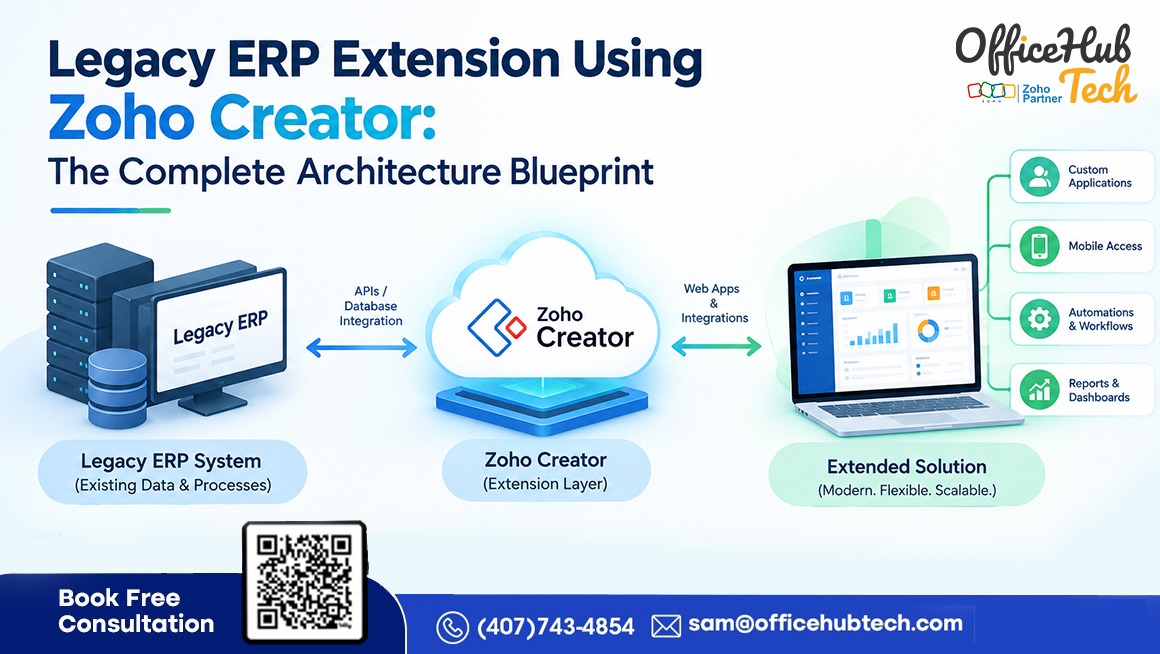
Replacing the entire ERP may be unnecessary when its core functions remain reliable. A more targeted approach is to evaluate a legacy ERP extension and modernization strategy that introduces new capabilities around the existing system.
Zoho Creator can be considered for building custom applications and coordinating workflows without automatically requiring changes to the ERP’s core. Depending on the existing system’s integration capabilities, ERP integration using middleware can help connect applications, coordinate data exchange, and manage interactions between systems. The overall architecture must also enforce business rules, manage permissions, and handle failures without creating another disconnected system.
##Quick Answer
Legacy ERP extension using Zoho Creator involves building custom applications and workflows around an existing ERP while preserving its core transactional responsibilities. A well-designed architecture connects Zoho Creator to the ERP through supported APIs, middleware, webhooks, or scheduled data exchanges. It defines which system owns each record, how information is validated and synchronized, how access is controlled, and how integration failures are detected and recovered. The optimal architecture is determined by the ERP system’s capabilities, organizational needs, deployment setup, and integration limitations.
##Key Takeaways
- Extend suitable ERP capabilities without automatically replacing the existing system.
- Separate application logic, integration services, data ownership, and operational controls.
- Select integration methods according to the ERP’s supported interfaces.
- Define synchronization rules, transaction identifiers, validation, and duplicate prevention.
- Protect data through authentication, least-privilege permissions, and audit trails.
- Monitor failed transactions and establish recovery and reconciliation procedures.
- Start with one measurable business workflow before expanding the architecture.
What Legacy ERP Extension Means at the Architecture Level
Legacy ERP extension adds capabilities around an existing enterprise resource planning system rather than replacing the entire platform. The ERP can continue managing established transactions while external applications address specific operational limitations.
Extension versus customization versus replacement
| Approach | What changes | When to consider it |
| ERP extension | External applications, integrations, and workflows | Core ERP functions remain suitable, but additional capabilities are needed |
| ERP customization | Configuration or code within the ERP | The requirement belongs inside the ERP and can be maintained safely |
| ERP upgrade | The ERP moves to a supported version or release | Existing limitations can be addressed by upgrading |
| ERP replacement | Core processes and data move to another platform | The current ERP cannot meet critical technical or business requirements |
Extension does not eliminate the need for ERP maintenance or guarantee that replacement will never be necessary. It provides another option when the existing system remains viable.
What belongs in the ERP and what belongs in Zoho Creator?
The ERP should generally retain ownership of critical transactions it already manages reliably, such as financial postings, inventory valuation, or official purchase order records.
Zoho Creator may provide custom forms, approval interfaces, employee portals, mobile data capture, operational dashboards, and workflow coordination. Its applications can collect information, validate submissions, and route decisions before sending approved transactions to the ERP through a supported integration.
The boundary must be explicit. An application should not create a second, conflicting source of truth for information already owned by the ERP.
Architecture Overview: How the Core Components Connect
A legacy ERP extension architecture should define the responsibilities of each component, the paths through which data travels, and the controls that apply across those paths.
The six architectural layers
Layer 1: User experience. Zoho Creator applications can provide forms, dashboards, portals, and interfaces tailored to employees, managers, vendors, or other authorized users.
Layer 2: Application and workflow logic. This layer validates inputs, applies business rules, manages approval states, and determines when a transaction is ready for submission.
Layer 3: Integration and orchestration. APIs, webhooks, middleware, or scheduled jobs transfer and transform data between the application and enterprise systems.
Layer 4: Enterprise systems. The existing ERP remains responsible for its designated core transactions. Other business applications, including CRM, inventory management, and financial systems, can also be integrated when needed.
Layer 5: Data and transaction controls. Field mapping, record identifiers, validation, duplicate prevention, synchronization, and reconciliation maintain data consistency.
Layer 6: Cross-cutting operational controls. Authentication, authorization, audit records, monitoring, alerts, and recovery procedures apply across the architecture.
[Fig: Illustrates the six-layer architecture connecting users, Zoho Creator, integration services, the legacy ERP, authoritative records, and cross-cutting security and monitoring controls.]
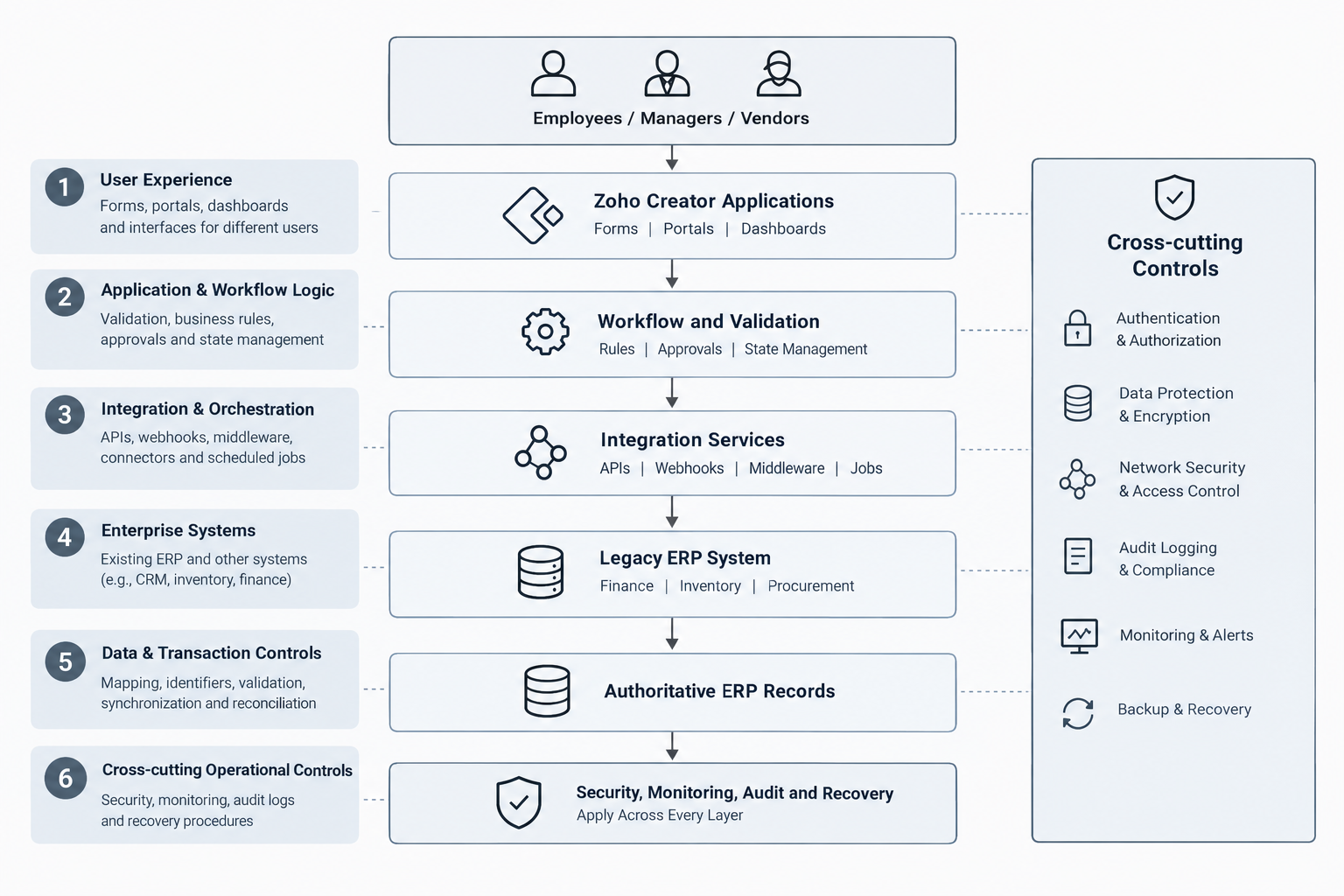
The six layers describe a logical reference model, not six separate services that must be deployed. Some responsibilities may reside in Zoho Creator, others in the ERP, and others in a separate integration platform.
Define the system of record
Before development, document which system owns each business entity. For example, the ERP may own product records and purchase orders, while Creator maintains an operational request and its approval history.
Define which system can create or update each record, how external identifiers map to ERP identifiers, and how conflicts are resolved. These decisions prevent duplicate records and ambiguous ownership.
Choose the appropriate deployment topology
A cloud ERP may be accessible through vendor-supported APIs, while an on-premises ERP may require a secure integration gateway, middleware, or another approved connectivity mechanism.
A hybrid architecture must account for network access, firewall rules, credential management, availability, and the security implications of exposing internal services. The appropriate design depends on the actual ERP environment.
Integration Mechanics: Connecting Zoho Creator to a Legacy ERP
The integration layer determines how data moves between systems and how technical differences are handled.
Assess the ERP’s available interfaces
Start by checking the ERP version, vendor documentation, existing customizations, authentication mechanisms, and supported integration interfaces.
Possible approaches include:
- REST or SOAP APIs: Exchange structured requests and responses when supported by the ERP.
- Webhooks or events: Notify connected systems when a relevant event occurs, where supported.
- Middleware: Coordinate multiple systems, transformations, routing, and error handling.
- Scheduled synchronization: Exchange records at defined intervals when immediate updates are unnecessary.
- File-based exchange: Process controlled CSV, XML, or other supported exports and imports when modern APIs are unavailable.
Direct database access requires particular caution. Reading data may be possible in some environments, but writing directly to ERP tables can bypass validation, business rules, and transaction controls. Use vendor-supported interfaces wherever possible.
Direct integration or middleware?
A direct API connection may suit a limited integration with straightforward data mapping. Middleware becomes more useful when several applications must communicate, transformations are complex, connectivity is constrained, or centralized monitoring and orchestration are needed.
Middleware is not automatically required for every project. The decision should reflect complexity, operational risk, maintainability, and the ERP’s capabilities.
Authentication and authorization
Zoho Creator APIs support OAuth 2.0 authentication. The authentication method used to access the legacy ERP depends on that system’s supported mechanisms.
A secure implementation should use dedicated integration identities, minimum necessary permissions, protected credentials, appropriate token renewal, and credential rotation. Administrative credentials should not be embedded in application code or exposed to ordinary users.
Data mapping and transformation
Suppose a purchasing application uses a field called supplier_ref, while the ERP expects a specific supplier identifier. The integration must map the field correctly, validate the identifier, and handle cases where the supplier does not exist or is inactive.
Mapping should also account for date formats, currencies, units of measure, required fields, enumeration values, and differences in record identifiers.
Synchronization patterns
Choose the pattern according to business timing and technical constraints:
| Pattern | Suitable use |
| Request-response | Used when a submitted transaction requires an immediate response. |
| Event-driven | A supported event should trigger downstream processing |
| Scheduled synchronization | Reference data or status updates can be refreshed periodically |
| Batch processing | Larger datasets can be processed in controlled groups |
| File exchange | The ERP supports exports and imports rather than direct APIs |
An API does not automatically provide real-time synchronization. Actual timing depends on event support, processing time, polling intervals, rate limits, and system availability.
Performance and error handling
Estimate transaction volumes, peak activity, payload sizes, API quotas, concurrency, and execution limits before selecting the design. Use pagination or batching where supported and avoid unnecessary repeated requests.
Failed transactions need a defined response. Implement bounded retries for transient failures, duplicate protection, error logging, and an exception process for cases requiring investigation. Reconciliation should identify records that were processed but never received a confirmed acknowledgment.
Reliable real-time ERP data integration using APIs also requires consistent data synchronization, secure communication, and appropriate handling of failed or delayed transactions across connected systems.
End-to-End Workflow Blueprint: From User Action to ERP Transaction
Consider a company that wants to replace spreadsheet-based purchase requests with a controlled workflow built using Zoho Creator.
How the workflow operates:
- Request submission: An employee submits a purchase request through a Creator application.
- Validation: The application checks required fields, request details, and relevant reference data.
- Approval routing: Business rules assign the request to the appropriate manager.
- Decision: The manager approves, rejects, or returns the request for changes.
- ERP submission: The integration layer sends the approved transaction to the ERP through its supported interface.
- ERP processing: The ERP applies its own validation and records the official transaction.
- Status update: Creator records the outcome and notifies the appropriate users.
- Exception handling: Failed or ambiguous transactions are flagged for controlled investigation.
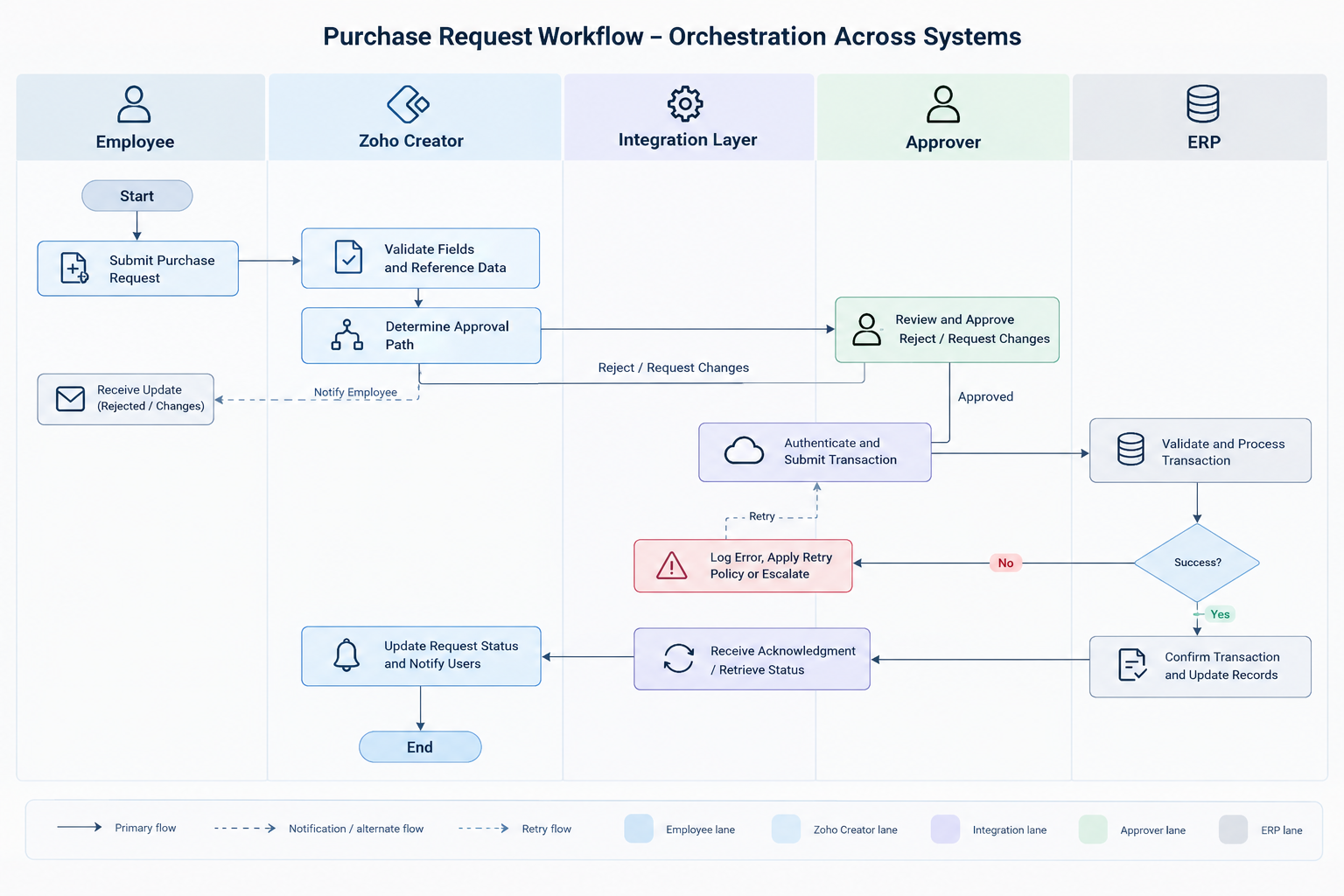
[Workflow orchestration diagram: Shows how a purchase request moves through employee submission, Zoho Creator validation, approval, integration, ERP transaction processing, status updates, and error recovery.]
Manage workflow states explicitly:
Use defined states such as Draft, Submitted, Pending Approval, Approved, ERP Processing, Completed, and Failed. Specify which actions can change each state and which roles can perform them.
This prevents users from treating an approved request as a completed ERP transaction. Approval and successful posting are separate events.
Handle partial failures correctly:
Suppose the ERP creates a purchase order but the response never reaches Creator. Retrying the same request without checking its status could create a duplicate.
The integration should use an idempotency mechanism where supported, or another reliable duplicate-detection method based on transaction identifiers and ERP records. When the outcome remains uncertain, reconcile the transaction before resubmitting it.
Data Architecture, Consistency, and Reconciliation
A reliable extension requires more than transferring fields between applications. It must preserve the meaning, ownership, and consistency of business records.
Decide what to store and synchronize
The ERP may remain the authoritative source for products, suppliers, inventory balances, and purchase orders. Creator may retain request details, approval history, operational notes, and workflow status.
Only synchronize the information required for the business process. Unnecessary duplication increases maintenance effort and creates more opportunities for conflicting updates.
Prevent conflicting updates
Define which system can modify each field and how changes propagate. Where supported, version checks or timestamps can help detect stale updates. Conflict resolution should be an explicit rule rather than an assumption that the latest update is always correct.
Maintain data quality and auditability
Validation should detect missing identifiers, inactive suppliers, invalid quantities, duplicate submissions, and rejected transactions.
Maintain enough information to trace a business request across systems, including correlation or transaction identifiers, timestamps, outcomes, and relevant error details. Protect logs from unnecessary sensitive data exposure and establish appropriate retention rules.
Periodic reconciliation should compare expected and actual transaction states across Creator and the ERP. This helps identify missed updates, unresolved failures, and discrepancies that require correction.
Security, Permissions, and Governance by Design
Security must cover users, applications, integration credentials, network connections, and the ERP itself.
Apply least-privilege access
Assign users only the permissions needed for their responsibilities. A requester may submit a purchase request without having permission to approve it or modify ERP financial records.
Assign dedicated accounts for integrations when needed, grant only the necessary permissions, and periodically reassess access rights. Platform-specific role and field restrictions should be verified against the selected configuration and plan.
Protect data and credentials
Use encrypted connections, secure credential storage, supported authentication methods, and appropriate network controls. For on-premises systems, assess whether private connectivity or an approved gateway is necessary.
Preserve ERP transaction controls
Creator-side validation improves the user experience, but it should not replace authoritative ERP validation. The ERP must still enforce the transaction rules and permissions that govern its own records.
Establish governance and audit trails
Document who owns application changes, API changes, access reviews, incident handling, and production releases. Record relevant user actions, integration outcomes, administrative changes, and deployment approvals.
A secure ERP extension using Zoho Creator requires well-defined access controls, protected integrations, and governance policies that preserve the integrity of existing ERP operations.
Monitoring, Error Handling, and Recovery
An integration is not production-ready simply because the normal transaction path works.
Monitoring should track failed requests, synchronization delays, retry counts, unresolved exceptions, and discrepancies between systems. Alerts should reach the team responsible for the affected process and include sufficient diagnostic context without exposing credentials or sensitive business data.
Recovery procedures should define how to investigate a failure, verify whether the ERP committed a transaction, retry safely, and reconcile records after service resumes.
Test failure scenarios before launch, including expired credentials, API downtime, malformed data, rate-limit responses, network interruptions, and ERP-side validation errors. Document who is responsible for resolving each type of exception.
Scalability, Maintainability, and Lifecycle Management
The architecture must remain manageable as transaction volumes, business requirements, and connected systems change.
Estimate peak workload, API usage, payload sizes, and expected growth. Separate reusable validation, mapping, integration, and notification logic where practical. Avoid tightly coupling every workflow to the ERP’s internal implementation.
Use development, testing, and production environments with controlled configuration, regression testing, deployment approvals, and a rollback or contingency plan. Before an ERP upgrade or API change, test the affected integration contracts and business-critical workflows.
Long-term ownership matters as much as the initial build. Maintain integration documentation, support procedures, dependency inventories, monitoring responsibilities, and periodic architecture reviews.
Business Benefits: Connecting Architecture Decisions to Outcomes
A well-designed extension can address operational friction without requiring every improvement to be built into the ERP.
| Architecture decision | Potential benefit | Measurement |
| Custom Zoho Creator interface | Streamlined execution of specific workflows | Time required to complete tasks |
| Automated approval routing | Fewer manual follow-ups | Approval cycle time |
| Clear data ownership | Fewer conflicting updates | Data discrepancy rate |
| Retry and reconciliation controls | More reliable transaction processing | Unresolved transaction count |
| Centralized monitoring | Faster failure detection | Mean time to detect and resolve |
| Modular integration design | More controlled changes | Regression defects and change effort |
These are suggested measurement criteria, not guaranteed results. Establish a baseline before implementation and compare actual performance after deployment.
Implementation Roadmap: From Assessment to Production
Six-Stage ERP Implementation Roadmap:
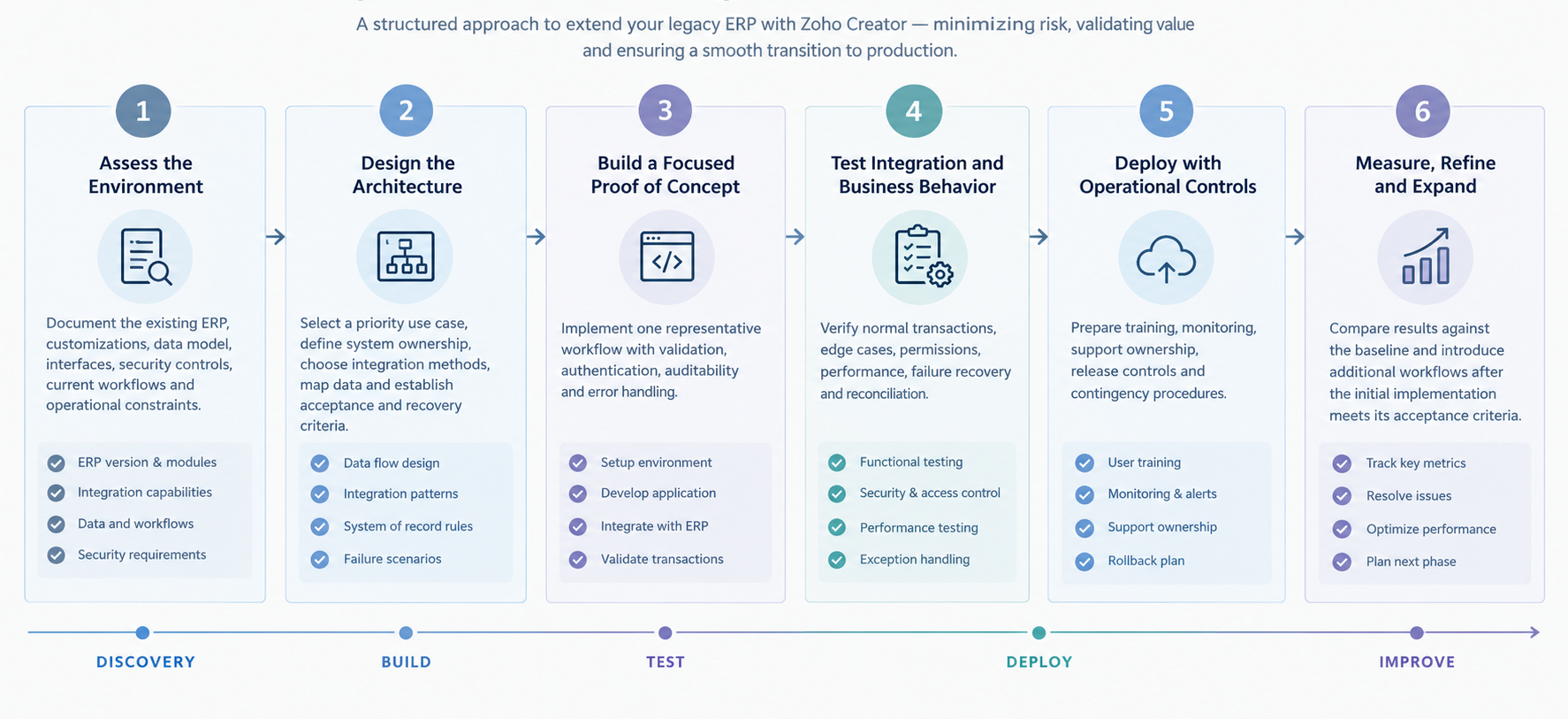
A phased approach reduces the scope of the first release, but it does not eliminate the need for proper testing or change management.
Common Architecture Mistakes to Avoid
Several implementation choices can undermine an otherwise useful extension:
- Duplicating ERP functions without a clear reason.
- Connecting systems before defining data ownership.
- Assuming the ERP supports modern APIs or real-time events.
- Writing directly to ERP tables in ways that bypass business logic.
- Retrying failed transactions without duplicate protection.
- Omitting monitoring, reconciliation, or recovery procedures.
- Exposing internal ERP services without suitable access controls.
- Ignoring API quotas and platform execution limits.
- Expanding to multiple workflows before validating the first implementation.
Addressing these risks during architecture design is generally easier than correcting them after production deployment.
When to Extend, Upgrade, or Replace the Legacy ERP
Extension is worth evaluating when the ERP remains supportable, core transactions work reliably, and the missing capabilities can be added through a secure, maintainable integration.
An upgrade may be more appropriate when a supported release already provides the required features or resolves important compatibility and security limitations.
Replacement deserves consideration when the ERP cannot meet critical business requirements, cannot be integrated safely, or would require disproportionate effort to maintain.
The decision should reflect business value, technical feasibility, risk, lifecycle costs, and future requirements—not simply the desire to avoid changing the existing system.
Conclusion: Build Around Your ERP Without Losing Control of the Core
Legacy ERP extension using Zoho Creator is not simply about adding new applications to an existing system. It is about connecting evolving business requirements with established ERP processes through a well-defined architecture. When application logic, integrations, data ownership, and transaction controls work together, businesses can introduce new workflows and digital capabilities without unnecessarily disrupting the core operations they already depend on.
The key is to build for more than the initial use case. Supported integrations, clear system boundaries, reliable error recovery, and consistent governance help keep the extension maintainable as business processes and technology requirements evolve. Starting with one clearly defined workflow allows organizations to validate the architecture, measure its impact, and establish a sound foundation for broader ERP modernization.
With the right architecture, your existing ERP can become the foundation for continued improvement rather than a barrier to it.
How OfficeHub Tech Can Help Build Your ERP Extension Architecture
Implementing a legacy ERP extension starts with understanding the existing system and identifying the operational processes that need improvement. OfficeHub Tech helps businesses use Zoho Creator to extend their ERP environments with custom applications, integrations, and workflow capabilities while retaining suitable core ERP functions.
To establish the right approach, the process begins with an assessment of the current ERP, its supported interfaces, data dependencies, business constraints, and workflows that create operational friction. These findings then guide the architecture design, including the responsibilities of the ERP, Zoho Creator, and any integration services. Defining data ownership, security boundaries, synchronization rules, failure-handling procedures, and acceptance criteria before development helps ensure that each component works within clear boundaries.
With the architecture established, OfficeHub Tech develops the required custom forms, portals, dashboards, and workflows, connecting them through supported integration methods. Each component is then validated for transaction handling, permissions, and exception scenarios before deployment. To support long-term reliability, the extension is introduced in manageable phases, with operational monitoring and performance measured against agreed business baselines before the solution is expanded.
For organizations evaluating top legacy ERP extension and modernization solution providers in the USA, India, UAE, and KSA, OfficeHub Tech can assess the available options and develop an implementation approach aligned with their existing ERP environment and business requirements.
Start Building Your ERP Extension with Zoho Creator
Extending a legacy ERP starts with identifying where custom applications, integrations, and workflow automation can improve existing business processes. Zoho Creator provides a low-code platform for building these capabilities around your current ERP without necessarily replacing its core functionality.
From automating manual approvals and developing business portals to connecting applications and streamlining data exchange, Zoho Creator can help address operational gaps identified during your ERP extension planning.
Explore Zoho Creator to Extend Your Existing ERP Capabilities:
Discover how Zoho Creator can support your ERP extension strategy with custom applications and automated business processes.